private ConsumerRecords<K, V> poll(final Timer timer, finalboolean includeMetadataInTimeout){ // Step1:确认KafkaConsumer实例是单线程运行,以及没有被关闭 acquireAndEnsureOpen(); try { if (this.subscriptions.hasNoSubscriptionOrUserAssignment()) { thrownew IllegalStateException("Consumer is not subscribed to any topics or assigned any partitions"); }
// poll for new data until the timeout expires do { client.maybeTriggerWakeup();
if (includeMetadataInTimeout) { // Step2:更新metadata信息,获取GroupCoordinator的ip以及接口,并连接、 join-group、sync-group,期间group会进行rebalance。在此步骤,consumer会先加入group,然后获取需要消费的topic partition的offset信息 if (!updateAssignmentMetadataIfNeeded(timer)) { return ConsumerRecords.empty(); } } else { while (!updateAssignmentMetadataIfNeeded(time.timer(Long.MAX_VALUE))) { log.warn("Still waiting for metadata"); } }
// Step3:拉取数据,核心步骤 final Map<TopicPartition, List<ConsumerRecord<K, V>>> records = pollForFetches(timer); if (!records.isEmpty()) { // before returning the fetched records, we can send off the next round of fetches // and avoid block waiting for their responses to enable pipelining while the user // is handling the fetched records. // // NOTE: since the consumed position has already been updated, we must not allow // wakeups or any other errors to be triggered prior to returning the fetched records. // 在返回数据之前,发送下次的fetch请求,避免用户在下次获取数据时线程block if (fetcher.sendFetches() > 0 || client.hasPendingRequests()) { client.pollNoWakeup(); }
returnthis.interceptors.onConsume(new ConsumerRecords<>(records)); } } while (timer.notExpired());
privatestaticclassTopicPartitionState{ private FetchState fetchState; private FetchPosition position; // last consumed position private Long highWatermark; // the high watermark from last fetch private Long logStartOffset; // the log start offset private Long lastStableOffset; privateboolean paused; // whether this partition has been paused by the user private OffsetResetStrategy resetStrategy; // the strategy to use if the offset needs resetting private Long nextRetryTimeMs; private Integer preferredReadReplica; private Long preferredReadReplicaExpireTimeMs; ... }
consumer 实例订阅的每个 topic-partition 都会有一个对应的 TopicPartitionState 对象,在这个对象中会记录上面内容,最需要关注的就是 position 这个属性,它表示上一次消费的位置。通过 consumer.seek () 方式指定消费 offset 的时候,其实设置的就是这个 position 值。
updateFetchPositions - 拉取 offset
在 consumer 成功加入 group 并开始消费之前,我们还需要知道 consumer 是从 offset 为多少的位置开始消费。consumer 加入 group 之后,就得去获取 offset 了,下面的方法,就是开始更新 position (offset):
/** * Set the fetch position to the committed position (if there is one) * or reset it using the offset reset policy the user has configured. * * @throws org.apache.kafka.common.errors.AuthenticationException if authentication fails. See the exception for more details * @throws NoOffsetForPartitionException If no offset is stored for a given partition and no offset reset policy is * defined * @return true iff the operation completed without timing out */ privatebooleanupdateFetchPositions(final Timer timer){ // If any partitions have been truncated due to a leader change, we need to validate the offsets fetcher.validateOffsetsIfNeeded();
// Step1:查看TopicPartitionState的position是否为空,第一次消费肯定为空 cachedSubscriptionHashAllFetchPositions = subscriptions.hasAllFetchPositions(); if (cachedSubscriptionHashAllFetchPositions) returntrue;
// If there are any partitions which do not have a valid position and are not // awaiting reset, then we need to fetch committed offsets. We will only do a // coordinator lookup if there are partitions which have missing positions, so // a consumer with manually assigned partitions can avoid a coordinator dependence // by always ensuring that assigned partitions have an initial position. // Step2:如果没有有效的offset,那么需要从GroupCoordinator中获取 if (coordinator != null && !coordinator.refreshCommittedOffsetsIfNeeded(timer)) returnfalse;
// If there are partitions still needing a position and a reset policy is defined, // request reset using the default policy. If no reset strategy is defined and there // are partitions with a missing position, then we will raise an exception. // Step3:如果还存在partition不知道position,并且设置了offsetreset策略,那么就等待重置,不然就抛出异常 subscriptions.resetMissingPositions();
// Finally send an asynchronous request to lookup and update the positions of any // partitions which are awaiting reset. // Step4:向PartitionLeader(GroupCoordinator所在机器)发送ListOffsetRequest重置position fetcher.resetOffsetsIfNeeded();
returntrue; }
上面的代码主要分为 4 个步骤,具体如下:
首先,查看当前 TopicPartition 的 position 是否为空,如果不为空,表示知道下次 fetch position (即拉取数据时从哪个位置开始拉取),但如果是第一次消费,这个 TopicPartitionState.position 肯定为空。
然后,通过 GroupCoordinator 为缺少 fetch position 的 partition 拉取 position (即 last committed offset)。
继而,仍不知道 partition 的 position (_consumer_offsets 中未保存位移信息),且设置了 offsetreset 策略,那么就等待重置,如果没有设置重置策略,就抛出 NoOffsetForPartitionException 异常。
最后,为那些需要重置 fetch position 的 partition 发送 ListOffsetRequest 重置 position (consumer.beginningOffsets (),consumer.endOffsets (),consumer.offsetsForTimes (),consumer.seek () 都会发送 ListOffRequest 请求)。
/** * Refresh the committed offsets for provided partitions. * * @param timer Timer bounding how long this method can block * @return true iff the operation completed within the timeout */ publicbooleanrefreshCommittedOffsetsIfNeeded(Timer timer){ final Set<TopicPartition> missingFetchPositions = subscriptions.missingFetchPositions();
// 1.发送获取offset的请求,核心步骤 final Map<TopicPartition, OffsetAndMetadata> offsets = fetchCommittedOffsets(missingFetchPositions, timer); if (offsets == null) returnfalse;
for (final Map.Entry<TopicPartition, OffsetAndMetadata> entry : offsets.entrySet()) { final TopicPartition tp = entry.getKey(); // 2.获取response中的offset final OffsetAndMetadata offsetAndMetadata = entry.getValue(); final ConsumerMetadata.LeaderAndEpoch leaderAndEpoch = metadata.leaderAndEpoch(tp); final SubscriptionState.FetchPosition position = new SubscriptionState.FetchPosition( offsetAndMetadata.offset(), offsetAndMetadata.leaderEpoch(), leaderAndEpoch);
log.info("Setting offset for partition {} to the committed offset {}", tp, position); entry.getValue().leaderEpoch().ifPresent(epoch -> this.metadata.updateLastSeenEpochIfNewer(entry.getKey(), epoch)); // 3.实际就是设置SubscriptionState的position值 this.subscriptions.seekUnvalidated(tp, position); } returntrue; }
/** * Fetch the current committed offsets from the coordinator for a set of partitions. * * @param partitions The partitions to fetch offsets for * @return A map from partition to the committed offset or null if the operation timed out */ public Map<TopicPartition, OffsetAndMetadata> fetchCommittedOffsets(final Set<TopicPartition> partitions, final Timer timer){ if (partitions.isEmpty()) return Collections.emptyMap();
final Generation generation = generation(); if (pendingCommittedOffsetRequest != null && !pendingCommittedOffsetRequest.sameRequest(partitions, generation)) { // if we were waiting for a different request, then just clear it. pendingCommittedOffsetRequest = null; }
do { if (!ensureCoordinatorReady(timer)) returnnull;
// contact coordinator to fetch committed offsets final RequestFuture<Map<TopicPartition, OffsetAndMetadata>> future; if (pendingCommittedOffsetRequest != null) { future = pendingCommittedOffsetRequest.response; } else { // 1.封装FetchRequest请求 future = sendOffsetFetchRequest(partitions); pendingCommittedOffsetRequest = new PendingCommittedOffsetRequest(partitions, generation, future);
/** * Reset offsets for all assigned partitions that require it. * * @throws org.apache.kafka.clients.consumer.NoOffsetForPartitionException If no offset reset strategy is defined * and one or more partitions aren't awaiting a seekToBeginning() or seekToEnd(). */ publicvoidresetOffsetsIfNeeded(){ // Raise exception from previous offset fetch if there is one RuntimeException exception = cachedListOffsetsException.getAndSet(null); if (exception != null) throw exception;
// 1.需要执行reset策略的partition Set<TopicPartition> partitions = subscriptions.partitionsNeedingReset(time.milliseconds()); if (partitions.isEmpty()) return;
final Map<TopicPartition, Long> offsetResetTimestamps = new HashMap<>(); for (final TopicPartition partition : partitions) { Long timestamp = offsetResetStrategyTimestamp(partition); if (timestamp != null) offsetResetTimestamps.put(partition, timestamp); }
if (!(e instanceof RetriableException) && !cachedListOffsetsException.compareAndSet(null, e)) log.error("Discarding error in ListOffsetResponse because another error is pending", e); } }); } }
/** * Send the ListOffsetRequest to a specific broker for the partitions and target timestamps. * * @param node The node to send the ListOffsetRequest to. * @param timestampsToSearch The mapping from partitions to the target timestamps. * @param requireTimestamp True if we require a timestamp in the response. * @return A response which can be polled to obtain the corresponding timestamps and offsets. */ private RequestFuture<ListOffsetResult> sendListOffsetRequest(final Node node, final Map<TopicPartition, ListOffsetRequest.PartitionData> timestampsToSearch, boolean requireTimestamp){ ListOffsetRequest.Builder builder = ListOffsetRequest.Builder .forConsumer(requireTimestamp, isolationLevel) .setTargetTimes(timestampsToSearch);
log.debug("Sending ListOffsetRequest {} to broker {}", builder, node); return client.send(node, builder) .compose(new RequestFutureAdapter<ClientResponse, ListOffsetResult>() { @Override publicvoidonSuccess(ClientResponse response, RequestFuture<ListOffsetResult> future){ ListOffsetResponse lor = (ListOffsetResponse) response.responseBody(); log.trace("Received ListOffsetResponse {} from broker {}", lor, node); handleListOffsetResponse(timestampsToSearch, lor, future); } }); }
// if data is available already, return it immediately // 1.获取fetcher已经拉取到的数据 final Map<TopicPartition, List<ConsumerRecord<K, V>>> records = fetcher.fetchedRecords(); if (!records.isEmpty()) { return records; } // 到此,说明上次fetch到的数据已经全部拉取了,需要再次发送fetch请求,从broker拉取新的数据
// send any new fetches (won't resend pending fetches) // 2.发送fetch请求,会从多个topic-partition拉取数据(只要对应的topic-partition没有未完成的请求) fetcher.sendFetches();
// We do not want to be stuck blocking in poll if we are missing some positions // since the offset lookup may be backing off after a failure
// NOTE: the use of cachedSubscriptionHashAllFetchPositions means we MUST call // updateAssignmentMetadataIfNeeded before this method. if (!cachedSubscriptionHashAllFetchPositions && pollTimeout > retryBackoffMs) { pollTimeout = retryBackoffMs; }
Timer pollTimer = time.timer(pollTimeout); // 3.真正开始发送,底层同样使用NIO client.poll(pollTimer, () -> { // since a fetch might be completed by the background thread, we need this poll condition // to ensure that we do not block unnecessarily in poll() return !fetcher.hasCompletedFetches(); }); timer.update(pollTimer.currentTimeMs());
// after the long poll, we should check whether the group needs to rebalance // prior to returning data so that the group can stabilize faster // 4.如果group需要rebalance,直接返回空数据,这样更快地让group进入稳定状态 if (coordinator != null && coordinator.rejoinNeededOrPending()) { return Collections.emptyMap(); }
/** * Set-up a fetch request for any node that we have assigned partitions for which doesn't already have * an in-flight fetch or pending fetch data. * @return number of fetches sent */ publicsynchronizedintsendFetches(){ // Update metrics in case there was an assignment change sensors.maybeUpdateAssignment(subscriptions);
// 1.创建FetchRequest Map<Node, FetchSessionHandler.FetchRequestData> fetchRequestMap = prepareFetchRequests(); for (Map.Entry<Node, FetchSessionHandler.FetchRequestData> entry : fetchRequestMap.entrySet()) { final Node fetchTarget = entry.getKey(); final FetchSessionHandler.FetchRequestData data = entry.getValue(); final FetchRequest.Builder request = FetchRequest.Builder .forConsumer(this.maxWaitMs, this.minBytes, data.toSend()) .isolationLevel(isolationLevel) .setMaxBytes(this.maxBytes) .metadata(data.metadata()) .toForget(data.toForget()) .rackId(clientRackId);
if (log.isDebugEnabled()) { log.debug("Sending {} {} to broker {}", isolationLevel, data.toString(), fetchTarget); } // 2.发送FetchRequest RequestFuture<ClientResponse> future = client.send(fetchTarget, request); // We add the node to the set of nodes with pending fetch requests before adding the // listener because the future may have been fulfilled on another thread (e.g. during a // disconnection being handled by the heartbeat thread) which will mean the listener // will be invoked synchronously. this.nodesWithPendingFetchRequests.add(entry.getKey().id()); future.addListener(new RequestFutureListener<ClientResponse>() { @Override publicvoidonSuccess(ClientResponse resp){ synchronized (Fetcher.this) { try { @SuppressWarnings("unchecked") FetchResponse<Records> response = (FetchResponse<Records>) resp.responseBody(); FetchSessionHandler handler = sessionHandler(fetchTarget.id()); if (handler == null) { log.error("Unable to find FetchSessionHandler for node {}. Ignoring fetch response.", fetchTarget.id()); return; } if (!handler.handleResponse(response)) { return; }
Set<TopicPartition> partitions = new HashSet<>(response.responseData().keySet()); FetchResponseMetricAggregator metricAggregator = new FetchResponseMetricAggregator(sensors, partitions);
for (Map.Entry<TopicPartition, FetchResponse.PartitionData<Records>> entry : response.responseData().entrySet()) { TopicPartition partition = entry.getKey(); FetchRequest.PartitionData requestData = data.sessionPartitions().get(partition); if (requestData == null) { String message; if (data.metadata().isFull()) { message = MessageFormatter.arrayFormat( "Response for missing full request partition: partition={}; metadata={}", new Object[]{partition, data.metadata()}).getMessage(); } else { message = MessageFormatter.arrayFormat( "Response for missing session request partition: partition={}; metadata={}; toSend={}; toForget={}", new Object[]{partition, data.metadata(), data.toSend(), data.toForget()}).getMessage(); }
// Received fetch response for missing session partition thrownew IllegalStateException(message); } else { long fetchOffset = requestData.fetchOffset; FetchResponse.PartitionData<Records> fetchData = entry.getValue();
log.debug("Fetch {} at offset {} for partition {} returned fetch data {}", isolationLevel, fetchOffset, partition, fetchData); // 3.发送FetchRequest请求成功,将返回的数据放到ConcurrentLinkedQueue<CompletedFetch>中 completedFetches.add(new CompletedFetch(partition, fetchOffset, fetchData, metricAggregator, resp.requestHeader().apiVersion())); } }
/** * Return the fetched records, empty the record buffer and update the consumed position. * * NOTE: returning empty records guarantees the consumed position are NOT updated. * * @return The fetched records per partition * @throws OffsetOutOfRangeException If there is OffsetOutOfRange error in fetchResponse and * the defaultResetPolicy is NONE * @throws TopicAuthorizationException If there is TopicAuthorization error in fetchResponse. */ public Map<TopicPartition, List<ConsumerRecord<K, V>>> fetchedRecords() { Map<TopicPartition, List<ConsumerRecord<K, V>>> fetched = new HashMap<>(); // 在max.poll.records中设置单词最大的拉取条数,默认500条 int recordsRemaining = maxPollRecords;
try { while (recordsRemaining > 0) { if (nextInLineRecords == null || nextInLineRecords.isFetched) {// nextInLineRecords为空时 // Step1:当一个nextInLineRecords处理完,就从completedFetches处理下一个完成的Fetch请求 CompletedFetch completedFetch = completedFetches.peek(); if (completedFetch == null) break;
try { // Step2:获取下一个要处理的nextInLineRecords nextInLineRecords = parseCompletedFetch(completedFetch); } catch (Exception e) { // Remove a completedFetch upon a parse with exception if (1) it contains no records, and // (2) there are no fetched records with actual content preceding this exception. // The first condition ensures that the completedFetches is not stuck with the same completedFetch // in cases such as the TopicAuthorizationException, and the second condition ensures that no // potential data loss due to an exception in a following record. FetchResponse.PartitionData partition = completedFetch.partitionData; if (fetched.isEmpty() && (partition.records == null || partition.records.sizeInBytes() == 0)) { completedFetches.poll(); } throw e; } completedFetches.poll(); } else { // Step3:拉取records,更新position List<ConsumerRecord<K, V>> records = fetchRecords(nextInLineRecords, recordsRemaining); TopicPartition partition = nextInLineRecords.partition; if (!records.isEmpty()) { List<ConsumerRecord<K, V>> currentRecords = fetched.get(partition); if (currentRecords == null) {// 正常情况下,一个node只会发送一个request,一般只会有一个 fetched.put(partition, records); } else { // this case shouldn't usually happen because we only send one fetch at a time per partition, // but it might conceivably happen in some rare cases (such as partition leader changes). // we have to copy to a new list because the old one may be immutable List<ConsumerRecord<K, V>> newRecords = new ArrayList<>(records.size() + currentRecords.size()); newRecords.addAll(currentRecords); newRecords.addAll(records); fetched.put(partition, newRecords); } recordsRemaining -= records.size(); } } } } catch (KafkaException e) { if (fetched.isEmpty()) throw e; } // Step4:返回相应的Records数据 return fetched; }
private List<ConsumerRecord<K, V>> fetchRecords(PartitionRecords partitionRecords, int maxRecords) { if (!subscriptions.isAssigned(partitionRecords.partition)) { // this can happen when a rebalance happened before fetched records are returned to the consumer's poll call log.debug("Not returning fetched records for partition {} since it is no longer assigned", partitionRecords.partition); } elseif (!subscriptions.isFetchable(partitionRecords.partition)) { // this can happen when a partition is paused before fetched records are returned to the consumer's // poll call or if the offset is being reset // 这个topic-partition不能被消费了,比如调用了pause log.debug("Not returning fetched records for assigned partition {} since it is no longer fetchable", partitionRecords.partition); } else { SubscriptionState.FetchPosition position = subscriptions.position(partitionRecords.partition); if (partitionRecords.nextFetchOffset == position.offset) {// offset对的上,也就是拉取是按顺序拉的 // 获取该topic-partition对应的records,并更新partitionRecords的fetchOffset(用于判断是否顺序) List<ConsumerRecord<K, V>> partRecords = partitionRecords.fetchRecords(maxRecords);
if (partitionRecords.nextFetchOffset > position.offset) { SubscriptionState.FetchPosition nextPosition = new SubscriptionState.FetchPosition( partitionRecords.nextFetchOffset, partitionRecords.lastEpoch, position.currentLeader); log.trace("Returning fetched records at offset {} for assigned partition {} and update " + "position to {}", position, partitionRecords.partition, nextPosition); // 更新消费到的offset(the fetch position) subscriptions.position(partitionRecords.partition, nextPosition); }
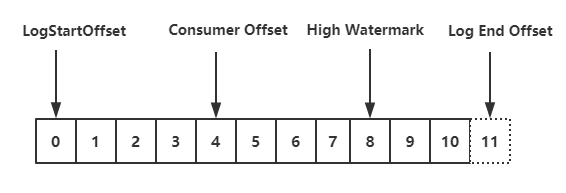
// 获取Lag(即position与hw之间差值),hw为null时,才返回null Long partitionLag = subscriptions.partitionLag(partitionRecords.partition, isolationLevel); if (partitionLag != null) this.sensors.recordPartitionLag(partitionRecords.partition, partitionLag);
Long lead = subscriptions.partitionLead(partitionRecords.partition); if (lead != null) { this.sensors.recordPartitionLead(partitionRecords.partition, lead); }
return partRecords; } else { // these records aren't next in line based on the last consumed position, ignore them // they must be from an obsolete request log.debug("Ignoring fetched records for {} at offset {} since the current position is {}", partitionRecords.partition, partitionRecords.nextFetchOffset, position); } }
partitionRecords.drain(); return emptyList(); }
consumer 的 Fetcher 处理从 server 获取的 fetch response 大致分为以下几个过程: