File 类
java.io.File类:文件和文件目录路径的抽象表示形式,与平台无关。- File 主要表示类似
D:\\文件目录1与D:\\文件目录1\\文件.txt,前者是文件夹 (directory),后者则是文件 (file),而 File 类就是操作这两者的类。
- File 主要表示类似
File 能新建、删除、重命名文件和目录,但 File 不能访问文件内容本身。如果需要访问文件内容本身,则需要使用输入/输出流。
- File 跟流无关,File 类不能对文件进行读和写也就是输入和输出。
想要在 Java 程序中表示一个真实存在的文件或目录,那么必须有一个 File 对象,但是 Java 程序中的一个 File 对象,可能不对应一个真实存在的文件或目录。
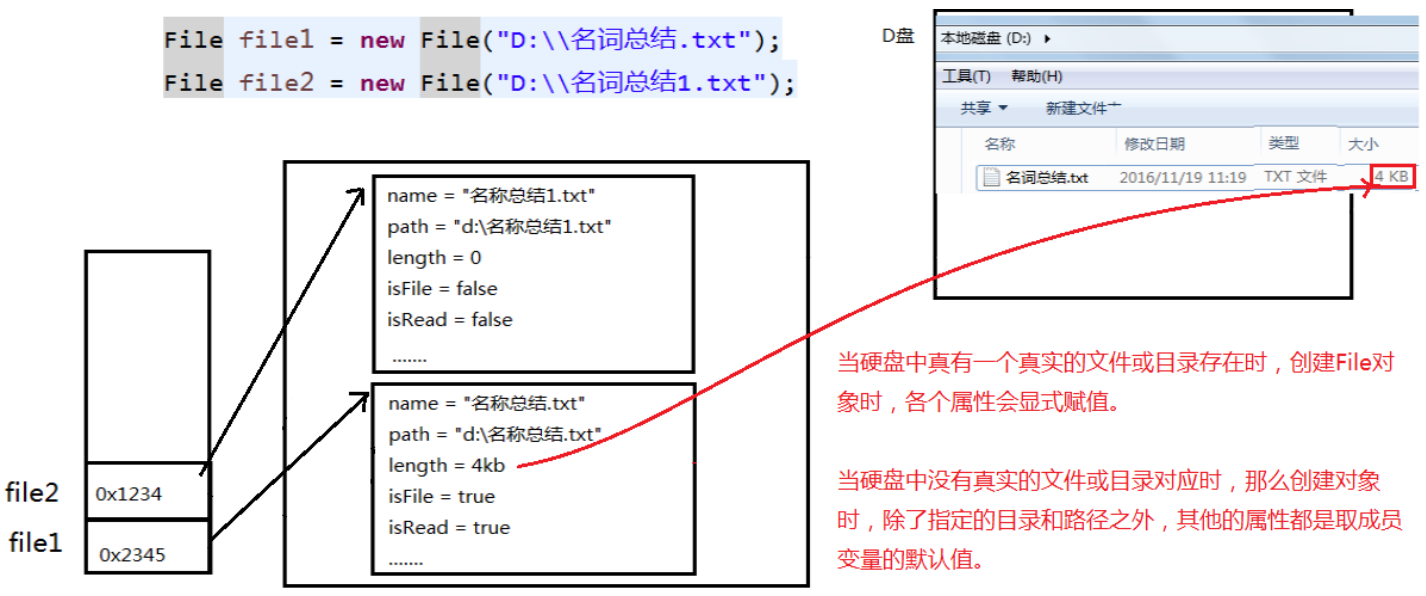
File 对象可以作为参数传递给流的构造器,指明读取或写入的 “终点”。
在 Java 中,一切皆是对象,File 类也不例外,不论是哪个对象都应该从该对象的构造方法说起:

public File(String pathname):以 pathname 为路径创建 File 对象,可以是绝对路径或者相对路径,如果 pathname 是相对路径,则默认的当前路径在系统属性 user.dir 中存储。绝对路径:是一个固定的路径,从盘符开始。
相对路径:是相对于某个位置开始。
IDEA 中的路径说明,
main()和 Test 中,相对路径不一样:1
2
3
4
5
6
7
8
9
10
11
12public class Test {
public static void main(String[] args) {
File file = new File("hello.txt");// 相较于当前工程
System.out.println(file.getAbsolutePath());// D:\JetBrainsWorkSpace\IDEAProjects\xisun-projects\hello.txt
}
public void testFileReader() {
File file = new File("hello.txt");// 相较于当前Module
System.out.println(file.getAbsolutePath());// D:\JetBrainsWorkSpace\IDEAProjects\xisun-projects\xisun-java_base\hello.txt
}
}
public File(String parent, String child):以 parent 为父路径,child 为子路径创建 File 对象。public File(File parent, String child):根据一个父 File 对象和子文件路径创建 File 对象。实例:
1
2
3
4
5
6
7
8
9
10
11
12
13
14
15
16
17// 通过文件路径名
String path1 = "D:\\123.txt";
File file1 = new File(path1);
// 通过文件路径名
String path2 = "D:\\1\\2.txt";
File file2 = new File(path2); -------------相当于d:\\1\\2.txt
// 通过父路径和子路径字符串
String parent = "F:\\aaa";
String child = "bbb.txt";
File file3 = new File(parent, child); --------相当于f:\\aaa\\bbb.txt
// 通过父级File对象和子路径字符串
File parentDir = new File("F:\\aaa");
String child = "bbb.txt";
File file4 = new File(parentDir, child); --------相当于f:\\aaa\\bbb.txt路径分隔符:
路径中的每级目录之间用一个路径分隔符隔开。
路径分隔符和系统有关:
- windows 和 DOS 系统默认使用 “\“ 来表示。
- UNIX 和 URL 使用 “/“ 来表示。
Java 程序支持跨平台运行,因此路径分隔符要慎用。为了解决这个隐患,File 类提供了一个常量
public static final String separator,能够根据操作系统,动态的提供分隔符。实例:
1
2
3File file1 = new File("d:\\test\\info.txt");
File file2 = new File("d:/test/info.txt");
File file3 = new File("d:" + File.separator + "test" + File.separator + "info.txt");
获取功能的方法:
public String getAbsolutePath():获取绝对路径。public String getPath():获取路径。public String getName():获取名称。public String getParent():获取上层文件目录路径。若无,返回 null。public long length():获取文件长度,即:字节数。不能获取目录的长度。public long lastModified():获取最后一次的修改时间,毫秒值。实例:
1
2
3
4
5
6
7
8
9
10
11
12
13
14
15
16
17
18
19
20
21
22public class Test {
public static void main(String[] args) {
File file1 = new File("hello.txt");
File file2 = new File("d:\\io\\hi.txt");
System.out.println(file1.getAbsolutePath());
System.out.println(file1.getPath());
System.out.println(file1.getName());
System.out.println(file1.getParent());
System.out.println(file1.length());
System.out.println(new Date(file1.lastModified()));
System.out.println();
System.out.println(file2.getAbsolutePath());
System.out.println(file2.getPath());
System.out.println(file2.getName());
System.out.println(file2.getParent());
System.out.println(file2.length());
System.out.println(file2.lastModified());
}
}public String[] list():获取指定目录下的所有文件或者文件目录的名称数组,如果指定目录不存在,返回 null。public File[] listFiles():获取指定目录下的所有文件或者文件目录的 File 数组,如果指定目录不存在,返回 null。实例:
1
2
3
4
5
6
7
8
9
10
11
12
13
14
15
16
17
18
19
20
21
22
23public class Test {
public static void main(String[] args) {
File file = new File("D:\\workspace_idea1\\JavaSenior");
String[] list = file.list();
System.out.println(list);
if (list != null) {
for (String s : list) {
System.out.println(s);
}
}
System.out.println();
File[] files = file.listFiles();
System.out.println(files);
if (files != null) {
for (File f : files) {
System.out.println(f);
}
}
}
}public String[] list(FilenameFilter filter):指定文件过滤器。public File[] listFiles(FilenameFilter filter):指定文件过滤器。public File[] listFiles(FileFilter filter):指定文件过滤器。实例:
1
2
3
4
5
6
7
8
9
10
11
12
13
14
15
16
17
18
19
20
21
22
23
24
25
26
27
28
29
30
31
32
33
34
35
36
37
38
39
40
41public class Test {
public static void main(String[] args) {
File srcFile = new File("d:\\code");
String[] subFiles1 = srcFile.list(new FilenameFilter() {
public boolean accept(File dir, String name) {
return name.endsWith(".jpg");
}
});
if (subFiles1 != null) {
for (String fileName : subFiles1) {
System.out.println(fileName);
}
}
File[] subFiles2 = srcFile.listFiles(new FilenameFilter() {
public boolean accept(File dir, String name) {
return name.endsWith(".jpg");
}
});
if (subFiles2 != null) {
for (File file : subFiles2) {
System.out.println(file.getAbsolutePath());
}
}
File[] subFiles3 = srcFile.listFiles(new FileFilter() {
public boolean accept(File pathname) {
return pathname.getName().endsWith(".jpg");
}
});
if (subFiles3 != null) {
for (File file : subFiles3) {
System.out.println(file.getAbsolutePath());
}
}
}
}
重命名功能的方法
public boolean renameTo(File dest):把文件重命名为指定的文件路径。以file1.renameTo(file2)为例:要想保证返回 true,需要 file1 在硬盘中是存在的,且 file2 在硬盘中不能存在。实例:
1
2
3
4
5
6
7
8
9public class Test {
public static void main(String[] args) {
File file1 = new File("hello.txt");
File file2 = new File("D:\\io\\hi.txt");
boolean renameTo = file2.renameTo(file1);
System.out.println(renameTo);
}
}
判断功能的方法
public boolean exists():判断是否存在。public boolean isDirectory():判断是否是文件目录。public boolean isFile():判断是否是文件。public boolean canRead():判断是否可读。public boolean canWrite():判断是否可写。public boolean isHidden():判断是否隐藏。实例:
1
2
3
4
5
6
7
8
9
10
11
12
13
14
15
16
17
18
19
20
21
22
23
24public class Test {
public static void main(String[] args) {
File file1 = new File("hello.txt");
file1 = new File("hello1.txt");
System.out.println(file1.isDirectory());
System.out.println(file1.isFile());
System.out.println(file1.exists());
System.out.println(file1.canRead());
System.out.println(file1.canWrite());
System.out.println(file1.isHidden());
System.out.println();
File file2 = new File("d:\\io");
file2 = new File("d:\\io1");
System.out.println(file2.isDirectory());
System.out.println(file2.isFile());
System.out.println(file2.exists());
System.out.println(file2.canRead());
System.out.println(file2.canWrite());
System.out.println(file2.isHidden());
}
}
创建功能的方法
public boolean createNewFile():创建文件。若文件不存在,则创建一个新的空文件并返回 true;若文件存在,则不创建文件并返回 false。public boolean mkdir():创建文件目录。如果此文件目录存在,则不创建;如果此文件目录的上层目录不存在,也不创建。public boolean mkdirs():创建文件目录。如果上层文件目录不存在,也一并创建。如果创建文件或者文件目录时,没有写盘符路径,那么,默认在项目路径下。
实例:
1
2
3
4
5
6
7
8
9
10
11
12
13
14
15
16
17
18public class Test {
public static void main(String[] args) {
File file1 = new File("hi.txt");
if (!file1.exists()) {
// 文件不存在
try {
boolean newFile = file1.createNewFile();
System.out.println("创建成功?" + newFile);
} catch (IOException exception) {
exception.printStackTrace();
}
} else {
// 文件存在
boolean delete = file1.delete();
System.out.println("删除成功?" + delete);
}
}
}
删除功能的方法
public boolean delete():删除文件或者文件夹。Java 中的删除不走回收站。要删除一个文件目录,请注意该文件目录内不能包含文件或者文件目录,即只能删除空的文件目录。
实例:
1
2
3
4
5
6
7
8
9
10
11
12
13
14
15
16
17
18
19
20
21public class Test {
public static void main(String[] args) {
// 文件目录的创建
File file1 = new File("d:\\io\\io1\\io3");
boolean mkdir = file1.mkdir();
if (mkdir) {
System.out.println("创建成功1");
}
File file2 = new File("d:\\io\\io1\\io4");
boolean mkdir1 = file2.mkdirs();
if (mkdir1) {
System.out.println("创建成功2");
}
// 要想删除成功,io4文件目录下不能有子目录或文件
File file3 = new File("D:\\io\\io1\\io4");
file3 = new File("D:\\io\\io1");
System.out.println(file3.delete());
}
}
递归遍历文件夹下所有文件以及子文件
1
2
3
4
5
6
7
8
9
10
11
12
13
14
15
16
17
18
19
20
21
22
23
24
25
26
27
28
29
30
31
32
33
34
35
36
37
38
39
40
41
42
43
44
45
46
47
48
49
50
51
52
53
54
55
56
57
58
59
60
61
62
63
64
65
66
67
68
69
70
71
72
73
74
75
76
77
78
79
80
81
82
83
84
85
86
87
88
89
90
91
92
93
94
95
96
97
98
99
100
101
102
103
104
105
106
107
108public class Test {
public static void main(String[] args) {
// 递归:文件目录
/** 打印出指定目录所有文件名称,包括子文件目录中的文件 */
// 1.创建目录对象
File dir = new File("E:\\teach\\01_javaSE\\_尚硅谷Java编程语言\\3_软件");
// 2.打印目录的子文件
printSubFile(dir);
}
// 方式一:
public static void printSubFile(File dir) {
// 判断传入的是否是目录
if (!dir.isDirectory()) {
// 不是目录直接退出
return;
}
// 打印目录的子文件
File[] subfiles = dir.listFiles();
if (subfiles != null) {
for (File f : subfiles) {
if (f.isDirectory()) {
// 文件目录
printSubFile(f);
} else {
// 文件
System.out.println(f.getAbsolutePath());
}
}
}
}
// 方式二:循环实现
// 列出file目录的下级内容,仅列出一级的话,使用File类的String[] list()比较简单
public void listSubFiles(File file) {
if (file.isDirectory()) {
String[] all = file.list();
if (all != null) {
for (String s : all) {
System.out.println(s);
}
}
} else {
System.out.println(file + "是文件!");
}
}
// 方式三:列出file目录的下级,如果它的下级还是目录,接着列出下级的下级,依次类推
// 建议使用File类的File[] listFiles()
public void listAllSubFiles(File file) {
if (file.isFile()) {
System.out.println(file);
} else {
File[] all = file.listFiles();
// 如果all[i]是文件,直接打印
// 如果all[i]是目录,接着再获取它的下一级
if (all != null) {
for (File f : all) {
// 递归调用:自己调用自己就叫递归
listAllSubFiles(f);
}
}
}
}
// 拓展1:计算指定目录所在空间的大小
// 求任意一个目录的总大小
public long getDirectorySize(File file) {
// file是文件,那么直接返回file.length()
// file是目录,把它的下一级的所有大小加起来就是它的总大小
long size = 0;
if (file.isFile()) {
size += file.length();
} else {
// 获取file的下一级
File[] all = file.listFiles();
if (all != null) {
// 累加all[i]的大小
for (File f : all) {
// f的大小
size += getDirectorySize(f);
}
}
}
return size;
}
// 拓展2:删除指定文件目录及其下的所有文件
public void deleteDirectory(File file) {
// 如果file是文件,直接delete
// 如果file是目录,先把它的下一级干掉,然后删除自己
if (file.isDirectory()) {
File[] all = file.listFiles();
// 循环删除的是file的下一级
if (all != null) {
// f代表file的每一个下级
for (File f : all) {
deleteDirectory(f);
}
}
}
// 删除自己
file.delete();
}
}
字符编码
字符集
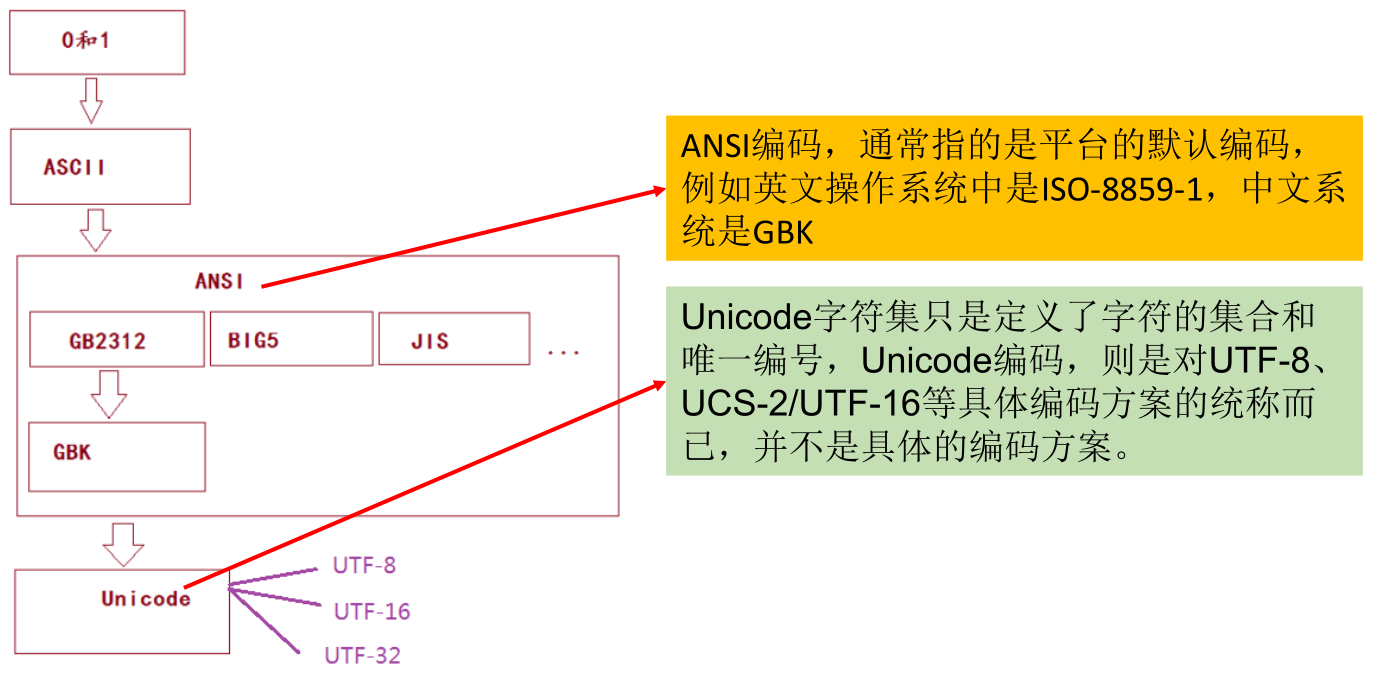
Charset:也叫编码表。是一个系统支持的所有字符的集合,包括各国家文字、标点符号、图形符号、数字等。编码表的由来:计算机只能识别二进制数据,早期由来是电信号。为了方便应用计算机,让它可以识别各个国家的文字。就将各个国家的文字用数字来表示,并一一对应,形成一张表。这就是编码表。
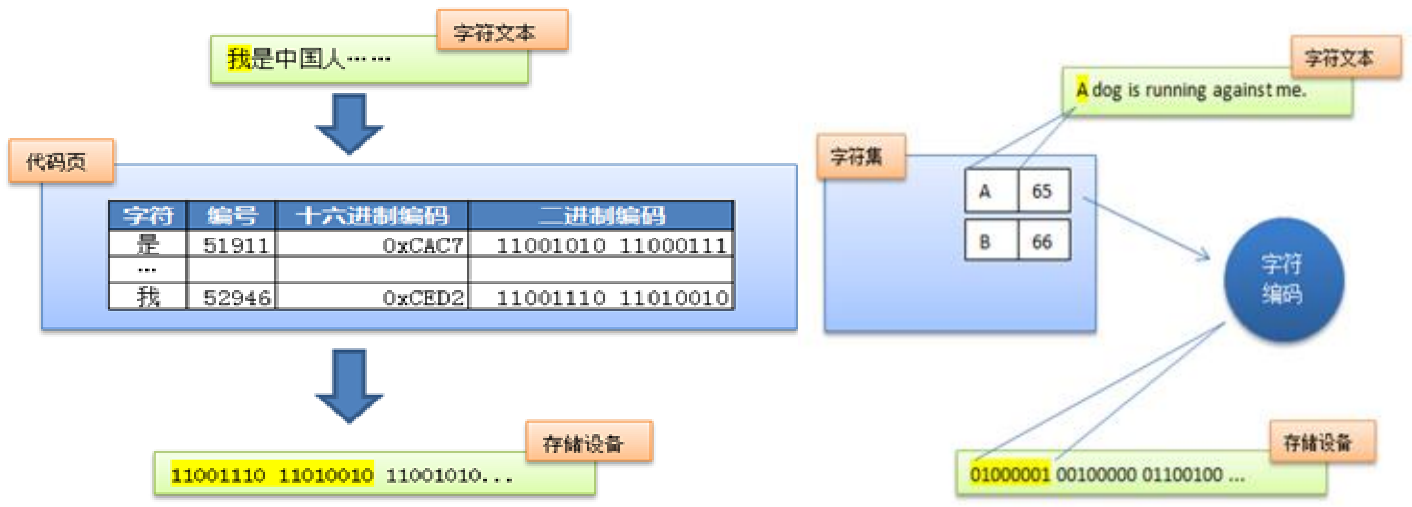
常见的编码表:
ASCII:美国标准信息交换码。用一个字节的 7 位可以表示。
ISO8859-1:拉丁码表,欧洲码表。用一个字节的 8 位表示。
GB2312:中国的中文编码表。最多两个字节编码所有字符。
GBK:中国的中文编码表升级,融合了更多的中文文字符号。最多两个字节编码。
Unicode:国际标准码,融合了目前人类使用的所有字符。为每个字符分配唯一的字符码。所有的文字都用两个字节来表示。
UTF-8:变长的编码方式,可用 1 ~ 4 个字节来表示一个字符。
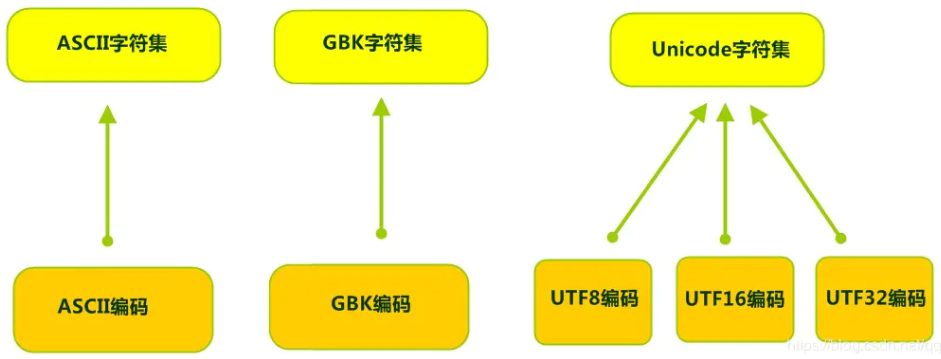
在 Unicode 出现之前,所有的字符集都是和具体编码方案绑定在一起的,即字符集 ≈ 编码方式,都是直接将字符和最终字节流绑定死了。
GBK 等双字节编码方式,用最高位是 1 或 0 表示两个字节和一个字节。
Unicode 不完美,这里就有三个问题,一个是,我们已经知道,英文字母只用一个字节表示就够了,第二个问题是如何才能区别 Unicode 和 ASCII,计算机怎么知道是两个字节表示一个符号,而不是分别表示两个符号呢?第三个,如果和 GBK 等双字节编码方式一样,用最高位是 1 或 0 表示两个字节和一个字节,就少了很多值无法用于表示字符,不够表示所有字符。Unicode 在很长一段时间内无法推广,直到互联网的出现。
面向传输的众多 UTF (UCS Transfer Format) 标准出现了,顾名思义,UTF-8 就是每次 8 个位传输数据,而 UTF-16 就是每次 16 个位。这是为传输而设计的编码,并使编码无国界,这样就可以显示全世界上所有文化的字符了。
Unicode 只是定义了一个庞大的、全球通用的字符集,并为每个字符规定了唯一确定的编号,具体存储成什么样的字节流,取决于字符编码方案。推荐的 Unicode 编码是 UTF-8 和 UTF-16。
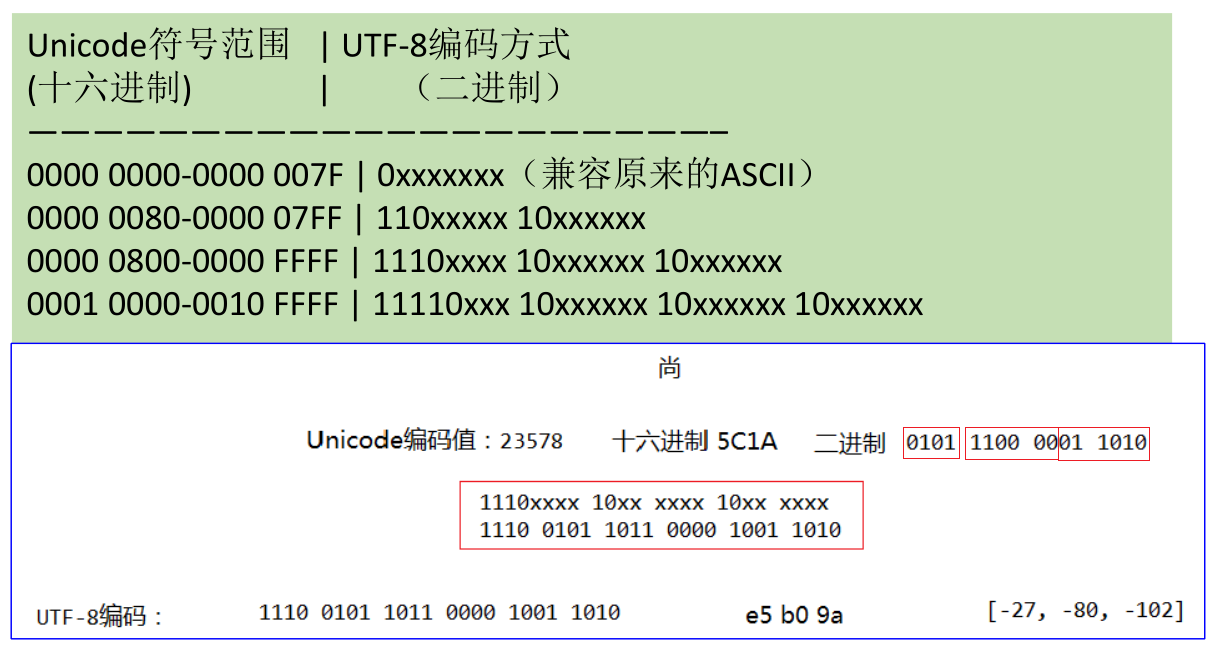
计算机中储存的信息都是用二进制数表示的,而能在屏幕上看到的数字、英文、标点符号、汉字等字符是二进制数转换之后的结果。按照某种规则,将字符存储到计算机中,称为编码 。反之,将存储在计算机中的二进制数按照某种规则解析显示出来,称为解码 。
- 编码规则和解码规则要对应,否则会导致乱码。比如说,按照 A 规则存储,同样按照 A 规则解析,那么就能显示正确的文本符号。反之,按照 A 规则存储,再按照 B 规则解析,就会导致乱码现象。
编码: 字符串 —> 字节数组。(能看懂的 —> 看不懂的)
解码: 字节数组 —> 字符串。(看不懂的 —> 能看懂的)
启示:客户端/浏览器端 <——> 后台 (Java,GO,Python,Node.js,php…) <——> 数据库,要求前前后后使用的字符集要统一,都使用 UTF-8,这样才不会乱码。
IO 流原理
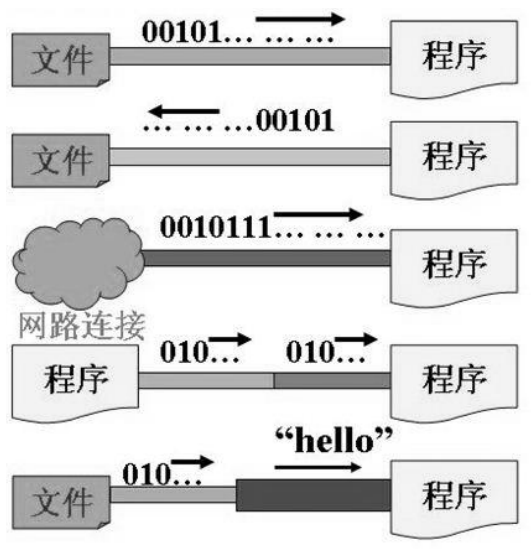
I/O 是 Input/Output 的缩写, I/O 技术是非常实用的技术,用于处理设备之间的数据传输。如读/写文件,网络通讯等。
Java 程序中,对于数据的输入/输出操作以 “流 (stream)” 的方式进行。
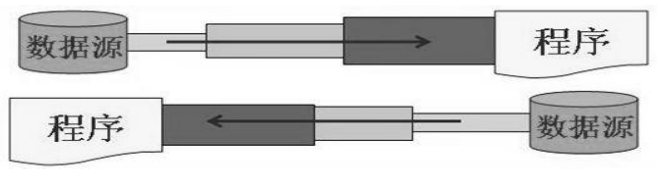
java.io包下提供了各种 “流” 类和接口,用以获取不同种类的数据,并通过标准的方法输入或输出数据。输入 input:读取外部数据 (磁盘、光盘等存储设备的数据) 到程序 (内存) 中。
输出 output:将程序 (内存) 数据输出到磁盘、光盘等外部存储设备中。
IO 流的分类
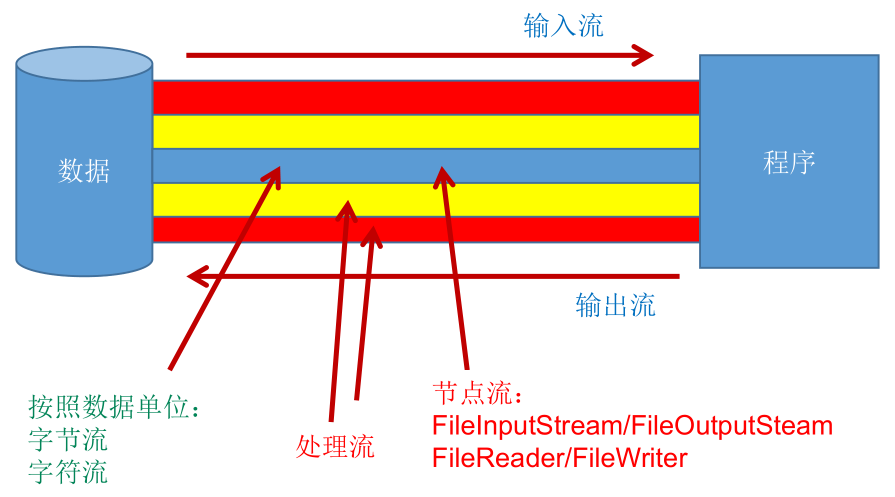
按操作数据单位不同分为:字节流 (8 bit),字符流 (16 bit)。
- 字节流:以字节为单位,读写数据的流。
- 字符流:以字符为单位,读写数据的流。
按数据流的流向不同分为:输入流,输出流。
- 输入流:把数据从其他设备上读取到内存中的流。
- 输出流:把数据从内存中写出到其他设备上的流。
按流的角色的不同分为:节点流,处理流。
节点流:直接从数据源或目的地读写数据。也叫文件流。

处理流:不直接连接到数据源或目的地,而是连接在已存在的流 (节点流或处理流) 之上,通过对数据的处理为程序提供更为强大的读写功能。
Java 的 IO 流共涉及 40 多个类,实际上非常规则,都是从如下四个抽象基类派生的。同时,由这四个类派生出来的子类名称都是以其父类名作为子类名后缀:
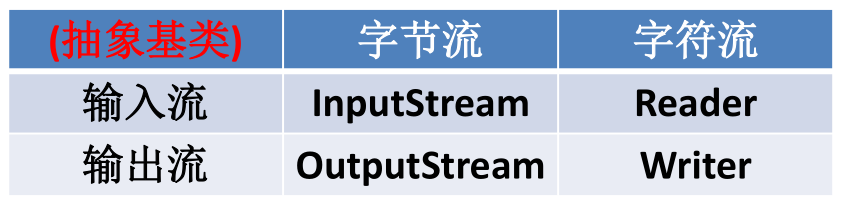
IO 流体系:
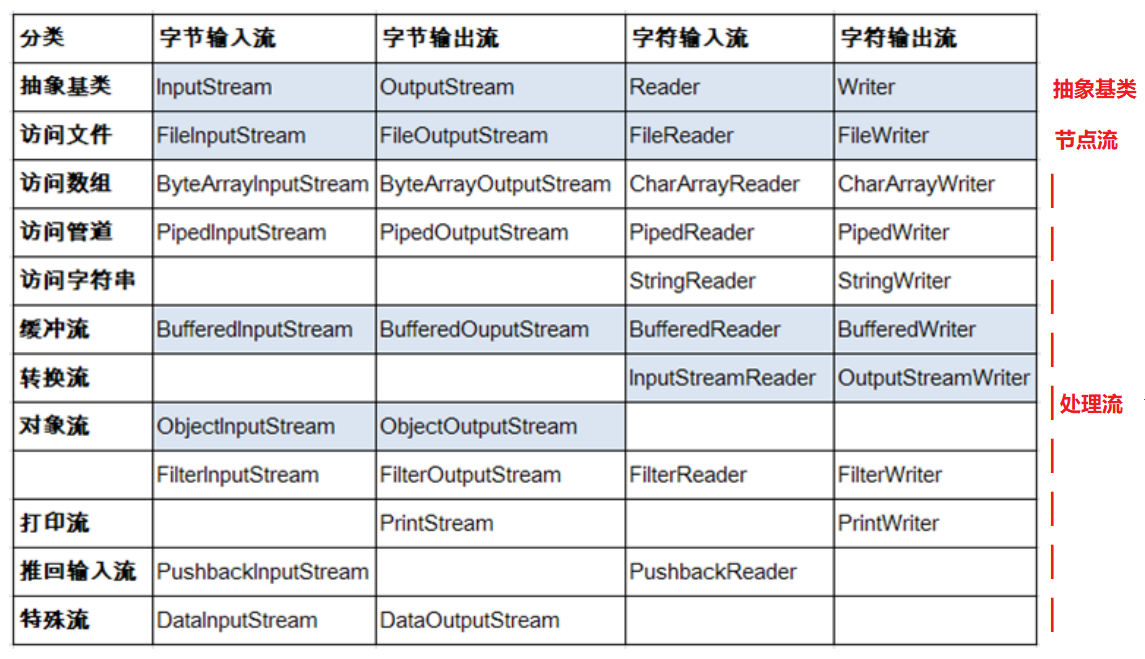
四个抽象基类
InputStream & Reader:
- InputStream 和 Reader 是所有输入流的基类。
- InputStream 的典型实现:FileInputStream。
int read()int read(byte[] b)int read(byte[] b, int off, int len)
- Reader 的典型实现:FileReader。
int read()int read(char [] c)int read(char [] c, int off, int len)
- 程序中打开的文件 IO 资源不属于内存里的资源,垃圾回收机制无法回收该资源,所以应该显式关闭文件 IO 资源。
- FileInputStream 从文件系统中的某个文件中获得输入字节。FileInputStream 用于读取非文本数据之类的原始字节流。如果要读取文本数据的字符流,需要使用 FileReader。
InputStream:
int read():从输入流中读取数据的下一个字节。返回 0 到 255 范围内的 int 字节值。如果因为已经到达流末尾而没有可用的字节,则返回值 -1。int read(byte[] b):从输入流中将最多b.length()个字节的数据读入一个 byte 数组中。以整数形式返回实际读取的字节数。如果因为已经到达流末尾而没有可用的字节,则返回值 -1。int read(byte[] b, int off,int len):将输入流中最多 len 个数据字节读入 byte 数组。尝试读取 len 个字节,但读取的字节也可能小于该值。以整数形式返回实际读取的字节数。如果因为已经到达流末尾而没有可用的字节,则返回值 -1。public void close() throws IOException:关闭输入流并释放与该流关联的所有系统资源。
Reader:
int read():读取单个字符。作为整数读取的字符,范围在 0 到 65535 之间 (0x00-0xffff) (2 个字节的 Unicode 码),如果已到达流的末尾,则返回 -1。int read(char[] cbuf):将字符读入数组。如果已到达流的末尾,则返回 -1。否则返回本次读取的字符数。int read(char[] cbuf,int off,int len):将字符读入数组的某一部分。存到数组 cbuf 中,从 off 处开始存储,最多读 len 个字符。如果已到达流的末尾,则返回 -1。否则返回本次读取的字符数。public void close() throws IOException:关闭此输入流并释放与该流关联的所有系统资源。
OutputStream & Writer:
- OutputStream 和 Writer 是所有输入流的基类。
- OutputStream 的典型实现:FileOutStream。
void write(int b)void write(byte[] b)void write(byte[] b, int off, int len)public void flush() throws IOExceptionpublic void close() throws IOException
- Writer 的典型实现:FileWriter。
void write(int c)void write(char[] cbuf)void write(char[] buff, int off, int len)public void flush() throws IOExceptionpublic void close() throws IOException
- 因为字符流直接以字符作为操作单位,所以 Writer 还可以用字符串来替换字符数组,即以 String 对象作为参数。
void write(String str)void write(String str, int off, int len)
- FileOutputStream 从文件系统中的某个文件中获得输出字节。FileOutputStream 用于写出非文本数据之类的原始字节流。如果要要写出文本数据的字符流,需要使用 FileWriter。
OutputStream:
void write(int b):将指定的字节写入此输出流。write 的常规协定是:向输出流写入一个字节。要写入的字节是参数 b 的八个低位。b 的 24 个高位将被忽略,即写入 0 ~ 255 范围的。void write(byte[] b):将b.length()个字节从指定的 byte 数组写入此输出流。write(b)的常规协定是:应该与调用write(b, 0, b.length)的效果完全相同。void write(byte[] b,int off,int len):将指定 byte 数组中从偏移量 off 开始的 len 个字节写入此输出流。public void flush() throws IOException:刷新此输出流并强制写出所有缓冲的输出字节,调用此方法指示应将这些字节立即写入它们预期的目标。public void close() throws IOException:关闭此输出流并释放与该流关联的所有系统资源。
Writer:
void write(int c):写入单个字符。要写入的字符包含在给定整数值的 16 个低位中,16 高位被忽略。 即写入0 到 65535 之间的 Unicode 码。void write(char[] cbuf):写入字符数组。void write(char[] cbuf,int off,int len):写入字符数组的某一部分。从 off 开始,写入 len 个字符。void write(String str):写入字符串。void write(String str,int off,int len):写入字符串的某一部分。public void flush() throws IOException:刷新该流的缓冲,则立即将它们写入预期目标。public void close() throws IOException:关闭此输出流并释放与该流关联的所有系统资源。
节点流 (或文件流)
读取文件流程:
- 实例化 File 类的对象,指明要操作的文件。
- 提供具体的流对象。
- 数据的读入。
- 流的关闭操作。
写入文件流程:
- 实例化 File 类的对象,指明写出到的文件。
- 提供具体的流对象。
- 数据的写入。
- 流的关闭操作。
定义文件路径时,可以用 / 或者 \。
在写入一个文件时,如果使用构造器
FileOutputStream(file),则目录下有同名文件将被覆盖。如果使用构造器
FileOutputStream(file,true),则目录下的同名文件不会被覆盖,而是在文件内容末尾追加内容。在读取文件时,必须保证该文件已存在,否则报异常。
对于非文本文件 (.jpg,.mp3,.mp4,.avi,.rmvb,.doc,.ppt 等),使用字节流处理。如果使用字节流操作文本文件,在输出到控制台时,可能会出现乱码。
- 如果只是将文本文件复制到其他地方,也可以使用字节流。
对于文本文件 (.txt,.java,.c,.cpp 等),使用字符流处理。
FileReader 和 FileWriter 操作的实例:
1
2
3
4
5
6
7
8
9
10
11
12
13
14
15
16
17
18
19
20
21
22
23
24
25
26
27
28
29
30
31
32
33
34
35
36
37
38
39
40
41
42
43
44
45
46
47
48
49
50
51
52
53
54
55
56
57
58
59
60
61
62
63
64
65
66
67
68
69
70
71
72
73
74
75
76
77
78
79
80
81
82
83
84
85
86
87
88
89
90
91
92
93
94
95
96
97
98
99
100
101
102
103
104
105
106
107
108
109
110
111
112
113
114
115
116
117
118
119
120
121
122
123
124
125
126
127
128
129
130
131
132
133
134
135
136
137
138
139
140
141
142
143
144
145
146
147
148
149
150
151
152
153
154
155
156
157
158
159
160
161
162
163
164
165
166
167
168
169
170
171
172
173
174
175
176
177
178
179
180
181
182
183
184
185
186
187
188
189
190
191
192
193
194
195
196
197
198
199
200
201
202
203
204
205
206
207
208
209
210
211
212
213
214
215
216/**
* 一、流的分类:
* 1.操作数据单位:字节流、字符流
* 2.数据的流向:输入流、输出流
* 3.流的角色:节点流、处理流
*
* 二、流的体系结构
* 抽象基类 节点流(或文件流) 缓冲流(处理流的一种)
* InputStream FileInputStream (read(byte[] buffer)) BufferedInputStream (read(byte[] buffer))
* OutputStream FileOutputStream (write(byte[] buffer,0,len) BufferedOutputStream (write(byte[] buffer,0,len)/flush()
* Reader FileReader (read(char[] cbuf)) BufferedReader (read(char[] cbuf)/readLine())
* Writer FileWriter (write(char[] cbuf,0,len) BufferedWriter (write(char[] cbuf,0,len)/flush()
*/
public class FileReaderWriterTest {
/*
将当前Module下的hello.txt文件内容读入程序中,并输出到控制台
说明点:
1. read()的理解:返回读入的一个字符。如果达到文件末尾,返回-1
2. 异常的处理:为了保证流资源一定可以执行关闭操作。需要使用try-catch-finally处理
3. 读入的文件一定要存在,否则就会报FileNotFoundException。
*/
// read(): 返回读入的一个字符。如果达到文件末尾,返回-1
public void testFileReader() {
FileReader fr = null;
try {
// 1.实例化File类的对象,指明要操作的文件
File file = new File("hello.txt");// 相较于当前Module
// 2.提供具体的流
fr = new FileReader(file);
// 3.数据的读入
// 方式一:
/*int data = fr.read();
while (data != -1) {
System.out.print((char) data);
data = fr.read();
}*/
// 方式二:语法上针对于方式一的修改
int data;
while ((data = fr.read()) != -1) {
System.out.print((char) data);
}
} catch (IOException e) {
e.printStackTrace();
} finally {
// 4.流的关闭操作
// 方式一:
/*try {
if (fr != null)
fr.close();
} catch (IOException e) {
e.printStackTrace();
}*/
// 方式二:
if (fr != null) {
try {
fr.close();
} catch (IOException e) {
e.printStackTrace();
}
}
}
}
// 对read()操作升级:使用read的重载方法read(char[] cbuf)
public void testFileReader1() {
FileReader fr = null;
try {
// 1.File类的实例化
File file = new File("hello.txt");
// 2.FileReader流的实例化
fr = new FileReader(file);
// 3.读入的操作
// read(char[] cbuf):返回每次读入cbuf数组中的字符的个数。如果达到文件末尾,返回-1
char[] cbuf = new char[5];
int len;
while ((len = fr.read(cbuf)) != -1) {
// 方式一:
// 错误的写法,如果以cubf的length为基准,可能会造成多输出内容
/*for (int i = 0; i < cbuf.length; i++) {
System.out.print(cbuf[i]);
}*/
// 正确的写法
/*for (int i = 0; i < len; i++) {
System.out.print(cbuf[i]);
}*/
//方式二:
// 错误的写法,对应着方式一的错误的写法
/*String str = new String(cbuf);
System.out.print(str);*/
// 正确的写法,对应着方式一的正确的写法
String str = new String(cbuf, 0, len);
System.out.print(str);
}
} catch (IOException e) {
e.printStackTrace();
} finally {
if (fr != null) {
// 4.资源的关闭
try {
fr.close();
} catch (IOException e) {
e.printStackTrace();
}
}
}
}
/*
从内存中写出数据到硬盘的文件里。
说明:
1. 输出操作,对应的File可以不存在的。并不会报异常
2.
File对应的硬盘中的文件如果不存在,在输出的过程中,会自动创建此文件。
File对应的硬盘中的文件如果存在:
如果流使用的构造器是:FileWriter(file,false) / FileWriter(file)--->对原有文件的覆盖
如果流使用的构造器是:FileWriter(file,true)--->不会对原有文件覆盖,而是在原有文件基础上追加内容
*/
public void testFileWriter() {
FileWriter fw = null;
try {
// 1.提供File类的对象,指明写出到的文件
File file = new File("hello1.txt");
// 2.提供FileWriter的对象,用于数据的写出
fw = new FileWriter(file, false);
// 3.写出的操作
fw.write("I have a dream!\n");
fw.write("you need to have a dream!");
} catch (IOException e) {
e.printStackTrace();
} finally {
// 4.流资源的关闭
if (fw != null) {
try {
fw.close();
} catch (IOException e) {
e.printStackTrace();
}
}
}
}
/*
实现对已存在文件的复制
*/
public void testFileReaderFileWriter() {
FileReader fr = null;
FileWriter fw = null;
try {
// 1.创建File类的对象,指明读入和写出的文件
File srcFile = new File("hello.txt");
File destFile = new File("hello2.txt");
// 不能使用字符流来处理图片等字节数据
/*File srcFile = new File("爱情与友情.jpg");
File destFile = new File("爱情与友情1.jpg");*/
// 2.创建输入流和输出流的对象
fr = new FileReader(srcFile);
fw = new FileWriter(destFile);
// 3.数据的读入和写出操作
char[] cbuf = new char[5];
// 记录每次读入到cbuf数组中的字符的个数
int len;
while ((len = fr.read(cbuf)) != -1) {
// 每次写出len个字符
fw.write(cbuf, 0, len);
}
} catch (IOException e) {
e.printStackTrace();
} finally {
// 4.关闭流资源
// 方式一:
/*try {
if (fw != null)
fw.close();
} catch (IOException e) {
e.printStackTrace();
} finally {
try {
if (fr != null)
fr.close();
} catch (IOException e) {
e.printStackTrace();
}
}*/
// 方式二:
try {
if (fw != null)
fw.close();
} catch (IOException e) {
e.printStackTrace();
}
try {
if (fr != null)
fr.close();
} catch (IOException e) {
e.printStackTrace();
}
}
}
}FileInputStream 和 FileOutputStream 操作的实例:
1
2
3
4
5
6
7
8
9
10
11
12
13
14
15
16
17
18
19
20
21
22
23
24
25
26
27
28
29
30
31
32
33
34
35
36
37
38
39
40
41
42
43
44
45
46
47
48
49
50
51
52
53
54
55
56
57
58
59
60
61
62
63
64
65
66
67
68
69
70
71
72
73
74
75
76
77
78
79
80
81
82
83
84
85
86
87
88
89
90
91
92
93
94
95
96
97
98
99
100
101
102
103
104
105
106
107
108
109
110
111
112
113
114
115
116
117
118
119
120
121
122
123
124
125
126
127
128
129
130
131
132
133
134
135
136
137
138
139
140
141
142
143
144
145
146
147/**
* 测试FileInputStream和FileOutputStream的使用
*
* 结论:
* 1. 对于文本文件(.txt,.java,.c,.cpp),使用字符流处理
* 2. 对于非文本文件(.jpg,.mp3,.mp4,.avi,.doc,.ppt,...),使用字节流处理
*/
public class FileInputOutputStreamTest {
/*
使用字节流FileInputStream处理文本文件,可能出现乱码。
*/
public void testFileInputStream() {
FileInputStream fis = null;
try {
// 1. 造文件
File file = new File("hello.txt");
// 2.造流
fis = new FileInputStream(file);
// 3.读数据
byte[] buffer = new byte[5];
// 记录每次读取的字节的个数
int len;
while ((len = fis.read(buffer)) != -1) {
String str = new String(buffer, 0, len);
System.out.print(str);
}
} catch (IOException e) {
e.printStackTrace();
} finally {
if (fis != null) {
// 4.关闭资源
try {
fis.close();
} catch (IOException e) {
e.printStackTrace();
}
}
}
}
/*
实现对图片的复制操作
*/
public void testFileInputOutputStream() {
FileInputStream fis = null;
FileOutputStream fos = null;
try {
// 1.获取文件
File srcFile = new File("爱情与友情.jpg");
File destFile = new File("爱情与友情2.jpg");
// 2.获取流
fis = new FileInputStream(srcFile);
fos = new FileOutputStream(destFile);
// 3.复制的过程
byte[] buffer = new byte[5];
int len;
while ((len = fis.read(buffer)) != -1) {
fos.write(buffer, 0, len);
}
} catch (IOException e) {
e.printStackTrace();
} finally {
// 4.关闭流
if (fos != null) {
try {
fos.close();
} catch (IOException e) {
e.printStackTrace();
}
}
if (fis != null) {
try {
fis.close();
} catch (IOException e) {
e.printStackTrace();
}
}
}
}
/*
指定路径下文件的复制
*/
public void copyFile(String srcPath, String destPath) {
FileInputStream fis = null;
FileOutputStream fos = null;
try {
// 1.获取文件
File srcFile = new File(srcPath);
File destFile = new File(destPath);
// 2.获取流
fis = new FileInputStream(srcFile);
fos = new FileOutputStream(destFile);
// 3.复制的过程
byte[] buffer = new byte[1024];
int len;
while ((len = fis.read(buffer)) != -1) {
fos.write(buffer, 0, len);
}
} catch (IOException e) {
e.printStackTrace();
} finally {
// 4.关闭流
if (fos != null) {
try {
fos.close();
} catch (IOException e) {
e.printStackTrace();
}
}
if (fis != null) {
try {
fis.close();
} catch (IOException e) {
e.printStackTrace();
}
}
}
}
public void testCopyFile() {
long start = System.currentTimeMillis();
String srcPath = "C:\\Users\\Administrator\\Desktop\\01-视频.avi";
String destPath = "C:\\Users\\Administrator\\Desktop\\02-视频.avi";
/*String srcPath = "hello.txt";
String destPath = "hello3.txt";*/
copyFile(srcPath, destPath);
long end = System.currentTimeMillis();
System.out.println("复制操作花费的时间为:" + (end - start));// 618
}
}
处理流之一:缓冲流
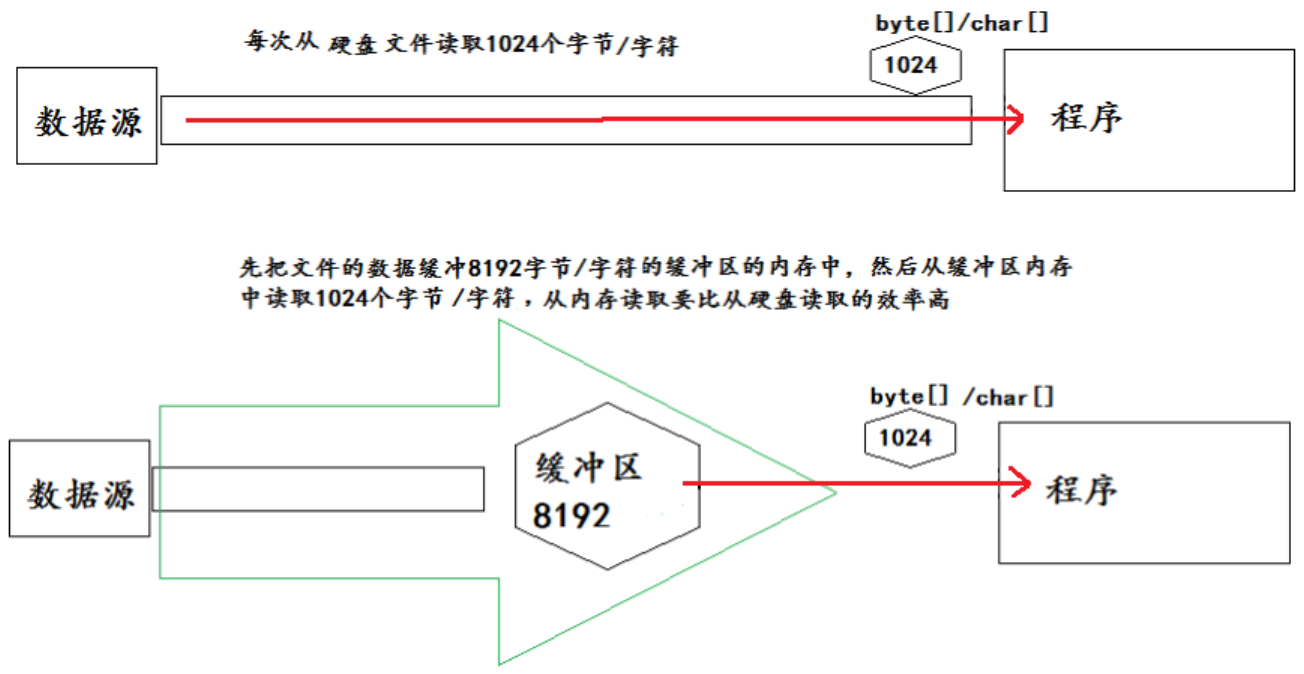
为了提高数据读写的速度,Java API 提供了带缓冲功能的流类,在使用这些流类时,会创建一个内部缓冲区数组,缺省使用 8192 个字节 (8Kb) 的缓冲区。
1
2
3public class BufferedInputStream extends FilterInputStream {
private static int DEFAULT_BUFFER_SIZE = 8192;
}1
2
3public class BufferedReader extends Reader {
private static int defaultCharBufferSize = 8192;
}1
2
3public class BufferedWriter extends Writer {
private static int defaultCharBufferSize = 8192;
}缓冲流要 “套接” 在相应的节点流之上,根据数据操作单位可以把缓冲流分为:
- BufferedInputStream 和 和 BufferedOutputStream
public BufferedInputStream(InputStream in):创建一个新的缓冲输入流,注意参数类型为 InputStream。public BufferedOutputStream(OutputStream out): 创建一个新的缓冲输出流,注意参数类型为 OutputStream。
- BufferedReader 和 BufferedWriter
public BufferedReader(Reader in):创建一个新的缓冲输入流,注意参数类型为 Reader。public BufferedWriter(Writer out): 创建一个新的缓冲输出流,注意参数类型为 Writer。
- BufferedInputStream 和 和 BufferedOutputStream
当读取数据时,数据按块读入缓冲区,其后的读操作则直接访问缓冲区。
当使用 BufferedInputStream 读取字节文件时,BufferedInputStream 会一次性从文件中读取 8192 个字节 (8Kb) 存在缓冲区中,直到缓冲区装满了,才重新从文件中读取下一个 8192 个字节数组。
向流中写入字节时,不会直接写到文件,先写到缓冲区中直到缓冲区写满,BufferedOutputStream 才会把缓冲区中的数据一次性写到文件里。使用
flush()可以强制将缓冲区的内容全部写入输出流。flush()的使用:手动将 buffer 中内容写入文件。- 如果使用带缓冲区的流对象的
close(),不但会关闭流,还会在关闭流之前刷新缓冲区,但关闭流后不能再写出。
关闭流的顺序和打开流的顺序相反。一般只需关闭最外层流即可,关闭最外层流也会相应关闭内层节点流。
流程示意图:
实现非文本文件及文本文件的复制:
1
2
3
4
5
6
7
8
9
10
11
12
13
14
15
16
17
18
19
20
21
22
23
24
25
26
27
28
29
30
31
32
33
34
35
36
37
38
39
40
41
42
43
44
45
46
47
48
49
50
51
52
53
54
55
56
57
58
59
60
61
62
63
64
65
66
67
68
69
70
71
72
73
74
75
76
77
78
79
80
81
82
83
84
85
86
87
88
89
90
91
92
93
94
95
96
97
98
99
100
101
102
103
104
105
106
107
108
109
110
111
112
113
114
115
116
117
118
119
120
121
122
123
124
125
126
127
128
129
130
131
132
133
134
135
136
137
138
139
140
141
142
143
144
145
146
147
148
149
150
151
152
153
154
155
156
157
158
159
160
161
162
163
164
165
166
167
168
169
170
171
172
173
174
175
176
177
178
179
180
181
182
183/**
* 处理流之一:缓冲流的使用
*
* 1.缓冲流:
* BufferedInputStream
* BufferedOutputStream
* BufferedReader
* BufferedWriter
*
* 2.作用:提高流的读取、写入的速度
* 提高读写速度的原因:内部提供了一个缓冲区
*
* 3. 处理流,就是"套接"在已有的流的基础上。(不一定必须是套接在节点流之上)
*/
public class BufferedStreamTest {
/*
使用BufferedInputStream和BufferedOutputStream实现非文本文件的复制
*/
public void BufferedStreamTest() throws FileNotFoundException {
BufferedInputStream bis = null;
BufferedOutputStream bos = null;
try {
// 1.造文件
File srcFile = new File("爱情与友情.jpg");
File destFile = new File("爱情与友情3.jpg");
// 2.造流
// 2.1 造节点流
FileInputStream fis = new FileInputStream((srcFile));
FileOutputStream fos = new FileOutputStream(destFile);
// 2.2 造缓冲流
bis = new BufferedInputStream(fis);
bos = new BufferedOutputStream(fos);
// 3.复制的细节:读取、写入
byte[] buffer = new byte[10];
int len;
while ((len = bis.read(buffer)) != -1) {
bos.write(buffer, 0, len);
// bos.flush();// 显示的刷新缓冲区,一般不需要
}
} catch (IOException e) {
e.printStackTrace();
} finally {
// 4.资源关闭
// 要求:先关闭外层的流,再关闭内层的流
if (bos != null) {
try {
bos.close();
} catch (IOException e) {
e.printStackTrace();
}
}
if (bis != null) {
try {
bis.close();
} catch (IOException e) {
e.printStackTrace();
}
}
// 说明:关闭外层流的同时,内层流也会自动的进行关闭。关于内层流的关闭,我们可以省略.
// fos.close();
// fis.close();
}
}
/*
使用BufferedInputStream和BufferedOutputStream实现文件复制的方法
*/
public void copyFileWithBuffered(String srcPath, String destPath) {
BufferedInputStream bis = null;
BufferedOutputStream bos = null;
try {
// 1.造文件
File srcFile = new File(srcPath);
File destFile = new File(destPath);
// 2.造流
// 2.1 造节点流
FileInputStream fis = new FileInputStream((srcFile));
FileOutputStream fos = new FileOutputStream(destFile);
// 2.2 造缓冲流
bis = new BufferedInputStream(fis);
bos = new BufferedOutputStream(fos);
// 3.复制的细节:读取、写入
byte[] buffer = new byte[1024];
int len;
while ((len = bis.read(buffer)) != -1) {
bos.write(buffer, 0, len);
}
} catch (IOException e) {
e.printStackTrace();
} finally {
// 4.资源关闭
// 要求:先关闭外层的流,再关闭内层的流
if (bos != null) {
try {
bos.close();
} catch (IOException e) {
e.printStackTrace();
}
}
if (bis != null) {
try {
bis.close();
} catch (IOException e) {
e.printStackTrace();
}
}
// 说明:关闭外层流的同时,内层流也会自动的进行关闭。关于内层流的关闭,我们可以省略.
// fos.close();
// fis.close();
}
}
public void testCopyFileWithBuffered() {
long start = System.currentTimeMillis();
String srcPath = "C:\\Users\\Administrator\\Desktop\\01-视频.avi";
String destPath = "C:\\Users\\Administrator\\Desktop\\03-视频.avi";
copyFileWithBuffered(srcPath, destPath);
long end = System.currentTimeMillis();
System.out.println("复制操作花费的时间为:" + (end - start));//618 - 176
}
/*
使用BufferedReader和BufferedWriter实现文本文件的复制
*/
public void testBufferedReaderBufferedWriter() {
BufferedReader br = null;
BufferedWriter bw = null;
try {
// 1.创建文件和相应的流
br = new BufferedReader(new FileReader(new File("dbcp.txt")));
bw = new BufferedWriter(new FileWriter(new File("dbcp1.txt")));
// 2.读写操作
// 方式一:使用char[]数组
/*char[] cbuf = new char[1024];
int len;
while ((len = br.read(cbuf)) != -1) {// 读到文件末尾时返回-1
bw.write(cbuf, 0, len);
// bw.flush();
}*/
// 方式二:使用String
String data;
while ((data = br.readLine()) != null) {// 读到文件末尾时返回null
// 方法一:
// bw.write(data + "\n");// data中不包含换行符
// 方法二:
bw.write(data);// data中不包含换行符
bw.newLine();// 提供换行的操作
}
} catch (IOException e) {
e.printStackTrace();
} finally {
// 3.关闭资源
if (bw != null) {
try {
bw.close();
} catch (IOException e) {
e.printStackTrace();
}
}
if (br != null) {
try {
br.close();
} catch (IOException e) {
e.printStackTrace();
}
}
}
}
}实现图片加密:
1
2
3
4
5
6
7
8
9
10
11
12
13
14
15
16
17
18
19
20
21
22
23
24
25
26
27
28
29
30
31
32
33
34
35
36
37
38
39
40
41
42
43
44
45
46
47
48
49
50
51
52
53
54
55
56
57
58
59
60
61
62
63
64
65
66
67
68
69
70
71
72
73
74
75
76
77
78
79
80
81
82
83
84
85
86
87
88
89
90
91
92public class ImageEncryption {
/*
图片的加密
*/
public void test1() {
FileInputStream fis = null;
FileOutputStream fos = null;
try {
fis = new FileInputStream("爱情与友情.jpg");
fos = new FileOutputStream("爱情与友情secret.jpg");
byte[] buffer = new byte[20];
int len;
while ((len = fis.read(buffer)) != -1) {
// 加密:对字节数组进行修改,异或操作
// 错误的写法,buffer数组中的数据没有改变,只是重新复制给了变量b
/*for (byte b : buffer) {
b = (byte) (b ^ 5);
}*/
// 正确的写法
for (int i = 0; i < len; i++) {
buffer[i] = (byte) (buffer[i] ^ 5);
}
fos.write(buffer, 0, len);
}
} catch (IOException e) {
e.printStackTrace();
} finally {
if (fos != null) {
try {
fos.close();
} catch (IOException e) {
e.printStackTrace();
}
}
if (fis != null) {
try {
fis.close();
} catch (IOException e) {
e.printStackTrace();
}
}
}
}
/*
图片的解密
*/
public void test2() {
FileInputStream fis = null;
FileOutputStream fos = null;
try {
fis = new FileInputStream("爱情与友情secret.jpg");
fos = new FileOutputStream("爱情与友情4.jpg");
byte[] buffer = new byte[20];
int len;
while ((len = fis.read(buffer)) != -1) {
// 解密:对字节数组进行修改,异或操作之后再异或,返回的是自己本身
// 错误的写法
/*for (byte b : buffer) {
b = (byte) (b ^ 5);
}*/
// 正确的写法
for (int i = 0; i < len; i++) {
buffer[i] = (byte) (buffer[i] ^ 5);
}
fos.write(buffer, 0, len);
}
} catch (IOException e) {
e.printStackTrace();
} finally {
if (fos != null) {
try {
fos.close();
} catch (IOException e) {
e.printStackTrace();
}
}
if (fis != null) {
try {
fis.close();
} catch (IOException e) {
e.printStackTrace();
}
}
}
}
}获取文本上每个字符出现的次数:
1
2
3
4
5
6
7
8
9
10
11
12
13
14
15
16
17
18
19
20
21
22
23
24
25
26
27
28
29
30
31
32
33
34
35
36
37
38
39
40
41
42
43
44
45
46
47
48
49
50
51
52
53
54
55
56
57
58
59
60
61
62
63
64
65
66
67
68
69
70
71
72
73
74public class WordCount {
/*
说明:如果使用单元测试,文件相对路径为当前module
如果使用main()测试,文件相对路径为当前工程
*/
public void testWordCount() {
FileReader fr = null;
BufferedWriter bw = null;
try {
// 1.创建Map集合
Map<Character, Integer> map = new HashMap<Character, Integer>();
// 2.遍历每一个字符,每一个字符出现的次数放到map中
fr = new FileReader("dbcp.txt");
int c;
while ((c = fr.read()) != -1) {
// int 还原 char
char ch = (char) c;
// 判断char是否在map中第一次出现
if (map.get(ch) == null) {
map.put(ch, 1);
} else {
map.put(ch, map.get(ch) + 1);
}
}
// 3.把map中数据存在文件count.txt
// 3.1 创建Writer
bw = new BufferedWriter(new FileWriter("wordcount.txt"));
// 3.2 遍历map,再写入数据
Set<Map.Entry<Character, Integer>> entrySet = map.entrySet();
for (Map.Entry<Character, Integer> entry : entrySet) {
switch (entry.getKey()) {
case ' ':
bw.write("空格 = " + entry.getValue());
break;
case '\t'://\t表示tab 键字符
bw.write("tab键 = " + entry.getValue());
break;
case '\r'://
bw.write("回车 = " + entry.getValue());
break;
case '\n'://
bw.write("换行 = " + entry.getValue());
break;
default:
bw.write(entry.getKey() + " = " + entry.getValue());
break;
}
bw.newLine();
}
} catch (IOException e) {
e.printStackTrace();
} finally {
// 4.关闭流
if (fr != null) {
try {
fr.close();
} catch (IOException e) {
e.printStackTrace();
}
}
if (bw != null) {
try {
bw.close();
} catch (IOException e) {
e.printStackTrace();
}
}
}
}
}
处理流之二:转换流
转换流提供了在字节流和字符流之间的转换。
Java API 提供了两个转换流:
- InputStreamReader:将 InputStream 转换为 Reader。
InputStreamReader(InputStream in):创建一个使用默认字符集的字符流。InputStreamReader(InputStream in, String charsetName):创建一个指定字符集的字符流。
- OutputStreamWriter:将 Writer 转换为 OutputStream。
OutputStreamWriter(OutputStream in):创建一个使用默认字符集的字符流。OutputStreamWriter(OutputStream in, String charsetName):创建一个指定字符集的字符流。
- InputStreamReader:将 InputStream 转换为 Reader。
字节流中的数据都是字符时,转成字符流操作更高效。
很多时候我们使用转换流来处理文件乱码问题,实现编码和解码的功能。
InputStreamReader:
- 实现将字节的输入流按指定字符集转换为字符的输入流。
- 需要和 InputStream 套接。
- 构造器
public InputStreamReader(InputStream in)public InputSreamReader(InputStream in,String charsetName)- 比如:
Reader isr = new InputStreamReader(System.in,"gbk");,指定字符集为 gbk。
- 比如:
OutputStreamWriter:
- 实现将字符的输出流按指定字符集转换为字节的输出流。
- 需要和 OutputStream 套接。
- 构造器
public OutputStreamWriter(OutputStream out)public OutputSreamWriter(OutputStream out,String charsetName)
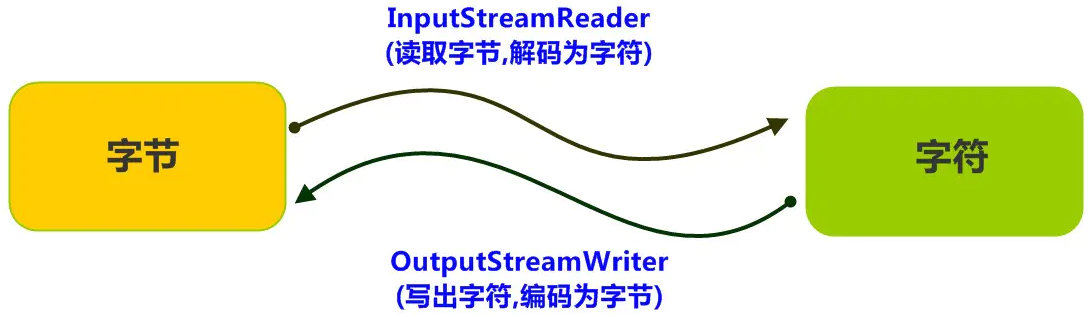
使用 InputStreamReader 解码时,使用的字符集取决于 OutputStreamWriter 编码时使用的字符集。
流程示意图:
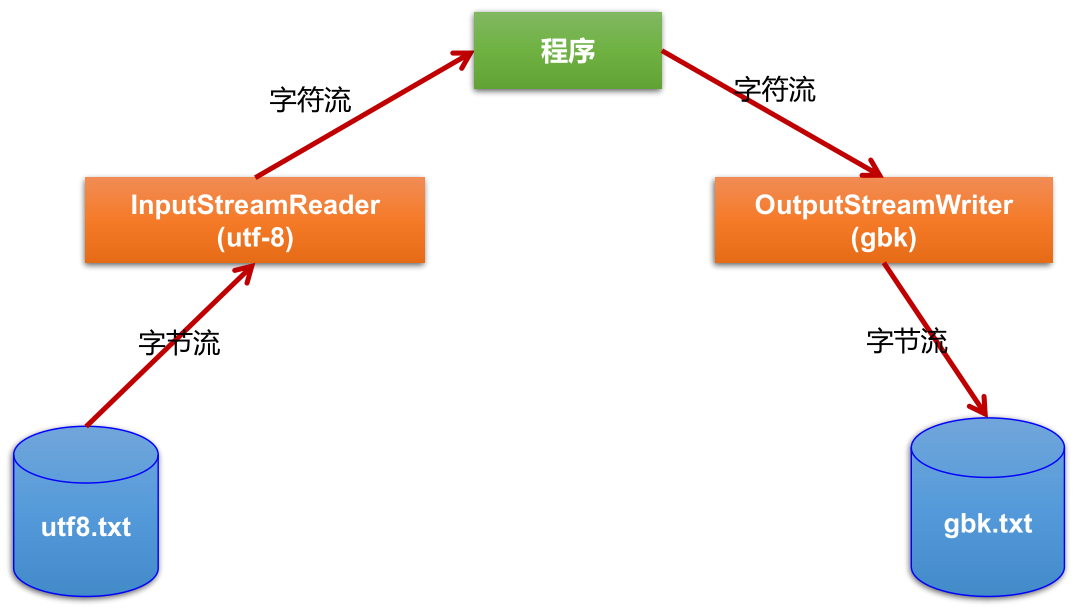
转换流的编码应用:
- 可以将字符按指定编码格式存储。
- 可以对文本数据按指定编码格式来解读。
- 指定编码表的动作由构造器完成。
为了达到最高效率,可以考虑在 BufferedReader 内包装 InputStreamReader:
1
BufferedReader in = new BufferedReader(new InputStreamReader(System.in));
实例:
1
2
3
4
5
6
7
8
9
10
11
12
13
14
15
16
17
18
19
20
21
22
23
24
25
26
27
28
29
30
31
32
33
34
35
36
37
38
39
40
41
42
43
44
45
46
47
48
49
50
51
52
53
54
55
56
57
58
59
60
61
62
63
64
65
66
67
68
69
70
71
72
73
74
75
76
77
78
79
80
81
82
83
84
85
86
87
88
89
90
91
92
93
94
95
96
97
98
99
100
101/**
* 处理流之二:转换流的使用
* 1.转换流:属于字符流
* InputStreamReader:将一个字节的输入流转换为字符的输入流
* OutputStreamWriter:将一个字符的输出流转换为字节的输出流
*
* 2.作用:提供字节流与字符流之间的转换
*
* 3. 解码:字节、字节数组 --->字符数组、字符串
* 编码:字符数组、字符串 ---> 字节、字节数组
*
*
* 4.字符集
* ASCII:美国标准信息交换码。
* 用一个字节的7位可以表示。
* ISO8859-1:拉丁码表。欧洲码表
* 用一个字节的8位表示。
* GB2312:中国的中文编码表。最多两个字节编码所有字符
* GBK:中国的中文编码表升级,融合了更多的中文文字符号。最多两个字节编码
* Unicode:国际标准码,融合了目前人类使用的所有字符。为每个字符分配唯一的字符码。所有的文字都用两个字节来表示。
* UTF-8:变长的编码方式,可用1-4个字节来表示一个字符。
*/
public class InputStreamReaderTest {
/*
此时处理异常的话,仍然应该使用try-catch-finally
InputStreamReader的使用,实现字节的输入流到字符的输入流的转换
*/
public void test1() {
InputStreamReader isr = null;
try {
FileInputStream fis = new FileInputStream("dbcp.txt");
// InputStreamReader isr = new InputStreamReader(fis);// 使用系统默认的字符集,如果在IDEA中,就是看IDEA设置的默认字符集
// 参数2指明了字符集,具体使用哪个字符集,取决于文件dbcp.txt保存时使用的字符集
isr = new InputStreamReader(fis, StandardCharsets.UTF_8);// 指定字符集
char[] cbuf = new char[20];
int len;
while ((len = isr.read(cbuf)) != -1) {
String str = new String(cbuf, 0, len);
System.out.print(str);
}
} catch (IOException exception) {
exception.printStackTrace();
} finally {
if (isr != null) {
try {
isr.close();
} catch (IOException exception) {
exception.printStackTrace();
}
}
}
}
/*
此时处理异常的话,仍然应该使用try-catch-finally
综合使用InputStreamReader和OutputStreamWriter
*/
public void test2() {
InputStreamReader isr = null;
OutputStreamWriter osw = null;
try {
// 1.造文件、造流
File file1 = new File("dbcp.txt");
File file2 = new File("dbcp_gbk.txt");
FileInputStream fis = new FileInputStream(file1);
FileOutputStream fos = new FileOutputStream(file2);
isr = new InputStreamReader(fis, StandardCharsets.UTF_8);
osw = new OutputStreamWriter(fos, "gbk");
// 2.读写过程
char[] cbuf = new char[20];
int len;
while ((len = isr.read(cbuf)) != -1) {
osw.write(cbuf, 0, len);
}
} catch (IOException exception) {
exception.printStackTrace();
} finally {
// 3.关闭资源
if (isr != null) {
try {
isr.close();
} catch (IOException exception) {
exception.printStackTrace();
}
}
if (osw != null) {
try {
osw.close();
} catch (IOException exception) {
exception.printStackTrace();
}
}
}
}
}
处理流之三:标准输入、输出流
System.in和System.out分别代表了系统标准的输入和输出设备。默认输入设备是:键盘,输出设备是:显示器。
System.in的类型是 InputStream。System.out的类型是 PrintStream,其是 OutputStream 的子类 FilterOutputStream 的子类。重定向:通过 System 类的
setIn()和setOut()对默认设备进行改变。public static void setIn(InputStream in)public static void setOut(PrintStream out)
实例:
1
2
3
4
5
6
7
8
9
10
11
12
13
14
15
16
17
18
19
20
21
22
23
24
25
26
27
28
29
30
31
32
33
34
35
36
37
38
39
40
41
42
43
44
45
46
47public class OtherStreamTest {
/*
1.标准的输入、输出流
1.1
System.in: 标准的输入流,默认从键盘输入
System.out: 标准的输出流,默认从控制台输出
1.2
System类的setIn(InputStream is) / setOut(PrintStream ps)方式重新指定输入和输出的流。
1.3练习:
从键盘输入字符串,要求将读取到的整行字符串转成大写输出。然后继续进行输入操作,
直至当输入“e”或者“exit”时,退出程序。
方法一:使用Scanner实现,调用next()返回一个字符串
方法二:使用System.in实现。System.in ---> 转换流 ---> BufferedReader的readLine()
*/
// IDEA的单元测试不支持从键盘输入,更改为main()
public static void main(String[] args) {
BufferedReader br = null;
try {
InputStreamReader isr = new InputStreamReader(System.in);
br = new BufferedReader(isr);
while (true) {
System.out.println("请输入字符串:");
String data = br.readLine();
if ("e".equalsIgnoreCase(data) || "exit".equalsIgnoreCase(data)) {
System.out.println("程序结束");
break;
}
String upperCase = data.toUpperCase();
System.out.println(upperCase);
}
} catch (IOException e) {
e.printStackTrace();
} finally {
if (br != null) {
try {
br.close();
} catch (IOException e) {
e.printStackTrace();
}
}
}
}
}模拟 Scanner:
1
2
3
4
5
6
7
8
9
10
11
12
13
14
15
16
17
18
19
20
21
22
23
24
25
26
27
28
29
30
31
32
33
34
35
36
37
38
39
40
41
42
43
44
45
46
47
48
49
50
51
52
53
54
55
56
57
58/**
* MyInput.java: Contain the methods for reading int, double, float, boolean, short, byte and
* string values from the keyboard
*/
public class MyInput {
// Read a string from the keyboard
public static String readString() {
BufferedReader br = new BufferedReader(new InputStreamReader(System.in));
// Declare and initialize the string
String string = "";
// Get the string from the keyboard
try {
string = br.readLine();
} catch (IOException ex) {
System.out.println(ex);
}
// Return the string obtained from the keyboard
return string;
}
// Read an int value from the keyboard
public static int readInt() {
return Integer.parseInt(readString());
}
// Read a double value from the keyboard
public static double readDouble() {
return Double.parseDouble(readString());
}
// Read a byte value from the keyboard
public static double readByte() {
return Byte.parseByte(readString());
}
// Read a short value from the keyboard
public static double readShort() {
return Short.parseShort(readString());
}
// Read a long value from the keyboard
public static double readLong() {
return Long.parseLong(readString());
}
// Read a float value from the keyboard
public static double readFloat() {
return Float.parseFloat(readString());
}
public static void main(String[] args) {
int i = readInt();
System.out.println("输出的数为:" + i);
}
}
处理流之四:打印流
实现将基本数据类型的数据格式转化为字符串输出。
打印流:PrintStream 和 PrintWriter。
- 提供了一系列重载的
print()和println(),用于多种数据类型的输出。 - PrintStream 和 PrintWriter 的输出不会抛出 IOException 异常。
- PrintStream 和 PrintWriter 有自动 flush 功能。
- PrintStream 打印的所有字符都使用平台的默认字符编码转换为字节。在需要写入字符而不是写入字节的情况下,应该使用 PrintWriter 类。
- System.out 返回的是 PrintStream 的实例。
- 提供了一系列重载的
把标准输出流 (控制台输出) 改成文件:
1
2
3
4
5
6
7
8
9
10
11
12
13
14
15
16
17
18
19
20
21
22
23
24
25
26
27
28
29
30
31
32
33
34
35
36public class OtherStreamTest {
/*
2. 打印流:PrintStream 和PrintWriter
2.1 提供了一系列重载的print()和println()
2.2 练习:将ASCII字符输出到自定义的外部文件
*/
public void test2() {
PrintStream ps = null;
try {
FileOutputStream fos = new FileOutputStream(new File("D:\\text.txt"));
// 创建打印输出流,设置为自动刷新模式(写入换行符或字节 '\n' 时都会刷新输出缓冲区)
ps = new PrintStream(fos, true);
// 把标准输出流(控制台输出)改成输出到本地文件
if (ps != null) {
// 如果不设置,下面的循环输出是在控制台
// 设置之后,控制台不再输出,而是输出到D:\text.txt
System.setOut(ps);
}
// 开始输出ASCII字符
for (int i = 0; i <= 255; i++) {
System.out.print((char) i);
if (i % 50 == 0) {// 每50个数据一行
System.out.println();// 换行
}
}
} catch (FileNotFoundException e) {
e.printStackTrace();
} finally {
if (ps != null) {
ps.close();
}
}
}
}
处理流之五:数据流
为了方便地操作 Java 语言的基本数据类型和 String 类型的数据,可以使用数据流。(不能操作内存中的对象)
数据流有两个类:分别用于读取和写出基本数据类型、String类的数据。
- DataInputStream 和 DataOutputStream。
- 分别套接在 InputStream 和 和 OutputStream 子类的流上。
- 用 DataOutputStream 输出的文件需要用 DataInputStream 来读取。
- DataInputStream 读取不同类型的数据的顺序,要与当初 DataOutputStream 写入文件时,保存的数据的顺序一致。
DataInputStream 中的方法:
boolean readBoolean(),byte readByte()char readChar(),float readFloat()double readDouble(),short readShort()long readLong(),int readInt()String readUTF(),void readFully(byte[] b)
DataOutputStream 中的方法:
- 将上述的方法的 read 改为相应的 write 即可。
将内存中的字符串、基本数据类型的变量写出到文件中,再读取到内存中:
1
2
3
4
5
6
7
8
9
10
11
12
13
14
15
16
17
18
19
20
21
22
23
24
25
26
27
28
29
30
31
32
33
34
35
36
37
38
39
40
41
42
43
44
45
46
47
48
49
50
51
52
53
54
55
56
57
58
59
60
61
62
63
64
65
66
67
68public class OtherStreamTest {
/*
3. 数据流
3.1 DataInputStream 和 DataOutputStream
3.2 作用:用于读取或写出基本数据类型的变量或字符串
练习:将内存中的字符串、基本数据类型的变量写出到文件中。
注意:处理异常的话,仍然应该使用try-catch-finally。
*/
public void test3() {
DataOutputStream dos = null;
try {
// 1.造流
dos = new DataOutputStream(new FileOutputStream("data.txt"));
// 2.写入操作
dos.writeUTF("刘建辰");// 写入String
dos.flush();// 刷新操作,将内存中的数据立即写入文件,也可以在关闭流时自动刷新
dos.writeInt(23);// 写入int
dos.flush();
dos.writeBoolean(true);// 写入boolean
dos.flush();
} catch (IOException exception) {
exception.printStackTrace();
} finally {
// 3.关闭流
if (dos != null) {
try {
dos.close();
} catch (IOException exception) {
exception.printStackTrace();
}
}
}
}
/*
将文件中存储的基本数据类型变量和字符串读取到内存中,保存在变量中。
注意点:读取不同类型的数据的顺序要与当初写入文件时,保存的数据的顺序一致!
*/
public void test4() {
DataInputStream dis = null;
try {
// 1.造流
dis = new DataInputStream(new FileInputStream("data.txt"));
// 2.读取操作
String name = dis.readUTF();// 读取String
int age = dis.readInt();// 读取int
boolean isMale = dis.readBoolean();// 读取boolean
System.out.println("name = " + name);
System.out.println("age = " + age);
System.out.println("isMale = " + isMale);
} catch (IOException exception) {
exception.printStackTrace();
} finally {
// 3.关闭流
if (dis!=null) {
try {
dis.close();
} catch (IOException exception) {
exception.printStackTrace();
}
}
}
}
}
处理流之六:对象流
ObjectInputStream 和 OjbectOutputSteam:用于存储和读取基本数据类型数据或对象的处理流。它的强大之处就是可以把 Java 中的对象写入到数据源中,也能把对象从数据源中还原回来。
- 一般情况下,会把对象转换为 Json 字符串,然后进行序列化和反序列化操作,而不是直接操作对象。
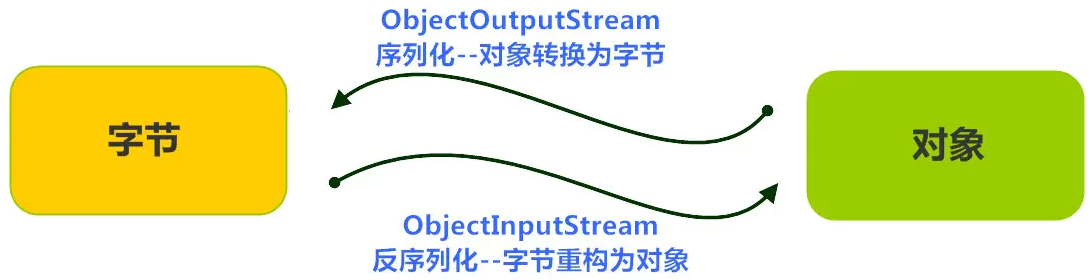
序列化:用 ObjectOutputStream 类保存基本类型数据或对象的机制。
反序列化:用 ObjectInputStream 类读取基本类型数据或对象的机制。
ObjectOutputStream 和 ObjectInputStream 不能序列化 static 和 transient 修饰的成员变量。
在序列化一个类的对象时,如果类中含有 static 和 transient 修饰的成员变量,则在反序列化时,这些成员变量的值会变成默认值,而不是序列化时这个对象赋予的值。比如,Person 类含有一个 static 修饰的 String name 属性,序列化时,对象把 name 赋值为张三,在反序列化时,name 会变为 null

对象序列化机制允许把内存中的 Java 对象转换成平台无关的二进制流 (序列化操作),从而允许把这种二进制流持久地保存在磁盘上,或通过网络将这种二进制流传输到另一个网络节点。当其它程序获取了这种二进制流,就可以恢复成原来的 Java 对象 (反序列化操作)。
序列化的好处在于可将任何实现了 Serializable 接口的对象转化为字节数据,使其在保存和传输时可被还原。
序列化是 RMI (Remote Method Invoke – 远程方法调用) 过程的参数和返回值都必须实现的机制,而 RMI 是 JavaEE 的基础,因此序列化机制是 JavaEE 平台的基础。
如果需要让某个对象支持序列化机制,则必须让对象所属的类及其属性是可序列化的,为了让某个类是可序列化的,该类必须实现如下两个接口之一。否则,会抛出 NotSerializableException 异常。
- Serializable
- Externalizable
凡是实现 Serializable 接口的类都有一个表示序列化版本标识符的静态变量:
private static final long serialVersionUID;- serialVersionUID 用来表明类的不同版本间的兼容性。 简言之,其目的是以序列化对象进行版本控制,有关各版本反序列化时是否兼容。
- 如果类没有显示定义这个静态常量,它的值是 Java 运行时环境根据类的内部细节自动生成的。此时,若类的实例变量做了修改,serialVersionUID 可能发生变化,则再对修改之前被序列化的类进行反序列化操作时,会操作失败。因此,建议显式声明 serialVersionUID。
- 在某些场合,希望类的不同版本对序列化兼容,因此需要确保类的不同版本具有相同的 serialVersionUID;在某些场合,不希望类的不同版本对序列化兼容,因此需要确保类的不同版本具有不同的 serialVersionUID。
- 当序列化了一个类实例后,后续可能更改一个字段或添加一个字段。如果不设置 serialVersionUID,所做的任何更改都将导致无法反序化旧有实例,并在反序列化时抛出一个异常;如果你添加了 serialVersionUID,在反序列旧有实例时,新添加或更改的字段值将设为初始化值 (对象为 null,基本类型为相应的初始默认值),字段被删除将不设置。
简单来说,Java 的序列化机制是通过在运行时判断类的 serialVersionUID 来验证版本一致性的。在进行反序列化时,JVM 会把传来的字节流中的 serialVersionUID 与本地相应实体类的 serialVersionUID 进行比较,如果相同就认为是一致的,可以进行反序列化,否则就会出现序列化版本不一致的异常,即 InvalidCastException。
若某个类实现了 Serializable 接口,该类的对象就是可序列化的:
- 创建一个 ObjectOutputStream。
public ObjectOutputStream(OutputStream out): 创建一个指定 OutputStream 的 ObjectOutputStream。
- 调用 ObjectOutputStream 对象的
writeObject(Object obj)输出可序列化对象。 - 注意写出一次,操作
flush()一次。
- 创建一个 ObjectOutputStream。
反序列化:
- 创建一个 ObjectInputStream。
public ObjectInputStream(InputStream in): 创建一个指定 InputStream 的 ObjectInputStream。
- 调用
readObject()读取流中的对象。
- 创建一个 ObjectInputStream。
强调:如果某个类的属性不是基本数据类型或 String 类型,而是另一个引用类型,那么这个引用类型必须是可序列化的,否则拥有该类型的 Field 的类也不能序列化。
- 默认情况下,基本数据类型是可序列化的。String 实现了 Serializable 接口。
流程示意图:
实例:
1
2
3
4
5
6
7
8
9
10
11
12
13
14
15
16
17
18
19
20
21
22
23
24
25
26
27
28
29
30
31
32
33
34
35
36
37
38
39
40
41
42
43
44
45
46
47
48
49
50
51
52
53
54
55
56
57
58
59
60
61
62
63
64
65
66
67
68
69
70
71
72
73
74
75
76
77
78
79
80
81
82
83
84
85
86
87
88
89
90
91
92
93
94
95
96
97
98
99/**
* Person需要满足如下的要求,方可序列化
* 1.需要实现接口:Serializable
* 2.当前类提供一个全局常量:serialVersionUID
* 3.除了当前Person类需要实现Serializable接口之外,还必须保证其内部所有属性
* 也必须是可序列化的。(默认情况下,基本数据类型可序列化)
*
* 补充:ObjectOutputStream和ObjectInputStream不能序列化static和transient修饰的成员变量
*/
public class Person implements Serializable {
public static final long serialVersionUID = 475463534532L;
private String name;
private int age;
private int id;
private Account acct;
public Person() {
}
public Person(String name, int age) {
this.name = name;
this.age = age;
}
public Person(String name, int age, int id) {
this.name = name;
this.age = age;
this.id = id;
}
public Person(String name, int age, int id, Account acct) {
this.name = name;
this.age = age;
this.id = id;
this.acct = acct;
}
public String toString() {
return "Person{" +
"name='" + name + '\'' +
", age=" + age +
", id=" + id +
", acct=" + acct +
'}';
}
public int getId() {
return id;
}
public void setId(int id) {
this.id = id;
}
public String getName() {
return name;
}
public void setName(String name) {
this.name = name;
}
public int getAge() {
return age;
}
public void setAge(int age) {
this.age = age;
}
}
class Account implements Serializable {
public static final long serialVersionUID = 4754534532L;
private double balance;
public Account(double balance) {
this.balance = balance;
}
public String toString() {
return "Account{" +
"balance=" + balance +
'}';
}
public double getBalance() {
return balance;
}
public void setBalance(double balance) {
this.balance = balance;
}
}1
2
3
4
5
6
7
8
9
10
11
12
13
14
15
16
17
18
19
20
21
22
23
24
25
26
27
28
29
30
31
32
33
34
35
36
37
38
39
40
41
42
43
44
45
46
47
48
49
50
51
52
53
54
55
56
57
58
59
60
61
62
63
64
65
66
67
68
69
70
71
72
73
74
75
76
77
78
79
80
81
82
83
84
85/**
* 对象流的使用
* 1.ObjectInputStream 和 ObjectOutputStream
* 2.作用:用于存储和读取基本数据类型数据或对象的处理流。它的强大之处就是可以把Java中的对象写入到数据源中,也能把对象从数据源中还原回来。
*
* 3.要想一个java对象是可序列化的,需要满足相应的要求。见Person.java
*
* 4.序列化机制:
* 对象序列化机制允许把内存中的Java对象转换成平台无关的二进制流,从而允许把这种
* 二进制流持久地保存在磁盘上,或通过网络将这种二进制流传输到另一个网络节点。
* 当其它程序获取了这种二进制流,就可以恢复成原来的Java对象。
*/
public class ObjectInputOutputStreamTest {
/*
序列化过程:将内存中的java对象保存到磁盘中或通过网络传输出去
使用ObjectOutputStream实现
*/
public void testObjectOutputStream() {
ObjectOutputStream oos = null;
try {
// 1.造流
oos = new ObjectOutputStream(new FileOutputStream("object.dat"));
// 2.序列化:写操作
oos.writeObject(new String("我爱北京天安门"));
oos.flush();// 刷新操作
oos.writeObject(new Person("王铭", 23));
oos.flush();
oos.writeObject(new Person("张学", 23, 1001, new Account(5000)));
oos.flush();
} catch (IOException e) {
e.printStackTrace();
} finally {
if (oos != null) {
// 3.关闭流
try {
oos.close();
} catch (IOException e) {
e.printStackTrace();
}
}
}
}
/*
反序列化:将磁盘文件中的对象还原为内存中的一个java对象
使用ObjectInputStream来实现
*/
public void testObjectInputStream() {
ObjectInputStream ois = null;
try {
// 1.造流
ois = new ObjectInputStream(new FileInputStream("object.dat"));
// 2.反序列化:读操作
// 文件中保存的是不同类型的对象,反序列化时,需要与序列化时的顺序一致
Object obj = ois.readObject();
String str = (String) obj;
System.out.println(str);
Person p = (Person) ois.readObject();
System.out.println(p);
Person p1 = (Person) ois.readObject();
System.out.println(p1);
} catch (IOException e) {
e.printStackTrace();
} catch (ClassNotFoundException e) {
e.printStackTrace();
} finally {
if (ois != null) {
try {
ois.close();
} catch (IOException e) {
e.printStackTrace();
}
}
}
}
}面试题:谈谈你对
java.io.Serializable接口的理解,我们知道它用于序列化,是空方法接口,还有其它认识吗?- 实现了 Serializable 接口的对象,可将它们转换成一系列字节,并可在以后完全恢复回原来的样子。 这一过程亦可通过网络进行。这意味着序列化机制能自动补偿操作系统间的差异。换句话说,可以先在 Windows 机器上创台 建一个对象,对其序列化,然后通过网络发给一台 Unix 机器,然后在那里准确无误地重新“装配”。不必关心数据在不同机器上如何表示,也不必关心字节的顺序或者其他任何细节。
- 由于大部分作为参数的类如 String 、Integer 等都实现了
java.io.Serializable接口,也可以利用多态的性质,作为参数使接口更灵活。
随机存取文件流
RandomAccessFile 声明在
java.io包下,但直接继承于java.lang.Object类。并且它实现了 DataInput、DataOutput 这两个接口,也就意味着这个类既可以读也可以写。RandomAccessFile 类支持 “随机访问” 的方式,程序可以直接跳到文件的任意地方来读、写文件。
- 支持只访问文件的部分内容。
- 可以向已存在的文件后追加内容。
RandomAccessFile 对象包含一个记录指针,用以标示当前读写处的位置。RandomAccessFile 类对象可以自由移动记录指针:
long getFilePointer():获取文件记录指针的当前位置。void seek(long pos):将文件记录指针定位到 pos 位置。
构造器
public RandomAccessFile(File file, String mode)public RandomAccessFile(String name, String mode)
创建 RandomAccessFile 类实例需要指定一个 mode 参数,该参数指定 RandomAccessFile 的访问模式:
- r:以只读方式打开。
- rw:打开以便读取和写入。
- rwd:打开以便读取和写入;同步文件内容的更新。
- rws:打开以便读取和写入;同步文件内容和元数据的更新。
- JDK 1.6 上面写的每次 write 数据时,rw 模式,数据不会立即写到硬盘中,而 rwd 模式,数据会被立即写入硬盘。如果写数据过程发生异常,rwd 模式中已被 write 的数据会被保存到硬盘,而 rw 模式的数据会全部丢失。
如果模式为只读 r,则不会创建文件,而是会去读取一个已经存在的文件,如果读取的文件不存在则会出现异常。 如果模式为读写 rw,如果文件不存在则会去创建文件,如果存在则不会创建。
RandomAccessFile 的应用:我们可以用 RandomAccessFile 这个类,来实现一个多线程断点下载的功能,用过下载工具的朋友们都知道,下载前都会建立两个临时文件,一个是与被下载文件大小相同的空文件,另一个是记录文件指针的位置文件,每次暂停的时候,都会保存上一次的指针,然后断点下载的时候,会继续从上一次的地方下载,从而实现断点下载或上传的功能,有兴趣的朋友们可以自己实现下。
实例:
1
2
3
4
5
6
7
8
9
10
11
12
13
14
15
16
17
18
19
20
21
22
23
24
25
26
27
28
29
30
31
32
33
34
35
36
37
38
39
40
41
42
43
44
45
46
47
48
49
50
51
52
53
54
55
56
57
58
59
60
61
62
63
64
65
66
67
68
69
70
71
72
73
74
75
76
77
78
79
80
81
82
83
84
85
86
87
88
89
90
91
92
93
94
95
96
97
98
99
100
101
102
103
104
105
106
107
108
109
110
111
112
113
114
115
116
117
118
119
120
121
122
123
124
125
126
127
128
129
130
131
132/**
* RandomAccessFile的使用
* 1.RandomAccessFile直接继承于java.lang.Object类,实现了DataInput和DataOutput接口
* 2.RandomAccessFile既可以作为一个输入流,又可以作为一个输出流
*
* 3.如果RandomAccessFile作为输出流时,写出到的文件如果不存在,则在执行过程中自动创建。
* 如果写出到的文件存在,则会对原有文件内容进行覆盖。(默认情况下,从头覆盖)
*
* 4. 可以通过相关的操作,实现RandomAccessFile“插入”数据的效果
*/
public class RandomAccessFileTest {
/*
使用RandomAccessFile实现文件的复制
*/
public void test1() {
RandomAccessFile raf1 = null;
RandomAccessFile raf2 = null;
try {
// 1.造流
raf1 = new RandomAccessFile(new File("爱情与友情.jpg"), "r");
raf2 = new RandomAccessFile(new File("爱情与友情1.jpg"), "rw");
// 2.读写操作
byte[] buffer = new byte[1024];
int len;
while ((len = raf1.read(buffer)) != -1) {
raf2.write(buffer, 0, len);
}
} catch (IOException e) {
e.printStackTrace();
} finally {
// 3.关闭流
if (raf1 != null) {
try {
raf1.close();
} catch (IOException e) {
e.printStackTrace();
}
}
if (raf2 != null) {
try {
raf2.close();
} catch (IOException e) {
e.printStackTrace();
}
}
}
}
/*
使用RandomAccessFile实现文件内容的覆盖和追加
*/
public void test2() {
RandomAccessFile raf1 = null;
try {
// hello.txt内容为:abcdefghijklmn
File file = new File("hello.txt");
raf1 = new RandomAccessFile(file, "rw");
raf1.write("123".getBytes());// 从头开始覆盖:123defghijklmn
raf1.seek(5);// 将指针调到角标为5的位置,角标从0开始
raf1.write("456".getBytes());// 从角标为5处开始覆盖:123de456ijklmn
raf1.seek(file.length());// 将指针调到文件末尾
raf1.write("789".getBytes());// 在文件末尾追加:123de456ijklmn789
} catch (IOException exception) {
exception.printStackTrace();
} finally {
if (raf1 != null) {
try {
raf1.close();
} catch (IOException exception) {
exception.printStackTrace();
}
}
}
}
/*
使用RandomAccessFile实现数据的插入效果
*/
public void test3() {
RandomAccessFile raf1 = null;
try {
// hello.txt内容为:abcdefghijklmn
File file = new File("hello.txt");
raf1 = new RandomAccessFile(file, "rw");
// 将指针调到角标为3的位置,从此处开始读入文件的数据
raf1.seek(3);
// 方法一:保存指针3后面的所有数据到StringBuilder中
/*StringBuilder builder = new StringBuilder((int) file.length());
byte[] buffer = new byte[20];
int len;
while ((len = raf1.read(buffer)) != -1) {
builder.append(new String(buffer, 0, len));
}*/
// 方法二:保存指针3后面的所有数据到ByteArrayOutputStream中
ByteArrayOutputStream baos = new ByteArrayOutputStream();
byte[] buffer = new byte[10];
int len;
while ((len = raf1.read(buffer)) != -1) {
baos.write(buffer, 0, len);
}
// 经过上面的读操作后,指针位置移到了文件的末尾处
// 调回指针,写入"123",实际上是覆盖原文件内容
raf1.seek(3);
raf1.write("123".getBytes());// abc123ghijklmn
// 经过上面的写入操作,指针位置已到了123后,紧接着:
// 方法一:将StringBuilder中的数据写入到文件中,实际上是覆盖123后的内容
// raf1.write(builder.toString().getBytes());// abc123defghijklmn
// 方法二:将ByteArrayOutputStream中的数据写入到文件中
raf1.write(baos.toString().getBytes());// abc123defghijklmn
} catch (IOException exception) {
exception.printStackTrace();
} finally {
if (raf1 != null) {
try {
raf1.close();
} catch (IOException exception) {
exception.printStackTrace();
}
}
}
}
}
流的基本应用小结
- 流是用来处理数据的。
- 处理数据时,一定要先明确数据源,与数据目的地:
- 数据源可以是文件,可以是键盘。
- 数据目的地可以是文件、显示器或者其他设备。
- 流只是在帮助数据进行传输,并对传输的数据进行处理,比如过滤处理、转换处理等。
NIO.2 中 Path 、Paths 、Files
Java NIO (New IO 或 Non-Blocking IO) 是从 Java 1.4 版本开始引入的一套新的 IO API,可以替代标准的 Java IO API。NIO 与原来的 IO 有同样的作用和目的,但是使用的方式完全不同,NIO 支持面向缓冲区的 (IO是面向流的)、基于通道的 IO 操作,NIO 也会以更加高效的方式进行文件的读写操作。
Java API 中提供了两套 NIO,一套是针对标准输入输出 NIO,另一套就是网络编程 NIO。
- |—–
java.nio.channels.Channel- |—–
FileChannel:处理本地文件。- |—–
SocketChannel:TCP 网络编程的客户端的 Channel。 - |—–
ServerSocketChannel:TCP 网络编程的服务器端的 Channel。 - |—–
DatagramChannel:UDP 网络编程中发送端和接收端的 Channel。
- |—–
- |—–
- |—–
随着 JDK 7 的发布,Java 对 NIO 进行了极大的扩展,增强了对文件处理和文件系统特性的支持,以至于我们称他们为 NIO.2。因为 NIO 提供的一些功能,NIO 已经成为文件处理中越来越重要的部分。
早期的 Java 只提供了一个 File 类来访问文件系统,但 File 类的功能比较有限,所提供的方法性能也不高。而且,大多数方法在出错时仅返回失败,并不会提供异常信息。
NIO. 2 为了弥补这种不足,引入了 Path 接口,代表一个平台无关的平台路径,描述了目录结构中文件的位置。Path 可以看成是 File 类的升级版本,实际引用的资源也可以不存在。
在以前 IO 操作是类似如下写法的:
1
2
3import java.io.File;
File file = new File("index.html");但在 Java 7 中,我们可以这样写:
1
2
3
4import java.nio.file.Path;
import java.nio.file.Paths;
Path path = Paths.get("index.html");同时,NIO.2 在
java.nio.file包下还提供了 Files、Paths 工具类,Files 包含了大量静态的工具方法来操作文件;Paths 则包含了两个返回 Path 的静态工厂方法。Paths 类提供的获取 Path 对象的方法:
static Path get(String first, String … more):用于将多个字符串串连成路径。static Path get(URI uri):返回指定 uri 对应的 Path 路径。1
2
3
4
5
6
7
8
9
10
11
12
13
14
15
16public class PathTest {
/*
如何使用Paths实例化Path
*/
public void test1() {
Path path1 = Paths.get("d:\\nio\\hello.txt");// = new File(String filepath)
System.out.println(path1);
Path path2 = Paths.get("d:\\", "nio\\hello.txt");// = new File(String parent,String filename);
System.out.println(path2);
Path path3 = Paths.get("d:\\", "nio");
System.out.println(path3);
}
}
Path 类常用方法:
String toString():返回调用 Path 对象的字符串表示形式。boolean startsWith(String path):判断是否以 path 路径开始。boolean endsWith(String path):判断是否以 path 路径结束。boolean isAbsolute():判断是否是绝对路径。Path getParent():返回 Path 对象包含整个路径,不包含 Path 对象指定的文件路径。Path getRoot():返回调用 Path 对象的根路径。Path getFileName():返回与调用 Path 对象关联的文件名。int getNameCount():返回 Path 根目录后面元素的数量。Path getName(int idx):返回指定索引位置 idx 的路径名称。Path toAbsolutePath():作为绝对路径返回调用 Path 对象。Path resolve(Path p):合并两个路径,返回合并后的路径对应的 Path 对象。File toFile():将 Path 转化为 File 类的对象。File 类转化为 Path 对象的方法是:Path toPath()。1
2
3
4
5
6
7
8
9
10
11
12
13
14
15
16
17
18
19
20
21
22
23
24
25
26
27
28
29
30
31
32
33
34
35
36
37
38
39
40
41
42
43
44
45
46
47
48
49
50public class PathTest {
/*
Path中的常用方法
*/
public void test2() {
Path path1 = Paths.get("d:\\", "nio\\nio1\\nio2\\hello.txt");
Path path2 = Paths.get("hello1.txt");// 相对当前Module的路径
// String toString():返回调用Path对象的字符串表示形式
System.out.println(path1);// d:\nio\nio1\nio2\hello.txt
// boolean startsWith(String path): 判断是否以path路径开始
System.out.println(path1.startsWith("d:\\nio"));// true
// boolean endsWith(String path): 判断是否以path路径结束
System.out.println(path1.endsWith("hello.txt"));// true
// boolean isAbsolute(): 判断是否是绝对路径
System.out.println(path1.isAbsolute() + "~");// true~
System.out.println(path2.isAbsolute() + "~");// false~
// Path getParent():返回Path对象包含整个路径,不包含Path对象指定的文件路径
System.out.println(path1.getParent());// d:\nio\nio1\nio2
System.out.println(path2.getParent());// null
// Path getRoot():返回调用Path对象的根路径
System.out.println(path1.getRoot());// d:\
System.out.println(path2.getRoot());// null
// Path getFileName(): 返回与调用Path对象关联的文件名
System.out.println(path1.getFileName() + "~");// hello.txt~
System.out.println(path2.getFileName() + "~");// hello1.txt~
// int getNameCount(): 返回Path根目录后面元素的数量
// Path getName(int idx): 返回指定索引位置idx的路径名称
for (int i = 0; i < path1.getNameCount(); i++) {
// nio*****nio1*****nio2*****hello.txt*****
System.out.print(path1.getName(i) + "*****");
}
System.out.println();
// Path toAbsolutePath(): 作为绝对路径返回调用Path对象
System.out.println(path1.toAbsolutePath());// d:\nio\nio1\nio2\hello.txt
System.out.println(path2.toAbsolutePath());// D:\xisun-projects\java_base\hello1.txt
// Path resolve(Path p): 合并两个路径,返回合并后的路径对应的Path对象
Path path3 = Paths.get("d:\\", "nio");
Path path4 = Paths.get("nioo\\hi.txt");
path3 = path3.resolve(path4);
System.out.println(path3);// d:\nio\nioo\hi.txt
// File toFile(): 将Path转化为File类的对象
File file = path1.toFile();// Path--->File的转换
// Path toPath(): 将File转化为Path类的对象
Path newPath = file.toPath();// File--->Path的转换
}
}
java.nio.file.Files:用于操作文件或目录的工具类。Files 常用方法:
Path copy(Path src, Path dest, CopyOption … how):文件的复制。Path createDirectory(Path path, FileAttribute<?> … attr):创建一个目录。Path createFile(Path path, FileAttribute<?> … arr):创建一个文件。void delete(Path path):删除一个文件/目录,如果不存在,执行报错。void deleteIfExists(Path path):Path 对应的文件/目录如果存在,执行删除。Path move(Path src, Path dest, CopyOption…how):将 src 移动到 dest 位置。long size(Path path):返回 path 指定文件的大小。boolean exists(Path path, LinkOption … opts):判断文件是否存在。boolean isDirectory(Path path, LinkOption … opts):判断是否是目录。boolean isRegularFile(Path path, LinkOption … opts):判断是否是文件。boolean isHidden(Path path):判断是否是隐藏文件。boolean isReadable(Path path):判断文件是否可读。boolean isWritable(Path path):判断文件是否可写。boolean notExists(Path path, LinkOption … opts):判断文件是否不存在。SeekableByteChannel newByteChannel(Path path, OpenOption…how):获取与指定文件的连接,how 指定打开方式。DirectoryStream\<Path> newDirectoryStream(Path path):打开 path 指定的目录。InputStream newInputStream(Path path, OpenOption…how):获取 InputStream 对象。OutputStream newOutputStream(Path path, OpenOption…how):获取 OutputStream 对象。1
2
3
4
5
6
7
8
9
10
11
12
13
14
15
16
17
18
19
20
21
22
23
24
25
26
27
28
29
30
31
32
33
34
35
36
37
38
39
40
41
42
43
44
45
46
47
48
49
50
51
52
53
54
55
56
57
58
59
60
61
62
63
64
65
66
67
68
69
70
71
72
73
74
75
76
77
78
79
80
81
82
83
84
85
86
87
88
89
90
91
92public class FilesTest {
public void test1() throws IOException {
Path path1 = Paths.get("d:\\nio", "hello.txt");
Path path2 = Paths.get("atguigu.txt");
// Path copy(Path src, Path dest, CopyOption … how): 文件的复制
// 要想复制成功,要求path1对应的物理上的文件存在。path2 对应的文件没有要求。
// Files.copy(path1, path2, StandardCopyOption.REPLACE_EXISTING);
// Path createDirectory(Path path, FileAttribute<?> … attr): 创建一个目录
// 要想执行成功,要求path对应的物理上的文件目录不存在。一旦存在,抛出异常。
Path path3 = Paths.get("d:\\nio\\nio1");
// Files.createDirectory(path3);
// Path createFile(Path path, FileAttribute<?> … arr): 创建一个文件
// 要想执行成功,要求path对应的物理上的文件不存在。一旦存在,抛出异常。
Path path4 = Paths.get("d:\\nio\\hi.txt");
// Files.createFile(path4);
// void delete(Path path): 删除一个文件/目录,如果不存在,执行报错
// Files.delete(path4);
// void deleteIfExists(Path path): Path对应的文件/目录如果存在,执行删除。如果不存在,正常执行结束
Files.deleteIfExists(path3);
// Path move(Path src, Path dest, CopyOption…how): 将src移动到dest位置
// 要想执行成功,src对应的物理上的文件需要存在,dest对应的文件没有要求。
// Files.move(path1, path2, StandardCopyOption.ATOMIC_MOVE);
// long size(Path path): 返回path指定文件的大小
long size = Files.size(path2);
System.out.println(size);
}
public void test2() throws IOException {
Path path1 = Paths.get("d:\\nio", "hello.txt");
Path path2 = Paths.get("atguigu.txt");
// boolean exists(Path path, LinkOption … opts): 判断文件是否存在
System.out.println(Files.exists(path2, LinkOption.NOFOLLOW_LINKS));
// boolean isDirectory(Path path, LinkOption … opts): 判断是否是目录
// 不要求此path对应的物理文件存在。
System.out.println(Files.isDirectory(path1, LinkOption.NOFOLLOW_LINKS));
// boolean isRegularFile(Path path, LinkOption … opts): 判断是否是文件
// /boolean isHidden(Path path): 判断是否是隐藏文件
// 要求此path对应的物理上的文件需要存在。才可判断是否隐藏。否则,抛异常。
System.out.println(Files.isHidden(path1));
// /boolean isReadable(Path path): 判断文件是否可读
System.out.println(Files.isReadable(path1));
// boolean isWritable(Path path): 判断文件是否可写
System.out.println(Files.isWritable(path1));
// boolean notExists(Path path, LinkOption … opts): 判断文件是否不存在
System.out.println(Files.notExists(path1, LinkOption.NOFOLLOW_LINKS));
}
/**
* StandardOpenOption.READ: 表示对应的Channel是可读的。
* StandardOpenOption.WRITE:表示对应的Channel是可写的。
* StandardOpenOption.CREATE:如果要写出的文件不存在,则创建。如果存在,忽略
* StandardOpenOption.CREATE_NEW:如果要写出的文件不存在,则创建。如果存在,抛异常
*
* @throws IOException
*/
public void test3() throws IOException {
Path path1 = Paths.get("d:\\nio", "hello.txt");
// InputStream newInputStream(Path path, OpenOption…how): 获取InputStream对象
InputStream inputStream = Files.newInputStream(path1, StandardOpenOption.READ);
// OutputStream newOutputStream(Path path, OpenOption…how): 获取OutputStream对象
OutputStream outputStream = Files.newOutputStream(path1, StandardOpenOption.WRITE, StandardOpenOption.CREATE);
// SeekableByteChannel newByteChannel(Path path, OpenOption…how): 获取与指定文件的连接,how指定打开方式
SeekableByteChannel channel = Files.newByteChannel(path1, StandardOpenOption.READ,
StandardOpenOption.WRITE, StandardOpenOption.CREATE);
// DirectoryStream<Path> newDirectoryStream(Path path): 打开path指定的目录
Path path2 = Paths.get("e:\\teach");
DirectoryStream<Path> directoryStream = Files.newDirectoryStream(path2);
Iterator<Path> iterator = directoryStream.iterator();
while (iterator.hasNext()) {
System.out.println(iterator.next());
}
}
}
FileUtils 工具类
Maven 引入依赖:
1
2
3
4
5<dependency>
<groupId>commons-io</groupId>
<artifactId>commons-io</artifactId>
<version>2.7</version>
</dependency>复制功能:
1
2
3
4
5
6
7
8
9
10
11
12public class FileUtilsTest {
public static void main(String[] args) {
File srcFile = new File("day10\\爱情与友情.jpg");
File destFile = new File("day10\\爱情与友情2.jpg");
try {
FileUtils.copyFile(srcFile, destFile);
} catch (IOException e) {
e.printStackTrace();
}
}
}遍历文件夹和文件的每一行:
1
2
3
4
5
6
7
8
9
10
11
12
13
14
15
16
17
18
19
20
21
22
23
24
25
26
27
28
29
30
31
32
33
34
35
36
37
38
39
40
41
42
43
44
45
46
47
48
49
50
51
52
53
54
55
56
57
58
59
60
61
62
63
64
65
66
67
68
69
70
71
72
73
74
75
76
77
78
79
80
81
82
83
84
85
86
87public class FileUtilsMethod {
/**
* 常规方法:若文件路径内的文件比较少,可以采用此方法
*
* @param filePath 文件路径
*/
public static void common(String filePath) {
File file = new File(filePath);
if (file.exists()) {
// 获取子文件夹内所有文件,放到文件数组里,如果含有大量文件,会创建一个很大的数组,占用空间
File[] fileList = file.listFiles();
for (File currentFile : fileList) {
// 当前文件是普通文件(排除文件夹),且不是隐藏文件
if (currentFile.isFile() && !currentFile.isHidden()) {
// 当前文件的完整路径,含文件名
String currentFilePath = currentFile.getPath();
if (currentFilePath.endsWith("xml") || currentFilePath.endsWith("XML")) {
// 当前文件的文件名,含后缀
String fileName = currentFile.getName();
System.out.println("文件名:" + fileName);
}
}
}
System.out.println("=======================================");
// list方法返回的是文件名的String数组
String[] fileNameList = file.list();
for (String fileName : fileNameList) {
System.out.println("文件名:" + fileName);
}
}
}
/**
* 根据文件路径,迭代获取该路径下指定文件后缀类型的文件:若文件路径内含有大量文件,建议采用此方法
*
* @param filePath 文件路径
*/
public static void iterateFiles(String filePath) {
File file = FileUtils.getFile(filePath);
if (file.isDirectory()) {
Iterator<File> fileIterator = FileUtils.iterateFiles(file, new String[]{"xml", "XML"}, false);
while (fileIterator.hasNext()) {
File currentFile = fileIterator.next();
if (currentFile.isFile() && !currentFile.isHidden()) {
// 绝对路径
String currentFilePath = currentFile.getAbsolutePath();
System.out.println("绝对路径:" + currentFilePath);
// 文件名,含文件后缀
String fileName = currentFilePath.substring(currentFilePath.lastIndexOf("\\") + 1);
System.out.println("含后缀文件名:" + fileName);
// 文件名,不含文件后缀
fileName = fileName.substring(0, fileName.lastIndexOf("."));
System.out.println("不含后缀文件名:" + fileName);
}
}
}
}
/**
* 读取目标文件每一行数据,返回List:若文件内容较少,可以采用此方法
*
* @param filePath 文件路径
* @throws IOException
*/
public static void readLinesForList(String filePath) throws IOException {
List<String> linesList = FileUtils.readLines(new File(filePath), "utf-8");
for (String line : linesList) {
System.out.println(line);
}
}
/**
* 读取目标文件每一行数据,返回迭代器:若文件内容较多,建议采用此方法
*
* @param filePath 文件路径
* @throws IOException
*/
public static void readLinesForIterator(String filePath) throws IOException {
LineIterator lineIterator = FileUtils.lineIterator(new File(filePath), "utf-8");
while (lineIterator.hasNext()) {
System.out.println(lineIterator.next());
}
}
}
本文参考
https://www.gulixueyuan.com/goods/show/203?targetId=309&preview=0
https://juejin.cn/post/6844903985078337550#heading-55
声明:写作本文初衷是个人学习记录,鉴于本人学识有限,如有侵权或不当之处,请联系 wdshfut@163.com。