maven 仓库分为本地仓库和远程仓库,而远程仓库又分为 maven 中央仓库、其他远程仓库和私服 (私有服务器)。
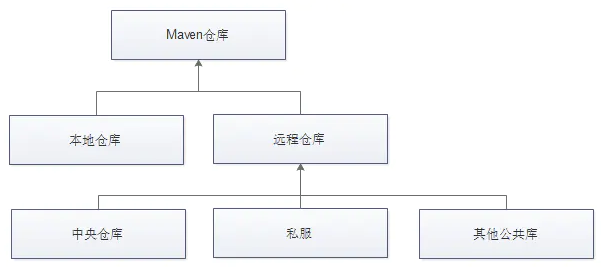
maven 项目使用的仓库一般有如下几种方式:
- maven 中央仓库,这是默认的仓库。
- 镜像仓库,通过 sttings.xml 中的 settings.mirrors.mirror 配置。
- 全局 profile 仓库,通过 settings.xml 中的 settings.repositories.repository 配置。
- 项目仓库,通过 pom.xml 中的 project.repositories.repository 配置。
- 项目 profile 仓库,通过 pom.xml 中的 project.profiles.profile.repositories.repository 配置。
- 本地仓库。
如果所有仓库的配置都存在,那么依赖的搜索顺序也会变得异常复杂。
仓库的配置方式
本地仓库
maven 缺省的本地仓库地址为 ${user.home}/.m2/repository,也就是说,一个用户会对应的拥有一个本地仓库。
可以通过修改 ${user.home}/.m2/settings.xml,在
1 | <localRepository>D:\java\maven-repo</localRepository> |
如果想让所有的用户使用统一的配置,那么可以修改 maven 主目录下的 setting.xml:${M2_HOME}/conf/setting.xml。
maven 中央仓库
在 maven 安装目录的 lib 目录下,有一个 maven-model-builder-3.6.1.jar,里面的 org/apache/maven/model/pom-4.0.0.xml 文件定义了 maven 默认中央仓库的地址:https://repo.maven.apache.org/maven2,如下图所示:
1 | <repositories> |
一般使用阿里云镜像仓库代替默认的 maven 中央仓库,配置方式有两种:
- 第一种,全局配置
修改 ${M2_HOME}/conf/setting.xml 文件,在
1 | <mirrors> |
修改全局配置后,所有使用此 maven 的工程都会生效。
< mirrorOf> 可以设置为哪个中央仓库做镜像,为名为 “central” 的中央仓库做镜像,写作 < mirrorOf>central< /mirrorOf>;为所有中央仓库做镜像,写作 < mirrorOf>*< /mirrorOf> (不建议)。maven 默认中央仓库的 id 为 central。id是唯一的。
- 第二种,局部配置
在需要使用阿里云镜像仓库的 maven 工程的 pom.xml 文件中添加:
1 | <repositories> |
修改局部配置后,只对当前工程有效。
私服
- 第一种,全局配置
修改 ${M2_HOME}/conf/setting.xml 文件,在
1 | <profiles> |
然后,在
1 | <activeProfiles> |
- 第二种,局部配置
在需要使用私服的 maven 工程的 pom.xml 文件中添加。
上传:
settings.xml:
1 | <server> |
pom.xml:
1 | <distributionManagement> |
下载:
pom.xml:
1 | <repositories> |
在项目中,将私服地址更改为自己公司的实际地址。
依赖的下载顺序
准备测试环境
安装 jdk 和 maven。
使用如下命令创建测试项目:
1 | yes | mvn archetype:generate -DarchetypeGroupId=org.apache.maven.archetypes -DarchetypeArtifactId=maven-archetype-webapp -DinteractiveMode=true -DgroupId=com.pollyduan -DartifactId=myweb -Dversion=1.0 -Dpackage=com.pollyduan |
创建完成后,为了避免后续测试干扰,先执行一次 compile。
1 | cd myweb |
最后,修改 pom.xml 文件,将 junit 版本号改为 4.12 。我们要使用这个 jar 来测试依赖的搜索顺序。
默认情况
首先确保 junit 4.12 不存在:
1 | rm -rf ~/.m2/repository/junit/junit/4.12 |
默认情况下没有配置任何仓库,也就是说,既没更改 $M2_HOME/conf/settings.xml,也没有添加 ~/.m2/settings.xml。
执行编译,查看日志中拉取 junit 的仓库。
1 | mvn compile |
从显示的仓库 id 可以看出:默认是从 maven 中央仓库拉取的 jar。
配置镜像仓库 settings_mirror
创建 ~/.m2/setttings.xml,配置 maven 中央仓库的镜像,如下:
1 | <settings> |
重新测试:
1 | rm -rf ~/.m2/repository/junit/junit/4.12 |
在日志中查看下载依赖的仓库:
1 | Downloaded from settings_mirror: https://maven.aliyun.com/repository/public/junit/junit/4.12/junit-4.12.pom (24 kB at 35 kB/s) |
从显示的仓库 id 可以看出:是从 settings_mirror 中下载的 jar。
结论:settings_mirror 的优先级高于 central。
配置项目仓库 pom_repositories
在 project 中的 pom.xml 文件中,增加如下配置:
1 | <repositories> |
由于改变了 id 的名字,所以仓库地址无所谓,使用相同的地址也不影响测试。
执行测试:
1 | rm -rf ~/.m2/repository/junit/junit/4.12 |
在日志中查看下载依赖的仓库:
1 | Downloaded from pom_repositories: http://10.18.29.128/nexus/content/groups/public/junit/junit/4.12/junit-4.12.pom (24 kB at 95 kB/s) |
从显示的仓库 id 可以看出:jar 是从 pom_repositories 中下载的。
结论:pom_repositories 优先级高于 settings_mirror。
配置全局 profile 仓库 settings_profile_repo
在 ~/.m2/settings.xml 中 settings 的节点内增加:
1 | <profiles> |
执行测试:
1 | rm -rf ~/.m2/repository/junit/junit/4.12 |
在日志中查看下载依赖的仓库:
1 | Downloaded from settings_profile_repo: http://mirrors.163.com/maven/repository/maven-public/junit/junit/4.12/junit-4.12.pom (24 kB at 63 kB/s) |
从显示的仓库 id 可以看出:jar 是从 settings_profile_repo 中下载的。
结论:settings_profile_repo 优先级高于 pom_repositories 和 settings_mirror。
配置项目 profile 仓库 pom_profile_repo
在 project 中的 pom.xml 文件中,增加如下配置:
1 | <profiles> |
执行测试:
1 | rm -rf ~/.m2/repository/junit/junit/4.12 |
在日志中查看下载依赖的仓库:
1 | Downloaded from settings_profile_repo: http://mirrors.163.com/maven/repository/maven-public/junit/junit/4.12/junit-4.12.pom (24 kB at 68 kB/s) |
从显示的仓库 id 可以看出:jar 是从 settings_profile_repo 中下载的。
结论:settings_profile_repo 优先级高于 pom_profile_repo。
进一步测试:
1 | rm -rf ~/.m2/repository/junit/junit/4.12 |
在日志中查看下载依赖的仓库:
1 | Downloaded from pom_profile_repo: http://10.18.29.128/nexus/content/groups/public/junit/junit/4.12/junit-4.12.pom (24 kB at 106 kB/s) |
从显示的仓库 id 可以看出:jar 是从 settings_profile_repo 中下载的。
结论:pom_profile_repo 优先级高于 pom_repositories。
本地仓库 local_repo
这不算测试了,只是一个结论,可以任意测试:只要 ~/.m2/repository 中包含依赖,无论怎么配置,都会优先使用 local 本地仓库中的 jar。
最终结论
settings_mirror 的优先级高于 central
settings_profile_repo 优先级高于 settings_mirror
settings_profile_repo 优先级高于 pom_repositories
settings_profile_repo 优先级高于 pom_profile_repo
pom_repositories 优先级高于 settings_mirror
pom_profile_repo 优先级高于 pom_repositories
通过上面的比较,可以得出各种仓库完整的搜索顺序链:
local_repo > settings_profile_repo > pom_profile_repo > pom_repositories > settings_mirror > central
简单来说,查找依赖的顺序大致如下:
在本地仓库中寻找,如果没有则进入下一步。
在全局配置的私服仓库 (settings.xml 中配置的并被激活) 中寻找,如果没有则进入下一步。
在项目自身配置的私服仓库 (pom.xml) 中寻找,如果没有则进入下一步。
在中央仓库中寻找,如果没有则终止寻找。
说明:
如果在找寻的过程中,发现该仓库有镜像设置,则用镜像的地址代替,即假设现在进行到要在 respository A 仓库中查找某个依赖,但 A 仓库配置了 mirror,则会转到从 A 的 mirror 中查找该依赖,不会再从 A 中查找。
settings.xml 中配置的 profile (激活的) 下的 respository 优先级高于项目中 pom.xml 文件配置的 respository。
如果仓库的 id 设置成 “central”,则该仓库会覆盖 maven 默认的中央仓库配置。
本文参考
https://blog.csdn.net/asdfsfsdgdfgh/article/details/96576665
https://www.cnblogs.com/default/p/11856188.html
https://my.oschina.net/polly/blog/2120650
https://blog.csdn.net/fengdayuan/article/details/93089136
声明:写作本文初衷是个人学习记录,鉴于本人学识有限,如有侵权或不当之处,请联系 wdshfut@163.com。