在使用计算机语言进行项目开发的过程中,即使程序员把代码写得 尽善尽美,在系统的运行过程中仍然会遇到一些问题,因为很多问题不是靠代码能够避免的,比如:客户输入数据的格式,读取文件是否存在,网络是否始终保持通畅等等。
在 java 语言中,将程序执行中发生的不正常情况称为异常。注意:开发过程中的语法错误和逻辑错误不是异常。
对于这些错误,一般有两种解决方法:一是遇到错误就终止程序的运行;另一种方法是由程序员在编写程序时,就考虑到错误的检测、错误消息的提示,以及错误的处理。捕获错误最理想的是在编译期间,但有的错误只有在运行时才会发生。比如:除数为0,数组下标越界等。
异常体系结构
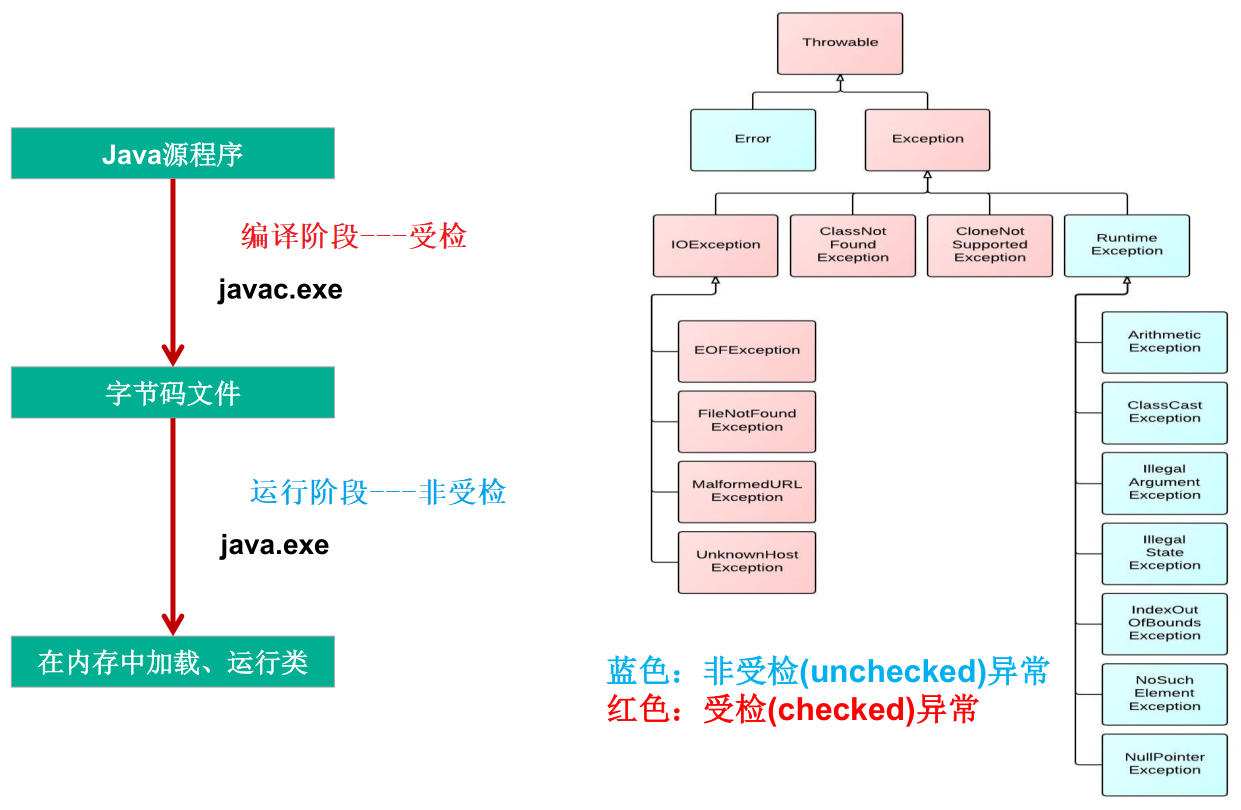
父类:java.lang.Throwable。常见的异常分类如下:
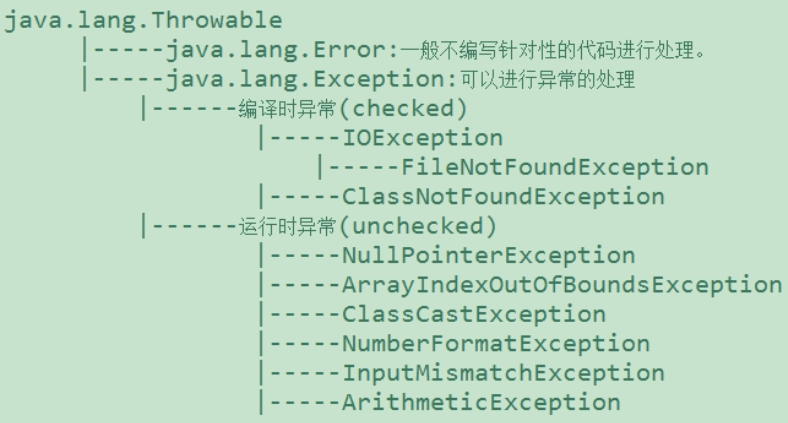
java.lang.Error:java 虚拟机无法解决的严重问题。如:JVM 系统内部错误、资源耗尽等严重情况。比如:StackOverflowError 和 OutOfMemoryError (OOM)。一般不编写针对性的代码进行处理 (需要更改代码逻辑等去解决问题)。1
2
3
4
5
6
7
8
9public class ErrorTest {
public static void main(String[] args) {
// 1.栈溢出:java.lang.StackOverflowError
main(args);
// 2.堆溢出:java.lang.OutOfMemoryError: Java heap space
Integer[] arr = new Integer[1024 * 1024 * 1024];
}
}java.lang.Exception:其它因编程错误或偶然的外在因素导致的一般性问题,可以使用针对性的代码进行处理。例如:空指针访问、试图读取不存在的文件、网络连接中断和数组角标越界等。编译时异常:是指编译器要求必须处置的异常。即程序在运行时由于外界因素造成的一般性异常。编译器要求 java 程序必须捕获或声明所有编译时异常。对于这类异常,如果程序不处理,可能会带来意想不到的结果。
java.io.IOException和java.io.FileNotFoundException1
2
3
4
5
6
7
8
9
10
11public class IOEx {
public static void main(String[] args) {
File file = new File("hello.txt");
FileInputStream fis = new FileInputStream(file);// !java.io.FileNotFoundException
int data;
while ((data = fis.read()) != -1) {// !java.io.IOException
System.out.println((char) data);
}
fis.close();// !java.io.IOException
}
}如上代码,在编译期 (javac.exe) 就会出错,编译不通过,无法生成字节码文件。
运行时异常:是指编译器不要求强制处置的异常。一般是指编程时的逻辑错误,是程序员应该积极避免其出现的异常。
java.lang.RuntimeException类及它的子类都是运行时异常。对于这类异常,可以不作处理,因为这类异常很普遍,若全处理可能会对程序的可读性和运行效率产生影响。java.lang.NullPointerException1
2
3
4
5
6
7
8
9public class NullRef {
int i = 1;
public static void main(String[] args) {
NullRef t = new NullRef();
t = null;
System.out.println(t.i);
}
}java.lang.ArrayIndexOutOfBoundsException1
2
3
4
5
6
7
8
9public class IndexOutExp {
public static void main(String[] args) {
String[] friends = {"lisa", "bily", "kessy"};
for (int i = 0; i < 5; i++) {
System.out.println(friends[i]); // friends[4]?
}
System.out.println("\nthis is the end");
}
}java.lang.ClassCastException
1
2
3
4
5
6
7
8public class Order {
public static void main(String[] args) {
Object obj = new Date();
Order order;
order = (Order) obj;
System.out.println(order);
}
}java.lang.NumberFormatException
1
2
3
4
5
6
7public class NumFormat {
public static void main(String[] args) {
String str = "abc";
int num = Integer.parseInt(str);
System.out.println("num = " + num);
}
}java.util.InputMismatchExcjavaeption
1
2
3
4
5
6
7
8public class NumFormat {
public static void main(String[] args) {
Scanner scanner = new Scanner(System.in);
int num = scanner.nextInt();// 输入的非整数
System.out.println("num = " + num);
scanner.close();
}
}java.lang.ArithmeticException1
2
3
4
5
6
7
8
9
10public class DivideZero {
int x;
public static void main(String[] args) {
DivideZero c = new DivideZero();
int y = 3 / c.x;
System.out.println("y = " + y);
System.out.println("program ends ok!");
}
}
异常处理机制
在编写程序时,经常要在可能出现错误的地方加上检测的代码,如进行 x / y 运算时,要检测分母为 0、数据为空、输入的不是数据而是字符等。而过多的 if - else 分支会导致程序的代码加长、臃肿,可读性差。因此采用异常处理机制。
java 采用的异常处理机制,是将异常处理的程序代码集中在一起,与正常的程序代码分开,使得程序简洁、优雅,并易于维护。
异常的处理:抓抛模型
- 过程一 — “抛”:程序在正常执行的过程中,一旦出现异常,就会在异常代码处生成一个对应异常类的对象,并将此对象抛出。一旦抛出对象以后,其后的代码就不再继续执行。
- 关于异常对象的产生:
- 系统自动生成的异常对象。
- 手动的生成一个异常对象,并抛出 (throw)。
- 关于异常对象的产生:
- 过程二 — “抓”:可以理解为异常的处理方式,分为两种。
- try -catch -finally
- throws
try - catch - finally
格式:
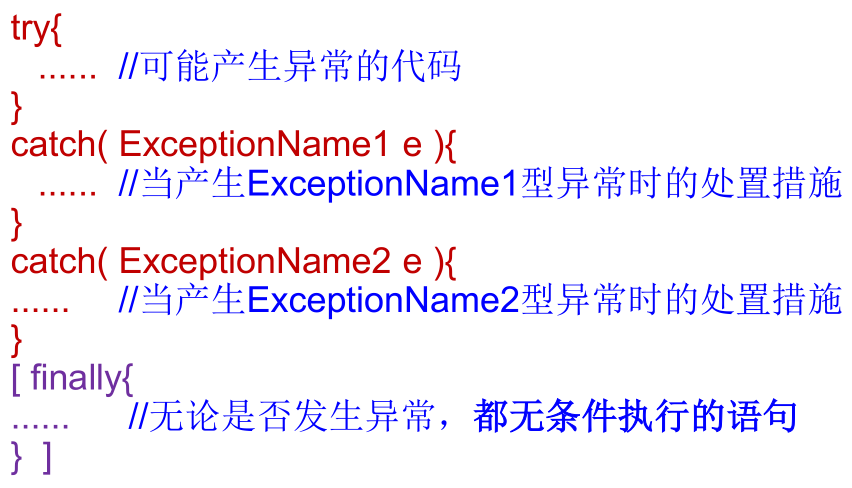
try:捕获异常的第一步是用 try 语句块选定捕获异常的范围,将可能出现异常的代码放在 try 语句块中。
catch (ExceptionType e):在 catch 语句块中是对异常对象进行处理的代码。
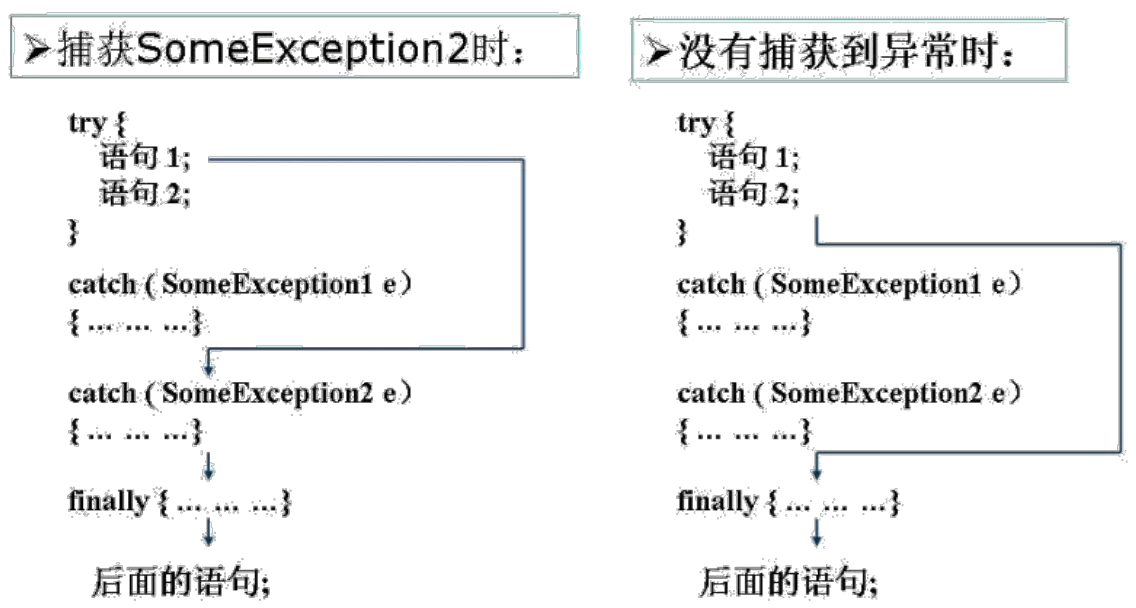
每个 try 语句块可以伴随一个或多个 catch 语句,用于处理可能产生的不同类型的异常对象,当异常对象匹配到某一个 catch 时,就进入该 catch 中进行异常的处理,一旦处理完成,就跳出当前的 try - catch,结构,继续执行 finally 结构和其后的代码。
如果明确知道产生的是何种异常,可以用该异常类作为 catch 的参数;也可以用其父类作为 catch 的参数。比如:可以用 ArithmeticException 类作为参数的地方,就可以用 RuntimeException 类作为参数,或者用所有异常的父类 Exception 类作为参数。但不能是与 ArithmeticException 类无关的异常,如 NullPointerException,此时 catch 中的语句将不会执行。
与其它对象一样,可以访问 catch 到的异常对象的成员变量或调用它的方法。
getMessage()获取异常的说明信息,返回字符串。printStackTrace()获取异常类名和异常的说明信息,以及异常出现在程序中的位置,返回值 void。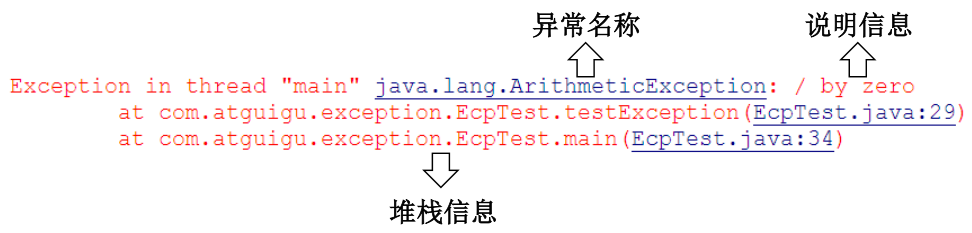
在 try 结构中声明的变量,出了 try 结构以后,就不能再使用了。
finally:捕获异常的最后一步是通过 finally 语句为异常处理提供一个统一的出口,使得在控制流转到程序的其它部分以前,能够对程序的状态作统一的管理。
不论在 try 代码块中是否发生了异常事件,catch 语句是否执行,catch 语句是否有异常,try 或 catch 语句中是否有 return,finally 块中的语句都会被执行。
1
2
3
4
5
6
7
8
9
10
11
12
13
14
15
16
17
18
19
20
21
22
23
24public class ExceptionTest {
public int method() {
try {
int[] arr = new int[10];
System.out.println(arr[10]);
return 1;
} catch (ArrayIndexOutOfBoundsException e) {
e.printStackTrace();
return 2;
} finally {
System.out.println("finally一定会被执行");
return 3;// finally中不建议使用return
}
}
public static void main(String[] args) {
ExceptionTest exceptionTest = new ExceptionTest();
int method = exceptionTest.method();
System.out.println(method);
}
}
输出结果:
finally一定会被执行
3由上面代码也可以看出,finally 语句的内容,会在 try 或 catch 的 return 语句之前执行。
像数据库连接、输入输出流、网络编程 Socket 等资源,JVM 是不能自动回收的,需要手动的进行资源的释放。此时的资源释放,就需要声明在 finally 中。
1
2
3
4
5
6
7
8
9
10
11
12
13
14
15
16
17
18
19
20
21
22
23public class ExceptionTest {
public static void main(String[] args) {
File file = new File("hello.txt");
FileInputStream fis = null;
try {
fis = new FileInputStream(file);
int data;
while ((data = fis.read()) != -1) {
System.out.println((char) data);
}
} catch (IOException e) {
e.printStackTrace();
} finally {
try {
if (fis != null) {
fis.close();
}
} catch (IOException exception) {
exception.printStackTrace();
}
}
}
}
try - catch - finally 结构可以嵌套。
try - catch - finally 结构中,try 语句必须存在,catch 和 finally 语句,必须至少存在一个,其中,catch 语句可以出现多个。
使用 try - catch - finally 处理编译时异常,使得程序在编译时就不再报错,但在运行时仍可能报错。相当于使用 try - catch - finally 将一个编译时可能出现的异常,延迟到运行时出现。
开发中,由于运行时异常比较常见,通常不针对运行时异常编写 try - catch - finally,针对编译时异常,一定要考虑异常的处理。
try - catch - finally:真正的将异常进行了处理。
throws
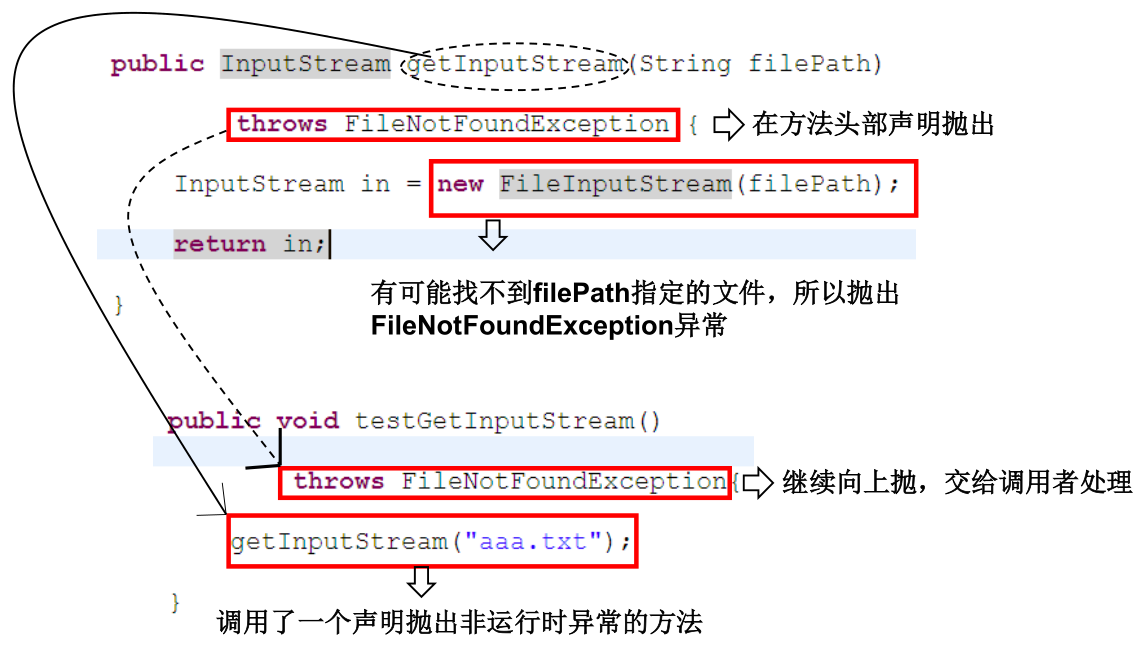
如果一个方法中的语句执行时可能生成某种异常,但是并不能确定如何处理这种异常,则此方法应显示地声明抛出异常,表明该方法将不对这些异常进行处理,而由该方法的调用者负责处理。在方法声明中用 throws 语句可以声明抛出异常的列表,throws 后面的异常类型可以是方法中产生的异常类型,也可以是它的父类。注意:不同于 try - catch - finally,throws 并没有真正的将异常进行了处理,而是抛给了方法的调用者去处理。
“throws + 异常类型”,写在方法的声明处。指明此方法执行时,可能会抛出的异常类型。一旦当方法体执行时出现异常,仍会在异常代码处生成一个异常类的对象,此对象满足 throws 后的异常类型时,就会被抛出。异常代码后续的代码,就不再被执行。
重写方法声明抛出异常的原则:子类重写的方法不能抛出比父类被重写的方法范围更大的异常类型。
1 | public class A { |
开发中如何选择使用 try - catch -finally 和 throws
- 如果父类中被重写的方法没有 throws 方式处理异常,则子类重写的方法也不能使用 throws,意味着如果子类重写的方法中由异常,必须使用 try - catch -finally 方式处理。
- 执行的方法中,先后又调用了另外的几个方法,这几个方法是递进关系执行的,则建议这几个方法使用 throws 的方式进行处理。而执行的方法中,可以考虑使用 try - catch -finally 方式进行处理。
手动生成并抛出异常
java 异常类对象除在程序执行过程中出现异常时由系统自动生成并抛出,也可根据需要使用人工创建并抛出 。
首先要生成异常类对象,然后通过 throw 语句实现抛出操作 (提交给 java 运行环境)。如:
IOException e = new IOException(); throw e;。可以抛出的异常必须是 Throwable 或其子类的实例。下面的语句在编译时将会产生语法错误:
throw new String("want to throw");。实例:
1
2
3
4
5
6
7
8
9
10
11
12
13
14
15
16
17
18
19
20
21
22
23
24
25
26
27
28
29
30
31
32public class Student {
public static void main(String[] args) {
Student student = new Student();
student.regist(-100);
try {
student.regist2(-200);
} catch (Exception exception) {
System.out.println(exception.getMessage());
}
}
private int id;
public void regist(int id) {
if (id > 0) {
this.id = id;
} else {
// 手动抛出异常
throw new RuntimeException("输入的数据非法:" + id);
}
}
public void regist2(int id) throws Exception {
if (id > 0) {
this.id = id;
} else {
// 手动抛出异常,需要在方法中声明
throw new Exception("输入的数据非法:" + id);
}
}
}执行 throw 后,后面代码还会执行吗?
1
2
3
4
5
6
7
8
9
10
11
12
13
14
15
16
17
18
19public class ExceptionTest {
public static void main(String[] args) {
int i = 1;
if (i > 5) {
System.out.println(i);
} else {
try {
throw new Exception("数据非法!");// 异常被try-catch
} catch (Exception e) {
e.printStackTrace();
}
System.out.println("123");
}
}
}
输出结果:
java.lang.Exception: 数据非法!
at cn.xisun.java.base.ExceptionTest.main(ExceptionTest.java:17)
1231
2
3
4
5
6
7
8
9
10
11public class ExceptionTest {
public static void main(String[] args) throws Exception {
int i = 1;
if (i > 5) {
System.out.println(i);
} else {
throw new Exception("数据非法!");// 异常被throws
System.out.println("123");// 编译不通过
}
}
}1
2
3
4
5
6
7
8
9
10
11
12
13
14public class ExceptionTest {
public static void main(String[] args) throws Exception {
int i = 1;
if (i > 5) {
System.out.println(i);
} else {
throw new Exception("数据非法!");
}
System.out.println("123");
}
}
输出结果:
Exception in thread "main" java.lang.Exception: 数据非法!
at cn.xisun.java.base.ExceptionTest.main(ExceptionTest.java:16)1
2
3
4
5
6
7
8
9
10
11
12
13
14
15
16
17
18
19
20
21
22
23public class ExceptionTest {
private static void get(int i) {
try {
int a = i / 0;
System.out.println(a);
} catch (Exception e) {
throw new RuntimeException("发生异常");
}
System.out.println("123");
}
public static void main(String[] args) {
for (int i = 1; i < 4; i++) {
System.out.println(i);
get(i);
}
}
}
输出结果:
1
Exception in thread "main" java.lang.RuntimeException: 发生异常
at cn.xisun.java.base.ExceptionTest.get(ExceptionTest.java:16)
at cn.xisun.java.base.ExceptionTest.main(ExceptionTest.java:24)
用户自定义异常类
如何自定义异常类:
继承于现有的异常结构:RuntimeException、Exception 等。
提供全局变量:serialVersionUID,唯一的标识当前类。
提供重载的构造器。
异常类的名字应做到见名知义,当异常出现时,可以根据名字判断异常类型。
实例:
1
2
3
4
5
6
7
8
9
10
11
12
13
14
15
16
17
18
19
20
21
22
23
24
25
26
27
28
29
30
31
32
33
34
35
36
37
38public class MyException extends Exception {
static final long serialVersionUID = 13465653435L;
public MyException() {
}
public MyException(String message) {
super(message);
}
}
class MyExpTest {
public void regist(int num) throws MyException {
if (num < 0) {
throw new MyException("人数为负值,不合理");
} else {
System.out.println("登记人数" + num);
}
}
public void manager() {
try {
regist(-100);
} catch (MyException e) {
System.out.print("登记失败,出错信息:" + e.getMessage());
}
System.out.print("本次登记操作结束");
}
public static void main(String args[]) {
MyExpTest t = new MyExpTest();
t.manager();
}
}
输出结果:
登记失败,出错信息:人数为负值,不合理
本次登记操作结束1
2
3
4
5
6
7
8
9
10
11
12
13
14
15
16
17
18
19
20
21
22
23
24
25
26
27
28
29
30
31
32
33
34public class ReturnExceptionDemo {
static void methodA() {
try {
System.out.println("进入方法A");
throw new RuntimeException("制造异常");
} finally {
System.out.println("调用A方法的finally");
}
}
static void methodB() {
try {
System.out.println("进入方法B");
return;
} finally {
System.out.println("调用B方法的finally");
}
}
public static void main(String[] args) {
try {
methodA();
} catch (Exception e) {
System.out.println(e.getMessage());
}
methodB();
}
}
输出结果:
进入方法A
调用A方法的finally
制造异常
进入方法B
调用B方法的finally
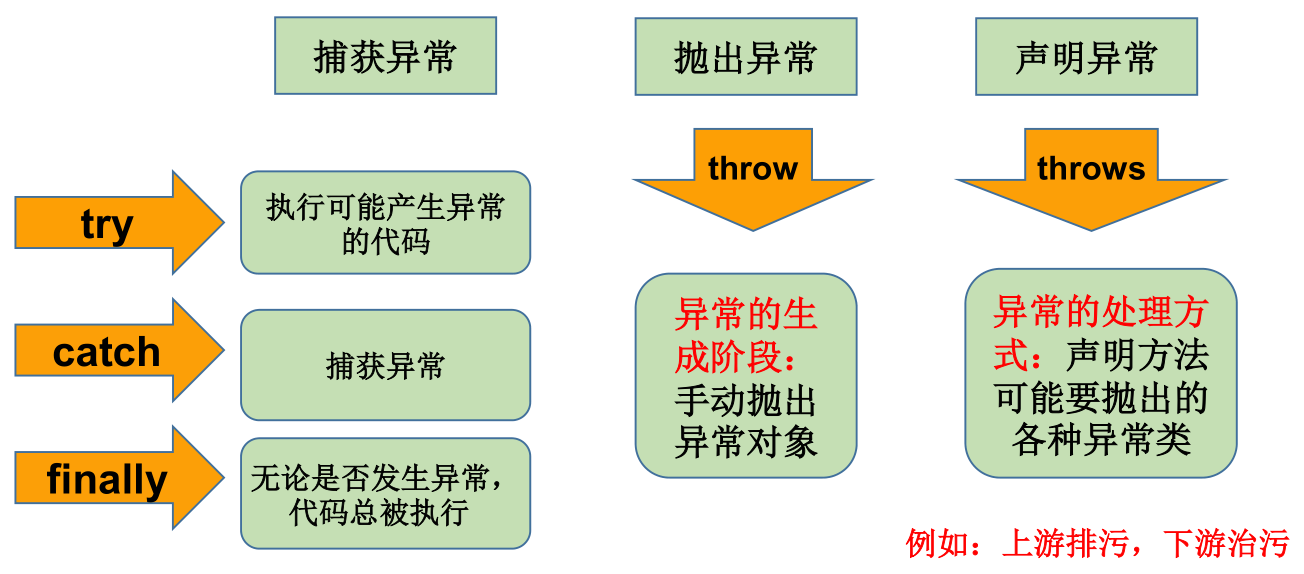
异常处理的 5 个关键字
面试题:
- final、finally 和 finalize 的区别?
- finalize 是一个方法。
- throw 和 throws 的区别?
- throw 表示抛出一个异常类的对象,生成异常对象的过程,声明在方法体内。
- throws 属于异常处理的一种方式,声明在方法的声明处。
本文参考
https://www.gulixueyuan.com/goods/show/203?targetId=309&preview=0
声明:写作本文初衷是个人学习记录,鉴于本人学识有限,如有侵权或不当之处,请联系 wdshfut@163.com。