jdk 8 之前的日期和时间 API
java.lang.System 类
long currentTimeMillis():返回当前时间与 1970 年 1 月 1 日 0 时 0 分 0 秒之间以毫秒为单位的时间差,也被称为时间戳。
System 类的其他说明:
System 类代表系统,系统级的很多属性和控制方法都放置在该类的内部。
由于该类的构造器是 private 的,所以无法创建该类的对象,也就是无法实例化该类。其内部的成员变量和成员方法都是 static 的,所以也可以很方便的进行调用。
成员变量:
- System 类内部包含 in、out 和 err 三个成员变量,分别代表标准输入流 (键盘输入),标准输出流 (显示器) 和标准错误输出流 (显示器)。
成员方法:
native long currentTimeMillis():该方法的作用是返回当前的计算机时间,时间的表达格式为当前计算机间和 GMT 时间 (格林威治时间) 1970 年 1 月 1 日 0 时 0 分 0 秒之间的毫秒数。void exit(int status):该方法的作用是退出程序。其中 status 的值为 0 代表正常退出,非零代表异常退出。使用该方法可以在图形界面编程中实现程序的退出功能等。void gc():该方法的作用是请求系统进行垃圾回收。至于系统是否立刻回收,则取决于系统中垃圾回收算法的实现以及系统执行时的情况。String getProperty(String key):该方法的作用是获得系统中属性名为 key 的属性对应的值。系统中常见的属性名以及属性的作用如下表所示: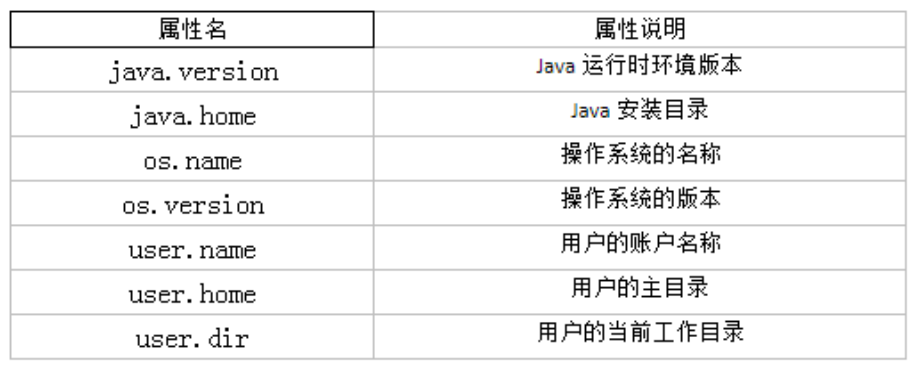
1
2
3
4
5
6
7
8
9
10
11
12
13
14
15
16
17
18
public class Test {
public static void main(String[] args) {
String javaVersion = System.getProperty("java.version");
System.out.println("java的version: " + javaVersion);
String javaHome = System.getProperty("java.home");
System.out.println("java的home: " + javaHome);
String osName = System.getProperty("os.name");
System.out.println("os的name: " + osName);
String osVersion = System.getProperty("os.version");
System.out.println("os的version: " + osVersion);
String userName = System.getProperty("user.name");
System.out.println("user的name: " + userName);
String userHome = System.getProperty("user.home");
System.out.println("user的home: " + userHome);
String userDir = System.getProperty("user.dir");
System.out.println("user的dir: " + userDir);
}
}
java.util.Date 类
两个构造器的使用:
Date date = new Date();:创建一个对应当前时间的 Date 对象。Date date = new Date(1615816891380L);:创建指定毫秒数的 Date 对象。
两个方法的使用:
toString():把此 Date 对象转换为以下形式的 String:dow mon dd hh:mm:ss zzz yyyy,其中: dow 是一周中的某一天 (Sun,Mon,Tue,Wed,Thu,Fri,Sat),zzz 是时间标准。getTime():返回自 1970 年 1 月 1 日 00:00:00 GMT 以来,此 Date 对象表示的毫秒数,即时间戳。- 其它很多方法都过时了,不建议使用。
区别于
java.sql.Date类:java.sql.Date继承于java.util.Date,是后者的子类,用于数据库中的日期。1
2
3
4
5
6
7
8
9
10
11
12
13
14
15
16
17
18public class Test {
public static void main(String[] args) {
// 创建java.sal.Date对象
java.sql.Date date = new java.sql.Date(System.currentTimeMillis());
System.out.println(date);// 2021-03-15
// java.util.Date对象转换为java.sql.Date对象
// 情况一:多态
java.util.Date date1 = new java.sql.Date(System.currentTimeMillis());
java.sql.Date date2 = (java.sql.Date) date1;
System.out.println(date2);
// 情况二:
java.util.Date date3 = new java.util.Date();
Date date4 = new Date(date3.getTime());
System.out.println(date4);// 2021-03-15
}
}
java.text.SimpleDateFormat 类
java.util.Date类的 API 不易于国际化,大部分被废弃了,java.text.SimpleDateFormat类是一个与语言环境无关的方式来格式化和解析日期的具体类。它允许对 Date 类的格式化和解析。
- 格式化:日期 —> 字符串。
- 解析:字符串 —> 日期。
SimpleDateFormat 类的实例化
使用默认构造器
public SimpleDateFormat():1
2
3
4
5
6
7
8
9
10
11
12
13
14
15
16
17public class Test {
public static void main(String[] args) {
SimpleDateFormat sdf = new SimpleDateFormat();
// 格式化:日期--->字符串
Date date = new Date();
String format = sdf.format(date);
System.out.println(format);// 21-3-16 下午8:46,默认格式化后的输出结果
// 解析:字符串--->日期
String str = "21-3-16 下午8:46";// 默认能解析的格式
try {
Date parse = sdf.parse(str);
System.out.println(parse);
} catch (ParseException e) {
e.printStackTrace();
}
}
}使用带参构造器
public SimpleDateFormat(String pattern):1
2
3
4
5
6
7
8
9
10
11
12
13
14
15
16
17public class Test {
public static void main(String[] args) {
SimpleDateFormat sdf = new SimpleDateFormat("yyyy-MM-dd HH:mm:ss");
// 格式化:日期--->字符串
Date date = new Date();
String format = sdf.format(date);
System.out.println(format);// 2021-03-16 21:59:37,按指定格式格式化后的输出结果
// 解析:字符串--->日期
String str = "2021-3-16 9:02:13";// 按照指定格式书写的日期字符串
try {
Date parse = sdf.parse(str);
System.out.println(parse);
} catch (ParseException e) {
e.printStackTrace();
}
}
}对于带参的构造器,在解析的时候,字符串必须是符合该参数指定的格式,否则,会解析发生异常。
实例:
1
2
3
4
5
6
7
8
9
10
11
12
13
14
15
16
17
18
19
20
21
22
23
24
25
26
27
28
29
30
31
32// 一个人从1990-1-1开始,三天打鱼两天晒网,求指定时间是在打渔还是晒网。
public class Test {
public static void main(String[] args) {
SimpleDateFormat sdf = new SimpleDateFormat("yyyy-MM-dd");
Date startDate = null;
try {
startDate = sdf.parse("1990-1-1");
} catch (ParseException e) {
e.printStackTrace();
}
Date nowDate = null;
try {
nowDate = sdf.parse("1990-1-1");
} catch (ParseException e) {
e.printStackTrace();
}
if (startDate != null && nowDate != null) {
long time = nowDate.getTime() - startDate.getTime();
long day = time / 1000 / 60 / 60 / 24 + 1;
long l = day % 5;
System.out.println(day + ", " + l);
if (l == 1 || l == 2 | l == 3) {
System.out.println("在打渔");
}
if (l == 0 || l == 4) {
System.out.println("在晒网");
}
}
}
}
java.util.Calendar 类 (日历类)
Calendar 是一个抽象类,主用用于完成日期字段之间相互操作的功能。
1
public abstract class Calendar implements Serializable, Cloneable, Comparable<Calendar> {}
获取 Calendar实例的方法:
- 创建它的子类 GregorianCalendar 的对象。
- 调用静态方法
Calendar.getInstance()。
一个 Calendar 的实例是系统当前时间的抽象表示,常用方法如下:
int get(int field):获取想要的时间信息。比如:YEAR、MONTH、DAY_OF_WEEK、HOUR_OF_DAY、MINUTE、SECOND 等。- 获取月份时:一月是 0,二月是 1,以此类推,十二月是 11。
- 获取星期时:周日是 1,周二是 2,以此类推,周六是 7。
void set(int field,int value):设置时间。void add(int field,int amount):当前时间基础上做增减。final Date getTime():Calendar 对象转换为 Date对象。final void setTime(Date date):Date 对象转换为 Calendar 对象。
实例:
1
2
3
4
5
6
7
8
9
10
11
12
13
14
15
16
17
18
19
20
21
22
23
24
25
26
27
28
29
30
31
32
33public class Test {
public static void main(String[] args) {
// 1.实例化
// 方式一:创建其子类(GregorianCalendar)的对象
// 方式二:调用其静态方法getInstance()
Calendar calendar = Calendar.getInstance();// 当前时间
System.out.println(calendar.getClass());// class java.util.GregorianCalendar
// 2.常用方法
// get()
System.out.println("年:" + calendar.get(Calendar.YEAR));// 2021
System.out.println("月:" + (calendar.get(Calendar.MONTH) + 1));// 月份,0代表1月,1代表2月,类推
System.out.println("日:" + calendar.get(Calendar.DAY_OF_MONTH));// 一个月中的第几天
System.out.println("时:" + calendar.get(Calendar.HOUR));
System.out.println("分:" + calendar.get(Calendar.MINUTE));
System.out.println("秒:" + calendar.get(Calendar.SECOND));
System.out.println("星期:" + (calendar.get(Calendar.DAY_OF_WEEK) - 1));// 一周中的第几天,1代表周日,2代表周一,类推
System.out.println("一年中第:" + calendar.get(Calendar.DAY_OF_YEAR));// 一年中的第几天
// set()
calendar.set(Calendar.YEAR, 2020);// 更改calendar本身
System.out.println("重设之后的年:" + calendar.get(Calendar.YEAR));// 2020
// add()
calendar.add(Calendar.YEAR, 2);
System.out.println("加2年之后的年:" + calendar.get(Calendar.YEAR));// 2022
calendar.add(Calendar.YEAR, -1);
System.out.println("减1年之后的年:" + calendar.get(Calendar.YEAR));// 2021
// getTime():Calendar--->java.util.Date
Date date = calendar.getTime();
// setTime():java.util.Date--->Calendar
Date date1 = new Date(234234235235L);
calendar.setTime(date1);// 设置calendar为指定时间
}
}
jdk 8 之后的日期和时间 API
如果我们可以跟别人说:”我们在 1502643933071 见面,别晚了!”那么就再简单不过了。但是我们希望时间与昼夜和四季有关,于是事情就变复杂了。jdk 1.0 中包含了一个 java.util.Date 类,但是它的大多数方法已经在 jdk 1.1 引入 Calendar 类之后被弃用了,但 Calendar 并不比 Date 好多少。它们面临的问题是:
可变性:像日期和时间这样的类应该是不可变的。
偏移性:Date 中的年份是从 1900 开始的,而月份都从 0 开始。
格式化:格式化只对 Date 有用,Calendar 则不行。
此外,它们也不是线程安全的,也不能处理闰秒等。
第三次引入的 API 是成功的,并且 java 8 中引入的 java.time API 已经纠正了过去的缺陷,将来很长一段时间内它都会为我们服务。
java 8 吸收了 Joda-Time 的精华,以一个新的开始为 java 创建优秀的 API。新的 java.time 中包含了所有关于本地日期 (LocalDate)、本地时间 (LocalTime)、本地日期时间 (LocalDateTime)、时区 (ZonedDateTime) 和持续时间 (Duration) 的类。历史悠久的 Date 类新增了 toInstant() 方法,用于把 Date 转换成新的表示形式。这些新增的本地化时间日期 API 大大简化了日期时间和本地化的管理。
新时间日期 API:
java.time– 包含值对象的基础包。java.time.chrono– 提供对不同的日历系统的访问。java.time.format– 格式化和解析时间和日期。java.time.temporal– 包括底层框架和扩展特性。java.time.zone– 包含时区支持的类。
说明:大多数开发者只会用到基础包和 format 包,也可能会用到 temporal 包。因此,尽管有 68 个新的公开类型,大多数开发者,大概将只会用到其中的三分之一。
java.time.LocalDate、java.time.LocalTime 和 java.time.LocalDateTime 类
LocalDate、LocalTime、LocalDateTime 类是其中较重要的几个类,它们的实例是不可变的对象,分别表示使用 ISO-8601日历系统的日期、时间、日期和时间。它们提供了简单的本地日期或时间,并不包含当前的时间信息,也不包含与时区相关的信息。
- LocalDate:代表 IOS 格式 (yyyy-MM-dd) 的日期,可以存储生日、纪念日等日期。
- LocalTime:表示一个时间,而不是日期。
- LocalDateTime:是用来表示日期和时间的,这是一个最常用的类之一。
ISO-8601日历系统是国际标准化组织制定的现代公民的日期和时间的表示法,也就是公历。
常用方法:
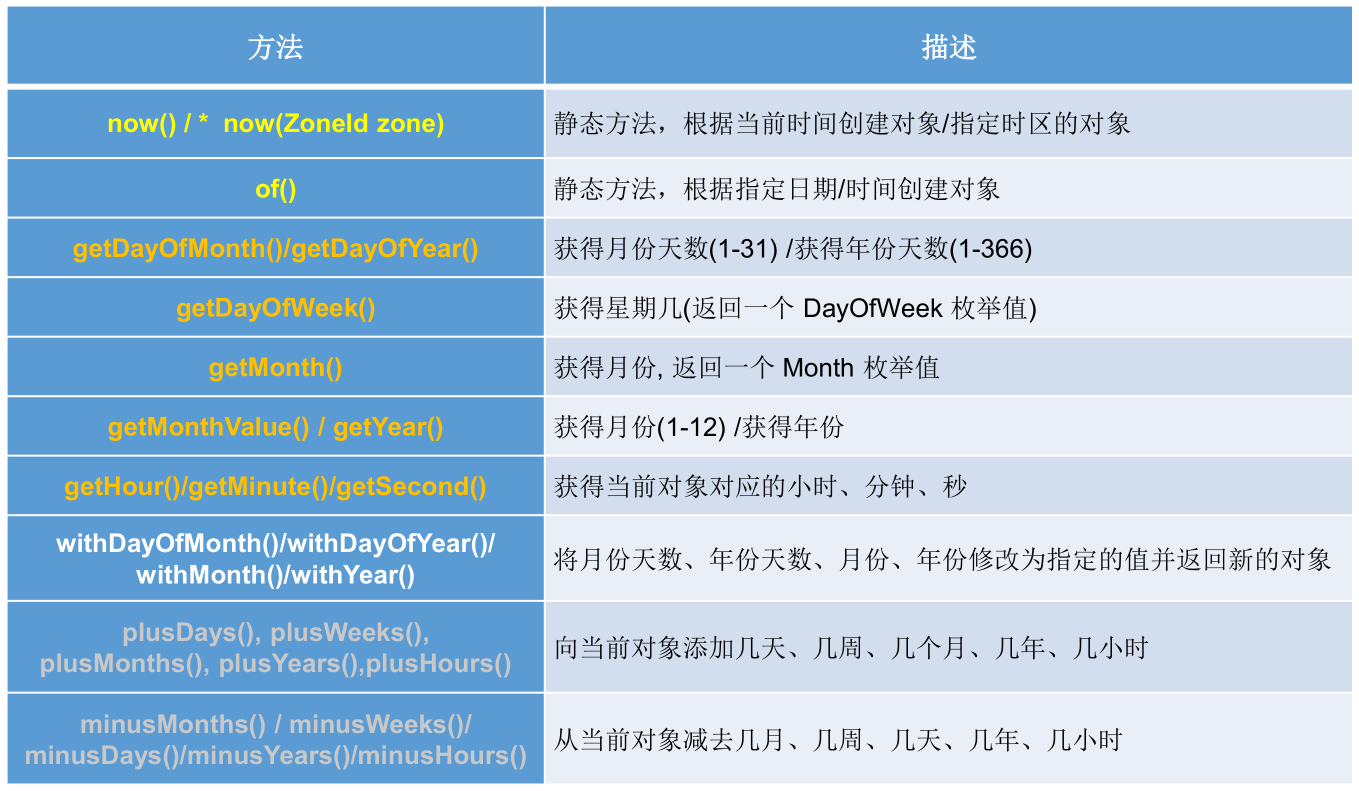
实例:
1
2
3
4
5
6
7
8
9
10
11
12
13
14
15
16
17
18
19
20
21
22
23
24
25
26
27
28
29
30
31
32
33
34
35
36
37
38
39
40
41
42public class Test {
public static void main(String[] args) {
// now():获取当前的日期、时间、日期+时间
LocalDate date = LocalDate.now();
LocalTime time = LocalTime.now();
LocalDateTime dateTime = LocalDateTime.now();
System.out.println(date);// 2021-03-17
System.out.println(time);// 11:37:43.400
System.out.println(dateTime);// 2021-03-17T11:37:43.400
// of():自定义指定的年、月、日、时、分、秒对应的时间对象,没有偏移量
LocalDate date1 = LocalDate.of(2020, 3, 17);
LocalTime time1 = LocalTime.of(11, 4, 25);
LocalDateTime dateTime1 = LocalDateTime.of(2020, 3, 17, 11, 05, 45);
System.out.println(date1);// 2020-03-17
System.out.println(time1);// 11:04:25
System.out.println(dateTime1);// 2020-03-17T11:05:45
// getXxx():获取指定的时间信息
System.out.println("年:" + dateTime.getYear());// 2021
System.out.println("月:" + dateTime.getMonth());// MARCH
System.out.println("月份数值:" + dateTime.getMonthValue());// 3
System.out.println("日:" + dateTime.getDayOfMonth());// 17
System.out.println("星期:" + dateTime.getDayOfWeek());// WEDNESDAY
System.out.println("时:" + dateTime.getHour());// 11
System.out.println("分:" + dateTime.getMinute());// 37
System.out.println("秒:" + dateTime.getSecond());// 18
// withXX():设置时间为指定的值并返回新的对象---不可变性
LocalDateTime dateTime2 = dateTime.withYear(2022);
System.out.println(dateTime);// 2021-03-17T11:37:43.400
System.out.println(dateTime2);// 2022-03-17T11:37:43.400
// plusXxx():在当前时间基础上做增减操作并返回新的对象---不可变性
LocalDateTime dateTime3 = dateTime.plusYears(2);// 加2年
System.out.println(dateTime);// 2021-03-17T11:37:43.400
System.out.println(dateTime3);// 2023-03-17T11:37:43.400
LocalDateTime dateTime4 = dateTime.minusYears(2);// 减2年
System.out.println(dateTime);// 2021-03-17T11:37:43.400
System.out.println(dateTime4);// 2019-03-17T11:37:43.400
}
}
java.time.Instant 类 — 瞬时
Instant:时间线上的一个瞬时点,这可能被用来记录应用程序中的事件时间戳。
在处理时间和日期的时候,我们通常会想到年,月,日,时,分,秒。然而,这只是时间的一个模型,是面向人类的。第二种通用模型是面向机器的,或者说是连续的。在此模型中,时间线中的一个点表示为一个很大的数,这有利于计算机处理。在 UNIX 中,这个数从 1970 年开始,以秒为的单位;同样的,在 java 中,也是从 1970 年开始,但以毫秒为单位。
java.time包通过值类型 Instant 提供机器视图,不提供处理人类意义上的时间单位。Instant 表示时间线上的一点,而不需要任何上下文信息,例如,时区。概念上讲,它只是简单的表示自 1970 年 01 月 01 日 00 时 00 分 00 秒 (UTC) 开始的秒数。因为java.time包是基于纳秒计算的,所以 Instant 的精度可以达到纳秒级。1秒 = 1000 毫秒 = 10^6 微秒 = 10^9 纳秒,即:1 ns = 10^-9 s。
常用方法:
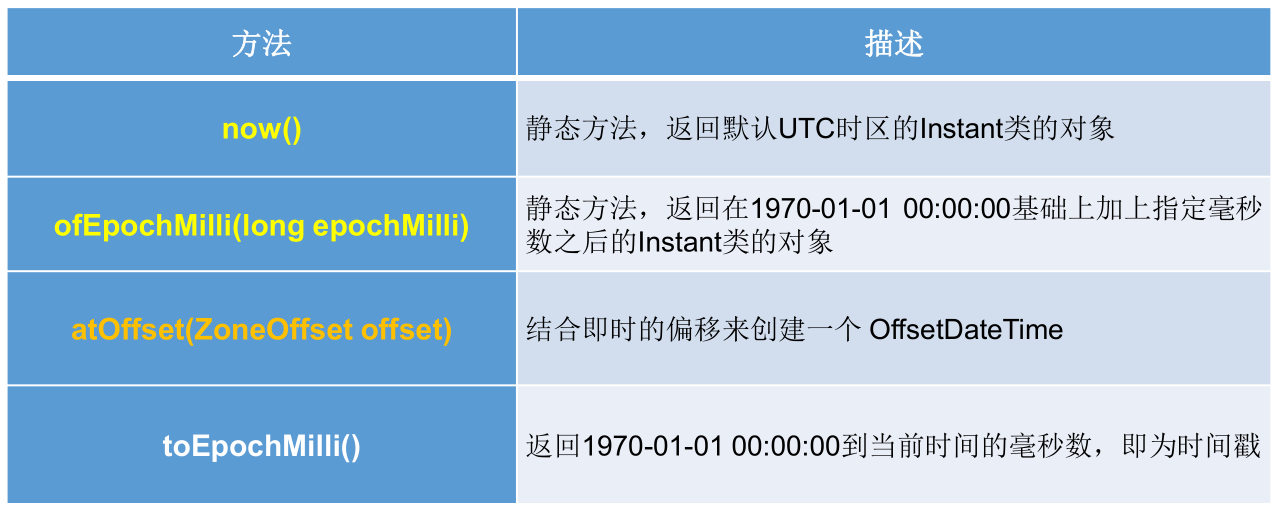
时间戳是指格林威治时间 1970 年 01 月 01 日 00 时 00 分 00 秒 (北京时间 1970 年 01 月 01日 08 时 00 分 00 秒) 起至现在的总秒数。
实例:
1
2
3
4
5
6
7
8
9
10
11
12
13
14
15
16
17
public class Test {
public static void main(String[] args) {
Instant instant = Instant.now();// 默认UTC时区,本初子午线对应的标准时间
System.out.println(instant);// 2021-03-17T03:50:15.672Z
// 添加时间的偏移量
OffsetDateTime now = instant.atOffset(ZoneOffset.ofHours(8));// 东八区时间,要加上8小时
System.out.println(now);
// 获取自1970-01-01 00:00:00(UTC)到当前时间的毫秒数 ---> Date类的getTime()方法
long milli = instant.toEpochMilli();
System.out.println(milli);
// 通过给定的毫秒数,获取Instant实例 ---> new Date(long millis);
Instant instant1 = Instant.ofEpochMilli(1615953468824L);
}
}
java.time.format.DateTimeFormatter 类
格式化日期或时间,类似 SimpleDateFormat。
常用方法:
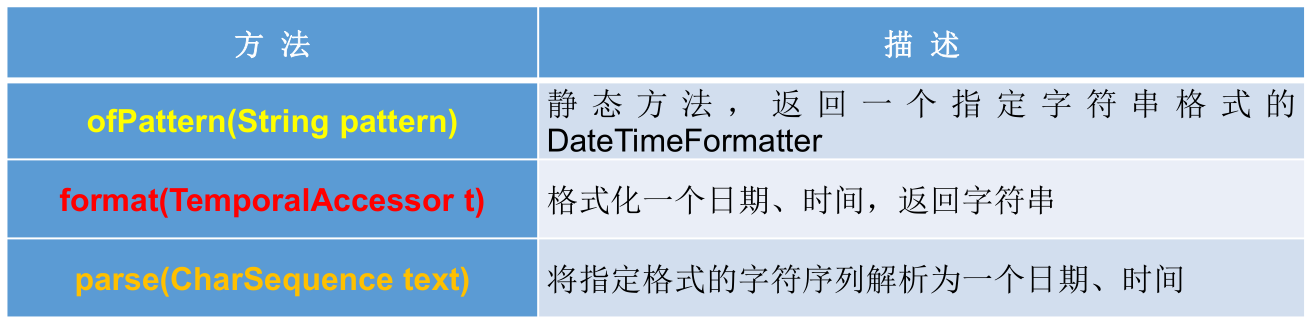
实例化方式一:预定义的标准格式。如:
ISO_LOCAL_DATE_TIME、ISO_LOCAL_DATE、ISO_LOCAL_TIME。1
2
3
4
5
6
7
8
9
10
11
12
13
14
15public class Test {
public static void main(String[] args) {
DateTimeFormatter formatter = DateTimeFormatter.ISO_LOCAL_DATE_TIME;
// 格式化:日期 ---> 字符串
LocalDateTime localDateTime = LocalDateTime.now();
System.out.println(localDateTime);// 2021-03-17T13:18:37.907
String str = formatter.format(localDateTime);
System.out.println(str);// 2021-03-17T13:18:37.907
// 解析:字符串 ---> 日期
String str1 = "2021-03-17T13:17:33.274";// 只能解析此种格式的字符串
TemporalAccessor parse = formatter.parse(str1);
System.out.println(parse);// {},ISO resolved to 2021-03-17T13:17:33.274
}
}实例化方式二,本地化相关的格式:
ofLocalizedDateTime(),三种格式:FormatStyle.LONG/FormatStyle.MEDIUM/FormatStyle.SHORT适用于 LocalDateTime。1
2
3
4
5
6
7
8
9
10
11
12
13
14
15
16public class Test {
public static void main(String[] args) {
LocalDateTime localDateTime = LocalDateTime.now();
System.out.println(localDateTime);// 2021-03-17T13:29:37.732
DateTimeFormatter formatter1 = DateTimeFormatter.ofLocalizedDateTime(FormatStyle.LONG);
String str1 = formatter1.format(localDateTime);
System.out.println(str1);// 2021年3月17日 下午01时29分37秒
DateTimeFormatter formatter2 = DateTimeFormatter.ofLocalizedDateTime(FormatStyle.MEDIUM);
String str2 = formatter2.format(localDateTime);
System.out.println(str2);// 2021-3-17 13:29:37
DateTimeFormatter formatter3 = DateTimeFormatter.ofLocalizedDateTime(FormatStyle.SHORT);
String str3 = formatter3.format(localDateTime);
System.out.println(str3);// 21-3-17 下午1:29
}
}ofLocalizedDate(),四种格式:FormatStyle.FULL/FormatStyle.LONG/FormatStyle.MEDIUM/FormatStyle.SHORT适用于LocalDate。1
2
3
4
5
6
7
8
9
10
11
12
13
14
15
16
17
18
19public class Test {
public static void main(String[] args) {
LocalDate localDate = LocalDate.now();
System.out.println(localDate);// 2021-03-17
DateTimeFormatter formatter1 = DateTimeFormatter.ofLocalizedDate(FormatStyle.FULL);
String str1 = formatter1.format(localDate);
System.out.println(str1);// 2021年3月17日 星期三
DateTimeFormatter formatter2 = DateTimeFormatter.ofLocalizedDate(FormatStyle.LONG);
String str2 = formatter2.format(localDate);
System.out.println(str2);// 2021年3月17日
DateTimeFormatter formatter3 = DateTimeFormatter.ofLocalizedDate(FormatStyle.MEDIUM);
String str3 = formatter3.format(localDate);
System.out.println(str3);// 2021-3-17
DateTimeFormatter formatter4 = DateTimeFormatter.ofLocalizedDate(FormatStyle.SHORT);
String str4 = formatter4.format(localDate);
System.out.println(str4);// 21-3-17
}
}
实例化方式三:自定义的格式,最常用。如:
ofPattern("yyyy-MM-dd hh:mm:ss")。1
2
3
4
5
6
7
8
9public class Test {
public static void main(String[] args) {
DateTimeFormatter formatter = DateTimeFormatter.ofPattern("yyyy-MM-dd HH:mm:ss");
String str = formatter.format(LocalDateTime.now());
System.out.println(str);// 2021-03-17 13:13:52
TemporalAccessor accessor = formatter.parse("2021-02-17 13:18:09");// 字符串需要严格匹配自定义的格式
System.out.println(accessor);// {},ISO resolved to 2021-02-17T13:18:09
}
}
其他 API
java.time.ZoneId:该类中包含了所有的时区信息,一个时区的 ID,如 Europe/Paris。1
2
3
4
5
6
7
8
9
10
11
12
13
14
15
16
17
18
19
20public class Test {
public static void main(String[] args) {
// ZoneId: 类中包含了所有的时区信息
// ZoneId的getAvailableZoneIds(): 获取所有的ZoneId
Set<String> zoneIds = ZoneId.getAvailableZoneIds();
for (String s : zoneIds) {
System.out.println(s);
}
// ZoneId的of(): 获取指定时区的时间
LocalDateTime localDateTime = LocalDateTime.now(ZoneId.of("Asia/Tokyo"));
System.out.println(localDateTime);
// ZonedDateTime: 带时区的日期时间
// ZonedDateTime的now(): 获取本时区的ZonedDateTime对象
ZonedDateTime zonedDateTime = ZonedDateTime.now();
System.out.println(zonedDateTime);
// ZonedDateTime的now(ZoneId id): 获取指定时区的ZonedDateTime对象
ZonedDateTime zonedDateTime1 = ZonedDateTime.now(ZoneId.of("Asia/Tokyo"));
System.out.println(zonedDateTime1);
}
}java.time.ZonedDateTime:一个在 ISO-8601日历系统时区的日期时间,如 2007-12-03T10:15:30+01:00 Europe/Paris。- 其中每个时区都对应着 ID,地区 ID 都为 “{区域}/{城市}” 的格式,例如:Asia/Shanghai 等。
java.time.Clock:使用时区提供对当前即时、日期和时间的访问的时钟。java.time.Duration:持续时间,用于计算两个 “时间” 间隔。1
2
3
4
5
6
7
8
9
10
11
12
13
14
15
16
17
18public class Test {
public static void main(String[] args) {
// Duration: 用于计算两个"时间"间隔,以秒和纳秒为基准
// between(): 静态方法,返回Duration对象,表示两个时间的间隔
LocalTime localTime = LocalTime.now();
LocalTime localTime1 = LocalTime.of(15, 23, 32);
Duration duration = Duration.between(localTime1, localTime);
System.out.println(duration);
System.out.println(duration.getSeconds());
System.out.println(duration.getNano());
LocalDateTime localDateTime = LocalDateTime.of(2016, 6, 12, 15, 23, 32);
LocalDateTime localDateTime1 = LocalDateTime.of(2017, 6, 12, 15, 23, 32);
Duration duration1 = Duration.between(localDateTime1, localDateTime);
System.out.println(duration1.toDays());// -365
}
}java.time.Period:日期间隔,用于计算两个 “日期” 间隔。1
2
3
4
5
6
7
8
9
10
11
12
13
14public class Test {
public static void main(String[] args) {
// Period:用于计算两个"日期"间隔,以年、月、日衡量
LocalDate localDate = LocalDate.now();// 2021-3-17
LocalDate localDate1 = LocalDate.of(2028, 3, 18);
Period period = Period.between(localDate, localDate1);
System.out.println(period);// P7Y1D
System.out.println(period.getYears());// 7
System.out.println(period.getMonths());// 0
System.out.println(period.getDays());// 1
Period period1 = period.withYears(2);
System.out.println(period1);
}
}java.time.temporal.TemporalAdjuster:时间校正器。有时我们可能需要获取诸如将日期调整到 “下一个工作日” 等操作。java.time.temporal.TemporalAdjusters:该类通过静态方法firstDayOfXxx()/lastDayOfXxx()/nextXxx(),提供了大量的常用 TemporalAdjuster 的实现。1
2
3
4
5
6
7
8
9
10
11
12
13
14
15
16
17
18
19
20
21
22
23
24public class Test {
public static void main(String[] args) {
// TemporalAdjuster: 时间校正器
// 获取当前日期的下一个周日是哪天?当前日期:2021-3-17
TemporalAdjuster temporalAdjuster = TemporalAdjusters.next(DayOfWeek.SUNDAY);
LocalDate localDateTime = LocalDate.now().with(temporalAdjuster);// LocalDateTime.now().with(temporalAdjuster)
System.out.println("下一个周日是:" + localDateTime);// 下一个周日是:2021-03-21
// 获取下一个工作日是哪天?
LocalDate localDate = LocalDate.now().with(new TemporalAdjuster() {
public Temporal adjustInto(Temporal temporal) {
LocalDate date = (LocalDate) temporal;
if (date.getDayOfWeek().equals(DayOfWeek.FRIDAY)) {
return date.plusDays(3);
} else if (date.getDayOfWeek().equals(DayOfWeek.SATURDAY)) {
return date.plusDays(2);
} else {
return date.plusDays(1);
}
}
});
System.out.println("下一个工作日是:" + localDate);// 下一个工作日是:2021-03-18
}
}
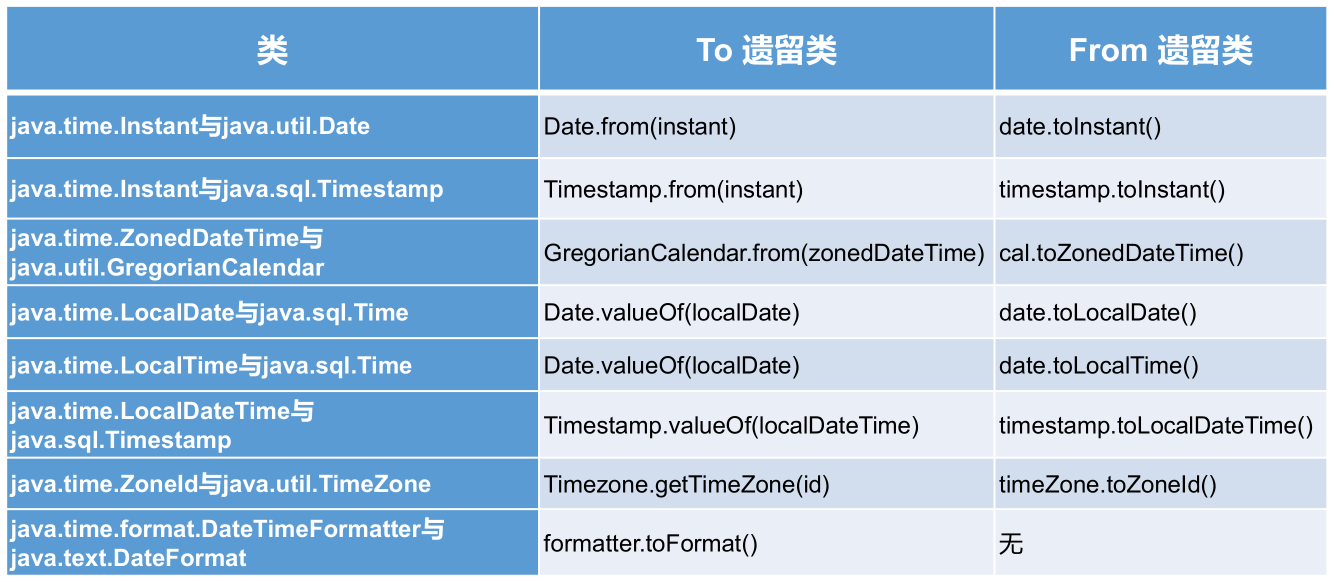
与传统日期处理的转换
本文参考
https://www.gulixueyuan.com/goods/show/203?targetId=309&preview=0
声明:写作本文初衷是个人学习记录,鉴于本人学识有限,如有侵权或不当之处,请联系 wdshfut@163.com。