项目主体结构
代码实现:
1
2
3
4
5
6
7
8
9
10
11
12
13
14
15
16
17
18
19
20
21
22
23
24
25
26
27
28
29
30
31
32
33
34
35
36
37
38
39
40
41
42
43
44
45
46
47
48
49
50
51
52
53
54
55
56
57
58
59
60
61
62
63
64
65
66
67
68
69
70
71
72
73
74
75
76
77
78
79
80
81
82
83
84
85
86
87
88
public class FlinkKafkaJob3 {
public static void main(String[] args) throws Exception {
// 获取参数
ParameterTool parameterTool = ParameterTool.fromArgs(args);
String consumerTopic = parameterTool.get("consumerTopic");
String producerTopic = parameterTool.get("producerTopic");
String specialTopic = parameterTool.get("specialTopic");
String ifEarliestOffset = parameterTool.get("ifEarliestOffset");
String ifSpecialOffset = parameterTool.get("ifSpecialOffset");
System.out.println("consumerTopic: " + consumerTopic + ", producerTopic: " + producerTopic +
", specialTopic: " + specialTopic + ", ifEarliestOffset: " + ifEarliestOffset + ", ifSpecialOffset: " + ifSpecialOffset);
// 创建流环境
StreamExecutionEnvironment env = StreamExecutionEnvironment.getExecutionEnvironment();
/*env.enableCheckpointing(30 * 1000);
env.getCheckpointConfig().setCheckpointingMode(CheckpointingMode.EXACTLY_ONCE);
env.getCheckpointConfig().setCheckpointTimeout(60000L);
env.getCheckpointConfig().setMinPauseBetweenCheckpoints(60000L);
env.setRestartStrategy(RestartStrategies.fixedDelayRestart(1, Time.minutes(1)));*/
// 定义kafka消费者
Properties consumerProp = ConsumerProperties.getProps();
FlinkKafkaConsumer<ConsumerRecord<String, String>> consumer = new FlinkKafkaConsumer<>(
consumerTopic,
new ConsumerStringDeserializationSchema(),
consumerProp);
if ("yes".equals(ifEarliestOffset)) {
consumer.setStartFromEarliest();
} else if ("yes".equals(ifSpecialOffset)) {
String partitions = parameterTool.get("partition");
String offsets = parameterTool.get("offset");
if (partitions != null && offsets != null) {
Map<KafkaTopicPartition, Long> specificOffsets = new HashMap<>(16);
String[] split = partitions.split(",");
String[] split1 = offsets.split(",");
for (int i = 0; i < split.length; i++) {
KafkaTopicPartition kafkaTopicPartition = new KafkaTopicPartition(consumerTopic, Integer.parseInt(split[i]));
specificOffsets.put(kafkaTopicPartition, Long.parseLong(split1[i]));
}
consumer.setStartFromSpecificOffsets(specificOffsets);
}
}
// 定义kafka生产者
Properties producerProp = ProducerProperties.getProps();
FlinkKafkaProducer<String> producer = new FlinkKafkaProducer<>(
producerTopic,
new ProducerStringSerializationSchema(producerTopic),
producerProp,
FlinkKafkaProducer.Semantic.EXACTLY_ONCE);
producer.setWriteTimestampToKafka(true);
// Flink任务链
env.addSource(consumer)
.map((MapFunction<ConsumerRecord<String, String>, PatentMessage>) consumerRecord -> {
String topic = consumerRecord.topic();
int partition = consumerRecord.partition();
long offset = consumerRecord.offset();
String key = consumerRecord.key();
String value = consumerRecord.value();
JSONObject kafkaMessage = new JSONObject();
kafkaMessage.put("topic", topic);
kafkaMessage.put("partition", partition);
kafkaMessage.put("offset", offset);
kafkaMessage.put("key", key);
return new PatentMessage(topic, partition, offset, key, value, null, kafkaMessage);
})
.filter(new FilterLargerOperator(specialTopic))
.map((MapFunction<PatentMessage, PatentMessage>) patentMessage -> {
String value = patentMessage.getValue();
if (patentMessage.getKey().endsWith(PatentXmlTags.SGM)) {
value = PatentContentUtil.transferSgmPatentContent(value);
}
Document document = Utils.buildXmlFromString(value);
patentMessage.setDocument(document);
return patentMessage;
})
.filter(new FilterBadOperator(specialTopic))
.flatMap(new RichFlatMapOperator(specialTopic))
// 有的时候,lambda表达式无法获悉返回值参数类型,需要指定,could not be determined automatically
.returns(Types.STRING)
.addSink(producer);
// 执行任务
env.execute("patent reaction extractor loader");
}
}打包命令:
mvn clean package -DskipTests。
集群配置
主机地址:
1
2
3
4
5
6
7
8
9
10
11
12
13
14
15
16
17
18
19
20
21
22
23
24
25
26
27
28
29
30
31
32
(base) [hadoop@client ~]$ ip addr
1: lo: <LOOPBACK,UP,LOWER_UP> mtu 65536 qdisc noqueue state UNKNOWN group default qlen 1000
link/loopback 00:00:00:00:00:00 brd 00:00:00:00:00:00
inet 127.0.0.1/8 scope host lo
valid_lft forever preferred_lft forever
inet6 ::1/128 scope host
valid_lft forever preferred_lft forever
2: ens192: <BROADCAST,MULTICAST,UP,LOWER_UP> mtu 1500 qdisc mq state UP group default qlen 1000
link/ether 00:0c:29:14:8b:4e brd ff:ff:ff:ff:ff:ff
inet 192.168.2.106/24 brd 192.168.2.255 scope global noprefixroute dynamic ens192
valid_lft 40466sec preferred_lft 40466sec
inet6 fe80::fda6:9e98:3fce:8b74/64 scope link noprefixroute
valid_lft forever preferred_lft forever
(base) [hadoop@client ~]$ ifconfig
ens192: flags=4163<UP,BROADCAST,RUNNING,MULTICAST> mtu 1500
inet 192.168.2.106 netmask 255.255.255.0 broadcast 192.168.2.255
inet6 fe80::fda6:9e98:3fce:8b74 prefixlen 64 scopeid 0x20<link>
ether 00:0c:29:14:8b:4e txqueuelen 1000 (Ethernet)
RX packets 2326369660 bytes 961932882940 (895.8 GiB)
RX errors 0 dropped 0 overruns 0 frame 0
TX packets 1614468546 bytes 1124856260518 (1.0 TiB)
TX errors 0 dropped 0 overruns 0 carrier 0 collisions 0
lo: flags=73<UP,LOOPBACK,RUNNING> mtu 65536
inet 127.0.0.1 netmask 255.0.0.0
inet6 ::1 prefixlen 128 scopeid 0x10<host>
loop txqueuelen 1000 (Local Loopback)
RX packets 34513 bytes 3083025 (2.9 MiB)
RX errors 0 dropped 0 overruns 0 frame 0
TX packets 34513 bytes 3083025 (2.9 MiB)
TX errors 0 dropped 0 overruns 0 carrier 0 collisions 0主机名:hadoopclient。
Flink 版本:
1
2
3
4
5
6
7
8
9
(base) [hadoop@client flink-1.11.1]$ pwd
/opt/flink-1.11.1
(base) [hadoop@client flink-1.11.1]$ flink -v
SLF4J: Class path contains multiple SLF4J bindings.
SLF4J: Found binding in [jar:file:/opt/flink-1.11.1/lib/logback-classic-1.2.3.jar!/org/slf4j/impl/StaticLoggerBinder.class]
SLF4J: Found binding in [jar:file:/opt/hadoop-3.2.1/share/hadoop/common/lib/slf4j-log4j12-1.7.25.jar!/org/slf4j/impl/StaticLoggerBinder.class]
SLF4J: See http://www.slf4j.org/codes.html#multiple_bindings for an explanation.
SLF4J: Actual binding is of type [ch.qos.logback.classic.util.ContextSelectorStaticBinder]
Version: 1.11.1, Commit ID: 7eb514aHadoop 版本:
1
2
(base) [hadoop@client hadoop-3.2.1]$ pwd
/opt/hadoop-3.2.1Hadoop 节点:
1
2
3
4
5
6
7
8
9
10
11
12
13
14
15
16
17
18
19
20
21
(base) [hadoop@client ~]$ cd .ssh/
(base) [hadoop@client .ssh]$ pwd
/home/hadoop/.ssh
(base) [hadoop@client .ssh]$ ll
total 24
-rw-------. 1 hadoop hadoop 5921 Sep 3 2020 authorized_keys
-rw-------. 1 hadoop hadoop 1675 Sep 3 2020 id_rsa
-rw-r--r--. 1 hadoop hadoop 395 Sep 3 2020 id_rsa.pub
-rw-r--r--. 1 hadoop hadoop 7446 Sep 9 2020 known_hosts
(base) [hadoop@client .ssh]$ cat known_hosts
datanode1,192.168.2.188
datanode3,192.168.2.143
datanode2,192.168.2.199
node1,192.168.1.61
node2,192.168.1.62
node3,192.168.1.63
node4,192.168.1.64
node5,192.168.1.65
node6,192.168.1.66
node7,192.168.1.67
node8,192.168.1.68known_hosts 文件内容有删改。
datanode1 ~ 3 主要为存储节点,node1 ~ 8 主要为计算节点。
主机与节点间的切换:
1
2
3
4
5
6
7
8
9
10
11
12
13
14
15
16
17
18
19
20
21
22
23
24
(base) [hadoop@client ~]$ ssh node1
Last login: Mon Aug 23 15:58:50 2021 from node2
[hadoop@node1 ~]$ ll /opt/
total 0
drwxrwxr-x. 6 hadoop hadoop 99 Feb 28 2020 apache-maven-3.6.3
drwxr-xr-x. 10 hadoop hadoop 156 Sep 3 2020 flink-1.11.1
drwxr-xr-x. 12 hadoop hadoop 185 Sep 23 2020 hadoop-3.2.1
drwxrwxr-x. 7 hadoop hadoop 146 Feb 13 2020 zookeeper-3.5.6
[hadoop@node1 ~]$ ssh node6
Last login: Mon Oct 19 14:19:59 2020 from node5
[hadoop@node6 ~]$ ll /opt/
total 0
drwxrwxr-x. 6 hadoop hadoop 99 Aug 30 2020 apache-maven-3.6.3
drwxr-xr-x. 10 hadoop hadoop 156 Sep 3 2020 flink-1.11.1
drwxr-xr-x. 12 hadoop hadoop 185 Sep 23 2020 hadoop-3.2.1
drwxrwxr-x. 7 hadoop hadoop 146 Aug 30 2020 zookeeper-3.5.6
[hadoop@node6 ~]$ ssh hadoopclient
Last login: Mon Aug 23 16:06:40 2021 from 192.168.1.1
(base) [hadoop@client ~]$ ll /opt/
total 0
drwxrwxr-x. 6 hadoop hadoop 99 Aug 30 2020 apache-maven-3.6.3
drwxr-xr-x. 10 hadoop hadoop 186 Aug 23 15:37 flink-1.11.1
drwxr-xr-x. 12 hadoop hadoop 185 Sep 23 2020 hadoop-3.2.1
drwxrwxr-x. 7 hadoop hadoop 146 Aug 30 2020 zookeeper-3.5.6
Kafka 操作命令
查看 Kafka topic 列表命令,返回 topic 名字列表:
1
2
3
4
5
6
7
(base) [hadoop@client patent-extractor]$ ~/kafka_2.12-2.6.0/bin/kafka-topics.sh --zookeeper hadoopdatanode1:2181 --list
__consumer_offsets
__transaction_state
extractor-log
extractor-patent
extractor-patent-exception
extractor-result创建 Kafka topic 命令:
1
2
(base) [hadoop@client patent-extractor]$ ~/kafka_2.12-2.6.0/bin/kafka-topics.sh --zookeeper hadoopdatanode1:2181,hadoopdatanode2:2181,hadoopdatanode3:2181 --create --partitions 12 --replication-factor 2 --topic extractor-patent
Created topic extractor-patent.查看 Kafka 指定 topic 的详情命令,返回该 topic 的 partition 数量、replica 因子以及每个 partition 的 leader、replica 信息:
1
2
3
4
5
6
7
8
9
10
11
12
13
14
(base) [hadoop@client patent-extractor]$ ~/kafka_2.12-2.6.0/bin/kafka-topics.sh --zookeeper hadoopdatanode1:2181 --describe --topic extractor-patent
Topic: extractor-patent PartitionCount: 12 ReplicationFactor: 2 Configs:
Topic: extractor-patent Partition: 0 Leader: 1 Replicas: 1,2 Isr: 1,2
Topic: extractor-patent Partition: 1 Leader: 2 Replicas: 2,0 Isr: 2,0
Topic: extractor-patent Partition: 2 Leader: 0 Replicas: 0,1 Isr: 0,1
Topic: extractor-patent Partition: 3 Leader: 1 Replicas: 1,0 Isr: 1,0
Topic: extractor-patent Partition: 4 Leader: 2 Replicas: 2,1 Isr: 2,1
Topic: extractor-patent Partition: 5 Leader: 0 Replicas: 0,2 Isr: 0,2
Topic: extractor-patent Partition: 6 Leader: 1 Replicas: 1,2 Isr: 1,2
Topic: extractor-patent Partition: 7 Leader: 2 Replicas: 2,0 Isr: 2,0
Topic: extractor-patent Partition: 8 Leader: 0 Replicas: 0,1 Isr: 0,1
Topic: extractor-patent Partition: 9 Leader: 1 Replicas: 1,0 Isr: 1,0
Topic: extractor-patent Partition: 10 Leader: 2 Replicas: 2,1 Isr: 2,1
Topic: extractor-patent Partition: 11 Leader: 0 Replicas: 0,2 Isr: 0,2查看 Kafka 指定 topic 各 partition 的 offset 信息命令,–time 参数为 -1 时,表示各分区最大的 offset,为 -2 时,表示各分区最小的 offset:
1
2
3
4
5
6
7
8
9
10
11
12
13
(base) [hadoop@client patent-extractor]$ ~/kafka_2.12-2.6.0/bin/kafka-run-class.sh kafka.tools.GetOffsetShell --broker-list hadoopdatanode1:9092 --time -1 --topic extractor-patent
extractor-patent:0:364004
extractor-patent:1:364109
extractor-patent:2:363695
extractor-patent:3:364158
extractor-patent:4:363723
extractor-patent:5:363860
extractor-patent:6:363821
extractor-patent:7:365197
extractor-patent:8:364364
extractor-patent:9:364092
extractor-patent:10:365772
extractor-patent:11:364990删除 Kafka topic 命令:
1
2
3
(base) [hadoop@client patent-extractor]$ ~/kafka_2.12-2.6.0/bin/kafka-topics.sh --zookeeper hadoopdatanode1:2181 --delete -topic extractor-patents
Topic extractor-patents is marked for deletion.
Note: This will have no impact if delete.topic.enable is not set to true.查看 Kafka consumer group 命令,返回 consumer group 名字列表 (新版信息保存在 broker 中,老版信息保存在 zookeeper 中,二者命令不同):
1
2
3
4
5
(base) [hadoop@client patent-extractor]$ ~/kafka_2.12-2.6.0/bin/kafka-consumer-groups.sh --bootstrap-server hadoopdatanode1:9092 --list
extractor-patent-consumer
result-consumer
log-consumer
timeout-consumer老版命令:
~/kafka_2.12-2.6.0/bin/kafka-consumer-groups.sh --zookeeper hadoopdatanode1:2181 --list。查看 Kafka 指定 consumer group 的详情命令,返回 consumer group 对应的 topic 信息、当前消费的 offset、总 offset、剩余待消费 offset 等信息:
1
2
3
4
5
6
7
8
9
10
11
12
13
14
15
16
17
(base) [hadoop@client patent-extractor]$ ~/kafka_2.12-2.6.0/bin/kafka-consumer-groups.sh --bootstrap-server hadoopdatanode1:9092 --describe --group extractor-patent-consumer
Consumer group 'extractor-patent-consumer' has no active members.
GROUP TOPIC PARTITION CURRENT-OFFSET LOG-END-OFFSET LAG CONSUMER-ID HOST CLIENT-ID
extractor-patent-consumer extractor-patent 5 262567 363860 101293 - - -
extractor-patent-consumer extractor-patent 6 267012 363821 96809 - - -
extractor-patent-consumer extractor-patent 3 262809 364158 101349 - - -
extractor-patent-consumer extractor-patent 4 262506 363723 101217 - - -
extractor-patent-consumer extractor-patent 9 266548 364092 97544 - - -
extractor-patent-consumer extractor-patent 10 266975 365772 98797 - - -
extractor-patent-consumer extractor-patent 7 264665 365197 100532 - - -
extractor-patent-consumer extractor-patent 8 270991 364364 93373 - - -
extractor-patent-consumer extractor-patent 11 256111 364990 108879 - - -
extractor-patent-consumer extractor-patent 1 267012 364109 97097 - - -
extractor-patent-consumer extractor-patent 2 264837 363695 98858 - - -
extractor-patent-consumer extractor-patent 0 262513 364004 101491 - - -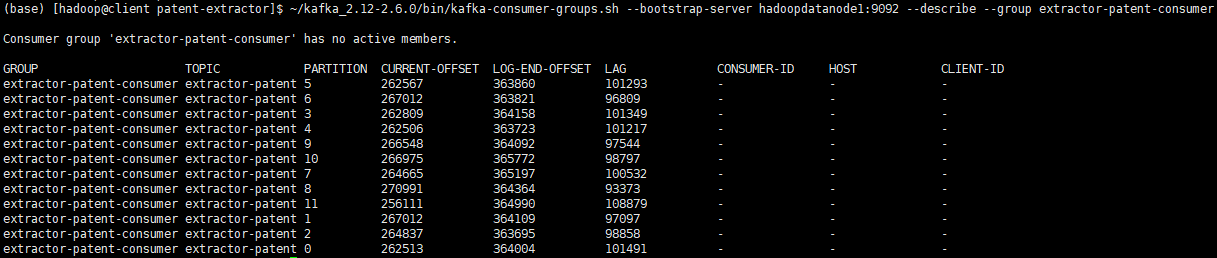
重置 Kafka 指定 consumer group 消费的 topic 的 offset 命令:
1
(base) [hadoop@client patent-extractor]$ ~/kafka_2.12-2.6.0/bin/kafka-consumer-groups.sh --bootstrap-server hadoopdatanode1:9092 --reset-offsets -to-offset 0 --execute --topic patent-app --group extractor-patent-consumer
删除 Kafka 指定 consumer group 命令:
1
(base) [hadoop@client patent-extractor]$ ~/kafka_2.12-2.6.0/bin/kafka-consumer-groups.sh --bootstrap-server hadoopdatanode1:9092 --delete --group extractor-patent-consumer
命令行消费 Kafka 指定 topic 的内容命令:
1
2
# 从头开始消费
(base) [hadoop@client patent-extractor]$ ~/kafka_2.12-2.6.0/bin/kafka-console-consumer.sh --bootstrap-server hadoopdatanode1:9092 --from-beginning --topic extractor-log > extractor.log1
2# 从头开始消费前10条消息,并显示key
(base) [hadoop@client patent-extractor]$ ~/kafka_2.12-2.6.0/bin/kafka-console-consumer.sh --bootstrap-server hadoopdatanode1:9092 --from-beginning --max-messages 10 --property print.key=true --topic extractor-log1
2# 从指定分区、指定offset开始消费
(base) [hadoop@client patent-extractor]$ ~/kafka_2.12-2.6.0/bin/kafka-console-consumer.sh --bootstrap-server hadoopdatanode1:9092 --partition 0 --offset 219000 --topic extractor-log1
2# 从尾开始消费,必须指定分区
(base) [hadoop@client patent-extractor]$ ~/kafka_2.12-2.6.0/bin/kafka-console-consumer.sh --bootstrap-server hadoopdatanode1:9092 --partition 0 --offset latest --topic extractor-log更多命令参数查看 help:
1
2
3
4
5
6
7
8
9
10
11
12
13
14
15
16
17
18
19
20
21
22
23
24
25
26
27
28
29
30
31
32
33
34
35
36
37
38
39
40
41
42
43
44
45
46
47
48
49
50
51
52
53
54
55
56
57
58
59
60
61
62
63
64
65
66
67
68
69
70
71
72
73
74
75
76
77
78
79
80
81
82
83
84
85
86
87
88
89
90
91
92
93
94
95
96
97
98
99
100
101
102
103
104
105
106
107
108
109
110
111
112
113
114
115
116
117
118
119
120
121(base) [hadoop@client patent-extractor]$ ~/kafka_2.12-2.6.0/bin/kafka-topics.sh --help
This tool helps to create, delete, describe, or change a topic.
Option Description
------ -----------
--alter Alter the number of partitions,
replica assignment, and/or
configuration for the topic.
--at-min-isr-partitions if set when describing topics, only
show partitions whose isr count is
equal to the configured minimum. Not
supported with the --zookeeper
option.
--bootstrap-server <String: server to REQUIRED: The Kafka server to connect
connect to> to. In case of providing this, a
direct Zookeeper connection won't be
required.
--command-config <String: command Property file containing configs to be
config property file> passed to Admin Client. This is used
only with --bootstrap-server option
for describing and altering broker
configs.
--config <String: name=value> A topic configuration override for the
topic being created or altered.The
following is a list of valid
configurations:
cleanup.policy
compression.type
delete.retention.ms
file.delete.delay.ms
flush.messages
flush.ms
follower.replication.throttled.
replicas
index.interval.bytes
leader.replication.throttled.replicas
max.compaction.lag.ms
max.message.bytes
message.downconversion.enable
message.format.version
message.timestamp.difference.max.ms
message.timestamp.type
min.cleanable.dirty.ratio
min.compaction.lag.ms
min.insync.replicas
preallocate
retention.bytes
retention.ms
segment.bytes
segment.index.bytes
segment.jitter.ms
segment.ms
unclean.leader.election.enable
See the Kafka documentation for full
details on the topic configs.It is
supported only in combination with --
create if --bootstrap-server option
is used.
--create Create a new topic.
--delete Delete a topic
--delete-config <String: name> A topic configuration override to be
removed for an existing topic (see
the list of configurations under the
--config option). Not supported with
the --bootstrap-server option.
--describe List details for the given topics.
--disable-rack-aware Disable rack aware replica assignment
--exclude-internal exclude internal topics when running
list or describe command. The
internal topics will be listed by
default
--force Suppress console prompts
--help Print usage information.
--if-exists if set when altering or deleting or
describing topics, the action will
only execute if the topic exists.
--if-not-exists if set when creating topics, the
action will only execute if the
topic does not already exist.
--list List all available topics.
--partitions <Integer: # of partitions> The number of partitions for the topic
being created or altered (WARNING:
If partitions are increased for a
topic that has a key, the partition
logic or ordering of the messages
will be affected). If not supplied
for create, defaults to the cluster
default.
--replica-assignment <String: A list of manual partition-to-broker
broker_id_for_part1_replica1 : assignments for the topic being
broker_id_for_part1_replica2 , created or altered.
broker_id_for_part2_replica1 :
broker_id_for_part2_replica2 , ...>
--replication-factor <Integer: The replication factor for each
replication factor> partition in the topic being
created. If not supplied, defaults
to the cluster default.
--topic <String: topic> The topic to create, alter, describe
or delete. It also accepts a regular
expression, except for --create
option. Put topic name in double
quotes and use the '\' prefix to
escape regular expression symbols; e.
g. "test\.topic".
--topics-with-overrides if set when describing topics, only
show topics that have overridden
configs
--unavailable-partitions if set when describing topics, only
show partitions whose leader is not
available
--under-min-isr-partitions if set when describing topics, only
show partitions whose isr count is
less than the configured minimum.
Not supported with the --zookeeper
option.
--under-replicated-partitions if set when describing topics, only
show under replicated partitions
--version Display Kafka version.
--zookeeper <String: hosts> DEPRECATED, The connection string for
the zookeeper connection in the form
host:port. Multiple hosts can be
given to allow fail-over.1
2
3
4
5
6
7
8
9
10
11
12
13
14
15
16
17
18
19
20
21
22
23
24
25
26
27
28
29
30
31
32
33
34
35
36
37
38
39
40
41
42
43
44
45
46
47
48
49
50
51
52
53
54
55
56
57
58
59
60
61
62
63
64
65
66
67
68
69
70
71
72
73
74
75
76
77
78
79
80
81
82
83
84
85
86
87
88
89
90
91
92
93
94
95
96
97
98
99
100
101
102
103
104
105
106
107
108
109
110
111
112
113
114
115
116
117
118
119
120
121
122
123
124(base) [hadoop@client patent-extractor]$ ~/kafka_2.12-2.6.0/bin/kafka-consumer-groups.sh --help
Missing required argument "[bootstrap-server]"
Option Description
------ -----------
--all-groups Apply to all consumer groups.
--all-topics Consider all topics assigned to a
group in the `reset-offsets` process.
--bootstrap-server <String: server to REQUIRED: The server(s) to connect to.
connect to>
--by-duration <String: duration> Reset offsets to offset by duration
from current timestamp. Format:
'PnDTnHnMnS'
--command-config <String: command Property file containing configs to be
config property file> passed to Admin Client and Consumer.
--delete Pass in groups to delete topic
partition offsets and ownership
information over the entire consumer
group. For instance --group g1 --
group g2
--delete-offsets Delete offsets of consumer group.
Supports one consumer group at the
time, and multiple topics.
--describe Describe consumer group and list
offset lag (number of messages not
yet processed) related to given
group.
--dry-run Only show results without executing
changes on Consumer Groups.
Supported operations: reset-offsets.
--execute Execute operation. Supported
operations: reset-offsets.
--export Export operation execution to a CSV
file. Supported operations: reset-
offsets.
--from-file <String: path to CSV file> Reset offsets to values defined in CSV
file.
--group <String: consumer group> The consumer group we wish to act on.
--help Print usage information.
--list List all consumer groups.
--members Describe members of the group. This
option may be used with '--describe'
and '--bootstrap-server' options
only.
Example: --bootstrap-server localhost:
9092 --describe --group group1 --
members
--offsets Describe the group and list all topic
partitions in the group along with
their offset lag. This is the
default sub-action of and may be
used with '--describe' and '--
bootstrap-server' options only.
Example: --bootstrap-server localhost:
9092 --describe --group group1 --
offsets
--reset-offsets Reset offsets of consumer group.
Supports one consumer group at the
time, and instances should be
inactive
Has 2 execution options: --dry-run
(the default) to plan which offsets
to reset, and --execute to update
the offsets. Additionally, the --
export option is used to export the
results to a CSV format.
You must choose one of the following
reset specifications: --to-datetime,
--by-period, --to-earliest, --to-
latest, --shift-by, --from-file, --
to-current.
To define the scope use --all-topics
or --topic. One scope must be
specified unless you use '--from-
file'.
--shift-by <Long: number-of-offsets> Reset offsets shifting current offset
by 'n', where 'n' can be positive or
negative.
--state [String] When specified with '--describe',
includes the state of the group.
Example: --bootstrap-server localhost:
9092 --describe --group group1 --
state
When specified with '--list', it
displays the state of all groups. It
can also be used to list groups with
specific states.
Example: --bootstrap-server localhost:
9092 --list --state stable,empty
This option may be used with '--
describe', '--list' and '--bootstrap-
server' options only.
--timeout <Long: timeout (ms)> The timeout that can be set for some
use cases. For example, it can be
used when describing the group to
specify the maximum amount of time
in milliseconds to wait before the
group stabilizes (when the group is
just created, or is going through
some changes). (default: 5000)
--to-current Reset offsets to current offset.
--to-datetime <String: datetime> Reset offsets to offset from datetime.
Format: 'YYYY-MM-DDTHH:mm:SS.sss'
--to-earliest Reset offsets to earliest offset.
--to-latest Reset offsets to latest offset.
--to-offset <Long: offset> Reset offsets to a specific offset.
--topic <String: topic> The topic whose consumer group
information should be deleted or
topic whose should be included in
the reset offset process. In `reset-
offsets` case, partitions can be
specified using this format: `topic1:
0,1,2`, where 0,1,2 are the
partition to be included in the
process. Reset-offsets also supports
multiple topic inputs.
--verbose Provide additional information, if
any, when describing the group. This
option may be used with '--
offsets'/'--members'/'--state' and
'--bootstrap-server' options only.
Example: --bootstrap-server localhost:
9092 --describe --group group1 --
members --verbose
--version Display Kafka version.1
2
3
4
5
6
7
8
9
10
11
12
13
14
15
16
17
18
19
20
21
22
23
24
25
26
27
28
29
30
31
32
33
34
35
36
37
38
39
40
41
42
43
44
45
46
47
48
49
50
51
52
53
54
55
56
57
58
59
60
61
62
63
64
65
66
67
68
69
70
71
72
73
74
75
76(base) [hadoop@client patent-extractor]$ ~/kafka_2.12-2.6.0/bin/kafka-console-consumer.sh --help
This tool helps to read data from Kafka topics and outputs it to standard output.
Option Description
------ -----------
--bootstrap-server <String: server to REQUIRED: The server(s) to connect to.
connect to>
--consumer-property <String: A mechanism to pass user-defined
consumer_prop> properties in the form key=value to
the consumer.
--consumer.config <String: config file> Consumer config properties file. Note
that [consumer-property] takes
precedence over this config.
--enable-systest-events Log lifecycle events of the consumer
in addition to logging consumed
messages. (This is specific for
system tests.)
--formatter <String: class> The name of a class to use for
formatting kafka messages for
display. (default: kafka.tools.
DefaultMessageFormatter)
--from-beginning If the consumer does not already have
an established offset to consume
from, start with the earliest
message present in the log rather
than the latest message.
--group <String: consumer group id> The consumer group id of the consumer.
--help Print usage information.
--isolation-level <String> Set to read_committed in order to
filter out transactional messages
which are not committed. Set to
read_uncommitted to read all
messages. (default: read_uncommitted)
--key-deserializer <String:
deserializer for key>
--max-messages <Integer: num_messages> The maximum number of messages to
consume before exiting. If not set,
consumption is continual.
--offset <String: consume offset> The offset id to consume from (a non-
negative number), or 'earliest'
which means from beginning, or
'latest' which means from end
(default: latest)
--partition <Integer: partition> The partition to consume from.
Consumption starts from the end of
the partition unless '--offset' is
specified.
--property <String: prop> The properties to initialize the
message formatter. Default
properties include:
print.timestamp=true|false
print.key=true|false
print.value=true|false
key.separator=<key.separator>
line.separator=<line.separator>
key.deserializer=<key.deserializer>
value.deserializer=<value.
deserializer>
Users can also pass in customized
properties for their formatter; more
specifically, users can pass in
properties keyed with 'key.
deserializer.' and 'value.
deserializer.' prefixes to configure
their deserializers.
--skip-message-on-error If there is an error when processing a
message, skip it instead of halt.
--timeout-ms <Integer: timeout_ms> If specified, exit if no message is
available for consumption for the
specified interval.
--topic <String: topic> The topic id to consume on.
--value-deserializer <String:
deserializer for values>
--version Display Kafka version.
--whitelist <String: whitelist> Regular expression specifying
whitelist of topics to include for
consumption.
Flink 任务提交
提交任务所需的 jar 包,放置于主机上:
1
2
3
4
5(base) [hadoop@client patent-extractor]$ pwd
/data/patent/official/patent-extractor
(base) [hadoop@client patent-extractor]$ ll
total 349140
-rw-rw-r-- 1 hadoop hadoop 357510953 Aug 20 12:01 reaction-extractor-1.0-SNAPSHOT.jar提交任务的模式:yarn-cluster。
提交任务的命令:
1
flink run -m yarn-cluster -p 12 -d reaction-extractor-1.0-SNAPSHOT.jar --consumerTopic extractor-patent --producerTopic extractor-result --specialTopic extractor-patent-exception
1
flink run -m yarn-cluster -p 12 -d reaction-extractor-1.0-SNAPSHOT.jar --consumerTopic extractor-patent --producerTopic extractor-result --specialTopic extractor-patent-timeout --ifEarliestOffset yes
1
2flink run -m yarn-cluster -p 12 -d reaction-extractor-1.0-SNAPSHOT.jar --consumerTopic extractor-patent --producerTopic extractor-result --specialTopic extractor-patent-timeout --ifSpecialOffset yes
--partition 0,1,2,3,4,5,6,7,8,9,10,11 --offset 273413,277780,268447,274226,273855,273795,278069,275783,284768,277734,281195,265928
YARN 查询命令
查看yarn上面的资源使用情况命令,ctrl+c退出:
1
2
3
4
5
6
7
8
9
10(base) [hadoop@client official]$ yarn top
YARN top - 22:52:46, up 266d, 4:43, 0 active users, queue(s): root
NodeManager(s): 11 total, 11 active, 0 unhealthy, 0 decommissioned, 0 lost, 0 rebooted
Queue(s) Applications: 1 running, 167 submitted, 0 pending, 39 completed, 127 killed, 0 failed
Queue(s) Mem(GB): 382 available, 146 allocated, 0 pending, 0 reserved
Queue(s) VCores: 163 available, 13 allocated, 0 pending, 0 reserved
Queue(s) Containers: 13 allocated, 0 pending, 0 reserved
APPLICATIONID USER TYPE QUEUE PRIOR #CONT #RCONT VCORES RVCORES MEM RMEM VCORESECS MEMSECS %PROGR TIME NAME
application_1606730935892_0168 hadoop apache flink default 0 13 0 13 0 146G 0G 68363 767752 100.00 00:01:27 Flink per-job cluster查看 YARN 上运行的任务列表命令,如果集群有 krb 认证的话,需要先 kinit,认证后可以看到所有正在运行的任务:
1
2
3
4(base) [hadoop@client official]$ yarn application -list
Total number of applications (application-types: [], states: [SUBMITTED, ACCEPTED, RUNNING] and tags: []):1
Application-Id Application-Name Application-Type User Queue State Final-State Progress Tracking-URL
application_1606730935892_0168 Flink per-job cluster Apache Flink hadoop default RUNNING UNDEFINED 100% http://node3:36312查看 YARN 上运行的指定状态的任务列表命令:
1
2
3
4(base) [hadoop@client official]$ yarn application -list -appStates RUNNING
Total number of applications (application-types: [], states: [RUNNING] and tags: []):1
Application-Id Application-Name Application-Type User Queue State Final-State Progress Tracking-URL
application_1606730935892_0168 Flink per-job cluster Apache Flink hadoop default RUNNING UNDEFINED 100% http://node3:36312查看 YARN 指定任务的状态信息命令:
1
yarn application -status <applicationId>
1
2
3
4
5
6
7
8
9
10
11
12
13
14
15
16
17
18
19
20
21
22
23
24(base) [hadoop@client official]$ yarn application -status application_1606730935892_0168
Application Report :
Application-Id : application_1606730935892_0168
Application-Name : Flink per-job cluster
Application-Type : Apache Flink
User : hadoop
Queue : default
Application Priority : 0
Start-Time : 1629725098333
Finish-Time : 0
Progress : 100%
State : RUNNING
Final-State : UNDEFINED
Tracking-URL : http://node3:36312
RPC Port : 36312
AM Host : node3
Aggregate Resource Allocation : 829449970 MB-seconds, 72126 vcore-seconds
Aggregate Resource Preempted : 0 MB-seconds, 0 vcore-seconds
Log Aggregation Status : NOT_START
Diagnostics :
Unmanaged Application : false
Application Node Label Expression : <Not set>
AM container Node Label Expression : <DEFAULT_PARTITION>
TimeoutType : LIFETIME ExpiryTime : UNLIMITED RemainingTime : -1seconds查看 YARN 指定 application 任务日志命令,可以选择输出到本地文件:
1
yarn logs -applicationId <applicationId> > yarn.log
kill yarn application 命令:
1
yarn application -kill <applicationId>
kill yarn job 命令:
1
yarn job -kill <jobId>