XiSun的博客

Learning is endless

0%

JDBC 概述

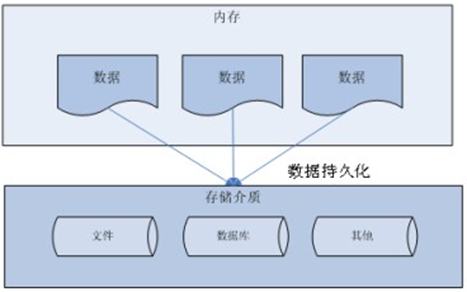
数据的持久化

  • 持久化 (persistence):把数据保存到可掉电式存储设备中以供之后使用。大多数情况下,特别是企业级应用,数据持久化意味着将内存中的数据保存到硬盘上加以 “固化”,而持久化的实现过程大多通过各种关系数据库来完成

  • 持久化的主要应用是将内存中的数据存储在关系型数据库中,当然也可以存储在磁盘文件、XML 数据文件中。
    1566741430592

Java 中的数据存储技术

  • 在 Java 中,数据库存取技术可分为如下几类:

    • JDBC 直接访问数据库。

    • JDO (Java Data Object ) 技术。

    • 第三方 O/R 工具,如 Hibernate,Mybatis 等。

  • JDBC 是 Java 访问数据库的基石,JDO、Hibernate、MyBatis 等只是更好的封装了 JDBC。

JDBC 介绍

  • JDBC (Java Database Connectivity) 是一个独立于特定数据库管理系统、通用的 SQL 数据库存取和操作的公共接口 (一组 API),定义了用来访问数据库的标准 Java 类库,然后 java.sqljavax.sql 这些 Java 的 API,可以使用这些类库以一种标准的方法、方便地访问数据库资源。
  • JDBC 为访问不同的数据库提供了一种统一的途径,为开发者屏蔽了一些细节问题。
  • JDBC 的目标是使 Java 程序员使用 JDBC 可以连接任何提供了 JDBC 驱动程序的数据库系统,这样就使得程序员无需对特定的数据库系统的特点有过多的了解,从而大大简化和加快了开发过程。
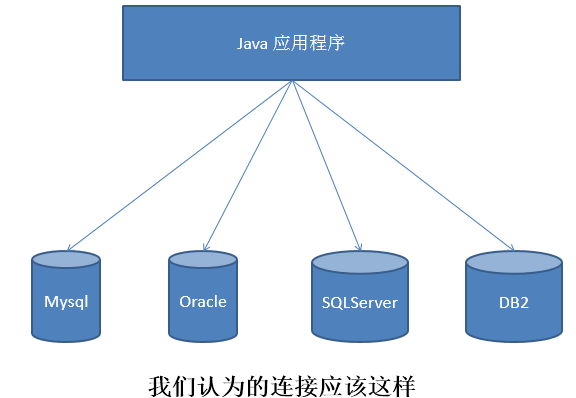
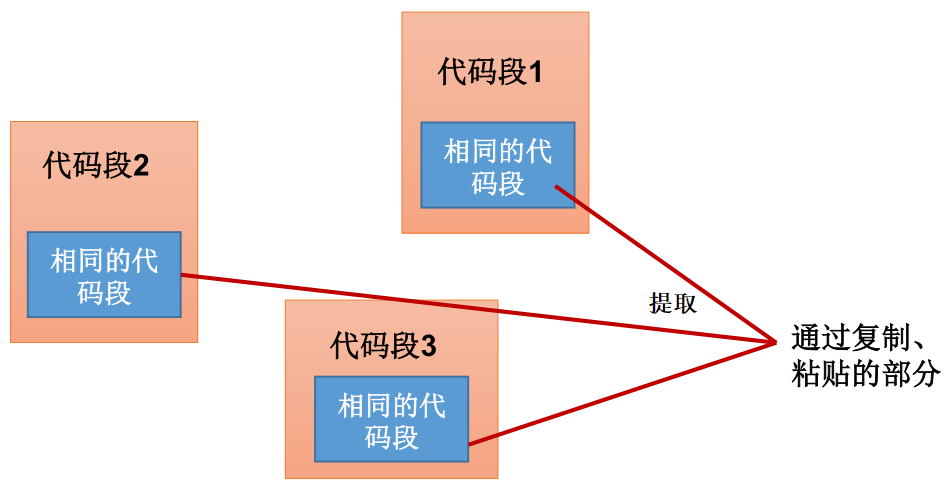
  • 如果没有 JDBC,那么 Java 程序访问数据库时是这样的:

1555575760234

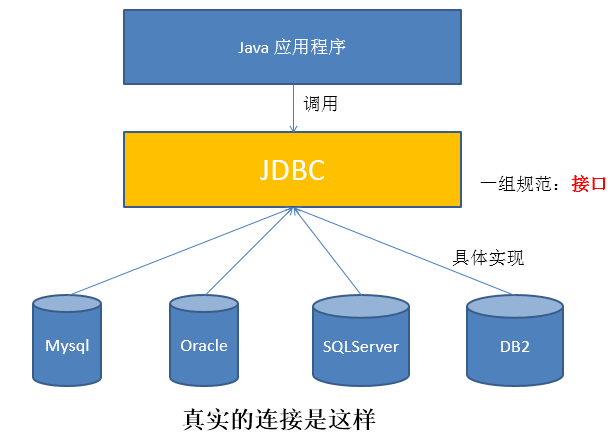
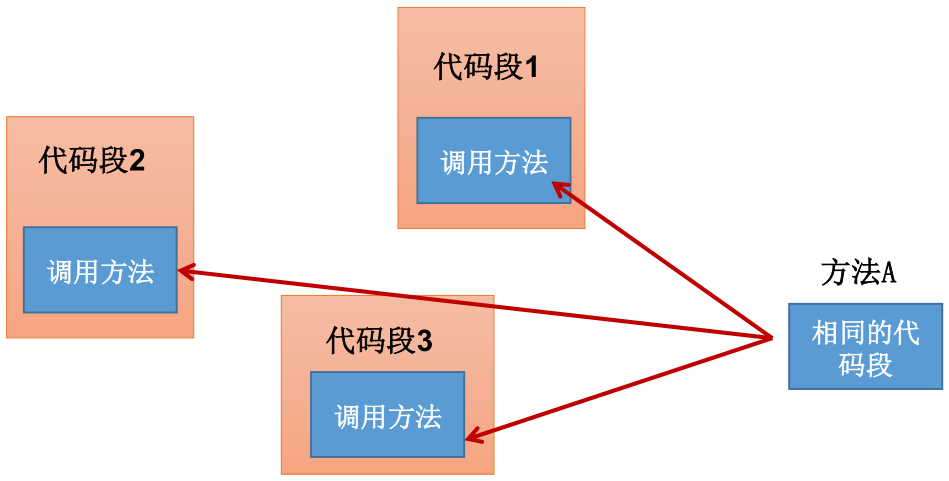
  • 有了 JDBC,Java 程序访问数据库时是这样的:

1555575981203

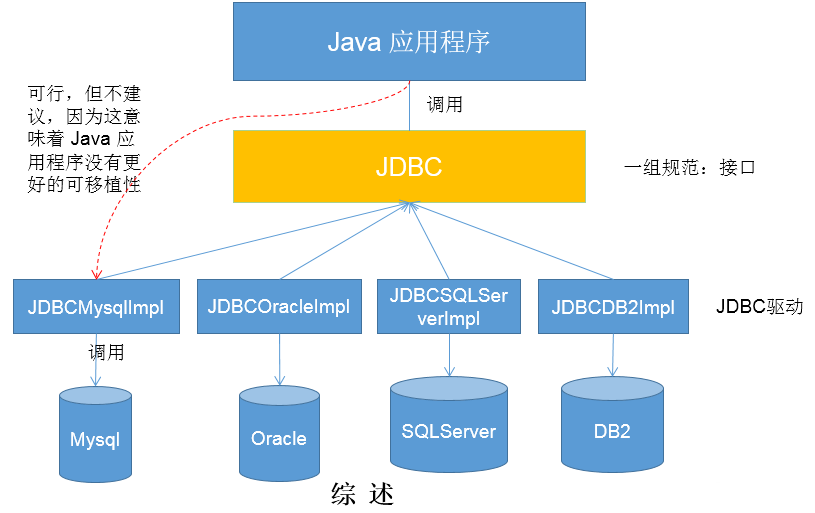
  • 总结如下:

1566741692804

JDBC 体系结构

  • JDBC 接口 (API) 包括两个层次:
    • 面向应用的 API:Java API,抽象接口,供应用程序开发人员使用 (连接数据库,执行 SQL 语句,获得结果)。
    • 面向数据库的 API:Java Driver API,供开发商开发数据库驱动程序用。

面向接口编程:

JDBC 是 sun 公司提供一套用于数据库操作的接口,Java 程序员只需要面向这套接口编程即可。

不同的数据库厂商,需要针对这套接口,提供不同实现。不同的实现的集合,即为不同数据库的驱动。

JDBC 程序编写步骤
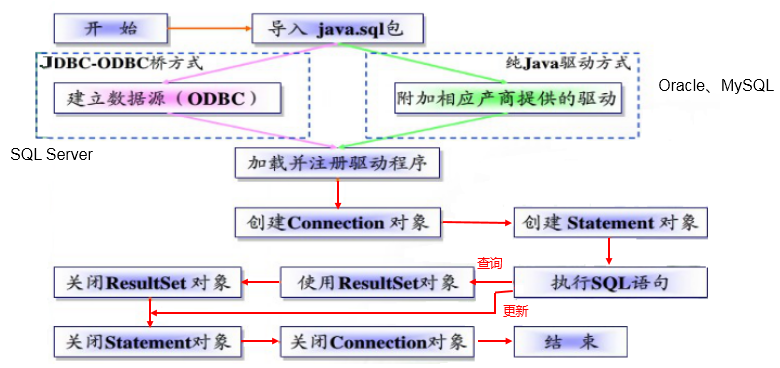
1565969323908

ODBC (Open Database Connectivity,开放式数据库连接),是微软在 Windows 平台下推出的。使用者在程序中只需要调用 ODBC API,由 ODBC 驱动程序将调用转换成为对特定的数据库的调用请求。

获取数据库连接

要素一:Driver 驱动

  • java.sql.Driver 接口是所有 JDBC 驱动程序需要实现的接口。这个接口是提供给数据库厂商使用的,不同数据库厂商提供不同的实现。

  • 在程序中不需要直接去访问实现了 Driver 接口的类,而是由驱动程序管理器类 (java.sql.DriverManager) 去调用这些 Driver 实现。

  • 第一步:Maven 添加驱动依赖。

    • MySQL:

      1
      2
      3
      4
      5
      <dependency>
      <groupId>mysql</groupId>
      <artifactId>mysql-connector-java</artifactId>
      <version>8.0.25</version>
      </dependency>
    • PostgreSQL:

      1
      2
      3
      4
      5
      <dependency>
      <groupId>org.postgresql</groupId>
      <artifactId>postgresql</artifactId>
      <version>42.2.10</version>
      </dependency>
  • 第二步:加载驱动。加载 JDBC 驱动需调用 Class 类的静态方法 forName(),并向其传递要加载的 JDBC 驱动的类名。

    • MySQL:

      1
      Class.forName("com.mysql.cj.jdbc.Driver");

      com.mysql.jdbc.Driver 已被舍弃。

    • PostgreSQL:

      1
      Class.forName("org.postgresql.Driver");
  • 第三步:注册驱动。DriverManager 类是驱动程序管理器类,负责管理驱动程序。

    • DriverManager 类使用 registerDriver() 注册驱动。

    • 通常不用显式调用 DriverManager 类的 registerDriver() 来注册驱动程序类的实例,因为 Driver 接口的驱动程序类 (即实现类) 都包含了一个静态代码块,在这个静态代码块中,会调用 DriverManager 类 的 registerDriver() 来注册自身的一个实例。下图是 MySQL 的 Driver 实现类的源码:

      1
      2
      3
      4
      5
      6
      7
      8
      9
      10
      11
      12
      13
      14
      15
      16
      17
      package com.mysql.cj.jdbc;

      import java.sql.DriverManager;
      import java.sql.SQLException;

      public class Driver extends NonRegisteringDriver implements java.sql.Driver {
      public Driver() throws SQLException {
      }

      static {
      try {
      DriverManager.registerDriver(new Driver());
      } catch (SQLException var1) {
      throw new RuntimeException("Can't register driver!");
      }
      }
      }

要素二:URL

  • JDBC URL 用于标识一个被注册的驱动程序,驱动程序管理器通过这个 URL 选择正确的驱动程序,从而建立到数据库的连接。

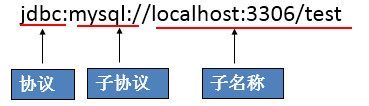
  • JDBC URL 的标准由三部分组成,各部分间用冒号分隔。

    • 格式:协议:子协议:子名称
    • 协议:JDBC URL 中的协议总是 jdbc。
    • 子协议:子协议用于标识一个数据库驱动程序。
    • 子名称:一种标识数据库的方法。子名称可以依不同的子协议而变化,用子名称的目的是为定位数据库提供足够的信息。包含主机名 (对应服务端的 ip 地址),端口号和数据库名
  • 举例:

    1555576477107

  • 几种常用数据库的 JDBC URL

    • MySQL 的连接 URL 的编写方式:

      • jdbc:mysql://主机名称:mysql服务端口号/数据库名称?参数=值&参数=值
        • jdbc:mysql://localhost:3306/atguigu
        • jdbc:mysql://localhost:3306/atguigu?useUnicode=true&characterEncoding=utf8
          • 如果 JDBC 程序与服务器端的字符集不一致,会导致乱码,此时,可以通过参数指定服务器端的字符集。
        • jdbc:mysql://localhost:3306/atguigu?user=root&password=123456
    • Oracle 9i 的连接 URL 的编写方式:

      • jdbc:oracle:thin:@主机名称:oracle服务端口号:数据库名称
        • jdbc:oracle:thin:@localhost:1521:atguigu
    • SQLServer 的连接 URL 的编写方式:

      • jdbc:sqlserver://主机名称:sqlserver服务端口号:DatabaseName=数据库名称

        • jdbc:sqlserver://localhost:1433:DatabaseName=atguigu

要素三:用户名和密码

  • user 和 password,可以用 属性名=属性值 的方式告诉数据库。
  • 可以调用 DriverManager 类的 getConnection() 方法建立到数据库的连接。

数据库连接方式举例

  • 连接方式一

    1
    2
    3
    4
    5
    6
    7
    8
    9
    10
    11
    12
    13
    14
    15
    16
    17
    18
    19
    20
    21
    public void testConnection1() {
    try {
    // 1.提供java.sql.Driver接口实现类的对象
    Driver driver = null;
    driver = new com.mysql.cj.jdbc.Driver();

    // 2.提供url,指明具体操作的数据
    String url = "jdbc:mysql://localhost:3306/test";

    // 3.提供Properties的对象,指明用户名和密码
    Properties info = new Properties();
    info.setProperty("user", "root");
    info.setProperty("password", "abc123");

    // 4.调用driver的connect(),获取连接
    Connection connection = driver.connect(url, info);
    System.out.println(connection);
    } catch (SQLException e) {
    e.printStackTrace();
    }
    }

    说明:上述代码中显式出现了第三方数据库的 API。

  • 连接方式二

    1
    2
    3
    4
    5
    6
    7
    8
    9
    10
    11
    12
    13
    14
    15
    16
    17
    18
    19
    20
    21
    22
    public void testConnection2() {
    try {
    // 1.实例化Driver
    String className = "com.mysql.cj.jdbc.Driver";
    Class<?> clazz = Class.forName(className);
    Driver driver = (Driver) clazz.newInstance();

    // 2.提供url,指明具体操作的数据
    String url = "jdbc:mysql://localhost:3306/test";

    // 3.提供Properties的对象,指明用户名和密码
    Properties info = new Properties();
    info.setProperty("user", "root");
    info.setProperty("password", "abc123");

    // 4.调用driver的connect(),获取连接
    Connection connection = driver.connect(url, info);
    System.out.println(connection);
    } catch (Exception e) {
    e.printStackTrace();
    }
    }

    说明:相较于方式一,这里使用反射实例化 Driver,不在代码中体现第三方数据库的 API,体现了面向接口编程思想。

  • 连接方式三

    1
    2
    3
    4
    5
    6
    7
    8
    9
    10
    11
    12
    13
    14
    15
    16
    17
    18
    19
    20
    21
    22
    public void testConnection3() {
    try {
    // 1.数据库连接的4个基本要素:
    String url = "jdbc:mysql://localhost:3306/test";
    String user = "root";
    String password = "abc123";
    String driverName = "com.mysql.cj.jdbc.Driver";

    // 2.实例化Driver
    Class<?> clazz = Class.forName(driverName);
    Driver driver = (Driver) clazz.newInstance();

    // 3.注册驱动
    DriverManager.registerDriver(driver);

    // 4.获取连接
    Connection connection = DriverManager.getConnection(url, user, password);
    System.out.println(connection);
    } catch (Exception e) {
    e.printStackTrace();
    }
    }

    说明:使用 DriverManager 实现数据库的连接。体会获取连接必要的 4 个基本要素。

  • 连接方式四

    1
    2
    3
    4
    5
    6
    7
    8
    9
    10
    11
    12
    13
    14
    15
    16
    17
    18
    19
    20
    21
    22
    23
    24
    25
    26
    27
    28
    29
    30
    31
    32
    public void testConnection4() {
    try {
    // 1.数据库连接的4个基本要素:
    String url = "jdbc:mysql://localhost:3306/test";
    String user = "root";
    String password = "abc123";
    String driverName = "com.mysql.cj.jdbc.Driver";

    // 2.加载驱动(实例化Driver和注册驱动)
    Class.forName(driverName);

    // Driver driver = (Driver) clazz.newInstance();
    // 3.注册驱动
    // DriverManager.registerDriver(driver);
    /*
    可以注释掉上述代码的原因,是因为在mysql的Driver类中声明有(其他数据库的Driver类有类似代码):
    static {
    try {
    DriverManager.registerDriver(new Driver());
    } catch (SQLException var1) {
    throw new RuntimeException("Can't register driver!");
    }
    }
    */

    // 4.获取连接
    Connection connection = DriverManager.getConnection(url, user, password);
    System.out.println(connection);
    } catch (Exception e) {
    e.printStackTrace();
    }
    }

    说明:不必显式的注册驱动。因为在 DriverManager 的源码中已经存在静态代码块,实现了驱动的注册。

  • 连接方式五 (最终版)

    1
    2
    3
    4
    5
    6
    7
    8
    9
    10
    11
    12
    13
    14
    15
    16
    17
    18
    19
    20
    @Test
    public void testConnection5() throws Exception {
    // 1.加载配置文件
    InputStream is = ConnectionTest.class.getClassLoader().getResourceAsStream("jdbc.properties");
    Properties pros = new Properties();
    pros.load(is);

    // 2.读取配置信息
    String user = pros.getProperty("user");
    String password = pros.getProperty("password");
    String url = pros.getProperty("url");
    String driverClass = pros.getProperty("driverClass");

    // 3.加载驱动
    Class.forName(driverClass);

    // 4.获取连接
    Connection connection = DriverManager.getConnection(url,user,password);
    System.out.println(connection);
    }
    • 配置文件 jdbc.properties 内容如下:

      1
      2
      3
      4
      user=root
      password=abc123
      url=jdbc:mysql://localhost:3306/test
      driverClass=com.mysql.cj.jdbc.Driver

      说明:使用配置文件的方式保存配置信息,在代码中加载配置文件。

    • 使用配置文件的好处:

      • 实现了代码和数据的分离,如果需要修改配置信息,直接在配置文件中修改,不需要深入代码。
      • 如果修改了配置信息,省去重新编译、打包的过程。

使用 PreparedStatement 实现 CRUD 操作

Java 操作和访问数据库

  • 数据库连接被用于向数据库服务器发送命令和 SQL 语句,并接受数据库服务器返回的结果。其实一个数据库连接就是一个 Socket 连接。

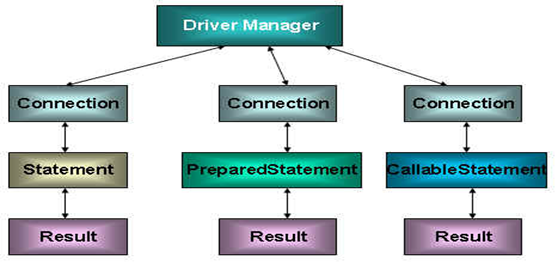
  • java.sql 包中有 3 个接口分别定义了对数据库的调用的不同方式:

    • Statement:用于执行静态 SQL 语句并返回它所生成结果的对象。
    • PrepatedStatement:SQL 语句被预编译并存储在此对象中,可以使用此对象多次高效地执行该语句。
    • CallableStatement:用于执行 SQL 存储过程。

    1566573842140

Java 与 SQL 对应数据类型转换表

Java 类型 SQL 类型
boolean BIT
byte TINYINT
short SMALLINT
int INTEGER
long BIGINT
String CHAR,VARCHAR,LONGVARCHAR
byte array BINARY , VAR BINARY
java.sql.Date DATE
java.sql.Time TIME
java.sql.Timestamp TIMESTAMP

使用 Statement 操作数据表的弊端

  • 通过调用 Connection 对象的 createStatement() 创建该对象。该对象用于执行静态的 SQL 语句,并且返回执行结果。

  • Statement 接口中定义了下列方法用于执行 SQL 语句:

    1
    2
    3
    4
    5
    // 执行更新操作INSERT、UPDATE、DELETE
    int executeUpdate(String sql) throws SQLException;

    // 执行查询操作SELECT
    ResultSet executeQuery(String sql) throws SQLException;
  • 但是,使用 Statement 操作数据表存在弊端:

    • 问题一:存在拼串操作,繁琐。
    • 问题二:存在 SQL 注入问题。
  • SQL 注入是利用某些系统没有对用户输入的数据进行充分的检查,而在用户输入的数据中注入非法的 SQL 语句段或命令,如:SELECT user, password FROM user_table WHERE user='a' OR 1 = ' AND password = ' OR '1' = '1'),从而利用系统的 SQL 引擎完成恶意行为的做法。

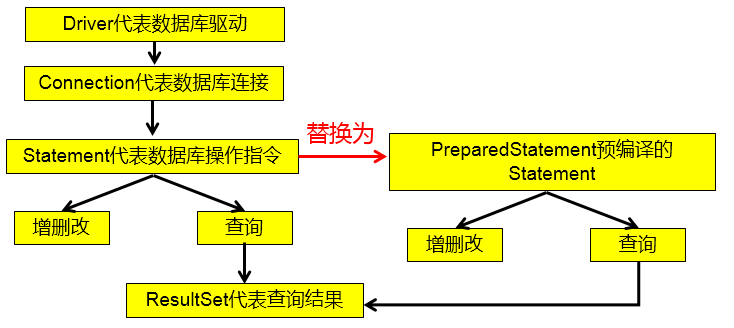
  • 对于 Java 而言,要防范 SQL 注入,只要用 PreparedStatement (从 Statement 扩展而来) 取代 Statement 就可以了。

  • 代码演示:

    1
    2
    3
    4
    5
    6
    7
    8
    9
    10
    11
    12
    13
    14
    15
    16
    17
    18
    19
    20
    21
    22
    23
    24
    25
    26
    27
    28
    29
    30
    31
    32
    33
    34
    35
    36
    37
    38
    39
    40
    41
    42
    43
    44
    45
    46
    47
    48
    49
    50
    51
    52
    53
    54
    55
    56
    57
    58
    59
    60
    61
    62
    63
    64
    65
    66
    67
    68
    69
    70
    71
    72
    73
    74
    75
    76
    77
    78
    79
    80
    81
    82
    83
    84
    85
    86
    87
    88
    89
    90
    91
    92
    93
    94
    95
    96
    97
    98
    99
    100
    101
    102
    103
    104
    105
    public class StatementTest {
    // 使用Statement实现对数据表的查询操作
    public static <T> T get(String sql, Class<T> clazz) {
    Connection connection = null;
    Statement statement = null;
    ResultSet resultSet = null;
    try {
    // 1.加载配置文件
    InputStream is = StatementTest.class.getClassLoader().getResourceAsStream("jdbc.properties");
    Properties properties = new Properties();
    properties.load(is);

    // 2.读取配置信息
    String user = properties.getProperty("user");
    String password = properties.getProperty("password");
    String url = properties.getProperty("url");
    String driverClass = properties.getProperty("driverClass");

    // 3.加载驱动
    Class.forName(driverClass);

    // 4.获取连接
    connection = DriverManager.getConnection(url, user, password);

    statement = connection.createStatement();

    resultSet = statement.executeQuery(sql);

    // 获取结果集的元数据
    ResultSetMetaData resultSetMetaData = resultSet.getMetaData();

    // 获取结果集的列数
    int columnCount = resultSetMetaData.getColumnCount();

    if (resultSet.next()) {

    T t = clazz.newInstance();

    for (int i = 0; i < columnCount; i++) {
    // 1.获取列的名称
    // String columnName = resultSetMetaData.getColumnName(i+1);

    // 1.获取列的别名
    String columnName = resultSetMetaData.getColumnLabel(i + 1);

    // 2. 根据列名获取对应数据表中的数据
    Object columnVal = resultSet.getObject(columnName);

    // 3. 将数据表中得到的数据,封装进对象
    Field field = clazz.getDeclaredField(columnName);
    field.setAccessible(true);
    field.set(t, columnVal);
    }
    return t;
    }
    } catch (Exception e) {
    e.printStackTrace();
    } finally {
    // 关闭资源
    if (resultSet != null) {
    try {
    resultSet.close();
    } catch (SQLException e) {
    e.printStackTrace();
    }
    }

    if (statement != null) {
    try {
    statement.close();
    } catch (SQLException e) {
    e.printStackTrace();
    }
    }

    if (connection != null) {
    try {
    connection.close();
    } catch (SQLException e) {
    e.printStackTrace();
    }
    }
    }
    return null;
    }

    public static void main(String[] args) {
    // 使用Statement的弊端:需要拼写sql语句,并且存在SQL注入的问题
    // 如何避免出现sql注入:只要用 PreparedStatement(从Statement扩展而来) 取代 Statement

    Scanner scanner = new Scanner(System.in);
    System.out.print("请输入用户名:");
    String user = scanner.nextLine();
    System.out.print("请输入密码:");
    String password = scanner.nextLine();
    // SELECT user,password FROM user_table WHERE user = '1' or ' AND password = '=1 or '1' = '1'
    String sql = "SELECT user,password FROM user_table WHERE user = '" + user + "' AND password = '" + password + "'";
    User returnUser = get(sql, User.class);
    if (returnUser != null) {
    System.out.println("登录成功");
    } else {
    System.out.println("用户名不存在或密码错误");
    }
    }
    }
  • 改进:

    1566569819744

PreparedStatement的使用

PreparedStatement介绍

  • 通过调用 Connection 对象的 preparedStatement(String sql) 获取 PreparedStatement 对象。

  • PreparedStatement 接口是 Statement 的子接口,它表示一条预编译过的 SQL 语句。

  • PreparedStatement 对象所代表的 SQL 语句中的参数用问号 (?) 来表示,调用 PreparedStatement 对象的 setXxx() (Xxx 表示数据类型) 来设置这些参数。setXxx() 有两个参数,第一个参数是要设置的 SQL 语句中的问号参数的索引 (从 1 开始),第二个是设置的 SQL 语句中的该索引位置对应参数的值。

PreparedStatement 与 Statement 的对比

  • 代码的可读性和可维护性。
  • PreparedStatement 通过预编译,可以防止 SQL 注入 (占位符的位置只是参数,SQL 的语意,在预编译时已经完成)。
  • PreparedStatement 可以操作 Blob 的数据,而 Statement 做不到。
  • PreparedStatement 能最大可能提高性能:
    • DBServer 会对预编译语句提供性能优化。因为预编译语句有可能被重复调用,所以语句在被 DBServer 的编译器编译后的执行代码被缓存下来,那么下次调用时只要是相同的预编译语句就不需要编译,只要将参数直接传入编译过的语句执行代码中就会得到执行。
    • 在 Statement 语句中,即使是相同操作,但因为数据内容不一样,所以整个语句本身不能匹配,没有缓存语句的意义。事实是没有数据库会对普通语句编译后的执行代码缓存。这样,每执行一次都要对传入的语句编译一次。
    • 对于新的 SQL 语句,需要经过语法检查,语义检查,翻译成二进制命令等操作,PreparedStatement 的语句是预编译的,会被缓存,就不再需要经过前面的那几个操作,从而提高效率。

使用 PreparedStatement 实现增、删、改操作

  • 常规:

    1
    2
    3
    4
    5
    6
    7
    8
    9
    10
    11
    12
    13
    14
    15
    16
    17
    18
    19
    20
    21
    22
    23
    24
    25
    26
    27
    28
    29
    30
    31
    32
    33
    34
    35
    36
    37
    38
    39
    40
    41
    42
    43
    44
    45
    46
    47
    48
    49
    50
    51
    52
    53
    54
    55
    56
    57
    58
    59
    60
    61
    public class PreparedStatementUpdateTest {
    // 向customers表中添加一条记录
    public static void testInsert() {
    Connection connection = null;
    PreparedStatement preparedStatement = null;
    try {
    // 1.读取配置文件中的4个基本信息
    InputStream is = ClassLoader.getSystemClassLoader().getResourceAsStream("jdbc.properties");
    Properties properties = new Properties();
    properties.load(is);

    String user = properties.getProperty("user");
    String password = properties.getProperty("password");
    String url = properties.getProperty("url");
    String driverClass = properties.getProperty("driverClass");

    // 2.加载驱动
    Class.forName(driverClass);

    // 3.获取连接
    connection = DriverManager.getConnection(url, user, password);

    // 4.预编译sql语句,返回PreparedStatement的实例
    String sql = "insert into customers(name, email, birth) values(?, ?, ?)";// ?: 占位符
    preparedStatement = connection.prepareStatement(sql);

    // 5.填充占位符
    preparedStatement.setString(1, "哪吒");
    preparedStatement.setString(2, "nezha@gmail.com");
    SimpleDateFormat sdf = new SimpleDateFormat("yyyy-MM-dd");
    java.util.Date date = sdf.parse("1000-01-01");
    preparedStatement.setDate(3, new Date(date.getTime()));// java.util.Date与java.sql.Date转换

    // 6.执行操作
    preparedStatement.execute();
    } catch (Exception e) {
    e.printStackTrace();
    } finally {
    // 7.资源的关闭
    try {
    if (preparedStatement != null) {
    preparedStatement.close();
    }
    } catch (SQLException e) {
    e.printStackTrace();
    }

    try {
    if (connection != null) {
    connection.close();
    }
    } catch (SQLException e) {
    e.printStackTrace();
    }
    }
    }

    public static void main(String[] args) {
    testInsert();
    }
    }
  • 通用:

    1
    2
    3
    4
    5
    6
    7
    8
    9
    10
    11
    12
    13
    14
    15
    16
    17
    18
    19
    20
    21
    22
    23
    24
    25
    26
    27
    28
    29
    30
    31
    32
    33
    34
    35
    36
    37
    38
    39
    40
    41
    42
    43
    44
    45
    46
    47
    48
    49
    50
    51
    52
    53
    54
    55
    56
    57
    58
    59
    60
    61
    62
    63
    64
    65
    public class JDBCUtils {
    // 使用throws抛出异常,在真正用到Connection的地方,统一使用try/catch,防止获取连接时出现异常,导致Connection为空但代码继续执行
    public static Connection getConnection() throws Exception {
    // 1.读取配置文件中的4个基本信息
    InputStream is = ClassLoader.getSystemClassLoader().getResourceAsStream("jdbc.properties");
    Properties properties = new Properties();
    properties.load(is);

    String user = properties.getProperty("user");
    String password = properties.getProperty("password");
    String url = properties.getProperty("url");
    String driverClass = properties.getProperty("driverClass");

    // 2.加载驱动
    Class.forName(driverClass);

    // 3.获取连接
    Connection connection = DriverManager.getConnection(url, user, password);
    return connection;
    }

    public static void closeResource(Connection connection, Statement statement) {
    if (statement != null) {
    try {
    statement.close();
    } catch (SQLException e) {
    e.printStackTrace();
    }
    }

    if (connection != null) {
    try {
    connection.close();
    } catch (SQLException e) {
    e.printStackTrace();
    }
    }
    }

    public static void closeResource(Connection connection, Statement statement, ResultSet resultSet) {
    if (resultSet != null) {
    try {
    resultSet.close();
    } catch (SQLException e) {
    e.printStackTrace();
    }
    }

    if (statement != null) {
    try {
    statement.close();
    } catch (SQLException e) {
    e.printStackTrace();
    }
    }

    if (connection != null) {
    try {
    connection.close();
    } catch (SQLException e) {
    e.printStackTrace();
    }
    }
    }
    }
    1
    2
    3
    4
    5
    6
    7
    8
    9
    10
    11
    12
    13
    14
    15
    16
    17
    18
    19
    20
    21
    22
    23
    24
    25
    26
    27
    28
    29
    30
    31
    32
    33
    34
    35
    36
    37
    38
    39
    40
    41
    42
    43
    44
    45
    46
    public class PreparedStatementUpdateTest {
    // 通用的增删改操作
    public static void update(String sql, Object... args) {// sql中占位符的个数与可变形参的长度相同!
    Connection connection = null;
    PreparedStatement preparedStatement = null;
    try {
    // 1.获取数据库的连接
    connection = JDBCUtils.getConnection();

    // 2.预编译sql语句,返回PreparedStatement的实例
    preparedStatement = connection.prepareStatement(sql);

    // 3.填充占位符
    for (int i = 0; i < args.length; i++) {
    preparedStatement.setObject(i + 1, args[i]);
    }

    // 4.执行
    /*
    * 方式一,preparedStatement.execute():
    * 如果执行的是查询操作,有返回结果,则此方法返回true;
    * 如果执行的是增、删、改操作,没有返回结果,则此方法返回false。
    */
    // preparedStatement.execute();
    /*
    * 方式二,preparedStatement.executeUpdate():
    * 返回sql语句执行过后,对数据库影响的行数,可以根据返回值,判断增、删、查操作的结果
    */
    preparedStatement.executeUpdate();
    } catch (Exception e) {
    e.printStackTrace();
    } finally {
    // 5.资源的关闭
    JDBCUtils.closeResource(connection, preparedStatement);
    }
    }

    public static void main(String[] args) {
    // String sql = "delete from customers where id = ?";
    // update(sql,3);

    // order是数据库关键字,作为表名,为防止错误,添加``符号
    String sql = "update `order` set order_name = ? where order_id = ?";
    update(sql, "DD", "2");
    }
    }

使用 PreparedStatement 实现查询操作

  • 常规:

    1
    2
    3
    4
    5
    6
    7
    8
    9
    10
    11
    12
    13
    14
    15
    16
    17
    18
    19
    20
    21
    22
    23
    24
    25
    26
    27
    28
    29
    30
    31
    32
    33
    34
    35
    36
    37
    38
    39
    40
    41
    42
    43
    44
    45
    46
    47
    48
    49
    50
    51
    52
    53
    54
    55
    56
    57
    58
    59
    60
    61
    62
    /*
    * ORM编程思想---Object Relational Mapping
    * 一个数据表对应一个Java类
    * 表中的一条记录对应Java类的一个对象
    * 表中的一个字段对应Java类的一个属性
    */
    public class Customer {
    private int id;

    private String name;

    private String email;

    private Date birth;// java.sql.Date

    public Customer() {
    }

    public Customer(int id, String name, String email, Date birth) {
    this.id = id;
    this.name = name;
    this.email = email;
    this.birth = birth;
    }

    public int getId() {
    return id;
    }

    public void setId(int id) {
    this.id = id;
    }

    public String getName() {
    return name;
    }

    public void setName(String name) {
    this.name = name;
    }

    public String getEmail() {
    return email;
    }

    public void setEmail(String email) {
    this.email = email;
    }

    public Date getBirth() {
    return birth;
    }

    public void setBirth(Date birth) {
    this.birth = birth;
    }

    @Override
    public String toString() {
    return "Customer [id=" + id + ", name=" + name + ", email=" + email + ", birth=" + birth + "]";
    }
    }
    1
    2
    3
    4
    5
    6
    7
    8
    9
    10
    11
    12
    13
    14
    15
    16
    17
    18
    19
    20
    21
    22
    23
    24
    25
    26
    27
    28
    29
    30
    31
    32
    33
    34
    35
    36
    37
    38
    39
    40
    41
    42
    43
    44
    45
    46
    47
    48
    49
    50
    /**
    * 针对于customers表的查询操作
    */
    public class CustomerForQuery {
    public static void testQuery1() {
    Connection connection = null;
    PreparedStatement preparedStatement = null;
    ResultSet resultSet = null;
    try {
    connection = JDBCUtils.getConnection();

    String sql = "select id, name, email, birth from customers where id = ?";
    preparedStatement = connection.prepareStatement(sql);
    preparedStatement.setObject(1, 1);

    // 执行,并返回结果集
    resultSet = preparedStatement.executeQuery();

    // 处理结果集
    // next():判断结果集的下一条是否有数据,如果有数据返回true,并且指针下移;
    // 如果没有数据返回false,指针不会下移。
    if (resultSet.next()) {
    // 获取当前这条数据的各个字段值
    int id = resultSet.getInt(1);
    String name = resultSet.getString(2);
    String email = resultSet.getString(3);
    Date birth = resultSet.getDate(4);

    // 方式一:
    // System.out.println("id = " + id + ",name = " + name + ",email = " + email + ",birth = " + birth);

    // 方式二:
    // Object[] data = new Object[]{id, name, email, birth};

    // 方式三:将数据封装为一个对象(推荐)
    Customer customer = new Customer(id, name, email, birth);
    System.out.println(customer);
    }
    } catch (Exception e) {
    e.printStackTrace();
    } finally {
    // 关闭资源
    JDBCUtils.closeResource(connection, preparedStatement, resultSet);
    }
    }

    public static void main(String[] args) {
    testQuery1();
    }
    }
  • 通用:

    • 类的属性和表的字段相同:

      1
      2
      3
      4
      5
      6
      7
      8
      9
      10
      11
      12
      13
      14
      15
      16
      17
      18
      19
      20
      21
      22
      23
      24
      25
      26
      27
      28
      29
      30
      31
      32
      33
      34
      35
      36
      37
      38
      39
      40
      41
      42
      43
      44
      45
      46
      47
      48
      49
      50
      51
      52
      53
      54
      55
      56
      57
      58
      59
      60
      61
      62
      /**
      * 针对于customers表的查询操作
      */
      public class CustomerForQuery {
      /**
      * 针对customers表的通用的查询操作
      */
      public static Customer queryForCustomers(String sql, Object... args) {
      Connection connection = null;
      PreparedStatement preparedStatement = null;
      ResultSet resultSet = null;
      try {
      connection = JDBCUtils.getConnection();

      preparedStatement = connection.prepareStatement(sql);
      for (int i = 0; i < args.length; i++) {
      preparedStatement.setObject(i + 1, args[i]);
      }

      resultSet = preparedStatement.executeQuery();
      // 获取结果集的元数据:ResultSetMetaData
      ResultSetMetaData resultSetMetaData = resultSet.getMetaData();
      // 通过ResultSetMetaData获取结果集中的列数
      int columnCount = resultSetMetaData.getColumnCount();

      // 只返回一条数据q2w
      if (resultSet.next()) {
      Customer customer = new Customer();
      // 处理结果集一行数据中的每一个列
      for (int i = 0; i < columnCount; i++) {
      // 获取列值
      Object columnValue = resultSet.getObject(i + 1);

      // 获取每个列的列名
      // String columnName = resultSetMetaData.getColumnName(i + 1);
      String columnLabel = resultSetMetaData.getColumnLabel(i + 1);

      // 通过反射:给customer对象指定的columnName属性,赋值为columnValue
      Field field = Customer.class.getDeclaredField(columnLabel);
      field.setAccessible(true);
      field.set(customer, columnValue);
      }
      return customer;
      }
      } catch (Exception e) {
      e.printStackTrace();
      } finally {
      JDBCUtils.closeResource(connection, preparedStatement, resultSet);
      }
      return null;
      }

      public static void main(String[] args) {
      String sql = "select id, name, email, birth from customers where id = ?";
      Customer customer = queryForCustomers(sql, 13);
      System.out.println(customer);

      sql = "select id, name, email, birth from customers where id = ? and name = ?";
      Customer customer1 = queryForCustomers(sql, 10, "杰杰");
      System.out.println(customer1);
      }
      }
    • 类的属性和表的字段不同:

      1
      2
      3
      4
      5
      6
      7
      8
      9
      10
      11
      12
      13
      14
      15
      16
      17
      18
      19
      20
      21
      22
      23
      24
      25
      26
      27
      28
      29
      30
      31
      32
      33
      34
      35
      36
      37
      38
      39
      40
      41
      42
      43
      44
      45
      46
      47
      public class Order {
      private int orderId;

      private String orderName;

      private Date orderDate;// java.sql.Date

      public Order() {
      super();
      }

      public Order(int orderId, String orderName, Date orderDate) {
      super();
      this.orderId = orderId;
      this.orderName = orderName;
      this.orderDate = orderDate;
      }

      public int getOrderId() {
      return orderId;
      }

      public void setOrderId(int orderId) {
      this.orderId = orderId;
      }

      public String getOrderName() {
      return orderName;
      }

      public void setOrderName(String orderName) {
      this.orderName = orderName;
      }

      public Date getOrderDate() {
      return orderDate;
      }

      public void setOrderDate(Date orderDate) {
      this.orderDate = orderDate;
      }

      @Override
      public String toString() {
      return "Order [orderId=" + orderId + ", orderName=" + orderName + ", orderDate=" + orderDate + "]";
      }
      }
      1
      2
      3
      4
      5
      6
      7
      8
      9
      10
      11
      12
      13
      14
      15
      16
      17
      18
      19
      20
      21
      22
      23
      24
      25
      26
      27
      28
      29
      30
      31
      32
      33
      34
      35
      36
      37
      38
      39
      40
      41
      42
      43
      44
      45
      46
      47
      48
      49
      50
      51
      52
      53
      54
      55
      56
      57
      58
      59
      60
      61
      62
      63
      64
      /**
      * 针对order表的通用的查询操作
      */
      public class OrderForQuery {
      /*
      * 针对于表的字段名与类的属性名不相同的情况:
      * 1.在声明sql时,使用类的属性名来命名字段的别名
      * 2.使用ResultSetMetaData时,需要使用getColumnLabel()来替换getColumnName()获取列的别名
      * 说明:如果sql中没有给字段起别名,getColumnLabel()获取的就是列名
      */

      /**
      * 针对于order表的通用的查询操作
      */
      public static Order orderForQuery(String sql, Object... args) {
      Connection connection = null;
      PreparedStatement preparedStatement = null;
      ResultSet resultSet = null;
      try {
      connection = JDBCUtils.getConnection();

      preparedStatement = connection.prepareStatement(sql);
      for (int i = 0; i < args.length; i++) {
      preparedStatement.setObject(i + 1, args[i]);
      }

      // 执行,获取结果集
      resultSet = preparedStatement.executeQuery();
      // 获取结果集的元数据
      ResultSetMetaData resultSetMetaData = resultSet.getMetaData();
      // 获取列数
      int columnCount = resultSetMetaData.getColumnCount();
      if (resultSet.next()) {
      Order order = new Order();
      for (int i = 0; i < columnCount; i++) {
      // 获取每个列的列值
      Object columnValue = resultSet.getObject(i + 1);
      // 通过ResultSetMetaData
      // 获取列的列名:getColumnName()---不推荐使用
      // 获取列的别名:getColumnLabel()
      // String columnName = resultSetMetaData.getColumnName(i + 1);
      String columnLabel = resultSetMetaData.getColumnLabel(i + 1);

      // 通过反射,将对象指定名columnName的属性赋值为指定的值columnValue
      Field field = Order.class.getDeclaredField(columnLabel);
      field.setAccessible(true);
      field.set(order, columnValue);
      }
      return order;
      }
      } catch (Exception e) {
      e.printStackTrace();
      } finally {
      JDBCUtils.closeResource(connection, preparedStatement, resultSet);
      }
      return null;
      }

      public static void main(String[] args) {
      String sql = "select order_id orderId, order_name orderName, order_date orderDate from `order` where order_id = ?";
      Order order = orderForQuery(sql, 1);
      System.out.println(order);
      }
      }
    • 不同表:

      1
      2
      3
      4
      5
      6
      7
      8
      9
      10
      11
      12
      13
      14
      15
      16
      17
      18
      19
      20
      21
      22
      23
      24
      25
      26
      27
      28
      29
      30
      31
      32
      33
      34
      35
      36
      37
      38
      39
      40
      41
      42
      43
      44
      45
      46
      47
      48
      49
      50
      51
      52
      53
      54
      55
      56
      57
      58
      59
      60
      61
      62
      63
      64
      65
      66
      67
      68
      69
      70
      71
      72
      73
      74
      75
      76
      77
      78
      79
      80
      81
      82
      83
      84
      85
      86
      87
      88
      89
      90
      91
      92
      93
      94
      95
      96
      97
      98
      99
      100
      101
      102
      103
      104
      105
      106
      107
      108
      public class PreparedStatementQueryTest {
      // 返回一个
      public static <T> T getInstance(Class<T> clazz, String sql, Object... args) {
      Connection connection = null;
      PreparedStatement preparedStatement = null;
      ResultSet resultSet = null;
      try {
      connection = JDBCUtils.getConnection();

      preparedStatement = connection.prepareStatement(sql);
      for (int i = 0; i < args.length; i++) {
      preparedStatement.setObject(i + 1, args[i]);
      }

      resultSet = preparedStatement.executeQuery();
      // 获取结果集的元数据
      ResultSetMetaData resultSetMetaData = resultSet.getMetaData();
      // 通过ResultSetMetaData获取结果集中的列数
      int columnCount = resultSetMetaData.getColumnCount();

      if (resultSet.next()) {
      T t = clazz.newInstance();
      // 处理结果集一行数据中的每一个列
      for (int i = 0; i < columnCount; i++) {
      // 获取列值
      Object columnValue = resultSet.getObject(i + 1);
      // 获取每个列的别名
      String columnLabel = resultSetMetaData.getColumnLabel(i + 1);

      // 通过反射,给t对象指定的columnName属性,赋值为columnValue
      Field field = clazz.getDeclaredField(columnLabel);
      field.setAccessible(true);
      field.set(t, columnValue);
      }
      return t;
      }
      } catch (Exception e) {
      e.printStackTrace();
      } finally {
      JDBCUtils.closeResource(connection, preparedStatement, resultSet);
      }
      return null;
      }

      // 返回一个集合
      public static <T> List<T> getForList(Class<T> clazz, String sql, Object... args) {
      Connection connection = null;
      PreparedStatement preparedStatement = null;
      ResultSet resultSet = null;
      try {
      connection = JDBCUtils.getConnection();

      preparedStatement = connection.prepareStatement(sql);
      for (int i = 0; i < args.length; i++) {
      preparedStatement.setObject(i + 1, args[i]);
      }

      resultSet = preparedStatement.executeQuery();
      // 获取结果集的元数据
      ResultSetMetaData resultSetMetaData = resultSet.getMetaData();
      // 通过ResultSetMetaData获取结果集中的列数
      int columnCount = resultSetMetaData.getColumnCount();
      // 创建集合对象
      List<T> list = new ArrayList<>();
      while (resultSet.next()) {
      T t = clazz.newInstance();
      // 处理结果集一行数据中的每一个列: 给t对象指定的属性赋值
      for (int i = 0; i < columnCount; i++) {
      // 获取列值
      Object columnValue = resultSet.getObject(i + 1);
      // 获取每个列的别名
      String columnLabel = resultSetMetaData.getColumnLabel(i + 1);

      // 给t对象指定的columnName属性,赋值为columnValue:通过反射
      Field field = clazz.getDeclaredField(columnLabel);
      field.setAccessible(true);
      field.set(t, columnValue);
      }
      list.add(t);
      }
      return list;
      } catch (Exception e) {
      e.printStackTrace();
      } finally {
      JDBCUtils.closeResource(connection, preparedStatement, resultSet);
      }
      return null;
      }

      public static void main(String[] args) {
      String sql = "select id, name, email, birth from customers where id = ?";
      Customer customer = getInstance(Customer.class, sql, 12);
      System.out.println(customer);

      String sql1 = "select order_id orderId, order_name orderName from `order` where order_id = ?";
      Order order = getInstance(Order.class, sql1, 1);
      System.out.println(order);


      String sql2 = "select id, name, email, birth from customers where id < ?";
      List<Customer> list = getForList(Customer.class, sql2, 12);
      list.forEach(System.out::println);

      String sql3 = "select order_id orderId, order_name orderName from `order`";
      List<Order> orderList = getForList(Order.class, sql3);
      orderList.forEach(System.out::println);
      }
      }

ResultSet 与 ResultSetMetaData 的说明

ResultSet

  • 查询数据库时,需要调用 PreparedStatement 的 executeQuery(),查询结果是一个 ResultSet 对象。

  • ResultSet 对象以逻辑表格的形式封装了执行数据库操作的结果集,ResultSet 接口由数据库厂商提供实现。

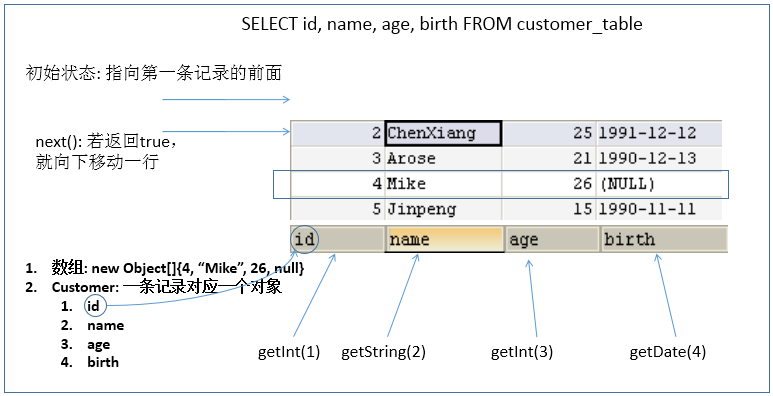
  • ResultSet 返回的实际上就是一张数据表。有一个指针指向数据表的第一条记录的前面。

  • ResultSet 对象维护了一个指向当前数据行的游标,初始的时候,游标在第一行之前,可以通过 ResultSet 对象的 next() 移动到下一行。调用 next() 时会检测下一行是否有效,若有效,该方法返回 true,且指针下移。相当于 Iterator 对象的 hasNext()next() 两个方法的结合体。

    1555580152530

  • 当指针指向一行时,可以通过调用 getXxx(int index)getXxx(int columnName) 获取每一列的值。

    • 例如:getInt(1)getString("name")
    • 注意:Java 与数据库交互涉及到的相关 Java API 中的索引都从 1 开始。

ResultSetMetaData

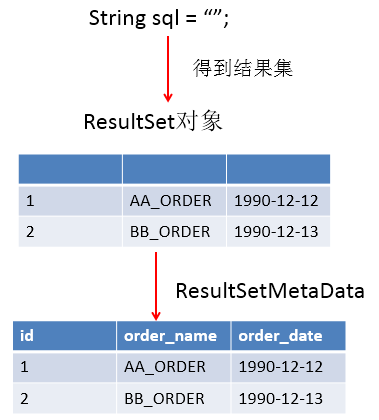
  • ResultSetMetaData 是描述 ResultSet 的元数据,可用于获取 ResultSet 对象中列的类型和属性信息。

  • 通过 ResultSet 的 getMetaData() 获取 ResultSetMetaData。

    1555579494691

    1555579816884

  • 常用方法:

    • getColumnCount():返回当前 ResultSet 对象中的列数。
    • getColumnName(int column):获取指定列的名称,不推荐使用。
    • getColumnLabel(int column):获取指定列的别名,如果没有别名,则返回该列的名称。
    • getColumnTypeName(int column):检索指定列的数据库特定的类型名称。
    • getColumnDisplaySize(int column):指示指定列的最大标准宽度,以字符为单位。
    • isNullable(int column):指示指定列中的值是否可以为 null。
    • isAutoIncrement(int column):指示是否自动为指定列进行编号,这样这些列仍然是只读的。

资源的释放

  • 释放 ResultSet,Statement,Connection。
  • 数据库连接 (Connection) 是非常稀有的资源,用完后必须马上释放,如果 Connection 不能及时正确的关闭将导致系统宕机。Connection 的使用原则是尽量晚创建,尽量早的释放。
  • 应该在 finally 中关闭,保证及时其他代码出现异常,资源也一定能被关闭。

JDBC API 使用小结

  • 两种思想:

    • 面向接口编程的思想

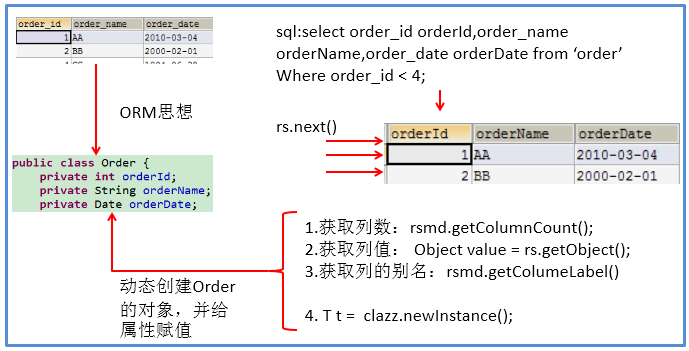
    • ORM 思想 (Object Relational Mapping)

      • 一个数据表对应一个 Java 类。
      • 表中的一条记录对应 Java 类的一个对象。
      • 表中的一个字段对应 Java 类的一个属性。

    SQL 应结合列名和表的属性名来写,必要时需要起别名。

  • 两种技术:

    • JDBC 结果集的元数据 ResultSetMetaData。
      • 获取列数:getColumnCount()
      • 获取列的别名:getColumnLabel()
    • 通过反射,创建指定类的对象,获取指定的属性并赋值。

操作 BLOB 类型字段

MySQL BLOB 类型

  • MySQL 中,BLOB 是一个二进制大型对象,是一个可以存储大量数据的容器,它能容纳不同大小的数据。

  • 插入 BLOB 类型的数据必须使用 PreparedStatement,因为 BLOB 类型的数据无法使用字符串拼接来写。

  • MySQL 的四种 BLOB 类型 (除了在存储的最大信息量上不同外,它们是等同的):
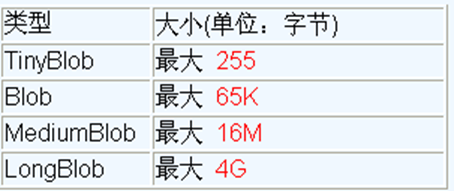
    1555581069798

  • 实际使用中根据需要存入的数据大小定义不同的 BLOB 类型。

  • 需要注意的是:如果存储的文件过大,数据库的性能会下降。

  • 如果在指定了相关的 BLOB 类型以后,还报错:xxx too large,原因是文件大小超过默认存储。

    1
    com.mysql.cj.jdbc.exceptions.PacketTooBigException: Packet for query is too large (6,218,041 > 4,194,304). You can change this value on the server by setting the 'max_allowed_packet' variable.
    • 在 MySQL 的安装目录下,查找 my.ini 文件,并添加如下的配置参数: max_allowed_packet=16M,设置存储大小。注意:修改了 my.ini 文件之后,需要重新启动 MySQL 服务。

      1
      max_allowed_packet=16M
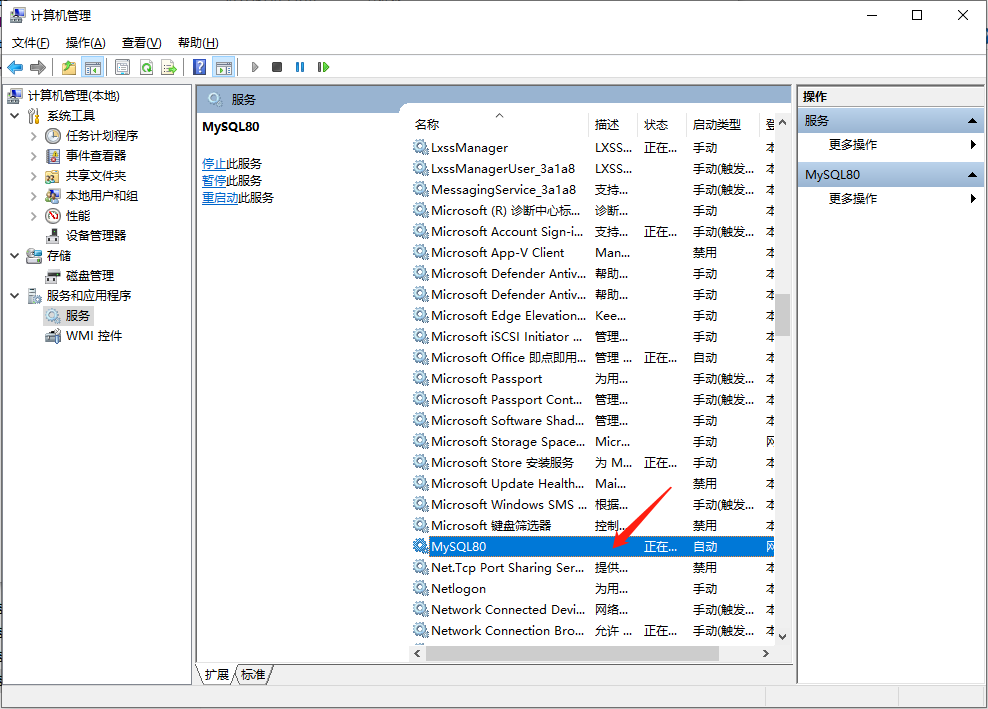
      image-20210630172127799
    • Windows 系统下,在服务中,右键点击属性,可以查找到 my.ini 文件的位置:
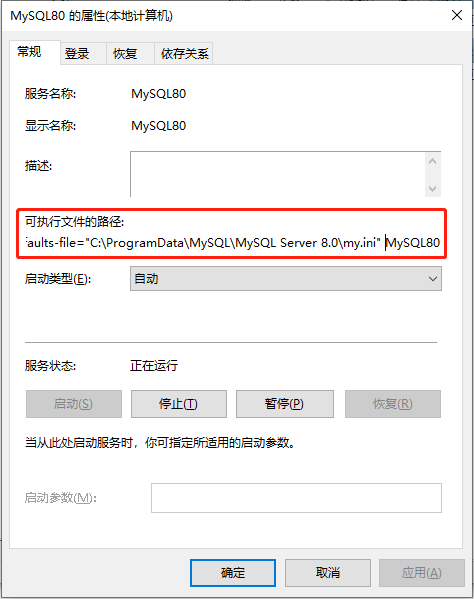
      image-20210630172332037

    • 在 cmd 中,也可以查看 max_allowed_packet 配置:

      1
      2
      3
      4
      5
      6
      7
      8
      9
      10
      11
      12
      13
      14
      15
      16
      17
      18
      19
      20
      21
      22
      23
      24
      25
      C:\Users\XiSun>mysql -u root -p
      Enter password: ***************
      Welcome to the MySQL monitor. Commands end with ; or \g.
      Your MySQL connection id is 8
      Server version: 8.0.25 MySQL Community Server - GPL

      Copyright (c) 2000, 2021, Oracle and/or its affiliates.

      Oracle is a registered trademark of Oracle Corporation and/or its
      affiliates. Other names may be trademarks of their respective
      owners.

      Type 'help;' or '\h' for help. Type '\c' to clear the current input statement.

      mysql> show VARIABLES like '%max_allowed_packet%';
      +---------------------------+------------+
      | Variable_name | Value |
      +---------------------------+------------+
      | max_allowed_packet | 16777216 |
      | mysqlx_max_allowed_packet | 67108864 |
      | slave_max_allowed_packet | 1073741824 |
      +---------------------------+------------+
      3 rows in set, 1 warning (0.01 sec)

      mysql>

      设置:set global max_allowed_packet = 2*1024*1024*10;

      退出 MySQL:quit

      重启:service mysqld restart

数据表中插入 BLOB 类型字段

1
2
3
4
5
6
7
8
9
10
11
12
13
14
15
16
17
18
19
20
21
22
23
24
25
26
27
28
29
30
31
32
33
public class BlobTest {
// 向数据表customers中插入Blob类型的字段
public static void testInsert() {
Connection connection = null;
PreparedStatement preparedStatement = null;
FileInputStream fis = null;
try {
connection = JDBCUtils.getConnection();

String sql = "insert into customers(name, email, birth, photo) values(?, ?, ?, ?)";
preparedStatement = connection.prepareStatement(sql);
preparedStatement.setObject(1, "袁浩");
preparedStatement.setObject(2, "yuan@qq.com");
preparedStatement.setObject(3, "1992-09-08");
fis = new FileInputStream(new File("E:/test.png"));
preparedStatement.setBlob(4, fis);

preparedStatement.execute();
} catch (Exception exception) {
exception.printStackTrace();
} finally {
try {
if (fis != null) {
fis.close();
}
} catch (IOException exception) {
exception.printStackTrace();
}

JDBCUtils.closeResource(connection, preparedStatement);
}
}
}

数据表中修改 BLOB 类型字段

1
2
3
4
5
6
7
8
9
10
11
12
13
14
15
16
17
18
19
20
21
22
23
24
25
26
27
28
29
30
31
public class BlobTest {
// 向数据表customers中修改Blob类型的字段
public static void testUpdate() {
Connection connection = null;
PreparedStatement preparedStatement = null;
FileInputStream fis = null;
try {
connection = JDBCUtils.getConnection();

String sql = "update customers set photo = ? where id = ?";
preparedStatement = connection.prepareStatement(sql);
fis = new FileInputStream(new File("test.png"));
preparedStatement.setBlob(1, fis);
preparedStatement.setObject(2, 20);

preparedStatement.execute();
} catch (Exception exception) {
exception.printStackTrace();
} finally {
try {
if (fis != null) {
fis.close();
}
} catch (IOException exception) {
exception.printStackTrace();
}

JDBCUtils.closeResource(connection, preparedStatement);
}
}
}

数据表中读取 BLOB 类型字段

1
2
3
4
5
6
7
8
9
10
11
12
13
14
15
16
17
18
19
20
21
22
23
24
25
26
27
28
29
30
31
32
33
34
35
36
37
38
39
40
41
42
43
44
45
46
47
48
49
50
51
52
53
54
55
56
57
58
59
60
61
62
63
public class BlobTest {
// 查询数据表customers中Blob类型的字段
public static void testQuery() {
Connection connection = null;
PreparedStatement preparedStatement = null;
InputStream is = null;
FileOutputStream fos = null;
ResultSet resultSet = null;
try {
connection = JDBCUtils.getConnection();
String sql = "select id, name, email, birth, photo from customers where id = ?";
preparedStatement = connection.prepareStatement(sql);
preparedStatement.setInt(1, 20);
resultSet = preparedStatement.executeQuery();
if (resultSet.next()) {
// 方式一:
// int id = resultSet.getInt(1);
// String name = resultSet.getString(2);
// String email = resultSet.getString(3);
// Date birth = resultSet.getDate(4);

// 方式二:
int id = resultSet.getInt("id");
String name = resultSet.getString("name");
String email = resultSet.getString("email");
Date birth = resultSet.getDate("birth");

Customer customer = new Customer(id, name, email, birth);
System.out.println(customer);

// Blob类型的字段需要下载下来,以文件的方式保存在本地
Blob photo = resultSet.getBlob("photo");
is = photo.getBinaryStream();
fos = new FileOutputStream("test2.jpg");
byte[] buffer = new byte[1024];
int len;
while ((len = is.read(buffer)) != -1) {
fos.write(buffer, 0, len);
}
}
} catch (Exception e) {
e.printStackTrace();
} finally {
try {
if (fos != null) {
fos.close();
}
} catch (IOException e) {
e.printStackTrace();
}

try {
if (is != null) {
is.close();
}
} catch (IOException e) {
e.printStackTrace();
}

JDBCUtils.closeResource(connection, preparedStatement, resultSet);
}
}
}

批量处理

批量执行 SQL 语句

  • 当需要成批插入或者更新记录时,可以采用 JDBC 的批量更新机制,这一机制允许多条语句一次性提交给数据库批量处理。通常情况下比单独提交处理更有效率
  • JDBC 的批量处理语句包括下面三个方法:

    • addBatch(String):添加需要批量处理的 SQL 语句或是参数。
    • executeBatch():执行批量处理语句。
    • clearBatch():清空缓存的数据。
  • 通常我们会遇到两种批量执行 SQL 语句的情况:

    • 多条 SQL 语句的批量处理。
    • 一条 SQL 语句的批量传参。

高效的批量插入

  • 举例:向数据表中插入 20000 条数据。
  • 数据库中提供一个 goods 表作为测试。创建如下:

    1
    2
    3
    4
    CREATE TABLE goods(
    id INT PRIMARY KEY AUTO_INCREMENT,
    NAME VARCHAR(20)
    );
    1
    2
    3
    4
    5
    # 查询goods表总条目数
    SELECT COUNT(*) FROM goods;

    # 清空goods表
    TRUNCATE TABLE goods;

实现层次一

1
2
3
4
5
6
7
8
9
10
11
12
13
14
15
16
17
18
19
20
21
22
23
24
25
26
27
28
29
30
/*
* 使用PreparedStatement实现批量数据的操作
*
* update、delete本身就具有批量操作的效果。
* 此时的批量操作,主要指的是批量插入。使用PreparedStatement如何实现更高效的批量插入?
*
* 功能:向goods表中插入20000条数据
*/
public class InsertTest {
// 批量插入的方式一:使用Statement
public static void testInsert1() {
Connection connection = null;
Statement statement = null;
try {
long start = System.currentTimeMillis();
connection = JDBCUtils.getConnection();
statement = connection.createStatement();
for (int i = 1; i <= 20000; i++) {
String sql = "insert into goods(name) values('name_" + i + "')";
statement.execute(sql);
}
long end = System.currentTimeMillis();
System.out.println("花费的时间为:" + (end - start));// 20000: 35856
} catch (Exception exception) {
exception.printStackTrace();
} finally {
JDBCUtils.closeResource(connection, statement);
}
}
}

实现层次二

1
2
3
4
5
6
7
8
9
10
11
12
13
14
15
16
17
18
19
20
21
22
23
24
25
26
27
28
29
30
31
/*
* 使用PreparedStatement实现批量数据的操作
*
* update、delete本身就具有批量操作的效果。
* 此时的批量操作,主要指的是批量插入。使用PreparedStatement如何实现更高效的批量插入?
*
* 功能:向goods表中插入20000条数据
*/
public class InsertTest {
// 批量插入的方式二:使用PreparedStatement
public static void testInsert2() {
Connection connection = null;
PreparedStatement preparedStatement = null;
try {
long start = System.currentTimeMillis();
connection = JDBCUtils.getConnection();
String sql = "insert into goods(name) values(?)";
preparedStatement = connection.prepareStatement(sql);
for (int i = 1; i <= 20000; i++) {
preparedStatement.setObject(1, "name_" + i);
preparedStatement.execute();
}
long end = System.currentTimeMillis();
System.out.println("花费的时间为:" + (end - start));// 20000:36488
} catch (Exception e) {
e.printStackTrace();
} finally {
JDBCUtils.closeResource(connection, preparedStatement);
}
}
}

实现层次三

1
2
3
4
5
6
7
8
9
10
11
12
13
14
15
16
17
18
19
20
21
22
23
24
25
26
27
28
29
30
31
32
33
34
35
36
37
38
39
40
41
42
43
44
/*
* 使用PreparedStatement实现批量数据的操作
*
* update、delete本身就具有批量操作的效果。
* 此时的批量操作,主要指的是批量插入。使用PreparedStatement如何实现更高效的批量插入?
*
* 功能:向goods表中插入20000条数据
*/
public class InsertTest {
/*
* 批量插入的方式三:
* 1.addBatch()、executeBatch()、clearBatch()
* 2.MySQL服务器默认是关闭批处理的,需要通过一个参数,让MySQL开启批处理的支持。
* 在配置文件的url后面添加参数:?rewriteBatchedStatements=true
* 3.MySQL驱动要求5.1.37及以上版本
*/
public static void testInsert3() {
Connection connection = null;
PreparedStatement preparedStatement = null;
try {
long start = System.currentTimeMillis();
connection = JDBCUtils.getConnection();
String sql = "insert into goods(name) values(?)";
preparedStatement = connection.prepareStatement(sql);
for (int i = 1; i <= 1000000; i++) {
preparedStatement.setObject(1, "name_" + i);
// 1."攒"sql
preparedStatement.addBatch();
if (i % 500 == 0) {
// 2.执行batch
preparedStatement.executeBatch();
// 3.清空batch
preparedStatement.clearBatch();
}
}
long end = System.currentTimeMillis();
System.out.println("花费的时间为:" + (end - start));// 20000: 1130
} catch (Exception e) { // 1000000: 13560
e.printStackTrace();
} finally {
JDBCUtils.closeResource(connection, preparedStatement);
}
}
}

url 格式:url=jdbc:mysql://localhost:3306/test?rewriteBatchedStatements=true

实现层次四

1
2
3
4
5
6
7
8
9
10
11
12
13
14
15
16
17
18
19
20
21
22
23
24
25
26
27
28
29
30
31
32
33
34
35
36
37
38
39
40
41
42
43
44
45
/*
* 使用PreparedStatement实现批量数据的操作
*
* update、delete本身就具有批量操作的效果。
* 此时的批量操作,主要指的是批量插入。使用PreparedStatement如何实现更高效的批量插入?
*
* 功能:向goods表中插入20000条数据
*/
public class InsertTest {
/*
* 批量插入的方式四:设置连接不允许自动提交数据(在方式三的基础上实现)
* 使用Connection的setAutoCommit(false)/commit()
*/
public static void testInsert4() {
Connection connection = null;
PreparedStatement ps = null;
try {
long start = System.currentTimeMillis();
connection = JDBCUtils.getConnection();
// 先设置不允许自动提交数据
connection.setAutoCommit(false);
String sql = "insert into goods(name) values(?)";
ps = connection.prepareStatement(sql);
for (int i = 1; i <= 1000000; i++) {
ps.setObject(1, "name_" + i);
// 1."攒"sql
ps.addBatch();
if (i % 500 == 0) {
// 2.执行batch
ps.executeBatch();
// 3.清空batch
ps.clearBatch();
}
}
// 然后手动提交数据
connection.commit();
long end = System.currentTimeMillis();
System.out.println("花费的时间为:" + (end - start));// 20000: 1094
} catch (Exception e) { // 1000000: 10129
e.printStackTrace();
} finally {
JDBCUtils.closeResource(connection, ps);
}
}
}

每次向数据库 commit 操作时,也会耗时,可以等全部数据处理完后,再统一 commit。

数据库事务

数据库事务介绍

  • 事务:一组逻辑操作单元,使数据从一种状态变换到另一种状态。
    • 一组逻辑操作单元:指一个或多个 DML 操作。
  • 事务处理 (事务操作):保证所有事务都作为一个工作单元来执行,即使出现了故障,都不能改变这种执行方式。当在一个事务中执行多个操作时,要么所有的事务都被提交 (commit),那么这些修改就永久地保存下来;要么数据库管理系统将放弃所作的所有修改,整个事务回滚 (rollback) 到最初状态。
  • 为确保数据库中数据的一致性,数据的操纵应当是离散的成组的逻辑单元:当它全部完成时,数据的一致性可以保持,而当这个单元中的一部分操作失败,整个事务应全部视为错误,所有从起始点以后的操作应全部回退到开始状态。

JDBC 事务处理

  • 数据一旦提交 (commit),就不可回滚。

  • 数据什么时候会提交:

    • DDL 操作,一旦执行,都会自动提交。注意:set autocommit = false 对 DDL 操作无效。
      • DDL:CREATE、ALTER、DROP、TRUNCATE、COMMENT、RENAME。
    • DML 操作,默认情况下,一旦执行,就会自动提交。可以通过 set autocommit = false 的方式取消 DML 操作的自动提交。
      • DML:SELECT、INSERT、UPDATE、DELETE、MERGE、CALL、EXPLAIN PLAN、LOCK TABLE。
    • 当一个连接对象被创建时,默认情况下是自动提交事务:每次执行一个 SQL 语句时,如果执行成功,就会向数据库自动提交,而不能回滚。
    • 关闭数据库连接时,数据也会自动的提交。如果多个操作,每个操作使用的是自己单独的连接,则无法保证事务。即同一个事务的多个操作必须在同一个连接下。
  • JDBC 程序中为了让多个 SQL 语句作为一个事务执行:

    • 第一步:调用 Connection 对象的 **setAutoCommit(false);**,取消自动提交事务;

    • 第二步:在所有的 SQL 语句都成功执行后,调用 **commit();**,提交事务;

    • 第三步:当出现异常时,调用 **rollback();**,回滚事务。

      当一个事务操作结束之后,若此时 Connection 没有被关闭,还可能被重复使用,则应该调用 Connection 的 setAutoCommit(true),恢复其自动提交状态 。尤其是在使用数据库连接池技术时,在执行 close() 关闭资源之前,建议恢复自动提交状态。

  • 案例:用户 AA 向用户 BB 转账 100。

    • 未考虑事务的情况:

      1
      2
      3
      4
      5
      6
      7
      8
      9
      10
      11
      12
      13
      14
      15
      16
      17
      18
      19
      20
      21
      22
      23
      24
      25
      26
      27
      28
      29
      30
      31
      32
      33
      34
      35
      36
      37
      38
      39
      40
      41
      42
      43
      44
      45
      46
      47
      48
      public class TransactionTest {

      /*
      * 针对于数据表user_table来说:
      * AA用户给BB用户转账100
      *
      * update user_table set balance = balance - 100 where user = 'AA';
      * update user_table set balance = balance + 100 where user = 'BB';
      */

      // 通用的增删改操作---version 1.0
      // ******************未考虑数据库事务情况下的转账操作**************************
      public static int update(String sql, Object... args) {
      Connection connection = null;
      PreparedStatement preparedStatement = null;
      try {
      // 1.获取数据库的连接
      connection = JDBCUtils.getConnection();
      // 2.预编译sql语句,返回PreparedStatement的实例
      preparedStatement = connection.prepareStatement(sql);
      // 3.填充占位符
      for (int i = 0; i < args.length; i++) {
      preparedStatement.setObject(i + 1, args[i]);
      }
      // 4.执行
      return preparedStatement.executeUpdate();
      } catch (Exception e) {
      e.printStackTrace();
      } finally {
      // 5.资源的关闭
      JDBCUtils.closeResource(connection, preparedStatement);
      }
      return 0;
      }

      public static void main(String[] args) {
      String sql1 = "update user_table set balance = balance - 100 where user = ?";
      update(sql1, "AA");

      // 模拟网络异常
      System.out.println(10 / 0);

      String sql2 = "update user_table set balance = balance + 100 where user = ?";
      update(sql2, "BB");

      System.out.println("转账成功");
      }
      }

      上述代码,当出现网络异常时,AA 用户资产会少 100,但 BB 用户资产不会变化,转账过程发生错误。

    • 考虑事务的情况:

      1
      2
      3
      4
      5
      6
      7
      8
      9
      10
      11
      12
      13
      14
      15
      16
      17
      18
      19
      20
      21
      22
      23
      24
      25
      26
      27
      28
      29
      30
      31
      32
      33
      34
      35
      36
      37
      38
      39
      40
      41
      42
      43
      44
      45
      46
      47
      48
      49
      50
      51
      52
      53
      54
      55
      56
      57
      58
      59
      60
      61
      62
      63
      64
      65
      66
      67
      68
      69
      70
      71
      72
      73
      74
      75
      76
      77
      78
      79
      80
      81
      82
      83
      84
      85
      86
      87
      88
      89
      90
      91
      92
      93
      94
      95
      96
      97
      98
      99
      100
      101
      102
      103
      104
      105
      /*
      * 1.什么叫数据库事务?
      * 事务:一组逻辑操作单元,使数据从一种状态变换到另一种状态。
      * > 一组逻辑操作单元:一个或多个DML操作。
      *
      * 2.事务处理的原则:保证所有事务都作为一个工作单元来执行,即使出现了故障,都不能改变这种执行方式。
      * 当在一个事务中执行多个操作时,要么所有的事务都被提交(commit),那么这些修改就永久地保存
      * 下来;要么数据库管理系统将放弃所作的所有修改,整个事务回滚(rollback)到最初状态。
      *
      * 3.数据一旦提交,就不可回滚
      *
      * 4.哪些操作会导致数据的自动提交?
      * >DDL操作一旦执行,都会自动提交。
      * >set autocommit = false 对DDL操作失效
      * >DML默认情况下,一旦执行,就会自动提交。
      * >我们可以通过set autocommit = false的方式取消DML操作的自动提交。
      * >默认在关闭连接时,会自动的提交数据
      */
      public class TransactionTest {

      /*
      * 针对于数据表user_table来说:
      * AA用户给BB用户转账100
      *
      * update user_table set balance = balance - 100 where user = 'AA';
      * update user_table set balance = balance + 100 where user = 'BB';
      */

      // 通用的增删改操作---version 2.0(考虑事务)
      public static int update(Connection conn, String sql, Object... args) {
      PreparedStatement ps = null;
      try {
      // 1.预编译sql语句,返回PreparedStatement的实例
      ps = conn.prepareStatement(sql);
      // 2.填充占位符
      for (int i = 0; i < args.length; i++) {
      ps.setObject(i + 1, args[i]);
      }
      // 3.执行
      return ps.executeUpdate();
      } catch (Exception e) {
      e.printStackTrace();
      } finally {
      // 4.资源的关闭
      if (ps != null) {
      try {
      ps.close();
      } catch (SQLException throwables) {
      throwables.printStackTrace();
      }
      }
      }
      return 0;
      }

      public static void main(String[] args) {
      // ********************考虑数据库事务后的转账操作*********************
      Connection connection = null;
      try {
      connection = JDBCUtils.getConnection();
      System.out.println(connection.getAutoCommit());// 默认为true
      // 1.取消数据的自动提交
      connection.setAutoCommit(false);

      String sql1 = "update user_table set balance = balance - 100 where user = ?";
      update(connection, sql1, "AA");

      // 模拟网络异常
      System.out.println(10 / 0);

      String sql2 = "update user_table set balance = balance + 100 where user = ?";
      update(connection, sql2, "BB");

      System.out.println("转账成功");

      // 2.提交数据
      connection.commit();
      } catch (Exception e) {
      e.printStackTrace();
      // 3.回滚数据
      if (connection != null) {
      try {
      connection.rollback();
      } catch (SQLException e1) {
      e1.printStackTrace();
      }
      }
      } finally {
      if (connection != null) {
      // 关闭之前修改其为自动提交数据,主要针对于使用数据库连接池的使用
      try {
      connection.setAutoCommit(true);
      } catch (SQLException e) {
      e.printStackTrace();
      }

      try {
      connection.close();
      } catch (SQLException throwables) {
      throwables.printStackTrace();
      }
      }
      }
      }
      }

      上述代码,是一个完整的事务操作,AA 和 BB 用户,要么资产都发生变化,要么资产都不发生变化。

事务的 ACID 属性

  • 原子性 (Atomicity)

    • 原子性是指事务是一个不可分割的工作单位,事务中的操作要么都发生,要么都不发生。
  • 一致性 (Consistency)

    • 事务必须使数据库从一个一致性状态变换到另外一个一致性状态。
  • 隔离性 (Isolation)

    • 事务的隔离性是指一个事务的执行不能被其他事务干扰,即一个事务内部的操作及使用的数据对并发的其他事务是隔离的,并发执行的各个事务之间不能互相干扰。

      参考多线程对共享数据的处理。

  • 持久性 (Durability)

    • 持久性是指一个事务一旦被提交,它对数据库中数据的改变就是永久性的,接下来的其他操作和数据库故障不应该对其有任何影响。

数据库的并发问题

  • 对于同时运行的多个事务,当这些事务访问数据库中相同的数据时,如果没有采取必要的隔离机制,就会导致各种并发问题:

    • 脏读:对于两个事务 T1 和 T2,T1 读取了已经被 T2 更新但还没有被提交的字段。之后,若 T2 回滚,那么 T1 读取的内容就是临时且无效的。
    • 不可重复读:对于两个事务 T1 和 T2,T1 读取了一个字段,然后 T2 更新了该字段。之后,T1 再次读取同一个字段,值会不一样。
    • 幻读:对于两个事务 T1 和 T2,T1 从一个表中读取了一个字段,然后 T2 在该表中插入了一些新的行。之后, 如果 T1 再次读取同一个表,就会多出几行。
  • 数据库事务的隔离性:数据库系统必须具有隔离并发运行各个事务的能力,使它们不会相互影响,从而避免各种并发问题。

  • 一个事务与其他事务隔离的程度称为隔离级别。数据库规定了多种事务隔离级别,不同隔离级别对应不同的干扰程度,隔离级别越高,数据一致性就越好,但并发性越弱。

四种隔离级别

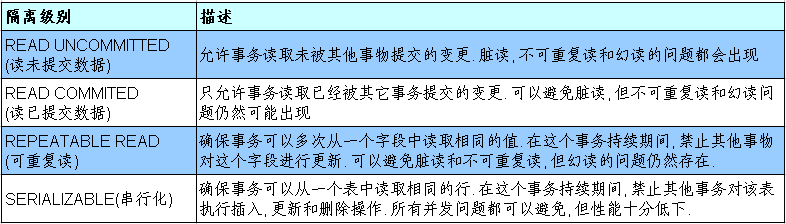
  • 数据库提供了 4 种事务隔离级别:

    1555586275271

  • Oracle 支持 2 种事务隔离级别:READ COMMITED 和 SERIALIZABLE。 Oracle 默认的事务隔离级别为 READ COMMITED

  • MySQL 支持 4 种事务隔离级别。MySQL 默认的事务隔离级别为 REPEATABLE READ
  • 在开发中,要保证隔离级别至少为 READ COMMITED。如果数据库本身能够满足,不需要在代码中设置,否则,应该在代码中显式设置事物的隔离级别。

在 MySQL 中设置隔离级别

  • 每启动一个 MySQL 程序,就会获得一个单独的数据库连接。每个数据库连接都有一个全局变量 @@transaction_isolation,表示当前的事务隔离级别。

  • 查看当前的隔离级别:

    1
    SELECT @@transaction_isolation;

    旧版本是 @@tx_isolation。

  • 设置当前用户 MySQL 连接的隔离级别:

    1
    set transaction isolation level read committed;
  • 设置数据库系统的全局的隔离级别:

    1
    set global transaction isolation level read committed;

    设置隔离级别之后,需要重新连接 MySQL。

  • 补充操作:

    • 创建 MySQL 数据库用户:

      1
      create user tom identified by 'abc123';
    • 授予权限:

      1
      2
      3
      4
      5
      # 授予通过网络方式登录的tom用户,对所有库所有表的全部权限,密码设为abc123
      grant all privileges on *.* to tom@'%' identified by 'abc123';

      # 给tom用户使用本地命令行方式,授予test这个库下的所有表的插删改查的权限。
      grant select, insert, delete, update on test.* to tom@localhost identified by 'abc123';

在 JDBC 中设置隔离级别

1
2
3
4
5
6
7
8
9
10
11
12
13
14
15
16
17
18
19
20
21
22
23
24
25
26
27
28
29
30
31
32
33
34
35
36
37
38
39
40
41
42
43
44
45
46
47
48
49
50
51
52
53
54
55
56
57
58
59
60
61
62
63
64
65
66
67
68
69
70
71
72
73
74
75
76
77
78
79
80
81
82
83
84
85
86
87
88
89
90
91
92
93
94
95
96
97
98
99
100
101
102
103
104
105
106
107
108
109
110
111
112
113
114
115
116
117
118
119
120
121
122
123
124
125
126
127
128
129
130
131
132
133
134
135
136
137
138
139
140
141
142
143
144
145
146
147
148
149
150
151
152
153
154
155
156
157
158
159
160
161
162
163
164
165
166
167
168
169
170
public class TransactionTest {
// 通用的增删改操作---version 2.0(考虑事务)
public static int update(Connection conn, String sql, Object... args) {
PreparedStatement ps = null;
try {
// 1.预编译sql语句,返回PreparedStatement的实例
ps = conn.prepareStatement(sql);
// 2.填充占位符
for (int i = 0; i < args.length; i++) {
ps.setObject(i + 1, args[i]);
}
// 3.执行
return ps.executeUpdate();
} catch (Exception e) {
e.printStackTrace();
} finally {
// 4.资源的关闭
if (ps != null) {
try {
ps.close();
} catch (SQLException throwables) {
throwables.printStackTrace();
}
}
}
return 0;
}

// 通用的查询操作,用于返回数据表中的一条记录---version 2.0(考虑事务)
public static <T> T getInstance(Connection connection, Class<T> clazz, String sql, Object... args) {
PreparedStatement preparedStatement = null;
ResultSet resultSet = null;
try {
preparedStatement = connection.prepareStatement(sql);
for (int i = 0; i < args.length; i++) {
preparedStatement.setObject(i + 1, args[i]);
}
resultSet = preparedStatement.executeQuery();
// 获取结果集的元数据 :ResultSetMetaData
ResultSetMetaData resultSetMetaData = resultSet.getMetaData();
// 通过ResultSetMetaData获取结果集中的列数
int columnCount = resultSetMetaData.getColumnCount();
if (resultSet.next()) {
T t = clazz.newInstance();
// 处理结果集一行数据中的每一个列
for (int i = 0; i < columnCount; i++) {
// 获取列值
Object columValue = resultSet.getObject(i + 1);
// 获取每个列的列名
String columnLabel = resultSetMetaData.getColumnLabel(i + 1);
// 给t对象指定的columnName属性,赋值为columValue:通过反射
Field field = clazz.getDeclaredField(columnLabel);
field.setAccessible(true);
field.set(t, columValue);
}
return t;
}
} catch (Exception e) {
e.printStackTrace();
} finally {
if (resultSet != null) {
try {
resultSet.close();
} catch (SQLException throwables) {
throwables.printStackTrace();
}
}

if (preparedStatement != null) {
try {
preparedStatement.close();
} catch (SQLException throwables) {
throwables.printStackTrace();
}
}
}
return null;
}

// 模拟隔离级别测试:查询
public static void testTransactionSelect() {
Connection connection = null;
try {
connection = JDBCUtils.getConnection();
// 获取当前连接的隔离级别,默认:TRANSACTION_REPEATABLE_READ
System.out.println(connection.getTransactionIsolation());
// 设置数据库的隔离级别
connection.setTransactionIsolation(Connection.TRANSACTION_READ_UNCOMMITTED);
// 取消自动提交数据
connection.setAutoCommit(false);
Thread.sleep(5000);
String sql = "select user, password, balance from user_table where user = ?";
User user = getInstance(connection, User.class, sql, "CC");
System.out.println(user);
} catch (Exception exception) {
exception.printStackTrace();
} finally {
if (connection != null) {
try {
connection.close();
} catch (SQLException throwables) {
throwables.printStackTrace();
}
}
}
}

// 模拟隔离级别测试:更新
public static void testTransactionUpdate() {
Connection connection = null;
try {
connection = JDBCUtils.getConnection();

// 取消自动提交数据
connection.setAutoCommit(false);
String sql = "update user_table set balance = ? where user = ?";
System.out.println("开始修改");
update(connection, sql, 5000, "CC");
Thread.sleep(15000);
System.out.println("修改结束");
connection.commit();
} catch (Exception exception) {
exception.printStackTrace();
if (connection != null) {
try {
connection.rollback();
} catch (SQLException throwables) {
throwables.printStackTrace();
}
}
} finally {
if (connection != null) {
try {
connection.setAutoCommit(true);
} catch (SQLException e) {
e.printStackTrace();
}

try {
connection.close();
} catch (SQLException throwables) {
throwables.printStackTrace();
}
}
}
}

public static void main(String[] args) {
Runnable update = () -> {
try {
testTransactionUpdate();
} catch (Exception exception) {
exception.printStackTrace();
}
};

new Thread(update).start();


Runnable select = () -> {
try {
testTransactionSelect();
} catch (Exception exception) {
exception.printStackTrace();
}
};

new Thread(select).start();
}
}

DAO 及相关实现类

  • DAO:Data Access Object,访问数据信息的类和接口,包括了对数据的 CRUD (Create、Retrival、Update、Delete) 操作,但不包含任何业务相关的信息。有时也称作 BaseDAO。
  • 作用:为了实现功能的模块化,更有利于代码的维护和升级。
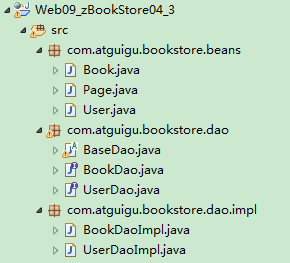
  • 下面是尚硅谷 JavaWeb 阶段书城项目中 DAO 使用的体现:

1566726681515

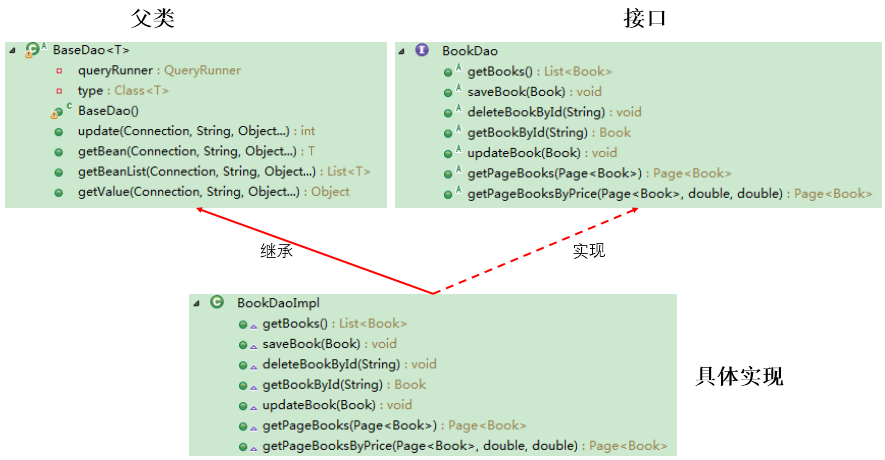
  • 层次结构:

1566745811244

基础实现

  • Page.java:

    1
    2
    3
    4
    5
    6
    7
    8
    9
    10
    11
    12
    13
    14
    15
    16
    17
    18
    19
    20
    21
    22
    23
    24
    25
    26
    27
    28
    29
    30
    31
    32
    33
    34
    35
    36
    37
    38
    39
    40
    public class Page<T> {
    public static final int PAGE_SIZE = 4; // 每页显示的记录数

    private int pageNo; // 当前页

    private List<T> list; // 每页查到的记录存放的集合

    // private int totalPageNo; // 总页数,通过计算得到

    private int totalRecord; // 总记录数,通过查询数据库得到

    public List<T> getList() {
    return list;
    }

    public void setList(List<T> list) {
    this.list = list;
    }

    public int getPageNo() {
    return pageNo;
    }

    public void setPageNo(int pageNo) {
    this.pageNo = pageNo;
    }

    public int getTotalRecord() {
    return totalRecord;
    }

    public void setTotalRecord(int totalRecord) {
    this.totalRecord = totalRecord;
    }

    @Override
    public String toString() {
    return "Page{" + "list=" + list + ", pageNo=" + pageNo + ", totalRecord=" + totalRecord + '}';
    }
    }
  • Customer.java:

    1
    2
    3
    4
    5
    6
    7
    8
    9
    10
    11
    12
    13
    14
    15
    16
    17
    18
    19
    20
    21
    22
    23
    24
    25
    26
    27
    28
    29
    30
    31
    32
    33
    34
    35
    36
    37
    38
    39
    40
    41
    42
    43
    44
    45
    46
    47
    48
    49
    50
    51
    52
    53
    54
    55
    56
    public class Customer {
    private int id;

    private String name;

    private String email;

    private Date birth;

    public Customer() {
    }

    public Customer(int id, String name, String email, Date birth) {
    this.id = id;
    this.name = name;
    this.email = email;
    this.birth = birth;
    }

    public int getId() {
    return id;
    }

    public void setId(int id) {
    this.id = id;
    }

    public String getName() {
    return name;
    }

    public void setName(String name) {
    this.name = name;
    }

    public String getEmail() {
    return email;
    }

    public void setEmail(String email) {
    this.email = email;
    }

    public Date getBirth() {
    return birth;
    }

    public void setBirth(Date birth) {
    this.birth = birth;
    }

    @Override
    public String toString() {
    return "Customer [id=" + id + ", name=" + name + ", email=" + email + ", birth=" + birth + "]";
    }
    }
  • BaseDao.java:

    1
    2
    3
    4
    5
    6
    7
    8
    9
    10
    11
    12
    13
    14
    15
    16
    17
    18
    19
    20
    21
    22
    23
    24
    25
    26
    27
    28
    29
    30
    31
    32
    33
    34
    35
    36
    37
    38
    39
    40
    41
    42
    43
    44
    45
    46
    47
    48
    49
    50
    51
    52
    53
    54
    55
    56
    57
    58
    59
    60
    61
    62
    63
    64
    65
    66
    67
    68
    69
    70
    71
    72
    73
    74
    75
    76
    77
    78
    79
    80
    81
    82
    83
    84
    85
    86
    87
    88
    89
    90
    91
    92
    93
    94
    95
    96
    97
    98
    99
    100
    101
    102
    103
    104
    105
    106
    107
    /*
    * DAO: Data(base) Access Object
    * 封装了针对于数据表的通用的操作,声明为abstact类,不能被实例化
    */
    public abstract class BaseDao {
    // 通用的增删改操作---version 2.0(考虑上事务)
    public int update(Connection connection, String sql, Object... args) {
    PreparedStatement preparedStatement = null;
    try {
    preparedStatement = connection.prepareStatement(sql);
    for (int i = 0; i < args.length; i++) {
    preparedStatement.setObject(i + 1, args[i]);
    }
    return preparedStatement.executeUpdate();
    } catch (Exception e) {
    e.printStackTrace();
    } finally {
    JDBCUtils.closeResource(null, preparedStatement);
    }
    return 0;
    }

    // 通用的查询操作,用于返回数据表中的一条记录---version 2.0(考虑上事务)
    public <T> T getInstance(Connection connection, Class<T> clazz, String sql, Object... args) {
    PreparedStatement preparedStatement = null;
    ResultSet resultSet = null;
    try {
    preparedStatement = connection.prepareStatement(sql);
    for (int i = 0; i < args.length; i++) {
    preparedStatement.setObject(i + 1, args[i]);
    }
    resultSet = preparedStatement.executeQuery();
    ResultSetMetaData resultSetMetaData = resultSet.getMetaData();
    int columnCount = resultSetMetaData.getColumnCount();
    if (resultSet.next()) {
    T t = clazz.newInstance();
    for (int i = 0; i < columnCount; i++) {
    Object columnValue = resultSet.getObject(i + 1);
    String columnLabel = resultSetMetaData.getColumnLabel(i + 1);
    Field field = clazz.getDeclaredField(columnLabel);
    field.setAccessible(true);
    field.set(t, columnValue);
    }
    return t;
    }
    } catch (Exception e) {
    e.printStackTrace();
    } finally {
    JDBCUtils.closeResource(null, preparedStatement, resultSet);
    }
    return null;
    }

    // 通用的查询操作,用于返回数据表中的多条记录构成的集合---version 2.0(考虑事务)
    public <T> List<T> getForList(Connection connection, Class<T> clazz, String sql, Object... args) {
    PreparedStatement preparedStatement = null;
    ResultSet resultSet = null;
    try {
    preparedStatement = connection.prepareStatement(sql);
    for (int i = 0; i < args.length; i++) {
    preparedStatement.setObject(i + 1, args[i]);
    }
    resultSet = preparedStatement.executeQuery();
    ResultSetMetaData resultSetMetaData = resultSet.getMetaData();
    int columnCount = resultSetMetaData.getColumnCount();
    ArrayList<T> list = new ArrayList<T>();
    while (resultSet.next()) {
    T t = clazz.newInstance();
    for (int i = 0; i < columnCount; i++) {
    Object columnValue = resultSet.getObject(i + 1);
    String columnLabel = resultSetMetaData.getColumnLabel(i + 1);
    Field field = clazz.getDeclaredField(columnLabel);
    field.setAccessible(true);
    field.set(t, columnValue);
    }
    list.add(t);
    }
    return list;
    } catch (Exception e) {
    e.printStackTrace();
    } finally {
    JDBCUtils.closeResource(null, preparedStatement, resultSet);
    }
    return null;
    }

    // 用于查询特殊值的通用的方法,比如:select count(*) from test;
    public <E> E getValue(Connection connection, String sql, Object... args) {
    PreparedStatement preparedStatement = null;
    ResultSet resultSet = null;
    try {
    preparedStatement = connection.prepareStatement(sql);
    for (int i = 0; i < args.length; i++) {
    preparedStatement.setObject(i + 1, args[i]);
    }
    resultSet = preparedStatement.executeQuery();
    if (resultSet.next()) {
    return (E) resultSet.getObject(1);
    }
    } catch (SQLException e) {
    e.printStackTrace();
    } finally {
    JDBCUtils.closeResource(null, preparedStatement, resultSet);
    }
    return null;
    }
    }

    BaseDao 中未指定泛型,getInstance()getForList() 两个方法是泛型方法,每个子类在实现这两个方法时,都需要传入一个对应的 Class 参数,实际上这个参数是可以省略的。

  • CustomerDao.java:

    1
    2
    3
    4
    5
    6
    7
    8
    9
    10
    11
    12
    13
    14
    15
    16
    17
    18
    19
    20
    21
    22
    23
    24
    25
    26
    27
    28
    29
    30
    31
    32
    33
    34
    35
    36
    37
    38
    39
    40
    41
    /*
    * 此接口用于规范针对于customers表的常用操作
    */
    public interface CustomerDao {
    // 将customer对象添加到数据库中
    void insert(Connection connection, Customer customer);

    // 针对指定的id,删除表中的一条记录
    void deleteById(Connection connection, int id);

    // 针对内存中的customer对象,去修改数据表中指定的记录
    void update(Connection connection, Customer customer);

    // 针对指定的id查询得到对应的customer对象
    Customer getCustomerById(Connection connection, int id);

    // 查询表中的所有记录构成的集合
    List<Customer> getAll(Connection connection);

    // 返回数据表中的数据的条目数
    Long getCount(Connection connection);

    // 返回数据表中最大的生日
    Date getMaxBirth(Connection connection);

    /**
    * 获取带分页的Customer信息
    *
    * @param page:是只包含了用户输入的pageNo属性的Page对象
    * @return 返回的Page对象是包含了所有属性的Page对象
    */
    Page<Customer> getPageCustomers(Connection connection, Page<Customer> page);

    /**
    * 获取带分页和生日范围的Customer信息
    *
    * @param page:是只包含了用户输入的pageNo属性的Page对象
    * @return 返回的Page对象是包含了所有属性的Page对象
    */
    Page<Customer> getPageCustomersByBirth(Connection connection, Page<Customer> page, Date minBirth, Date maxBirth);
    }
  • CustomerDaoImpl.java:

    1
    2
    3
    4
    5
    6
    7
    8
    9
    10
    11
    12
    13
    14
    15
    16
    17
    18
    19
    20
    21
    22
    23
    24
    25
    26
    27
    28
    29
    30
    31
    32
    33
    34
    35
    36
    37
    38
    39
    40
    41
    42
    43
    44
    45
    46
    47
    48
    49
    50
    51
    52
    53
    54
    55
    56
    57
    58
    59
    60
    61
    62
    63
    64
    65
    66
    67
    68
    69
    70
    71
    72
    73
    74
    75
    76
    77
    78
    79
    public class CustomerDaoImpl extends BaseDao implements CustomerDao {
    @Override
    public void insert(Connection connection, Customer customer) {
    String sql = "insert into customers(name, email, birth) values(?, ?, ?)";
    update(connection, sql, customer.getName(), customer.getEmail(), customer.getBirth());
    }

    @Override
    public void deleteById(Connection connection, int id) {
    String sql = "delete from customers where id = ?";
    update(connection, sql, id);
    }

    @Override
    public void update(Connection connection, Customer customer) {
    String sql = "update customers set name = ?, email = ?, birth = ? where id = ?";
    update(connection, sql, customer.getName(), customer.getEmail(), customer.getBirth(), customer.getId());
    }

    @Override
    public Customer getCustomerById(Connection connection, int id) {
    String sql = "select id, name, email, birth from customers where id = ?";
    return getInstance(connection, Customer.class, sql, id);
    }

    @Override
    public List<Customer> getAll(Connection connection) {
    String sql = "select id, name, email, birth from customers";
    return getForList(connection, Customer.class, sql);
    }

    @Override
    public Long getCount(Connection connection) {
    String sql = "select count(*) from customers";
    return getValue(connection, sql);
    }

    @Override
    public Date getMaxBirth(Connection connection) {
    String sql = "select max(birth) from customers";
    return getValue(connection, sql);
    }

    @Override
    public Page<Customer> getPageCustomers(Connection connection, Page<Customer> page) {
    // 获取数据库中Customer的总数
    String sql = "select count(*) from customers";
    // 调用BaseDao中获取一个单一值的方法
    long totalRecord = (long) getValue(connection, sql);
    // 将总数设置都page对象中
    page.setTotalRecord((int) totalRecord);

    // 获取当前页中的记录存放的List
    String sql2 = "select id, name, email, birth from customers limit ?, ?";
    // 调用BaseDao中获取一个集合的方法
    List<Customer> beanList = getForList(connection, sql2, (page.getPageNo() - 1) * Page.PAGE_SIZE, Page.PAGE_SIZE);
    // 将这个List设置到page对象中
    page.setList(beanList);
    return page;
    }

    @Override
    public Page<Customer> getPageCustomersByBirth(Connection connection, Page<Customer> page, Date minBirth, Date maxBirth) {
    // 获取数据库中Customer的总数
    String sql = "select count(*) from customers where birth between ? and ?";
    // 调用BaseDao中获取一个单一值的方法
    long totalRecord = getValue(connection, sql, minBirth, maxBirth);
    // 将总数设置都page对象中
    page.setTotalRecord((int) totalRecord);

    // 获取当前页中的记录存放的List
    String sql2 = "select id, name, email, birth from customers where birth between ? and ? limit ?, ?";
    // 调用BaseDao中获取一个集合的方法
    List<Customer> beanList = getForList(connection, sql2, minBirth, maxBirth, (page.getPageNo() - 1) * Page.PAGE_SIZE, Page.PAGE_SIZE);
    // 将这个List设置到page对象中
    page.setList(beanList);
    return page;
    }
    }

    CustomerDaoImpl 实现父类 BaseDao 的 getInstance()getForList() 方法,需要传入 Customer.class 参数。

  • CustomerDaoImplTest.java:

    1
    2
    3
    4
    5
    6
    7
    8
    9
    10
    11
    12
    13
    14
    15
    16
    17
    18
    19
    20
    21
    22
    23
    24
    25
    26
    27
    28
    29
    30
    31
    32
    33
    34
    35
    36
    37
    38
    39
    40
    41
    42
    43
    44
    45
    46
    47
    48
    49
    50
    51
    52
    53
    54
    55
    56
    57
    58
    59
    60
    61
    62
    63
    64
    65
    66
    67
    68
    69
    70
    71
    72
    73
    74
    75
    76
    77
    78
    79
    80
    81
    82
    83
    84
    85
    86
    87
    88
    89
    90
    91
    92
    93
    94
    95
    96
    97
    98
    99
    100
    101
    102
    103
    104
    105
    106
    107
    108
    109
    110
    111
    112
    113
    114
    115
    116
    117
    118
    119
    120
    121
    122
    123
    124
    125
    126
    127
    128
    129
    130
    131
    132
    133
    134
    135
    136
    137
    138
    class CustomerDaoImplTest {
    private final CustomerDaoImpl dao = new CustomerDaoImpl();

    @Test
    public void testInsert() {
    Connection connection = null;
    try {
    connection = JDBCUtils.getConnection();
    Customer customer = new Customer(1, "于小飞", "xiaofei@126.com", new Date(43534646435L));
    dao.insert(connection, customer);
    System.out.println("添加成功");
    } catch (Exception e) {
    e.printStackTrace();
    } finally {
    JDBCUtils.closeResource(connection, null);
    }
    }

    @Test
    public void testDeleteById() {
    Connection connection = null;
    try {
    connection = JDBCUtils.getConnection();
    dao.deleteById(connection, 22);
    System.out.println("删除成功");
    } catch (Exception e) {
    e.printStackTrace();
    } finally {
    JDBCUtils.closeResource(connection, null);
    }
    }

    @Test
    public void testUpdate() {
    Connection connection = null;
    try {
    connection = JDBCUtils.getConnection();
    Customer customer = new Customer(18, "贝多芬", "beiduofen@126.com", new Date(453465656L));
    dao.update(connection, customer);
    System.out.println("修改成功");
    } catch (Exception e) {
    e.printStackTrace();
    } finally {
    JDBCUtils.closeResource(connection, null);
    }
    }

    @Test
    public void testGetCustomerById() {
    Connection connection = null;
    try {
    connection = JDBCUtils.getConnection();
    Customer customer = dao.getCustomerById(connection, 20);
    System.out.println(customer);
    } catch (Exception e) {
    e.printStackTrace();
    } finally {
    JDBCUtils.closeResource(connection, null);
    }
    }

    @Test
    public void testGetAll() {
    Connection connection = null;
    try {
    connection = JDBCUtils.getConnection();
    List<Customer> list = dao.getAll(connection);
    list.forEach(System.out::println);
    } catch (Exception e) {
    e.printStackTrace();
    } finally {
    JDBCUtils.closeResource(connection, null);
    }
    }

    @Test
    public void testGetCount() {
    Connection connection = null;
    try {
    connection = JDBCUtils.getConnection();
    Long count = dao.getCount(connection);
    System.out.println("表中的记录数为:" + count);
    } catch (Exception e) {
    e.printStackTrace();
    } finally {
    JDBCUtils.closeResource(connection, null);
    }
    }

    @Test
    public void testGetMaxBirth() {
    Connection connection = null;
    try {
    connection = JDBCUtils.getConnection();
    Date maxBirth = dao.getMaxBirth(connection);
    System.out.println("最大的生日为:" + maxBirth);
    } catch (Exception e) {
    e.printStackTrace();
    } finally {
    JDBCUtils.closeResource(connection, null);
    }
    }

    @Test
    public void testGetPageCustomers() {
    Connection connection = null;
    try {
    connection = JDBCUtils.getConnection();
    Page<Customer> page = new Page<>();
    page.setPageNo(2);// 查询第二页
    page = dao.getPageCustomers(connection, page);
    System.out.println(page);
    } catch (Exception exception) {
    exception.printStackTrace();
    } finally {
    JDBCUtils.closeResource(connection, null);
    }
    }

    @Test
    public void testGetPageCustomersByBirth() {
    Connection connection = null;
    try {
    connection = JDBCUtils.getConnection();
    Page<Customer> page = new Page<>();
    page.setPageNo(1);// 查询第二页
    SimpleDateFormat sdf = new SimpleDateFormat("yyyy-MM-dd");
    java.util.Date minDate = sdf.parse("1984-01-01");
    java.util.Date maxDate = sdf.parse("2010-12-31");
    page = dao.getPageCustomersByBirth(connection, page, new Date(minDate.getTime()), new Date(maxDate.getTime()));
    System.out.println(page);
    } catch (Exception exception) {
    exception.printStackTrace();
    } finally {
    JDBCUtils.closeResource(connection, null);
    }
    }
    }

升级

  • 在 BaseDao 中添加泛型,同步修改 CustomerDaoImpl 的相应代码:

  • BaseDao.java:

    1
    2
    3
    4
    5
    6
    7
    8
    9
    10
    11
    12
    13
    14
    15
    16
    17
    18
    19
    20
    21
    22
    23
    24
    25
    26
    27
    28
    29
    30
    31
    32
    33
    34
    35
    36
    37
    38
    39
    40
    41
    42
    43
    44
    45
    46
    47
    48
    49
    50
    51
    52
    53
    54
    55
    56
    57
    58
    59
    60
    61
    62
    63
    64
    65
    66
    67
    68
    69
    70
    71
    72
    73
    74
    75
    76
    77
    78
    79
    80
    81
    82
    83
    84
    85
    86
    87
    88
    89
    90
    91
    92
    93
    94
    95
    96
    97
    98
    99
    100
    101
    102
    103
    104
    105
    106
    107
    108
    109
    110
    111
    112
    113
    114
    115
    116
    117
    118
    119
    120
    121
    122
    123
    124
    125
    126
    127
    128
    129
    130
    131
    132
    133
    134
    /*
    * DAO: Data(base) Access Object
    * 封装了针对于数据表的通用的操作,声明为abstact类,不能被实例化
    */
    public abstract class BaseDao<T> {
    // 在构造器中,或者代码块中赋值,clazz就是当前类的父类的泛型参数
    // 比如当前类为CustomerDaoImpl,clazz就是它的父类BaseDao<Customer>的泛型参数
    private Class<T> clazz;

    // 方式一:获取T的Class对象,获取泛型的类型,泛型是在被子类继承时才确定
    public BaseDao() {
    // 获取子类的类型
    Class clazz = this.getClass();
    // 获取父类的类型
    // getGenericSuperclass()用来获取当前类的父类的类型
    // ParameterizedType表示的是带泛型的类型
    ParameterizedType parameterizedType = (ParameterizedType) clazz.getGenericSuperclass();
    // 获取具体的泛型类型 getActualTypeArguments获取具体的泛型的类型
    // 这个方法会返回一个Type的数组
    Type[] types = parameterizedType.getActualTypeArguments();
    // 获取具体的泛型的类型·
    this.type = (Class<T>) types[0];
    }

    // 方式二:
    /*{
    Type genericSuperclass = this.getClass().getGenericSuperclass();
    ParameterizedType parameterizedType = (ParameterizedType) genericSuperclass;
    Type[] actualTypeArguments = parameterizedType.getActualTypeArguments();// 获取了父类的泛型参数
    clazz = (Class<T>) actualTypeArguments[0];// 泛型的第一个参数
    }*/

    // 通用的增删改操作---version 2.0(考虑上事务)
    public int update(Connection connection, String sql, Object... args) {
    PreparedStatement preparedStatement = null;
    try {
    preparedStatement = connection.prepareStatement(sql);
    for (int i = 0; i < args.length; i++) {
    preparedStatement.setObject(i + 1, args[i]);
    }
    return preparedStatement.executeUpdate();
    } catch (Exception e) {
    e.printStackTrace();
    } finally {
    JDBCUtils.closeResource(null, preparedStatement);
    }
    return 0;
    }

    // 通用的查询操作,用于返回数据表中的一条记录---version 2.0(考虑上事务)
    public T getInstance(Connection connection, String sql, Object... args) {
    PreparedStatement preparedStatement = null;
    ResultSet resultSet = null;
    try {
    preparedStatement = connection.prepareStatement(sql);
    for (int i = 0; i < args.length; i++) {
    preparedStatement.setObject(i + 1, args[i]);
    }
    resultSet = preparedStatement.executeQuery();
    ResultSetMetaData resultSetMetaData = resultSet.getMetaData();
    int columnCount = resultSetMetaData.getColumnCount();
    if (resultSet.next()) {
    T t = clazz.newInstance();
    for (int i = 0; i < columnCount; i++) {
    Object columnValue = resultSet.getObject(i + 1);
    String columnLabel = resultSetMetaData.getColumnLabel(i + 1);
    Field field = clazz.getDeclaredField(columnLabel);
    field.setAccessible(true);
    field.set(t, columnValue);
    }
    return t;
    }
    } catch (Exception e) {
    e.printStackTrace();
    } finally {
    JDBCUtils.closeResource(null, preparedStatement, resultSet);
    }
    return null;
    }

    // 通用的查询操作,用于返回数据表中的多条记录构成的集合---version 2.0(考虑事务)
    public List<T> getForList(Connection connection, String sql, Object... args) {
    PreparedStatement preparedStatement = null;
    ResultSet resultSet = null;
    try {
    preparedStatement = connection.prepareStatement(sql);
    for (int i = 0; i < args.length; i++) {
    preparedStatement.setObject(i + 1, args[i]);
    }
    resultSet = preparedStatement.executeQuery();
    ResultSetMetaData resultSetMetaData = resultSet.getMetaData();
    int columnCount = resultSetMetaData.getColumnCount();
    ArrayList<T> list = new ArrayList<T>();
    while (resultSet.next()) {
    T t = clazz.newInstance();
    for (int i = 0; i < columnCount; i++) {
    Object columnValue = resultSet.getObject(i + 1);
    String columnLabel = resultSetMetaData.getColumnLabel(i + 1);
    Field field = clazz.getDeclaredField(columnLabel);
    field.setAccessible(true);
    field.set(t, columnValue);
    }
    list.add(t);
    }
    return list;
    } catch (Exception e) {
    e.printStackTrace();
    } finally {
    JDBCUtils.closeResource(null, preparedStatement, resultSet);
    }
    return null;
    }

    // 用于查询特殊值的通用的方法,比如:select count(*) from test;
    public <E> E getValue(Connection connection, String sql, Object... args) {
    PreparedStatement preparedStatement = null;
    ResultSet resultSet = null;
    try {
    preparedStatement = connection.prepareStatement(sql);
    for (int i = 0; i < args.length; i++) {
    preparedStatement.setObject(i + 1, args[i]);
    }
    resultSet = preparedStatement.executeQuery();
    if (resultSet.next()) {
    return (E) resultSet.getObject(1);
    }
    } catch (SQLException e) {
    e.printStackTrace();
    } finally {
    JDBCUtils.closeResource(null, preparedStatement, resultSet);
    }
    return null;
    }
    }

    BaseDao 中添加了泛型参数,每一个子类在继承时,直接添加对应的 Class,这样在方法中,就不需要再单独传入 Class 参数。

  • CustomerDaoImpl.java:

    1
    2
    3
    4
    5
    6
    7
    8
    9
    10
    11
    12
    13
    14
    15
    16
    17
    18
    19
    20
    21
    22
    23
    24
    25
    26
    27
    28
    29
    30
    31
    32
    33
    34
    35
    36
    37
    38
    39
    40
    41
    42
    43
    public class CustomerDaoImpl extends BaseDao<Customer> implements CustomerDao {
    @Override
    public void insert(Connection connection, Customer customer) {
    String sql = "insert into customers(name, email, birth) values(?, ?, ?)";
    update(connection, sql, customer.getName(), customer.getEmail(), customer.getBirth());
    }

    @Override
    public void deleteById(Connection connection, int id) {
    String sql = "delete from customers where id = ?";
    update(connection, sql, id);
    }

    @Override
    public void update(Connection connection, Customer customer) {
    String sql = "update customers set name = ?, email = ?, birth = ? where id = ?";
    update(connection, sql, customer.getName(), customer.getEmail(), customer.getBirth(), customer.getId());
    }

    @Override
    public Customer getCustomerById(Connection connection, int id) {
    String sql = "select id, name, email, birth from customers where id = ?";
    return getInstance(connection, sql, id);
    }

    @Override
    public List<Customer> getAll(Connection connection) {
    String sql = "select id, name, email, birth from customers";
    return getForList(connection, sql);
    }

    @Override
    public Long getCount(Connection connection) {
    String sql = "select count(*) from customers";
    return getValue(connection, sql);
    }

    @Override
    public Date getMaxBirth(Connection connection) {
    String sql = "select max(birth) from customers";
    return getValue(connection, sql);
    }
    }

数据库连接池

JDBC 数据库连接池的必要性

  • 在使用开发基于数据库的 Web 程序时,传统的模式基本是按以下步骤:  

    • 在主程序 (如 servlet、beans) 中建立数据库连接;
    • 进行 SQL 操作;
    • 断开数据库连接。
  • 这种模式开发,存在的问题:

    • 普通的 JDBC 数据库连接使用 DriverManager 来获取,每次向数据库建立连接的时候都要将 Connection 加载到内存中,再验证用户名和密码 (需要耗费 0.05s~1s 的时间)。当需要数据库连接的时候,就向数据库要求一个,执行完成后再断开连接。这样的方式将会消耗大量的资源和时间。数据库的连接资源并没有得到很好的重复利用。若同时有几百人甚至几千人在线,频繁的进行数据库连接操作将占用很多的系统资源,严重的甚至会造成服务器的崩溃。
    • 对于每一次数据库连接,使用完后都得断开。否则,如果程序出现异常而未能关闭,将会导致数据库系统中的内存泄漏,最终将导致重启数据库。
    • 这种开发不能控制被创建的连接对象数,系统资源会被毫无顾及的分配出去,如连接过多,也可能导致内存泄漏,服务器崩溃。

数据库连接池技术

  • 为解决传统开发中的数据库连接问题,可以采用数据库连接池技术。

  • 数据库连接池的基本思想:就是为数据库连接建立一个”缓冲池”。预先在缓冲池中放入一定数量的连接,当需要建立数据库连接时,只需从”缓冲池”中取出一个,使用完毕之后再放回去。

  • 数据库连接池负责分配、管理和释放数据库连接,它允许应用程序重复使用一个现有的数据库连接,而不是重新建立一个

  • 数据库连接池在初始化时,会创建一定数量的数据库连接放到连接池中,这些数据库连接的数量是由最小数据库连接数来设定的。无论这些数据库连接是否被使用,连接池都将一直保证至少拥有这么多的连接数量。连接池的最大数据库连接数量限定了这个连接池能占有的最大连接数,当应用程序向连接池请求的连接数超过最大连接数量时,这些请求将被加入到等待队列中。
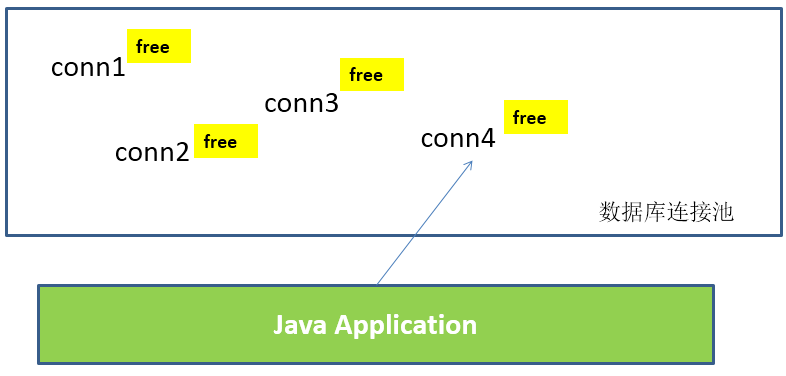
    1555593464033
  • 工作原理:

    1555593598606

  • 数据库连接池技术的优点:

    • 资源重用
      • 由于数据库连接得以重用,避免了频繁创建、释放连接所引起的大量性能开销。在减少系统消耗的基础上,另一方面也增加了系统运行环境的平稳性。
    • 更快的系统反应速度
      • 数据库连接池在初始化过程中,往往已经创建了若干数据库连接置于连接池中备用。此时连接的初始化工作均已完成。对于业务请求处理而言,直接利用现有可用连接,避免了数据库连接初始化和释放过程的时间开销,从而减少了系统的响应时间。
    • 新的资源分配手段
      • 对于多应用共享同一数据库的系统而言,可在应用层通过数据库连接池的配置,实现某一应用最大可用数据库连接数的限制,避免某一应用独占所有的数据库资源。
    • 统一的连接管理,避免数据库连接泄漏
      • 在较为完善的数据库连接池实现中,可根据预先的占用超时设定,强制回收被占用连接,从而避免了常规数据库连接操作中可能出现的资源泄露。

多种开源的数据库连接池

  • JDBC 的数据库连接池使用 javax.sql.DataSource 来表示,DataSource 是一个接口,该接口通常由服务器 (如 Weblogic,WebSphere,Tomcat 等) 提供实现,也有一些开源组织提供实现:
    • DBCP:是 Apache 提供的数据库连接池。Tomcat 服务器自带 DBCP 数据库连接池。速度相对 C3P0 较快,但因自身存在 BUG,Hibernate3 已不再提供支持。
    • C3P0:是一个开源组织提供的一个数据库连接池,速度相对较慢,稳定性还可以。Hibernate 官方推荐使用。
    • Proxool:是 sourceforge 下的一个开源项目数据库连接池,有监控连接池状态的功能,稳定性较 C3P0 差一点。
    • BoneCP:是一个开源组织提供的数据库连接池,速度快。
    • Druid:是阿里提供的数据库连接池,据说是集DBCP 、C3P0 、Proxool 优点于一身的数据库连接池,但是速度不确定是否有BoneCP快
  • DataSource 通常被称为数据源,它包含连接池和连接池管理两个部分,习惯上也经常把 DataSource 称为连接池。
  • DataSource 用来取代 DriverManager 来获取 Connection,获取速度快,同时可以大幅度提高数据库访问速度。
  • 特别注意:
    • 数据源和数据库连接不同,数据源无需创建多个,它是产生数据库连接的工厂,因此,整个应用只需要一个数据源即可。
    • 当数据库访问结束后,程序还是像以前一样关闭数据库连接:connection.close();,但 connection.close() 并没有关闭数据库的物理连接,它仅仅把数据库连接释放,将其归还给了数据库连接池。

C3P0 数据库连接池

  • Maven 添加依赖:

    1
    2
    3
    4
    5
    <dependency>
    <groupId>com.mchange</groupId>
    <artifactId>c3p0</artifactId>
    <version>0.9.5.2</version>
    </dependency>
  • 获取连接方式一

    1
    2
    3
    4
    5
    6
    7
    8
    9
    10
    11
    12
    13
    14
    15
    16
    17
    18
    19
    20
    21
    22
    23
    24
    25
    26
    27
    28
    29
    30
    public class C3P0Test {
    // 方式一:不推荐
    private ComboPooledDataSource cpds = new ComboPooledDataSource();

    {
    try {
    // 创建c3p0数据库连接池
    cpds.setDriverClass("com.mysql.cj.jdbc.Driver");
    cpds.setJdbcUrl("jdbc:mysql://localhost:3306/test");
    cpds.setUser("root");
    cpds.setPassword("abc123");

    // 通过设置相关的参数,对数据库连接池进行管理
    cpds.setInitialPoolSize(10);// 设置初始时数据库连接池中的连接数
    // ......
    } catch (PropertyVetoException e) {
    e.printStackTrace();
    }
    }

    public Connection getC3P0Connection() throws Exception {
    Connection connection = cpds.getConnection();
    System.out.println(connection);

    // 销毁c3p0数据库连接池的方法,了解,不要轻易使用
    // DataSources.destroy(cpds);

    return connection;
    }
    }
  • 获取连接方式二

    1
    2
    3
    4
    5
    6
    7
    8
    9
    10
    public class C3P0Test {
    // 方式二:使用配置文件,推荐
    private final DataSource cpds = new ComboPooledDataSource("helloc3p0");

    public Connection getC3P0Connection() throws SQLException {
    Connection connection = cpds.getConnection();
    System.out.println(connection);
    return connection;
    }
    }
    1
    2
    3
    4
    5
    6
    7
    8
    9
    10
    11
    12
    13
    14
    15
    16
    17
    18
    19
    20
    21
    22
    23
    24
    25
    <?xml version="1.0" encoding="UTF-8"?>
    <c3p0-config>
    <named-config name="helloc3p0">
    <!-- 获取连接的4个基本信息 -->
    <property name="driverClass">com.mysql.cj.jdbc.Driver</property>
    <!-- 如果连接本地3306端口,可以简写为:jdbc:mysql:///test -->
    <property name="jdbcUrl">jdbc:mysql://localhost:3306/test</property>
    <property name="user">root</property>
    <property name="password">abc123</property>

    <!-- 涉及到数据库连接池的管理的常用相关属性的设置 -->
    <!-- 若数据库中连接数不足时,一次向数据库服务器申请多少个连接 -->
    <property name="acquireIncrement">5</property>
    <!-- 初始化数据库连接池时连接的数量 -->
    <property name="initialPoolSize">5</property>
    <!-- 数据库连接池中的最小的数据库连接数 -->
    <property name="minPoolSize">5</property>
    <!-- 数据库连接池中的最大的数据库连接数 -->
    <property name="maxPoolSize">10</property>
    <!-- C3P0数据库连接池可以维护的Statement的个数 -->
    <property name="maxStatements">20</property>
    <!-- 每个连接同时可以使用的Statement对象的个数 -->
    <property name="maxStatementsPerConnection">5</property>
    </named-config>
    </c3p0-config>

    c3p0-config.xml 配置文件,在 resourcs 目录下新建。

DBCP 数据库连接池

  • DBCP 是 Apache 软件基金组织下的开源连接池实现,该连接池依赖该组织下的另一个开源系统:Common-pool。如需使用该连接池实现,应在系统中增加如下两个 jar 文件:

    • Commons-dbcp.jar:连接池的实现。
    • Commons-pool.jar:连接池实现的依赖库。
  • Tomcat 的连接池正是采用该连接池来实现的。该数据库连接池既可以与应用服务器整合使用,也可由应用程序独立使用。

  • 配置属性说明:

    属性 默认值 说明
    initialSize 0 连接池启动时创建的初始化连接数量
    maxActive 8 连接池中可同时连接的最大的连接数
    maxIdle 8 连接池中最大的空闲的连接数,超过的空闲连接将被释放,如果设置为负数表示不限制
    minIdle 0 连接池中最小的空闲的连接数,低于这个数量会被创建新的连接。该参数越接近maxIdle,性能越好,因为连接的创建和销毁,都是需要消耗资源的;但是不能太大。
    maxWait 无限制 最大等待时间,当没有可用连接时,连接池等待连接释放的最大时间,超过该时间限制会抛出异常,如果设置-1表示无限等待
    poolPreparedStatements false 开启池的Statement是否prepared
    maxOpenPreparedStatements 无限制 开启池的prepared 后的同时最大连接数
    minEvictableIdleTimeMillis 连接池中连接,在时间段内一直空闲, 被逐出连接池的时间
    removeAbandonedTimeout 300 超过时间限制,回收没有用(废弃)的连接
    removeAbandoned false 超过removeAbandonedTimeout时间后,是否进 行没用连接(废弃)的回收
  • Maven 添加依赖:

    1
    2
    3
    4
    5
    <dependency>
    <groupId>commons-dbcp</groupId>
    <artifactId>commons-dbcp</artifactId>
    <version>1.4</version>
    </dependency>

    image-20210702172610516

  • 获取连接方式一

    1
    2
    3
    4
    5
    6
    7
    8
    9
    10
    11
    12
    13
    14
    15
    16
    17
    18
    19
    20
    21
    22
    23
    24
    25
    26
    27
    28
    public class DBCPTest {
    // 方式一:不推荐
    private final BasicDataSource source = new BasicDataSource();

    {
    // 设置基本信息
    source.setDriverClassName("com.mysql.cj.jdbc.Driver");
    source.setUrl("jdbc:mysql:///test");
    source.setUsername("root");
    source.setPassword("abc123");

    // 设置其他涉及数据库连接池管理的相关属性:
    source.setInitialSize(10);
    source.setMaxActive(10);
    // ......
    }

    public Connection getDbcpConnection() {
    Connection connection = null;
    try {
    connection = source.getConnection();
    System.out.println(connection);
    } catch (SQLException throwables) {
    throwables.printStackTrace();
    }
    return connection;
    }
    }
  • 获取连接方式二

    1
    2
    3
    4
    5
    6
    7
    8
    9
    10
    11
    12
    13
    14
    15
    16
    17
    18
    19
    20
    21
    22
    23
    24
    public class DBCPTest {
    // 方式二:使用配置文件,推荐
    private DataSource source = null;

    {
    try {
    Properties properties = new Properties();
    // 方式1:
    // FileInputStream is = new FileInputStream(new File("dbcp.properties"));
    // 方式2:
    InputStream is = ClassLoader.getSystemClassLoader().getResourceAsStream("dbcp.properties");
    properties.load(is);
    source = BasicDataSourceFactory.createDataSource(properties);
    } catch (Exception e) {
    e.printStackTrace();
    }
    }

    public Connection getDbcpConnection() throws Exception {
    Connection connection = source.getConnection();
    System.out.println(connection);
    return connection;
    }
    }
    1
    2
    3
    4
    5
    driverClassName=com.mysql.cj.jdbc.Driver
    url=jdbc:mysql://localhost:3306/test?rewriteBatchedStatements=true&useServerPrepStmts=false
    username=root
    password=abc123
    initialSize=10

    dbcp.properties 配置文件,在 resourcs 目录下新建。

Druid (德鲁伊) 数据库连接池

  • Druid是阿里巴巴开源平台上一个数据库连接池实现,它结合了C3P0、DBCP、Proxool等DB池的优点,同时加入了日志监控,可以很好的监控DB池连接和SQL的执行情况,可以说是针对监控而生的DB连接池,可以说是目前最好的连接池之一。

  • 详细配置参数:

    配置 缺省 说明
    name 配置这个属性的意义在于,如果存在多个数据源,监控的时候可以通过名字来区分开来。 如果没有配置,将会生成一个名字,格式是:”DataSource-” + System.identityHashCode(this)
    url 连接数据库的url,不同数据库不一样。例如:mysql : jdbc:mysql://10.20.153.104:3306/druid2 oracle : jdbc:oracle:thin:@10.20.149.85:1521:ocnauto
    username 连接数据库的用户名
    password 连接数据库的密码。如果你不希望密码直接写在配置文件中,可以使用ConfigFilter。详细看这里:https://github.com/alibaba/druid/wiki/%E4%BD%BF%E7%94%A8ConfigFilter
    driverClassName 根据url自动识别 这一项可配可不配,如果不配置druid会根据url自动识别dbType,然后选择相应的driverClassName(建议配置下)
    initialSize 0 初始化时建立物理连接的个数。初始化发生在显示调用init方法,或者第一次getConnection时
    maxActive 8 最大连接池数量
    maxIdle 8 已经不再使用,配置了也没效果
    minIdle 最小连接池数量
    maxWait 获取连接时最大等待时间,单位毫秒。配置了maxWait之后,缺省启用公平锁,并发效率会有所下降,如果需要可以通过配置useUnfairLock属性为true使用非公平锁。
    poolPreparedStatements false 是否缓存preparedStatement,也就是PSCache。PSCache对支持游标的数据库性能提升巨大,比如说oracle。在mysql下建议关闭。
    maxOpenPreparedStatements -1 要启用PSCache,必须配置大于0,当大于0时,poolPreparedStatements自动触发修改为true。在Druid中,不会存在Oracle下PSCache占用内存过多的问题,可以把这个数值配置大一些,比如说100
    validationQuery 用来检测连接是否有效的sql,要求是一个查询语句。如果validationQuery为null,testOnBorrow、testOnReturn、testWhileIdle都不会其作用。
    testOnBorrow true 申请连接时执行validationQuery检测连接是否有效,做了这个配置会降低性能。
    testOnReturn false 归还连接时执行validationQuery检测连接是否有效,做了这个配置会降低性能
    testWhileIdle false 建议配置为true,不影响性能,并且保证安全性。申请连接的时候检测,如果空闲时间大于timeBetweenEvictionRunsMillis,执行validationQuery检测连接是否有效。
    timeBetweenEvictionRunsMillis 有两个含义: 1)Destroy线程会检测连接的间隔时间2)testWhileIdle的判断依据,详细看testWhileIdle属性的说明
    numTestsPerEvictionRun 不再使用,一个DruidDataSource只支持一个EvictionRun
    minEvictableIdleTimeMillis
    connectionInitSqls 物理连接初始化的时候执行的sql
    exceptionSorter 根据dbType自动识别 当数据库抛出一些不可恢复的异常时,抛弃连接
    filters 属性类型是字符串,通过别名的方式配置扩展插件,常用的插件有:监控统计用的filter:stat;日志用的filter:log4j;防御sql注入的filter:wall。
    proxyFilters 类型是List,如果同时配置了filters和proxyFilters,是组合关系,并非替换关系
  • Maven 添加依赖:

    1
    2
    3
    4
    5
    <dependency>
    <groupId>com.alibaba</groupId>
    <artifactId>druid</artifactId>
    <version>1.2.6</version>
    </dependency>
  • 获取连接方式一

    1
    2
    3
    4
    5
    6
    7
    8
    9
    10
    11
    12
    13
    14
    15
    16
    17
    18
    19
    20
    21
    22
    23
    public class DruidTest {
    // 方式一:不推荐
    private DruidDataSource dataSource = null;

    {
    // 设置基本信息
    dataSource = new DruidDataSource();
    dataSource.setDriverClassName("com.mysql.cj.jdbc.Driver");
    dataSource.setUrl("jdbc:mysql:///test");
    dataSource.setUsername("root");
    dataSource.setPassword("abc123");

    // 设置其他涉及数据库连接池管理的相关属性:
    dataSource.setInitialSize(10);
    // ......
    }

    public Connection getDruidConnection() throws Exception {
    Connection connection = dataSource.getConnection();
    System.out.println(connection);
    return connection;
    }
    }
  • 获取连接方式二

    1
    2
    3
    4
    5
    6
    7
    8
    9
    10
    11
    12
    13
    14
    15
    16
    17
    18
    19
    20
    21
    public class DruidTest {
    // 方式二:使用配置文件,推荐
    private DataSource dataSource = null;

    {
    try {
    Properties properties = new Properties();
    InputStream is = ClassLoader.getSystemClassLoader().getResourceAsStream("druid.properties");
    properties.load(is);
    dataSource = DruidDataSourceFactory.createDataSource(properties);
    } catch (Exception e) {
    e.printStackTrace();
    }
    }

    public Connection getDruidConnection() throws Exception {
    Connection connection = dataSource.getConnection();
    System.out.println(connection);
    return connection;
    }
    }
    1
    2
    3
    4
    5
    6
    7
    8
    driverClassName=com.mysql.cj.jdbc.Driver
    url=jdbc:mysql://localhost:3306/test?rewriteBatchedStatements=true
    username=root
    password=abc123
    initialSize=10
    maxActive=20
    maxWait=1000
    filters=wall

    druid.properties 配置文件,在 resourcs 目录下新建。

Apache-DBUtils 实现 CRUD 操作

Apache-DBUtils 简介

  • commons-dbutils 是 Apache 组织提供的一个开源 JDBC工具类库,它是对 JDBC 的简单封装,学习成本极低,并且使用 DBUtils 能极大简化 JDBC 编码的工作量,同时也不会影响程序的性能。

  • API 介绍:

    • org.apache.commons.dbutils.DbUtils
      • 工具类。
    • org.apache.commons.dbutils.QueryRunner
      • 提供数据库操作的一系列重载的 update()query() 操作。
    • org.apache.commons.dbutils.ResultSetHandler
      • 此接口用于处理数据库查询操作得到的结果集。不同的结果集的情形,由其不同的子类来实现。
  • Maven 添加依赖:

    1
    2
    3
    4
    5
    <dependency>
    <groupId>commons-dbutils</groupId>
    <artifactId>commons-dbutils</artifactId>
    <version>1.7</version>
    </dependency>

主要 API 的使用

DbUtils

  • DbUtils :提供如关闭连接、装载 JDBC 驱动程序等常规工作的工具类,里面的所有方法都是静态的。
  • 主要方法如下:
    • public static void close(…) throws java.sql.SQLException: DbUtils 类提供了三个重载的关闭方法。这些方法检查所提供的参数是不是 null,如果不是的话,它们就关闭 Connection、Statement 和 ResultSet。
    • public static void closeQuietly(…):这一类方法不仅能在 Connection、Statement 和 ResultSet 为 null 情况下避免关闭,还能隐藏一些在程序中抛出的 SQLEeception。
    • public static void commitAndClose(Connection connection)throws SQLException: 用来提交连接的事务,然后关闭连接。
    • public static void commitAndCloseQuietly(Connection connection): 用来提交连接,然后关闭连接,并且在关闭连接时不抛出 SQL 异常。
    • public static void rollback(Connection connection)throws SQLException:允许 connection 为 null,因为方法内部做了判断。
    • public static void rollbackAndClose(Connection connection)throws SQLException
    • rollbackAndCloseQuietly(Connection connection)
    • public static boolean loadDriver(java.lang.String driverClassName):这一方装载并注册 JDBC 驱动程序,如果成功就返回 true。使用该方法,你不需要捕捉 ClassNotFoundException 异常。

QueryRunner类

  • 该类简单化了 SQL 查询,它与 ResultSetHandler 组合在一起使用可以完成大部分的数据库操作,能够大大减少编码量。

  • QueryRunner 类提供了两个构造器:

    • 默认的构造器。
    • 需要一个 javax.sql.DataSource 来作参数的构造器。
  • QueryRunner类的主要方法:

    • 更新
      • public int update(Connection connection, String sql, Object... params) throws SQLException:用来执行一个更新 (插入、更新或删除) 操作。
    • 插入
      • public <T> T insert(Connection connection, String sql, ResultSetHandler<T> rsh, Object... params) throws SQLException:只支持 INSERT 语句,其中,rsh:The handler used to create the result object from the ResultSet of auto-generated keys。返回值:An object generated by the handler,即自动生成的键值。
    • 批处理
      • public int[] batch(Connection connection, String sql, Object[][] params)throws SQLException: INSERT,UPDATE,DELETE 语句。
      • public <T> T insertBatch(Connection connection, String sql, ResultSetHandler<T> rsh, Object[][] params)throws SQLException:只支持 INSERT 语句。
    • 查询
      • public Object query(Connection connection, String sql, ResultSetHandler rsh, Object... params) throws SQLException:执行一个查询操作,在这个查询中,对象数组中的每个元素值被用来作为查询语句的置换参数。该方法会自行处理 PreparedStatement 和 ResultSet 的创建和关闭。

ResultSetHandler 接口及实现类

  • 该接口用于处理 java.sql.ResultSet,将数据按要求转换为另一种形式。

  • ResultSetHandler 接口提供了一个单独的方法:Object handle (java.sql.ResultSet rs)

  • 接口的主要实现类:

    • ArrayHandler:把结果集中的第一行数据转成对象数组。

    • ArrayListHandler:把结果集中的每一行数据都转成一个数组,再存放到 List 中。

    • BeanHandler:将结果集中的第一行数据封装到一个对应的 JavaBean 实例中。

    • BeanListHandler:将结果集中的每一行数据都封装到一个对应的 JavaBean 实例中,再存放到 List 中。

    • ColumnListHandler:将结果集中某一列的数据存放到 List 中。

    • KeyedHandler(name):将结果集中的每一行数据都封装到一个 Map 里,再把这些 Map 再存到一个 Map 里,其 key 为指定的 key。

    • MapHandler:将结果集中的第一行数据封装到一个 Map 里,key 是列名,value 是对应的值。

    • MapListHandler:将结果集中的每一行数据都封装到一个 Map 里,再存放到 List 中。

    • ScalarHandler:查询单个值对象。

JDBC 总结

  • pom.xml:

    1
    2
    3
    4
    5
    6
    7
    8
    9
    10
    11
    12
    13
    14
    15
    16
    17
    18
    19
    20
    21
    22
    23
    24
    25
    26
    27
    28
    29
    30
    31
    32
    33
    34
    35
    36
    37
    38
    39
    40
    41
    42
    43
    44
    45
    46
    47
    48
    49
    <?xml version="1.0" encoding="UTF-8"?>
    <project xmlns="http://maven.apache.org/POM/4.0.0"
    xmlns:xsi="http://www.w3.org/2001/XMLSchema-instance"
    xsi:schemaLocation="http://maven.apache.org/POM/4.0.0 http://maven.apache.org/xsd/maven-4.0.0.xsd">
    <modelVersion>4.0.0</modelVersion>

    <groupId>cn.xisun</groupId>
    <artifactId>xisun-jdbc</artifactId>
    <version>1.0-SNAPSHOT</version>

    <dependencies>
    <dependency>
    <groupId>org.junit.jupiter</groupId>
    <artifactId>junit-jupiter</artifactId>
    <version>5.6.2</version>
    <scope>chemicalStructure</scope>
    </dependency>

    <dependency>
    <groupId>mysql</groupId>
    <artifactId>mysql-connector-java</artifactId>
    <version>8.0.25</version>
    </dependency>

    <dependency>
    <groupId>com.mchange</groupId>
    <artifactId>c3p0</artifactId>
    <version>0.9.5.2</version>
    </dependency>

    <dependency>
    <groupId>commons-dbcp</groupId>
    <artifactId>commons-dbcp</artifactId>
    <version>1.4</version>
    </dependency>

    <dependency>
    <groupId>com.alibaba</groupId>
    <artifactId>druid</artifactId>
    <version>1.2.6</version>
    </dependency>

    <dependency>
    <groupId>commons-dbutils</groupId>
    <artifactId>commons-dbutils</artifactId>
    <version>1.7</version>
    </dependency>
    </dependencies>
    </project>
  • JDBCUtils.java:

    1
    2
    3
    4
    5
    6
    7
    8
    9
    10
    11
    12
    13
    14
    15
    16
    17
    18
    19
    20
    21
    22
    23
    24
    25
    26
    27
    28
    29
    30
    31
    32
    33
    34
    35
    36
    37
    38
    39
    40
    41
    42
    43
    44
    45
    46
    47
    48
    49
    50
    51
    52
    53
    54
    55
    56
    57
    58
    59
    60
    61
    62
    63
    64
    65
    66
    67
    68
    69
    70
    71
    72
    73
    74
    75
    76
    77
    78
    79
    80
    81
    82
    83
    84
    85
    86
    87
    88
    89
    90
    91
    92
    93
    94
    95
    96
    97
    98
    99
    100
    101
    102
    103
    104
    105
    106
    107
    108
    109
    110
    111
    112
    113
    114
    115
    116
    117
    118
    119
    120
    121
    122
    123
    124
    125
    126
    127
    128
    129
    130
    131
    132
    133
    134
    135
    136
    137
    138
    139
    140
    141
    142
    143
    144
    145
    146
    147
    148
    149
    150
    151
    152
    153
    154
    155
    public class JDBCUtils {
    /**
    * @Description 常规方式获取数据库的连接
    */
    public static Connection getCommonConnection() throws Exception {
    // 1.读取配置文件中的4个基本信息
    Properties properties = new Properties();
    InputStream is = ClassLoader.getSystemClassLoader().getResourceAsStream("jdbc.properties");
    properties.load(is);
    String driverClass = properties.getProperty("driverClass");
    String url = properties.getProperty("url");
    String user = properties.getProperty("user");
    String password = properties.getProperty("password");

    // 2.加载驱动
    Class.forName(driverClass);

    // 3.获取连接
    return DriverManager.getConnection(url, user, password);
    }


    /**
    * @Description 使用C3P0数据库连接池技术获取数据库连接
    */
    // 创建一个C3P0数据库连接池,数据库连接池只需提供一个即可
    private static final ComboPooledDataSource CPDS = new ComboPooledDataSource("hellc3p0");

    public static Connection getC3P0Connection() throws SQLException {
    return CPDS.getConnection();
    }


    /**
    * @Description 使用DBCP数据库连接池技术获取数据库连接
    */
    // 创建一个DBCP数据库连接池,数据库连接池只需提供一个即可
    private static DataSource dbcpSource;

    static {
    try {
    Properties properties = new Properties();
    InputStream is = ClassLoader.getSystemClassLoader().getResourceAsStream("dbcp.properties");
    properties.load(is);
    dbcpSource = BasicDataSourceFactory.createDataSource(properties);
    } catch (Exception e) {
    e.printStackTrace();
    }
    }

    public static Connection getDbcpConnection() throws Exception {
    return dbcpSource.getConnection();
    }


    /**
    * @Description 使用Druid数据库连接池技术获取数据库连接
    */
    // 创建一个Druid数据库连接池,数据库连接池只需提供一个即可
    private static DataSource druidSource;

    static {
    try {
    Properties properties = new Properties();
    InputStream is = ClassLoader.getSystemClassLoader().getResourceAsStream("druid.properties");
    properties.load(is);
    druidSource = DruidDataSourceFactory.createDataSource(properties);
    } catch (Exception e) {
    e.printStackTrace();
    }
    }

    public static Connection getDruidConnection() throws SQLException {
    return druidSource.getConnection();
    }


    /**
    * @Description 连接回滚
    */
    public static void rollBackConnection(Connection connection) {
    if (connection != null) {
    try {
    connection.rollback();
    } catch (SQLException throwables) {
    throwables.printStackTrace();
    }
    }

    // DbUtils工具类提供的回滚操作
    /*DbUtils.rollback(connection);
    DbUtils.rollbackAndClose(connection);
    DbUtils.rollbackAndCloseQuietly(connection);*/
    }


    /**
    * @Description 常规方式,实现资源的关闭
    */
    public static void closeResource(Connection connection, Statement statement, ResultSet resultSet) {
    if (resultSet != null) {
    try {
    resultSet.close();
    } catch (SQLException throwables) {
    throwables.printStackTrace();
    }
    }

    if (statement != null) {
    try {
    statement.close();
    } catch (SQLException e) {
    e.printStackTrace();
    }
    }

    if (connection != null) {
    try {
    connection.close();
    } catch (SQLException e) {
    e.printStackTrace();
    }
    }
    }


    /**
    * @Description 使用DbUtils工具类,实现资源的关闭
    */
    public static void closeResourceByDbUtils(Connection connection, Statement statement, ResultSet resultSet) {
    // 方式一
    /*try {
    DbUtils.close(resultSet);
    } catch (SQLException e) {
    e.printStackTrace();
    }

    try {
    DbUtils.close(statement);
    } catch (SQLException e) {
    e.printStackTrace();
    }

    try {
    DbUtils.close(connection);
    } catch (SQLException e) {
    e.printStackTrace();
    }*/

    // 方式二
    DbUtils.closeQuietly(resultSet);
    DbUtils.closeQuietly(statement);
    DbUtils.closeQuietly(connection);
    }
    }
  • resources:

    • jdbc.properties:

      1
      2
      3
      4
      driverClass=com.mysql.cj.jdbc.Driver
      url=jdbc:mysql://localhost:3306/test
      user=root
      password=abc123
    • c3p0-config.xml:

      1
      2
      3
      4
      5
      6
      7
      8
      9
      10
      11
      12
      13
      14
      15
      16
      17
      18
      19
      20
      21
      22
      23
      24
      25
      <?xml version="1.0" encoding="UTF-8"?>
      <c3p0-config>
      <named-config name="helloc3p0">
      <!-- 获取连接的4个基本信息 -->
      <property name="driverClass">com.mysql.cj.jdbc.Driver</property>
      <!-- 如果连接本地3306端口,可以简写为:jdbc:mysql:///test -->
      <property name="jdbcUrl">jdbc:mysql://localhost:3306/test</property>
      <property name="user">root</property>
      <property name="password">abc123</property>

      <!-- 涉及到数据库连接池的管理的常用相关属性的设置 -->
      <!-- 若数据库中连接数不足时,一次向数据库服务器申请多少个连接 -->
      <property name="acquireIncrement">5</property>
      <!-- 初始化数据库连接池时连接的数量 -->
      <property name="initialPoolSize">5</property>
      <!-- 数据库连接池中的最小的数据库连接数 -->
      <property name="minPoolSize">5</property>
      <!-- 数据库连接池中的最大的数据库连接数 -->
      <property name="maxPoolSize">10</property>
      <!-- C3P0数据库连接池可以维护的Statement的个数 -->
      <property name="maxStatements">20</property>
      <!-- 每个连接同时可以使用的Statement对象的个数 -->
      <property name="maxStatementsPerConnection">5</property>
      </named-config>
      </c3p0-config>
    • dbcp.properties:

      1
      2
      3
      4
      5
      driverClassName=com.mysql.cj.jdbc.Driver
      url=jdbc:mysql:///test?rewriteBatchedStatements=true&useServerPrepStmts=false
      username=root
      password=abc123
      initialSize=10
    • druid.properties:

      1
      2
      3
      4
      5
      6
      7
      8
      driverClassName=com.mysql.cj.jdbc.Driver
      url=jdbc:mysql:///test?rewriteBatchedStatements=true
      username=root
      password=abc123
      initialSize=10
      maxActive=20
      maxWait=1000
      filters=wall

      ?rewriteBatchedStatements=true:开启 MySQL 批处理的支持。

  • QueryRunnerTest.java:

    1
    2
    3
    4
    5
    6
    7
    8
    9
    10
    11
    12
    13
    14
    15
    16
    17
    18
    19
    20
    21
    22
    23
    24
    25
    26
    27
    28
    29
    30
    31
    32
    33
    34
    35
    36
    37
    38
    39
    40
    41
    42
    43
    44
    45
    46
    47
    48
    49
    50
    51
    52
    53
    54
    55
    56
    57
    58
    59
    60
    61
    62
    63
    64
    65
    66
    67
    68
    69
    70
    71
    72
    73
    74
    75
    76
    77
    78
    79
    80
    81
    82
    83
    84
    85
    86
    87
    88
    89
    90
    91
    92
    93
    94
    95
    96
    97
    98
    99
    100
    101
    102
    103
    104
    105
    106
    107
    108
    109
    110
    111
    112
    113
    114
    115
    116
    117
    118
    119
    120
    121
    122
    123
    124
    125
    126
    127
    128
    129
    130
    131
    132
    133
    134
    135
    136
    137
    138
    139
    140
    141
    142
    143
    144
    145
    146
    147
    148
    149
    150
    151
    152
    153
    154
    155
    156
    157
    158
    159
    160
    161
    162
    163
    164
    165
    166
    167
    168
    169
    170
    171
    172
    173
    174
    175
    176
    177
    178
    179
    180
    181
    182
    183
    184
    185
    186
    187
    188
    189
    190
    191
    192
    193
    194
    195
    196
    197
    198
    199
    200
    201
    202
    203
    204
    205
    206
    207
    208
    209
    210
    211
    212
    213
    214
    215
    216
    217
    218
    219
    220
    221
    222
    223
    224
    225
    226
    227
    228
    229
    230
    231
    232
    233
    234
    235
    236
    237
    238
    239
    240
    241
    242
    243
    244
    245
    246
    247
    248
    249
    250
    251
    252
    253
    254
    255
    256
    257
    258
    259
    260
    261
    262
    263
    264
    265
    266
    267
    268
    269
    270
    271
    272
    273
    274
    275
    276
    277
    278
    279
    280
    281
    282
    public class QueryRunnerTest {
    /**
    * @Description 测试插入
    */
    public void testInsert() {
    Connection connection = null;
    try {
    connection = JDBCUtils.getDruidConnection();
    QueryRunner runner = new QueryRunner();
    String sql = "insert into customers(name, email, birth) values(?, ?, ?)";
    int insertCount = runner.update(connection, sql, "cc", "cc@126.com", "1997-09-08");
    System.out.println("添加了" + insertCount + "条记录");
    } catch (SQLException e) {
    e.printStackTrace();
    } finally {
    JDBCUtils.closeResourceByDbUtils(connection, null, null);
    }
    }

    /**
    * @Description 测试删除
    */
    public void testDelete() {
    Connection connection = null;
    try {
    connection = JDBCUtils.getDruidConnection();
    QueryRunner runner = new QueryRunner();
    String sql = "delete from customers where id < ?";
    int deleteCount = runner.update(connection, sql, 26);
    System.out.println("删除了" + deleteCount + "条记录");
    } catch (SQLException e) {
    e.printStackTrace();
    } finally {
    JDBCUtils.closeResourceByDbUtils(connection, null, null);
    }
    }

    /**
    * @Description 测试更新
    */
    public void testUpdate() {
    Connection connection = null;
    FileInputStream fis = null;
    try {
    connection = JDBCUtils.getDruidConnection();
    QueryRunner runner = new QueryRunner();
    String sql = "update customers set name = ?, email = ?, birth = ?, photo = ? where id = ?";
    SimpleDateFormat sdf = new SimpleDateFormat("yyyy-MM-dd");
    java.util.Date date = sdf.parse("1997-05-21");
    // 处理BLOB类型字段数据
    fis = new FileInputStream(new File("E:/test.png"));
    int updateCount = runner.update(connection, sql, "zhangsan", "zs@163.com", new Date(date.getTime()), fis, 26);
    System.out.println("更新了" + updateCount + "条记录");
    } catch (SQLException | ParseException | FileNotFoundException e) {
    e.printStackTrace();
    } finally {
    if (fis != null) {
    try {
    fis.close();
    } catch (IOException exception) {
    exception.printStackTrace();
    }
    }
    JDBCUtils.closeResourceByDbUtils(connection, null, null);
    }
    }

    /**
    * @Description 测试查询
    * BeanHander:ResultSetHandler接口的实现类,用于封装表中的一条记录。
    */
    public void testQueryForBean() {
    Connection connection = null;
    try {
    connection = JDBCUtils.getDruidConnection();
    QueryRunner runner = new QueryRunner();
    String sql = "select id, name, email, birth from customers where id = ?";
    BeanHandler<Customer> handler = new BeanHandler<>(Customer.class);
    Customer customer = runner.query(connection, sql, handler, 26);
    System.out.println(customer);
    } catch (SQLException e) {
    e.printStackTrace();
    } finally {
    JDBCUtils.closeResourceByDbUtils(connection, null, null);
    }
    }

    /**
    * @Description 测试查询
    * BeanListHandler:ResultSetHandler接口的实现类,用于封装表中的多条记录构成的集合。
    */
    public void testQueryForBeanList() {
    Connection connection = null;
    try {
    connection = JDBCUtils.getDruidConnection();
    QueryRunner runner = new QueryRunner();
    String sql = "select id, name, email, birth from customers where id < ?";
    BeanListHandler<Customer> handler = new BeanListHandler<>(Customer.class);
    List<Customer> list = runner.query(connection, sql, handler, 28);
    list.forEach(System.out::println);
    } catch (SQLException e) {
    e.printStackTrace();
    } finally {
    JDBCUtils.closeResourceByDbUtils(connection, null, null);
    }
    }

    /**
    * @Description 测试查询
    * MapHander:ResultSetHandler接口的实现类,对应表中的一条记录。
    * 将字段及相应字段的值作为Map中的key和value
    */
    public void testQueryForMap() {
    Connection connection = null;
    try {
    connection = JDBCUtils.getDruidConnection();
    QueryRunner runner = new QueryRunner();
    String sql = "select id, name, email, birth from customers where id = ?";
    MapHandler handler = new MapHandler();
    Map<String, Object> map = runner.query(connection, sql, handler, 26);
    System.out.println(map);
    } catch (SQLException e) {
    e.printStackTrace();
    } finally {
    JDBCUtils.closeResourceByDbUtils(connection, null, null);
    }
    }

    /**
    * @Description 测试查询
    * MapListHander:ResultSetHandler接口的实现类,对应表中的多条记录。
    * 将字段及相应字段的值作为Map中的key和value,再将每一个Map添加到List中
    */
    public void testQueryForMapList() {
    Connection connection = null;
    try {
    connection = JDBCUtils.getDruidConnection();
    QueryRunner runner = new QueryRunner();
    String sql = "select id, name, email, birth from customers where id < ?";
    MapListHandler handler = new MapListHandler();
    List<Map<String, Object>> list = runner.query(connection, sql, handler, 28);
    list.forEach(System.out::println);
    } catch (SQLException e) {
    e.printStackTrace();
    } finally {
    JDBCUtils.closeResourceByDbUtils(connection, null, null);
    }
    }

    /**
    * @Description 测试查询
    * ScalarHandler:用于查询特殊值。
    * 类似于最大的,最小的,平均的,总和,个数相关的数据。
    */
    public void testQueryForSpecialValue1() {
    Connection connection = null;
    try {
    connection = JDBCUtils.getDruidConnection();
    QueryRunner runner = new QueryRunner();
    String sql = "select count(*) from customers";
    ScalarHandler<Long> handler = new ScalarHandler<>();
    Long count = runner.query(connection, sql, handler);
    System.out.println(count);
    } catch (SQLException e) {
    e.printStackTrace();
    } finally {
    JDBCUtils.closeResourceByDbUtils(connection, null, null);
    }
    }

    public void testQueryForSpecialValue2() {
    Connection connection = null;
    try {
    connection = JDBCUtils.getDruidConnection();
    QueryRunner runner = new QueryRunner();
    String sql = "select max(birth) from customers";
    ScalarHandler<Date> handler = new ScalarHandler<>();
    Date maxBirth = runner.query(connection, sql, handler);
    System.out.println(maxBirth);
    } catch (SQLException e) {
    e.printStackTrace();
    } finally {
    JDBCUtils.closeResourceByDbUtils(connection, null, null);
    }
    }

    /**
    * @Description 自定义ResultSetHandler的实现类
    */
    public void testQueryPersonal() {
    Connection connection = null;
    try {
    connection = JDBCUtils.getDruidConnection();
    QueryRunner runner = new QueryRunner();
    String sql = "select id, name, email, birth, photo from customers where id = ?";
    // 匿名内部类
    ResultSetHandler<Customer> handler = new ResultSetHandler<Customer>() {
    @Override
    public Customer handle(ResultSet resultSet) throws SQLException {
    if (resultSet.next()) {
    int id = resultSet.getInt("id");
    String name = resultSet.getString("name");
    String email = resultSet.getString("email");
    Date birth = resultSet.getDate("birth");

    // 处理BLOB类型字段
    InputStream is = null;
    FileOutputStream fos = null;
    try {
    Blob photo = resultSet.getBlob("photo");
    is = photo.getBinaryStream();
    fos = new FileOutputStream("test2.jpg");
    byte[] buffer = new byte[1024];
    int len;
    while ((len = is.read(buffer)) != -1) {
    fos.write(buffer, 0, len);
    }
    } catch (IOException exception) {
    exception.printStackTrace();
    } finally {
    if (fos != null) {
    try {
    fos.close();
    } catch (IOException exception) {
    exception.printStackTrace();
    }
    }
    if (is != null) {
    try {
    is.close();
    } catch (IOException exception) {
    exception.printStackTrace();
    }
    }
    }
    return new Customer(id, name, email, birth);
    }
    return null;
    }
    };
    Customer customer = runner.query(connection, sql, handler, 26);
    System.out.println(customer);
    } catch (SQLException e) {
    e.printStackTrace();
    } finally {
    JDBCUtils.closeResourceByDbUtils(connection, null, null);
    }
    }

    /**
    * @Description 测试事务操作
    */
    public void testTransaction() {
    Connection connection = null;
    try {
    connection = JDBCUtils.getDruidConnection();
    // 1.取消数据的自动提交
    connection.setAutoCommit(false);
    QueryRunner runner = new QueryRunner();
    String sql1 = "update user_table set balance = balance - 100 where user = ?";
    runner.update(connection, sql1, "AA");

    // 模拟网络异常
    System.out.println(10 / 0);

    String sql2 = "update user_table set balance = balance + 100 where user = ?";
    runner.update(connection, sql2, "BB");

    System.out.println("转账成功");

    // 2.提交数据
    connection.commit();
    } catch (Exception e) {
    e.printStackTrace();
    // 3.回滚数据
    JDBCUtils.rollBackConnection(connection);
    System.out.println("转账失败");
    } finally {
    JDBCUtils.closeResourceByDbUtils(connection, null, null);
    }
    }
    }

本文参考

https://www.bilibili.com/video/BV1eJ411c7rf

声明:写作本文初衷是个人学习记录,鉴于本人学识有限,如有侵权或不当之处,请联系 wdshfut@163.com

Spring Boot 简介

Spring Boot 的作用

  • Spring Boot makes it easy to create stand-alone, production-grade Spring based Applications that you can “just run”.
    • Spring Boot 能快速创建出生产级别的 Spring 应用。

Spring Boot 的优点

  • Create stand-alone Spring applications

    • 创建独立的 Spring 应用。
  • Embed Tomcat, Jetty or Undertow directly (no need to deploy WAR files)

    • 内嵌 web 服务器。
  • Provide opinionated ‘starter’ dependencies to simplify your build configuration

    • 自动 starter 依赖,简化构建配置。
  • Automatically configure Spring and 3rd party libraries whenever possible

    • 自动配置 Spring 以及第三方功能。
  • Provide production-ready features such as metrics, health checks, and externalized configuration

    • 提供生产级别的监控、健康检查及外部化配置。
  • Absolutely no code generation and no requirement for XML configuration

    • 无代码生成、无需编写 XML。

Spring Boot 的缺点

  • 人称版本帝,迭代快,需要时刻关注变化。
  • 封装太深,内部原理复杂,不容易精通。

Spring Boot 2 入门

系统要求

  • Java 8 +:

    1
    2
    3
    4
    PS C:\Users\XiSun> java -version
    openjdk version "1.8.0_222"
    OpenJDK Runtime Environment (AdoptOpenJDK)(build 1.8.0_222-b10)
    OpenJDK 64-Bit Server VM (AdoptOpenJDK)(build 25.222-b10, mixed mode)
  • Maven 3.5 +:

    1
    2
    3
    4
    5
    6
    PS C:\Users\XiSun> mvn -v
    Apache Maven 3.6.3 (cecedd343002696d0abb50b32b541b8a6ba2883f)
    Maven home: D:\Program Files\Maven\apache-maven-3.6.3\bin\..
    Java version: 1.8.0_222, vendor: AdoptOpenJDK, runtime: D:\Program Files\AdoptOpenJDK\jdk-8.0.222.10-hotspot\jre
    Default locale: zh_CN, platform encoding: GBK
    OS name: "windows 10", version: "10.0", arch: "amd64", family: "windows"
    • Maven setting.xml 的设置:

      1
      2
      3
      4
      5
      6
      7
      8
      9
      10
      11
      12
      13
      14
      15
      16
      17
      18
      19
      20
      21
      22
      23
      <mirrors>
      <mirror>
      <id>nexus-aliyun</id>
      <mirrorOf>central</mirrorOf>
      <name>Nexus aliyun</name>
      <url>http://maven.aliyun.com/nexus/content/groups/public</url>
      </mirror>
      </mirrors>

      <profiles>
      <profile>
      <id>jdk-1.8</id>
      <activation>
      <activeByDefault>true</activeByDefault>
      <jdk>1.8</jdk>
      </activation>
      <properties>
      <maven.compiler.source>1.8</maven.compiler.source>
      <maven.compiler.target>1.8</maven.compiler.target>
      <maven.compiler.compilerVersion>1.8</maven.compiler.compilerVersion>
      </properties>
      </profile>
      </profiles>
    • 说明:添加上面的配置后,项目中每次 Maven 更新依赖时,不会改变 Compiler 的版本。如果针对单个项目配置,则在该项目的 pom.xml 文件中添加:

      1
      2
      3
      4
      5
      6
      7
      8
      9
      10
      11
      12
      13
      14
      15
      16
      17
      18
      19
      20
      21
      <properties>
      <app.main.class>cn.matgene.reaction.extractor.FlinkKafkaJob</app.main.class>
      <project.build.sourceEncoding>UTF-8</project.build.sourceEncoding>
      <java.version>1.8</java.version>
      <maven.compiler.version>3.6.1</maven.compiler.version>
      <maven.compiler.source>${java.version}</maven.compiler.source>
      <maven.compiler.target>${java.version}</maven.compiler.target>
      </properties>

      <build>
      <plugins>
      <plugin>
      <groupId>org.apache.maven.plugins</groupId>
      <artifactId>maven-compiler-plugin</artifactId>
      <version>${maven.compiler.version}</version>
      <configuration>
      <source>${maven.compiler.source}</source>
      <target>${maven.compiler.target}</target>
      </configuration>
      </plugin>
      </build>

HelloWorld

  • 需求:浏览器发送 /hello请求,服务器响应 Hello, Spring Boot 2!

  • 参考:https://docs.spring.io/spring-boot/docs/current/reference/html/getting-started.html#getting-started.first-application

  • 创建 Maven 工程,并添加 parent 依赖:

    image-20210620142811195

    1
    2
    3
    4
    5
    6
    7
    8
    9
    10
    11
    12
    13
    14
    15
    16
    17
    <?xml version="1.0" encoding="UTF-8"?>
    <project xmlns="http://maven.apache.org/POM/4.0.0"
    xmlns:xsi="http://www.w3.org/2001/XMLSchema-instance"
    xsi:schemaLocation="http://maven.apache.org/POM/4.0.0 http://maven.apache.org/xsd/maven-4.0.0.xsd">
    <modelVersion>4.0.0</modelVersion>

    <groupId>cn.xisun</groupId>
    <artifactId>springboot-helloworld</artifactId>
    <version>1.0-SNAPSHOT</version>

    <parent>
    <groupId>org.springframework.boot</groupId>
    <artifactId>spring-boot-starter-parent</artifactId>
    <version>2.5.1</version>
    </parent>

    </project>

    parent 节点为手动添加。

  • 引入 web 相关依赖:

    1
    2
    3
    4
    <dependency>
    <groupId>org.springframework.boot</groupId>
    <artifactId>spring-boot-starter-web</artifactId>
    </dependency>
  • 创建主程序:

    1
    2
    3
    4
    5
    6
    7
    8
    9
    10
    11
    /**
    * @Author XiSun
    * @Date 2021/6/20 15:03
    * @Description 主程序类
    */
    @SpringBootApplication
    public class MainApplication {
    public static void main(String[] args) {
    SpringApplication.run(MainApplication.class, args);
    }
    }
  • 业务层:

    1
    2
    3
    4
    5
    6
    7
    8
    9
    10
    11
    12
    /**
    * @Author XiSun
    * @Date 2021/6/20 15:17
    */
    @Controller
    public class HelloController {
    @RequestMapping("/hello")
    @ResponseBody
    public String hello() {
    return "Hello, Spring Boot 2!";
    }
    }
  • 运行 MainApplication.class 的 main 方法,启动程序,在浏览器输入地址 http://localhost:8080/hello,查看结果:

    1
    2
    3
    4
    5
    6
    7
    8
    9
    10
    11
    12
    13
    14
    15
    16
    17
    18
    19
    20
      .   ____          _            __ _ _
    /\\ / ___'_ __ _ _(_)_ __ __ _ \ \ \ \
    ( ( )\___ | '_ | '_| | '_ \/ _` | \ \ \ \
    \\/ ___)| |_)| | | | | || (_| | ) ) ) )
    ' |____| .__|_| |_|_| |_\__, | / / / /
    =========|_|==============|___/=/_/_/_/
    :: Spring Boot :: (v2.5.1)

    2021-06-20 15:37:47.623 INFO 14268 --- [ main] cn.xisun.web.MainApplication : Starting MainApplication using Java 1.8.0_222 on DESKTOP-OJKMETJ with PID 14268 (D:\JetBrainsWorkSpace\IDEAProjects\xisun-springboot\target\classes started by XiSun in D:\JetBrainsWorkSpace\IDEAProjects\xisun-springboot)
    2021-06-20 15:37:47.627 INFO 14268 --- [ main] cn.xisun.web.MainApplication : No active profile set, falling back to default profiles: default
    2021-06-20 15:37:48.380 INFO 14268 --- [ main] o.s.b.w.embedded.tomcat.TomcatWebServer : Tomcat initialized with port(s): 8080 (http)
    2021-06-20 15:37:48.386 INFO 14268 --- [ main] o.apache.catalina.core.StandardService : Starting service [Tomcat]
    2021-06-20 15:37:48.386 INFO 14268 --- [ main] org.apache.catalina.core.StandardEngine : Starting Servlet engine: [Apache Tomcat/9.0.46]
    2021-06-20 15:37:48.438 INFO 14268 --- [ main] o.a.c.c.C.[Tomcat].[localhost].[/] : Initializing Spring embedded WebApplicationContext
    2021-06-20 15:37:48.439 INFO 14268 --- [ main] w.s.c.ServletWebServerApplicationContext : Root WebApplicationContext: initialization completed in 760 ms
    2021-06-20 15:37:48.674 INFO 14268 --- [ main] o.s.b.w.embedded.tomcat.TomcatWebServer : Tomcat started on port(s): 8080 (http) with context path ''
    2021-06-20 15:37:48.681 INFO 14268 --- [ main] cn.xisun.web.MainApplication : Started MainApplication in 1.374 seconds (JVM running for 2.301)
    2021-06-20 15:37:59.504 INFO 14268 --- [nio-8080-exec-1] o.a.c.c.C.[Tomcat].[localhost].[/] : Initializing Spring DispatcherServlet 'dispatcherServlet'
    2021-06-20 15:37:59.504 INFO 14268 --- [nio-8080-exec-1] o.s.web.servlet.DispatcherServlet : Initializing Servlet 'dispatcherServlet'
    2021-06-20 15:37:59.504 INFO 14268 --- [nio-8080-exec-1] o.s.web.servlet.DispatcherServlet : Completed initialization in 0 ms

    image-20210620154854477

  • 简化配置:

  • 简化部署:

    • 添加 spring-boot-maven-plugin

      1
      2
      3
      4
      5
      6
      7
      8
      <build>
      <plugins>
      <plugin>
      <groupId>org.springframework.boot</groupId>
      <artifactId>spring-boot-maven-plugin</artifactId>
      </plugin>
      </plugins>
      </build>
    • 打包:

      1
      2
      3
      4
      5
      6
      7
      8
      9
      10
      11
      12
      13
      14
      15
      16
      17
      18
      19
      20
      21
      22
      23
      24
      25
      26
      27
      28
      29
      30
      31
      32
      33
      34
      35
      36
      37
      38
      39
      40
      41
      42
      D:\JetBrainsWorkSpace\IDEAProjects\xisun-springboot>mvn clean package -DskipTests
      [INFO] Scanning for projects...
      [INFO]
      [INFO] -------------------< cn.xisun:springboot-helloworld >-------------------
      [INFO] Building springboot-helloworld 1.0-SNAPSHOT
      [INFO] --------------------------------[ jar ]---------------------------------
      [INFO]
      [INFO] --- maven-clean-plugin:3.1.0:clean (default-clean) @ springboot-helloworld ---
      [INFO] Deleting D:\JetBrainsWorkSpace\IDEAProjects\xisun-springboot\target
      [INFO]
      [INFO] --- maven-resources-plugin:3.2.0:resources (default-resources) @ springboot-helloworld ---
      [INFO] Using 'UTF-8' encoding to copy filtered resources.
      [INFO] Using 'UTF-8' encoding to copy filtered properties files.
      [INFO] Copying 1 resource
      [INFO] Copying 0 resource
      [INFO]
      [INFO] --- maven-compiler-plugin:3.8.1:compile (default-compile) @ springboot-helloworld ---
      [INFO] Changes detected - recompiling the module!
      [INFO] Compiling 2 source files to D:\JetBrainsWorkSpace\IDEAProjects\xisun-springboot\target\classes
      [INFO]
      [INFO] --- maven-resources-plugin:3.2.0:testResources (default-testResources) @ springboot-helloworld ---
      [INFO] Using 'UTF-8' encoding to copy filtered resources.
      [INFO] Using 'UTF-8' encoding to copy filtered properties files.
      [INFO] skip non existing resourceDirectory D:\JetBrainsWorkSpace\IDEAProjects\xisun-springboot\src\test\resources
      [INFO]
      [INFO] --- maven-compiler-plugin:3.8.1:testCompile (default-testCompile) @ springboot-helloworld ---
      [INFO] Changes detected - recompiling the module!
      [INFO]
      [INFO] --- maven-surefire-plugin:2.22.2:test (default-test) @ springboot-helloworld ---
      [INFO] Tests are skipped.
      [INFO]
      [INFO] --- maven-jar-plugin:3.2.0:jar (default-jar) @ springboot-helloworld ---
      [INFO] Building jar: D:\JetBrainsWorkSpace\IDEAProjects\xisun-springboot\target\springboot-helloworld-1.0-SNAPSHOT.jar
      [INFO]
      [INFO] --- spring-boot-maven-plugin:2.5.1:repackage (repackage) @ springboot-helloworld ---
      [INFO] Replacing main artifact with repackaged archive
      [INFO] ------------------------------------------------------------------------
      [INFO] BUILD SUCCESS
      [INFO] ------------------------------------------------------------------------
      [INFO] Total time: 1.890 s
      [INFO] Finished at: 2021-06-20T16:47:43+08:00
      [INFO] ------------------------------------------------------------------------

Spring Boot 的特点

依赖管理

  • Spring Boot 项目,都会添加一个 parent 依赖 spring-boot-starter-parent

    1
    2
    3
    4
    5
    <parent>
    <groupId>org.springframework.boot</groupId>
    <artifactId>spring-boot-starter-parent</artifactId>
    <version>2.5.1</version>
    </parent>
    • 父项目一般都是做依赖管理的,后续在项目中添加的依赖,其版本号和父项目 version 一致,不需要再单独指定。

    • spring-boot-starter-parent 有自己的父项目 spring-boot-dependencies,在该项目中几乎声明了所有开发中常用的依赖的版本号,这个版本号一般适应当前项目对应的版本。这是自动版本仲裁机制

      1
      2
      3
      4
      5
      <parent>
      <groupId>org.springframework.boot</groupId>
      <artifactId>spring-boot-dependencies</artifactId>
      <version>2.5.1</version>
      </parent>
      1
      2
      3
      4
      5
      6
      7
      8
      9
      10
      11
      12
      13
      14
      15
      16
      17
      18
      19
      20
      21
      22
      23
      24
      25
      26
      27
      28
      29
      30
      31
      32
      33
      34
      35
      36
      37
      38
      39
      40
      41
      42
      43
      44
      45
      46
      47
      48
      49
      50
      51
      52
      53
      54
      55
      56
      57
      58
      59
      60
      61
      62
      63
      64
      65
      66
      67
      68
      69
      70
      71
      72
      73
      74
      75
      76
      77
      78
      79
      80
      81
      82
      83
      84
      85
      86
      87
      88
      89
      90
      91
      92
      93
      94
      95
      96
      97
      98
      99
      100
      101
      102
      103
      104
      105
      106
      107
      108
      109
      110
      111
      112
      113
      114
      115
      116
      117
      118
      119
      120
      121
      122
      123
      124
      125
      126
      127
      128
      129
      130
      131
      132
      133
      134
      135
      136
      137
      138
      139
      140
      141
      142
      143
      144
      145
      146
      147
      148
      149
      150
      151
      152
      153
      154
      155
      156
      157
      158
      159
      160
      161
      162
      163
      164
      165
      166
      167
      168
      169
      170
      171
      172
      173
      174
      175
      176
      177
      178
      179
      180
      181
      182
      183
      184
      185
      186
      187
      188
      189
      190
      191
      192
      193
      194
      195
      196
      197
      198
      199
      <properties>
      <activemq.version>5.16.2</activemq.version>
      <antlr2.version>2.7.7</antlr2.version>
      <appengine-sdk.version>1.9.89</appengine-sdk.version>
      <artemis.version>2.17.0</artemis.version>
      <aspectj.version>1.9.6</aspectj.version>
      <assertj.version>3.19.0</assertj.version>
      <atomikos.version>4.0.6</atomikos.version>
      <awaitility.version>4.0.3</awaitility.version>
      <build-helper-maven-plugin.version>3.2.0</build-helper-maven-plugin.version>
      <byte-buddy.version>1.10.22</byte-buddy.version>
      <caffeine.version>2.9.1</caffeine.version>
      <cassandra-driver.version>4.11.1</cassandra-driver.version>
      <classmate.version>1.5.1</classmate.version>
      <commons-codec.version>1.15</commons-codec.version>
      <commons-dbcp2.version>2.8.0</commons-dbcp2.version>
      <commons-lang3.version>3.12.0</commons-lang3.version>
      <commons-pool.version>1.6</commons-pool.version>
      <commons-pool2.version>2.9.0</commons-pool2.version>
      <couchbase-client.version>3.1.6</couchbase-client.version>
      <db2-jdbc.version>11.5.5.0</db2-jdbc.version>
      <dependency-management-plugin.version>1.0.11.RELEASE</dependency-management-plugin.version>
      <derby.version>10.14.2.0</derby.version>
      <dropwizard-metrics.version>4.1.22</dropwizard-metrics.version>
      <ehcache.version>2.10.9.2</ehcache.version>
      <ehcache3.version>3.9.4</ehcache3.version>
      <elasticsearch.version>7.12.1</elasticsearch.version>
      <embedded-mongo.version>3.0.0</embedded-mongo.version>
      <flyway.version>7.7.3</flyway.version>
      <freemarker.version>2.3.31</freemarker.version>
      <git-commit-id-plugin.version>4.0.5</git-commit-id-plugin.version>
      <glassfish-el.version>3.0.3</glassfish-el.version>
      <glassfish-jaxb.version>2.3.4</glassfish-jaxb.version>
      <groovy.version>3.0.8</groovy.version>
      <gson.version>2.8.7</gson.version>
      <h2.version>1.4.200</h2.version>
      <hamcrest.version>2.2</hamcrest.version>
      <hazelcast.version>4.1.3</hazelcast.version>
      <hazelcast-hibernate5.version>2.2.0</hazelcast-hibernate5.version>
      <hibernate.version>5.4.32.Final</hibernate.version>
      <hibernate-validator.version>6.2.0.Final</hibernate-validator.version>
      <hikaricp.version>4.0.3</hikaricp.version>
      <hsqldb.version>2.5.2</hsqldb.version>
      <htmlunit.version>2.49.1</htmlunit.version>
      <httpasyncclient.version>4.1.4</httpasyncclient.version>
      <httpclient.version>4.5.13</httpclient.version>
      <httpclient5.version>5.0.4</httpclient5.version>
      <httpcore.version>4.4.14</httpcore.version>
      <httpcore5.version>5.1.1</httpcore5.version>
      <infinispan.version>12.1.4.Final</infinispan.version>
      <influxdb-java.version>2.21</influxdb-java.version>
      <jackson-bom.version>2.12.3</jackson-bom.version>
      <jakarta-activation.version>1.2.2</jakarta-activation.version>
      <jakarta-annotation.version>1.3.5</jakarta-annotation.version>
      <jakarta-jms.version>2.0.3</jakarta-jms.version>
      <jakarta-json.version>1.1.6</jakarta-json.version>
      <jakarta-json-bind.version>1.0.2</jakarta-json-bind.version>
      <jakarta-mail.version>1.6.7</jakarta-mail.version>
      <jakarta-persistence.version>2.2.3</jakarta-persistence.version>
      <jakarta-servlet.version>4.0.4</jakarta-servlet.version>
      <jakarta-servlet-jsp-jstl.version>1.2.7</jakarta-servlet-jsp-jstl.version>
      <jakarta-transaction.version>1.3.3</jakarta-transaction.version>
      <jakarta-validation.version>2.0.2</jakarta-validation.version>
      <jakarta-websocket.version>1.1.2</jakarta-websocket.version>
      <jakarta-ws-rs.version>2.1.6</jakarta-ws-rs.version>
      <jakarta-xml-bind.version>2.3.3</jakarta-xml-bind.version>
      <jakarta-xml-soap.version>1.4.2</jakarta-xml-soap.version>
      <jakarta-xml-ws.version>2.3.3</jakarta-xml-ws.version>
      <janino.version>3.1.4</janino.version>
      <javax-activation.version>1.2.0</javax-activation.version>
      <javax-annotation.version>1.3.2</javax-annotation.version>
      <javax-cache.version>1.1.1</javax-cache.version>
      <javax-jaxb.version>2.3.1</javax-jaxb.version>
      <javax-jaxws.version>2.3.1</javax-jaxws.version>
      <javax-jms.version>2.0.1</javax-jms.version>
      <javax-json.version>1.1.4</javax-json.version>
      <javax-jsonb.version>1.0</javax-jsonb.version>
      <javax-mail.version>1.6.2</javax-mail.version>
      <javax-money.version>1.1</javax-money.version>
      <javax-persistence.version>2.2</javax-persistence.version>
      <javax-transaction.version>1.3</javax-transaction.version>
      <javax-validation.version>2.0.1.Final</javax-validation.version>
      <javax-websocket.version>1.1</javax-websocket.version>
      <jaxen.version>1.2.0</jaxen.version>
      <jaybird.version>4.0.3.java8</jaybird.version>
      <jboss-logging.version>3.4.2.Final</jboss-logging.version>
      <jboss-transaction-spi.version>7.6.1.Final</jboss-transaction-spi.version>
      <jdom2.version>2.0.6</jdom2.version>
      <jedis.version>3.6.0</jedis.version>
      <jersey.version>2.33</jersey.version>
      <jetty-el.version>9.0.29</jetty-el.version>
      <jetty-jsp.version>2.2.0.v201112011158</jetty-jsp.version>
      <jetty-reactive-httpclient.version>1.1.9</jetty-reactive-httpclient.version>
      <jetty.version>9.4.42.v20210604</jetty.version>
      <jmustache.version>1.15</jmustache.version>
      <johnzon.version>1.2.13</johnzon.version>
      <jolokia.version>1.6.2</jolokia.version>
      <jooq.version>3.14.11</jooq.version>
      <json-path.version>2.5.0</json-path.version>
      <json-smart.version>2.4.7</json-smart.version>
      <jsonassert.version>1.5.0</jsonassert.version>
      <jstl.version>1.2</jstl.version>
      <jtds.version>1.3.1</jtds.version>
      <junit.version>4.13.2</junit.version>
      <junit-jupiter.version>5.7.2</junit-jupiter.version>
      <kafka.version>2.7.1</kafka.version>
      <kotlin.version>1.5.10</kotlin.version>
      <kotlin-coroutines.version>1.5.0</kotlin-coroutines.version>
      <lettuce.version>6.1.2.RELEASE</lettuce.version>
      <liquibase.version>4.3.5</liquibase.version>
      <log4j2.version>2.14.1</log4j2.version>
      <logback.version>1.2.3</logback.version>
      <lombok.version>1.18.20</lombok.version>
      <mariadb.version>2.7.3</mariadb.version>
      <maven-antrun-plugin.version>1.8</maven-antrun-plugin.version>
      <maven-assembly-plugin.version>3.3.0</maven-assembly-plugin.version>
      <maven-clean-plugin.version>3.1.0</maven-clean-plugin.version>
      <maven-compiler-plugin.version>3.8.1</maven-compiler-plugin.version>
      <maven-dependency-plugin.version>3.1.2</maven-dependency-plugin.version>
      <maven-deploy-plugin.version>2.8.2</maven-deploy-plugin.version>
      <maven-enforcer-plugin.version>3.0.0-M3</maven-enforcer-plugin.version>
      <maven-failsafe-plugin.version>2.22.2</maven-failsafe-plugin.version>
      <maven-help-plugin.version>3.2.0</maven-help-plugin.version>
      <maven-install-plugin.version>2.5.2</maven-install-plugin.version>
      <maven-invoker-plugin.version>3.2.2</maven-invoker-plugin.version>
      <maven-jar-plugin.version>3.2.0</maven-jar-plugin.version>
      <maven-javadoc-plugin.version>3.2.0</maven-javadoc-plugin.version>
      <maven-resources-plugin.version>3.2.0</maven-resources-plugin.version>
      <maven-shade-plugin.version>3.2.4</maven-shade-plugin.version>
      <maven-source-plugin.version>3.2.1</maven-source-plugin.version>
      <maven-surefire-plugin.version>2.22.2</maven-surefire-plugin.version>
      <maven-war-plugin.version>3.3.1</maven-war-plugin.version>
      <micrometer.version>1.7.0</micrometer.version>
      <mimepull.version>1.9.14</mimepull.version>
      <mockito.version>3.9.0</mockito.version>
      <mongodb.version>4.2.3</mongodb.version>
      <mssql-jdbc.version>9.2.1.jre8</mssql-jdbc.version>
      <mysql.version>8.0.25</mysql.version>
      <nekohtml.version>1.9.22</nekohtml.version>
      <neo4j-java-driver.version>4.2.6</neo4j-java-driver.version>
      <netty.version>4.1.65.Final</netty.version>
      <netty-tcnative.version>2.0.39.Final</netty-tcnative.version>
      <oauth2-oidc-sdk.version>9.3.3</oauth2-oidc-sdk.version>
      <nimbus-jose-jwt.version>9.8.1</nimbus-jose-jwt.version>
      <ojdbc.version>19.3.0.0</ojdbc.version>
      <okhttp3.version>3.14.9</okhttp3.version>
      <oracle-database.version>21.1.0.0</oracle-database.version>
      <pooled-jms.version>1.2.2</pooled-jms.version>
      <postgresql.version>42.2.20</postgresql.version>
      <prometheus-pushgateway.version>0.10.0</prometheus-pushgateway.version>
      <quartz.version>2.3.2</quartz.version>
      <querydsl.version>4.4.0</querydsl.version>
      <r2dbc-bom.version>Arabba-SR10</r2dbc-bom.version>
      <rabbit-amqp-client.version>5.12.0</rabbit-amqp-client.version>
      <reactive-streams.version>1.0.3</reactive-streams.version>
      <reactor-bom.version>2020.0.7</reactor-bom.version>
      <rest-assured.version>4.3.3</rest-assured.version>
      <rsocket.version>1.1.1</rsocket.version>
      <rxjava.version>1.3.8</rxjava.version>
      <rxjava-adapter.version>1.2.1</rxjava-adapter.version>
      <rxjava2.version>2.2.21</rxjava2.version>
      <saaj-impl.version>1.5.3</saaj-impl.version>
      <selenium.version>3.141.59</selenium.version>
      <selenium-htmlunit.version>2.49.1</selenium-htmlunit.version>
      <sendgrid.version>4.7.2</sendgrid.version>
      <servlet-api.version>4.0.1</servlet-api.version>
      <slf4j.version>1.7.30</slf4j.version>
      <snakeyaml.version>1.28</snakeyaml.version>
      <solr.version>8.8.2</solr.version>
      <spring-amqp.version>2.3.8</spring-amqp.version>
      <spring-batch.version>4.3.3</spring-batch.version>
      <spring-data-bom.version>2021.0.1</spring-data-bom.version>
      <spring-framework.version>5.3.8</spring-framework.version>
      <spring-hateoas.version>1.3.1</spring-hateoas.version>
      <spring-integration.version>5.5.0</spring-integration.version>
      <spring-kafka.version>2.7.2</spring-kafka.version>
      <spring-ldap.version>2.3.4.RELEASE</spring-ldap.version>
      <spring-restdocs.version>2.0.5.RELEASE</spring-restdocs.version>
      <spring-retry.version>1.3.1</spring-retry.version>
      <spring-security.version>5.5.0</spring-security.version>
      <spring-session-bom.version>2021.0.0</spring-session-bom.version>
      <spring-ws.version>3.1.1</spring-ws.version>
      <sqlite-jdbc.version>3.34.0</sqlite-jdbc.version>
      <sun-mail.version>1.6.7</sun-mail.version>
      <thymeleaf.version>3.0.12.RELEASE</thymeleaf.version>
      <thymeleaf-extras-data-attribute.version>2.0.1</thymeleaf-extras-data-attribute.version>
      <thymeleaf-extras-java8time.version>3.0.4.RELEASE</thymeleaf-extras-java8time.version>
      <thymeleaf-extras-springsecurity.version>3.0.4.RELEASE</thymeleaf-extras-springsecurity.version>
      <thymeleaf-layout-dialect.version>2.5.3</thymeleaf-layout-dialect.version>
      <tomcat.version>9.0.46</tomcat.version>
      <unboundid-ldapsdk.version>4.0.14</unboundid-ldapsdk.version>
      <undertow.version>2.2.8.Final</undertow.version>
      <versions-maven-plugin.version>2.8.1</versions-maven-plugin.version>
      <webjars-hal-browser.version>3325375</webjars-hal-browser.version>
      <webjars-locator-core.version>0.46</webjars-locator-core.version>
      <wsdl4j.version>1.6.3</wsdl4j.version>
      <xml-maven-plugin.version>1.0.2</xml-maven-plugin.version>
      <xmlunit2.version>2.8.2</xmlunit2.version>
      </properties>

      通过 spring-boot-dependencies,可以查看适应当前版本的其他依赖的 version。

  • 场景启动器:

    • 参考:https://docs.spring.io/spring-boot/docs/current/reference/html/using.html#using.build-systems.starters

    • 场景启动器表示的是实现某种功能时,所需要的一组常规的依赖,当引入这个启动器后,会自动添加这一组依赖。比如 spring-boot-start-web

      springboot-helloworld

    • Spring 官方的启动器命名规则为 spring-boot-start-*,* 代表的就是某种场景。

    • 自定义的第三方启动器,命名规则一般为 thirdpartyproject-spring-boot-starter

    • 所有场景启动器最底层的依赖:

      1
      2
      3
      4
      5
      6
      <dependency>
      <groupId>org.springframework.boot</groupId>
      <artifactId>spring-boot-starter</artifactId>
      <version>2.5.1</version>
      <scope>compile</scope>
      </dependency>

自动配置

  • 比如,引入 spring-boot-start-web 启动器时,会自动引入 Tomcat、SpringMVC 的相关依赖,并配置好。也会自动配好 Web 的常见功能,如:字符编码问题。

  • 默认的包结构:

    • 主程序所在包及其下面的所有子包里面的组件都会被默认扫描进来,无需自行设置包扫描。

      image-20210623132742700

    • 如果想要改变扫描路径,使用 **@SpringBootApplication(scanBasePackages="cn.xisun")**。

      1
      2
      3
      4
      5
      6
      @SpringBootApplication(scanBasePackages = "cn.xisun")
      public class MainApplication {
      public static void main(String[] args) {
      SpringApplication.run(MainApplication.class, args);
      }
      }
      • @SpringBootApplication 注解等同于 @SpringBootConfiguration@EnableAutoConfiguration@ComponentScan,复写此三个注解,然后使用 @ComponentScan 也可以重新指定扫码路径。

        1
        2
        3
        4
        5
        6
        7
        8
        @SpringBootConfiguration
        @EnableAutoConfiguration
        @ComponentScan("cn.xisun")
        public class MainApplication {
        public static void main(String[] args) {
        SpringApplication.run(MainApplication.class, args);
        }
        }
  • 各种配置拥有默认值:

    • 默认配置最终都是映射到某个类上,如:MultipartProperties。
    • 配置文件的值最终会绑定每个类上,这个类会在容器中会创建对象。
    • 在 application.properties 文件内可以修改各种配置的默认值。
  • 按需加载所有自动配置项:

    • 引入了一个场景启动器后,这个场景的自动配置才会开启。
    • Spring Boot 所有的自动配置功能,都在 spring-boot-autoconfigure 包里面。

Spring Boot 的容器功能

添加组件

  • 新建 User 类和 Pet 类,用于测试:

    1
    2
    3
    4
    5
    6
    7
    8
    9
    10
    11
    12
    13
    14
    15
    16
    17
    18
    19
    20
    21
    22
    23
    24
    25
    26
    27
    28
    29
    30
    31
    package cn.xisun.web.bean;

    /**
    * @Author XiSun
    * @Date 2021/6/23 16:28
    */
    public class Pet {
    private String name;

    public Pet() {
    }

    public Pet(String name) {
    this.name = name;
    }

    public String getName() {
    return name;
    }

    public void setName(String name) {
    this.name = name;
    }

    @Override
    public String toString() {
    return "Pet{" +
    "name='" + name + '\'' +
    '}';
    }
    }
    1
    2
    3
    4
    5
    6
    7
    8
    9
    10
    11
    12
    13
    14
    15
    16
    17
    18
    19
    20
    21
    22
    23
    24
    25
    26
    27
    28
    29
    30
    31
    32
    33
    34
    35
    36
    37
    38
    39
    40
    41
    42
    43
    44
    45
    46
    47
    48
    49
    50
    51
    52
    53
    54
    package cn.xisun.web.bean;

    /**
    * @Author XiSun
    * @Date 2021/6/23 15:23
    */
    public class User {
    private String name;

    private int age;

    private Pet pet;

    public User() {
    }

    public User(String name, int age) {
    this.name = name;
    this.age = age;
    }

    public String getName() {
    return name;
    }

    public void setName(String name) {
    this.name = name;
    }

    public int getAge() {
    return age;
    }

    public void setAge(int age) {
    this.age = age;
    }

    public Pet getPet() {
    return pet;
    }

    public void setPet(Pet pet) {
    this.pet = pet;
    }

    @Override
    public String toString() {
    return "User{" +
    "name='" + name + '\'' +
    ", age=" + age +
    ", pet=" + pet +
    '}';
    }
    }
  • @Configuration

    1
    2
    3
    4
    5
    6
    7
    8
    9
    10
    11
    12
    13
    14
    15
    16
    17
    18
    19
    20
    21
    22
    23
    24
    25
    26
    27
    28
    29
    30
    31
    32
    33
    34
    35
    36
    37
    38
    39
    40
    41
    42
    43
    44
    45
    46
    47
    48
    49
    50
    51
    /**
    * @Author XiSun
    * @Date 2021/6/23 15:24
    * @Description 1.@Configuration注解标识当前类是一个配置类,作用等同于Spring的配置文件
    * 2.@Configuration注解标识的配置类本身也是一个组件
    * 3.配置类里可以使用@Bean注解,标注在方法上给容器注册组件,组件是单实例的
    * 4.@Configuration注解有一个proxyBeanMethods属性,表示是否代理配置类中Bean的方法,默认为true,即代理
    */
    @Configuration(proxyBeanMethods = false)
    public class MyConfig {
    /**
    * 使用@Bean注解给容器中注册组件
    *
    * @return 以方法名作为组件的id,返回类型就是组件的类型,返回的值,就是组件在容器中的实例
    */
    @Bean
    public User user01() {
    User zhangsan = new User("zhangsan", 18);
    /*
    * user01组件依赖了tom组件:
    * 如果proxyBeanMethods = true,user01组件依赖的tom组件,就是容器中注册的那个
    * 如果proxyBeanMethods = false,user01组件依赖的tom组件,是新建的,与容器中注册的那个无关
    */
    zhangsan.setPet(tomcatPet());
    return zhangsan;
    }

    /**
    * @return 可以重新指定组件的id
    */
    @Bean("lisi")
    public User user02() {
    return new User("lisi", 19);
    }

    @Bean("tom")
    public Pet tomcatPet() {
    return new Pet("tomcat");
    }

    /**
    * 使用@Scope("prototype")注解,指定注册的组件是多实例的,默认情况是单实例
    *
    * @return 每次从容器中获得的tom1组件,都不相同
    */
    @Bean("tom1")
    @Scope("prototype")
    public Pet tomcatPet1() {
    return new Pet("tomcat2");
    }
    }
    1
    2
    3
    4
    5
    6
    7
    8
    9
    10
    11
    12
    13
    14
    15
    16
    17
    18
    19
    20
    21
    22
    23
    24
    25
    26
    27
    28
    29
    30
    31
    32
    33
    34
    35
    36
    37
    38
    39
    40
    41
    42
    43
    44
    45
    46
    47
    48
    49
    50
    51
    52
    53
    54
    55
    /**
    * @Author XiSun
    * @Date 2021/6/20 15:03
    * @Description 主程序类
    */
    @SpringBootApplication
    public class MainApplication {
    public static void main(String[] args) {
    // 1.返回IOC容器
    ConfigurableApplicationContext run = SpringApplication.run(MainApplication.class, args);

    // 2.查看容器内的所有组件
    String[] beanDefinitionNames = run.getBeanDefinitionNames();
    for (String beanDefinitionName : beanDefinitionNames) {
    System.out.println(beanDefinitionName);
    }

    // 3.从容器中获取配置类本身的组件
    MyConfig myConfig = run.getBean(MyConfig.class);
    System.out.println(myConfig);

    // 4.从容器中获取配置类中注册的组件,每次获取的实例都相同
    User user01 = run.getBean("user01", User.class);
    User user011 = run.getBean("user01", User.class);
    System.out.println(user01);
    System.out.println("单例? " + (user01 == user011));
    User lisi = run.getBean("lisi", User.class);
    System.out.println(lisi);

    /*
    * 5.通过配置类的方法获取实例
    * @Configuration(proxyBeanMethods = true):
    * 此时,配置类是一个MyConfig$$EnhancerBySpringCGLIB$$70400c34@1517f633对象(CGLIB代理对象)
    * 在执行方法前,SpringBoot总会检查要获取的组件是否在容器中已存在,若存在,直接返回该组件---保持容器中组件单实例
    * Full模式:外部无论对配置类中的这个组件的注册方法调用多少次,获取的都是之前已经注册在容器中的单实例对象,即user和user1总是相等
    * 组件依赖必须使用Full模式
    * @Configuration(proxyBeanMethods = false):
    * 此时,配置类是一个MyConfig@644abb8f对象(普通对象)
    * 在执行方法前,SpringBoot不会检查要获取的组件是否在容器中已存在
    * Lite模式:外部对配置类中的这个组件的注册方法的每一次调用,都会获得一个新的实例,即user和user1总是不等
    */
    User user = myConfig.user01();
    User user1 = myConfig.user01();
    System.out.println(user == user1);

    // 根据proxyBeanMethods的属性为true或false,可以看出user01的pet属性,与容器中的tom组件是否相同
    Pet tom = run.getBean("tom", Pet.class);
    System.out.println("用户的宠物:" + (user01.getPet() == tom));

    // tom1组件是多实例的,tom1对象和tom2对象不相同
    Pet tom1 = run.getBean("tom1", Pet.class);
    Pet tom2 = run.getBean("tom1", Pet.class);
    System.out.println(tom1 == tom2);
    }
    }
    • @Configuration 标注在类上,表明该类是一个配置类,作用等同于 Spring 的 xml 配置文件中的 <beans> 标签,如下所示:

      1
      2
      3
      4
      5
      6
      7
      8
      9
      10
      11
      12
      13
      14
      15
      16
      17
      18
      19
      <?xml version="1.0" encoding="UTF-8"?>
      <beans xmlns="http://www.springframework.org/schema/beans"
      xmlns:xsi="http://www.w3.org/2001/XMLSchema-instance"
      xsi:schemaLocation="http://www.springframework.org/schema/beans http://www.springframework.org/schema/beans/spring-beans.xsd">
      <bean id="user01" class="cn.xisun.web.bean.User">
      <property name="name" value="zhangsan"/>
      <property name="age" value="18"/>
      <property name="pet" ref="tom"/>
      </bean>

      <bean id="lisi" class="cn.xisun.web.bean.User">
      <property name="name" value="lisi"/>
      <property name="age" value="19"/>
      </bean>

      <bean id="tom" class="cn.xisun.web.bean.Pet">
      <property name="name" value="tomcat"/>
      </bean>
      </beans>
    • 根据 @Configuration 注解的 proxyBeanMethods 属性值:

      • false:Lite 模式。当配置类组件之间无依赖关系时,用 Lite 模式可以减少判断,加速容器启动过程。
      • true:Full 模式。当配置类组件之间有依赖关系时,配置类里的 Bean 方法会被调用,为了得到之前容器中注册的单实例组件,需要使用 Full 模式。
        • 组件依赖必须使用 Full 模式。
  • @ComponentScan:指定扫描的包,默认扫码主程序所在包及其下面的所有子包。

  • @Import:给容器中自动创建出指定类型的组件,并且,默认组件的名字是全类名。

    1
    2
    3
    4
    5
    6
    7
    8
    9
    10
    11
    12
    13
    @Configuration
    @Import({User.class, ThrowableToStringArray.class})
    public class MyConfig {
    @Bean
    public User user01() {
    return new User("zhangsan", 18);
    }

    @Bean("lisi")
    public User user02() {
    return new User("lisi", 19);
    }
    }
    1
    2
    3
    4
    5
    6
    7
    8
    9
    10
    11
    12
    13
    14
    15
    16
    17
    18
    19
    20
    21
    22
    @SpringBootApplication
    public class MainApplication {
    public static void main(String[] args) {
    // 1.返回IOC容器
    ConfigurableApplicationContext run = SpringApplication.run(MainApplication.class, args);

    // 2.按User类型获取容器中注册的实例
    String[] beanNamesForType = run.getBeanNamesForType(User.class);
    for (String bean : beanNamesForType) {
    System.out.println(bean);
    }

    ThrowableToStringArray bean = run.getBean(ThrowableToStringArray.class);
    System.out.println(bean);
    }
    }

    输出结果:
    cn.xisun.web.bean.User // 全类名
    user01 // 容器中注册的
    lisi // 容器中注册的
    ch.qos.logback.core.helpers.ThrowableToStringArray@312afbc7 // 全类名
  • @Bean@Component@Controller@Service@Repository

  • @Conditional:条件装配,当满足 @Conditional 指定的条件时,则进行组件注入。

    • @Conditional 注解有多个派生注解,每一个派生注解都代表一种条件。

      image-20210709153759323

      • @ConditionalOnBean:当容器中存在指定的 Bean 时。
      • @ConditionalOnMissingBean:当容器中不存在指定的 Bean 时。
      • @ConditionalOnClass:当容器中存在指定的类时。
      • @ConditionalOnMissingClass:当容器中不存在指定的类时。
      • @ConditionalOnJava:当指定的 Java 版本时。
      • @ConditionalOnResource:当指定资源存在时。
    • 注意:配置类中定义的组件,是按照从上到下的顺序依次注册的,在使用类似 @ConditionalOnBean 这样的条件装配注解时,需要注意组件的定义顺序。在这样的情况下,在配置类上使用条件装配注解时,需要额外注意。

      • tom 组件在 user01 组件上面定义:

        1
        2
        3
        4
        5
        6
        7
        8
        9
        10
        11
        12
        13
        14
        15
        @Configuration
        public class MyConfig {
        @Bean("tom")
        public Pet tomcatPet() {
        return new Pet("tomcat");
        }

        @Bean
        @ConditionalOnBean(name = "tom")
        public User user01() {
        User zhangsan = new User("zhangsan", 18);
        zhangsan.setPet(tomcatPet());
        return zhangsan;
        }
        }
        1
        2
        3
        4
        5
        6
        7
        8
        9
        10
        11
        12
        13
        14
        @SpringBootApplication
        public class MainApplication {
        public static void main(String[] args) {
        ConfigurableApplicationContext run = SpringApplication.run(MainApplication.class, args);
        boolean tom = run.containsBean("tom");
        boolean user01 = run.containsBean("user01");
        System.out.println("容器中存在tom?" + tom);
        System.out.println("容器中存在user01?" + user01);
        }
        }

        输出结果:
        容器中存在tom?true
        容器中存在user01?true
      • tom 组件在 user01 组件下面定义:

        1
        2
        3
        4
        5
        6
        7
        8
        9
        10
        11
        12
        13
        14
        15
        @Configuration
        public class MyConfig {
        @Bean
        @ConditionalOnBean(name = "tom")
        public User user01() {
        User zhangsan = new User("zhangsan", 18);
        zhangsan.setPet(tomcatPet());
        return zhangsan;
        }

        @Bean("tom")
        public Pet tomcatPet() {
        return new Pet("tomcat");
        }
        }
        1
        2
        3
        4
        5
        6
        7
        8
        9
        10
        11
        12
        13
        14
        @SpringBootApplication
        public class MainApplication {
        public static void main(String[] args) {
        ConfigurableApplicationContext run = SpringApplication.run(MainApplication.class, args);
        boolean tom = run.containsBean("tom");
        boolean user01 = run.containsBean("user01");
        System.out.println("容器中存在tom?" + tom);
        System.out.println("容器中存在user01?" + user01);
        }
        }

        输出结果:
        容器中存在tom?true
        容器中存在user01?false

原生配置文件引入

  • @ImportResource:导入 Spring 的配置文件,使用在主类上,或者任一配置类上。当旧项目更新,并存在很多配置文件时,会很有用处。

    • oldBeans.xml:

      1
      2
      3
      4
      5
      6
      7
      8
      9
      10
      11
      12
      13
      14
      <?xml version="1.0" encoding="UTF-8"?>
      <beans xmlns="http://www.springframework.org/schema/beans"
      xmlns:xsi="http://www.w3.org/2001/XMLSchema-instance"
      xsi:schemaLocation="http://www.springframework.org/schema/beans http://www.springframework.org/schema/beans/spring-beans.xsd">
      <bean id="wangwu" class="cn.xisun.web.bean.User">
      <property name="name" value="wangwu"/>
      <property name="age" value="20"/>
      <property name="pet" ref="jerry"/>
      </bean>

      <bean id="jerry" class="cn.xisun.web.bean.Pet">
      <property name="name" value="jerry"/>
      </bean>
      </beans>
    • MainApplication.java:

      1
      2
      3
      4
      5
      6
      7
      8
      9
      10
      11
      12
      13
      14
      15
      @SpringBootApplication
      @ImportResource("classpath:oldBeans.xml")
      public class MainApplication {
      public static void main(String[] args) {
      ConfigurableApplicationContext run = SpringApplication.run(MainApplication.class, args);
      boolean wangwu = run.containsBean("wangwu");
      boolean jerry = run.containsBean("jerry");
      System.out.println("容器中存在jerry?" + jerry);
      System.out.println("容器中存在wangwu?" + wangwu);
      }
      }

      输出结果:
      容器中存在jerry?true
      容器中存在wangwu?true

配置绑定

  • application.properties 文件:

    1
    2
    3
    server.port=8080
    mycar.brand=BMW
    mycar.price=200000.0
  • 待封装的 JavaBean:

    1
    2
    3
    4
    5
    6
    7
    8
    9
    10
    11
    12
    13
    14
    15
    16
    17
    18
    19
    20
    21
    22
    23
    24
    25
    26
    27
    28
    29
    public class Car {
    private String brand;

    private Double price;

    public String getBrand() {
    return brand;
    }

    public void setBrand(String brand) {
    this.brand = brand;
    }

    public Double getPrice() {
    return price;
    }

    public void setPrice(Double price) {
    this.price = price;
    }

    @Override
    public String toString() {
    return "Car{" +
    "brand='" + brand + '\'' +
    ", price=" + price +
    '}';
    }
    }
    • 自定义的类和配置文件绑定一般没有提示,Car 类上会出现以下提示,需要添加 spring-boot-configuration-processo 依赖:

      image-20210715114843221

      1
      2
      3
      4
      5
      <dependency>
      <groupId>org.springframework.boot</groupId>
      <artifactId>spring-boot-configuration-processor</artifactId>
      <optional>true</optional>
      </dependency>
    • 该依赖只在开发时提供帮助,因此在打包 jar 包时,应该排除:

      1
      2
      3
      4
      5
      6
      7
      8
      9
      10
      11
      12
      13
      14
      15
      16
      17
      18
      <!-- 打包插件 -->
      <build>
      <plugins>
      <plugin>
      <groupId>org.springframework.boot</groupId>
      <artifactId>spring-boot-maven-plugin</artifactId>
      <!-- 打包时排除依赖 -->
      <configuration>
      <excludes>
      <exclude>
      <groupId>org.springframework.boot</groupId>
      <artifactId>spring-boot-configuration-processor</artifactId>
      </exclude>
      </excludes>
      </configuration>
      </plugin>
      </plugins>
      </build>
  • 从 application.properties 文件中读取内容,并且把它封装到 JavaBean 中的普通写法:

    1
    2
    3
    4
    5
    6
    7
    8
    9
    10
    11
    12
    13
    public static void getProperties() throws IOException {
    Properties properties = new Properties();
    InputStream is = ClassLoader.getSystemClassLoader().getResourceAsStream("application.properties");
    properties.load(is);
    // 得到配置文件中的值
    Enumeration<?> enumeration = properties.propertyNames();
    while (enumeration.hasMoreElements()) {
    String strKey = (String) enumeration.nextElement();
    String strValue = properties.getProperty(strKey);
    System.out.println(strKey + "=" + strValue);
    // 封装到JavaBean的操作
    }
    }
  • 方式一:在需绑定的 JavaBean 上,添加 @Component@ConfigurationProperties 注解。

    1
    2
    3
    4
    5
    6
    7
    8
    9
    10
    11
    12
    13
    14
    15
    16
    17
    18
    19
    20
    21
    22
    23
    24
    25
    26
    27
    28
    29
    30
    31
    32
    33
    34
    35
    36
    37
    38
    39
    40
    /**
    * @Author XiSun
    * @Date 2021/7/9 21:58
    * 1.使用@Component注解将JavaBean注册到容器中,只有容器中的组件才能
    * 拥有SpringBoot提供的功能,这是前提;
    * 2.使用@ConfigurationProperties注解,将配置文件和JavaBean绑定,
    * prefix属性指定配置文件中需绑定的值的前缀;
    * 3.JavaBean的属性名,需和配置文件中对应值前缀后的值相同。
    */
    @Component
    @ConfigurationProperties(prefix = "mycar")
    public class Car {
    private String brand;

    private Double price;

    public String getBrand() {
    return brand;
    }

    public void setBrand(String brand) {
    this.brand = brand;
    }

    public Double getPrice() {
    return price;
    }

    public void setPrice(Double price) {
    this.price = price;
    }

    @Override
    public String toString() {
    return "Car{" +
    "brand='" + brand + '\'' +
    ", price=" + price +
    '}';
    }
    }
  • 方式二:在需绑定的 JavaBean 上,添加 @ConfigurationProperties 注解,在配置类上添加 @EnableConfigurationProperties 注解。

    1
    2
    3
    4
    5
    6
    7
    8
    9
    10
    11
    12
    13
    14
    15
    16
    17
    18
    19
    20
    21
    22
    23
    24
    25
    26
    27
    28
    29
    30
    31
    32
    33
    34
    35
    36
    37
    /**
    * @Author XiSun
    * @Date 2021/7/9 21:58
    * 1.使用@ConfigurationProperties注解,将配置文件和JavaBean绑定,
    * prefix属性指定配置文件中需绑定的值的前缀;
    * 2.JavaBean的属性名,需和配置文件中对应值前缀后的值相同。
    */
    @ConfigurationProperties(prefix = "mycar")
    public class Car {
    private String brand;

    private Double price;

    public String getBrand() {
    return brand;
    }

    public void setBrand(String brand) {
    this.brand = brand;
    }

    public Double getPrice() {
    return price;
    }

    public void setPrice(Double price) {
    this.price = price;
    }

    @Override
    public String toString() {
    return "Car{" +
    "brand='" + brand + '\'' +
    ", price=" + price +
    '}';
    }
    }
    1
    2
    3
    4
    5
    6
    7
    8
    9
    10
    11
    12
    13
    14
    15
    16
    17
    18
    19
    20
    21
    /**
    * 1.使用@EnableConfigurationProperties注解,开启待装配的JavaBean的配置绑定功能,
    * 同时,将该JavaBean这个组件自动注入到容器中;
    * 2.JavaBean上不需要使用@Component注解,某些时候,比如JavaBean是第三方依赖包中的
    * 类,这个特点会很重要。
    */
    @Configuration
    @EnableConfigurationProperties({Car.class})
    public class MyConfig {
    @Bean
    public User user01() {
    User zhangsan = new User("zhangsan", 18);
    zhangsan.setPet(tomcatPet());
    return zhangsan;
    }

    @Bean("tom")
    public Pet tomcatPet() {
    return new Pet("tomcat");
    }
    }
  • 主类测试:

    1
    2
    3
    4
    5
    6
    7
    8
    9
    10
    11
    12
    13
    14
    15
    16
    17
    18
    19
    20
    21
    22
    23
    24
    25
    26
    27
    28
    /**
    * @Author XiSun
    * @Date 2021/6/20 15:03
    * @Description 主程序类
    */
    @SpringBootApplication
    public class MainApplication {
    public static void main(String[] args) {
    ConfigurableApplicationContext run = SpringApplication.run(MainApplication.class, args);

    // 获取容器中的Car类型的组件
    String[] beanNamesForType = run.getBeanNamesForType(Car.class);
    for (String beanName : beanNamesForType) {
    System.out.println(beanName);
    }

    Car car = run.getBean("car", Car.class);
    System.out.println(car);
    }
    }

    方式一输出结果:
    car
    Car{brand='BMW', price=200000.0}

    方式二输出结果:
    mycar-cn.xisun.web.bean.Car
    Car{brand='BMW', price=200000.0}

    对于方式一,注册到容器中的组件名,就是 JavaBean 类名的首字母小写。

    对于方式二,注册到容器中的组件名,有所不同,为前缀加 JavaBean 全类名。

  • Controller 中获取:

    1
    2
    3
    4
    5
    6
    7
    8
    9
    10
    11
    12
    13
    14
    15
    16
    17
    18
    19
    20
    21
    /**
    * @Author XiSun
    * @Date 2021/6/20 15:17
    */
    @Controller
    public class HelloController {
    @Autowired
    private Car car;

    @RequestMapping("/car")
    @ResponseBody
    public Car car() {
    return car;
    }

    @RequestMapping("/hello")
    @ResponseBody
    public String hello() {
    return "Hello, Spring Boot 2!";
    }
    }

    image-20210710220348915

Spring Boot 的自动配置原理入门

引导加载自动配置类

  • 主类:

    1
    2
    3
    4
    5
    6
    @SpringBootApplication
    public class MainApplication {
    public static void main(String[] args) {
    SpringApplication.run(MainApplication.class, args);
    }
    }
  • @SpringBootApplication

    1
    2
    3
    4
    5
    6
    7
    8
    9
    @Target(ElementType.TYPE)
    @Retention(RetentionPolicy.RUNTIME)
    @Documented
    @Inherited
    @SpringBootConfiguration
    @EnableAutoConfiguration
    @ComponentScan(excludeFilters = { @Filter(type = FilterType.CUSTOM, classes = TypeExcludeFilter.class),
    @Filter(type = FilterType.CUSTOM, classes = AutoConfigurationExcludeFilter.class) })
    public @interface SpringBootApplication {}
    • @SpringBootConfiguration:是 @Configuration 的派生注解,表明当前主类实际上也是一个配置类。

    • @ComponentScan:指定扫描的包,默认为当前主类所在包及其子包。

    • @EnableAutoConfiguration

      1
      2
      3
      4
      5
      6
      7
      @Target(ElementType.TYPE)
      @Retention(RetentionPolicy.RUNTIME)
      @Documented
      @Inherited
      @AutoConfigurationPackage
      @Import(AutoConfigurationImportSelector.class)
      public @interface EnableAutoConfiguration {}
      • @AutoConfigurationPackage

        1
        2
        3
        4
        5
        6
        @Target(ElementType.TYPE)
        @Retention(RetentionPolicy.RUNTIME)
        @Documented
        @Inherited
        @Import(AutoConfigurationPackages.Registrar.class)
        public @interface AutoConfigurationPackage {}
        • @Import(AutoConfigurationPackages.Registrar.class):向容器中注册了一个 AutoConfigurationPackages.Registrar.class 组件。

          1
          2
          3
          4
          5
          6
          7
          8
          9
          10
          11
          12
          13
          14
          15
          16
          17
          /**
          * {@link ImportBeanDefinitionRegistrar} to store the base package from the importing
          * configuration.
          */
          static class Registrar implements ImportBeanDefinitionRegistrar, DeterminableImports {

          @Override
          public void registerBeanDefinitions(AnnotationMetadata metadata, BeanDefinitionRegistry registry) {
          register(registry, new PackageImports(metadata).getPackageNames().toArray(new String[0]));
          }

          @Override
          public Set<Object> determineImports(AnnotationMetadata metadata) {
          return Collections.singleton(new PackageImports(metadata));
          }

          }
          • new PackageImports(metadata).getPackageNames():拿到元注解所包含的包信息,实际上就是主类所在的包,如 cn.xisun.web
          • register() 的功能,也就是将主类所在包下的所有组件,批量注册到容器中。这也就是默认包路径为主类所在包的原因。
      • @Import(AutoConfigurationImportSelector.class)向容器中注册了一个 AutoConfigurationImportSelector.class 组件,执行如下方法。

        1
        2
        3
        4
        5
        6
        7
        8
        @Override
        public String[] selectImports(AnnotationMetadata annotationMetadata) {
        if (!isEnabled(annotationMetadata)) {
        return NO_IMPORTS;
        }
        AutoConfigurationEntry autoConfigurationEntry = getAutoConfigurationEntry(annotationMetadata);
        return StringUtils.toStringArray(autoConfigurationEntry.getConfigurations());
        }
        • getAutoConfigurationEntry(annotationMetadata):向容器中批量注册一些组件。

          1
          2
          3
          4
          5
          6
          7
          8
          9
          10
          11
          12
          13
          14
          protected AutoConfigurationEntry getAutoConfigurationEntry(AnnotationMetadata annotationMetadata) {
          if (!isEnabled(annotationMetadata)) {
          return EMPTY_ENTRY;
          }
          AnnotationAttributes attributes = getAttributes(annotationMetadata);
          List<String> configurations = getCandidateConfigurations(annotationMetadata, attributes);
          configurations = removeDuplicates(configurations);
          Set<String> exclusions = getExclusions(annotationMetadata, attributes);
          checkExcludedClasses(configurations, exclusions);
          configurations.removeAll(exclusions);
          configurations = getConfigurationClassFilter().filter(configurations);
          fireAutoConfigurationImportEvents(configurations, exclusions);
          return new AutoConfigurationEntry(configurations, exclusions);
          }
          • getCandidateConfigurations(annotationMetadata, attributes);:获取所有待批量注册的组件。

            1
            2
            3
            4
            5
            6
            7
            protected List<String> getCandidateConfigurations(AnnotationMetadata metadata, AnnotationAttributes attributes) {
            List<String> configurations = SpringFactoriesLoader.loadFactoryNames(getSpringFactoriesLoaderFactoryClass(),
            getBeanClassLoader());
            Assert.notEmpty(configurations, "No auto configuration classes found in META-INF/spring.factories. If you "
            + "are using a custom packaging, make sure that file is correct.");
            return configurations;
            }
            • SpringFactoriesLoader.loadFactoryNames(getSpringFactoriesLoaderFactoryClass(), getBeanClassLoader());:具体通过 SpringFactoriesLoader 工厂加载所有的组件。

              1
              2
              3
              4
              5
              6
              7
              8
              9
              10
              11
              12
              13
              14
              15
              16
              17
              18
              19
              20
              21
              22
              23
              24
              25
              26
              27
              28
              29
              30
              31
              32
              33
              34
              35
              36
              37
              38
              39
              40
              41
              42
              43
              44
              45
              46
              47
              48
              49
              50
              51
              /**
              * The location to look for factories.
              * <p>Can be present in multiple JAR files.
              */
              public static final String FACTORIES_RESOURCE_LOCATION = "META-INF/spring.factories";

              public static List<String> loadFactoryNames(Class<?> factoryType, @Nullable ClassLoader classLoader) {
              ClassLoader classLoaderToUse = classLoader;
              if (classLoaderToUse == null) {
              classLoaderToUse = SpringFactoriesLoader.class.getClassLoader();
              }
              String factoryTypeName = factoryType.getName();
              return loadSpringFactories(classLoaderToUse).getOrDefault(factoryTypeName, Collections.emptyList());
              }

              private static Map<String, List<String>> loadSpringFactories(ClassLoader classLoader) {
              Map<String, List<String>> result = cache.get(classLoader);
              if (result != null) {
              return result;
              }

              result = new HashMap<>();
              try {
              // 在此处,加载项目里
              Enumeration<URL> urls = classLoader.getResources(FACTORIES_RESOURCE_LOCATION);
              while (urls.hasMoreElements()) {
              URL url = urls.nextElement();
              UrlResource resource = new UrlResource(url);
              Properties properties = PropertiesLoaderUtils.loadProperties(resource);
              for (Map.Entry<?, ?> entry : properties.entrySet()) {
              String factoryTypeName = ((String) entry.getKey()).trim();
              String[] factoryImplementationNames =
              StringUtils.commaDelimitedListToStringArray((String) entry.getValue());
              for (String factoryImplementationName : factoryImplementationNames) {
              result.computeIfAbsent(factoryTypeName, key -> new ArrayList<>())
              .add(factoryImplementationName.trim());
              }
              }
              }

              // Replace all lists with unmodifiable lists containing unique elements
              result.replaceAll((factoryType, implementations) -> implementations.stream().distinct()
              .collect(Collectors.collectingAndThen(Collectors.toList(), Collections::unmodifiableList)));
              cache.put(classLoader, result);
              }
              catch (IOException ex) {
              throw new IllegalArgumentException("Unable to load factories from location [" +
              FACTORIES_RESOURCE_LOCATION + "]", ex);
              }
              return result;
              }
              • classLoader.getResources(FACTORIES_RESOURCE_LOCATION);:此方法扫描项目内各 jar 包的 META-INF/spring.factories 路径内声明的资源。主要看 spring-boot-autoconfigure-2.5.1.jar 包下的 spring.factories 文件,该文件内声明了 131 个需要自动注册的组件,当 Spring Boot 启动时,就会向容器中注册这些声明的组件:

                image-20210713150035110

                image-20210713150238536

                image-20210713132839154

按需开启自动配置项

  • 在上面的分析中,Spring Boot 在启动时,默认会加载 131 个自动配置的组件。但在实际启动时,各 xxxxAutoConfiguration 组件,会根据 @Conditional 注解,即按照条件装配规则,实现按需配置。

  • 例如,org.springframework.boot.autoconfigure.aop.AopAutoConfiguration

    1
    2
    3
    4
    5
    6
    7
    8
    9
    10
    11
    12
    13
    14
    15
    16
    17
    18
    19
    20
    21
    22
    23
    24
    25
    26
    27
    28
    29
    30
    31
    32
    33
    34
    35
    36
    37
    38
    39
    40
    41
    42
    43
    44
    45
    46
    47
    48
    @Configuration(proxyBeanMethods = false)
    @ConditionalOnProperty(prefix = "spring.aop", name = "auto", havingValue = "true", matchIfMissing = true)
    public class AopAutoConfiguration {

    /**
    * 当org.aspectj.weaver.Advice.class文件存在时,AspectJAutoProxyingConfiguration生效
    */
    @Configuration(proxyBeanMethods = false)
    @ConditionalOnClass(Advice.class)
    static class AspectJAutoProxyingConfiguration {

    @Configuration(proxyBeanMethods = false)
    @EnableAspectJAutoProxy(proxyTargetClass = false)
    @ConditionalOnProperty(prefix = "spring.aop", name = "proxy-target-class", havingValue = "false")
    static class JdkDynamicAutoProxyConfiguration {

    }

    @Configuration(proxyBeanMethods = false)
    @EnableAspectJAutoProxy(proxyTargetClass = true)
    @ConditionalOnProperty(prefix = "spring.aop", name = "proxy-target-class", havingValue = "true",
    matchIfMissing = true)
    static class CglibAutoProxyConfiguration {

    }
    }

    /**
    * 当org.aspectj.weaver.Advice.class文件不存在,且配置文件中spring.aop.proxy-target-class属性值为true(默认为true)时,
    * ClassProxyingConfiguration生效
    */
    @Configuration(proxyBeanMethods = false)
    @ConditionalOnMissingClass("org.aspectj.weaver.Advice")
    @ConditionalOnProperty(prefix = "spring.aop", name = "proxy-target-class", havingValue = "true",
    matchIfMissing = true)
    static class ClassProxyingConfiguration {
    @Bean
    static BeanFactoryPostProcessor forceAutoProxyCreatorToUseClassProxying() {
    return (beanFactory) -> {
    if (beanFactory instanceof BeanDefinitionRegistry) {
    BeanDefinitionRegistry registry = (BeanDefinitionRegistry) beanFactory;
    AopConfigUtils.registerAutoProxyCreatorIfNecessary(registry);
    AopConfigUtils.forceAutoProxyCreatorToUseClassProxying(registry);
    }
    };
    }
    }
    }
    • @ConditionalOnProperty(prefix = "spring.aop", name = "auto", havingValue = "true", matchIfMissing = true):当配置文件中配置了 spring.aop.auto 属性,且值为 true 时,AopAutoConfiguration 生效。默认情况下,即使没有配置此属性,也认为其生效。
    • 可以看出,当导入 aop 依赖时,会注册 AspectJAutoProxyingConfiguration 配置类,否则,注册 ClassProxyingConfiguration 配置类,且后者是 Spring Boot 默认开启的一个简单的 aop 功能。
  • 例如,org.springframework.boot.autoconfigure.web.servlet.DispatcherServletAutoConfiguration

    1
    2
    3
    4
    5
    6
    7
    8
    9
    10
    11
    12
    13
    14
    15
    16
    17
    18
    19
    20
    21
    22
    23
    24
    25
    26
    27
    28
    29
    30
    31
    32
    33
    34
    35
    36
    37
    38
    39
    40
    41
    42
    43
    44
    45
    46
    47
    48
    49
    50
    51
    52
    53
    54
    55
    56
    57
    58
    59
    60
    61
    62
    63
    64
    65
    66
    67
    68
    69
    70
    71
    72
    73
    74
    75
    76
    77
    78
    79
    80
    81
    82
    83
    84
    85
    86
    87
    88
    89
    90
    91
    92
    93
    94
    95
    96
    97
    98
    99
    100
    101
    102
    103
    104
    105
    106
    107
    108
    109
    110
    111
    112
    113
    114
    115
    116
    117
    118
    119
    120
    121
    122
    123
    124
    125
    126
    127
    128
    129
    130
    131
    132
    133
    134
    135
    136
    137
    138
    139
    140
    141
    142
    143
    144
    145
    146
    147
    148
    149
    150
    151
    152
    153
    154
    155
    156
    157
    @AutoConfigureOrder(Ordered.HIGHEST_PRECEDENCE)// 当前配置类的配置顺序
    @Configuration(proxyBeanMethods = false)
    @ConditionalOnWebApplication(type = Type.SERVLET)// 当项目是一个原生的Web Servlet应用时
    @ConditionalOnClass(DispatcherServlet.class)// 当容器中存在DispatcherServlet.class时
    @AutoConfigureAfter(ServletWebServerFactoryAutoConfiguration.class)// 在ServletWebServerFactoryAutoConfiguration后配置
    public class DispatcherServletAutoConfiguration {

    /**
    * The bean name for a DispatcherServlet that will be mapped to the root URL "/".
    */
    public static final String DEFAULT_DISPATCHER_SERVLET_BEAN_NAME = "dispatcherServlet";

    /**
    * The bean name for a ServletRegistrationBean for the DispatcherServlet "/".
    */
    public static final String DEFAULT_DISPATCHER_SERVLET_REGISTRATION_BEAN_NAME = "dispatcherServletRegistration";

    @Configuration(proxyBeanMethods = false)
    @Conditional(DefaultDispatcherServletCondition.class)
    @ConditionalOnClass(ServletRegistration.class)// 当容器中存在ServletRegistration.class时
    @EnableConfigurationProperties(WebMvcProperties.class)// 开启WebMvcProperties类的配置绑定功能,并注册到容器中
    protected static class DispatcherServletConfiguration {

    @Bean(name = DEFAULT_DISPATCHER_SERVLET_BEAN_NAME)// 注册DispatcherServlet组件到容器中,名字为dispatcherServlet
    public DispatcherServlet dispatcherServlet(WebMvcProperties webMvcProperties) {
    DispatcherServlet dispatcherServlet = new DispatcherServlet();// 新建了一个DispatcherServlet对象
    dispatcherServlet.setDispatchOptionsRequest(webMvcProperties.isDispatchOptionsRequest());
    dispatcherServlet.setDispatchTraceRequest(webMvcProperties.isDispatchTraceRequest());
    dispatcherServlet.setThrowExceptionIfNoHandlerFound(webMvcProperties.isThrowExceptionIfNoHandlerFound());
    dispatcherServlet.setPublishEvents(webMvcProperties.isPublishRequestHandledEvents());
    dispatcherServlet.setEnableLoggingRequestDetails(webMvcProperties.isLogRequestDetails());
    return dispatcherServlet;
    }

    @Bean// 注册MultipartResolver组件到容器中,即文件上传解析器
    @ConditionalOnBean(MultipartResolver.class)// 当容器中存在MultipartResolver.class时
    // 当容器中没有name为multipartResolver的MultipartResolver对象时
    @ConditionalOnMissingBean(name = DispatcherServlet.MULTIPART_RESOLVER_BEAN_NAME)
    // 用@Bean标注的方法传入的对象参数,会从容器中找一个该参数所属类型的对象,并赋值
    public MultipartResolver multipartResolver(MultipartResolver resolver) {
    // 因为容器中有MultipartResolver的对象,所以resolver参数会自动绑定该对象
    // 此方法的作用是,防止有些用户配置的文件上传解析器不符合规范:
    // 将用户自己配置的文件上传解析器重新注册给容器,并重命名为multipartResolver(方法名)
    // (Spring Boot种的文件上传解析器的名字,就叫multipartResolver)
    // Detect if the user has created a MultipartResolver but named it incorrectly
    return resolver;
    }

    }

    @Configuration(proxyBeanMethods = false)
    @Conditional(DispatcherServletRegistrationCondition.class)
    @ConditionalOnClass(ServletRegistration.class)
    @EnableConfigurationProperties(WebMvcProperties.class)
    @Import(DispatcherServletConfiguration.class)
    protected static class DispatcherServletRegistrationConfiguration {

    @Bean(name = DEFAULT_DISPATCHER_SERVLET_REGISTRATION_BEAN_NAME)
    @ConditionalOnBean(value = DispatcherServlet.class, name = DEFAULT_DISPATCHER_SERVLET_BEAN_NAME)
    public DispatcherServletRegistrationBean dispatcherServletRegistration(DispatcherServlet dispatcherServlet,
    WebMvcProperties webMvcProperties, ObjectProvider<MultipartConfigElement> multipartConfig) {
    DispatcherServletRegistrationBean registration = new DispatcherServletRegistrationBean(dispatcherServlet,
    webMvcProperties.getServlet().getPath());
    registration.setName(DEFAULT_DISPATCHER_SERVLET_BEAN_NAME);
    registration.setLoadOnStartup(webMvcProperties.getServlet().getLoadOnStartup());
    multipartConfig.ifAvailable(registration::setMultipartConfig);
    return registration;
    }

    }

    @Order(Ordered.LOWEST_PRECEDENCE - 10)
    private static class DefaultDispatcherServletCondition extends SpringBootCondition {

    @Override
    public ConditionOutcome getMatchOutcome(ConditionContext context, AnnotatedTypeMetadata metadata) {
    ConditionMessage.Builder message = ConditionMessage.forCondition("Default DispatcherServlet");
    ConfigurableListableBeanFactory beanFactory = context.getBeanFactory();
    List<String> dispatchServletBeans = Arrays
    .asList(beanFactory.getBeanNamesForType(DispatcherServlet.class, false, false));
    if (dispatchServletBeans.contains(DEFAULT_DISPATCHER_SERVLET_BEAN_NAME)) {
    return ConditionOutcome
    .noMatch(message.found("dispatcher servlet bean").items(DEFAULT_DISPATCHER_SERVLET_BEAN_NAME));
    }
    if (beanFactory.containsBean(DEFAULT_DISPATCHER_SERVLET_BEAN_NAME)) {
    return ConditionOutcome.noMatch(
    message.found("non dispatcher servlet bean").items(DEFAULT_DISPATCHER_SERVLET_BEAN_NAME));
    }
    if (dispatchServletBeans.isEmpty()) {
    return ConditionOutcome.match(message.didNotFind("dispatcher servlet beans").atAll());
    }
    return ConditionOutcome.match(message.found("dispatcher servlet bean", "dispatcher servlet beans")
    .items(Style.QUOTE, dispatchServletBeans)
    .append("and none is named " + DEFAULT_DISPATCHER_SERVLET_BEAN_NAME));
    }

    }

    @Order(Ordered.LOWEST_PRECEDENCE - 10)
    private static class DispatcherServletRegistrationCondition extends SpringBootCondition {

    @Override
    public ConditionOutcome getMatchOutcome(ConditionContext context, AnnotatedTypeMetadata metadata) {
    ConfigurableListableBeanFactory beanFactory = context.getBeanFactory();
    ConditionOutcome outcome = checkDefaultDispatcherName(beanFactory);
    if (!outcome.isMatch()) {
    return outcome;
    }
    return checkServletRegistration(beanFactory);
    }

    private ConditionOutcome checkDefaultDispatcherName(ConfigurableListableBeanFactory beanFactory) {
    boolean containsDispatcherBean = beanFactory.containsBean(DEFAULT_DISPATCHER_SERVLET_BEAN_NAME);
    if (!containsDispatcherBean) {
    return ConditionOutcome.match();
    }
    List<String> servlets = Arrays
    .asList(beanFactory.getBeanNamesForType(DispatcherServlet.class, false, false));
    if (!servlets.contains(DEFAULT_DISPATCHER_SERVLET_BEAN_NAME)) {
    return ConditionOutcome.noMatch(
    startMessage().found("non dispatcher servlet").items(DEFAULT_DISPATCHER_SERVLET_BEAN_NAME));
    }
    return ConditionOutcome.match();
    }

    private ConditionOutcome checkServletRegistration(ConfigurableListableBeanFactory beanFactory) {
    ConditionMessage.Builder message = startMessage();
    List<String> registrations = Arrays
    .asList(beanFactory.getBeanNamesForType(ServletRegistrationBean.class, false, false));
    boolean containsDispatcherRegistrationBean = beanFactory
    .containsBean(DEFAULT_DISPATCHER_SERVLET_REGISTRATION_BEAN_NAME);
    if (registrations.isEmpty()) {
    if (containsDispatcherRegistrationBean) {
    return ConditionOutcome.noMatch(message.found("non servlet registration bean")
    .items(DEFAULT_DISPATCHER_SERVLET_REGISTRATION_BEAN_NAME));
    }
    return ConditionOutcome.match(message.didNotFind("servlet registration bean").atAll());
    }
    if (registrations.contains(DEFAULT_DISPATCHER_SERVLET_REGISTRATION_BEAN_NAME)) {
    return ConditionOutcome.noMatch(message.found("servlet registration bean")
    .items(DEFAULT_DISPATCHER_SERVLET_REGISTRATION_BEAN_NAME));
    }
    if (containsDispatcherRegistrationBean) {
    return ConditionOutcome.noMatch(message.found("non servlet registration bean")
    .items(DEFAULT_DISPATCHER_SERVLET_REGISTRATION_BEAN_NAME));
    }
    return ConditionOutcome.match(message.found("servlet registration beans").items(Style.QUOTE, registrations)
    .append("and none is named " + DEFAULT_DISPATCHER_SERVLET_REGISTRATION_BEAN_NAME));
    }

    private ConditionMessage.Builder startMessage() {
    return ConditionMessage.forCondition("DispatcherServlet Registration");
    }

    }

    }
    • @ConditionalOnWebApplication(type = Type.SERVLET):Spring Boot 支持两种类型的 Web 应用开发,一种是响应式,一种是原生 Servlet。响应式 Web 开发导入 spring-boot-starter-webflux 依赖,原生 Servlet Web 开发导入 spring-boot-starter-web 依赖。

    • @ConditionalOnClass(DispatcherServlet.class):在主类中可以验证项目中存在 DispatcherServlet 类。

      1
      2
      3
      4
      5
      6
      7
      8
      9
      @SpringBootApplication
      public class MainApplication {
      public static void main(String[] args) {
      ConfigurableApplicationContext run = SpringApplication.run(MainApplication.class, args);

      String[] beanNamesForType = run.getBeanNamesForType(DispatcherServlet.class);
      System.out.println(beanNamesForType.length);// 1
      }
      }
  • 例如,org.springframework.boot.autoconfigure.web.servlet.HttpEncodingAutoConfiguration

    1
    2
    3
    4
    5
    6
    7
    8
    9
    10
    11
    12
    13
    14
    15
    16
    17
    18
    19
    20
    21
    22
    23
    24
    25
    26
    27
    28
    29
    30
    31
    32
    33
    34
    35
    36
    37
    38
    39
    40
    41
    42
    43
    44
    45
    46
    47
    48
    49
    50
    51
    52
    53
    54
    55
    56
    @Configuration(proxyBeanMethods = false)
    @EnableConfigurationProperties(ServerProperties.class)// 开启ServerProperties类的配置绑定功能,并注册到容器中
    @ConditionalOnWebApplication(type = ConditionalOnWebApplication.Type.SERVLET)// 当项目是一个原生的Web Servlet应用时
    @ConditionalOnClass(CharacterEncodingFilter.class)// 当容器中存在CharacterEncodingFilter.class时
    // 当配置文件中server.servlet.encoding属性值为enabled(默认为true)时
    @ConditionalOnProperty(prefix = "server.servlet.encoding", value = "enabled", matchIfMissing = true)
    public class HttpEncodingAutoConfiguration {

    private final Encoding properties;

    public HttpEncodingAutoConfiguration(ServerProperties properties) {
    this.properties = properties.getServlet().getEncoding();
    }

    /**
    * 向容器中注册一个CharacterEncodingFilter组件,此组件就是解决Spring Boot收到的请求出现乱码的问题
    */
    @Bean
    @ConditionalOnMissingBean// 当容器中没有这个Bean时才配置,即用户未配置时,Spring Boot才主动配置一个
    public CharacterEncodingFilter characterEncodingFilter() {
    CharacterEncodingFilter filter = new OrderedCharacterEncodingFilter();
    filter.setEncoding(this.properties.getCharset().name());
    filter.setForceRequestEncoding(this.properties.shouldForce(Encoding.Type.REQUEST));
    filter.setForceResponseEncoding(this.properties.shouldForce(Encoding.Type.RESPONSE));
    return filter;
    }

    @Bean
    public LocaleCharsetMappingsCustomizer localeCharsetMappingsCustomizer() {
    return new LocaleCharsetMappingsCustomizer(this.properties);
    }

    static class LocaleCharsetMappingsCustomizer
    implements WebServerFactoryCustomizer<ConfigurableServletWebServerFactory>, Ordered {

    private final Encoding properties;

    LocaleCharsetMappingsCustomizer(Encoding properties) {
    this.properties = properties;
    }

    @Override
    public void customize(ConfigurableServletWebServerFactory factory) {
    if (this.properties.getMapping() != null) {
    factory.setLocaleCharsetMappings(this.properties.getMapping());
    }
    }

    @Override
    public int getOrder() {
    return 0;
    }

    }

    }
    • HttpEncodingAutoConfiguration 配置类会防止 Spring Boot 乱码。

    • 测试:

      1
      2
      3
      4
      5
      6
      7
      8
      @Controller
      public class HelloController {
      @RequestMapping("/helloWho")
      @ResponseBody
      public String helloWho(@RequestParam("name") String name) {
      return "Hello, " + name + "!";
      }
      }

      image-20210714132902955

      image-20210714133027284

修改默认配置

  • 一般来说,Spring Boot 默认会在底层配好所有需要的组件,但是如果用户自己配置了,就会以用户配置的优先。

  • 以 CharacterEncodingFilter 为例,如果用户希望按自己的需求进行配置,可以在配置类中自行添加:

    1
    2
    3
    4
    5
    6
    7
    8
    @Configuration
    public class MyConfig {
    @Bean
    public CharacterEncodingFilter characterEncodingFilter() {
    // filter的实现代码
    return null;
    }
    }
  • 从前面对 CharacterEncodingFilter 的分析可以看出,当用户自己配置了 CharacterEncodingFilter 的实例时,Spring Boot 就不会再配置。

总结

  • Spring Boot 先加载所有的自动配置类,即 xxxxxAutoConfiguration.class。

  • 每个自动配置类按照条件进行生效。xxxxxAutoConfiguration.class 在配置时,会从对应的 xxxxxProperties.class 中取值,而 xxxxxProperties.class 会和配置文件中对应的值进行绑定。比如:

    1
    2
    3
    4
    5
    6
    7
    8
    9
    10
    11
    12
    13
    14
    15
    16
    17
    @Configuration(proxyBeanMethods = false)
    @Conditional(DefaultDispatcherServletCondition.class)
    @ConditionalOnClass(ServletRegistration.class)
    @EnableConfigurationProperties(WebMvcProperties.class)// WebMvcProperties.class与配置文件绑定
    protected static class DispatcherServletConfiguration {

    @Bean(name = DEFAULT_DISPATCHER_SERVLET_BEAN_NAME)
    public DispatcherServlet dispatcherServlet(WebMvcProperties webMvcProperties) {// 从容器中的webMvcProperties组件取值
    DispatcherServlet dispatcherServlet = new DispatcherServlet();
    dispatcherServlet.setDispatchOptionsRequest(webMvcProperties.isDispatchOptionsRequest());
    dispatcherServlet.setDispatchTraceRequest(webMvcProperties.isDispatchTraceRequest());
    dispatcherServlet.setThrowExceptionIfNoHandlerFound(webMvcProperties.isThrowExceptionIfNoHandlerFound());
    dispatcherServlet.setPublishEvents(webMvcProperties.isPublishRequestHandledEvents());
    dispatcherServlet.setEnableLoggingRequestDetails(webMvcProperties.isLogRequestDetails());
    return dispatcherServlet;
    }
    }
  • 生效的配置类,会给容器中装配很多不同功能的组件;

  • 这些组件装配到容器中后,项目就具有了该组件所具有的功能;

  • 如果用户自行配置了某一个组件,则以用户配置的优先。

  • 若想实现定制化配置,有两种方法:

  • 过程:xxxxxAutoConfiguration.class —> 注册组件 —> 从 xxxxxProperties.class 里面拿值 —-> 绑定 application.properties 文件

    • 可以看出,一般通过修改 application.properties 文件中相应的配置,就可完成 Spring Boot 功能的修改。

最佳实践

  • 第一步:引入相应的场景依赖。

  • 第二步:查看 Spring Boot 做了哪些自动配置。

    • 自己查看底层源码,找出对应配置的参数。一般来说,引入一个场景后,该场景对应的自动配置都会生效。

    • 配置文件中添加 debug=true,开启自动配置的报告。启动主程序后,即可在控制台查看所有生效和未生效的配置 — Positive (生效) / Negative (未生效):

      1
      debug=true
      1
      2
      3
      4
      5
      6
      @SpringBootApplication
      public class MainApplication {
      public static void main(String[] args) {
      SpringApplication.run(MainApplication.class, args);
      }
      }

      image-20210715111453136

      image-20210715111558457

  • 第三步:按照需求,确定是否需要修改默写配置。

    • 参照文档修改配置项

    • 自定义加入或者替换组件。

      • @Bean@Component 等。
    • 自定义器 xxxxxCustomizer

  • 第四步:实现自己所需功能的业务逻辑。

Spring Boot 的开发工具

dev-tools

  • Maven 添加依赖:

    1
    2
    3
    4
    5
    <dependency>
    <groupId>org.springframework.boot</groupId>
    <artifactId>spring-boot-devtools</artifactId>
    <optional>true</optional>
    </dependency>
  • 重新启动项目,在后续开发时,如果对项目有改动,使用 ctrl + F9 快捷键,即可刷新项目,实现简单的热更新,其本质上是自动重启项目。

  • 如果项目做了某些改动,ctrl + F9 之后,控制台会打印重启信息。

Spring Initailizr

  • 项目初始化向导,能够快速的创建 Spring Boot 的项目。

  • New Project 时,选择需要的开发场景,Spring Boot 会自动添加所需要的依赖,并创建好主类:

    image-20210715133805834

    image-20210715134035829

    image-20210715143251658

    image-20210715143631578

    static:静态资源,如 css,js 等;templates:Web 页面。

    1
    2
    3
    4
    5
    6
    7
    8
    9
    10
    11
    12
    13
    14
    15
    16
    17
    18
    19
    20
    21
    22
    23
    24
    25
    26
    27
    28
    29
    30
    31
    32
    33
    34
    35
    36
    37
    38
    39
    40
    41
    42
    43
    44
    45
    46
    47
    48
    49
    <?xml version="1.0" encoding="UTF-8"?>
    <project xmlns="http://maven.apache.org/POM/4.0.0" xmlns:xsi="http://www.w3.org/2001/XMLSchema-instance"
    xsi:schemaLocation="http://maven.apache.org/POM/4.0.0 https://maven.apache.org/xsd/maven-4.0.0.xsd">
    <modelVersion>4.0.0</modelVersion>

    <!-- 自动添加parent -->
    <parent>
    <groupId>org.springframework.boot</groupId>
    <artifactId>spring-boot-starter-parent</artifactId>
    <version>2.5.2</version>
    <relativePath/> <!-- lookup parent from repository -->
    </parent>

    <groupId>cn.xisun.springboot</groupId>
    <artifactId>helloworld</artifactId>
    <version>0.0.1-SNAPSHOT</version>
    <name>helloworld</name>
    <description>Demo project for Spring Boot</description>
    <properties>
    <java.version>1.8</java.version>
    </properties>

    <!-- 自动添加相关依赖 -->
    <dependencies>
    <!-- Web开发 -->
    <dependency>
    <groupId>org.springframework.boot</groupId>
    <artifactId>spring-boot-starter-web</artifactId>
    </dependency>

    <!-- 单元测试 -->
    <dependency>
    <groupId>org.springframework.boot</groupId>
    <artifactId>spring-boot-starter-test</artifactId>
    <scope>test</scope>
    </dependency>
    </dependencies>

    <!-- 自动添加打包插件 -->
    <build>
    <plugins>
    <plugin>
    <groupId>org.springframework.boot</groupId>
    <artifactId>spring-boot-maven-plugin</artifactId>
    </plugin>
    </plugins>
    </build>

    </project>

Spring Boot 2 核心功能

配置文件

文件类型

  • properties:同前面 application.properties 配置文件的写法。

  • yaml:

    • YAML 是 “YAML Ain’t Markup Language” (YAML 不是一种标记语言 ) 的递归缩写。在开发这种语言时,YAML 的意思其实是:”Yet Another Markup Language” (仍是一种标记语言)。

    • yarm 非常适合用来做以数据为中心的配置文件。

    • 基本语法:

      • 书写格式:key: value,key 和 value 之间有空格;

      • 大小写敏感;

      • 使用缩进表示层级关系;

      • 缩进不允许使用 tab,只允许使用空格;

      • 缩进的空格数不重要,只要相同层级的元素左对齐即可;

      • # 表示注释;

      • 文件中的字符串无需加引号,如果要加,’ ‘ 内的字符串内容会被转义,” “ 内的字符串内容不会被转义。

        • 单引号:

          1
          2
          person:
          userName: 'zhangsan \n 李四'
          1
          2
          3
          4
          5
          6
          7
          8
          9
          10
          11
          @SpringBootApplication
          public class HelloworldApplication {
          public static void main(String[] args) {
          ConfigurableApplicationContext run = SpringApplication.run(HelloworldApplication.class, args);
          Person person = run.getBean("person", Person.class);
          System.out.println(person.getUserName());
          }
          }

          输出结果:
          zhangsan \n 李四

          单引号内的 \n,没有表现出换行的本意,而是被转义为了 \n 字符串 — 单引号内的字符串内容会被转义。

        • 双引号:

          1
          2
          person:
          userName: "zhangsan \n 李四"
          1
          2
          3
          4
          5
          6
          7
          8
          9
          10
          11
          12
          @SpringBootApplication
          public class HelloworldApplication {
          public static void main(String[] args) {
          ConfigurableApplicationContext run = SpringApplication.run(HelloworldApplication.class, args);
          Person person = run.getBean("person", Person.class);
          System.out.println(person.getUserName());
          }
          }

          输出结果:
          zhangsan
          李四

          双引号内的 \n,表现出换行的本意,没有被转义为 \n 字符串 — 双引号内的字符串内容不会被转义。

    • 数据类型:

      • 字面量:单个的、不可再分的值。如 date、boolean、string、number、null。

        1
        key: value
      • 对象:键值对的集合。如 map、hash、set、object。

        1
        2
        3
        4
        5
        6
        7
        8
        # 行内写法
        key: {key1:value1, key2:value2, key3:value3}

        # 缩进写法
        key:
        key1: value1
        key2: value2
        key3: value3
      • 数组:一组按次序排列的值。如 array、list、queue。

        1
        2
        3
        4
        5
        6
        7
        8
        # 行内写法
        key: {value1, value2, value3}

        # 缩进写法,一个-代表一个元素
        key:
        - value1
        - value2
        - value3
    • 示例:

      • Person 和 Pet 类:

        1
        2
        3
        4
        5
        6
        7
        8
        9
        10
        11
        12
        13
        14
        15
        16
        17
        18
        19
        20
        21
        22
        23
        24
        25
        26
        27
        28
        @Setter
        @Getter
        @NoArgsConstructor
        @AllArgsConstructor
        @ToString
        @Component
        @ConfigurationProperties(prefix = "person")
        public class Person {
        private String userName;

        private Boolean boss;

        private Date birth;

        private Integer age;

        private Pet pet;

        private String[] interests;

        private List<String> animal;

        private Map<String, Object> score;

        private Set<Double> salarys;

        private Map<String, List<Pet>> allPets;
        }
        1
        2
        3
        4
        5
        6
        7
        8
        9
        10
        11
        12
        @Setter
        @Getter
        @NoArgsConstructor
        @AllArgsConstructor
        @ToString
        @Component
        @ConfigurationProperties(prefix = "pet")
        public class Pet {
        private String name;

        private Double weight;
        }
      • application.yaml 配置文件 (也可以命名为 application.yml):

        1
        2
        3
        4
        5
        6
        7
        8
        9
        10
        11
        12
        13
        14
        15
        16
        17
        18
        19
        20
        21
        22
        23
        24
        25
        person:
        userName: zhangsan
        boss: false
        birth: 2019/12/12 20:12:33
        age: 18
        pet:
        name: tomcat
        weight: 23.4
        interests: [篮球, 游泳]
        animal:
        - jerry
        - tom
        score:
        english:
        first: 30
        second: 40
        third: 50
        math: [131, 140, 148]
        chinese: {first: 128, second: 136}
        salarys: [3999, 4999.98, 5999.99]
        allPets:
        sick:
        - {name: tom1, weight: 33}
        - {name: jerry1, weight: 47}
        healthy: [{name: tom2, weight: 33}, {name: jerry2, weight: 47}]

        在实际开发时,配置文件的写法方式,应该统一为行内写法,或者缩进写法,不要混写。

      • Controller 测试:

        1
        2
        3
        4
        5
        6
        7
        8
        9
        10
        11
        @Controller
        public class HelloController {
        @Autowired
        private Person person;

        @RequestMapping("/person")
        @ResponseBody
        public Person person() {
        return person;
        }
        }

        image-20210715155740364

        可以看出,容器中的 Person 组件,就是按照 application.yaml 配置文件进行属性配置的。

  • Spring Boot 项目,可以同时存在 properties 和 yaml 两种配置文件,当二者包含相同属性的配置时,propertire 配置文件会覆盖 yaml 配置文件。

    • application.properties:

      1
      person.user-name=wangwu
    • application.yaml:

      1
      2
      person:
      userName: zhangsan
    • 主类:

      1
      2
      3
      4
      5
      6
      7
      8
      9
      10
      11
      @SpringBootApplication
      public class HelloworldApplication {
      public static void main(String[] args) {
      ConfigurableApplicationContext run = SpringApplication.run(HelloworldApplication.class, args);
      Person person = run.getBean("person", Person.class);
      System.out.println(person.getUserName());
      }
      }

      输出结果:
      wangwu

配置提示

  • 自定义的类和配置文件绑定一般没有提示,需要添加 spring-boot-configuration-processor 依赖,这样在配置文件书写时,会进行提示:

    1
    2
    3
    4
    5
    <dependency>
    <groupId>org.springframework.boot</groupId>
    <artifactId>spring-boot-configuration-processor</artifactId>
    <optional>true</optional>
    </dependency>

    image-20210715164630655

    user-name 与 userName 效果等同。

  • 因为 spring-boot-configuration-processor 依赖是开发过程中提供帮助,在打包程序时,应将其排除,不打包:

    1
    2
    3
    4
    5
    6
    7
    8
    9
    10
    11
    12
    13
    14
    15
    16
    17
    18
    <!-- 打包插件 -->
    <build>
    <plugins>
    <plugin>
    <groupId>org.springframework.boot</groupId>
    <artifactId>spring-boot-maven-plugin</artifactId>
    <!-- 打包时排除依赖 -->
    <configuration>
    <excludes>
    <exclude>
    <groupId>org.springframework.boot</groupId>
    <artifactId>spring-boot-configuration-processor</artifactId>
    </exclude>
    </excludes>
    </configuration>
    </plugin>
    </plugins>
    </build>

Web 开发

Spring MVC 自动配置概览

  • Spring Boot provides auto-configuration for Spring MVC that works well with most applications.

    • 大多场景都无需自定义配置。
  • The auto-configuration adds the following features on top of Spring’s defaults:

    • Inclusion of ContentNegotiatingViewResolver and BeanNameViewResolver beans.

      • 内容协商视图解析器和 BeanName 视图解析器。
    • Support for serving static resources, including support for WebJars (covered later in this document)).

      • 静态资源 (包括 WebJars)。
    • Automatic registration of Converter, GenericConverter, and Formatter beans.

      • 自动注册 ConverterGenericConverterFormatter
    • Support for HttpMessageConverters (covered later in this document).

      • 支持 HttpMessageConverters (配合内容协商章节理解原理)。
    • Automatic registration of MessageCodesResolver (covered later in this document).

      • 自动注册 MessageCodesResolver (国际化用)。
    • Static index.html support.

      • 静态 index.html 页支持。
    • Custom Favicon support (covered later in this document).

      • 自定义 Favicon
    • Automatic use of a ConfigurableWebBindingInitializer bean (covered later in this document).

      • 自动使用 ConfigurableWebBindingInitializer,(DataBinder 负责将请求数据绑定到 JavaBean 上)。
  • If you want to keep those Spring Boot MVC customizations and make more MVC customizations (interceptors, formatters, view controllers, and other features), you can add your own @Configuration class of type WebMvcConfigurer but without @EnableWebMvc.

    • 不用 @EnableWebMvc 注解,使用 @Configuration + WebMvcConfigurer 自定义规则。
  • If you want to provide custom instances of RequestMappingHandlerMapping, RequestMappingHandlerAdapter, or ExceptionHandlerExceptionResolver, and still keep the Spring Boot MVC customizations, you can declare a bean of type WebMvcRegistrations and use it to provide custom instances of those components.

    • 声明 WebMvcRegistrations 改变默认底层组件。
  • If you want to take complete control of Spring MVC, you can add your own @Configuration annotated with @EnableWebMvc, or alternatively add your own @Configuration-annotated DelegatingWebMvcConfiguration as described in the Javadoc of @EnableWebMvc.

    • 使用 @EnableWebMvc + @Configuration + DelegatingWebMvcConfiguration 全面接管 Spring MVC。

Spring MVC 静态资源访问及原理

静态资源访问
  • 静态资源目录

    • 只要静态资源放在类路径下的 /static 或者 /public 或者 /resources 或者 /META-INF/resources,都可以访问。

      image-20210715172620534

    • 访问方式:当前项目根路径 / + 静态资源名。例如:http://localhost:8080/spring1.jpg

    • 原理:Spring Boot 静态资源访问映射 /**,即拦截所有的请求。当一个请求进来时,先去找 Controller 看能不能处理,不能处理的所有请求,都会交给静态资源处理器。如果静态资源也找不到,则响应 404 页面。

      image-20210716112544630

    • 改变静态资源默认的存储路径:

      1
      2
      3
      4
      5
      # 单个路径
      spring:
      web:
      resources:
      static-locations: classpath:images
      1
      2
      3
      4
      5
      # 多个路径
      spring:
      web:
      resources:
      static-locations: [classpath:images, classpath:statics]

      image-20210716115724190

      静态资源都需要放在 application.yaml 配置文件里标明的路径下 (有时可能不生效,更改一下路径名,刷新几次)。

      默认的那几个路径不再生效,默认路径如下:

      1
      private static final String[] CLASSPATH_RESOURCE_LOCATIONS = new String[]{"classpath:/META-INF/resources/", "classpath:/resources/", "classpath:/static/", "classpath:/public/"};
  • 静态资源访问前缀

    • 静态资源访问时,默认没有前缀。

    • 改变静态资源的访问前缀:

      1
      2
      3
      spring:
      mvc:
      static-path-pattern: /res/**
    • 再次访问静态资源时,都需要添加前缀。比如:http://localhost:8080/res/spring.jpg

  • webjar (了解)

    • Spring 把常用的一些 js 打包成 jar 包,添加引用后即可使用。官方地址:https://www.webjars.org/

      image-20210716132425106

    • 例如,使用 jquery,Maven 引入依赖:

      1
      2
      3
      4
      5
      <dependency>
      <groupId>org.webjars</groupId>
      <artifactId>jquery</artifactId>
      <version>3.6.0</version>
      </dependency>

      image-20210716133416070

    • 访问时,根据添加的 jquery 依赖的资源结构,确定访问地址:http://localhost:8080/webjars/jquery/3.6.0/jquery.js

      image-20210716133549052

      不同的 webjars,其访问地址可能不同,需要按照相应依赖里面的资源包路径确定。

欢迎页支持
  • Spring Boot supports both static and templated welcome pages. It first looks for an index.html file in the configured static content locations. If one is not found, it then looks for an index template. If either is found, it is automatically used as the welcome page of the application.

    • Spring Boot 支持两种方式的欢迎页,一种是存放在静态资源存储路径下的 index.html,另一种是能处理动态请求 /index 的 Controller。

    • 静态欢迎页:

      1
      2
      3
      4
      5
      6
      7
      8
      spring:
      # 配置静态资源路径,会导致welcome page失效
      # mvc:
      # static-path-pattern: /res/**

      web:
      resources:
      static-locations: [classpath:images, classpath:statics]

      image-20210716150324478

      1
      2
      3
      4
      5
      6
      7
      8
      9
      10
      <!DOCTYPE html>
      <html lang="en">
      <head>
      <meta charset="UTF-8">
      <title>Title</title>
      </head>
      <body>
      <h1>Hello, Xisun!</h1>
      </body>
      </html>

      image-20210716150414792

    • 动态请求:/index,交由相应的 Controller 处理。

静态资源配置原理
  • Spring Boot 在启动时,默认加载 xxxxxAutoConfiguration.class,即各种自动配置类。

    • 分析 Spring Boot 的某一项功能时,应该先查找其对应的自动配置类,从底层源码开始。
  • 与 Spring MVC 相关的自动配置类,是 org.springframework.boot.autoconfigure.web.servlet.WebMvcAutoConfiguration

    1
    2
    3
    4
    5
    6
    7
    8
    @Configuration(proxyBeanMethods = false)
    @ConditionalOnWebApplication(type = Type.SERVLET)
    @ConditionalOnClass({ Servlet.class, DispatcherServlet.class, WebMvcConfigurer.class })
    @ConditionalOnMissingBean(WebMvcConfigurationSupport.class)
    @AutoConfigureOrder(Ordered.HIGHEST_PRECEDENCE + 10)
    @AutoConfigureAfter({ DispatcherServletAutoConfiguration.class, TaskExecutionAutoConfiguration.class,
    ValidationAutoConfiguration.class })
    public class WebMvcAutoConfiguration {}
    • WebMvcAutoConfiguration 配置类中的 WebMvcAutoConfigurationAdapter 组件,对应了静态资源路径和访问前缀有关的规则:

      1
      2
      3
      4
      5
      6
      7
      8
      9
      10
      11
      12
      13
      14
      15
      16
      17
      18
      19
      20
      21
      22
      23
      24
      25
      26
      27
      28
      29
      30
      31
      32
      33
      34
      35
      36
      37
      38
      39
      40
      41
      42
      43
      44
      45
      46
      47
      48
      49
      50
      51
      52
      53
      54
      55
      56
      57
      58
      59
      60
      61
      62
      63
      @Configuration(proxyBeanMethods = false)
      @Import(EnableWebMvcConfiguration.class)
      // 开启WebMvcProperties、ResourceProperties和WebProperties类配置绑定功能,并注册到容器中
      // 1.WebMvcProperties.class: spring.mvc
      // 2.ResourceProperties.class: spring.resources
      // 3.WebProperties.class: spring.web
      @EnableConfigurationProperties({ WebMvcProperties.class,
      org.springframework.boot.autoconfigure.web.ResourceProperties.class, WebProperties.class })
      @Order(0)
      public static class WebMvcAutoConfigurationAdapter implements WebMvcConfigurer, ServletContextAware {

      /**
      * WebMvcAutoConfigurationAdapter配置类只有一个有参构造器
      * 有参构造器所有参数的值都会从容器中确定
      * resourceProperties: 获取和spring.resources属性的所有值绑定的对象
      * webProperties: 获取和spring.web属性的所有值绑定的对象;
      * mvcProperties: 获取和spring.mvc属性的所有值绑定的对象;
      * beanFactory: Spring的beanFactory;
      * messageConvertersProvider: 找到所有的HttpMessageConverters;
      * resourceHandlerRegistrationCustomizerProvider: 找到资源处理器的自定义器
      * dispatcherServletPath:
      * servletRegistrations: 给应用注册Servlet、Filter....
      */
      public WebMvcAutoConfigurationAdapter(
      org.springframework.boot.autoconfigure.web.ResourceProperties resourceProperties,
      WebProperties webProperties, WebMvcProperties mvcProperties, ListableBeanFactory beanFactory,
      ObjectProvider<HttpMessageConverters> messageConvertersProvider,
      ObjectProvider<ResourceHandlerRegistrationCustomizer> resourceHandlerRegistrationCustomizerProvider,
      ObjectProvider<DispatcherServletPath> dispatcherServletPath,
      ObjectProvider<ServletRegistrationBean<?>> servletRegistrations) {
      this.resourceProperties = resourceProperties.hasBeenCustomized() ? resourceProperties
      : webProperties.getResources();
      this.mvcProperties = mvcProperties;
      this.beanFactory = beanFactory;
      this.messageConvertersProvider = messageConvertersProvider;
      this.resourceHandlerRegistrationCustomizer = resourceHandlerRegistrationCustomizerProvider.getIfAvailable();
      this.dispatcherServletPath = dispatcherServletPath;
      this.servletRegistrations = servletRegistrations;
      this.mvcProperties.checkConfiguration();
      }

      /**
      * webjars资源处理的默认规则
      */
      @Override
      public void addResourceHandlers(ResourceHandlerRegistry registry) {
      if (!this.resourceProperties.isAddMappings()) {
      logger.debug("Default resource handling disabled");
      return;
      }
      // webjars: 映射规则是/webjars/**,资源路径是各jar包下的classpath:/META-INF/resources/webjars/
      addResourceHandler(registry, "/webjars/**", "classpath:/META-INF/resources/webjars/");
      // this.mvcProperties.getStaticPathPattern(): 静态资源默认映射是/**
      addResourceHandler(registry, this.mvcProperties.getStaticPathPattern(), (registration) -> {
      registration.addResourceLocations(this.resourceProperties.getStaticLocations());
      if (this.servletContext != null) {
      ServletContextResource resource = new ServletContextResource(this.servletContext, SERVLET_LOCATION);
      registration.addResourceLocations(resource);
      }
      });
      }

      }
      1
      2
      3
      4
      5
      6
      7
      8
      9
      10
      11
      12
      13
      14
      15
      16
      @ConfigurationProperties("spring.web")
      public class WebProperties {

      public static class Resources {
      // 静态资源默认存储路径
      private static final String[] CLASSPATH_RESOURCE_LOCATIONS = { "classpath:/META-INF/resources/",
      "classpath:/resources/", "classpath:/static/", "classpath:/public/" };

      /**
      * Whether to enable default resource handling.
      * 通过设置spring.web.add-mappings: false, 能够禁用所有静态资源的规则,
      * 也就是说无论静态资源存放在哪,都无法访问,默认为true
      */
      private boolean addMappings = true;
      }
      }
    • WebMvcAutoConfiguration 配置类中的 EnableWebMvcConfiguration 组件,对应了欢迎页的处理规则:

      1
      2
      3
      4
      5
      6
      7
      8
      9
      10
      11
      12
      13
      14
      15
      16
      17
      @Configuration(proxyBeanMethods = false)
      @EnableConfigurationProperties(WebProperties.class)
      public static class EnableWebMvcConfiguration extends DelegatingWebMvcConfiguration implements ResourceLoaderAware {

      // HandlerMapping: 处理器映射,保存了每一个Handler能处理哪些请求.
      @Bean
      public WelcomePageHandlerMapping welcomePageHandlerMapping(ApplicationContext applicationContext,
      FormattingConversionService mvcConversionService, ResourceUrlProvider mvcResourceUrlProvider) {
      WelcomePageHandlerMapping welcomePageHandlerMapping = new WelcomePageHandlerMapping(
      new TemplateAvailabilityProviders(applicationContext), applicationContext, getWelcomePage(),
      this.mvcProperties.getStaticPathPattern());
      welcomePageHandlerMapping.setInterceptors(getInterceptors(mvcConversionService, mvcResourceUrlProvider));
      welcomePageHandlerMapping.setCorsConfigurations(getCorsConfigurations());
      return welcomePageHandlerMapping;
      }

      }
      1
      2
      3
      4
      5
      6
      7
      8
      9
      10
      11
      12
      13
      14
      15
      16
      final class WelcomePageHandlerMapping extends AbstractUrlHandlerMapping {

      WelcomePageHandlerMapping(TemplateAvailabilityProviders templateAvailabilityProviders,
      ApplicationContext applicationContext, Resource welcomePage, String staticPathPattern) {
      // 如果使用欢迎页功能,默认映射是/**,访问index.html
      if (welcomePage != null && "/**".equals(staticPathPattern)) {
      logger.info("Adding welcome page: " + welcomePage);
      setRootViewName("forward:index.html");
      }
      // 如果上面的条件不满足,转为发送/index请求,查看Controller是否能匹配并处理
      else if (welcomeTemplateExists(templateAvailabilityProviders, applicationContext)) {
      logger.info("Adding welcome page template: index");
      setRootViewName("index");
      }
      }
      }

Spring MVC 请求参数的处理

请求映射
  • 请求映射的方式

    • 常使用 @RequestMapping 注解声明请求映射。比如:

      1
      2
      3
      4
      5
      6
      7
      8
      9
      10
      11
      12
      13
      14
      15
      16
      17
      18
      19
      20
      21
      22
      23
      @Target({ElementType.TYPE, ElementType.METHOD})
      @Retention(RetentionPolicy.RUNTIME)
      @Documented
      @Mapping
      public @interface RequestMapping {
      String name() default "";

      @AliasFor("path")
      String[] value() default {};

      @AliasFor("value")
      String[] path() default {};

      RequestMethod[] method() default {};

      String[] params() default {};

      String[] headers() default {};

      String[] consumes() default {};

      String[] produces() default {};
      }
      1
      2
      3
      4
      5
      6
      7
      @RestController
      public class HelloController {
      @RequestMapping("/hello")
      public String hello() {
      return "HellO, Spring Boot!";
      }
      }
    • Rest 风格支持:使用 HTTP 请求方式的动词来表示对资源的操作。

      • 以前:/getUser 表示获取用户请求,/saveUser 表示保存用户请求,/editUser 表示修改用户请求,/deleteUser 表示删除用户请求。

      • 现在: /user 表示所有与 User 相关的请求,GET 请求表示获取用户,POST 请求表示保存用户,PUT 请求表示修改用户,DELETE 请求表示删除用户。

      • 默认情况下,浏览器只发送 GET 和 POST 请求,不支持 PUT 和 DELETE 请求。如果要完成 Rest 风格的请求,需要在容器中配置一个 HiddenHttpMethodFilter 的组件。

        1
        2
        3
        4
        5
        6
        7
        8
        9
        10
        11
        12
        13
        14
        15
        16
        17
        18
        19
        20
        21
        22
        23
        24
        25
        26
        27
        28
        29
        30
        31
        32
        33
        34
        35
        36
        37
        38
        39
        40
        41
        42
        43
        44
        45
        46
        47
        48
        49
        50
        51
        52
        53
        54
        55
        56
        57
        58
        59
        60
        61
        62
        63
        64
        65
        66
        67
        public class HiddenHttpMethodFilter extends OncePerRequestFilter {

        private static final List<String> ALLOWED_METHODS =
        Collections.unmodifiableList(Arrays.asList(HttpMethod.PUT.name(),
        HttpMethod.DELETE.name(), HttpMethod.PATCH.name()));

        // 表单提交时,添加一个隐藏的_method参数,该参数的值,作为最终的实际请求
        /** Default method parameter: {@code _method}. */
        public static final String DEFAULT_METHOD_PARAM = "_method";

        private String methodParam = DEFAULT_METHOD_PARAM;


        /**
        * Set the parameter name to look for HTTP methods.
        * @see #DEFAULT_METHOD_PARAM
        */
        public void setMethodParam(String methodParam) {
        Assert.hasText(methodParam, "'methodParam' must not be empty");
        this.methodParam = methodParam;
        }

        @Override
        protected void doFilterInternal(HttpServletRequest request, HttpServletResponse response, FilterChain filterChain)
        throws ServletException, IOException {

        // 原生Request(POST请求)
        HttpServletRequest requestToUse = request;

        // 原理: 发送的请求没有异常,且是POST请求时,会获取请求中的_method参数的值,并根据该值发送实际的请求
        if ("POST".equals(request.getMethod()) && request.getAttribute(WebUtils.ERROR_EXCEPTION_ATTRIBUTE) == null) {
        String paramValue = request.getParameter(this.methodParam);
        if (StringUtils.hasLength(paramValue)) {
        String method = paramValue.toUpperCase(Locale.ENGLISH);
        // ALLOWED_METHODS: 兼容PUT、DELETE和PATCH请求
        if (ALLOWED_METHODS.contains(method)) {
        // 创建了一个新的请求,作为最终实际的请求
        // 包装Request(根据_method参数的值,作为实际请求)
        requestToUse = new HttpMethodRequestWrapper(request, method);
        }
        }
        }

        filterChain.doFilter(requestToUse, response);
        }


        /**
        * Simple {@link HttpServletRequest} wrapper that returns the supplied method for
        * {@link HttpServletRequest#getMethod()}.
        */
        private static class HttpMethodRequestWrapper extends HttpServletRequestWrapper {

        private final String method;

        public HttpMethodRequestWrapper(HttpServletRequest request, String method) {
        super(request);
        this.method = method;
        }

        @Override
        public String getMethod() {
        return this.method;
        }
        }

        }
        • HiddenHttpMethodFilter 会拦截 POST 请求,并根据请求中的 _method 参数的值,发送实际的请求。

        • HiddenHttpMethodFilter 兼容 PUT、DELETE 和 PATCH 请求,也就是说,除了 GET 和 POST 请求,Rest 风格支持上述的三种请求。

        • Spring Boot 自动配置的 WebMvcAutoConfiguration 中,默认提供了一个 OrderedHiddenHttpMethodFilter,但 spring.mvc.hiddenmethod.filter 值默认为 false,也就是说,Spring Boot 默认不开启 Rest 风格支持。

          1
          2
          3
          4
          5
          6
          7
          8
          9
          10
          11
          12
          13
          14
          15
          @Configuration(proxyBeanMethods = false)
          @ConditionalOnWebApplication(type = Type.SERVLET)
          @ConditionalOnClass({ Servlet.class, DispatcherServlet.class, WebMvcConfigurer.class })
          @ConditionalOnMissingBean(WebMvcConfigurationSupport.class)
          @AutoConfigureOrder(Ordered.HIGHEST_PRECEDENCE + 10)
          @AutoConfigureAfter({ DispatcherServletAutoConfiguration.class, TaskExecutionAutoConfiguration.class,
          ValidationAutoConfiguration.class })
          public class WebMvcAutoConfiguration {
          @Bean
          @ConditionalOnMissingBean(HiddenHttpMethodFilter.class)
          @ConditionalOnProperty(prefix = "spring.mvc.hiddenmethod.filter", name = "enabled")
          public OrderedHiddenHttpMethodFilter hiddenHttpMethodFilter() {
          return new OrderedHiddenHttpMethodFilter();
          }
          }
          1
          public class OrderedHiddenHttpMethodFilter extends HiddenHttpMethodFilter implements OrderedFilter {}
    • 配置类中手动开启 Rest 风格支持:

      1
      2
      3
      4
      5
      spring:
      mvc:
      hiddenmethod:
      filter:
      enabled: true
    • 用法:表单 method 设置为 POST,添加隐藏域 _method,值按需求设置为 PUT 和 DELETE。如果本意是发送 POST 请求,则不需要 _method 属性。

      1
      2
      3
      4
      5
      6
      7
      8
      9
      10
      11
      12
      13
      14
      15
      16
      17
      18
      19
      20
      21
      22
      23
      24
      25
      26
      27
      <!DOCTYPE html>
      <html lang="en">
      <head>
      <meta charset="UTF-8">
      <title>Title</title>
      </head>
      <body>
      <h1>Hello, Xisun!</h1>
      <form action="/user" method="get">
      <input value="RESET-GET 提交" type="submit">
      </form>

      <form action="/user" method="post">
      <input value="RESET-POST 提交" type="submit">
      </form>

      <form action="/user" method="post">
      <input name="_method" value="PUT" type="hidden">
      <input value="RESET-PUT 提交" type="submit">
      </form>

      <form action="/user" method="post">
      <input name="_method" value="DELETE" type="hidden">
      <input value="RESET-DELETE 提交" type="submit">
      </form>
      </body>
      </html>
      1
      2
      3
      4
      5
      6
      7
      8
      9
      10
      11
      12
      13
      14
      15
      16
      17
      18
      19
      20
      21
      22
      23
      24
      25
      26
      @RestController
      public class HelloController {
      // @RequestMapping(value = "/user", method = RequestMethod.GET)
      @GetMapping("/user")
      public String getUser() {
      return "GET-张三";
      }

      // @RequestMapping(value = "/user", method = RequestMethod.POST)
      @PostMapping("/user")
      public String saveUser() {
      return "POST-张三";
      }

      // @RequestMapping(value = "/user", method = RequestMethod.PUT)
      @PutMapping("/user")
      public String putUser() {
      return "PUT-张三";
      }

      // @RequestMapping(value = "/user", method = RequestMethod.DELETE)
      @DeleteMapping("/user")
      public String deleteUser() {
      return "DELETE-张三";
      }
      }

      @GetMapping@PostMapping@PutMapping@DeleteMapping 四个派生注解,效果等同上面的写法。

    • 原理 (表单提交时的情况):

      • 表单提交时,只有 GET 请求和 POST 请求两种方式。
      • 表单提交会带上 _method 参数,比如 _method=PUT
      • 请求过来时,会被 HiddenHttpMethodFilter 拦截:
        • 判断请求是正常的,并且是 POST 请求;
        • 获取到 _method 参数的值。
          • 兼容以下请求:PUT、DELETE 和 PATCH。
        • 将原生 Request (post 请求),使用包装模式 requesWrapper,重写 getMethod(),返回传入的 _method 的值。
        • 过滤器链放行的时候用 requesWrapper。后续的方法调用 getMethod() 时,调用的是 requesWrapper 重写后的方法。
        • 经过以上过程,实现了表单提交时的 Rest 风格。
      • 如果使用客户端工具,比如 PostMan,会直接发送 PUT、DELETE 等方式的请求,无需使用 HiddenHttpMethodFilter。
    • 扩展:修改默认的 _method 参数名。

      1
      2
      3
      4
      5
      6
      @Bean
      @ConditionalOnMissingBean(HiddenHttpMethodFilter.class)
      @ConditionalOnProperty(prefix = "spring.mvc.hiddenmethod.filter", name = "enabled")
      public OrderedHiddenHttpMethodFilter hiddenHttpMethodFilter() {
      return new OrderedHiddenHttpMethodFilter();
      }
      • 根据 OrderedHiddenHttpMethodFilter 的条件性注解,可以看出,当容器内没有 HiddenHttpMethodFilter 组件时,会默认注册一个 OrderedHiddenHttpMethodFilter 组件,而 OrderedHiddenHttpMethodFilter 组件默认使用 _method 参数。因此,如果希望修改 _method 参数,可以自己自定义注册一个 HiddenHttpMethodFilter 组件。

        1
        2
        3
        4
        5
        6
        7
        8
        9
        10
        @Configuration(proxyBeanMethods = false)
        public class WebMvcConfig {
        @Bean
        public HiddenHttpMethodFilter hiddenHttpMethodFilter() {
        HiddenHttpMethodFilter hiddenHttpMethodFilter = new HiddenHttpMethodFilter();
        // 修改默认的_method参数
        hiddenHttpMethodFilter.setMethodParam("_real");
        return hiddenHttpMethodFilter;
        }
        }
  • 请求映射的原理

    • 处理 Web 请求时,Spring Boot 底层使用的是 Spring MVC,当请求到达时,都会先经过 DispatcherServlet,这是 Web 请求的开始。

    • DispatcherServlet 的继承树结构 (ctrl + H):

      image-20210717225144630

      • HttpServletBean:没有重写 HttpServlet 的 doGet()doPost(),查看其子类。

      • FrameworkServlet:重写了 HttpServlet 的 doGet()doPost(),以及其他方法。可以看出,都调用了 processRequest(),最终执行 doService(),这个方法在 FrameworkServlet 类中没有实现,查看其子类。

        1
        2
        3
        4
        5
        6
        7
        8
        9
        10
        11
        12
        13
        14
        15
        16
        17
        18
        19
        20
        21
        22
        23
        24
        25
        26
        27
        28
        29
        30
        31
        32
        33
        34
        35
        36
        37
        38
        39
        @Override
        protected final void doGet(HttpServletRequest request, HttpServletResponse response)
        throws ServletException, IOException {

        processRequest(request, response);
        }

        /**
        * Delegate POST requests to {@link #processRequest}.
        * @see #doService
        */
        @Override
        protected final void doPost(HttpServletRequest request, HttpServletResponse response)
        throws ServletException, IOException {

        processRequest(request, response);
        }

        /**
        * Delegate PUT requests to {@link #processRequest}.
        * @see #doService
        */
        @Override
        protected final void doPut(HttpServletRequest request, HttpServletResponse response)
        throws ServletException, IOException {

        processRequest(request, response);
        }

        /**
        * Delegate DELETE requests to {@link #processRequest}.
        * @see #doService
        */
        @Override
        protected final void doDelete(HttpServletRequest request, HttpServletResponse response)
        throws ServletException, IOException {

        processRequest(request, response);
        }
        1
        2
        3
        4
        5
        6
        7
        8
        9
        10
        11
        12
        13
        14
        15
        16
        17
        18
        19
        20
        21
        22
        23
        24
        25
        26
        27
        28
        29
        30
        31
        32
        33
        34
        35
        36
        37
        38
        39
        protected final void processRequest(HttpServletRequest request, HttpServletResponse response)
        throws ServletException, IOException {

        long startTime = System.currentTimeMillis();
        Throwable failureCause = null;

        LocaleContext previousLocaleContext = LocaleContextHolder.getLocaleContext();
        LocaleContext localeContext = buildLocaleContext(request);

        RequestAttributes previousAttributes = RequestContextHolder.getRequestAttributes();
        ServletRequestAttributes requestAttributes = buildRequestAttributes(request, response, previousAttributes);

        WebAsyncManager asyncManager = WebAsyncUtils.getAsyncManager(request);
        asyncManager.registerCallableInterceptor(FrameworkServlet.class.getName(), new RequestBindingInterceptor());

        initContextHolders(request, localeContext, requestAttributes);

        try {
        // 最终执行的方法
        doService(request, response);
        }
        catch (ServletException | IOException ex) {
        failureCause = ex;
        throw ex;
        }
        catch (Throwable ex) {
        failureCause = ex;
        throw new NestedServletException("Request processing failed", ex);
        }

        finally {
        resetContextHolders(request, previousLocaleContext, previousAttributes);
        if (requestAttributes != null) {
        requestAttributes.requestCompleted();
        }
        logResult(request, response, failureCause, asyncManager);
        publishRequestHandledEvent(request, response, startTime, failureCause);
        }
        }
        1
        2
        3
        // FrameworkServlet中没有实现doService(),查看其子类的实现
        protected abstract void doService(HttpServletRequest request, HttpServletResponse response)
        throws Exception;
      • DispatcherServlet:重写了 doService(),核心方法在于调用 doDispatch(),这个方法是处理 Web 请求的最终方法。

        1
        2
        3
        4
        5
        6
        7
        8
        9
        10
        11
        12
        13
        14
        15
        16
        17
        18
        19
        20
        21
        22
        23
        24
        25
        26
        27
        28
        29
        30
        31
        32
        33
        34
        35
        36
        37
        38
        39
        40
        41
        42
        43
        44
        45
        46
        47
        48
        49
        50
        51
        52
        53
        54
        55
        @Override
        protected void doService(HttpServletRequest request, HttpServletResponse response) throws Exception {
        logRequest(request);

        // Keep a snapshot of the request attributes in case of an include,
        // to be able to restore the original attributes after the include.
        Map<String, Object> attributesSnapshot = null;
        if (WebUtils.isIncludeRequest(request)) {
        attributesSnapshot = new HashMap<>();
        Enumeration<?> attrNames = request.getAttributeNames();
        while (attrNames.hasMoreElements()) {
        String attrName = (String) attrNames.nextElement();
        if (this.cleanupAfterInclude || attrName.startsWith(DEFAULT_STRATEGIES_PREFIX)) {
        attributesSnapshot.put(attrName, request.getAttribute(attrName));
        }
        }
        }

        // Make framework objects available to handlers and view objects.
        request.setAttribute(WEB_APPLICATION_CONTEXT_ATTRIBUTE, getWebApplicationContext());
        request.setAttribute(LOCALE_RESOLVER_ATTRIBUTE, this.localeResolver);
        request.setAttribute(THEME_RESOLVER_ATTRIBUTE, this.themeResolver);
        request.setAttribute(THEME_SOURCE_ATTRIBUTE, getThemeSource());

        if (this.flashMapManager != null) {
        FlashMap inputFlashMap = this.flashMapManager.retrieveAndUpdate(request, response);
        if (inputFlashMap != null) {
        request.setAttribute(INPUT_FLASH_MAP_ATTRIBUTE, Collections.unmodifiableMap(inputFlashMap));
        }
        request.setAttribute(OUTPUT_FLASH_MAP_ATTRIBUTE, new FlashMap());
        request.setAttribute(FLASH_MAP_MANAGER_ATTRIBUTE, this.flashMapManager);
        }

        RequestPath previousRequestPath = null;
        if (this.parseRequestPath) {
        previousRequestPath = (RequestPath) request.getAttribute(ServletRequestPathUtils.PATH_ATTRIBUTE);
        ServletRequestPathUtils.parseAndCache(request);
        }

        try {
        // 核心方法
        doDispatch(request, response);
        }
        finally {
        if (!WebAsyncUtils.getAsyncManager(request).isConcurrentHandlingStarted()) {
        // Restore the original attribute snapshot, in case of an include.
        if (attributesSnapshot != null) {
        restoreAttributesAfterInclude(request, attributesSnapshot);
        }
        }
        if (this.parseRequestPath) {
        ServletRequestPathUtils.setParsedRequestPath(previousRequestPath, request);
        }
        }
        }
        1
        2
        3
        4
        5
        6
        7
        8
        9
        10
        11
        12
        13
        14
        15
        16
        17
        18
        19
        20
        21
        22
        23
        24
        25
        26
        27
        28
        29
        30
        31
        32
        33
        34
        35
        36
        37
        38
        39
        40
        41
        42
        43
        44
        45
        46
        47
        48
        49
        50
        51
        52
        53
        54
        55
        56
        57
        58
        59
        60
        61
        62
        63
        64
        65
        66
        67
        68
        69
        70
        71
        72
        73
        74
        75
        76
        77
        78
        79
        80
        81
        82
        protected void doDispatch(HttpServletRequest request, HttpServletResponse response) throws Exception {
        HttpServletRequest processedRequest = request;
        HandlerExecutionChain mappedHandler = null;
        boolean multipartRequestParsed = false;

        WebAsyncManager asyncManager = WebAsyncUtils.getAsyncManager(request);

        try {
        ModelAndView mv = null;
        Exception dispatchException = null;

        try {
        processedRequest = checkMultipart(request);
        multipartRequestParsed = (processedRequest != request);

        // Determine handler for the current request.
        // 找出当前请求使用哪个Handler处理,也就是Controller里的哪个方法
        mappedHandler = getHandler(processedRequest);
        if (mappedHandler == null) {
        noHandlerFound(processedRequest, response);
        return;
        }

        // Determine handler adapter for the current request.
        HandlerAdapter ha = getHandlerAdapter(mappedHandler.getHandler());

        // Process last-modified header, if supported by the handler.
        String method = request.getMethod();
        boolean isGet = HttpMethod.GET.matches(method);
        if (isGet || HttpMethod.HEAD.matches(method)) {
        long lastModified = ha.getLastModified(request, mappedHandler.getHandler());
        if (new ServletWebRequest(request, response).checkNotModified(lastModified) && isGet) {
        return;
        }
        }

        if (!mappedHandler.applyPreHandle(processedRequest, response)) {
        return;
        }

        // Actually invoke the handler.
        mv = ha.handle(processedRequest, response, mappedHandler.getHandler());

        if (asyncManager.isConcurrentHandlingStarted()) {
        return;
        }

        applyDefaultViewName(processedRequest, mv);
        mappedHandler.applyPostHandle(processedRequest, response, mv);
        }
        catch (Exception ex) {
        dispatchException = ex;
        }
        catch (Throwable err) {
        // As of 4.3, we're processing Errors thrown from handler methods as well,
        // making them available for @ExceptionHandler methods and other scenarios.
        dispatchException = new NestedServletException("Handler dispatch failed", err);
        }
        processDispatchResult(processedRequest, response, mappedHandler, mv, dispatchException);
        }
        catch (Exception ex) {
        triggerAfterCompletion(processedRequest, response, mappedHandler, ex);
        }
        catch (Throwable err) {
        triggerAfterCompletion(processedRequest, response, mappedHandler,
        new NestedServletException("Handler processing failed", err));
        }
        finally {
        if (asyncManager.isConcurrentHandlingStarted()) {
        // Instead of postHandle and afterCompletion
        if (mappedHandler != null) {
        mappedHandler.applyAfterConcurrentHandlingStarted(processedRequest, response);
        }
        }
        else {
        // Clean up any resources used by a multipart request.
        if (multipartRequestParsed) {
        cleanupMultipart(processedRequest);
        }
        }
        }
        }
        • mappedHandler = getHandler(processedRequest);:找出当前请求使用哪个 Handler 处理,也就是 Controller 里的哪个方法。

          1
          2
          3
          4
          5
          6
          7
          8
          9
          10
          11
          12
          13
          @Nullable
          protected HandlerExecutionChain getHandler(HttpServletRequest request) throws Exception {
          if (this.handlerMappings != null) {
          // 对每一个handlerMapping映射规则循环,以找到符合当前请求的映射
          for (HandlerMapping mapping : this.handlerMappings) {
          HandlerExecutionChain handler = mapping.getHandler(request);
          if (handler != null) {
          return handler;
          }
          }
          }
          return null;
          }
          • processedRequest:当前的请求,包含了请求的路径。

            image-20210718132758156

          • handlerMappings:处理器映射器,是对请求的处理规则。

            image-20210718133108782

            • 不同的 HandlerMapping 会处理不同的请求,上图中的五个 HandlerMapping,对应不同的功能。

              • 此处先着重说明 RequestMappingHandlerMapping 和 WelcomePageHandlerMapping。
            • 请求进来时,会遍历尝试所有的 HandlerMapping,看其是否有符合的请求信息。

              • 如果有,就找到这个请求对应的 handler;
              • 如果没有,就继续遍历下一个 HandlerMapping 查找。
            • RequestMappingHandlerMapping

              • 保存了所有 @RequestMapping 注解对应的 handler 的映射规则。

              • 在 Spring Boot 启动时,就会扫描所有包内 Controller 中的 @RequestMapping 注解,然后保存每一个注解中的规则。

                image-20210718140932222

              • 每一个映射规则,都有其所在的 Controller 和对应的方法:

                image-20210718141237274

              • RequestMappingHandlerMapping 的依赖树:

                image-20210718142901281

              • RequestMappingHandlerMapping 的 getHandler():(Debug 模式下,F7 进入方法内部,查看方法的具体执行方,F8 则跳过当前方法,不查看细节)

                1
                2
                3
                4
                5
                6
                7
                8
                9
                10
                11
                12
                13
                14
                15
                16
                17
                18
                19
                20
                21
                22
                23
                24
                25
                26
                27
                28
                29
                30
                31
                32
                33
                34
                35
                36
                37
                38
                39
                40
                41
                42
                43
                44
                45
                46
                47
                48
                49
                50
                public abstract class AbstractHandlerMapping extends WebApplicationObjectSupport
                implements HandlerMapping, Ordered, BeanNameAware {
                @Override
                @Nullable
                public final HandlerExecutionChain getHandler(HttpServletRequest request) throws Exception {
                // 获取当前请求对应的handler!!!F7进入方法内部
                Object handler = getHandlerInternal(request);

                // 找到了handler之后,即可进行之后的业务功能、逻辑处理等操作
                if (handler == null) {
                handler = getDefaultHandler();
                }
                if (handler == null) {
                return null;
                }
                // Bean name or resolved handler?
                if (handler instanceof String) {
                String handlerName = (String) handler;
                handler = obtainApplicationContext().getBean(handlerName);
                }

                // Ensure presence of cached lookupPath for interceptors and others
                if (!ServletRequestPathUtils.hasCachedPath(request)) {
                initLookupPath(request);
                }

                HandlerExecutionChain executionChain = getHandlerExecutionChain(handler, request);

                if (logger.isTraceEnabled()) {
                logger.trace("Mapped to " + handler);
                }
                else if (logger.isDebugEnabled() && !DispatcherType.ASYNC.equals(request.getDispatcherType())) {
                logger.debug("Mapped to " + executionChain.getHandler());
                }

                if (hasCorsConfigurationSource(handler) || CorsUtils.isPreFlightRequest(request)) {
                CorsConfiguration config = getCorsConfiguration(handler, request);
                if (getCorsConfigurationSource() != null) {
                CorsConfiguration globalConfig = getCorsConfigurationSource().getCorsConfiguration(request);
                config = (globalConfig != null ? globalConfig.combine(config) : config);
                }
                if (config != null) {
                config.validateAllowCredentials();
                }
                executionChain = getCorsHandlerExecutionChain(request, executionChain, config);
                }

                return executionChain;
                }
                }
                1
                2
                3
                4
                5
                6
                7
                8
                9
                10
                11
                12
                13
                14
                public abstract class RequestMappingInfoHandlerMapping extends AbstractHandlerMethodMapping<RequestMappingInfo> {
                @Override
                @Nullable
                protected HandlerMethod getHandlerInternal(HttpServletRequest request) throws Exception {
                request.removeAttribute(PRODUCIBLE_MEDIA_TYPES_ATTRIBUTE);
                try {
                // 具体调用!!!F7进入方法内部
                return super.getHandlerInternal(request);
                }
                finally {
                ProducesRequestCondition.clearMediaTypesAttribute(request);
                }
                }
                }
                1
                2
                3
                4
                5
                6
                7
                8
                9
                10
                11
                12
                13
                14
                15
                16
                17
                18
                19
                20
                21
                22
                23
                public abstract class AbstractHandlerMethodMapping<T> extends AbstractHandlerMapping implements InitializingBean {
                // Handler method lookup

                /**
                * Look up a handler method for the given request.
                */
                @Override
                @Nullable
                protected HandlerMethod getHandlerInternal(HttpServletRequest request) throws Exception {
                // 当前请求的路径,例如: /user
                String lookupPath = initLookupPath(request);
                // 加锁
                this.mappingRegistry.acquireReadLock();
                try {
                // 查找当前请求的lookupPath路径,应该由哪个Handler处理!!!F7进入方法内部
                HandlerMethod handlerMethod = lookupHandlerMethod(lookupPath, request);
                return (handlerMethod != null ? handlerMethod.createWithResolvedBean() : null);
                }
                finally {
                this.mappingRegistry.releaseReadLock();
                }
                }
                }
                1
                2
                3
                4
                5
                6
                7
                8
                9
                10
                11
                12
                13
                14
                15
                16
                17
                18
                19
                20
                21
                22
                23
                24
                25
                26
                27
                28
                29
                30
                31
                32
                33
                34
                35
                36
                37
                38
                39
                40
                41
                42
                43
                44
                45
                46
                47
                48
                49
                50
                51
                @Nullable
                protected HandlerMethod lookupHandlerMethod(String lookupPath, HttpServletRequest request) throws Exception {
                List<Match> matches = new ArrayList<>();
                // 查找RequestMappingHandlerMapping中注册的所有能够处理lookupPath请求的Mapping,可能有多个
                List<T> directPathMatches = this.mappingRegistry.getMappingsByDirectPath(lookupPath);
                if (directPathMatches != null) {
                // 找到的Mapping,经过验证,找到最佳匹配的Mapping,然后添加到matches集合中
                addMatchingMappings(directPathMatches, matches, request);
                }
                if (matches.isEmpty()) {
                // 如果没找到,做一些空值处理
                addMatchingMappings(this.mappingRegistry.getRegistrations().keySet(), matches, request);
                }
                if (!matches.isEmpty()) {
                // 得到的最佳匹配的Mapping,正常情况下只能有一个
                Match bestMatch = matches.get(0);
                // 同一个请求,如果有多个Mapping,会抛出异常
                if (matches.size() > 1) {
                Comparator<Match> comparator = new MatchComparator(getMappingComparator(request));
                matches.sort(comparator);
                bestMatch = matches.get(0);
                if (logger.isTraceEnabled()) {
                logger.trace(matches.size() + " matching mappings: " + matches);
                }
                if (CorsUtils.isPreFlightRequest(request)) {
                for (Match match : matches) {
                if (match.hasCorsConfig()) {
                return PREFLIGHT_AMBIGUOUS_MATCH;
                }
                }
                }
                else {
                Match secondBestMatch = matches.get(1);
                if (comparator.compare(bestMatch, secondBestMatch) == 0) {
                Method m1 = bestMatch.getHandlerMethod().getMethod();
                Method m2 = secondBestMatch.getHandlerMethod().getMethod();
                String uri = request.getRequestURI();
                throw new IllegalStateException(
                "Ambiguous handler methods mapped for '" + uri + "': {" + m1 + ", " + m2 + "}");
                }
                }
                }
                request.setAttribute(BEST_MATCHING_HANDLER_ATTRIBUTE, bestMatch.getHandlerMethod());
                handleMatch(bestMatch.mapping, lookupPath, request);
                // 返回最佳匹配的结果,如下图所示,这个结果就是此次请求所对应的Mapping,以及所在的Controller和方法
                return bestMatch.getHandlerMethod();
                }
                else {
                return handleNoMatch(this.mappingRegistry.getRegistrations().keySet(), lookupPath, request);
                }
                }

                image-20210718175748062

            • WelcomePageHandlerMapping:处理欢迎页的映射规则,访问 / 能访问到 index.html。

              image-20210718133924900

              image-20210718134030643

            • Spring Boot 在启动时,会在 WebMvcAutoConfiguration 配置类中注册 HandlerMapping:

              1
              2
              3
              4
              5
              6
              7
              8
              9
              10
              11
              12
              13
              14
              15
              16
              17
              18
              19
              20
              21
              22
              23
              24
              25
              26
              27
              28
              29
              30
              31
              32
              33
              34
              35
              36
              37
              @Configuration(proxyBeanMethods = false)
              @ConditionalOnWebApplication(type = Type.SERVLET)
              @ConditionalOnClass({ Servlet.class, DispatcherServlet.class, WebMvcConfigurer.class })
              @ConditionalOnMissingBean(WebMvcConfigurationSupport.class)
              @AutoConfigureOrder(Ordered.HIGHEST_PRECEDENCE + 10)
              @AutoConfigureAfter({ DispatcherServletAutoConfiguration.class, TaskExecutionAutoConfiguration.class,
              ValidationAutoConfiguration.class })
              public class WebMvcAutoConfiguration {
              @Configuration(proxyBeanMethods = false)
              @EnableConfigurationProperties(WebProperties.class)
              public static class EnableWebMvcConfiguration extends DelegatingWebMvcConfiguration implements ResourceLoaderAware {
              // RequestMappingHandlerMapping!!!
              @Bean
              @Primary
              @Override
              public RequestMappingHandlerMapping requestMappingHandlerMapping(
              @Qualifier("mvcContentNegotiationManager") ContentNegotiationManager contentNegotiationManager,
              @Qualifier("mvcConversionService") FormattingConversionService conversionService,
              @Qualifier("mvcResourceUrlProvider") ResourceUrlProvider resourceUrlProvider) {
              // Must be @Primary for MvcUriComponentsBuilder to work
              return super.requestMappingHandlerMapping(contentNegotiationManager, conversionService,
              resourceUrlProvider);
              }

              // WelcomePageHandlerMapping!!!
              @Bean
              public WelcomePageHandlerMapping welcomePageHandlerMapping(ApplicationContext applicationContext,
              FormattingConversionService mvcConversionService, ResourceUrlProvider mvcResourceUrlProvider) {
              WelcomePageHandlerMapping welcomePageHandlerMapping = new WelcomePageHandlerMapping(
              new TemplateAvailabilityProviders(applicationContext), applicationContext, getWelcomePage(),
              this.mvcProperties.getStaticPathPattern());
              welcomePageHandlerMapping.setInterceptors(getInterceptors(mvcConversionService, mvcResourceUrlProvider));
              welcomePageHandlerMapping.setCorsConfigurations(getCorsConfigurations());
              return welcomePageHandlerMapping;
              }
              }
              }
            • 如果需要一些自定义的映射处理,我们也可以自己向容器中注册 HandlerMapping。

              • 自定义 HandlerMapping 的场合,比如:项目内包含一个系统的两个版本,v1 和 v2 版本调用不同的映射。
普通参数与基本注解
  • 注解:

    • @PathVariable@RequestHeader@RequestParam@CookieValue

      • Controller:

        1
        2
        3
        4
        5
        6
        7
        8
        9
        10
        11
        12
        13
        14
        15
        16
        17
        18
        19
        20
        21
        22
        23
        24
        25
        26
        27
        28
        29
        30
        31
        32
        33
        34
        35
        36
        37
        38
        39
        40
        41
        42
        43
        44
        45
        46
        47
        48
        49
        50
        51
        52
        53
        54
        55
        56
        57
        @RestController
        public class ParameterController {
        /**
        * 假设访问路径为: localhost:8080/car/3/owner/lisi?age=18&interests=basketball&interests=football
        * <p>
        * 说明: 3这个位置为id,lisi这个位置为userName,?age=18&interests=basketball&interests=football为请求参数
        * <p>
        * 使用@PathVariable注解:
        * 1.指定变量名时,可以获取访问路径中对应的变量值
        * 2.不指定变量名时,可以获取访问路径中所有的变量值,但必须是Map<String, String>格式
        * <p>
        * 使用@RequestHeader注解:
        * 1.指定变量名时,可以获取请求头中指定的变量值
        * 2.不指定变量名时,可以获取请求头中所有的变量值,但必须是Map<String, String>格式
        * <p>
        * 使用@RequestParam注解:
        * 1.指定变量名时,可以获取请求参数中指定的变量值
        * 2.不指定变量名时,可以获取请求参数中所有的变量值,但必须是Map<String, String>格式
        * <p>
        * 使用@CookieValue注解:
        * 1.指定变量名时,可以获取Cookie中指定的变量值,也可以直接转换为Cookie对象
        * 2.注意: 如果请求中没有Cookie,使用@CookieValue注解会报错
        */
        @GetMapping("/car/{id}/owner/{userName}")
        public Map<String, Object> getCar(@PathVariable("id") Integer id,
        @PathVariable("userName") String userName,
        @PathVariable Map<String, String> paths,
        @RequestHeader("User-Agent") String userAgent,
        @RequestHeader Map<String, String> headers,
        @RequestParam("age") Integer age,
        @RequestParam("interests") List<String> interests,
        @RequestParam Map<String, String> params
        /*@CookieValue("_ga") String ga,
        @CookieValue("_ga") Cookie cookie*/) {
        Map<String, Object> map = new HashMap<>();

        // 存放请求中路径变量的值
        map.put("id", id);
        map.put("userName", userName);
        map.put("paths", paths);

        // 存放请求头中的值
        map.put("userAgent", userAgent);
        map.put("headers", headers);

        // 存放请求参数中的值
        map.put("age", age);
        map.put("interests", interests);
        map.put("params", params);

        // 存放Cookie中的值
        /*map.put("_ga", ga);
        System.out.println("打印Cookie对象: " + cookie);
        System.out.println(cookie.getName() + " ------> " + cookie.getValue());*/
        return map;
        }
        }
      • 测试:

        image-20210719155355517

        • 细节:

        image-20210719160053974

        image-20210719155911239

    • @RequestBody

      • index.html:

        1
        2
        3
        4
        5
        6
        7
        8
        9
        10
        11
        12
        13
        14
        15
        <!DOCTYPE html>
        <html lang="en">
        <head>
        <meta charset="UTF-8">
        <title>Title</title>
        </head>
        <body>
        <h1>Hello, Xisun!</h1>
        <form action="/save" method="post">
        用户名: <input name="userName">
        邮箱:<input name="email">
        <input type="submit" value="提交">
        </form>
        </body>
        </html>
      • Controller:

        1
        2
        3
        4
        5
        6
        7
        8
        9
        10
        11
        12
        @RestController
        public class ParameterController {
        /**
        * 对于POST请求,可以使用@RequestBody注解,获取表单提交中的参数
        */
        @PostMapping("/save")
        public Map<String, Object> postMethod(@RequestBody String content) {
        Map<String, Object> map = new HashMap<>();
        map.put("content", content);
        return map;
        }
        }
      • 测试:

        image-20210719162448727

        image-20210719163217031

    • @RequestAttribute

      • Controller:

        1
        2
        3
        4
        5
        6
        7
        8
        9
        10
        11
        12
        13
        14
        15
        16
        17
        18
        19
        20
        21
        22
        23
        24
        25
        26
        27
        28
        29
        30
        31
        32
        33
        34
        35
        @Controller
        public class RequestController {
        @GetMapping("/goto")
        public String goToPage(HttpServletRequest request) {
        // 收到/goto请求时,在请求中添加一个或多个属性,然后转发到/success请求
        request.setAttribute("msg", "go to success");
        request.setAttribute("code", 200);
        return "forward:/success";// return "/success"; 这种方式也可以正常转发
        }

        /**
        * 有两种方式获得Request中的属性值:
        * 方式一: 使用@RequestAttribute注解,并指定需要获取的属性名
        * 方式二: 直接从Request对象中获得属性值
        * 注意: 直接访问/success请求会出异常,因为该请求中没有msg和code这两个属性
        */
        @ResponseBody
        @GetMapping("/success")
        public Map<String, Object> success(@RequestAttribute("msg") String msg,
        @RequestAttribute("code") Integer code,
        HttpServletRequest request) {
        Map<String, Object> map = new HashMap<>();

        // 方式一: 使用@RequestAttribute注解获取的Request中的属性值
        map.put("annotationMsg", msg);
        map.put("annotationCode", code);

        // 方式二: 直接从Request对象中获得属性值
        String reqMsg = (String) request.getAttribute("msg");
        map.put("requestMsg", reqMsg);
        Integer reqCode = (Integer) request.getAttribute("code");
        map.put("requestCode", reqCode);
        return map;
        }
        }
      • 测试:

        image-20210719170034261

        image-20210719170135235

        image-20210719170328498

    • @MatrixVariable:矩阵变量注解,此处省略不谈。

    • @ModelAttribute:此处省略不谈。

  • s

数据访问

单元测试

指标监控

原理解析

本文参考

https://www.bilibili.com/video/BV19K4y1L7MT

https://www.yuque.com/atguigu/springboot

声明:写作本文初衷是个人学习记录,鉴于本人学识有限,如有侵权或不当之处,请联系 wdshfut@163.com

Docker 简介

Docker 出现的背景

  • 一款产品从开发到上线,从操作系统,到运行环境,再到应用配置。作为开发 + 运维之间的协作我们需要关心很多东西,这也是很多互联网公司都不得不面对的问题,特别是各种版本的迭代之后,不同版本环境的兼容,对运维人员都是考验。

  • 环境配置如此麻烦,换一台机器,就要重来一次,费力费时。很多人想到,能不能从根本上解决问题,软件可以带环境安装?也就是说,安装的时候,把原始环境一模一样地复制过来。

  • Docker 之所以发展如此迅速,也是因为它对此给出了一个标准化的解决方案。开发人员利用 Docker 可以消除协作编码时 “在我的机器上可正常工作” 的问题。

  • 之前在服务器配置一个应用的运行环境,要安装各种软件。安装和配置这些东西有多麻烦就不说了,它还不能跨平台。假如我们是在 Windows 上安装的这些环境,到了 Linux 又得重新装。况且就算不跨操作系统,换另一台同样操作系统的服务器,要移植应用也是非常麻烦的。

  • 传统上认为,软件编码开发/测试结束后,所产出的成果即是程序或是能够编译执行的二进制字节码等。而为了让这程序可以顺利执行,开发团队也得准备完整的部署文件,让运维团队得以部署应用程式,开发需要清楚的告诉运维部署团队,用的全部配置文件 + 所有软件环境。不过,即便如此,仍然常常发生部署失败的状况。Docker 镜像的设计,使得 Docker 得以打破过去「程序即应用」的观念。透过镜像 (images) 将作业系统核心除外,运作应用程式所需要的系统环境,由下而上打包,达到应用程式跨平台间的无缝接轨运作。

    image-20210517132812149

Docker 的理念

  • Docker 是基于 Go 语言实现的云开源项目。
  • Docker 的主要目标是 “Build, Ship and Run Any App, Anywhere“,也就是通过对应用组件的封装、分发、部署、运行等生命期的管理,使用户的 APP (可以是一个 WEB 应用或数据库应用等等) 及其运行环境能够做到 “一次封装,到处运行“。
  • Linux 容器技术的出现就解决了这样一个问题,而 Docker 就是在它的基础上发展过来的。将应用运行在 Docker 容器上面,而 Docker 容器在任何操作系统上都是一致的,这就实现了跨平台、跨服务器。只需要一次配置好环境,换到别的机子上就可以一键部署好,大大简化了操作。
  • 总之,Docker 是一个解决了运行环境和配置问题的软件容器,是方便做持续集成并有助于整体发布的容器虚拟化技术。

Docker 的基本组成

架构图

image-20210517153016458

镜像 (Image)

  • Docker 镜像就是一个只读的模板。镜像可以用来创建 Docker 容器,一个镜像可以创建很多容器。

  • 镜像与容器的关系类似于面向对象编程中的类与对象:

    Docker 面向对象
    镜像
    容器 对象

容器 (Container)

  • Docker 利用容器独立运行一个或一组应用。容器是用镜像创建的运行实例。
  • 容器可以被启动、开始、停止、删除。每个容器都是相互隔离的、保证安全的平台。
  • 容器可以看做是一个简易版的 Linux 环境 (包括 root 用户权限、进程空间、用户空间和网络空间等) 和运行在其中的应用程序。
  • 容器的定义和镜像几乎一模一样,也是一堆层的统一视角, 唯一区别在于容器的最上面那一层是可读可写的。

仓库 (Repository)

  • 仓库是集中存放镜像文件的场所。
  • 仓库和仓库注册服务器 (Registry) 是有区别的。仓库注册服务器上往往存放着多个仓库,每个仓库中又包含了多镜像,每个镜像有不同的标签 (tag) 。
  • 仓库分为公开仓库 (Public) 和私有仓库 (Private) 两种形式。
  • 最大的公开仓库是 Docker Hub ( https://hub.docker.com/ ),存放了数量庞大的镜像供用户下载。国内的公开仓库包括阿里云、网易云等。

总结

  • Docker本身是一个容器运行载体或称之为管理引擎。我们把应用程序和配置依赖打包好形成一个可交付的运行环境,这个打包好的运行环境就是 image 镜像文件。只有通过这个镜像文件才能生成 Docker 容器。image 文件可以看作是容器的模板。Docker 根据 image 文件生成容器的实例。同一个 image 文件,可以生成多个同时运行的容器实例。
  • image 文件生成的容器实例,本身也是一个文件,称为镜像文件。
  • 一个容器运行一种服务,当我们需要的时候,就可以通过 Docker 客户端创建一个对应的运行实例,也就是我们的容器。
  • 至于仓储,就是放了一堆镜像的地方,我们可以把镜像发布到仓储中,需要的时候从仓储中拉下来就可以了。

底层原理

Docker 是怎样工作的

  • Docker 是一个 Client-Server 结构的系统,Docker 守护进程运行在主机上,然后通过 Socket 连接从客户端访问,守护进程从客户端接受命令并管理运行在主机上的容器。容器,是一个运行时环境,就是我们前面说到的集装箱。

    image-20210518115953156

Docker 为什么比 VM 快

  • Docker 有着比虚拟机更少的抽象层。由于 Docker 不需要 Hypervisor 实现硬件资源虚拟化,运行在 Docker 容器上的程序直接使用的都是实际物理机的硬件资源。因此在 CPU、内存利用率上,Docker 将会在效率上有明显优势。

  • Docker 利用的是宿主机的内核,而不需要 Guest OS。因此,当新建一个容器时,Docker 不需要和虚拟机一样重新加载一个操作系统内核,因此可以避免引寻、加载操作系统内核这个比较费时费资源的过程,当新建一个虚拟机时,虚拟机软件需要加载 Guest OS,这个新建过程是分钟级别的。而 Docker 由于直接利用宿主机的操作系统,则省略了返个过程,因此新建一个 Docker 容器只需要几秒钟。

    image-20210518164632786

    image-20210518164700236

Docker 安装

WSL 安装

  • 默认已经安装 WSL,打开 Windows PowerShell,输入以下命令启动:

    1
    PS C:\WINDOWS\system32> wsl
  • 默认安装的 WSL version 是 1,在 Windows PowerShell 中查看:

    1
    2
    3
    PS C:\Users\Xisun\Desktop> wsl --list -v
    NAME STATE VERSION
    * Ubuntu Running 1
    • WSL 有时候会因为一些原因导致无法启动,提示 参考的对象类型不支持尝试的操作,此时需要以管理员身份打开 Windows PowerShell,然后执行以下命令,再重启电脑即可恢复:

      1
      (base) PS C:\WINDOWS\system32> netsh winsock reset
  • 在 Windows PowerShell 中,切换 WSL version 为 2:

    • 启用 Hyper-V 功能:

      image-20210607214517890

      启用 Hyper-V 功能后,需要重启电脑。

    • 再按以下步骤依次执行:

      image-20210608092639524

      参考:https://docs.microsoft.com/en-us/windows/wsl/install-win10

    • 切换 version:

      1
      wsl --set-version <distribution name> <versionNumber>
      1
      2
      3
      4
      5
      6
      7
      PS C:\Users\Xisun\Desktop> wsl --set-version Ubuntu 2
      正在进行转换,这可能需要几分钟时间...
      有关与 WSL 2 的主要区别的信息,请访问 https://aka.ms/wsl2
      转换完成。
      PS C:\Users\Xisun\Desktop> wsl --list -v
      NAME STATE VERSION
      * Ubuntu Running 2
  • WSL 默认不支持 Docker,需要破解:

    • 破解步骤:

      image-20210609105236382

      参考:https://github.com/arkane-systems/genie

    • 以管理员身份打开 Windows PowerShell:win + x 快捷键,打开 Windows PowerShell,或者以管理员方式打开,然后在界面中执行命令 wsl,进入 WSL 控制台,并切换到 root 用户:

      1
      2
      3
      4
      PS C:\WINDOWS\system32> wsl
      xisun@DESKTOP-OJKMETJ:/mnt/c/WINDOWS/system32$ su root
      Password:
      root@DESKTOP-OJKMETJ:/mnt/c/WINDOWS/system32#
      • 如果忘记 root 用户密码,可以如下方式重置:

        1
        2
        3
        1.以管理员身份打开Windows PowerShell;
        2.输入命令: wsl.exe --user root;
        3.输入命令: passwd root, 修改root用户密码。
    • 安装 dotnet:

      • 查看 Ubuntu 版本:

        • 方式一:

          1
          2
          root@DESKTOP-OJKMETJ:/mnt/c/Windows/system32# cat /proc/version
          Linux version 5.4.72-microsoft-standard-WSL2 (oe-user@oe-host) (gcc version 8.2.0 (GCC)) #1 SMP Wed Oct 28 23:40:43 UTC 2020
        • 方式二:

          1
          2
          3
          4
          5
          6
          root@DESKTOP-OJKMETJ:/mnt/c/Windows/system32# lsb_release -a
          No LSB modules are available.
          Distributor ID: Ubuntu
          Description: Ubuntu 20.04.2 LTS
          Release: 20.04
          Codename: focal

          image-20210609113128182

        • 查看内核版本号:

          1
          2
          root@DESKTOP-OJKMETJ:/mnt/c/Windows/system32# uname -r
          5.4.72-microsoft-standard-WSL2
      • 安装对应版本的 dotnet:

        image-20210608214208564

        参考:https://docs.microsoft.com/zh-cn/dotnet/core/install/linux-ubuntu

        • 将 Microsoft 包签名密钥添加到受信任密钥列表,并添加包存储库。

          1
          2
          wget https://packages.microsoft.com/config/ubuntu/20.04/packages-microsoft-prod.deb -O packages-microsoft-prod.deb
          sudo dpkg -i packages-microsoft-prod.deb
          1
          2
          3
          4
          5
          6
          7
          8
          9
          10
          11
          12
          13
          14
          15
          16
          17
          18
          root@DESKTOP-OJKMETJ:/mnt/c/Windows/system32# wget https://packages.microsoft.com/config/ubuntu/20.04/packages-microsoft-prod.deb -O packages-microsoft-prod.deb
          o dpkg -i packages-microsoft-prod.deb--2021-06-08 21:15:31-- https://packages.microsoft.com/config/ubuntu/20.04/packages-microsoft-prod.deb
          Resolving packages.microsoft.com (packages.microsoft.com)... 65.52.183.205
          Connecting to packages.microsoft.com (packages.microsoft.com)|65.52.183.205|:443... connected.
          HTTP request sent, awaiting response... 200 OK
          Length: 3124 (3.1K) [application/octet-stream]
          Saving to: ‘packages-microsoft-prod.deb’

          packages-microsoft-prod.deb 100%[=================================================>] 3.05K --.-KB/s in 0s

          2021-06-08 21:15:32 (523 MB/s) - ‘packages-microsoft-prod.deb’ saved [3124/3124]

          root@DESKTOP-OJKMETJ:/mnt/c/Windows/system32# sudo dpkg -i packages-microsoft-prod.deb
          Selecting previously unselected package packages-microsoft-prod.
          (Reading database ... 47281 files and directories currently installed.)
          Preparing to unpack packages-microsoft-prod.deb ...
          Unpacking packages-microsoft-prod (1.0-ubuntu20.04.1) ...
          Setting up packages-microsoft-prod (1.0-ubuntu20.04.1) ...
        • 安装 SDK:

          1
          2
          3
          4
          sudo apt-get update; \
          sudo apt-get install -y apt-transport-https && \
          sudo apt-get update && \
          sudo apt-get install -y dotnet-sdk-5.0
          1
          2
          3
          4
          5
          6
          7
          8
          9
          10
          11
          12
          13
          14
          15
          16
          17
          18
          19
          20
          21
          22
          23
          24
          25
          26
          27
          28
          29
          30
          31
          32
          33
          34
          35
          36
          37
          38
          39
          40
          41
          42
          43
          44
          45
          46
          47
          48
          49
          50
          51
          52
          53
          54
          55
          56
          57
          58
          59
          60
          61
          62
          63
          64
          65
          66
          67
          68
          69
          70
          71
          72
          73
          74
          75
          76
          77
          78
          79
          80
          81
          82
          83
          84
          85
          86
          87
          88
          89
          90
          91
          92
          93
          94
          95
          96
          97
          98
          99
          100
          101
          102
          103
          104
          105
          106
          107
          108
          109
          110
          111
          112
          113
          114
          115
          116
          117
          118
          119
          120
          121
          122
          123
          124
          125
          126
          127
          128
          129
          130
          131
          132
          133
          134
          135
          136
          137
          138
          root@DESKTOP-OJKMETJ:/mnt/c/Windows/system32# sudo apt-get update; \
          > sudo apt-get install -y apt-transport-https && \
          > sudo apt-get update && \
          > sudo apt-get install -y dotnet-sdk-5.0
          Get:1 https://packages.microsoft.com/ubuntu/20.04/prod focal InRelease [10.5 kB]
          Get:2 https://packages.microsoft.com/ubuntu/20.04/prod focal/main amd64 Packages [74.9 kB]
          Hit:3 http://archive.ubuntu.com/ubuntu focal InRelease
          Get:4 http://security.ubuntu.com/ubuntu focal-security InRelease [114 kB]
          Get:5 http://archive.ubuntu.com/ubuntu focal-updates InRelease [114 kB]
          Get:6 http://security.ubuntu.com/ubuntu focal-security/main amd64 Packages [702 kB]
          Get:7 http://archive.ubuntu.com/ubuntu focal-backports InRelease [101 kB]
          Get:8 http://security.ubuntu.com/ubuntu focal-security/main Translation-en [141 kB]
          Get:9 http://archive.ubuntu.com/ubuntu focal-updates/main amd64 Packages [1026 kB]
          Get:10 http://security.ubuntu.com/ubuntu focal-security/main amd64 c-n-f Metadata [7780 B]
          Get:11 http://security.ubuntu.com/ubuntu focal-security/restricted amd64 Packages [247 kB]
          Get:12 http://security.ubuntu.com/ubuntu focal-security/restricted Translation-en [36.1 kB]
          Get:13 http://security.ubuntu.com/ubuntu focal-security/restricted amd64 c-n-f Metadata [456 B]
          Get:14 http://security.ubuntu.com/ubuntu focal-security/universe amd64 Packages [588 kB]
          Get:15 http://security.ubuntu.com/ubuntu focal-security/universe Translation-en [94.6 kB]
          Get:16 http://security.ubuntu.com/ubuntu focal-security/universe amd64 c-n-f Metadata [11.5 kB]
          Get:17 http://security.ubuntu.com/ubuntu focal-security/multiverse amd64 Packages [19.9 kB]
          Get:18 http://security.ubuntu.com/ubuntu focal-security/multiverse Translation-en [4316 B]
          Get:19 http://security.ubuntu.com/ubuntu focal-security/multiverse amd64 c-n-f Metadata [528 B]
          Get:20 http://archive.ubuntu.com/ubuntu focal-updates/main Translation-en [229 kB]
          Get:21 http://archive.ubuntu.com/ubuntu focal-updates/main amd64 c-n-f Metadata [13.5 kB]
          Get:22 http://archive.ubuntu.com/ubuntu focal-updates/restricted amd64 Packages [266 kB]
          Get:23 http://archive.ubuntu.com/ubuntu focal-updates/restricted Translation-en [38.9 kB]
          Get:24 http://archive.ubuntu.com/ubuntu focal-updates/restricted amd64 c-n-f Metadata [456 B]
          Get:25 http://archive.ubuntu.com/ubuntu focal-updates/universe amd64 Packages [781 kB]
          Get:26 http://archive.ubuntu.com/ubuntu focal-updates/universe Translation-en [170 kB]
          Get:27 http://archive.ubuntu.com/ubuntu focal-updates/universe amd64 c-n-f Metadata [17.6 kB]
          Get:28 http://archive.ubuntu.com/ubuntu focal-updates/multiverse amd64 Packages [23.6 kB]
          Get:29 http://archive.ubuntu.com/ubuntu focal-updates/multiverse Translation-en [6376 B]
          Get:30 http://archive.ubuntu.com/ubuntu focal-updates/multiverse amd64 c-n-f Metadata [648 B]
          Fetched 4840 kB in 4s (1125 kB/s)
          Reading package lists... Done
          Reading package lists... Done
          Building dependency tree
          Reading state information... Done
          The following NEW packages will be installed:
          apt-transport-https
          0 upgraded, 1 newly installed, 0 to remove and 101 not upgraded.
          Need to get 1704 B of archives.
          After this operation, 161 kB of additional disk space will be used.
          Get:1 http://archive.ubuntu.com/ubuntu focal-updates/universe amd64 apt-transport-https all 2.0.5 [1704 B]
          Fetched 1704 B in 0s (3469 B/s)
          Selecting previously unselected package apt-transport-https.
          (Reading database ... 47289 files and directories currently installed.)
          Preparing to unpack .../apt-transport-https_2.0.5_all.deb ...
          Unpacking apt-transport-https (2.0.5) ...
          Setting up apt-transport-https (2.0.5) ...
          Hit:1 https://packages.microsoft.com/ubuntu/20.04/prod focal InRelease
          Hit:2 http://security.ubuntu.com/ubuntu focal-security InRelease
          Hit:3 http://archive.ubuntu.com/ubuntu focal InRelease
          Hit:4 http://archive.ubuntu.com/ubuntu focal-updates InRelease
          Hit:5 http://archive.ubuntu.com/ubuntu focal-backports InRelease
          Reading package lists... Done
          Reading package lists... Done
          Building dependency tree
          Reading state information... Done
          The following additional packages will be installed:
          aspnetcore-runtime-5.0 aspnetcore-targeting-pack-5.0 dotnet-apphost-pack-5.0 dotnet-host dotnet-hostfxr-5.0
          dotnet-runtime-5.0 dotnet-runtime-deps-5.0 dotnet-targeting-pack-5.0 netstandard-targeting-pack-2.1
          The following NEW packages will be installed:
          aspnetcore-runtime-5.0 aspnetcore-targeting-pack-5.0 dotnet-apphost-pack-5.0 dotnet-host dotnet-hostfxr-5.0
          dotnet-runtime-5.0 dotnet-runtime-deps-5.0 dotnet-sdk-5.0 dotnet-targeting-pack-5.0 netstandard-targeting-pack-2.1
          0 upgraded, 10 newly installed, 0 to remove and 101 not upgraded.
          Need to get 95.1 MB of archives.
          After this operation, 396 MB of additional disk space will be used.
          Get:1 https://packages.microsoft.com/ubuntu/20.04/prod focal/main amd64 dotnet-runtime-deps-5.0 amd64 5.0.6-1 [2642 B]
          Get:2 https://packages.microsoft.com/ubuntu/20.04/prod focal/main amd64 dotnet-host amd64 5.0.6-1 [52.5 kB]
          Get:3 https://packages.microsoft.com/ubuntu/20.04/prod focal/main amd64 dotnet-hostfxr-5.0 amd64 5.0.6-1 [140 kB]
          Get:4 https://packages.microsoft.com/ubuntu/20.04/prod focal/main amd64 dotnet-runtime-5.0 amd64 5.0.6-1 [22.1 MB]
          Get:5 https://packages.microsoft.com/ubuntu/20.04/prod focal/main amd64 aspnetcore-runtime-5.0 amd64 5.0.6-1 [6086 kB]
          Get:6 https://packages.microsoft.com/ubuntu/20.04/prod focal/main amd64 dotnet-targeting-pack-5.0 amd64 5.0.0-1 [2086 kB]
          Get:7 https://packages.microsoft.com/ubuntu/20.04/prod focal/main amd64 aspnetcore-targeting-pack-5.0 amd64 5.0.0-1 [1316 kB]
          Get:8 https://packages.microsoft.com/ubuntu/20.04/prod focal/main amd64 dotnet-apphost-pack-5.0 amd64 5.0.6-1 [3412 kB]
          Get:9 https://packages.microsoft.com/ubuntu/20.04/prod focal/main amd64 netstandard-targeting-pack-2.1 amd64 2.1.0-1 [1476 kB]
          Get:10 https://packages.microsoft.com/ubuntu/20.04/prod focal/main amd64 dotnet-sdk-5.0 amd64 5.0.300-1 [58.4 MB]
          Fetched 95.1 MB in 1min 11s (1332 kB/s)
          Selecting previously unselected package dotnet-runtime-deps-5.0.
          (Reading database ... 47293 files and directories currently installed.)
          Preparing to unpack .../0-dotnet-runtime-deps-5.0_5.0.6-1_amd64.deb ...
          Unpacking dotnet-runtime-deps-5.0 (5.0.6-1) ...
          Selecting previously unselected package dotnet-host.
          Preparing to unpack .../1-dotnet-host_5.0.6-1_amd64.deb ...
          Unpacking dotnet-host (5.0.6-1) ...
          Selecting previously unselected package dotnet-hostfxr-5.0.
          Preparing to unpack .../2-dotnet-hostfxr-5.0_5.0.6-1_amd64.deb ...
          Unpacking dotnet-hostfxr-5.0 (5.0.6-1) ...
          Selecting previously unselected package dotnet-runtime-5.0.
          Preparing to unpack .../3-dotnet-runtime-5.0_5.0.6-1_amd64.deb ...
          Unpacking dotnet-runtime-5.0 (5.0.6-1) ...
          Selecting previously unselected package aspnetcore-runtime-5.0.
          Preparing to unpack .../4-aspnetcore-runtime-5.0_5.0.6-1_amd64.deb ...
          Unpacking aspnetcore-runtime-5.0 (5.0.6-1) ...
          Selecting previously unselected package dotnet-targeting-pack-5.0.
          Preparing to unpack .../5-dotnet-targeting-pack-5.0_5.0.0-1_amd64.deb ...
          Unpacking dotnet-targeting-pack-5.0 (5.0.0-1) ...
          Selecting previously unselected package aspnetcore-targeting-pack-5.0.
          Preparing to unpack .../6-aspnetcore-targeting-pack-5.0_5.0.0-1_amd64.deb ...
          Unpacking aspnetcore-targeting-pack-5.0 (5.0.0-1) ...
          Selecting previously unselected package dotnet-apphost-pack-5.0.
          Preparing to unpack .../7-dotnet-apphost-pack-5.0_5.0.6-1_amd64.deb ...
          Unpacking dotnet-apphost-pack-5.0 (5.0.6-1) ...
          Selecting previously unselected package netstandard-targeting-pack-2.1.
          Preparing to unpack .../8-netstandard-targeting-pack-2.1_2.1.0-1_amd64.deb ...
          Unpacking netstandard-targeting-pack-2.1 (2.1.0-1) ...
          Selecting previously unselected package dotnet-sdk-5.0.
          Preparing to unpack .../9-dotnet-sdk-5.0_5.0.300-1_amd64.deb ...
          Unpacking dotnet-sdk-5.0 (5.0.300-1) ...
          Setting up dotnet-host (5.0.6-1) ...
          Setting up dotnet-runtime-deps-5.0 (5.0.6-1) ...
          Setting up netstandard-targeting-pack-2.1 (2.1.0-1) ...
          Setting up dotnet-hostfxr-5.0 (5.0.6-1) ...
          Setting up dotnet-apphost-pack-5.0 (5.0.6-1) ...
          Setting up dotnet-targeting-pack-5.0 (5.0.0-1) ...
          Setting up aspnetcore-targeting-pack-5.0 (5.0.0-1) ...
          Setting up dotnet-runtime-5.0 (5.0.6-1) ...
          Setting up aspnetcore-runtime-5.0 (5.0.6-1) ...
          Setting up dotnet-sdk-5.0 (5.0.300-1) ...
          This software may collect information about you and your use of the software, and send that to Microsoft.
          Please visit http://aka.ms/dotnet-cli-eula for more information.
          Welcome to .NET!
          ---------------------
          Learn more about .NET: https://aka.ms/dotnet-docs
          Use 'dotnet --help' to see available commands or visit: https://aka.ms/dotnet-cli-docs

          Telemetry
          ---------
          The .NET tools collect usage data in order to help us improve your experience. It is collected by Microsoft and shared with the community. You can opt-out of telemetry by setting the DOTNET_CLI_TELEMETRY_OPTOUT environment variable to '1' or 'true' using your favorite shell.

          Read more about .NET CLI Tools telemetry: https://aka.ms/dotnet-cli-telemetry

          Configuring...
          --------------
          A command is running to populate your local package cache to improve restore speed and enable offline access. This command takes up to one minute to complete and only runs once.
          Processing triggers for man-db (2.9.1-1) ...
        • 安装运行时:

          1
          2
          3
          4
          sudo apt-get update; \
          sudo apt-get install -y apt-transport-https && \
          sudo apt-get update && \
          sudo apt-get install -y aspnetcore-runtime-5.0

          dotnet-sdk-5.0 安装成功后,会一起安装 aspnetcore-runtime-5.0。

        • 检查 dotnet 版本:

          1
          2
          3
          4
          5
          6
          7
          8
          9
          10
          11
          12
          13
          14
          15
          16
          17
          18
          root@DESKTOP-OJKMETJ:/mnt/c/Windows/system32# dotnet

          Usage: dotnet [options]
          Usage: dotnet [path-to-application]

          Options:
          -h|--help Display help.
          --info Display .NET information.
          --list-sdks Display the installed SDKs.
          --list-runtimes Display the installed runtimes.

          path-to-application:
          The path to an application .dll file to execute.
          root@DESKTOP-OJKMETJ:/mnt/c/Windows/system32# dotnet --list-sdks
          5.0.300 [/usr/share/dotnet/sdk]
          root@DESKTOP-OJKMETJ:/mnt/c/WINDOWS/system32# dotnet --list-runtimes
          Microsoft.AspNetCore.App 5.0.6 [/home/xisun/.dotnet/shared/Microsoft.AspNetCore.App]
          Microsoft.NETCore.App 5.0.6 [/home/xisun/.dotnet/shared/Microsoft.NETCore.App]
    • 安装 wsl-translinux:

      image-20210609105418915

      参考:https://arkane-systems.github.io/wsl-transdebian/

      1
      2
      3
      4
      5
      6
      7
      8
      9
      10
      11
      12
      apt install apt-transport-https

      wget -O /etc/apt/trusted.gpg.d/wsl-transdebian.gpg https://arkane-systems.github.io/wsl-transdebian/apt/wsl-transdebian.gpg

      chmod a+r /etc/apt/trusted.gpg.d/wsl-transdebian.gpg

      cat << EOF > /etc/apt/sources.list.d/wsl-transdebian.list
      deb https://arkane-systems.github.io/wsl-transdebian/apt/ $(lsb_release -cs) main
      deb-src https://arkane-systems.github.io/wsl-transdebian/apt/ $(lsb_release -cs) main
      EOF

      apt update
      1
      2
      3
      4
      5
      6
      7
      8
      9
      10
      11
      12
      13
      14
      15
      16
      17
      18
      19
      20
      21
      22
      23
      24
      25
      26
      27
      28
      29
      30
      31
      32
      33
      34
      35
      36
      37
      38
      39
      40
      41
      42
      43
      44
      45
      46
      47
      root@DESKTOP-OJKMETJ:/mnt/c/Windows/system32# apt install apt-transport-https

      wget -O /etc/apt/trusted.gpg.d/wsl-transdebian.gpg https://arkane-systems.github.io/wsl-transdebian/apt/wsl-transdebian.gpg

      chmod a+r /etc/apt/trusted.gpg.d/wsl-transdebian.gpg

      cat << EOF > /etc/apt/sources.list.d/wsl-transdebian.list
      deb https://arkane-systems.github.io/wsl-transdebian/apt/ $(lsb_release -cs) main
      deb-src https://arkane-systems.github.io/wsl-transdebian/apt/ $(lsb_release -cs) main
      EOF

      Reading package lists... Done
      Building dependency tree
      Reading state information... Done
      apt-transport-https is already the newest version (2.0.5).
      0 upgraded, 0 newly installed, 0 to remove and 101 not upgraded.
      root@DESKTOP-OJKMETJ:/mnt/c/Windows/system32# wget -O /etc/apt/trusted.gpg.d/wsl-transdebian.gpg https://arkane-systems.github.io/wsl-transdebian/apt/wsl-transdebian.gpg
      --2021-06-08 21:23:47-- https://arkane-systems.github.io/wsl-transdebian/apt/wsl-transdebian.gpg
      Resolving arkane-systems.github.io (arkane-systems.github.io)... 185.199.109.153, 185.199.108.153, 185.199.110.153, ...
      Connecting to arkane-systems.github.io (arkane-systems.github.io)|185.199.109.153|:443... connected.
      HTTP request sent, awaiting response... 200 OK
      Length: 2280 (2.2K) [application/octet-stream]
      Saving to: ‘/etc/apt/trusted.gpg.d/wsl-transdebian.gpg’

      /etc/apt/trusted.gpg.d/wsl-tr 100%[=================================================>] 2.23K --.-KB/s in 0s

      2021-06-08 21:23:49 (36.1 MB/s) - ‘/etc/apt/trusted.gpg.d/wsl-transdebian.gpg’ saved [2280/2280]

      root@DESKTOP-OJKMETJ:/mnt/c/Windows/system32# chmod a+r /etc/apt/trusted.gpg.d/wsl-transdebian.gpg
      root@DESKTOP-OJKMETJ:/mnt/c/Windows/system32# cat << EOF > /etc/apt/sources.list.d/wsl-transdebian.list
      > deb https://arkane-systems.github.io/wsl-transdebian/apt/ $(lsb_release -cs) main
      > deb-src https://arkane-systems.github.io/wsl-transdebian/apt/ $(lsb_release -cs) main
      > EOF
      root@DESKTOP-OJKMETJ:/mnt/c/Windows/system32# apt update
      Hit:1 https://packages.microsoft.com/ubuntu/20.04/prod focal InRelease
      Hit:2 http://archive.ubuntu.com/ubuntu focal InRelease
      Hit:3 http://security.ubuntu.com/ubuntu focal-security InRelease
      Hit:4 http://archive.ubuntu.com/ubuntu focal-updates InRelease
      Get:5 https://arkane-systems.github.io/wsl-transdebian/apt focal InRelease [2495 B]
      Hit:6 http://archive.ubuntu.com/ubuntu focal-backports InRelease
      Get:7 https://arkane-systems.github.io/wsl-transdebian/apt focal/main Sources [1338 B]
      Get:8 https://arkane-systems.github.io/wsl-transdebian/apt focal/main amd64 Packages [1897 B]
      Fetched 5730 B in 2s (3130 B/s)
      Reading package lists... Done
      Building dependency tree
      Reading state information... Done
      101 packages can be upgraded. Run 'apt list --upgradable' to see them.
    • 安装 genie:

      1
      2
      sudo apt update
      sudo apt install -y systemd-genie
      1
      2
      3
      4
      5
      6
      7
      8
      9
      10
      11
      12
      13
      14
      15
      16
      17
      18
      19
      20
      21
      22
      23
      24
      25
      26
      27
      28
      29
      30
      31
      32
      33
      34
      35
      36
      37
      38
      39
      40
      41
      42
      43
      44
      45
      46
      47
      48
      49
      50
      51
      52
      53
      54
      55
      56
      57
      58
      59
      60
      61
      62
      63
      64
      65
      66
      67
      68
      69
      70
      71
      72
      73
      74
      75
      76
      77
      78
      79
      80
      root@DESKTOP-OJKMETJ:/mnt/c/Windows/system32# sudo apt update
      Hit:1 https://packages.microsoft.com/ubuntu/20.04/prod focal InRelease
      Hit:2 http://security.ubuntu.com/ubuntu focal-security InRelease
      Hit:3 http://archive.ubuntu.com/ubuntu focal InRelease
      Hit:4 http://archive.ubuntu.com/ubuntu focal-updates InRelease
      Hit:5 https://arkane-systems.github.io/wsl-transdebian/apt focal InRelease
      Hit:6 http://archive.ubuntu.com/ubuntu focal-backports InRelease
      Reading package lists... Done
      Building dependency tree
      Reading state information... Done
      101 packages can be upgraded. Run 'apt list --upgradable' to see them.
      root@DESKTOP-OJKMETJ:/mnt/c/Windows/system32# sudo apt install -y systemd-genie
      Reading package lists... Done
      Building dependency tree
      Reading state information... Done
      The following additional packages will be installed:
      daemonize libnss-mymachines libnss-systemd libpam-systemd libsystemd0 systemd systemd-container systemd-sysv
      systemd-timesyncd
      The following NEW packages will be installed:
      daemonize libnss-mymachines systemd-container systemd-genie
      The following packages will be upgraded:
      libnss-systemd libpam-systemd libsystemd0 systemd systemd-sysv systemd-timesyncd
      6 upgraded, 4 newly installed, 0 to remove and 95 not upgraded.
      Need to get 5359 kB of archives.
      After this operation, 3892 kB of additional disk space will be used.
      Get:1 http://archive.ubuntu.com/ubuntu focal-updates/main amd64 libnss-systemd amd64 245.4-4ubuntu3.6 [95.8 kB]
      Get:2 https://arkane-systems.github.io/wsl-transdebian/apt focal/main amd64 systemd-genie amd64 1.42 [504 kB]
      Get:3 http://archive.ubuntu.com/ubuntu focal-updates/main amd64 systemd-timesyncd amd64 245.4-4ubuntu3.6 [28.1 kB]
      Get:4 http://archive.ubuntu.com/ubuntu focal-updates/main amd64 systemd-sysv amd64 245.4-4ubuntu3.6 [10.3 kB]
      Get:5 http://archive.ubuntu.com/ubuntu focal-updates/main amd64 libpam-systemd amd64 245.4-4ubuntu3.6 [186 kB]
      Get:6 http://archive.ubuntu.com/ubuntu focal-updates/main amd64 systemd amd64 245.4-4ubuntu3.6 [3805 kB]
      Get:7 http://archive.ubuntu.com/ubuntu focal-updates/main amd64 libsystemd0 amd64 245.4-4ubuntu3.6 [269 kB]
      Get:8 http://archive.ubuntu.com/ubuntu focal/universe amd64 daemonize amd64 1.7.8-1 [11.9 kB]
      Get:9 http://archive.ubuntu.com/ubuntu focal-updates/main amd64 systemd-container amd64 245.4-4ubuntu3.6 [317 kB]
      Get:10 http://archive.ubuntu.com/ubuntu focal-updates/main amd64 libnss-mymachines amd64 245.4-4ubuntu3.6 [131 kB]
      Fetched 5359 kB in 5s (1137 kB/s)
      (Reading database ... 50558 files and directories currently installed.)
      Preparing to unpack .../0-libnss-systemd_245.4-4ubuntu3.6_amd64.deb ...
      Unpacking libnss-systemd:amd64 (245.4-4ubuntu3.6) over (245.4-4ubuntu3.4) ...
      Preparing to unpack .../1-systemd-timesyncd_245.4-4ubuntu3.6_amd64.deb ...
      Unpacking systemd-timesyncd (245.4-4ubuntu3.6) over (245.4-4ubuntu3.4) ...
      Preparing to unpack .../2-systemd-sysv_245.4-4ubuntu3.6_amd64.deb ...
      Unpacking systemd-sysv (245.4-4ubuntu3.6) over (245.4-4ubuntu3.4) ...
      Preparing to unpack .../3-libpam-systemd_245.4-4ubuntu3.6_amd64.deb ...
      Unpacking libpam-systemd:amd64 (245.4-4ubuntu3.6) over (245.4-4ubuntu3.4) ...
      Preparing to unpack .../4-systemd_245.4-4ubuntu3.6_amd64.deb ...
      Unpacking systemd (245.4-4ubuntu3.6) over (245.4-4ubuntu3.4) ...
      Preparing to unpack .../5-libsystemd0_245.4-4ubuntu3.6_amd64.deb ...
      Unpacking libsystemd0:amd64 (245.4-4ubuntu3.6) over (245.4-4ubuntu3.4) ...
      Setting up libsystemd0:amd64 (245.4-4ubuntu3.6) ...
      Selecting previously unselected package daemonize.
      (Reading database ... 50558 files and directories currently installed.)
      Preparing to unpack .../daemonize_1.7.8-1_amd64.deb ...
      Unpacking daemonize (1.7.8-1) ...
      Selecting previously unselected package systemd-container.
      Preparing to unpack .../systemd-container_245.4-4ubuntu3.6_amd64.deb ...
      Unpacking systemd-container (245.4-4ubuntu3.6) ...
      Selecting previously unselected package systemd-genie.
      Preparing to unpack .../systemd-genie_1.42_amd64.deb ...
      Unpacking systemd-genie (1.42) ...
      Selecting previously unselected package libnss-mymachines:amd64.
      Preparing to unpack .../libnss-mymachines_245.4-4ubuntu3.6_amd64.deb ...
      Unpacking libnss-mymachines:amd64 (245.4-4ubuntu3.6) ...
      Setting up daemonize (1.7.8-1) ...
      Setting up systemd (245.4-4ubuntu3.6) ...
      Initializing machine ID from random generator.
      Setting up systemd-timesyncd (245.4-4ubuntu3.6) ...
      Setting up systemd-container (245.4-4ubuntu3.6) ...
      Created symlink /etc/systemd/system/multi-user.target.wants/machines.target → /lib/systemd/system/machines.target.
      Setting up systemd-sysv (245.4-4ubuntu3.6) ...
      Setting up systemd-genie (1.42) ...
      Created symlink /etc/systemd/system/sockets.target.wants/wslg-xwayland.socket → /lib/systemd/system/wslg-xwayland.socket.
      Setting up libnss-systemd:amd64 (245.4-4ubuntu3.6) ...
      Setting up libnss-mymachines:amd64 (245.4-4ubuntu3.6) ...
      First installation detected...
      Checking NSS setup...
      Setting up libpam-systemd:amd64 (245.4-4ubuntu3.6) ...
      Processing triggers for libc-bin (2.31-0ubuntu9.2) ...
      Processing triggers for man-db (2.9.1-1) ...
      Processing triggers for dbus (1.12.16-2ubuntu2.1) ...
  • 破解完成之后,即可在 WSL 中安装 Docker (利用脚本安装):

    image-20210610215004640

    1
    2
    curl -fsSL https://get.docker.com -o get-docker.sh
    sh get-docker.sh
    1
    2
    3
    4
    5
    6
    7
    8
    9
    10
    11
    12
    13
    14
    15
    16
    17
    18
    19
    20
    21
    22
    23
    24
    25
    26
    27
    28
    29
    30
    31
    32
    33
    34
    35
    36
    37
    38
    39
    40
    root@DESKTOP-OJKMETJ:/mnt/c/Windows/system32# curl -fsSL https://get.docker.com -o get-docker.sh
    root@DESKTOP-OJKMETJ:/mnt/c/Windows/system32# sh get-docker.sh
    # Executing docker install script, commit: 7cae5f8b0decc17d6571f9f52eb840fbc13b2737

    WSL DETECTED: We recommend using Docker Desktop for Windows.
    Please get Docker Desktop from https://www.docker.com/products/docker-desktop


    You may press Ctrl+C now to abort this script.
    + sleep 20
    + sh -c apt-get update -qq >/dev/null
    + sh -c DEBIAN_FRONTEND=noninteractive apt-get install -y -qq apt-transport-https ca-certificates curl >/dev/null
    + sh -c curl -fsSL "https://download.docker.com/linux/ubuntu/gpg" | apt-key add -qq - >/dev/null
    Warning: apt-key output should not be parsed (stdout is not a terminal)
    + sh -c echo "deb [arch=amd64] https://download.docker.com/linux/ubuntu focal stable" > /etc/apt/sources.list.d/docker.l
    ist
    + sh -c apt-get update -qq >/dev/null
    + [ -n ]
    + sh -c apt-get install -y -qq --no-install-recommends docker-ce >/dev/null
    + [ -n 1 ]
    + sh -c DEBIAN_FRONTEND=noninteractive apt-get install -y -qq docker-ce-rootless-extras >/dev/null

    ================================================================================

    To run Docker as a non-privileged user, consider setting up the
    Docker daemon in rootless mode for your user:

    dockerd-rootless-setuptool.sh install

    Visit https://docs.docker.com/go/rootless/ to learn about rootless mode.


    To run the Docker daemon as a fully privileged service, but granting non-root
    users access, refer to https://docs.docker.com/go/daemon-access/

    WARNING: Access to the remote API on a privileged Docker daemon is equivalent
    to root access on the host. Refer to the 'Docker daemon attack surface'
    documentation for details: https://docs.docker.com/go/attack-surface/

    ================================================================================

    参考:https://github.com/docker/docker-install

  • Docker 安装成功后,启动 Docker 服务:

    1
    2
    root@DESKTOP-OJKMETJ:/mnt/c/WINDOWS/system32# service docker start
    * Starting Docker: docker [ OK ]

    Docker 服务如果没有启动,执行 Docker 的命令时,会提示:Cannot connect to the Docker daemon at unix:///var/run/docker.sock. Is the docker daemon running?

    Docker 服务启动后,如果不手动关闭,会一直运行,即使关闭 Windows PowerShell 也不会关闭。

    如果关闭电脑,需要重启 Docker 服务。

  • 查看 Docker version:

    1
    2
    3
    4
    5
    6
    7
    8
    9
    10
    11
    12
    13
    14
    15
    16
    17
    18
    19
    20
    21
    22
    23
    24
    25
    26
    27
    28
    29
    root@DESKTOP-OJKMETJ:/mnt/c/WINDOWS/system32# docker version
    Client: Docker Engine - Community
    Version: 20.10.6
    API version: 1.41
    Go version: go1.13.15
    Git commit: 370c289
    Built: Fri Apr 9 22:47:17 2021
    OS/Arch: linux/amd64
    Context: default
    Experimental: true

    Server: Docker Engine - Community
    Engine:
    Version: 20.10.7
    API version: 1.41 (minimum version 1.12)
    Go version: go1.13.15
    Git commit: b0f5bc3
    Built: Wed Jun 2 11:54:50 2021
    OS/Arch: linux/amd64
    Experimental: false
    containerd:
    Version: 1.4.6
    GitCommit: d71fcd7d8303cbf684402823e425e9dd2e99285d
    runc:
    Version: 1.0.0-rc95
    GitCommit: b9ee9c6314599f1b4a7f497e1f1f856fe433d3b7
    docker-init:
    Version: 0.19.0
    GitCommit: de40ad0
  • 测试 Docker,运行 hello-world:

    1
    2
    3
    4
    5
    6
    7
    8
    9
    10
    11
    12
    13
    14
    15
    16
    17
    18
    19
    20
    21
    22
    23
    24
    25
    26
    27
    28
    29
    30
    31
    root@DESKTOP-OJKMETJ:/mnt/c/Windows/system32# docker run hello-world
    Unable to find image 'hello-world:latest' locally
    latest: Pulling from library/hello-world
    b8dfde127a29: Pull complete
    Digest: sha256:9f6ad537c5132bcce57f7a0a20e317228d382c3cd61edae14650eec68b2b345c
    Status: Downloaded newer image for hello-world:latest

    Hello from Docker!
    This message shows that your installation appears to be working correctly.

    To generate this message, Docker took the following steps:
    1. The Docker client contacted the Docker daemon.
    2. The Docker daemon pulled the "hello-world" image from the Docker Hub.
    (amd64)
    3. The Docker daemon created a new container from that image which runs the
    executable that produces the output you are currently reading.
    4. The Docker daemon streamed that output to the Docker client, which sent it
    to your terminal.

    To try something more ambitious, you can run an Ubuntu container with:
    $ docker run -it ubuntu bash

    Share images, automate workflows, and more with a free Docker ID:
    https://hub.docker.com/

    For more examples and ideas, visit:
    https://docs.docker.com/get-started/

    root@DESKTOP-OJKMETJ:/mnt/c/Windows/system32# docker images
    REPOSITORY TAG IMAGE ID CREATED SIZE
    hello-world latest d1165f221234 3 months ago 13.3kB
  • 关闭 Docker 服务:

    1
    2
    root@DESKTOP-OJKMETJ:/mnt/c/Users/Ziyoo# service docker stop
    * Stopping Docker: docker [ OK ]

    启动和关闭 Docker 服务时,必须使用 root 用户。

Ubuntu 安装

  • 参考:https://docs.docker.com/engine/install/ubuntu/

  • 按照官网指示一步步执行,即可安装 Docker。主要涉及如下命令,各命令的含义参考官网:

    1
    2
    3
    4
    5
    6
    7
    8
    9
    10
    11
    12
    13
    14
    15
    16
    17
    18
    19
    20
    21
    $ sudo apt-get remove docker docker-engine docker.io containerd runc

    $ sudo apt-get update

    $ sudo apt-get install apt-transport-https \
    ca-certificates \
    curl \
    gnupg \
    lsb-release

    $ curl -fsSL https://download.docker.com/linux/ubuntu/gpg | \
    sudo gpg --dearmor -o /usr/share/keyrings/docker-archive-keyring.gpg

    $ echo \
    "deb [arch=amd64 signed-by=/usr/share/keyrings/docker-archive-keyring.gpg] https://download.docker.com/linux/ubuntu \
    $(lsb_release -cs) stable" | sudo tee /etc/apt/sources.list.d/docker.list > /dev/null

    $ sudo apt-get update

    $ sudo apt-get install docker-ce docker-ce-cli containerd.io

以上命令默认安装的为 Docker 最新版本,若需要安装特定版本,请参考官网。

Docker 常用命令

帮助命令

1
2
3
4
5
$ docker version

$ docker info

$ docker --help

镜像命令

  • 列出本机上的镜像

    1
    $ docker images [OPTIONS]
    • OPTIONS 说明:

      1
      2
      3
      4
      -a 列出本地所有的镜像(含中间映射层)
      -q 只显示镜像ID
      --digests 显示镜像的摘要信息
      --no-trunc 显示完整的镜像信息
    image-20210518170502255
  • 查询某个镜像

    1
    $ docker search [OPTIONS] 镜像名字
    • OPTIONS 说明:

      1
      2
      3
      --no-trunc 显示完整的镜像描述
      -s 列出收藏数不小于指定值的镜像
      --automated 只列出 automated build类型的镜像

    官方镜像仓库:https://hub.docker.com/

  • 下载镜像

    1
    $ docker pull 镜像名字[:TAG]

    一般设置从阿里云镜像下载。

    docker pull tomcat 等价于 docker pull tomcat:latest,即默认下载最新版本。

  • 删除镜像

    • 删除单个镜像:

      1
      $ docker rmi -f 镜像名[:TAG]
    • 删除多个镜像:

      1
      $ docker rmi -f 镜像名1[:TAG] 镜像名2[:TAG] 镜像名3[:TAG] ...
    • 删除全部镜像:

      1
      $ docker rmi -f $(docker images -qa)

容器命令

  • 有镜像才能创建容器,这是根本前提。先下载一个 CentOS 镜像作为示例:

    1
    $ docker pull centos
  • 新建并启动容器

    1
    $ docker run [OPTIONS] IMAGENAME [COMMAND][ARG]
    • OPTIONS 说明:

      1
      2
      3
      4
      5
      6
      7
      8
      9
      10
      --name 为容器指定一个名称,若不指定,由系统随机分配
      -d 后台运行容器,并返回容器ID,即启动守护式容器
      -i 以交互模式运行容器,通常与-t同时使用
      -t 为容器重新分配一个伪输入终端,通常与-i同时使用
      -P 随机端口映射
      -p 指定端口映射,有以下四种格式:
      ip:hostPort:containerPort
      ip::containerPort
      hostPort:containerPort
      containerPort
    image-20210519144837032

    此时启动的是一个交互式的容器。

  • 列出当前所有正在运行的容器

    1
    $ docker ps [OPTIONS]
    • OPTIONS 说明:

      1
      2
      3
      4
      5
      -a 列出当前所有正在运行的容器+历史上运行过的
      -| 显示最近创建的容器
      -n 显示最近n个创建的容器
      -q 静默模式,只显示容器编号
      --no-trunc 不截断输出
  • 退出容器

    • 方式一,停止容器并退出:exit
    • 方式二,不停止容器退出:ctrl + P + Q
  • 启动容器

    1
    $ docker start 容器ID或容器名
  • 重启容器

    1
    $ docker restart 容器ID或容器名
  • 停止容器

    1
    $ docker stop 容器ID或容器名
  • 强制停止容器

    1
    $ docker kill 容器ID或容器名
  • 删除已停止的容器

    • 普通删除:

      1
      $ docker rm 容器ID或容器名
    • 强制删除:

      1
      $ docker rm -f 容器ID或容器名

      -f 可以删除没有停止的容器。

    • 删除所有:

      1
      $ docker rm -f $(docker ps -aq)
      1
      $ docker ps -aq | xargs docker rm
  • 启动守护式容器

    1
    $ docker run -d IMAGENAME
    • 例如,以后台模式启动一个 CentOS,docker run -d centos,然后 docker ps -a 进行查看,会发现容器已经退出。
    • Docker 容器若要后台运行,就必须有一个前台进程。
  • 查看容器日志

    • 启动一个一直运行的守护式容器:

      1
      $ docker run -d centos /bin/sh -c "while true; do echo hello xisun; sleep 2; done"
    • 查看该容器的日志:

      1
      $ docker logs [OPTIONS] 容器ID或容器名
      • OPTION 说明:

        1
        2
        3
        4
        5
        -t 添加时间戳

        -f 跟随最新的日志打印

        --tail number 显示最后number条
  • 查看容器内运行的进程

    1
    $ docker top 容器ID或容器名
  • 查看容器内部的细节

    1
    $ docker inspect 容器ID或容器名
  • 进入正在运行的容器并以命令行交互

    • 方式一:

      1
      $ docker attach 容器ID或容器名

      直接进入容器启动命令的终端,不会启动新的进程。然后在该容器的终端内,执行相应的命令。

    • 方式二:

      1
      $ docker exec -t 容器ID或容器名 ls -l /tmp

      在容器中打开新的终端,并且可以启动新的进程。然后执行后续的命令,并将结果显示在当前窗口。

      1
      $ docker exec -t 容器ID或容器名 /bin/bash

      与方式一等效。

      image-20210520094656346

    针对执行 ctrl + P + Q 命令退出的容器。

  • 从容器内拷贝文件到主机上

    1
    $ docker cp 容器ID或容器名:容器内路径 目的主机路径
    image-20210520102210176

总结

image-20210520102432819 20201003133051

Docker 镜像

  • 镜像是一种轻量级、可执行的独立软件包,用来打包软件运行环境和基于运行环境开发的软件,它包含运行某个软件所需的有内容,包括代码、运行时、库、环境变量和配置文件。

UnionFS (联合文件系统)

  • UnionFS 是一种分层、轻量级并且高性能的文件系统,它支持对文件系统的修作为一次提交来一层层的叠加,同时可以将不同目录挂载到同一个虚拟文件系统下 (unite several directories into a single virtual file system)。
  • UnionFS 是 Docker 镜像的基础。镜像可以通过分层来进行继承,基于基础镜像 (没有父镜像),可以制作各种具体的应用镜像。
  • 特性:一次同时加载多个文件系统,但从外面看起来,只能看到一个文件系统,联合加载会把各层文件系统叠加起来,这样最终的文件系统会包含所有底层的文件和目录。

Docker 镜像加载原理

  • Docker 的镜像实际上是由一层一层的文件系统组成,这种层级的文件系统即为 UnionFS。主要包含两个部分:

    image-20210520113123426
    • bootfs (boot file system):主要包含 bootloader 和 kernel,bootloader 主要是引导加载 kernel,Linux 刚启动时会加载bootfs文件系统。bootfs 是 Docker 镜像的最底层,这一层与我们典型的 Linux/Unix 系统是一样的,包含 boot 加载器和内核。当 boot 加载完成之后整个内核就都在内存中了,此时内存的使用权由 bootfs 转交给内核,系统也会卸载 bootfs。
    • rootfs (root file system):在 bootfs 之上。包含的就是典型 Linux 系统中的 /dev, /proc,/bin,/etc 等标准目录和文件。rootfs 就是各种不同的操作系统发行版,比如 Ubuntu,CentOS 等等。
  • 对于一个精简的 OS,rootfs 可以很小,只需要包括最基本的命令、工具和程序库就可以了,因为底层直接用 Host (宿主机) 的 kernel,自己只需要提供 rootfs 就行了。由此可见对于不同的 Linux 发行版,bootfs 基本是一致的,rootfs 会有差别,因此不同的发行版可以公用 bootfs。比如:平时我们安装的虚拟机的 CentOS 都是好几个 G 大小,而 Docker 里才要 200 M 左右。

    image-20210520113538105

Docker 镜像是分层的

  • 在执行 pull 命令时,可以看出 docker 的镜像时一层一层的在下载:

    image-20210520165412315

  • 以 tomcat 为例,主要分为如下几个层次:

    image-20210520165008832

Docker 镜像采用分层结构的原因

  • 最大的一个好处就是:共享资源。
  • 比如:有多个镜像都从相同的 base 镜像构建而来,那么宿主机只需在磁盘上保存一份 base 镜像,同时内存中也只需加载一份 base 镜像,就可以为所有容器服务了。进一步的,镜像的每一层都可以被共享。

Docker 镜像的特点

  • Docker 镜像都是只读的,当容器启动时,一个新的可写层被加载到镜像的顶部,这一层通常被称为容器层,容器层之下都叫镜像层
    • Docker 镜像的最外层是可写的,之下的都是封装好不可写的。

Docker 镜像 commit 操作

  • docker commit 命令,可以提交容器副本使之称为一个新的镜像。

    1
    $ docker commit -m="提交的描述信息" -a="作者" 容器ID 要创建的目标镜像名:[标签名]
  • 案例演示:

    • 从 Hub 上下载 tomcat 镜像到本地,然后运行。

      1
      $ docker run -it -p 8888:8080 tomcat
      1
      2
      3
      4
      5
      -p 主机端口:容器端口,主机端口即为暴露的能访问docker的端口,容器端口即为docker内待访问特定容器的端口,如tomcat默认为8080
      -P 随机分配主机的端口
      -d 后台运行容器,并返回容器ID,即启动守护式容器
      -i 以交互模式运行容器,通常与-t同时使用
      -t 为容器重新分配一个伪输入终端,通常与-i同时使用

      image-20210523092658718

    • 故意删除上一步镜像生成的 tomcat 容器的文档,会发现再次进入 tomcat 主页时,点击 Documentation 会返回 404。

      image-20210523095753669

      image-20210523095840185

    • 也即当前的 tomcat 运行实例是一个没有文档内容的容器,现在,以此为模板 commit 一个没有 doc 文档的 tomcat 新镜像:atguigu/tomcat02:1.2。

      image-20210523105707137

    • 启动新镜像并和原来的对比。

      • 启动 atuigu/tomcat02,没有doc

        1
        $ docker run -it -p 7777:8080 atuigu/tomcat02:1.2
      • 启动原来 tomcat,有doc

        1
        $ docker run -it -p 8888:8080 tomcat

Docker 容器数据卷

  • Docker 容器产生的数据,如果不通过 docker commit 生成一个新的镜像,使得数据做为镜像的一部分保存下来,那么当容器删除后,数据自然也就没有了。
  • 在 Docker 中,使用卷来保存数据。有点类似 Redis 里面的 rdb 和 aof 文件。
  • 卷是目录或文件,存在于一个或多个容器中,由 Docker 挂载到容器,但不属于联合文件系统,因此能够绕过 UnionFS 提供一些用于持续存储或共享数据的特性。
  • 卷的设计目的就是数据的持久化,卷完全独立于容器的生存周期,因此 Docker 不会在容器删除时删除其挂载的数据卷。
  • 卷的特点:
    • 数据卷可在容器之间共享或重用数据。
    • 数据卷中的更改可以直接生效。
    • 数据卷中的更改不会包含在镜像的更新中。
    • 数据卷的生命周期一直持续到没有容器使用它为止。

容器内添加数据卷

  • 直接命令添加

    1
    $ docker run -it -v /宿主机绝对路径目录:/容器内目录 镜像名
    • 案例演示:

      image-20210525100710287

    • 查看数据卷是否挂载成功:

      1
      $ docker inspect 容器ID

      image-20210525102017647

      此时,volume 权限是可读写的。可以在容器或主机内分别对卷进行数据的读写,读写的数据是共享的。

    • 容器运行时,容器和宿主机之间数据能够共享:

      image-20210525102405896

    • 容器停止退出后,主机修改后的数据也能同步:

      image-20210525103400831

    • 带权限的命令:

      1
      $ docker run -it -v /宿主机绝对路径目录:/容器内目录:ro 镜像名

      image-20210525104906871

      此时,volume 权限是不可写的。可以在主机对卷进行数据的读写,读写的数据是共享的。但是,在容器内,只可对卷进行数据的读,不可写。

  • Dockerfile 添加

    • 在主机根目录下新建 mydocker 文件夹并进入:

      1
      2
      $ mkdir /mydocker
      $ cd /mydocker
    • 在 Dockerfile 中,使用 VOLUME 指令来给镜像添加一个或多个数据卷:

      1
      VOLUME ["/dataVolumeContainer","/dataVolumeContainer2","/dataVolumeContainer3"]
      • 出于可移植和分享的考虑,用 -v 主机目录:容器目录 这种方法不能直接在 Dockerfile 中实现。因为宿主机目录是依赖于特定宿主机的,不能保证在所有的宿主机上都存在这样的特定目录。
    • 构建 Dockerfile:

      1
      $ vim Dockerfile2

      在 Dockerfile2 中添加如下内容:

      1
      2
      3
      4
      5
      # volume test
      FROM centos
      VOLUME ["/dataVolumeContainer1","/dataVolumeContainer2"]
      CMD echo "finished,--------success1"
      CMD /bin/bash

      大致等同于命令:docker run -it -v /host1:/dataVolumeContainer1 -v /host2:/dataVolumeContainer2 centos /bin/bash

    • 执行 build 命令生成一个新镜像:

      1
      $ docker builder -f /mydocker/Dockerfile2 -t zzyy/centos .

      image-20210525170205671

    • 执行 run 命令启动容器,并查看容器内创建的卷的目录所在:

      1
      $ docker run -it zzyy/centos /bin/bash

      image-20210525170543474

    • 执行 inspect 命令查看主机对应的目录:

      1
      $ docker inspect 容器ID

      image-20210525171348807

      image-20210525171451918

  • 备注:

    • Docker 挂载主机目录 Docker 访问出现 cannot open directory. Permission denied 异常时,在挂载目录后多加一个 --privileged=true 参数即可。

数据卷容器

  • 命名的容器挂载数据卷,其它容器通过挂载这个 (父容器) 实现数据共享,挂载数据卷的容器,称之为数据卷容器。

  • 案例演示:

    • 先启动一个父容器 doc1,启动后在 dataVolumeContainer2 中新增内容 dc01_add.txt:

      1
      $ docker run -it --name dc01 zzyy/centos

      image-20210525172731112

    • 启动子容器 dc02 和 dc03,继承 dc01,启动后分别在 dataVolumeContainer2 中新增内容 dc02_add.txt 和 dc03_add.txt:

      1
      $ docker run -it --name dc02 --volume-from dco1 zzyy/centos
      1
      $ docker run -it --name dc03 --volume-from dco1 zzyy/centos

      image-20210525173239008

    • 重新进入 dc01 容器,可以看到 dc02 和 dc03 容器内添加的数据,在卷 dataVolumeContainer2 中都可以共享:

      1
      $ docker ps
      1
      $ docker attach dc01

      image-20210525173530503

    • 删除 dc01,dc02 和 dc03 仍然能够共享数据:

      image-20210525215431656

    • 删除 dc02 后,dc03 仍然能够共享数据:

      image-20210525221249241

    • 新建 dc04 继承 dc03,然后删除 dc03,dc04 仍然能够共享数据:

      image-20210525221624773

      image-20210525221738032

  • 结论:容器之间配置信息的传递,数据卷的生命周期一直持续到没有容器使用它为止。

Dockerfile 解析

  • Dockerfile 是用来构建 Docker 镜像的构建文件,由一系列命令和参数构成的脚本。

    image-20210526170718893

  • Dockerfile 构建的三步骤:

    • 手动编写一个 Dockerfile 文件,必须要符合 Dockerfile 的规范;
    • docker build 命令执行编写好的 Dockerfile 文件,获得一个自定义的镜像;
    • doucker run 命令启动容器。

Dockerfile 构建过程解析

  • Dockerfile 内容基础知识:

    • 每条保留字指令都必须为大写字母,且后面要跟随至少一个参数。
    • 指令按照从上到下,顺序执行。
    • # 表示注释。
    • 每条指令都会创建一个新的镜像层,并对镜像进行提交。
  • Docker 执行 Dockerfile 的大致流程:

    • 第一步:Docker 从基础镜像运行一个容器;
    • 第二步:执行一条指令并对容器作出修改;
    • 第三步:执行类似 docker commit 的操作提交一个新的镜像层;
    • 第四步:docker 再基刚提交的镜像运行一个新容器;
    • 第五步:执行 Dockerfile 中的下一条指令,重复第二至第五步,直到所有指令都执行完成。
  • Dockerfile、 Docker 镜像与 Docker 容器三者的关系:

    • 从应用软件的角度来看,Dockerfile、 Docker 镜像与 Docker 容器分别代表软件的三个不同阶段:

      image-20210526203303754

      • Dockerfile 是软件的原材料。
      • Docker 镜像是软件的交付品。
      • Docker 容器可以认为是软件的运行态。
      • Dockerfile 面向开发,Docker 镜像为交付标准,Docker 容器则涉及部署与运维,三者缺一不可,合力充当 Docker 体系的基石。
    • Dockerfile 定义了进程需要的一切东西。Dockerfile 涉及的内容包括执行代码或者是文件、环境变量、依赖包、运行时环境、动态链接库、操作系统的发行版、服务进程和内核进程 (当应用进程需要和系统服务和内核进程打交道,这时需要考虑如何设计 namespace 的权限控制) 等等。

    • 定义了 Dockerfile 文件后,docker build 命令产生一个 Docker 镜像。

    • 对于生成的 Docker 镜像,docker run 命令生成 Docker 容器,容器是直接提供服务的。

Dockerfile 体系结构 (保留字指令)

image-20210528152339289
  • FROM:基础镜像,即当前新镜像是基于哪个镜像的。

  • MAINTAINER:镜像维护者的姓名和邮箱地址。

  • RUN:容器构建时需要运行的命令。

  • EXPOSE:当前容器对外暴露出的端口。

  • WORKDIR:指定在创建容器后,终端默认进入的工作目录。如果不指定,则为根目录。

  • ENV:用来在构建过程中设置环境变量。例如:ENV MY_PATH /usr/mytest,这个环境变量可以在后续的任何 RUN 指令中使用,如同在命令前制定了环境变量前缀;也可以在其他指令中直接使用这个环境变量,如 WORKDIR $MY_PATH

  • ADD:将宿主机目录下的文件拷贝进镜像,并且能够自动处理 URL 和解压 tar 压缩包。

  • COPY:类似 ADD,拷贝文件和目录到镜像中 (只拷贝)。将从构建上下文目录中 <源路径> 的文件/目录复制到新的一层镜像内的 <目标路径> 指向的位置。

    • COPY src dest
    • COPY ["src","dest"]
  • VOLUME:容器数据卷,用于数据保存和持久化工作。

  • CMD:指定一个容器启动时要运行的命令。

    • CMD 指令的格式和 RUN 相似:
      • shell 格式:CMD <命令>
      • exec 格式:CMD ["可执行文件", "参数1", "参数2"...]
      • 参数列表格式:CMD ["参数1", "参数2"...]。在指定了 ENTRYPOINT 指令后,用 CMD 指定具体的参数。
    • Dockerfile 中可以有多个 CMD 指令,但只有最后一个生效。CMD 指令会被 docker run 之后的参数替换。
  • ENTRYPOINT:指定一个容器启动时要运行的命令。

    • ENTRYPOINT 的目的和 CMD 一样,不同的是,ENTRYPOINT 指令会被 docker run 之后的参数追加。
  • ONBUILD:当构建一个被继承的 Dockerfile 时运行命令,父镜像在被子镜像继承时,父镜像的 ONBUILD 指令触发,

    image-20210528152445200

案例演示

Base 镜像

  • Docker Hub 中 99% 的镜像都是通过在 base 镜像中,安装和配置需要的软件构建出来的。例如 centos 镜像:

    1
    2
    3
    4
    FROM scratch
    ADD centos-8-x86_64.tar.xz /
    LABEL org.label-schema.schema-version="1.0" org.label-schema.name="CentOS Base Image" org.label-schema.vendor="CentOS" org.label-schema.license="GPLv2" org.label-schema.build-date="20201204"
    CMD ["/bin/bash"]

自定义镜像 mycentos

  • 编写 Dockerfile:

    • Docker Hub 默认的 centos 镜像:

      image-20210528161841454

    • 需求:

      • 设置登陆后的默认路径;
      • 增加 vim 编辑器;
      • 增加查看网络配置 ifconfig 支持。
    • 在主机 /mydocker 或其他目录下编写 Dockerfile 文件:

      1
      2
      3
      4
      5
      6
      7
      8
      9
      10
      11
      12
      13
      14
      FROM centos
      MAINTAINER ZZYY<zzyy167@126.com>

      ENV MYPATH /usr/local
      WORKDIR $MYPATH

      RUN yum -y install vim
      RUN yum -y install net-tools

      EXPOSE 80

      CMD echo $MYPATH
      CMD echo "success--------------ok"
      CMD /bin/bash
  • 构建镜像:**docker build -f Dockerfile路径 -t 新镜像名字:TAG .**

    1
    $ docker build -f /mydocker/Dockerfile -t mycentos:1.3 .

    image-20210528165752297

  • 运行容器:**docker run -it 新镜像名字:TAG **

    1
    $ docker run -it mycentos:1.3

    image-20210528170148528

  • 列出镜像的变更历史:

    1
    $ docker history 镜像ID

    image-20210528173122209

CMD/ENTRYPOINT 镜像案例

  • CMD/ENTRYPOINT 都是指定一个容器启动时要运行的命令。

  • Dockerfile 中可以有多个 CMD 指令,但只有最后一个生效;另外,CMD 指令会被 docker run 命令之后的参数替换。

    1
    2
    3
    4
    5
    6
    7
    8
    9
    10
    11
    12
    13
    14
    15
    16
    17
    18
    19
    20
    21
    22
    23
    24
    25
    26
    FROM openjdk:16-jdk-buster

    ENV CATALINA_HOME /usr/local/tomcat
    ENV PATH $CATALINA_HOME/bin:$PATH
    RUN mkdir -p "$CATALINA_HOME"
    WORKDIR $CATALINA_HOME

    # let "Tomcat Native" live somewhere isolated
    ENV TOMCAT_NATIVE_LIBDIR $CATALINA_HOME/native-jni-lib
    ENV LD_LIBRARY_PATH ${LD_LIBRARY_PATH:+$LD_LIBRARY_PATH:}$TOMCAT_NATIVE_LIBDIR

    # see https://www.apache.org/dist/tomcat/tomcat-$TOMCAT_MAJOR/KEYS
    # see also "update.sh" (https://github.com/docker-library/tomcat/blob/master/update.sh)
    ENV GPG_KEYS A9C5DF4D22E99998D9875A5110C01C5A2F6059E7

    ENV TOMCAT_MAJOR 10
    ENV TOMCAT_VERSION 10.0.6
    ENV TOMCAT_SHA512 3d39b086b6fec86e354aa4837b1b55e6c16bfd5ec985a82a5dd71f928e3fab5370b2964a5a1098cfe05ca63d031f198773b18b1f8c7c6cdee6c90aa0644fb2f2

    RUN ...

    # verify Tomcat Native is working properly
    RUN ...

    EXPOSE 8080
    CMD ["catalina.sh", "run"]
    • 以 tomcat 的 Dockerfile 为例,可以看到,文件的最后一条指令为 CMD 指令。

    • 运行以下命令,tomcat 能够正常启动:

      1
      $ docker run -it -p 7777:8080 tomcat
    • 运行以下命令,tomcat 不能正常启动:

      1
      $ docker run -it -p 7777:8080 tomcat ls -l
      • 上面的 docker run 命令,末尾的 ls -l 参数会替换 Dockerfile 文件中的 CMD ["catalina.sh", "run"] 指令,因此,tomcat 不会启动,只会列出 /usr/local/tomcat 路径下的文件。
  • 不同于 CMD 指令,docker run 命令之后的参数,会传递给 ENTRYPOINT 指令,追加形成新的命令组合。

    • curl 命令解释:

      • curl 命令可以用来执行下载、发送各种 HTTP 请求,指定 HTTP 头部等操作。
      • 如果系统没有 curl,可以使用 yum install -y curl 命令安装。
      • curl 命令的 URL 如果指向的是 HTML 文档,那么缺省只显示文件头部,即 HTML 文档的 header,要全部显示,则加参数 -i。
    • CMD 版查询 IP 信息的容器:

      1
      2
      3
      FROM centos
      RUN yum install -y curl
      CMD ["curl", "-s", "http://ip.cn"]

      image-20210601115857147

      • 上面的容器,已经指定了 CMD 指令,如果希望查询结果包含 header,命令 docker run myip -i 会不生效。-i 参数会替换掉 CMD 指令。
    • ENTRYPOINT 版查询 IP 信息的容器:

      1
      2
      3
      FROM centos
      RUN yum install -y curl
      ENTRYPOINT ["curl", "-s", "http://ip.cn"]

      image-20210601152053797

      • 上面的容器,使用的是 ENTRYPOINT 指令,如果希望查询结果包含 header,只需要使用命令 docker run myip -i 即可。-i 参数会追加到 ENTRYPOINT 指令后面。

自定义镜像 tomcat

  • 创建目录:

    1
    $ mkdir -p /zzyy/mydockerfile/tomcat9
  • 再上述目录创建 c.txt:

    1
    2
    3
    $ cd /zzyy/mydockerfile/tomcat9

    $ touch c.txt
  • 将 JDK 和 tomcat 的安装压缩包拷贝进上一步目录:

    1
    2
    3
    $ cp /opt/jdk-8u171-linux-x64.tar.gz /zzyy/mydockerfile/tomcat9

    $ cp /opt/apache-tomcat-9.0.8.tar.gz /zzyy/mydockerfile/tomcat9
  • 在 zzyyuse/mydockerfile/tomcat9 目录下新建 Dockerfile 文件:

    1
    $ vim Dockerfie
    1
    2
    3
    4
    5
    6
    7
    8
    9
    10
    11
    12
    13
    14
    15
    16
    17
    18
    19
    20
    21
    22
    23
    24
    FROM centos
    MAINTAINER zzyy<zzyybs@ 126.com>
    #把宿主机当前上下文的c.txt拷贝到容器/usr/local/路径下
    COPY c.txt /usr/local/cincontainer.txt
    #把java与tomcat添加到容器中
    ADD jdk-8u171-linux x64.tar.gz /usr/local/
    ADD apache-tomcat-9.0.8.tar.gz /usr/local/
    #安装vim编辑器
    RUN yum -y install vim
    #设置工作访问时候的WORKDIR路径,登录落脚点
    ENV MYPATH /usr/local
    WORKDIR $MYPATH
    #配置java与tomcat环境变量
    ENV JAVA_ HOME /usr/local/jdk1.8.0_171
    ENV CLASSPATH $JAVA_HOME/lib/dt.jar:$JAVA_HOME/lib/tools.jar
    ENV CATALINA_HOME /usr/local/apache-tomcat-9.0.8
    ENV CATALINA_BASE /usr/local/apache-tomcat-9.0.8
    ENV PATH $PATH:$JAVA_HOME/bin:$CATALINA_HOME/lib:$CATALINA_HOME/bin
    #容器运行时监听的端口
    EXPOSE 8080
    #启动时运行tomcat
    # ENTRYPOINT ["/usrl/local/apache-tomcat-9.0.8/bin/startup.sh" ]
    # CMD ["/usr/local/apache-tomcat-9.0.8/bin/catalina.sh","run"]
    CMD /usr/local/apache-tomcat-9.0.8/bin/startup.sh && tail -F /usr/local/apache-tomcat-9.0.8/in/logs/catalina.out
  • 目录内容:

    image-20210601172840353
  • 构建镜像:

    1
    $ docker build -t zzyytomcat9

    不添加 -f 参数,默认构建当前路径下的 Dockerfile。

    image-20210601173056817

    image-20210601173119315

  • 运行容器:

    1
    $ docker run -d -p 9080:8080 -name myt9 -v /zzyyuse/mydockerfile/tomcat9/test:/usrlocal/apache-tomcat9.0.8/webapps/test -v /zzyyuse/mydockerfile/tomcat9/tomcat9logs/:/usrlocal/apache-tomcat-9.0.8/logs -privileged=true zzyytomcat9

    image-20210601173620972

    • -v 参数设置两个数据卷,一个用于存放发布项目,一个用于存放日志记录。
    • -privileged=true 是 Docker 挂载主机目录 Docker 访问出现 cannot open directory : Permission denied 时的解决办法。
  • 验证:

    image-20210602102100326

  • 发布 web 服务 test:

    • 在主机数据卷对应的目录 /zzyyuse/mydockerfile/tomcat9/test 目录下,新建 WEB-INF 目录,并添加 web.xml 文件。然后编写一个 a.jsp 文件作为测试:

      image-20210602102911917

    • web.xml:

      1
      2
      3
      4
      5
      6
      7
      8
      9
      <?xml version="1 .0" encoding="UTF-8"?>
      <web-app xmIns:xsi="http://www.w3.org/2001/XML Schema-instance"
      xmIns="http://java sun.com/xm/ns/javaee"
      xsi:schemaL ocation="http://java. sun.com/xml/ns/javaee htp:/:/java. sun.com/xml/ns/javaee/web-app_ 2_ _5.xsd"
      id="WebApp_ ID" version="2.5">

      <display-name>test</display-name>

      </web-app>
    • a.jsp:

      1
      2
      3
      4
      5
      6
      7
      8
      9
      10
      11
      12
      13
      14
      15
      <%@ page language="java" contentType="text/html; charset=UTF-8" pageEncoding="UTF-8"%>
      <!DOCTYPE html PUBLIC“//W3C//DTD HTML 4.01 Transitional//EN" http://www.w3.org/TR/html4/loose.dtd">
      <html>
      <head>
      <meta http-equiv="Content-Type" content="text/html; charset=UTF-8">
      <title>Insert title here </title>
      </head>
      <body>
      ---------------welcome---------------
      <br>
      <%="i am in docker tomcat self "%>
      <br>
      <% System.out.printIn("==========docker tomcat self");%>
      </body>
      </htmI>
    • docker restart 命令重新启动 tomcat,然后网页访问 localhost:9080/test/a.jsp,即可查看到 a.jsp 网页的内容。在主机目录下修改 a.jsp 的内容时,会同步到 tomcat 中。

    • 主机上查看日志:

      image-20210602112906898

总结

image-20210602112943914

Docker 常用安装

总体步骤

  • 搜索镜像
  • 拉取镜像
  • 查看镜像
  • 启动镜像
  • 停止镜像
  • 移除镜像

安装 mysql

  • docker hub 上查找 mysql 镜像:

    image-20210602113910658

  • 从 docker hub (阿里云加速器) 拉取 mysql 镜像到本地,标签为 5.6:

    image-20210602114009574

  • 使用 mysql:5.6 镜像创建容器 (也叫运行镜像):

    image-20210602114309822

    • 命令说明:

      1
      2
      3
      4
      5
      6
      7
      8
      9
      10
      11
      12
      13
      14
      15
      16
      17
      docker run -p 12345:3306 --name mysql 
      -v /zzyyuse/mysql/conf:/etc/mysql/conf.d
      -v /zzyyuse/mysql/logs:/logs
      -v /zzyyuse/mysql/data:/var/lib/mysql
      -e MYSQL_ROOT_PASSWORD=123456 -d mysql:5.6
      ----------------------------------------------
      命令说明:
      -p 12345:3306: 将主机的12345端口映射到docker容器的3306端口
      -name mysql: 运行服务名字
      -v /zzyyuse/mysql/conf:/etc/mysql/conf.d: 将主机/zzyyuse/mysq|目录下的conf/my.cnf挂载到容器的/etc/mysql/conf.d
      -v /zzyyuse/mysql/logs:/logs: 将主机/zzyyuse/mysql目录下的logs目录挂载到容器的/logs
      -v /zzyyuse/mysql/data:/var/lib/mysql: 将主机/zzyyuse/mysql目录下的data目录挂载到容器的/var/lib/mysql
      -e MYSQL_ROOT_PASSWORD=123456: 初始化root用户的密码
      -d mysql:5.6: 后台程序运行mysql5.6
      ----------------------------------------------
      docker exec -it mysql运行成功后的容器ID /bin/bash
      ----------------------------------------------
  • 将 mysql 数据备份测试:

    1
    $ docker exec mysql运行成功后的容器ID sh -c 'exec mysqldump --all-databases -uroot -p"123456"' >/zzyyuse/all-database.sql

    image-20210602115827004

安装 redis

  • 从 docker hub 上 (阿里云加速器) 拉取 redis 镜像到本地,标签为 3.2:

    image-20210602132253349

  • 使用 redis:3.2 镜像创建容器 (也叫运行镜像):

    1
    $ docker run -p 6379:6379 -v /zzyyuse/myredis/conf/redis.conf:/usr/local/etc/redis/redis.conf -v /zzyyuse/myredis/data:/data -d redis:3.2 redis-server /usr/local/etc/redis/redis.conf --appendonly yes

    命令中的 redis.conf 是路径,不是文件。

  • 在主机 /zzyyuse/myredis/conf/redis.conf 目录下新建 redis 配置文件 redis.conf,并添加如下内容:

    1
    $ vim /zzyyuse/myredis/conf/redis.conf/redis.conf
    1
    2
    3
    4
    5
    6
    7
    8
    9
    10
    11
    12
    13
    14
    15
    16
    17
    18
    19
    20
    21
    22
    23
    24
    25
    26
    27
    28
    29
    30
    31
    32
    33
    34
    35
    36
    37
    38
    39
    40
    41
    42
    43
    44
    45
    46
    47
    48
    49
    50
    51
    52
    53
    54
    55
    56
    57
    58
    59
    60
    61
    62
    63
    64
    65
    66
    67
    68
    69
    70
    71
    72
    73
    74
    75
    76
    77
    78
    79
    80
    81
    82
    83
    84
    85
    86
    87
    88
    89
    90
    91
    92
    93
    94
    95
    96
    97
    98
    99
    100
    101
    102
    103
    104
    105
    106
    107
    108
    109
    110
    111
    112
    113
    114
    115
    116
    117
    118
    119
    120
    121
    122
    123
    124
    125
    126
    127
    128
    129
    130
    131
    132
    133
    134
    135
    136
    137
    138
    139
    140
    141
    142
    143
    144
    145
    146
    147
    148
    149
    150
    151
    152
    153
    154
    155
    156
    157
    158
    159
    160
    161
    162
    163
    164
    165
    166
    167
    168
    169
    170
    171
    172
    173
    174
    175
    176
    177
    178
    179
    180
    181
    182
    183
    184
    185
    186
    187
    188
    189
    190
    191
    192
    193
    194
    195
    196
    197
    198
    199
    200
    201
    202
    203
    204
    205
    206
    207
    208
    209
    210
    211
    212
    213
    214
    215
    216
    217
    218
    219
    220
    221
    222
    223
    224
    225
    226
    227
    228
    229
    230
    231
    232
    233
    234
    235
    236
    237
    238
    239
    240
    241
    242
    243
    244
    245
    246
    247
    248
    249
    250
    251
    252
    253
    254
    255
    256
    257
    258
    259
    260
    261
    262
    263
    264
    265
    266
    267
    268
    269
    270
    271
    272
    273
    274
    275
    276
    277
    278
    279
    280
    281
    282
    283
    284
    285
    286
    287
    288
    289
    290
    291
    292
    293
    294
    295
    296
    297
    298
    299
    300
    301
    302
    303
    304
    305
    306
    307
    308
    309
    310
    311
    312
    313
    314
    315
    316
    317
    318
    319
    320
    321
    322
    323
    324
    325
    326
    327
    328
    329
    330
    331
    332
    333
    334
    335
    336
    337
    338
    339
    340
    341
    342
    343
    344
    345
    346
    347
    348
    349
    350
    351
    352
    353
    354
    355
    356
    357
    358
    359
    360
    361
    362
    363
    364
    365
    366
    367
    368
    369
    370
    371
    372
    373
    374
    375
    376
    377
    378
    379
    380
    381
    382
    383
    384
    385
    386
    387
    388
    389
    390
    391
    392
    393
    394
    395
    396
    397
    398
    399
    400
    401
    402
    403
    404
    405
    406
    407
    408
    409
    410
    411
    412
    413
    414
    415
    416
    417
    418
    419
    420
    421
    422
    423
    424
    425
    426
    427
    428
    429
    430
    431
    432
    433
    434
    435
    436
    437
    438
    439
    440
    441
    442
    443
    444
    445
    446
    447
    448
    449
    450
    451
    452
    453
    454
    455
    456
    457
    458
    459
    460
    461
    462
    463
    464
    465
    466
    467
    468
    469
    470
    471
    472
    473
    474
    475
    476
    477
    478
    479
    480
    481
    482
    483
    484
    485
    486
    487
    488
    489
    490
    491
    492
    493
    494
    495
    496
    497
    498
    499
    500
    501
    502
    503
    504
    505
    506
    507
    508
    509
    510
    511
    512
    513
    514
    515
    516
    517
    518
    519
    520
    521
    522
    523
    524
    525
    526
    527
    528
    529
    530
    531
    532
    533
    534
    535
    536
    537
    538
    539
    540
    541
    542
    543
    544
    545
    546
    547
    548
    549
    550
    551
    552
    553
    554
    555
    556
    557
    558
    559
    560
    561
    562
    563
    564
    565
    566
    567
    568
    569
    570
    571
    572
    573
    574
    575
    576
    577
    578
    579
    580
    581
    582
    583
    584
    585
    586
    587
    588
    589
    590
    591
    592
    593
    594
    595
    596
    597
    598
    599
    600
    601
    602
    603
    604
    605
    606
    607
    608
    609
    610
    611
    612
    613
    614
    615
    616
    617
    618
    619
    620
    621
    622
    623
    624
    625
    626
    627
    628
    629
    630
    631
    632
    633
    634
    635
    636
    637
    638
    639
    640
    641
    642
    643
    644
    645
    646
    647
    648
    649
    650
    651
    652
    653
    654
    655
    656
    657
    658
    659
    660
    661
    662
    663
    664
    665
    666
    667
    668
    669
    670
    671
    672
    673
    674
    675
    676
    677
    678
    679
    680
    681
    682
    683
    684
    685
    686
    687
    688
    689
    690
    691
    692
    693
    694
    695
    696
    697
    698
    699
    700
    701
    702
    703
    704
    705
    706
    707
    708
    709
    710
    711
    712
    713
    714
    715
    716
    717
    718
    719
    720
    721
    722
    723
    724
    725
    726
    727
    728
    729
    730
    731
    732
    733
    734
    735
    736
    737
    738
    739
    740
    741
    742
    743
    744
    745
    746
    747
    748
    749
    750
    751
    752
    753
    754
    755
    756
    757
    758
    759
    760
    761
    762
    763
    764
    765
    766
    767
    768
    769
    770
    771
    772
    773
    774
    775
    776
    777
    778
    779
    780
    781
    782
    783
    784
    785
    786
    787
    788
    789
    790
    791
    792
    793
    794
    795
    796
    797
    798
    799
    800
    801
    802
    803
    804
    805
    806
    807
    808
    809
    810
    811
    812
    813
    814
    815
    816
    817
    818
    819
    820
    821
    822
    823
    824
    825
    826
    827
    828
    829
    830
    831
    832
    833
    834
    835
    836
    837
    838
    839
    840
    841
    842
    843
    844
    845
    846
    847
    848
    849
    850
    851
    852
    853
    854
    855
    856
    857
    858
    859
    860
    861
    862
    863
    864
    865
    866
    867
    868
    869
    870
    871
    872
    873
    874
    875
    876
    877
    878
    879
    880
    881
    882
    883
    884
    885
    886
    887
    888
    889
    890
    891
    892
    893
    894
    895
    896
    897
    898
    899
    900
    901
    902
    903
    904
    905
    906
    907
    908
    909
    910
    911
    912
    913
    914
    915
    916
    917
    918
    919
    920
    921
    922
    923
    924
    925
    926
    927
    928
    929
    930
    931
    932
    933
    934
    935
    936
    937
    938
    939
    940
    941
    942
    943
    944
    945
    946
    947
    948
    949
    950
    951
    952
    953
    954
    955
    956
    957
    958
    959
    960
    961
    962
    963
    964
    965
    966
    967
    968
    969
    970
    971
    972
    973
    974
    975
    976
    977
    978
    979
    980
    981
    982
    983
    984
    985
    986
    987
    988
    989
    990
    991
    992
    993
    994
    995
    996
    997
    998
    999
    1000
    1001
    1002
    1003
    1004
    1005
    1006
    1007
    1008
    1009
    1010
    1011
    1012
    1013
    1014
    1015
    1016
    1017
    1018
    1019
    1020
    1021
    1022
    1023
    1024
    1025
    1026
    1027
    1028
    1029
    1030
    1031
    1032
    1033
    1034
    1035
    1036
    1037
    1038
    1039
    1040
    1041
    1042
    1043
    1044
    1045
    1046
    1047
    1048
    1049
    1050
    1051
    1052
    1053
    1054
    1055
    1056
    1057
    1058
    1059
    1060
    1061
    1062
    1063
    1064
    1065
    1066
    1067
    1068
    1069
    1070
    1071
    1072
    1073
    1074
    1075
    1076
    1077
    1078
    1079
    1080
    1081
    1082
    1083
    1084
    1085
    1086
    1087
    1088
    1089
    1090
    1091
    1092
    1093
    1094
    1095
    1096
    1097
    1098
    1099
    1100
    1101
    1102
    1103
    1104
    1105
    1106
    1107
    1108
    1109
    1110
    1111
    1112
    1113
    1114
    1115
    1116
    1117
    1118
    1119
    1120
    1121
    1122
    1123
    1124
    1125
    1126
    1127
    1128
    1129
    1130
    1131
    1132
    1133
    1134
    1135
    1136
    1137
    1138
    1139
    1140
    1141
    1142
    1143
    1144
    1145
    1146
    1147
    1148
    1149
    1150
    1151
    1152
    1153
    1154
    1155
    1156
    1157
    1158
    1159
    1160
    1161
    1162
    1163
    1164
    1165
    1166
    1167
    1168
    1169
    1170
    1171
    1172
    1173
    1174
    1175
    1176
    1177
    1178
    1179
    1180
    1181
    1182
    1183
    1184
    1185
    1186
    1187
    1188
    1189
    1190
    1191
    1192
    1193
    1194
    1195
    1196
    1197
    1198
    1199
    1200
    1201
    1202
    1203
    1204
    1205
    1206
    1207
    1208
    1209
    1210
    1211
    1212
    1213
    1214
    1215
    1216
    1217
    1218
    1219
    1220
    1221
    1222
    1223
    1224
    1225
    1226
    1227
    1228
    1229
    1230
    1231
    1232
    1233
    1234
    1235
    1236
    1237
    1238
    1239
    1240
    1241
    1242
    1243
    1244
    1245
    1246
    1247
    1248
    1249
    1250
    1251
    1252
    1253
    1254
    1255
    1256
    1257
    1258
    1259
    1260
    1261
    1262
    1263
    1264
    1265
    1266
    1267
    1268
    1269
    1270
    1271
    1272
    1273
    1274
    1275
    1276
    1277
    1278
    1279
    1280
    1281
    1282
    1283
    1284
    1285
    1286
    1287
    1288
    1289
    1290
    1291
    1292
    1293
    1294
    1295
    1296
    1297
    1298
    1299
    1300
    1301
    1302
    1303
    1304
    1305
    1306
    1307
    1308
    1309
    1310
    1311
    1312
    1313
    1314
    1315
    1316
    1317
    1318
    1319
    1320
    1321
    1322
    1323
    1324
    1325
    1326
    1327
    1328
    1329
    1330
    1331
    1332
    1333
    1334
    1335
    1336
    1337
    1338
    1339
    1340
    1341
    1342
    1343
    1344
    1345
    1346
    1347
    1348
    1349
    1350
    1351
    1352
    1353
    1354
    1355
    1356
    1357
    1358
    1359
    1360
    1361
    1362
    1363
    1364
    1365
    1366
    1367
    1368
    1369
    1370
    1371
    1372
    1373
    1374
    1375
    1376
    1377
    1378
    1379
    1380
    1381
    1382
    1383
    1384
    1385
    1386
    1387
    1388
    1389
    1390
    1391
    1392
    1393
    1394
    1395
    1396
    1397
    1398
    1399
    1400
    1401
    1402
    1403
    1404
    1405
    1406
    1407
    1408
    1409
    1410
    1411
    1412
    1413
    1414
    1415
    1416
    1417
    1418
    1419
    1420
    1421
    1422
    1423
    1424
    1425
    1426
    1427
    1428
    1429
    1430
    1431
    1432
    1433
    1434
    1435
    1436
    1437
    1438
    1439
    1440
    1441
    1442
    1443
    1444
    1445
    1446
    1447
    1448
    1449
    1450
    1451
    1452
    1453
    1454
    1455
    1456
    1457
    1458
    1459
    1460
    1461
    1462
    1463
    1464
    1465
    1466
    1467
    1468
    1469
    1470
    1471
    1472
    1473
    1474
    1475
    1476
    1477
    1478
    1479
    1480
    1481
    1482
    1483
    1484
    1485
    1486
    1487
    1488
    1489
    1490
    1491
    1492
    1493
    1494
    1495
    1496
    1497
    1498
    1499
    1500
    1501
    1502
    1503
    1504
    1505
    1506
    1507
    1508
    1509
    1510
    1511
    1512
    1513
    1514
    1515
    1516
    1517
    1518
    1519
    1520
    1521
    1522
    1523
    1524
    1525
    1526
    1527
    1528
    1529
    1530
    1531
    1532
    1533
    1534
    1535
    1536
    1537
    1538
    1539
    1540
    1541
    1542
    1543
    1544
    1545
    1546
    1547
    1548
    1549
    1550
    1551
    1552
    1553
    1554
    1555
    1556
    1557
    1558
    1559
    1560
    1561
    1562
    1563
    1564
    1565
    1566
    1567
    1568
    1569
    1570
    1571
    1572
    1573
    1574
    1575
    1576
    1577
    1578
    1579
    1580
    1581
    1582
    1583
    1584
    1585
    1586
    1587
    1588
    1589
    1590
    1591
    1592
    1593
    1594
    1595
    1596
    1597
    1598
    1599
    1600
    1601
    1602
    1603
    1604
    1605
    1606
    1607
    1608
    1609
    1610
    1611
    1612
    1613
    1614
    1615
    1616
    1617
    1618
    1619
    1620
    1621
    1622
    1623
    1624
    1625
    1626
    1627
    1628
    1629
    1630
    1631
    1632
    1633
    1634
    1635
    1636
    1637
    1638
    1639
    1640
    1641
    1642
    1643
    1644
    1645
    1646
    1647
    1648
    1649
    1650
    1651
    1652
    1653
    1654
    1655
    1656
    1657
    1658
    1659
    1660
    1661
    1662
    1663
    1664
    1665
    1666
    1667
    1668
    1669
    1670
    1671
    1672
    1673
    1674
    1675
    1676
    1677
    1678
    1679
    1680
    1681
    1682
    1683
    1684
    1685
    1686
    1687
    1688
    1689
    1690
    1691
    1692
    1693
    1694
    1695
    1696
    1697
    1698
    1699
    1700
    1701
    1702
    1703
    1704
    1705
    1706
    1707
    1708
    1709
    1710
    1711
    1712
    1713
    1714
    1715
    1716
    1717
    1718
    1719
    1720
    1721
    1722
    1723
    1724
    1725
    1726
    1727
    1728
    1729
    1730
    1731
    1732
    1733
    1734
    1735
    1736
    1737
    1738
    1739
    1740
    1741
    1742
    1743
    1744
    1745
    1746
    1747
    1748
    1749
    1750
    1751
    1752
    1753
    1754
    1755
    1756
    1757
    1758
    1759
    1760
    1761
    1762
    1763
    1764
    1765
    1766
    1767
    1768
    1769
    1770
    1771
    1772
    1773
    1774
    1775
    1776
    1777
    1778
    1779
    1780
    1781
    1782
    1783
    1784
    1785
    1786
    1787
    1788
    1789
    1790
    1791
    1792
    1793
    1794
    1795
    1796
    1797
    1798
    1799
    1800
    1801
    1802
    1803
    1804
    1805
    1806
    1807
    1808
    1809
    1810
    1811
    1812
    1813
    1814
    1815
    1816
    1817
    1818
    1819
    1820
    1821
    1822
    1823
    1824
    1825
    1826
    1827
    1828
    1829
    1830
    1831
    1832
    1833
    1834
    1835
    1836
    1837
    1838
    1839
    1840
    1841
    1842
    1843
    1844
    1845
    1846
    1847
    1848
    1849
    1850
    1851
    1852
    1853
    1854
    1855
    1856
    1857
    1858
    1859
    1860
    1861
    # Redis configuration file example.
    #
    # Note that in order to read the configuration file, Redis must be
    # started with the file path as first argument:
    #
    # ./redis-server /path/to/redis.conf

    # Note on units: when memory size is needed, it is possible to specify
    # it in the usual form of 1k 5GB 4M and so forth:
    #
    # 1k => 1000 bytes
    # 1kb => 1024 bytes
    # 1m => 1000000 bytes
    # 1mb => 1024*1024 bytes
    # 1g => 1000000000 bytes
    # 1gb => 1024*1024*1024 bytes
    #
    # units are case insensitive so 1GB 1Gb 1gB are all the same.

    ################################## INCLUDES ###################################

    # Include one or more other config files here. This is useful if you
    # have a standard template that goes to all Redis servers but also need
    # to customize a few per-server settings. Include files can include
    # other files, so use this wisely.
    #
    # Notice option "include" won't be rewritten by command "CONFIG REWRITE"
    # from admin or Redis Sentinel. Since Redis always uses the last processed
    # line as value of a configuration directive, you'd better put includes
    # at the beginning of this file to avoid overwriting config change at runtime.
    #
    # If instead you are interested in using includes to override configuration
    # options, it is better to use include as the last line.
    #
    # include /path/to/local.conf
    # include /path/to/other.conf

    ################################## MODULES #####################################

    # Load modules at startup. If the server is not able to load modules
    # it will abort. It is possible to use multiple loadmodule directives.
    #
    # loadmodule /path/to/my_module.so
    # loadmodule /path/to/other_module.so

    ################################## NETWORK #####################################

    # By default, if no "bind" configuration directive is specified, Redis listens
    # for connections from all the network interfaces available on the server.
    # It is possible to listen to just one or multiple selected interfaces using
    # the "bind" configuration directive, followed by one or more IP addresses.
    #
    # Examples:
    #
    # bind 192.168.1.100 10.0.0.1
    # bind 127.0.0.1 ::1
    #
    # ~~~ WARNING ~~~ If the computer running Redis is directly exposed to the
    # internet, binding to all the interfaces is dangerous and will expose the
    # instance to everybody on the internet. So by default we uncomment the
    # following bind directive, that will force Redis to listen only into
    # the IPv4 loopback interface address (this means Redis will be able to
    # accept connections only from clients running into the same computer it
    # is running).
    #
    # IF YOU ARE SURE YOU WANT YOUR INSTANCE TO LISTEN TO ALL THE INTERFACES
    # JUST COMMENT THE FOLLOWING LINE.
    # ~~~~~~~~~~~~~~~~~~~~~~~~~~~~~~~~~~~~~~~~~~~~~~~~~~~~~~~~~~~~~~~~~~~~~~~~
    #bind 127.0.0.1

    # Protected mode is a layer of security protection, in order to avoid that
    # Redis instances left open on the internet are accessed and exploited.
    #
    # When protected mode is on and if:
    #
    # 1) The server is not binding explicitly to a set of addresses using the
    # "bind" directive.
    # 2) No password is configured.
    #
    # The server only accepts connections from clients connecting from the
    # IPv4 and IPv6 loopback addresses 127.0.0.1 and ::1, and from Unix domain
    # sockets.
    #
    # By default protected mode is enabled. You should disable it only if
    # you are sure you want clients from other hosts to connect to Redis
    # even if no authentication is configured, nor a specific set of interfaces
    # are explicitly listed using the "bind" directive.
    protected-mode yes

    # Accept connections on the specified port, default is 6379 (IANA #815344).
    # If port 0 is specified Redis will not listen on a TCP socket.
    port 6379

    # TCP listen() backlog.
    #
    # In high requests-per-second environments you need an high backlog in order
    # to avoid slow clients connections issues. Note that the Linux kernel
    # will silently truncate it to the value of /proc/sys/net/core/somaxconn so
    # make sure to raise both the value of somaxconn and tcp_max_syn_backlog
    # in order to get the desired effect.
    tcp-backlog 511

    # Unix socket.
    #
    # Specify the path for the Unix socket that will be used to listen for
    # incoming connections. There is no default, so Redis will not listen
    # on a unix socket when not specified.
    #
    # unixsocket /tmp/redis.sock
    # unixsocketperm 700

    # Close the connection after a client is idle for N seconds (0 to disable)
    timeout 0

    # TCP keepalive.
    #
    # If non-zero, use SO_KEEPALIVE to send TCP ACKs to clients in absence
    # of communication. This is useful for two reasons:
    #
    # 1) Detect dead peers.
    # 2) Take the connection alive from the point of view of network
    # equipment in the middle.
    #
    # On Linux, the specified value (in seconds) is the period used to send ACKs.
    # Note that to close the connection the double of the time is needed.
    # On other kernels the period depends on the kernel configuration.
    #
    # A reasonable value for this option is 300 seconds, which is the new
    # Redis default starting with Redis 3.2.1.
    tcp-keepalive 300

    ################################# TLS/SSL #####################################

    # By default, TLS/SSL is disabled. To enable it, the "tls-port" configuration
    # directive can be used to define TLS-listening ports. To enable TLS on the
    # default port, use:
    #
    # port 0
    # tls-port 6379

    # Configure a X.509 certificate and private key to use for authenticating the
    # server to connected clients, masters or cluster peers. These files should be
    # PEM formatted.
    #
    # tls-cert-file redis.crt
    # tls-key-file redis.key

    # Configure a DH parameters file to enable Diffie-Hellman (DH) key exchange:
    #
    # tls-dh-params-file redis.dh

    # Configure a CA certificate(s) bundle or directory to authenticate TLS/SSL
    # clients and peers. Redis requires an explicit configuration of at least one
    # of these, and will not implicitly use the system wide configuration.
    #
    # tls-ca-cert-file ca.crt
    # tls-ca-cert-dir /etc/ssl/certs

    # By default, clients (including replica servers) on a TLS port are required
    # to authenticate using valid client side certificates.
    #
    # If "no" is specified, client certificates are not required and not accepted.
    # If "optional" is specified, client certificates are accepted and must be
    # valid if provided, but are not required.
    #
    # tls-auth-clients no
    # tls-auth-clients optional

    # By default, a Redis replica does not attempt to establish a TLS connection
    # with its master.
    #
    # Use the following directive to enable TLS on replication links.
    #
    # tls-replication yes

    # By default, the Redis Cluster bus uses a plain TCP connection. To enable
    # TLS for the bus protocol, use the following directive:
    #
    # tls-cluster yes

    # Explicitly specify TLS versions to support. Allowed values are case insensitive
    # and include "TLSv1", "TLSv1.1", "TLSv1.2", "TLSv1.3" (OpenSSL >= 1.1.1) or
    # any combination. To enable only TLSv1.2 and TLSv1.3, use:
    #
    # tls-protocols "TLSv1.2 TLSv1.3"

    # Configure allowed ciphers. See the ciphers(1ssl) manpage for more information
    # about the syntax of this string.
    #
    # Note: this configuration applies only to <= TLSv1.2.
    #
    # tls-ciphers DEFAULT:!MEDIUM

    # Configure allowed TLSv1.3 ciphersuites. See the ciphers(1ssl) manpage for more
    # information about the syntax of this string, and specifically for TLSv1.3
    # ciphersuites.
    #
    # tls-ciphersuites TLS_CHACHA20_POLY1305_SHA256

    # When choosing a cipher, use the server's preference instead of the client
    # preference. By default, the server follows the client's preference.
    #
    # tls-prefer-server-ciphers yes

    # By default, TLS session caching is enabled to allow faster and less expensive
    # reconnections by clients that support it. Use the following directive to disable
    # caching.
    #
    # tls-session-caching no

    # Change the default number of TLS sessions cached. A zero value sets the cache
    # to unlimited size. The default size is 20480.
    #
    # tls-session-cache-size 5000

    # Change the default timeout of cached TLS sessions. The default timeout is 300
    # seconds.
    #
    # tls-session-cache-timeout 60

    ################################# GENERAL #####################################

    # By default Redis does not run as a daemon. Use 'yes' if you need it.
    # Note that Redis will write a pid file in /var/run/redis.pid when daemonized.
    daemonize no

    # If you run Redis from upstart or systemd, Redis can interact with your
    # supervision tree. Options:
    # supervised no - no supervision interaction
    # supervised upstart - signal upstart by putting Redis into SIGSTOP mode
    # supervised systemd - signal systemd by writing READY=1 to $NOTIFY_SOCKET
    # supervised auto - detect upstart or systemd method based on
    # UPSTART_JOB or NOTIFY_SOCKET environment variables
    # Note: these supervision methods only signal "process is ready."
    # They do not enable continuous liveness pings back to your supervisor.
    supervised no

    # If a pid file is specified, Redis writes it where specified at startup
    # and removes it at exit.
    #
    # When the server runs non daemonized, no pid file is created if none is
    # specified in the configuration. When the server is daemonized, the pid file
    # is used even if not specified, defaulting to "/var/run/redis.pid".
    #
    # Creating a pid file is best effort: if Redis is not able to create it
    # nothing bad happens, the server will start and run normally.
    pidfile /var/run/redis_6379.pid

    # Specify the server verbosity level.
    # This can be one of:
    # debug (a lot of information, useful for development/testing)
    # verbose (many rarely useful info, but not a mess like the debug level)
    # notice (moderately verbose, what you want in production probably)
    # warning (only very important / critical messages are logged)
    loglevel notice

    # Specify the log file name. Also the empty string can be used to force
    # Redis to log on the standard output. Note that if you use standard
    # output for logging but daemonize, logs will be sent to /dev/null
    logfile ""

    # To enable logging to the system logger, just set 'syslog-enabled' to yes,
    # and optionally update the other syslog parameters to suit your needs.
    # syslog-enabled no

    # Specify the syslog identity.
    # syslog-ident redis

    # Specify the syslog facility. Must be USER or between LOCAL0-LOCAL7.
    # syslog-facility local0

    # Set the number of databases. The default database is DB 0, you can select
    # a different one on a per-connection basis using SELECT <dbid> where
    # dbid is a number between 0 and 'databases'-1
    databases 16

    # By default Redis shows an ASCII art logo only when started to log to the
    # standard output and if the standard output is a TTY. Basically this means
    # that normally a logo is displayed only in interactive sessions.
    #
    # However it is possible to force the pre-4.0 behavior and always show a
    # ASCII art logo in startup logs by setting the following option to yes.
    always-show-logo yes

    ################################ SNAPSHOTTING ################################
    #
    # Save the DB on disk:
    #
    # save <seconds> <changes>
    #
    # Will save the DB if both the given number of seconds and the given
    # number of write operations against the DB occurred.
    #
    # In the example below the behaviour will be to save:
    # after 900 sec (15 min) if at least 1 key changed
    # after 300 sec (5 min) if at least 10 keys changed
    # after 60 sec if at least 10000 keys changed
    #
    # Note: you can disable saving completely by commenting out all "save" lines.
    #
    # It is also possible to remove all the previously configured save
    # points by adding a save directive with a single empty string argument
    # like in the following example:
    #
    # save ""

    save 900 1
    save 300 10
    save 60 10000

    # By default Redis will stop accepting writes if RDB snapshots are enabled
    # (at least one save point) and the latest background save failed.
    # This will make the user aware (in a hard way) that data is not persisting
    # on disk properly, otherwise chances are that no one will notice and some
    # disaster will happen.
    #
    # If the background saving process will start working again Redis will
    # automatically allow writes again.
    #
    # However if you have setup your proper monitoring of the Redis server
    # and persistence, you may want to disable this feature so that Redis will
    # continue to work as usual even if there are problems with disk,
    # permissions, and so forth.
    stop-writes-on-bgsave-error yes

    # Compress string objects using LZF when dump .rdb databases?
    # For default that's set to 'yes' as it's almost always a win.
    # If you want to save some CPU in the saving child set it to 'no' but
    # the dataset will likely be bigger if you have compressible values or keys.
    rdbcompression yes

    # Since version 5 of RDB a CRC64 checksum is placed at the end of the file.
    # This makes the format more resistant to corruption but there is a performance
    # hit to pay (around 10%) when saving and loading RDB files, so you can disable it
    # for maximum performances.
    #
    # RDB files created with checksum disabled have a checksum of zero that will
    # tell the loading code to skip the check.
    rdbchecksum yes

    # The filename where to dump the DB
    dbfilename dump.rdb

    # Remove RDB files used by replication in instances without persistence
    # enabled. By default this option is disabled, however there are environments
    # where for regulations or other security concerns, RDB files persisted on
    # disk by masters in order to feed replicas, or stored on disk by replicas
    # in order to load them for the initial synchronization, should be deleted
    # ASAP. Note that this option ONLY WORKS in instances that have both AOF
    # and RDB persistence disabled, otherwise is completely ignored.
    #
    # An alternative (and sometimes better) way to obtain the same effect is
    # to use diskless replication on both master and replicas instances. However
    # in the case of replicas, diskless is not always an option.
    rdb-del-sync-files no

    # The working directory.
    #
    # The DB will be written inside this directory, with the filename specified
    # above using the 'dbfilename' configuration directive.
    #
    # The Append Only File will also be created inside this directory.
    #
    # Note that you must specify a directory here, not a file name.
    dir ./

    ################################# REPLICATION #################################

    # Master-Replica replication. Use replicaof to make a Redis instance a copy of
    # another Redis server. A few things to understand ASAP about Redis replication.
    #
    # +------------------+ +---------------+
    # | Master | ---> | Replica |
    # | (receive writes) | | (exact copy) |
    # +------------------+ +---------------+
    #
    # 1) Redis replication is asynchronous, but you can configure a master to
    # stop accepting writes if it appears to be not connected with at least
    # a given number of replicas.
    # 2) Redis replicas are able to perform a partial resynchronization with the
    # master if the replication link is lost for a relatively small amount of
    # time. You may want to configure the replication backlog size (see the next
    # sections of this file) with a sensible value depending on your needs.
    # 3) Replication is automatic and does not need user intervention. After a
    # network partition replicas automatically try to reconnect to masters
    # and resynchronize with them.
    #
    # replicaof <masterip> <masterport>

    # If the master is password protected (using the "requirepass" configuration
    # directive below) it is possible to tell the replica to authenticate before
    # starting the replication synchronization process, otherwise the master will
    # refuse the replica request.
    #
    # masterauth <master-password>
    #
    # However this is not enough if you are using Redis ACLs (for Redis version
    # 6 or greater), and the default user is not capable of running the PSYNC
    # command and/or other commands needed for replication. In this case it's
    # better to configure a special user to use with replication, and specify the
    # masteruser configuration as such:
    #
    # masteruser <username>
    #
    # When masteruser is specified, the replica will authenticate against its
    # master using the new AUTH form: AUTH <username> <password>.

    # When a replica loses its connection with the master, or when the replication
    # is still in progress, the replica can act in two different ways:
    #
    # 1) if replica-serve-stale-data is set to 'yes' (the default) the replica will
    # still reply to client requests, possibly with out of date data, or the
    # data set may just be empty if this is the first synchronization.
    #
    # 2) if replica-serve-stale-data is set to 'no' the replica will reply with
    # an error "SYNC with master in progress" to all the kind of commands
    # but to INFO, replicaOF, AUTH, PING, SHUTDOWN, REPLCONF, ROLE, CONFIG,
    # SUBSCRIBE, UNSUBSCRIBE, PSUBSCRIBE, PUNSUBSCRIBE, PUBLISH, PUBSUB,
    # COMMAND, POST, HOST: and LATENCY.
    #
    replica-serve-stale-data yes

    # You can configure a replica instance to accept writes or not. Writing against
    # a replica instance may be useful to store some ephemeral data (because data
    # written on a replica will be easily deleted after resync with the master) but
    # may also cause problems if clients are writing to it because of a
    # misconfiguration.
    #
    # Since Redis 2.6 by default replicas are read-only.
    #
    # Note: read only replicas are not designed to be exposed to untrusted clients
    # on the internet. It's just a protection layer against misuse of the instance.
    # Still a read only replica exports by default all the administrative commands
    # such as CONFIG, DEBUG, and so forth. To a limited extent you can improve
    # security of read only replicas using 'rename-command' to shadow all the
    # administrative / dangerous commands.
    replica-read-only yes

    # Replication SYNC strategy: disk or socket.
    #
    # New replicas and reconnecting replicas that are not able to continue the
    # replication process just receiving differences, need to do what is called a
    # "full synchronization". An RDB file is transmitted from the master to the
    # replicas.
    #
    # The transmission can happen in two different ways:
    #
    # 1) Disk-backed: The Redis master creates a new process that writes the RDB
    # file on disk. Later the file is transferred by the parent
    # process to the replicas incrementally.
    # 2) Diskless: The Redis master creates a new process that directly writes the
    # RDB file to replica sockets, without touching the disk at all.
    #
    # With disk-backed replication, while the RDB file is generated, more replicas
    # can be queued and served with the RDB file as soon as the current child
    # producing the RDB file finishes its work. With diskless replication instead
    # once the transfer starts, new replicas arriving will be queued and a new
    # transfer will start when the current one terminates.
    #
    # When diskless replication is used, the master waits a configurable amount of
    # time (in seconds) before starting the transfer in the hope that multiple
    # replicas will arrive and the transfer can be parallelized.
    #
    # With slow disks and fast (large bandwidth) networks, diskless replication
    # works better.
    repl-diskless-sync no

    # When diskless replication is enabled, it is possible to configure the delay
    # the server waits in order to spawn the child that transfers the RDB via socket
    # to the replicas.
    #
    # This is important since once the transfer starts, it is not possible to serve
    # new replicas arriving, that will be queued for the next RDB transfer, so the
    # server waits a delay in order to let more replicas arrive.
    #
    # The delay is specified in seconds, and by default is 5 seconds. To disable
    # it entirely just set it to 0 seconds and the transfer will start ASAP.
    repl-diskless-sync-delay 5

    # -----------------------------------------------------------------------------
    # WARNING: RDB diskless load is experimental. Since in this setup the replica
    # does not immediately store an RDB on disk, it may cause data loss during
    # failovers. RDB diskless load + Redis modules not handling I/O reads may also
    # cause Redis to abort in case of I/O errors during the initial synchronization
    # stage with the master. Use only if your do what you are doing.
    # -----------------------------------------------------------------------------
    #
    # Replica can load the RDB it reads from the replication link directly from the
    # socket, or store the RDB to a file and read that file after it was completely
    # recived from the master.
    #
    # In many cases the disk is slower than the network, and storing and loading
    # the RDB file may increase replication time (and even increase the master's
    # Copy on Write memory and salve buffers).
    # However, parsing the RDB file directly from the socket may mean that we have
    # to flush the contents of the current database before the full rdb was
    # received. For this reason we have the following options:
    #
    # "disabled" - Don't use diskless load (store the rdb file to the disk first)
    # "on-empty-db" - Use diskless load only when it is completely safe.
    # "swapdb" - Keep a copy of the current db contents in RAM while parsing
    # the data directly from the socket. note that this requires
    # sufficient memory, if you don't have it, you risk an OOM kill.
    repl-diskless-load disabled

    # Replicas send PINGs to server in a predefined interval. It's possible to
    # change this interval with the repl_ping_replica_period option. The default
    # value is 10 seconds.
    #
    # repl-ping-replica-period 10

    # The following option sets the replication timeout for:
    #
    # 1) Bulk transfer I/O during SYNC, from the point of view of replica.
    # 2) Master timeout from the point of view of replicas (data, pings).
    # 3) Replica timeout from the point of view of masters (REPLCONF ACK pings).
    #
    # It is important to make sure that this value is greater than the value
    # specified for repl-ping-replica-period otherwise a timeout will be detected
    # every time there is low traffic between the master and the replica.
    #
    # repl-timeout 60

    # Disable TCP_NODELAY on the replica socket after SYNC?
    #
    # If you select "yes" Redis will use a smaller number of TCP packets and
    # less bandwidth to send data to replicas. But this can add a delay for
    # the data to appear on the replica side, up to 40 milliseconds with
    # Linux kernels using a default configuration.
    #
    # If you select "no" the delay for data to appear on the replica side will
    # be reduced but more bandwidth will be used for replication.
    #
    # By default we optimize for low latency, but in very high traffic conditions
    # or when the master and replicas are many hops away, turning this to "yes" may
    # be a good idea.
    repl-disable-tcp-nodelay no

    # Set the replication backlog size. The backlog is a buffer that accumulates
    # replica data when replicas are disconnected for some time, so that when a
    # replica wants to reconnect again, often a full resync is not needed, but a
    # partial resync is enough, just passing the portion of data the replica
    # missed while disconnected.
    #
    # The bigger the replication backlog, the longer the time the replica can be
    # disconnected and later be able to perform a partial resynchronization.
    #
    # The backlog is only allocated once there is at least a replica connected.
    #
    # repl-backlog-size 1mb

    # After a master has no longer connected replicas for some time, the backlog
    # will be freed. The following option configures the amount of seconds that
    # need to elapse, starting from the time the last replica disconnected, for
    # the backlog buffer to be freed.
    #
    # Note that replicas never free the backlog for timeout, since they may be
    # promoted to masters later, and should be able to correctly "partially
    # resynchronize" with the replicas: hence they should always accumulate backlog.
    #
    # A value of 0 means to never release the backlog.
    #
    # repl-backlog-ttl 3600

    # The replica priority is an integer number published by Redis in the INFO
    # output. It is used by Redis Sentinel in order to select a replica to promote
    # into a master if the master is no longer working correctly.
    #
    # A replica with a low priority number is considered better for promotion, so
    # for instance if there are three replicas with priority 10, 100, 25 Sentinel
    # will pick the one with priority 10, that is the lowest.
    #
    # However a special priority of 0 marks the replica as not able to perform the
    # role of master, so a replica with priority of 0 will never be selected by
    # Redis Sentinel for promotion.
    #
    # By default the priority is 100.
    replica-priority 100

    # It is possible for a master to stop accepting writes if there are less than
    # N replicas connected, having a lag less or equal than M seconds.
    #
    # The N replicas need to be in "online" state.
    #
    # The lag in seconds, that must be <= the specified value, is calculated from
    # the last ping received from the replica, that is usually sent every second.
    #
    # This option does not GUARANTEE that N replicas will accept the write, but
    # will limit the window of exposure for lost writes in case not enough replicas
    # are available, to the specified number of seconds.
    #
    # For example to require at least 3 replicas with a lag <= 10 seconds use:
    #
    # min-replicas-to-write 3
    # min-replicas-max-lag 10
    #
    # Setting one or the other to 0 disables the feature.
    #
    # By default min-replicas-to-write is set to 0 (feature disabled) and
    # min-replicas-max-lag is set to 10.

    # A Redis master is able to list the address and port of the attached
    # replicas in different ways. For example the "INFO replication" section
    # offers this information, which is used, among other tools, by
    # Redis Sentinel in order to discover replica instances.
    # Another place where this info is available is in the output of the
    # "ROLE" command of a master.
    #
    # The listed IP and address normally reported by a replica is obtained
    # in the following way:
    #
    # IP: The address is auto detected by checking the peer address
    # of the socket used by the replica to connect with the master.
    #
    # Port: The port is communicated by the replica during the replication
    # handshake, and is normally the port that the replica is using to
    # listen for connections.
    #
    # However when port forwarding or Network Address Translation (NAT) is
    # used, the replica may be actually reachable via different IP and port
    # pairs. The following two options can be used by a replica in order to
    # report to its master a specific set of IP and port, so that both INFO
    # and ROLE will report those values.
    #
    # There is no need to use both the options if you need to override just
    # the port or the IP address.
    #
    # replica-announce-ip 5.5.5.5
    # replica-announce-port 1234

    ############################### KEYS TRACKING #################################

    # Redis implements server assisted support for client side caching of values.
    # This is implemented using an invalidation table that remembers, using
    # 16 millions of slots, what clients may have certain subsets of keys. In turn
    # this is used in order to send invalidation messages to clients. Please
    # to understand more about the feature check this page:
    #
    # https://redis.io/topics/client-side-caching
    #
    # When tracking is enabled for a client, all the read only queries are assumed
    # to be cached: this will force Redis to store information in the invalidation
    # table. When keys are modified, such information is flushed away, and
    # invalidation messages are sent to the clients. However if the workload is
    # heavily dominated by reads, Redis could use more and more memory in order
    # to track the keys fetched by many clients.
    #
    # For this reason it is possible to configure a maximum fill value for the
    # invalidation table. By default it is set to 1M of keys, and once this limit
    # is reached, Redis will start to evict keys in the invalidation table
    # even if they were not modified, just to reclaim memory: this will in turn
    # force the clients to invalidate the cached values. Basically the table
    # maximum size is a trade off between the memory you want to spend server
    # side to track information about who cached what, and the ability of clients
    # to retain cached objects in memory.
    #
    # If you set the value to 0, it means there are no limits, and Redis will
    # retain as many keys as needed in the invalidation table.
    # In the "stats" INFO section, you can find information about the number of
    # keys in the invalidation table at every given moment.
    #
    # Note: when key tracking is used in broadcasting mode, no memory is used
    # in the server side so this setting is useless.
    #
    # tracking-table-max-keys 1000000

    ################################## SECURITY ###################################

    # Warning: since Redis is pretty fast an outside user can try up to
    # 1 million passwords per second against a modern box. This means that you
    # should use very strong passwords, otherwise they will be very easy to break.
    # Note that because the password is really a shared secret between the client
    # and the server, and should not be memorized by any human, the password
    # can be easily a long string from /dev/urandom or whatever, so by using a
    # long and unguessable password no brute force attack will be possible.

    # Redis ACL users are defined in the following format:
    #
    # user <username> ... acl rules ...
    #
    # For example:
    #
    # user worker +@list +@connection ~jobs:* on >ffa9203c493aa99
    #
    # The special username "default" is used for new connections. If this user
    # has the "nopass" rule, then new connections will be immediately authenticated
    # as the "default" user without the need of any password provided via the
    # AUTH command. Otherwise if the "default" user is not flagged with "nopass"
    # the connections will start in not authenticated state, and will require
    # AUTH (or the HELLO command AUTH option) in order to be authenticated and
    # start to work.
    #
    # The ACL rules that describe what an user can do are the following:
    #
    # on Enable the user: it is possible to authenticate as this user.
    # off Disable the user: it's no longer possible to authenticate
    # with this user, however the already authenticated connections
    # will still work.
    # +<command> Allow the execution of that command
    # -<command> Disallow the execution of that command
    # +@<category> Allow the execution of all the commands in such category
    # with valid categories are like @admin, @set, @sortedset, ...
    # and so forth, see the full list in the server.c file where
    # the Redis command table is described and defined.
    # The special category @all means all the commands, but currently
    # present in the server, and that will be loaded in the future
    # via modules.
    # +<command>|subcommand Allow a specific subcommand of an otherwise
    # disabled command. Note that this form is not
    # allowed as negative like -DEBUG|SEGFAULT, but
    # only additive starting with "+".
    # allcommands Alias for +@all. Note that it implies the ability to execute
    # all the future commands loaded via the modules system.
    # nocommands Alias for -@all.
    # ~<pattern> Add a pattern of keys that can be mentioned as part of
    # commands. For instance ~* allows all the keys. The pattern
    # is a glob-style pattern like the one of KEYS.
    # It is possible to specify multiple patterns.
    # allkeys Alias for ~*
    # resetkeys Flush the list of allowed keys patterns.
    # ><password> Add this passowrd to the list of valid password for the user.
    # For example >mypass will add "mypass" to the list.
    # This directive clears the "nopass" flag (see later).
    # <<password> Remove this password from the list of valid passwords.
    # nopass All the set passwords of the user are removed, and the user
    # is flagged as requiring no password: it means that every
    # password will work against this user. If this directive is
    # used for the default user, every new connection will be
    # immediately authenticated with the default user without
    # any explicit AUTH command required. Note that the "resetpass"
    # directive will clear this condition.
    # resetpass Flush the list of allowed passwords. Moreover removes the
    # "nopass" status. After "resetpass" the user has no associated
    # passwords and there is no way to authenticate without adding
    # some password (or setting it as "nopass" later).
    # reset Performs the following actions: resetpass, resetkeys, off,
    # -@all. The user returns to the same state it has immediately
    # after its creation.
    #
    # ACL rules can be specified in any order: for instance you can start with
    # passwords, then flags, or key patterns. However note that the additive
    # and subtractive rules will CHANGE MEANING depending on the ordering.
    # For instance see the following example:
    #
    # user alice on +@all -DEBUG ~* >somepassword
    #
    # This will allow "alice" to use all the commands with the exception of the
    # DEBUG command, since +@all added all the commands to the set of the commands
    # alice can use, and later DEBUG was removed. However if we invert the order
    # of two ACL rules the result will be different:
    #
    # user alice on -DEBUG +@all ~* >somepassword
    #
    # Now DEBUG was removed when alice had yet no commands in the set of allowed
    # commands, later all the commands are added, so the user will be able to
    # execute everything.
    #
    # Basically ACL rules are processed left-to-right.
    #
    # For more information about ACL configuration please refer to
    # the Redis web site at https://redis.io/topics/acl

    # ACL LOG
    #
    # The ACL Log tracks failed commands and authentication events associated
    # with ACLs. The ACL Log is useful to troubleshoot failed commands blocked
    # by ACLs. The ACL Log is stored in memory. You can reclaim memory with
    # ACL LOG RESET. Define the maximum entry length of the ACL Log below.
    acllog-max-len 128

    # Using an external ACL file
    #
    # Instead of configuring users here in this file, it is possible to use
    # a stand-alone file just listing users. The two methods cannot be mixed:
    # if you configure users here and at the same time you activate the exteranl
    # ACL file, the server will refuse to start.
    #
    # The format of the external ACL user file is exactly the same as the
    # format that is used inside redis.conf to describe users.
    #
    # aclfile /etc/redis/users.acl

    # IMPORTANT NOTE: starting with Redis 6 "requirepass" is just a compatiblity
    # layer on top of the new ACL system. The option effect will be just setting
    # the password for the default user. Clients will still authenticate using
    # AUTH <password> as usually, or more explicitly with AUTH default <password>
    # if they follow the new protocol: both will work.
    #
    # requirepass foobared

    # Command renaming (DEPRECATED).
    #
    # ------------------------------------------------------------------------
    # WARNING: avoid using this option if possible. Instead use ACLs to remove
    # commands from the default user, and put them only in some admin user you
    # create for administrative purposes.
    # ------------------------------------------------------------------------
    #
    # It is possible to change the name of dangerous commands in a shared
    # environment. For instance the CONFIG command may be renamed into something
    # hard to guess so that it will still be available for internal-use tools
    # but not available for general clients.
    #
    # Example:
    #
    # rename-command CONFIG b840fc02d524045429941cc15f59e41cb7be6c52
    #
    # It is also possible to completely kill a command by renaming it into
    # an empty string:
    #
    # rename-command CONFIG ""
    #
    # Please note that changing the name of commands that are logged into the
    # AOF file or transmitted to replicas may cause problems.

    ################################### CLIENTS ####################################

    # Set the max number of connected clients at the same time. By default
    # this limit is set to 10000 clients, however if the Redis server is not
    # able to configure the process file limit to allow for the specified limit
    # the max number of allowed clients is set to the current file limit
    # minus 32 (as Redis reserves a few file descriptors for internal uses).
    #
    # Once the limit is reached Redis will close all the new connections sending
    # an error 'max number of clients reached'.
    #
    # IMPORTANT: When Redis Cluster is used, the max number of connections is also
    # shared with the cluster bus: every node in the cluster will use two
    # connections, one incoming and another outgoing. It is important to size the
    # limit accordingly in case of very large clusters.
    #
    # maxclients 10000

    ############################## MEMORY MANAGEMENT ################################

    # Set a memory usage limit to the specified amount of bytes.
    # When the memory limit is reached Redis will try to remove keys
    # according to the eviction policy selected (see maxmemory-policy).
    #
    # If Redis can't remove keys according to the policy, or if the policy is
    # set to 'noeviction', Redis will start to reply with errors to commands
    # that would use more memory, like SET, LPUSH, and so on, and will continue
    # to reply to read-only commands like GET.
    #
    # This option is usually useful when using Redis as an LRU or LFU cache, or to
    # set a hard memory limit for an instance (using the 'noeviction' policy).
    #
    # WARNING: If you have replicas attached to an instance with maxmemory on,
    # the size of the output buffers needed to feed the replicas are subtracted
    # from the used memory count, so that network problems / resyncs will
    # not trigger a loop where keys are evicted, and in turn the output
    # buffer of replicas is full with DELs of keys evicted triggering the deletion
    # of more keys, and so forth until the database is completely emptied.
    #
    # In short... if you have replicas attached it is suggested that you set a lower
    # limit for maxmemory so that there is some free RAM on the system for replica
    # output buffers (but this is not needed if the policy is 'noeviction').
    #
    # maxmemory <bytes>

    # MAXMEMORY POLICY: how Redis will select what to remove when maxmemory
    # is reached. You can select one from the following behaviors:
    #
    # volatile-lru -> Evict using approximated LRU, only keys with an expire set.
    # allkeys-lru -> Evict any key using approximated LRU.
    # volatile-lfu -> Evict using approximated LFU, only keys with an expire set.
    # allkeys-lfu -> Evict any key using approximated LFU.
    # volatile-random -> Remove a random key having an expire set.
    # allkeys-random -> Remove a random key, any key.
    # volatile-ttl -> Remove the key with the nearest expire time (minor TTL)
    # noeviction -> Don't evict anything, just return an error on write operations.
    #
    # LRU means Least Recently Used
    # LFU means Least Frequently Used
    #
    # Both LRU, LFU and volatile-ttl are implemented using approximated
    # randomized algorithms.
    #
    # Note: with any of the above policies, Redis will return an error on write
    # operations, when there are no suitable keys for eviction.
    #
    # At the date of writing these commands are: set setnx setex append
    # incr decr rpush lpush rpushx lpushx linsert lset rpoplpush sadd
    # sinter sinterstore sunion sunionstore sdiff sdiffstore zadd zincrby
    # zunionstore zinterstore hset hsetnx hmset hincrby incrby decrby
    # getset mset msetnx exec sort
    #
    # The default is:
    #
    # maxmemory-policy noeviction

    # LRU, LFU and minimal TTL algorithms are not precise algorithms but approximated
    # algorithms (in order to save memory), so you can tune it for speed or
    # accuracy. For default Redis will check five keys and pick the one that was
    # used less recently, you can change the sample size using the following
    # configuration directive.
    #
    # The default of 5 produces good enough results. 10 Approximates very closely
    # true LRU but costs more CPU. 3 is faster but not very accurate.
    #
    # maxmemory-samples 5

    # Starting from Redis 5, by default a replica will ignore its maxmemory setting
    # (unless it is promoted to master after a failover or manually). It means
    # that the eviction of keys will be just handled by the master, sending the
    # DEL commands to the replica as keys evict in the master side.
    #
    # This behavior ensures that masters and replicas stay consistent, and is usually
    # what you want, however if your replica is writable, or you want the replica
    # to have a different memory setting, and you are sure all the writes performed
    # to the replica are idempotent, then you may change this default (but be sure
    # to understand what you are doing).
    #
    # Note that since the replica by default does not evict, it may end using more
    # memory than the one set via maxmemory (there are certain buffers that may
    # be larger on the replica, or data structures may sometimes take more memory
    # and so forth). So make sure you monitor your replicas and make sure they
    # have enough memory to never hit a real out-of-memory condition before the
    # master hits the configured maxmemory setting.
    #
    # replica-ignore-maxmemory yes

    # Redis reclaims expired keys in two ways: upon access when those keys are
    # found to be expired, and also in background, in what is called the
    # "active expire key". The key space is slowly and interactively scanned
    # looking for expired keys to reclaim, so that it is possible to free memory
    # of keys that are expired and will never be accessed again in a short time.
    #
    # The default effort of the expire cycle will try to avoid having more than
    # ten percent of expired keys still in memory, and will try to avoid consuming
    # more than 25% of total memory and to add latency to the system. However
    # it is possible to increase the expire "effort" that is normally set to
    # "1", to a greater value, up to the value "10". At its maximum value the
    # system will use more CPU, longer cycles (and technically may introduce
    # more latency), and will tollerate less already expired keys still present
    # in the system. It's a tradeoff betweeen memory, CPU and latecy.
    #
    # active-expire-effort 1

    ############################# LAZY FREEING ####################################

    # Redis has two primitives to delete keys. One is called DEL and is a blocking
    # deletion of the object. It means that the server stops processing new commands
    # in order to reclaim all the memory associated with an object in a synchronous
    # way. If the key deleted is associated with a small object, the time needed
    # in order to execute the DEL command is very small and comparable to most other
    # O(1) or O(log_N) commands in Redis. However if the key is associated with an
    # aggregated value containing millions of elements, the server can block for
    # a long time (even seconds) in order to complete the operation.
    #
    # For the above reasons Redis also offers non blocking deletion primitives
    # such as UNLINK (non blocking DEL) and the ASYNC option of FLUSHALL and
    # FLUSHDB commands, in order to reclaim memory in background. Those commands
    # are executed in constant time. Another thread will incrementally free the
    # object in the background as fast as possible.
    #
    # DEL, UNLINK and ASYNC option of FLUSHALL and FLUSHDB are user-controlled.
    # It's up to the design of the application to understand when it is a good
    # idea to use one or the other. However the Redis server sometimes has to
    # delete keys or flush the whole database as a side effect of other operations.
    # Specifically Redis deletes objects independently of a user call in the
    # following scenarios:
    #
    # 1) On eviction, because of the maxmemory and maxmemory policy configurations,
    # in order to make room for new data, without going over the specified
    # memory limit.
    # 2) Because of expire: when a key with an associated time to live (see the
    # EXPIRE command) must be deleted from memory.
    # 3) Because of a side effect of a command that stores data on a key that may
    # already exist. For example the RENAME command may delete the old key
    # content when it is replaced with another one. Similarly SUNIONSTORE
    # or SORT with STORE option may delete existing keys. The SET command
    # itself removes any old content of the specified key in order to replace
    # it with the specified string.
    # 4) During replication, when a replica performs a full resynchronization with
    # its master, the content of the whole database is removed in order to
    # load the RDB file just transferred.
    #
    # In all the above cases the default is to delete objects in a blocking way,
    # like if DEL was called. However you can configure each case specifically
    # in order to instead release memory in a non-blocking way like if UNLINK
    # was called, using the following configuration directives.

    lazyfree-lazy-eviction no
    lazyfree-lazy-expire no
    lazyfree-lazy-server-del no
    replica-lazy-flush no

    # It is also possible, for the case when to replace the user code DEL calls
    # with UNLINK calls is not easy, to modify the default behavior of the DEL
    # command to act exactly like UNLINK, using the following configuration
    # directive:

    lazyfree-lazy-user-del no

    ################################ THREADED I/O #################################

    # Redis is mostly single threaded, however there are certain threaded
    # operations such as UNLINK, slow I/O accesses and other things that are
    # performed on side threads.
    #
    # Now it is also possible to handle Redis clients socket reads and writes
    # in different I/O threads. Since especially writing is so slow, normally
    # Redis users use pipelining in order to speedup the Redis performances per
    # core, and spawn multiple instances in order to scale more. Using I/O
    # threads it is possible to easily speedup two times Redis without resorting
    # to pipelining nor sharding of the instance.
    #
    # By default threading is disabled, we suggest enabling it only in machines
    # that have at least 4 or more cores, leaving at least one spare core.
    # Using more than 8 threads is unlikely to help much. We also recommend using
    # threaded I/O only if you actually have performance problems, with Redis
    # instances being able to use a quite big percentage of CPU time, otherwise
    # there is no point in using this feature.
    #
    # So for instance if you have a four cores boxes, try to use 2 or 3 I/O
    # threads, if you have a 8 cores, try to use 6 threads. In order to
    # enable I/O threads use the following configuration directive:
    #
    # io-threads 4
    #
    # Setting io-threads to 1 will just use the main thread as usually.
    # When I/O threads are enabled, we only use threads for writes, that is
    # to thread the write(2) syscall and transfer the client buffers to the
    # socket. However it is also possible to enable threading of reads and
    # protocol parsing using the following configuration directive, by setting
    # it to yes:
    #
    # io-threads-do-reads no
    #
    # Usually threading reads doesn't help much.
    #
    # NOTE 1: This configuration directive cannot be changed at runtime via
    # CONFIG SET. Aso this feature currently does not work when SSL is
    # enabled.
    #
    # NOTE 2: If you want to test the Redis speedup using redis-benchmark, make
    # sure you also run the benchmark itself in threaded mode, using the
    # --threads option to match the number of Redis theads, otherwise you'll not
    # be able to notice the improvements.

    ############################ KERNEL OOM CONTROL ##############################

    # On Linux, it is possible to hint the kernel OOM killer on what processes
    # should be killed first when out of memory.
    #
    # Enabling this feature makes Redis actively control the oom_score_adj value
    # for all its processes, depending on their role. The default scores will
    # attempt to have background child processes killed before all others, and
    # replicas killed before masters.

    oom-score-adj no

    # When oom-score-adj is used, this directive controls the specific values used
    # for master, replica and background child processes. Values range -1000 to
    # 1000 (higher means more likely to be killed).
    #
    # Unprivileged processes (not root, and without CAP_SYS_RESOURCE capabilities)
    # can freely increase their value, but not decrease it below its initial
    # settings.
    #
    # Values are used relative to the initial value of oom_score_adj when the server
    # starts. Because typically the initial value is 0, they will often match the
    # absolute values.

    oom-score-adj-values 0 200 800

    ############################## APPEND ONLY MODE ###############################

    # By default Redis asynchronously dumps the dataset on disk. This mode is
    # good enough in many applications, but an issue with the Redis process or
    # a power outage may result into a few minutes of writes lost (depending on
    # the configured save points).
    #
    # The Append Only File is an alternative persistence mode that provides
    # much better durability. For instance using the default data fsync policy
    # (see later in the config file) Redis can lose just one second of writes in a
    # dramatic event like a server power outage, or a single write if something
    # wrong with the Redis process itself happens, but the operating system is
    # still running correctly.
    #
    # AOF and RDB persistence can be enabled at the same time without problems.
    # If the AOF is enabled on startup Redis will load the AOF, that is the file
    # with the better durability guarantees.
    #
    # Please check http://redis.io/topics/persistence for more information.

    appendonly no

    # The name of the append only file (default: "appendonly.aof")

    appendfilename "appendonly.aof"

    # The fsync() call tells the Operating System to actually write data on disk
    # instead of waiting for more data in the output buffer. Some OS will really flush
    # data on disk, some other OS will just try to do it ASAP.
    #
    # Redis supports three different modes:
    #
    # no: don't fsync, just let the OS flush the data when it wants. Faster.
    # always: fsync after every write to the append only log. Slow, Safest.
    # everysec: fsync only one time every second. Compromise.
    #
    # The default is "everysec", as that's usually the right compromise between
    # speed and data safety. It's up to you to understand if you can relax this to
    # "no" that will let the operating system flush the output buffer when
    # it wants, for better performances (but if you can live with the idea of
    # some data loss consider the default persistence mode that's snapshotting),
    # or on the contrary, use "always" that's very slow but a bit safer than
    # everysec.
    #
    # More details please check the following article:
    # http://antirez.com/post/redis-persistence-demystified.html
    #
    # If unsure, use "everysec".

    # appendfsync always
    appendfsync everysec
    # appendfsync no

    # When the AOF fsync policy is set to always or everysec, and a background
    # saving process (a background save or AOF log background rewriting) is
    # performing a lot of I/O against the disk, in some Linux configurations
    # Redis may block too long on the fsync() call. Note that there is no fix for
    # this currently, as even performing fsync in a different thread will block
    # our synchronous write(2) call.
    #
    # In order to mitigate this problem it's possible to use the following option
    # that will prevent fsync() from being called in the main process while a
    # BGSAVE or BGREWRITEAOF is in progress.
    #
    # This means that while another child is saving, the durability of Redis is
    # the same as "appendfsync none". In practical terms, this means that it is
    # possible to lose up to 30 seconds of log in the worst scenario (with the
    # default Linux settings).
    #
    # If you have latency problems turn this to "yes". Otherwise leave it as
    # "no" that is the safest pick from the point of view of durability.

    no-appendfsync-on-rewrite no

    # Automatic rewrite of the append only file.
    # Redis is able to automatically rewrite the log file implicitly calling
    # BGREWRITEAOF when the AOF log size grows by the specified percentage.
    #
    # This is how it works: Redis remembers the size of the AOF file after the
    # latest rewrite (if no rewrite has happened since the restart, the size of
    # the AOF at startup is used).
    #
    # This base size is compared to the current size. If the current size is
    # bigger than the specified percentage, the rewrite is triggered. Also
    # you need to specify a minimal size for the AOF file to be rewritten, this
    # is useful to avoid rewriting the AOF file even if the percentage increase
    # is reached but it is still pretty small.
    #
    # Specify a percentage of zero in order to disable the automatic AOF
    # rewrite feature.

    auto-aof-rewrite-percentage 100
    auto-aof-rewrite-min-size 64mb

    # An AOF file may be found to be truncated at the end during the Redis
    # startup process, when the AOF data gets loaded back into memory.
    # This may happen when the system where Redis is running
    # crashes, especially when an ext4 filesystem is mounted without the
    # data=ordered option (however this can't happen when Redis itself
    # crashes or aborts but the operating system still works correctly).
    #
    # Redis can either exit with an error when this happens, or load as much
    # data as possible (the default now) and start if the AOF file is found
    # to be truncated at the end. The following option controls this behavior.
    #
    # If aof-load-truncated is set to yes, a truncated AOF file is loaded and
    # the Redis server starts emitting a log to inform the user of the event.
    # Otherwise if the option is set to no, the server aborts with an error
    # and refuses to start. When the option is set to no, the user requires
    # to fix the AOF file using the "redis-check-aof" utility before to restart
    # the server.
    #
    # Note that if the AOF file will be found to be corrupted in the middle
    # the server will still exit with an error. This option only applies when
    # Redis will try to read more data from the AOF file but not enough bytes
    # will be found.
    aof-load-truncated yes

    # When rewriting the AOF file, Redis is able to use an RDB preamble in the
    # AOF file for faster rewrites and recoveries. When this option is turned
    # on the rewritten AOF file is composed of two different stanzas:
    #
    # [RDB file][AOF tail]
    #
    # When loading Redis recognizes that the AOF file starts with the "REDIS"
    # string and loads the prefixed RDB file, and continues loading the AOF
    # tail.
    aof-use-rdb-preamble yes

    ################################ LUA SCRIPTING ###############################

    # Max execution time of a Lua script in milliseconds.
    #
    # If the maximum execution time is reached Redis will log that a script is
    # still in execution after the maximum allowed time and will start to
    # reply to queries with an error.
    #
    # When a long running script exceeds the maximum execution time only the
    # SCRIPT KILL and SHUTDOWN NOSAVE commands are available. The first can be
    # used to stop a script that did not yet called write commands. The second
    # is the only way to shut down the server in the case a write command was
    # already issued by the script but the user doesn't want to wait for the natural
    # termination of the script.
    #
    # Set it to 0 or a negative value for unlimited execution without warnings.
    lua-time-limit 5000

    ################################ REDIS CLUSTER ###############################

    # Normal Redis instances can't be part of a Redis Cluster; only nodes that are
    # started as cluster nodes can. In order to start a Redis instance as a
    # cluster node enable the cluster support uncommenting the following:
    #
    # cluster-enabled yes

    # Every cluster node has a cluster configuration file. This file is not
    # intended to be edited by hand. It is created and updated by Redis nodes.
    # Every Redis Cluster node requires a different cluster configuration file.
    # Make sure that instances running in the same system do not have
    # overlapping cluster configuration file names.
    #
    # cluster-config-file nodes-6379.conf

    # Cluster node timeout is the amount of milliseconds a node must be unreachable
    # for it to be considered in failure state.
    # Most other internal time limits are multiple of the node timeout.
    #
    # cluster-node-timeout 15000

    # A replica of a failing master will avoid to start a failover if its data
    # looks too old.
    #
    # There is no simple way for a replica to actually have an exact measure of
    # its "data age", so the following two checks are performed:
    #
    # 1) If there are multiple replicas able to failover, they exchange messages
    # in order to try to give an advantage to the replica with the best
    # replication offset (more data from the master processed).
    # Replicas will try to get their rank by offset, and apply to the start
    # of the failover a delay proportional to their rank.
    #
    # 2) Every single replica computes the time of the last interaction with
    # its master. This can be the last ping or command received (if the master
    # is still in the "connected" state), or the time that elapsed since the
    # disconnection with the master (if the replication link is currently down).
    # If the last interaction is too old, the replica will not try to failover
    # at all.
    #
    # The point "2" can be tuned by user. Specifically a replica will not perform
    # the failover if, since the last interaction with the master, the time
    # elapsed is greater than:
    #
    # (node-timeout * replica-validity-factor) + repl-ping-replica-period
    #
    # So for example if node-timeout is 30 seconds, and the replica-validity-factor
    # is 10, and assuming a default repl-ping-replica-period of 10 seconds, the
    # replica will not try to failover if it was not able to talk with the master
    # for longer than 310 seconds.
    #
    # A large replica-validity-factor may allow replicas with too old data to failover
    # a master, while a too small value may prevent the cluster from being able to
    # elect a replica at all.
    #
    # For maximum availability, it is possible to set the replica-validity-factor
    # to a value of 0, which means, that replicas will always try to failover the
    # master regardless of the last time they interacted with the master.
    # (However they'll always try to apply a delay proportional to their
    # offset rank).
    #
    # Zero is the only value able to guarantee that when all the partitions heal
    # the cluster will always be able to continue.
    #
    # cluster-replica-validity-factor 10

    # Cluster replicas are able to migrate to orphaned masters, that are masters
    # that are left without working replicas. This improves the cluster ability
    # to resist to failures as otherwise an orphaned master can't be failed over
    # in case of failure if it has no working replicas.
    #
    # Replicas migrate to orphaned masters only if there are still at least a
    # given number of other working replicas for their old master. This number
    # is the "migration barrier". A migration barrier of 1 means that a replica
    # will migrate only if there is at least 1 other working replica for its master
    # and so forth. It usually reflects the number of replicas you want for every
    # master in your cluster.
    #
    # Default is 1 (replicas migrate only if their masters remain with at least
    # one replica). To disable migration just set it to a very large value.
    # A value of 0 can be set but is useful only for debugging and dangerous
    # in production.
    #
    # cluster-migration-barrier 1

    # By default Redis Cluster nodes stop accepting queries if they detect there
    # is at least an hash slot uncovered (no available node is serving it).
    # This way if the cluster is partially down (for example a range of hash slots
    # are no longer covered) all the cluster becomes, eventually, unavailable.
    # It automatically returns available as soon as all the slots are covered again.
    #
    # However sometimes you want the subset of the cluster which is working,
    # to continue to accept queries for the part of the key space that is still
    # covered. In order to do so, just set the cluster-require-full-coverage
    # option to no.
    #
    # cluster-require-full-coverage yes

    # This option, when set to yes, prevents replicas from trying to failover its
    # master during master failures. However the master can still perform a
    # manual failover, if forced to do so.
    #
    # This is useful in different scenarios, especially in the case of multiple
    # data center operations, where we want one side to never be promoted if not
    # in the case of a total DC failure.
    #
    # cluster-replica-no-failover no

    # This option, when set to yes, allows nodes to serve read traffic while the
    # the cluster is in a down state, as long as it believes it owns the slots.
    #
    # This is useful for two cases. The first case is for when an application
    # doesn't require consistency of data during node failures or network partitions.
    # One example of this is a cache, where as long as the node has the data it
    # should be able to serve it.
    #
    # The second use case is for configurations that don't meet the recommended
    # three shards but want to enable cluster mode and scale later. A
    # master outage in a 1 or 2 shard configuration causes a read/write outage to the
    # entire cluster without this option set, with it set there is only a write outage.
    # Without a quorum of masters, slot ownership will not change automatically.
    #
    # cluster-allow-reads-when-down no

    # In order to setup your cluster make sure to read the documentation
    # available at http://redis.io web site.

    ########################## CLUSTER DOCKER/NAT support ########################

    # In certain deployments, Redis Cluster nodes address discovery fails, because
    # addresses are NAT-ted or because ports are forwarded (the typical case is
    # Docker and other containers).
    #
    # In order to make Redis Cluster working in such environments, a static
    # configuration where each node knows its public address is needed. The
    # following two options are used for this scope, and are:
    #
    # * cluster-announce-ip
    # * cluster-announce-port
    # * cluster-announce-bus-port
    #
    # Each instruct the node about its address, client port, and cluster message
    # bus port. The information is then published in the header of the bus packets
    # so that other nodes will be able to correctly map the address of the node
    # publishing the information.
    #
    # If the above options are not used, the normal Redis Cluster auto-detection
    # will be used instead.
    #
    # Note that when remapped, the bus port may not be at the fixed offset of
    # clients port + 10000, so you can specify any port and bus-port depending
    # on how they get remapped. If the bus-port is not set, a fixed offset of
    # 10000 will be used as usually.
    #
    # Example:
    #
    # cluster-announce-ip 10.1.1.5
    # cluster-announce-port 6379
    # cluster-announce-bus-port 6380

    ################################## SLOW LOG ###################################

    # The Redis Slow Log is a system to log queries that exceeded a specified
    # execution time. The execution time does not include the I/O operations
    # like talking with the client, sending the reply and so forth,
    # but just the time needed to actually execute the command (this is the only
    # stage of command execution where the thread is blocked and can not serve
    # other requests in the meantime).
    #
    # You can configure the slow log with two parameters: one tells Redis
    # what is the execution time, in microseconds, to exceed in order for the
    # command to get logged, and the other parameter is the length of the
    # slow log. When a new command is logged the oldest one is removed from the
    # queue of logged commands.

    # The following time is expressed in microseconds, so 1000000 is equivalent
    # to one second. Note that a negative number disables the slow log, while
    # a value of zero forces the logging of every command.
    slowlog-log-slower-than 10000

    # There is no limit to this length. Just be aware that it will consume memory.
    # You can reclaim memory used by the slow log with SLOWLOG RESET.
    slowlog-max-len 128

    ################################ LATENCY MONITOR ##############################

    # The Redis latency monitoring subsystem samples different operations
    # at runtime in order to collect data related to possible sources of
    # latency of a Redis instance.
    #
    # Via the LATENCY command this information is available to the user that can
    # print graphs and obtain reports.
    #
    # The system only logs operations that were performed in a time equal or
    # greater than the amount of milliseconds specified via the
    # latency-monitor-threshold configuration directive. When its value is set
    # to zero, the latency monitor is turned off.
    #
    # By default latency monitoring is disabled since it is mostly not needed
    # if you don't have latency issues, and collecting data has a performance
    # impact, that while very small, can be measured under big load. Latency
    # monitoring can easily be enabled at runtime using the command
    # "CONFIG SET latency-monitor-threshold <milliseconds>" if needed.
    latency-monitor-threshold 0

    ############################# EVENT NOTIFICATION ##############################

    # Redis can notify Pub/Sub clients about events happening in the key space.
    # This feature is documented at http://redis.io/topics/notifications
    #
    # For instance if keyspace events notification is enabled, and a client
    # performs a DEL operation on key "foo" stored in the Database 0, two
    # messages will be published via Pub/Sub:
    #
    # PUBLISH __keyspace@0__:foo del
    # PUBLISH __keyevent@0__:del foo
    #
    # It is possible to select the events that Redis will notify among a set
    # of classes. Every class is identified by a single character:
    #
    # K Keyspace events, published with __keyspace@<db>__ prefix.
    # E Keyevent events, published with __keyevent@<db>__ prefix.
    # g Generic commands (non-type specific) like DEL, EXPIRE, RENAME, ...
    # $ String commands
    # l List commands
    # s Set commands
    # h Hash commands
    # z Sorted set commands
    # x Expired events (events generated every time a key expires)
    # e Evicted events (events generated when a key is evicted for maxmemory)
    # t Stream commands
    # m Key-miss events (Note: It is not included in the 'A' class)
    # A Alias for g$lshzxet, so that the "AKE" string means all the events
    # (Except key-miss events which are excluded from 'A' due to their
    # unique nature).
    #
    # The "notify-keyspace-events" takes as argument a string that is composed
    # of zero or multiple characters. The empty string means that notifications
    # are disabled.
    #
    # Example: to enable list and generic events, from the point of view of the
    # event name, use:
    #
    # notify-keyspace-events Elg
    #
    # Example 2: to get the stream of the expired keys subscribing to channel
    # name __keyevent@0__:expired use:
    #
    # notify-keyspace-events Ex
    #
    # By default all notifications are disabled because most users don't need
    # this feature and the feature has some overhead. Note that if you don't
    # specify at least one of K or E, no events will be delivered.
    notify-keyspace-events ""

    ############################### GOPHER SERVER #################################

    # Redis contains an implementation of the Gopher protocol, as specified in
    # the RFC 1436 (https://www.ietf.org/rfc/rfc1436.txt).
    #
    # The Gopher protocol was very popular in the late '90s. It is an alternative
    # to the web, and the implementation both server and client side is so simple
    # that the Redis server has just 100 lines of code in order to implement this
    # support.
    #
    # What do you do with Gopher nowadays? Well Gopher never *really* died, and
    # lately there is a movement in order for the Gopher more hierarchical content
    # composed of just plain text documents to be resurrected. Some want a simpler
    # internet, others believe that the mainstream internet became too much
    # controlled, and it's cool to create an alternative space for people that
    # want a bit of fresh air.
    #
    # Anyway for the 10nth birthday of the Redis, we gave it the Gopher protocol
    # as a gift.
    #
    # --- HOW IT WORKS? ---
    #
    # The Redis Gopher support uses the inline protocol of Redis, and specifically
    # two kind of inline requests that were anyway illegal: an empty request
    # or any request that starts with "/" (there are no Redis commands starting
    # with such a slash). Normal RESP2/RESP3 requests are completely out of the
    # path of the Gopher protocol implementation and are served as usually as well.
    #
    # If you open a connection to Redis when Gopher is enabled and send it
    # a string like "/foo", if there is a key named "/foo" it is served via the
    # Gopher protocol.
    #
    # In order to create a real Gopher "hole" (the name of a Gopher site in Gopher
    # talking), you likely need a script like the following:
    #
    # https://github.com/antirez/gopher2redis
    #
    # --- SECURITY WARNING ---
    #
    # If you plan to put Redis on the internet in a publicly accessible address
    # to server Gopher pages MAKE SURE TO SET A PASSWORD to the instance.
    # Once a password is set:
    #
    # 1. The Gopher server (when enabled, not by default) will still serve
    # content via Gopher.
    # 2. However other commands cannot be called before the client will
    # authenticate.
    #
    # So use the 'requirepass' option to protect your instance.
    #
    # To enable Gopher support uncomment the following line and set
    # the option from no (the default) to yes.
    #
    # gopher-enabled no

    ############################### ADVANCED CONFIG ###############################

    # Hashes are encoded using a memory efficient data structure when they have a
    # small number of entries, and the biggest entry does not exceed a given
    # threshold. These thresholds can be configured using the following directives.
    hash-max-ziplist-entries 512
    hash-max-ziplist-value 64

    # Lists are also encoded in a special way to save a lot of space.
    # The number of entries allowed per internal list node can be specified
    # as a fixed maximum size or a maximum number of elements.
    # For a fixed maximum size, use -5 through -1, meaning:
    # -5: max size: 64 Kb <-- not recommended for normal workloads
    # -4: max size: 32 Kb <-- not recommended
    # -3: max size: 16 Kb <-- probably not recommended
    # -2: max size: 8 Kb <-- good
    # -1: max size: 4 Kb <-- good
    # Positive numbers mean store up to _exactly_ that number of elements
    # per list node.
    # The highest performing option is usually -2 (8 Kb size) or -1 (4 Kb size),
    # but if your use case is unique, adjust the settings as necessary.
    list-max-ziplist-size -2

    # Lists may also be compressed.
    # Compress depth is the number of quicklist ziplist nodes from *each* side of
    # the list to *exclude* from compression. The head and tail of the list
    # are always uncompressed for fast push/pop operations. Settings are:
    # 0: disable all list compression
    # 1: depth 1 means "don't start compressing until after 1 node into the list,
    # going from either the head or tail"
    # So: [head]->node->node->...->node->[tail]
    # [head], [tail] will always be uncompressed; inner nodes will compress.
    # 2: [head]->[next]->node->node->...->node->[prev]->[tail]
    # 2 here means: don't compress head or head->next or tail->prev or tail,
    # but compress all nodes between them.
    # 3: [head]->[next]->[next]->node->node->...->node->[prev]->[prev]->[tail]
    # etc.
    list-compress-depth 0

    # Sets have a special encoding in just one case: when a set is composed
    # of just strings that happen to be integers in radix 10 in the range
    # of 64 bit signed integers.
    # The following configuration setting sets the limit in the size of the
    # set in order to use this special memory saving encoding.
    set-max-intset-entries 512

    # Similarly to hashes and lists, sorted sets are also specially encoded in
    # order to save a lot of space. This encoding is only used when the length and
    # elements of a sorted set are below the following limits:
    zset-max-ziplist-entries 128
    zset-max-ziplist-value 64

    # HyperLogLog sparse representation bytes limit. The limit includes the
    # 16 bytes header. When an HyperLogLog using the sparse representation crosses
    # this limit, it is converted into the dense representation.
    #
    # A value greater than 16000 is totally useless, since at that point the
    # dense representation is more memory efficient.
    #
    # The suggested value is ~ 3000 in order to have the benefits of
    # the space efficient encoding without slowing down too much PFADD,
    # which is O(N) with the sparse encoding. The value can be raised to
    # ~ 10000 when CPU is not a concern, but space is, and the data set is
    # composed of many HyperLogLogs with cardinality in the 0 - 15000 range.
    hll-sparse-max-bytes 3000

    # Streams macro node max size / items. The stream data structure is a radix
    # tree of big nodes that encode multiple items inside. Using this configuration
    # it is possible to configure how big a single node can be in bytes, and the
    # maximum number of items it may contain before switching to a new node when
    # appending new stream entries. If any of the following settings are set to
    # zero, the limit is ignored, so for instance it is possible to set just a
    # max entires limit by setting max-bytes to 0 and max-entries to the desired
    # value.
    stream-node-max-bytes 4096
    stream-node-max-entries 100

    # Active rehashing uses 1 millisecond every 100 milliseconds of CPU time in
    # order to help rehashing the main Redis hash table (the one mapping top-level
    # keys to values). The hash table implementation Redis uses (see dict.c)
    # performs a lazy rehashing: the more operation you run into a hash table
    # that is rehashing, the more rehashing "steps" are performed, so if the
    # server is idle the rehashing is never complete and some more memory is used
    # by the hash table.
    #
    # The default is to use this millisecond 10 times every second in order to
    # actively rehash the main dictionaries, freeing memory when possible.
    #
    # If unsure:
    # use "activerehashing no" if you have hard latency requirements and it is
    # not a good thing in your environment that Redis can reply from time to time
    # to queries with 2 milliseconds delay.
    #
    # use "activerehashing yes" if you don't have such hard requirements but
    # want to free memory asap when possible.
    activerehashing yes

    # The client output buffer limits can be used to force disconnection of clients
    # that are not reading data from the server fast enough for some reason (a
    # common reason is that a Pub/Sub client can't consume messages as fast as the
    # publisher can produce them).
    #
    # The limit can be set differently for the three different classes of clients:
    #
    # normal -> normal clients including MONITOR clients
    # replica -> replica clients
    # pubsub -> clients subscribed to at least one pubsub channel or pattern
    #
    # The syntax of every client-output-buffer-limit directive is the following:
    #
    # client-output-buffer-limit <class> <hard limit> <soft limit> <soft seconds>
    #
    # A client is immediately disconnected once the hard limit is reached, or if
    # the soft limit is reached and remains reached for the specified number of
    # seconds (continuously).
    # So for instance if the hard limit is 32 megabytes and the soft limit is
    # 16 megabytes / 10 seconds, the client will get disconnected immediately
    # if the size of the output buffers reach 32 megabytes, but will also get
    # disconnected if the client reaches 16 megabytes and continuously overcomes
    # the limit for 10 seconds.
    #
    # By default normal clients are not limited because they don't receive data
    # without asking (in a push way), but just after a request, so only
    # asynchronous clients may create a scenario where data is requested faster
    # than it can read.
    #
    # Instead there is a default limit for pubsub and replica clients, since
    # subscribers and replicas receive data in a push fashion.
    #
    # Both the hard or the soft limit can be disabled by setting them to zero.
    client-output-buffer-limit normal 0 0 0
    client-output-buffer-limit replica 256mb 64mb 60
    client-output-buffer-limit pubsub 32mb 8mb 60

    # Client query buffers accumulate new commands. They are limited to a fixed
    # amount by default in order to avoid that a protocol desynchronization (for
    # instance due to a bug in the client) will lead to unbound memory usage in
    # the query buffer. However you can configure it here if you have very special
    # needs, such us huge multi/exec requests or alike.
    #
    # client-query-buffer-limit 1gb

    # In the Redis protocol, bulk requests, that are, elements representing single
    # strings, are normally limited ot 512 mb. However you can change this limit
    # here, but must be 1mb or greater
    #
    # proto-max-bulk-len 512mb

    # Redis calls an internal function to perform many background tasks, like
    # closing connections of clients in timeout, purging expired keys that are
    # never requested, and so forth.
    #
    # Not all tasks are performed with the same frequency, but Redis checks for
    # tasks to perform according to the specified "hz" value.
    #
    # By default "hz" is set to 10. Raising the value will use more CPU when
    # Redis is idle, but at the same time will make Redis more responsive when
    # there are many keys expiring at the same time, and timeouts may be
    # handled with more precision.
    #
    # The range is between 1 and 500, however a value over 100 is usually not
    # a good idea. Most users should use the default of 10 and raise this up to
    # 100 only in environments where very low latency is required.
    hz 10

    # Normally it is useful to have an HZ value which is proportional to the
    # number of clients connected. This is useful in order, for instance, to
    # avoid too many clients are processed for each background task invocation
    # in order to avoid latency spikes.
    #
    # Since the default HZ value by default is conservatively set to 10, Redis
    # offers, and enables by default, the ability to use an adaptive HZ value
    # which will temporary raise when there are many connected clients.
    #
    # When dynamic HZ is enabled, the actual configured HZ will be used
    # as a baseline, but multiples of the configured HZ value will be actually
    # used as needed once more clients are connected. In this way an idle
    # instance will use very little CPU time while a busy instance will be
    # more responsive.
    dynamic-hz yes

    # When a child rewrites the AOF file, if the following option is enabled
    # the file will be fsync-ed every 32 MB of data generated. This is useful
    # in order to commit the file to the disk more incrementally and avoid
    # big latency spikes.
    aof-rewrite-incremental-fsync yes

    # When redis saves RDB file, if the following option is enabled
    # the file will be fsync-ed every 32 MB of data generated. This is useful
    # in order to commit the file to the disk more incrementally and avoid
    # big latency spikes.
    rdb-save-incremental-fsync yes

    # Redis LFU eviction (see maxmemory setting) can be tuned. However it is a good
    # idea to start with the default settings and only change them after investigating
    # how to improve the performances and how the keys LFU change over time, which
    # is possible to inspect via the OBJECT FREQ command.
    #
    # There are two tunable parameters in the Redis LFU implementation: the
    # counter logarithm factor and the counter decay time. It is important to
    # understand what the two parameters mean before changing them.
    #
    # The LFU counter is just 8 bits per key, it's maximum value is 255, so Redis
    # uses a probabilistic increment with logarithmic behavior. Given the value
    # of the old counter, when a key is accessed, the counter is incremented in
    # this way:
    #
    # 1. A random number R between 0 and 1 is extracted.
    # 2. A probability P is calculated as 1/(old_value*lfu_log_factor+1).
    # 3. The counter is incremented only if R < P.
    #
    # The default lfu-log-factor is 10. This is a table of how the frequency
    # counter changes with a different number of accesses with different
    # logarithmic factors:
    #
    # +--------+------------+------------+------------+------------+------------+
    # | factor | 100 hits | 1000 hits | 100K hits | 1M hits | 10M hits |
    # +--------+------------+------------+------------+------------+------------+
    # | 0 | 104 | 255 | 255 | 255 | 255 |
    # +--------+------------+------------+------------+------------+------------+
    # | 1 | 18 | 49 | 255 | 255 | 255 |
    # +--------+------------+------------+------------+------------+------------+
    # | 10 | 10 | 18 | 142 | 255 | 255 |
    # +--------+------------+------------+------------+------------+------------+
    # | 100 | 8 | 11 | 49 | 143 | 255 |
    # +--------+------------+------------+------------+------------+------------+
    #
    # NOTE: The above table was obtained by running the following commands:
    #
    # redis-benchmark -n 1000000 incr foo
    # redis-cli object freq foo
    #
    # NOTE 2: The counter initial value is 5 in order to give new objects a chance
    # to accumulate hits.
    #
    # The counter decay time is the time, in minutes, that must elapse in order
    # for the key counter to be divided by two (or decremented if it has a value
    # less <= 10).
    #
    # The default value for the lfu-decay-time is 1. A Special value of 0 means to
    # decay the counter every time it happens to be scanned.
    #
    # lfu-log-factor 10
    # lfu-decay-time 1

    ########################### ACTIVE DEFRAGMENTATION #######################
    #
    # What is active defragmentation?
    # -------------------------------
    #
    # Active (online) defragmentation allows a Redis server to compact the
    # spaces left between small allocations and deallocations of data in memory,
    # thus allowing to reclaim back memory.
    #
    # Fragmentation is a natural process that happens with every allocator (but
    # less so with Jemalloc, fortunately) and certain workloads. Normally a server
    # restart is needed in order to lower the fragmentation, or at least to flush
    # away all the data and create it again. However thanks to this feature
    # implemented by Oran Agra for Redis 4.0 this process can happen at runtime
    # in an "hot" way, while the server is running.
    #
    # Basically when the fragmentation is over a certain level (see the
    # configuration options below) Redis will start to create new copies of the
    # values in contiguous memory regions by exploiting certain specific Jemalloc
    # features (in order to understand if an allocation is causing fragmentation
    # and to allocate it in a better place), and at the same time, will release the
    # old copies of the data. This process, repeated incrementally for all the keys
    # will cause the fragmentation to drop back to normal values.
    #
    # Important things to understand:
    #
    # 1. This feature is disabled by default, and only works if you compiled Redis
    # to use the copy of Jemalloc we ship with the source code of Redis.
    # This is the default with Linux builds.
    #
    # 2. You never need to enable this feature if you don't have fragmentation
    # issues.
    #
    # 3. Once you experience fragmentation, you can enable this feature when
    # needed with the command "CONFIG SET activedefrag yes".
    #
    # The configuration parameters are able to fine tune the behavior of the
    # defragmentation process. If you are not sure about what they mean it is
    # a good idea to leave the defaults untouched.

    # Enabled active defragmentation
    # activedefrag no

    # Minimum amount of fragmentation waste to start active defrag
    # active-defrag-ignore-bytes 100mb

    # Minimum percentage of fragmentation to start active defrag
    # active-defrag-threshold-lower 10

    # Maximum percentage of fragmentation at which we use maximum effort
    # active-defrag-threshold-upper 100

    # Minimal effort for defrag in CPU percentage, to be used when the lower
    # threshold is reached
    # active-defrag-cycle-min 1

    # Maximal effort for defrag in CPU percentage, to be used when the upper
    # threshold is reached
    # active-defrag-cycle-max 25

    # Maximum number of set/hash/zset/list fields that will be processed from
    # the main dictionary scan
    # active-defrag-max-scan-fields 1000

    # Jemalloc background thread for purging will be enabled by default
    jemalloc-bg-thread yes

    # It is possible to pin different threads and processes of Redis to specific
    # CPUs in your system, in order to maximize the performances of the server.
    # This is useful both in order to pin different Redis threads in different
    # CPUs, but also in order to make sure that multiple Redis instances running
    # in the same host will be pinned to different CPUs.
    #
    # Normally you can do this using the "taskset" command, however it is also
    # possible to this via Redis configuration directly, both in Linux and FreeBSD.
    #
    # You can pin the server/IO threads, bio threads, aof rewrite child process, and
    # the bgsave child process. The syntax to specify the cpu list is the same as
    # the taskset command:
    #
    # Set redis server/io threads to cpu affinity 0,2,4,6:
    # server_cpulist 0-7:2
    #
    # Set bio threads to cpu affinity 1,3:
    # bio_cpulist 1,3
    #
    # Set aof rewrite child process to cpu affinity 8,9,10,11:
    # aof_rewrite_cpulist 8-11
    #
    # Set bgsave child process to cpu affinity 1,10,11
    # bgsave_cpulist 1,10-11
  • 测试 redis-cli 连接:

    1
    $ docker exec -it 运行的redis服务容器的ID redis-cli

    image-20210602141938779

  • 查看持久化文件生成:

    image-20210602142955037

推送镜像到阿里云

本地镜像发布到阿里云的流程

image-20210602143748392

本地镜像推送到阿里云

  • 本地镜像素材原型:

    image-20210602144708714

  • 升级为 1.4 (按需):

    1
    $ docker commit [OPTIONS] 容器ID [REPOSITORY[:TAG]]

    image-20210602150141742

    -a:提交镜像的作者;-m:提交时的文字说明。

  • 阿里云开发者平台:

    https://promotion.aliyun.com/ntms/act/kubernetes.html

    image-20210602144836594

  • 创建镜像仓库:

    image-20210602145700864

  • 将镜像推送到阿里云:

    1
    2
    3
    $ sudo docker login --username= registry.cn-shenzhen.aliyuncs.com
    $ sudo docker tag [ImageId] registry.cn-shenzhen.aliyuncs.com/[命名空间]/[仓库名称]:[镜像版本号]
    $ sudo docker push registry.cn-shenzhen.aliyuncs.com/[命名空间]/[仓库名称]:[镜像版本号]

    ImageId 即为要推送的本地镜像。阿里云仓库中的镜像版本号可以与本地镜像 tag 保持一致,也可以不一致。

    image-20210602145727217

  • 查看:

    image-20210602145837640

    image-20210602145904796

  • 下载:

    image-20210602145943825

本文参考

https://www.bilibili.com/video/BV1Ls411n7mx

https://gitee.com/jack-GCQ/brain-map

声明:写作本文初衷是个人学习记录,鉴于本人学识有限,如有侵权或不当之处,请联系 wdshfut@163.com

  • Apache Flink is a framework and distributed processing engine for stateful computations over unbounded and bounded data streams.

    • Apache Flink 是一个框架分布式处理引擎,用于对无界和有界数据流进行状态计算。
  • 为什么选择 Flink:

    • 流数据更真实地反映了我们的生活方式。
    • 传统的数据架构是基于有限数据集的。
    • 我们的目标:
      • 低延迟
      • 高吞吐
      • 结果的准确性和良好的容错性
  • 哪些行业需要处理流数据:

    • 电商和市场营销
      • 数据报表、广告投放、业务流程需要。
    • 物联网 (IOT)
      • 传感器实时数据采集和显示、实时报警,交通运输业。
    • 电信业
      • 基站流量调配。
    • 银行和金融业
      • 实时结算和通知推送,实时检测异常行为。

传统数据处理架构

  • 事务处理架构:

    image-20210425162301927
    • 特点:实时性好,但数据量大时,难以进行高并发处理。(低延迟、低吞吐)
  • 分析处理架构:

    image-20210425162650326
    • 特点:将数据从业务数据库复制到数仓,再进行分析和查询。能够处理大数据,高并发,但实时性差。(高延迟、高吞吐)

有状态的流式处理 (第一代)

image-20210425165553312
  • 数据存储于内存当中,达到 Periodic Checkpoint 条件时,执行持久化存储。能够做到低延迟、高吞吐,但分布式架构下,难以保证数据的顺序。

lambda 架构 (第二代)

image-20210425165954248
  • 采用两套系统,同时保证低延迟和结果准确:
    • 批处理系统处理速度慢,但准确性高。
    • 流处理系统处理速度快,但准确性差。
    • 缺点:实现一个功能,但需要维护两套系统,开发成本高。

流处理系统的演变

image-20210425170357898
  • Storm 能够做到低延迟,Spark Streaming 能做到高吞吐,而 Flink 不仅综合了它们的优点,同时还能做得更好。
  • Flink 可以看作第三代流处理架构。
  • 事件驱动 (Event-driven)

    image-20210425171740295
  • 基于流的世界观

    image-20210425171848097
    • 在 Flink 的世界观中,一切都是由流组成的,离线数据是有界的流,实时数据是一个没有界限的流,这就是所谓的有界流无界流
  • 分层 API

    image-20210425172005916
    • 越顶层越抽象,表达含义越简明,使用越方便。
    • 越底层越具体,表达能力越丰富,使用越灵活。
  • 支持事件时间 (event-time) 和处理时间 (processing-time) 语义。

  • 精确一次 (exactly-once) 的状态一致性保证。

  • 低延迟,每秒处理数百万个事件,毫秒级延迟。

  • 与众多常用存储系统的连接。

  • 高可用,动态扩展,实现 7 * 24 小时全天候运行。

  • Flink 是流处理 (stream) 架构,Spark Streaming 是微批处理 (micro-batching) 架构。

    image-20210425172711551
  • 数据模型

    • Spark 采用 RDD 模型,Spark Streaming 的 DStream 实际上也就是一组组小批数据 RDD 的集合。—> 底层实现基于微批
    • Flink 基本数据模型是数据流,以及事件 (Event) 序列。—> 底层实现就是流,一个一个的处理
  • 运行时架构

    • Spark 是批计算,将 DAG 划分为不同的 stage,一个完成后才可以计算下一个。—> 需要等待
    • Flink 是标准的流执行模式,一个事件在一个节点处理完后可以直接发往下一个节点进行处理。—> 不需要等待

QuickStart

  • 添加依赖:

    1
    2
    3
    4
    5
    6
    7
    8
    9
    10
    11
    12
    13
    14
    15
    16
    17
    18
    19
    20
    21
    22
    23
    24
    25
    26
    27
    28
    29
    30
    31
    32
    33
    34
    35
    36
    37
    <?xml version="1.0" encoding="UTF-8"?>
    <project xmlns="http://maven.apache.org/POM/4.0.0"
    xmlns:xsi="http://www.w3.org/2001/XMLSchema-instance"
    xsi:schemaLocation="http://maven.apache.org/POM/4.0.0 http://maven.apache.org/xsd/maven-4.0.0.xsd">
    <modelVersion>4.0.0</modelVersion>

    <groupId>cn.xisun.flink</groupId>
    <artifactId>xisun-flink</artifactId>
    <version>1.0-SNAPSHOT</version>

    <properties>
    <maven.compiler.source>8</maven.compiler.source>
    <maven.compiler.target>8</maven.compiler.target>
    <flink.version>1.11.1</flink.version>
    <scala.binary.version>2.12</scala.binary.version>
    </properties>

    <dependencies>
    <dependency>
    <groupId>org.apache.flink</groupId>
    <artifactId>flink-java</artifactId>
    <version>${flink.version}</version>
    </dependency>

    <dependency>
    <groupId>org.apache.flink</groupId>
    <artifactId>flink-streaming-java_${scala.binary.version}</artifactId>
    <version>${flink.version}</version>
    </dependency>

    <dependency>
    <groupId>org.apache.flink</groupId>
    <artifactId>flink-clients_${scala.binary.version}</artifactId>
    <version>${flink.version}</version>
    </dependency>
    </dependencies>
    </project>

    flink-streaming-java_2.12:Flink 底层组件依赖 scala,2.12 是 scala 版本。

    Flink 1.11 版本之后,需要添加 flink-clients_2.12 依赖,否则会报异常 java.lang.IllegalStateException: No ExecutorFactory found to execute the application.

批处理实现 WordCount

  • hello.txt 文件内容:

    1
    2
    3
    4
    5
    6
    7
    hello java
    hello world
    hello flink
    hello spark
    hello scala
    how are you
    fine thank you
  • 代码实现:

    1
    2
    3
    4
    5
    6
    7
    8
    9
    10
    11
    12
    13
    14
    15
    16
    17
    18
    19
    20
    21
    22
    23
    24
    25
    26
    27
    28
    29
    30
    31
    32
    33
    34
    35
    36
    37
    38
    39
    40
    41
    42
    43
    44
    45
    46
    47
    48
    49
    50
    package cn.xisun.flink;

    import org.apache.flink.api.common.functions.FlatMapFunction;
    import org.apache.flink.api.java.DataSet;
    import org.apache.flink.api.java.ExecutionEnvironment;
    import org.apache.flink.api.java.tuple.Tuple2;
    import org.apache.flink.util.Collector;

    /**
    * @author XiSun
    * @Date 2021/4/25 20:39
    */
    public class WordCount {
    /**
    * 自定义类,实现FlatMapFunction接口
    * 参数说明:
    * String:传入数据类型
    * Tuple2<String, Integer>:传出数据类型
    * Tuple2<T0, T1>:Flink自身实现的元组,注意不要用scala的
    */
    public static class MyFlatMapper implements FlatMapFunction<String, Tuple2<String, Integer>> {
    @Override
    public void flatMap(String line, Collector<Tuple2<String, Integer>> out) throws Exception {
    // 按空格分词
    String[] words = line.split(" ");
    // 遍历所有word,包装成二元组输出
    for (String str : words) {
    // 每一个word,都包装成一个二元组对象,并计数为1,然后用out收集
    out.collect(new Tuple2<>(str, 1));
    }
    }
    }

    public static void main(String[] args) throws Exception {
    // 1.创建批处理执行环境
    ExecutionEnvironment env = ExecutionEnvironment.getExecutionEnvironment();

    // 2.从resources路径下的文件中单线程读取数据,是按照一行一行读取的
    String inputPath = "src/main/resources/hello.txt";
    DataSet<String> inputDataSet = env.readTextFile(inputPath).setParallelism(1);

    // 3.对数据集进行处理,按空格分词展开,转换成(word, 1)这样的二元组进行统计
    DataSet<Tuple2<String, Integer>> resultSet = inputDataSet.flatMap(new MyFlatMapper())
    .groupBy(0)// 按照元组第一个位置的word分组
    .sum(1);// 按照元组第二个位置上的数据求和

    // 4.打印输出
    resultSet.print();
    }
    }
  • 输出结果:

    1
    2
    3
    4
    5
    6
    7
    8
    9
    10
    11
    12
    13
    14
    15
    16
    SLF4J: Failed to load class "org.slf4j.impl.StaticLoggerBinder".
    SLF4J: Defaulting to no-operation (NOP) logger implementation
    SLF4J: See http://www.slf4j.org/codes.html#StaticLoggerBinder for further details.
    (scala,1)
    (you,2)
    (flink,1)
    (world,1)
    (hello,5)
    (are,1)
    (java,1)
    (thank,1)
    (fine,1)
    (how,1)
    (spark,1)

    Process finished with exit code 0

流处理实现 WordCount

  • 基于文件读取数据,非真正的流式数据。

  • 批处理 —> 几组或所有数据到达后才处理;流处理 —> 有数据来就直接处理,不等数据堆叠到一定数量级。

  • 这里不像批处理有 groupBy —> 所有数据统一处理,而是用流处理的 keyBy —> 每一个数据都对 key 进行 hash 计算,进行类似分区的操作,来一个数据就处理一次,所有中间过程都有输出!

  • 并行度:本地 IDEA 执行环境的并行度默认就是计算机的 CPU 逻辑核数。

  • 代码实现:

    1
    2
    3
    4
    5
    6
    7
    8
    9
    10
    11
    12
    13
    14
    15
    16
    17
    18
    19
    20
    21
    22
    23
    24
    25
    26
    27
    28
    29
    30
    31
    32
    33
    34
    package cn.xisun.flink;

    import org.apache.flink.api.java.tuple.Tuple2;
    import org.apache.flink.streaming.api.datastream.DataStream;
    import org.apache.flink.streaming.api.environment.StreamExecutionEnvironment;

    /**
    * @author XiSun
    * @Date 2021/4/25 20:45
    */
    public class StreamWordCount {
    public static void main(String[] args) throws Exception {
    // 1.创建流处理执行环境
    StreamExecutionEnvironment env = StreamExecutionEnvironment.getExecutionEnvironment();

    // 设置并行度,可选操作,默认值=当前计算机的CPU逻辑核数(设置成1即为单线程处理)
    env.setParallelism(4);

    // 2.从resources路径下的文件中多线程读取数据,是按照一行一行读取的
    String inputPath = "src/main/resources/hello.txt";
    DataStream<String> inputDataStream = env.readTextFile(inputPath);

    // 3.对数据集进行处理,按空格分词展开,转换成(word, 1)这样的二元组进行统计
    DataStream<Tuple2<String, Integer>> resultStream = inputDataStream.flatMap(new WordCount.MyFlatMapper())
    .keyBy(0)
    .sum(1);

    // 4.打印输出
    resultStream.print();

    // 5.执行任务
    env.execute();
    }
    }

    不同于批处理,env.execute() 之前的代码,可以理解为是在定义任务,只有执行 env.execute() 后,Flink 才把前面的代码片段当作一个任务整体 (每个线程根据这个任务操作,并行处理流数据)。

  • 输出结果:

    1
    2
    3
    4
    5
    6
    7
    8
    9
    10
    11
    12
    13
    14
    15
    16
    17
    18
    19
    20
    21
    SLF4J: Failed to load class "org.slf4j.impl.StaticLoggerBinder".
    SLF4J: Defaulting to no-operation (NOP) logger implementation
    SLF4J: See http://www.slf4j.org/codes.html#StaticLoggerBinder for further details.
    2> (java,1)
    7> (flink,1)
    1> (scala,1)
    1> (spark,1)
    4> (are,1)
    3> (hello,1)
    3> (hello,2)
    6> (how,1)
    3> (thank,1)
    3> (hello,3)
    3> (hello,4)
    5> (fine,1)
    5> (you,1)
    5> (you,2)
    5> (world,1)
    3> (hello,5)

    Process finished with exit code 0

    因为是流处理,所以所有中间过程都会被输出,前面的序号就是并行执行任务的线程编号。

    线程最大编号为 7,是因为本机配置是 4 核 8 处理器,默认并行度为 8。

流式数据源测试

  • 开启适用于 Linux 的 Windows 子系统。

    image-20210426131311252
  • 第一次使用时,需要先安装 Ubuntu 系统:

    image-20210426152309423
  • 打开 Windows PowerShell,输入 wsl 命令进入系统,然后通过 nc -lk <port> 命令打开一个 Socket 服务,用于模拟实时的流数据。

  • 代码实现:

    1
    2
    3
    4
    5
    6
    7
    8
    9
    10
    11
    12
    13
    14
    15
    16
    17
    18
    19
    20
    21
    22
    23
    24
    25
    26
    27
    28
    29
    30
    31
    32
    33
    34
    package cn.xisun.flink;

    import org.apache.flink.api.java.tuple.Tuple2;
    import org.apache.flink.api.java.utils.ParameterTool;
    import org.apache.flink.streaming.api.datastream.DataStream;
    import org.apache.flink.streaming.api.environment.StreamExecutionEnvironment;

    /**
    * @author XiSun
    * @Date 2021/4/26 10:40
    */
    public class StreamWordCount throws Exception {
    public static void main(String[] args) {
    // 1.创建流处理执行环境
    StreamExecutionEnvironment env = StreamExecutionEnvironment.getExecutionEnvironment();

    // 设置并行度,默认值 = 当前计算机的CPU逻辑核数(设置成1即为单线程处理)
    env.setParallelism(4);

    // 2.从数据流中读取数据,Socket文本流只能单线程读取
    DataStream<String> inputDataStream = env.socketTextStream("localhost", 7777);

    // 3.对数据集进行处理,按空格分词展开,转换成(word, 1)这样的二元组进行统计
    DataStream<Tuple2<String, Integer>> resultStream = inputDataStream.flatMap(new WordCount.MyFlatMapper())
    .keyBy(0)
    .sum(1);

    // 4.打印输出
    resultStream.print();

    // 5.执行任务
    env.execute();
    }
    }
    • 生产环境时,一般是在程序的启动参数中设置主机和端口号,此时,可以通过 ParameterTool 工具提取参数:

      image-20210426142005687

      参数设置格式:--host localhost --port 7777

      1
      2
      3
      4
      5
      6
      7
      // 用parameter tool工具从程序启动参数中提取配置项
      ParameterTool parameterTool = ParameterTool.fromArgs(args);
      String host = parameterTool.get("host");
      int port = parameterTool.getInt("port");

      // 2.从数据流中读取数据
      DataStream<String> inputDataStream = env.socketTextStream(host, port);
  • 输出结果:在本地开启的 Socket 中输入数据,并观察 IDEA 的 Console 输出。

    1
    2
    3
    4
    xisun@DESKTOP-OM8IACS:/mnt/c/Users/Xisun/Desktop$ nc -lk 7777
    hello world
    hello flink
    hello scala
    1
    2
    3
    4
    5
    6
    7
    8
    9
    SLF4J: Failed to load class "org.slf4j.impl.StaticLoggerBinder".
    SLF4J: Defaulting to no-operation (NOP) logger implementation
    SLF4J: See http://www.slf4j.org/codes.html#StaticLoggerBinder for further details.
    3> (world,1)
    2> (hello,1)
    4> (flink,1)
    2> (hello,2)
    1> (scala,1)
    2> (hello,3)

    对于输出结果,某项数据对应的次数最大值,是该数据统计到当前时间的最终结果。

Standalone 模式

安装

  • 地址:https://www.apache.org/dyn/closer.lua/flink/flink-1.13.1/flink-1.13.1-bin-scala_2.12.tgz

  • Flink 组件:

    image-20210722111347256

  • 其他组件 (Hadoop):

    image-20210426211322730

  • 解压到指定目录,并把 Hadoop 的组件添加到 Flink 解压路径的 lib 目录下:

    image-20210722113043847

    image-20210722113205682

  • 打开 wsl 控制台,安装 JDK:

    1
    2
    xisun@DESKTOP-OM8IACS:/mnt/d/Program Files/flink-1.13.1$ sudo apt update
    xisun@DESKTOP-OM8IACS:/mnt/d/Program Files/flink-1.13.1$ sudo apt install openjdk-8-jdk
    1
    2
    3
    4
    xisun@DESKTOP-OM8IACS:/mnt/d/Program Files/flink-1.13.1$ java -version
    openjdk version "1.8.0_282"
    OpenJDK Runtime Environment (build 1.8.0_282-8u282-b08-0ubuntu1~20.04-b08)
    OpenJDK 64-Bit Server VM (build 25.282-b08, mixed mode)

    在 Ubuntu 20.04 系统下安装 OpenJDK 11 和 OpenJDK 8 的方法:https://ywnz.com/linuxjc/6984.html

  • 查看 JDK 安装路径,并在 Flink 安装目录的 conf/flink-conf.yaml 文件中配置 Java 环境:

    1
    2
    # Java
    env.java.home: /usr/lib/jvm/java-8-openjdk-amd64

    建议不要使用 Windows 系统下安装的 JDK 路径,可能会有问题。

  • 配置主机和从机 (未验证):

    • 修改 conf/flink-conf.yaml 文件,配置主机地址:

      1
      2
      3
      4
      5
      6
      7
      8
      9
      10
      # The external address of the host on which the JobManager runs and can be
      # reached by the TaskManagers and any clients which want to connect. This setting
      # is only used in Standalone mode and may be overwritten on the JobManager side
      # by specifying the --host <hostname> parameter of the bin/jobmanager.sh executable.
      # In high availability mode, if you use the bin/start-cluster.sh script and setup
      # the conf/masters file, this will be taken care of automatically. Yarn/Mesos
      # automatically configure the host name based on the hostname of the node where the
      # JobManager runs.

      jobmanager.rpc.address: hadoop1
    • 修改 conf/workers 文件,配置从机地址:

      1
      2
      hadoop2
      hadoop3
    • 将主机 Flink 安装文件,派发给从机:

      1
      $ xsync flink-1.13.1
  • 启动 Flink 集群:

    1
    2
    3
    4
    xisun@DESKTOP-OM8IACS:/mnt/c/Users/XiSun/Desktop$ bash /mnt/d/Program\ Files/flink-1.13.1/bin/start-cluster.sh
    Starting cluster.
    Starting standalonesession daemon on host DESKTOP-OM8IACS.
    Starting taskexecutor daemon on host DESKTOP-OM8IACS.
    1
    2
    3
    4
    xisun@DESKTOP-OM8IACS:/mnt/c/Users/XiSun/Desktop$ jps
    7347 Jps
    6956 StandaloneSessionClusterEntrypoint
    7246 TaskManagerRunner
  • 前端页面访问 localhost:8081,可以对 Flink 集群和任务进行监控管理。(8081 是默认端口)

    image-20210427100238674

    可以查看任务分配,内存使用,Log 日志,标准输出 (控制台) 等。

提交任务

  • Web 页面提交

    • 上传 Jar 包:Submit New Job —> Add New,将打包好的 Jar 包添加上来。

      image-20210427102627506

    • 设置启动参数:

      image-20210427103016003

      • Show Plan 查看任务执行计划:

        image-20210427103111560

    • Submit 提交任务:

      • 提交失败:

        image-20210427103303879

        提交任务时,如果 slot 的数量低于设置的线程数量,会提交失败,会一直等待分配更多的资源。—> 增加 slot 数量或者降低任务线程数量。

      • 提交成功:(需要先启动本机的 socket 服务)

        1
        2
        3
        4
        xisun@DESKTOP-OM8IACS:/mnt/c/Users/XiSun/Desktop$ nc -tl 7777
        hello world
        hello flink
        hellojava^[[D^[[D^[[D

        image-20210427110351124

  • 命令行提交

    • 准备数据文件,把含数据文件的文件夹,分发到 taskmanage 所在的机器中 (如果需要):

      1
      $ xsync flink

      如果从文件中读取数据,由于是从本地磁盘读取,实际任务会被分发到 taskmanage 的机器中,所以要把数据文件分发到该机器上。

    • 提交命令:

      1
      2
      xisun@DESKTOP-OM8IACS:/mnt/d/Program Files/flink-1.13.1/bin$ ./flink run -p 4 -c cn.xisun.flink.StreamWordCount /mnt/d/JetBrainsWorkSpace/IDEAProjects/xisun-flink/target/xisun-flink-1.0-SNAPSHOT.jar --host localhost --port 7777
      Job has been submitted with JobID 470883e75e676e9c538d13f509ddc6cc

      ./flink run:启动命令;-p 参数:指定并行度;-c 参数:指定 Jar 包运行的主程序。

    • 查看结果,如果输出到控制台,应该在 taskmanager 下查看;如果计算结果输出到文件,同样会保存到 taskmanage 的机器下,不会在 jobmanage 下。

      image-20210722164432110

      如果 Job 要求的 Task Slots 数大于可用的 Task Slots,Job 提交时会一直等待,直到分配到足够的资源。

      flink-conf.yaml 配置文件中,taskmanager.numberOfTaskSlots: 8 用于配置可用的最大 slots 数,默认为 1,一般设置与当前主机 CPU 最大逻辑核心数相同。

      image-20210722164519782

      image-20210722164634809

    • 查看提交的 Job 命令:

      1
      2
      3
      4
      5
      6
      xisun@DESKTOP-OM8IACS:/mnt/d/Program Files/flink-1.13.1/bin$ ./flink list
      Waiting for response...
      ------------------ Running/Restarting Jobs -------------------
      22.07.2021 16:41:11 : 470883e75e676e9c538d13f509ddc6cc : Flink Streaming Job (RUNNING)
      --------------------------------------------------------------
      No scheduled jobs.
    • 取消 Job:

      1
      2
      3
      xisun@DESKTOP-OM8IACS:/mnt/d/Program Files/flink-1.13.1/bin$ ./flink cancel 470883e75e676e9c538d13f509ddc6cc
      Cancelling job 470883e75e676e9c538d13f509ddc6cc.
      Cancelled job 470883e75e676e9c538d13f509ddc6cc.
    • 查看包含已取消的 Job 命令:

      1
      2
      3
      4
      5
      6
      7
      xisun@DESKTOP-OM8IACS:/mnt/d/Program Files/flink-1.13.1/bin$ ./flink list -a
      Waiting for response...
      No running jobs.
      No scheduled jobs.
      ---------------------- Terminated Jobs -----------------------
      22.07.2021 16:41:11 : 470883e75e676e9c538d13f509ddc6cc : Flink Streaming Job (CANCELED)
      --------------------------------------------------------------

Yarn 模式

  • 以 Yarn 模式部署 Flink 任务时,要求 Flink 是有 Hadoop 支持的版本,Hadoop 环境需要保证版本在 2.2 以上,并且集群中安装有 HDFS 服务。
  • Flink 提供了两种在 Yarn 上运行的模式,分别为 Session-Cluster 模式和 Per-Job-Cluster 模式。

  • Session-Cluster 模式

    image-20210723104757557

    • Session-Cluster 模式需要先在 Yarn 中初始化一个 Flink 会话集群,开辟指定的资源。之后,所有任务都向这个 Flink 会话集群提交。这个 Flink 会话集群会常驻在 Yarn 集群中,除非手动停止。
    • Flink 会话集群所占的资源,会一直保持不变。提交任务时,如果资源满了,下一个任务就无法提交,只有等到 Yarn 中的其中一个任务执行完成后,释放了资源,下个任务才会正常提交。
    • Flink 会话集群中所有任务共享 Dispatcher 和 ResourceManager;共享资源。
    • Session-Cluster 模式适合规模小执行时间短的任务。
  • Per-Job-Cluster 模式

    image-20210723112007722

    • Per-Job-Cluster 模式每次提交任务时,都会创建一个新的 Flink 集群,各任务之间互相独立,互不影响,方便管理。任务执行完成之后创建的集群也会消失。
    • 一个 Job 会对应一个集群,每提交一个任务会根据自身的情况,单独向 Yarn 申请资源,直到任务执行完成,一个任务的失败与否并不会影响下一个任务的正常提交和运行。
    • 每个任务独享 Dispatcher 和 ResourceManager,按需接受资源申请;适合规模大长时间运行的作业。

Session-Cluster

  • 启动 Hadoop 集群 (略)。

  • 启动 yarn-session:

    1
    $ ./yarn-session.sh -n 2 -s 2 -jm 1024 -tm 1024 -nm test -d

    -n (–container):TaskManager 的数量,新版本此参数应该无效了。
    -s (–slots): 每个 TaskManager 的 slot 数量,默认一个 slot 一个 core,默认每个 taskmanager 的 slot 的个数为 1,有时可以多一些 taskmanager,做冗余。
    -jm:JobManager 的内存,单位 MB。
    -tm:每个 taskmanager 的内存,单位 MB。
    -nm:Yarn 的 appName (出现在 Yarn 的 ui 上的名字)。
    -d:后台执行。

  • 提交任务:

    1
    $ ./flink run -p 4 -d -c cn.xisun.flink.StreamWordCount /mnt/d/JetBrainsWorkSpace/IDEAProjects/xisun-flink/target/xisun-flink-1.0-SNAPSHOT.jar --host localhost --port 7777

    在 Flink 中,如果启动了 yarn-session,提交任务时,默认提交到 yarn-session 中的 Flink 集群;如果没有启动 yarn-session,则提交到 Standalone 中的 Flink 集群。

  • 到 Yarn 控制台查看任务状态:

    image-20210723120009218

  • 取消 yarn-session:

    1
    $ yarn application --kill application_1577588252906_0001

Per-Job-Cluster

  • 启动 Hadoop 集群 (略)。

  • 不启动 yarn-session ,直接提交任务:

    1
    $ ./flink run –m yarn-cluster -p 4 -d -c cn.xisun.flink.StreamWordCount /mnt/d/JetBrainsWorkSpace/IDEAProjects/xisun-flink/target/xisun-flink-1.0-SNAPSHOT.jar --host localhost --port 7777

    按参数名称提取参数。

    1
    $ ./flink run -m yarn-cluster -p 6 -d reaction-extractor-1.0-SNAPSHOT.jar extractor-patent extractor-reaction extractor-patent-timeout y

    按参数位置提取参数。

  • 查看任务和关闭任务,使用 Yarn 命令处理:

    1
    2
    3
    4
    5
    6
    7
    8
    9
    10
    11
    12
    13
    14
    15
    16
    17
    # 查看yarn上面的资源使用情况命令,ctrl+c退出
    $ yarn top
    # 查看yarn上运行的任务列表命令,如果集群有krb认证的话,需要先kinit,认证后可以看到所有正在运行的任务
    $ yarn application -list
    # 查看yarn上运行的指定状态的任务列表命令
    $ yarn application -list -appStates RUNNING
    # 查看yarn指定任务的状态信息命令
    $ yarn application -status <applicationId>
    # 查看yarn指定application任务日志命令,可以选择输出到本地文件
    $ yarn logs -applicationId <applicationId> > yarn.log
    # yarn logs -applicationId application_1606730935892_0095 > yarn.log
    # yarn logs -applicationId application_1606730935892_0095 > yarn-2001-2005.log
    # yarn logs -applicationId application_1606730935892_0093 --size 3145728 > yarn-1996-2000.log
    # kill yarn application命令
    $ yarn application -kill <applicationId>
    # kill yarn job命令
    $ yarn job -kill <jobId>

Kubernetes 部署

  • 容器化部署是目前业界很流行的一项技术,基于 Docker 镜像运行能够让用户更加方便地对应用进行管理和运维。容器管理工具中最为流行的就是 Kubernetes (k8s),而 Flink 也在最近的版本中支持了 k8s 部署模式。

  • 搭建 Kubernetes 集群 (略)。

  • 配置各组件的 yaml 文件。

    • 在 k8s 上构建 Flink Session Cluster,需要将 Flink 集群的组件对应的 Docker 镜像分别在 k8s 上启动,包括 JobManager、TaskManager、JobManagerService 三个镜像服务,每个镜像服务都可以从中央镜像仓库中获取。
  • 启动 Flink Session Cluster:

    1
    2
    3
    4
    5
    6
    7
    8
    // 启动 jobmanager-service 服务
    $ kubectl create -f jobmanager-service.yaml

    // 启动 jobmanager-deployment 服务
    $ kubectl create -f jobmanager-deployment.yaml

    // 启动 taskmanager-deployment 服务
    $ kubectl create -f taskmanager-deployment.yaml
  • 访问 Flink UI 页面。集群启动后,就可以通过 JobManagerServicers 中配置的 WebUI 端口,用浏览器输入以下 url 来访问 Flink UI 页面了:http://{JobManagerHost:Port}/api/v1/namespaces/default/services/flink-jobmanager:ui/proxy

image-20210427114221318

作业管理器 (JobManager)

  • 控制一个应用程序执行的主进程,也就是说,每个应用程序都会被一个不同的 JobManager 所控制执行。
  • JobManager 会先接收到要执行的应用程序,这个应用程序会包括:作业图 (JobGraph)、逻辑数据流图 (logical dataflow graph) 和打包了所有的类、库和其它资源的 Jar 包。
  • JobManager 会把 JobGraph 转换成一个物理层面的数据流图,这个图被叫做 “执行图” (ExecutionGraph),包含了所有可以并发执行的任务。
  • JobManager 会向资源管理器 (ResourceManager) 请求执行任务必要的资源,也就是任务管理器 (TaskManager) 上的插槽 (slot)。一旦它获取到了足够的资源,就会将执行图分发到真正运行它们的 TaskManager 上。而在运行过程中,JobManager 会负责所有需要中央协调的操作,比如说检查点 (checkpoints) 的协调。

任务管理器 (TaskManager)

  • Flink 中的工作进程。通常在 Flink 中会有多个 TaskManager 运行,每一个 TaskManager 都包含了一定数量的插槽 (slots)。插槽的数量限制了 TaskManager 能够执行的任务数量。
  • 启动之后,TaskManager 会向资源管理器 (ResourceManager) 注册它的插槽;收到资源管理器 (ResourceManager) 的指令后,TaskManager 就会将一个或者多个插槽提供给 JobManager 调用,然后 JobManager 就可以向插槽分配任务 (tasks) 来执行了。
  • 在执行过程中,一个 TaskManager 可以跟其它运行同一应用程序的 TaskManager 交换数据。

资源管理器 (ResourceManager)

  • 主要负责管理任务管理器 (TaskManager) 的插槽 (slot),TaskManger 插槽是 Flink 中定义的处理资源单元。
  • Flink 为不同的环境和资源管理工具提供了不同资源管理器,比如 YARN、Mesos、K8s,以及 Standalone 部署。
  • 当 JobManager 申请插槽资源时,ResourceManager 会将有空闲插槽的 TaskManager 分配给 JobManager。如果 ResourceManager 没有足够的插槽来满足 JobManager 的请求,它还可以向资源提供平台发起会话,以提供启动 TaskManager 进程的容器。
  • 另外,ResourceManager 还负责终止空闲的 TaskManager,释放计算资源。

分发器 (Dispatcher)

  • 可以跨作业运行,它为应用提交提供了 REST 接口。
  • 当一个应用被提交执行时,分发器就会启动并将应用移交给一个 JobManager。
  • Dispatcher 也会启动一个 Web UI,用来方便地展示和监控作业执行的信息。
  • Dispatcher 在架构中可能并不是必需的,这取决于应用提交运行的方式。

任务提交流程

  • 当一个应用提交执行时,Flink 的各个组件交互协作的过程如下:

    image-20210427143509692

    上图中,步骤 7 指 TaskManager 为 JobManager 提供 slots,步骤 8 表示 JobManager 提交要在 slots 中执行的任务给 TaskManager。

  • 上图是从一个较为高层级的视角来看应用中各组件的交互协作。如果部署的集群环境不同 (例如 Yarn,Mesos,Kubernetes,Standalone等),其中一些步骤可以被省略,或是有些组件会运行在同一个 JVM 进程中。

  • 具体地,如果我们将 Flink 集群部署到 Yarn 上,那么就会有如下的提交流程:

    image-20210427143943176 - Flink 任务提交后,Client 向 HDFS 上传 Flink 的 Jar 包和配置。 - 之后,Client 向 Yarn ResourceManager 提交任务,Yarn ResourceManager 分配 Container 资源并通知对应的 NodeManager 启动 ApplicationMaster. - ApplicationMaster 启动后加载 Flink 的 Jar 包和配置构建环境,然后启动 JobManager,之后,**JobManager 向 Flink 自身的 ResourceManager 申请资源,Flink 自身的 ResourceManager 再向 Yarn 的 ResourceManager 申请资源 (因为是 Yarn 模式,所有资源归 Yarn 的 ResourceManager 管理),**申请到资源后,启动 TaskManager。 - Yarn ResourceManager 分配 Container 资源后 , 由 ApplicationMaster 通知资源所在节点的 NodeManager 启动 TaskManager。 - NodeManager 加载 Flink 的 Jar 包和配置构建环境并启动 TaskManager,TaskManager 启动后向 JobManager 发送心跳包,并等待 JobManager 向其分配任务。

任务调度原理

image-20210427151039156
  • 客户端不是运行时和程序执行的一部分,但它用于准备并发送 dataflow (JobGraph) 给 Master (JobManager),然后,客户端断开连接或者维持连接以等待接收计算结果。
  • 当 Flink 集群启动后,首先会启动一个 JobManger 和一个或多个的 TaskManager。由 Client 提交任务给 JobManager,JobManager 再调度任务到各个 TaskManager 去执行,然后 TaskManager 将心跳和统计信息汇报给 JobManager。TaskManager 之间以流的形式进行数据的传输。上述三者均为独立的 JVM 进程。
  • Client 为提交 Job 的客户端,可以是运行在任何机器上 (与 JobManager 环境连通即可)。提交 Job 后,Client 可以结束进程 (Streaming 的任务),也可以不结束并等待结果返回。
  • JobManager 会产生一个执行图 (Dataflow Graph),主要负责调度 Job 并协调 Task 做 checkpoint,职责上很像 Storm 的 Nimbus。从 Client 处接收到 Job 和 Jar 包等资源后,会生成优化后的执行计划,并以 Task 的单元调度到各个 TaskManager 去执行。
  • TaskManager 在启动的时候就设置好了槽位数 (Slot),每个 slot 能启动一个 Task,Task 为线程。从 JobManager 处接收需要部署的 Task,部署启动后,与自己的上游建立 Netty 连接,接收数据并处理。(如果一个 Slot 中启动多个线程,那么这几个线程类似 CPU 调度一样共用同一个 slot)

并行度 (Parallelism)

  • Flink 程序的执行具有并行、分布式的特性。

  • 在执行过程中,一个流 (Stream) 包含一个或多个分区 (stream partition),而每一个算子 (operator) 可以包含一个或多个子任务 (operator subtask),这些子任务在不同的线程、不同的物理机或不同的容器中彼此互不依赖地执行。

  • 一个特定算子的子任务 (subtask) 的个数,称之为该算子的并行度 (parallelism)。一个程序中,不同的算子可能具有不同的并行度。一般情况下,一个流程序的并行度,可以认为就是其所有算子中,设置最大的那个算子的并行度。

    image-20210721113548841

  • 并行度优先级:具体算子设置的并行度 > 程序全局设置的并行度 > 提交 Job 时设置的并行度 > flink-conf.yaml 配置文件默认的并行度。

  • 并行度,可以简单理解为:并行执行任务的程度。Flink 程序中,有四种方式设置并行度:

    • 通过 env.setParallelism(1); 设置全局的并行度。
    • 通过 setParallelism() 设置每一个算子的并行度。
    • 提交任务时,通过 Web 页面直接指定,或命令行使用 -p 参数指定并行度。
    • 通过 flink-conf.yaml 配置文件配置。
  • 并行度 parallelism 是动态概念,即 TaskManager 运行程序时实际使用的并发能力。在 flink-conf.yaml 配置文件中,通过 parallelism.default 设置并行度,默认为 1。

    1
    2
    3
    # The parallelism used for programs that did not specify and other parallelism.

    parallelism.default: 1

TaskManger 与 Slots

  • Flink 中每一个 worker (TaskManager) 都是一个 JVM 进程 (Processes),它可能会在独立的线程 (Threads) 上执行一个或多个 subtask。为了控制一个 worker 能接收多少个 task,worker 通过 task slot 来进行控制 (一个 worker 至少有一个 task slot)。

  • 每个 task slot 表示 TaskManager 拥有资源的一个固定大小的子集。假如一个 TaskManager 有三个 slot,那么它会将其管理的内存分成三份给各个 slot。资源 slot 化意味着一个 subtask 将不需要跟来自其他 job 的 subtask 竞争被管理的内存,取而代之的是它将拥有一定数量的内存储备。需要注意的是,这里不会涉及到 CPU 的隔离,slot 目前仅仅用来隔离 task 的受管理的内存。

    image-20210726145655263

    • slot 实际上就是,执行一个独立任务所需要的计算资源的最小单元 (主要就是 CPU 和内存资源)。
    • 当前 Flink 架构中,每一个 slot 所占的内存是隔离开的,即独享内存资源,互不影响。但 CPU 资源是共享的,如果一个 CPU 被多个 slot 使用,那 CPU 就是时间片上的一个轮转状态,被多个 slot 轮流使用。
    • 通过调整 task slot 的数量,允许用户定义 subtask 之间如何互相隔离。如果一个 TaskManager 只有一个 slot,那将意味着每个 task group 运行在独立的 JVM 中 (该 JVM 可能是通过一个特定的容器启动的),而一个 TaskManager 多个 slot,则意味着更多的 subtask 可以共享同一个 JVM。而在同一个 JVM 进程中的 task 将共享 TCP 连接 (基于多路复用) 和心跳消息。它们也可能共享数据集和数据结构,因此这减少了每个 task 的负载。
  • 默认情况下,Flink 允许子任务共享 slot,即使它们是不同任务的子任务。 这样的结果是,一个 slot 可以保存任务的整个管道 (也就是任务的一个完整流程)。

    image-20210726150221347

    • 从上图可以看出,Stream 的并行度为 6,共有 13 个任务,但实际上,只用了 6 个 slot 就完成了全部任务的执行。
  • 共享 slot 的好处:在一个 slot 中可以保存任务的整个管道,即使其他的 slot 挂掉了,也不会影响任务的完整执行,保证了程序的健壮性。另外,如果某个子任务比较占用 CPU,共享 slot 能够充分调用 CPU 的处理能力,防止出现有的 CPU 极其空闲,有的 CPU 极其繁忙。

  • 共享 slot 的前提:必须是一个 Stream 中先后发生的不同的子任务。比如上图中,不同的 source-map 算子任务,就只能放在不同的 slot 中,不能共享一个 slot,因为相同的子任务,如果共享一个 slot,可能会导致这几个相同的子任务间数据的混淆。

  • Task Slot 是静态的概念,是指 TaskManager 具有的并发执行能力。在 flink-conf.yaml 配置文件中,通过 taskmanager.numberOfTaskSlots 设置 TaskManager 中的 slot 数量,默认为 1,一般应设置为与当前主机 CPU 的逻辑核心数相同。

    1
    2
    3
    # The number of task slots that each TaskManager offers. Each slot runs one parallel pipeline.

    taskmanager.numberOfTaskSlots: 1
  • Flink 中,可以通过 slotSharingGroup() 设置每一个算子所属的 slot 共享组。 如果不同算子的 slot 共享组不同,则运行时一定要占用不同的 slot。

    1
    2
    3
    4
    5
    6
    7
    8
    9
    10
    11
    12
    13
    14
    15
    16
    17
    18
    19
    20
    21
    public class StreamWordCount throws Exception {
    public static void main(String[] args) {
    StreamExecutionEnvironment env = StreamExecutionEnvironment.getExecutionEnvironment();

    ParameterTool parameterTool = ParameterTool.fromArgs(args);
    String host = parameterTool.get("host");
    int port = parameterTool.getInt("port");

    DataStream<String> inputDataStream = env.socketTextStream(host, port);

    // 不配置时,默认slot共享组为default,后面的算子默认与前面的算子同一slot共享组
    DataStream<Tuple2<String, Integer>> resultStream = inputDataStream
    .flatMap(new WordCount.MyFlatMapper()).slotSharingGroup("green")
    .keyBy(0)
    .sum(1).setParallelism(2).slotSharingGroup("red");

    resultStream.print();

    env.execute();
    }
    }

    image-20210727163648248

    上面代码中,source 算子是 default 共享组,flatMap 是 green 共享组,sum 是 red 共享组,print 与 sum 相同。提交上面这个任务时,先考虑分组,再考虑每个分组内最大的并行度,相加之后,即为所需的 slot 数量。因此,上面的任务,至少需要 4 个 slot。

并行子任务的分配

  • 假设一个 JobGraph 如下图左所示,则可以看出,一共有 16 个子任务。如果没有自定义 slot 共享组,则如下图右所示,只需要 4 个 slot 就可以完成任务。

    image-20210727165729037

  • 假设一共有 3 个 TaskManager,每一个 TaskManager 中分配了 3 个 TaskSlot,也就是每个 TaskManager 可以接收 3 个 task,一共有 9 个 TaskSlot。在 Example 1 中,如果我们设置 parallelism.default=1,即运行程序默认的并行度为 1,那么 9 个 TaskSlot 只用了 1个,会有 8 个空闲。因此,设置合适的并行度才能提高效率,如 Example 2 ~ 4 所示。

    image-20210728144150779

    image-20210728144213582

程序与数据流 (DataFlow)

image-20210728171436010

  • 所有的 Flink 程序都是由三部分组成的:Source、Transformation 和 Sink。

    • Source 负责读取数据源,Transformation 利用各种算子进行处理加工,Sink 负责输出。
  • 在运行时,Flink 上运行的程序会被映射成 “逻辑数据流” (dataflows),它包含了这三部分。

  • 每一个 dataflow 以一个或多个 source 开始,以一个或多个 sink 结束。dataflow 类似于任意的有向无环图 (DAG) (有方向非环形)。

    image-20210729225604513

  • 在大部分情况下,程序中的转换运算 (transformations) 跟 dataflow 中的算子 (operator) 是一一对应的关系,但有时候,一个 transformation 可能对应多个 operator。

执行图 (ExecutionGrap)

  • 由 Flink 程序直接映射成的数据流图是 StreamGraph,也被称为逻辑流图,因为它们表示的是计算逻辑的高级视图。为了执行一个流处理程序,Flink 需要将逻辑流图转换为物理数据流图 (也叫执行图),详细说明程序的执行方式。

  • Flink 中的执行图可以分成四层:StreamGraph —> JobGraph —> ExecutionGraph —> 物理执行图。

    image-20210729231840293

    • StreamGraph:是根据用户通过 Stream API 编写的代码生成的最初的图。用来表示程序的拓扑结构。
    • JobGraph:StreamGraph 经过优化后生成了 JobGraph,即提交给 JobManager 的数据结构。主要的优化为:将多个符合条件的节点 chain 在一起作为一个节点,这样可以减少数据在节点之间流动所需要的序列化/反序列化/传输消耗。
    • ExecutionGraph:JobManager 根据 JobGraph 生成 ExecutionGraph。ExecutionGraph 是 JobGraph 的并行化版本,是调度层最核心的数据结构。
    • 物理执行图:JobManager 根据 ExecutionGraph 对 Job 进行调度后,在各个 TaskManager 上部署 Task 后形成的 “图”,并不是一个具体的数据结构。

数据传输形式

  • 一个 Flink 程序中,不同的算子可能具有不同的并行度。
  • Stream 在算子之间传输数据的形式可以是 one-to-one (forwarding) 的模式,也可以是 redistributing 的模式,具体是哪一种形式,取决于算子的种类
  • One-to-one:Stream维护着分区以及元素的顺序,比如在 source 和 map 这两个 operator 之间,这意味着 map 算子的子任务看到的元素的个数以及顺序,跟 source 算子的子任务生产的元素的个数、顺序相同。map、fliter、flatMap 等算子都是 one-to-one 的对应关系。
    • 类似于 Spark 中的窄依赖。
  • Redistributing:Stream 的分区会发生改变,比如 map 跟 keyBy/window 之间,或者 keyBy/window 跟 sink 之间。每一个算子的子任务依据所选择的 transformation 发送数据到不同的目标任务。例如,keyBy 基于 hashCode 重分区、broadcast 和 rebalance会随机重新分区 (rebalance 实际上是一种轮询的随机重新分区操作),这些算子都会引起 redistribute 过程,而 redistribute 过程就类似于 Spark 中的 shuffle 过程 (Flink 中的 shuffle 算子,是完全随机的重新分区操作)。
    • 类似于 Spark 中的宽依赖。

任务链 (Operator Chain)

image-20210730163822923

  • Flink 采用了一种称为任务链的优化技术,它能减少线程之间的切换和基于缓存区的数据交换,在减少时延的同时提升吞吐量,可以在特定条件下减少本地通信的开销。为了满足任务链的要求,必须将两个或多个算子设为相同的并行度,并通过本地转发 (local forward) 的方式进行连接。
  • 相同并行度的 one-to-one 操作,Flink 将这样相连的算子链接在一起形成一个 task,原来的算子成为里面的 subtask。
  • 算子合并的条件:并行度相同,并且是 one-to-one 操作,两个条件缺一不可。
  • 如上图所示,最终有 5 个任务,如果未自定义共享组,只需要 2 个 slot 即可。
  • 如果不希望 Key Agg 和 Sink 这两个算子合并为一个任务,但也还是能 slot 共享,则有以下几种方式处理:
    • 在 Key Agg 算子后做一个 rebalance (.rebalance()) 或 shuffle (.shuffle()) 操作,改变其传输方式;
    • 使用 .disableChaining(),指定 Key Agg 算子不参与任务链合并操作 (该算子前后都会不参与);
    • 使用 .startNewChain(),指定 Key Agg 算子后面开始一个新的任务链合并操作,即 Key Agg 算子还可以与它前面的算子合并,但不与后面的算子合并;
    • 如果希望每一个算子都这样处理,可以通过 env.disableOperatorChaining();,对全局进行设置。
image-20210428091400383

Environment

getExecutionEnvironment()

  • 创建一个执行环境,表示当前执行程序的上下文。 如果程序是独立调用的,则此方法返回本地执行环境;如果从命令行客户端调用程序以提交到集群,则此方法返回此集群的执行环境,也就是说,getExecutionEnvironment 会根据查询运行的方式决定返回什么样的运行环境,是最常用的一种创建执行环境的方式。

  • 批处理执行环境:

    1
    ExecutionEnvironment env = ExecutionEnvironment.getExecutionEnvironment();
  • 流处理执行环境:

    1
    StreamExecutionEnvironment env = StreamExecutionEnvironment.getExecutionEnvironment();
  • 在生产环境时,如果没有设置并行度,会以 flink-conf.yaml 中的配置为准,默认是 1:

    1
    2
    3
    # The parallelism used for programs that did not specify and other parallelism.

    parallelism.default: 1

    在本地 IDEA 执行环境时,默认并行度是本地计算机的 CPU 逻辑核数,本地计算机为 4 核 8 处理器,即默认并行度为 8,本文测试代码以此为基准。

createLocalEnvironment()

  • 返回本地执行环境,需要在调用时指定默认的并行度:

    1
    LocalStreamEnvironment env = StreamExecutionEnvironment.createLocalEnvironment(1);

createRemoteEnvironment()

  • 返回集群执行环境,将 Jar 提交到远程服务器。需要在调用时指定 JobManager 的 IP 和端口号,并指定要在集群中运行的 Jar 包。

    1
    2
    StreamExecutionEnvironment env =
    StreamExecutionEnvironment.createRemoteEnvironment("jobmanage-hostname", 6123, "YOURPATH//WordCount.jar");

Source

从集合读取数据

  • 代码实现:

    1
    2
    3
    4
    5
    6
    7
    8
    9
    10
    11
    12
    13
    14
    15
    16
    17
    18
    19
    20
    21
    22
    23
    24
    25
    26
    27
    28
    29
    30
    31
    32
    33
    34
    35
    36
    37
    38
    39
    40
    41
    42
    43
    44
    45
    46
    47
    48
    49
    50
    51
    52
    53
    54
    /**
    * 传感器温度读数的数据类型
    *
    * @author XiSun
    * @Date 2021/4/28 20:59
    */
    public class SensorReading {
    // 属性:id,时间戳,温度值
    private String id;
    private Long timestamp;
    private Double temperature;

    public SensorReading() {
    }

    public SensorReading(String id, Long timestamp, Double temperature) {
    this.id = id;
    this.timestamp = timestamp;
    this.temperature = temperature;
    }

    public String getId() {
    return id;
    }

    public void setId(String id) {
    this.id = id;
    }

    public Long getTimestamp() {
    return timestamp;
    }

    public void setTimestamp(Long timestamp) {
    this.timestamp = timestamp;
    }

    public Double getTemperature() {
    return temperature;
    }

    public void setTemperature(Double temperature) {
    this.temperature = temperature;
    }

    @Override
    public String toString() {
    return "SensorReading{" +
    "id='" + id + '\'' +
    ", timestamp=" + timestamp +
    ", temperature=" + temperature +
    '}';
    }
    }
    1
    2
    3
    4
    5
    6
    7
    8
    9
    10
    11
    12
    13
    14
    15
    16
    17
    18
    19
    20
    21
    22
    23
    24
    25
    26
    27
    28
    29
    /**
    * @author XiSun
    * @Date 2021/4/28 20:59
    */
    public class SourceTest1_Collection {
    public static void main(String[] args) throws Exception {
    // 1.创建流处理环境
    StreamExecutionEnvironment env = StreamExecutionEnvironment.getExecutionEnvironment();

    // 2.Source: 从集合读取数据
    DataStream<SensorReading> sensorDataStream = env.fromCollection(
    Arrays.asList(
    new SensorReading("sensor_1", 1547718199L, 35.8),
    new SensorReading("sensor_6", 1547718201L, 15.4),
    new SensorReading("sensor_7", 1547718202L, 6.7),
    new SensorReading("sensor_10", 1547718205L, 38.1)
    )
    );

    DataStream<Integer> intDataStream = env.fromElements(1, 2, 3, 4, 5, 6, 7, 8, 9);

    // 3. 打印,参数为数据流的名称,可选
    sensorDataStream.print("sensorDataName");
    intDataStream.print("intDataStreamName");

    // 4. 执行任务,参数为Job的名称,可选
    env.execute("JobName");
    }
    }
  • 输出结果:

    1
    2
    3
    4
    5
    6
    7
    8
    9
    10
    11
    12
    13
    14
    15
    16
    17
    18
    SLF4J: Failed to load class "org.slf4j.impl.StaticLoggerBinder".
    SLF4J: Defaulting to no-operation (NOP) logger implementation
    SLF4J: See http://www.slf4j.org/codes.html#StaticLoggerBinder for further details.
    intDataStreamName:1> 8
    intDataStreamName:5> 4
    intDataStreamName:4> 3
    sensorDataName:5> SensorReading{id='sensor_7', timestamp=1547718202, temperature=6.7}
    sensorDataName:3> SensorReading{id='sensor_1', timestamp=1547718199, temperature=35.8}
    intDataStreamName:3> 2
    sensorDataName:4> SensorReading{id='sensor_6', timestamp=1547718201, temperature=15.4}
    intDataStreamName:2> 1
    intDataStreamName:2> 9
    intDataStreamName:7> 6
    intDataStreamName:6> 5
    sensorDataName:6> SensorReading{id='sensor_10', timestamp=1547718205, temperature=38.1}
    intDataStreamName:8> 7

    Process finished with exit code 0

从文件读取数据

  • 代码实现:

    1
    2
    3
    4
    5
    6
    7
    8
    9
    10
    11
    12
    13
    14
    15
    16
    17
    18
    19
    /**
    * @author XiSun
    * @Date 2021/4/28 22:10
    */
    public class SourceTest2_File {
    public static void main(String[] args) throws Exception {
    // 1.创建流处理环境
    StreamExecutionEnvironment env = StreamExecutionEnvironment.getExecutionEnvironment();

    // 2.从文件读取数据:单线程读取文件,按顺序逐行读取,如果不设置,则多线程读取,文件内容会乱序
    DataStream<String> dataStream = env.readTextFile("src/main/resources/sensor.txt").setParallelism(1);

    // 3.打印,多线程
    dataStream.print();

    // 4.执行任务
    env.execute();
    }
    }
  • sensor.txt 文件内容:

    1
    2
    3
    4
    5
    6
    7
    sensor_1,1547718199,35.8
    sensor_6,1547718201,15.4
    sensor_7,1547718202,6.7
    sensor_10,1547718205,38.1
    sensor_1,1547718207,36.3
    sensor_1,1547718209,32.8
    sensor_1,1547718212,37.1
  • 输出结果 (多线程打印,每次输出结果都会不同):

    1
    2
    3
    4
    5
    6
    7
    8
    9
    10
    11
    12
    SLF4J: Failed to load class "org.slf4j.impl.StaticLoggerBinder".
    SLF4J: Defaulting to no-operation (NOP) logger implementation
    SLF4J: See http://www.slf4j.org/codes.html#StaticLoggerBinder for further details.
    4> sensor_1,1547718207,36.3
    1> sensor_6,1547718201,15.4
    3> sensor_10,1547718205,38.1
    6> sensor_1,1547718212,37.1
    2> sensor_7,1547718202,6.7
    5> sensor_1,1547718209,32.8
    8> sensor_1,1547718199,35.8

    Process finished with exit code 0
  • 设置 dataStream.print().setParallelism(1);,单线程打印的输出结果:

    1
    2
    3
    4
    5
    6
    7
    8
    9
    10
    11
    12
    SLF4J: Failed to load class "org.slf4j.impl.StaticLoggerBinder".
    SLF4J: Defaulting to no-operation (NOP) logger implementation
    SLF4J: See http://www.slf4j.org/codes.html#StaticLoggerBinder for further details.
    sensor_1,1547718199,35.8
    sensor_6,1547718201,15.4
    sensor_7,1547718202,6.7
    sensor_10,1547718205,38.1
    sensor_1,1547718207,36.3
    sensor_1,1547718209,32.8
    sensor_1,1547718212,37.1

    Process finished with exit code 0

从 Kafka 消息队列读取数据

  • 添加依赖:

    1
    2
    3
    4
    5
    <dependency>
    <groupId>org.apache.flink</groupId>
    <artifactId>flink-connector-kafka_${scala.binary.version}</artifactId>
    <version>${flink.version}</version>
    </dependency>
  • 代码实现:

    1
    2
    3
    4
    5
    6
    7
    8
    9
    10
    11
    12
    13
    14
    15
    16
    17
    18
    19
    20
    21
    22
    23
    24
    25
    26
    27
    28
    /**
    * @author XiSun
    * @Date 2021/4/28 22:15
    */
    public class SourceTest3_Kafka {
    public static void main(String[] args) throws Exception {
    // 1.创建流处理环境
    StreamExecutionEnvironment env = StreamExecutionEnvironment.getExecutionEnvironment();

    // 2.创建Kafka消费者
    Properties properties = new Properties();
    properties.setProperty("bootstrap.servers", "localhost:9092");
    properties.setProperty("group.id", "consumer-group");
    properties.setProperty("auto.offset.reset", "latest");
    properties.setProperty("key.deserializer", "org.apache.kafka.common.serialization.StringDeserializer");
    properties.setProperty("value.deserializer", "org.apache.kafka.common.serialization.StringDeserializer");
    FlinkKafkaConsumer<String> consumer = new FlinkKafkaConsumer<>("sensor", new SimpleStringSchema(), properties);

    // 3.从Kafka读取数据
    DataStream<String> dataStream = env.addSource(consumer);

    // 4.打印
    dataStream.print();

    // 5.执行任务
    env.execute();
    }
    }

自定义 Source

  • 代码实现:

    1
    2
    3
    4
    5
    6
    7
    8
    9
    10
    11
    12
    13
    14
    15
    16
    17
    18
    19
    20
    21
    22
    23
    24
    25
    26
    27
    28
    29
    30
    31
    32
    33
    34
    35
    36
    37
    38
    39
    40
    41
    42
    43
    44
    45
    46
    47
    48
    49
    50
    51
    52
    53
    54
    /**
    * @author XiSun
    * @Date 2021/4/28 22:25
    */
    public class SourceTest4_UDF {
    public static void main(String[] args) throws Exception {
    // 1.创建流处理环境
    StreamExecutionEnvironment env = StreamExecutionEnvironment.getExecutionEnvironment();
    // env.setParallelism(1);

    // 2.从自定义Source读取数据
    DataStream<SensorReading> dataStream = env.addSource(new MySensorSource());

    // 3.打印
    dataStream.print();

    // 4.执行任务
    env.execute();
    }

    // 实现自定义的SourceFunction,随机生成传感器数据
    public static class MySensorSource implements SourceFunction<SensorReading> {
    // 定义一个标识位,用来控制数据的产生
    private boolean running = true;

    @Override
    public void run(SourceContext<SensorReading> ctx) throws Exception {
    // 定义一个随机数发生器
    Random random = new Random();

    // 设置10个传感器的初始温度
    HashMap<String, Double> sensorTempMap = new HashMap<>();
    for (int i = 0; i < 10; i++) {
    sensorTempMap.put("sensor_" + (i + 1), 60 + random.nextGaussian() * 20);
    }

    while (running) {
    for (String sensorId : sensorTempMap.keySet()) {
    // 在当前温度基础上随机波动
    Double newtemp = sensorTempMap.get(sensorId) + random.nextGaussian();
    sensorTempMap.put(sensorId, newtemp);
    ctx.collect(new SensorReading(sensorId, System.currentTimeMillis(), newtemp));
    }
    // 控制输出频率
    Thread.sleep(1000L);
    }
    }

    @Override
    public void cancel() {
    running = false;
    }
    }
    }
  • 输出结果 (程序会一直输出下去):

    1
    2
    3
    4
    5
    6
    7
    8
    9
    10
    11
    12
    13
    14
    15
    16
    17
    18
    19
    SLF4J: Failed to load class "org.slf4j.impl.StaticLoggerBinder".
    SLF4J: Defaulting to no-operation (NOP) logger implementation
    SLF4J: See http://www.slf4j.org/codes.html#StaticLoggerBinder for further details.
    2> SensorReading{id='sensor_7', timestamp=1619670947828, temperature=57.523519020755195}
    6> SensorReading{id='sensor_1', timestamp=1619670947828, temperature=60.16683595604395}
    6> SensorReading{id='sensor_9', timestamp=1619670947831, temperature=42.125026316308286}
    4> SensorReading{id='sensor_10', timestamp=1619670947826, temperature=82.58226594512607}
    5> SensorReading{id='sensor_4', timestamp=1619670947828, temperature=78.73909616880852}
    4> SensorReading{id='sensor_5', timestamp=1619670947831, temperature=26.71490359887942}
    5> SensorReading{id='sensor_6', timestamp=1619670947831, temperature=85.09026456845346}
    1> SensorReading{id='sensor_2', timestamp=1619670947828, temperature=64.90731492147165}
    3> SensorReading{id='sensor_3', timestamp=1619670947822, temperature=31.96909359527708}
    3> SensorReading{id='sensor_8', timestamp=1619670947831, temperature=86.34172370619932}
    4> SensorReading{id='sensor_1', timestamp=1619670948831, temperature=60.71931724451548}
    6> SensorReading{id='sensor_7', timestamp=1619670948831, temperature=57.36109139383153}
    3> SensorReading{id='sensor_4', timestamp=1619670948831, temperature=78.1152626762054}
    5> SensorReading{id='sensor_2', timestamp=1619670948831, temperature=63.90599072985537}
    2> SensorReading{id='sensor_10', timestamp=1619670948831, temperature=82.1517010383502}
    ...

Transform

基本转换算子

  • map、flatMap、filter 通常被统一称为基本转换算子 (简单转换算子)。

  • map:

    image-20210429130112584
  • flatMap:

    image-20210429131505870
  • filter:

    image-20210429130649590
  • 代码实现:

    1
    2
    3
    4
    5
    6
    7
    8
    9
    10
    11
    12
    13
    14
    15
    16
    17
    18
    19
    20
    21
    22
    23
    24
    25
    26
    27
    28
    29
    30
    31
    32
    33
    34
    35
    36
    37
    38
    39
    40
    41
    42
    43
    44
    45
    46
    47
    48
    /**
    * @author XiSun
    * @Date 2021/4/28 10:39
    */
    public class TransformTest1_Base {
    public static void main(String[] args) throws Exception {
    // 1.创建流处理环境
    StreamExecutionEnvironment env = StreamExecutionEnvironment.getExecutionEnvironment();

    // 2.从文件读取数据
    DataStream<String> inputStream = env.readTextFile("src/main/resources/sensor.txt").setParallelism(1);

    // 3.map,把String转换成其长度输出
    DataStream<Integer> mapStream = inputStream.map(new MapFunction<String, Integer>() {
    @Override
    public Integer map(String value) throws Exception {
    return value.length();
    }
    });

    // 4.flatmap,按逗号分割字符串
    DataStream<String> flatMapStream = inputStream.flatMap(new FlatMapFunction<String, String>() {
    @Override
    public void flatMap(String value, Collector<String> out) throws Exception {
    String[] fields = value.split(",");
    for (String field : fields) {
    out.collect(field);
    }
    }
    });

    // 5.filter,筛选"sensor_1"开头的id对应的数据
    DataStream<String> filterStream = inputStream.filter(new FilterFunction<String>() {
    @Override
    public boolean filter(String value) throws Exception {
    return value.startsWith("sensor_1");
    }
    });

    // 6.打印
    mapStream.print("map");
    flatMapStream.print("flatMap");
    filterStream.print("filter");

    // 7.执行任务
    env.execute();
    }
    }
  • 输出结果:

    1
    2
    3
    4
    5
    6
    7
    8
    9
    10
    11
    12
    13
    14
    15
    16
    17
    18
    19
    20
    21
    22
    23
    24
    25
    26
    27
    28
    29
    30
    31
    32
    33
    34
    35
    36
    37
    38
    SLF4J: Failed to load class "org.slf4j.impl.StaticLoggerBinder".
    SLF4J: Defaulting to no-operation (NOP) logger implementation
    SLF4J: See http://www.slf4j.org/codes.html#StaticLoggerBinder for further details.
    map:5> 24
    map:5> 24
    flatMap:4> sensor_1
    flatMap:4> 1547718199
    flatMap:4> 35.8
    flatMap:4> sensor_1
    flatMap:4> 1547718212
    flatMap:4> 37.1
    flatMap:6> sensor_7
    flatMap:6> 1547718202
    flatMap:6> 6.7
    map:6> 24
    filter:3> sensor_1,1547718199,35.8
    filter:3> sensor_1,1547718212,37.1
    filter:6> sensor_10,1547718205,38.1
    map:4> 24
    map:1> 23
    map:3> 24
    map:2> 25
    filter:1> sensor_1,1547718207,36.3
    filter:2> sensor_1,1547718209,32.8
    flatMap:5> sensor_6
    flatMap:5> 1547718201
    flatMap:5> 15.4
    flatMap:3> sensor_1
    flatMap:3> 1547718209
    flatMap:3> 32.8
    flatMap:2> sensor_1
    flatMap:2> 1547718207
    flatMap:2> 36.3
    flatMap:1> sensor_10
    flatMap:1> 1547718205
    flatMap:1> 38.1

    Process finished with exit code 0

聚合操作算子

  • DataStream 里没有 reduce 和 sum 这类聚合操作的方法,因为 Flink 设计中,所有数据必须先分组才能做聚合操作。

  • 先 keyBy 得到 KeyedStream,然后调用其 reduce、sum 等聚合操作方法。(先分组后聚合)

  • 常见的聚合操作算子主要有:

    • keyBy
    • 滚动聚合算子 Rolling Aggregation
    • reduce
  • keyBy:

    image-20210429131832931
    • DataStream —> KeyedStream:逻辑地将一个流拆分成不相交的分组,每个分组包含具有相同 key 的元素,在内部以 hash 的形式实现的。

    • keyBy 会重新分组。相同的 key 一定在同一个分组,而不同的 key 可能会在一个分组,因为是通过 hash 原理实现的,可能存在取模操作。

    • keyBy 不是计算操作。

    • keyBy 可以按照元组的位置,或者对象的属性名分组,在 Flink 新版本中,有一些方法被弃用,可以用其他的方法替换。

      1
      2
      3
      4
      5
      6
      7
      8
      9
      10
      11
      12
      13
      14
      15
      16
      17
      18
      19
      20
      21
      22
      public <K> KeyedStream<T, K> keyBy(KeySelector<T, K> key) {
      Preconditions.checkNotNull(key);
      return new KeyedStream(this, (KeySelector)this.clean(key));
      }

      public <K> KeyedStream<T, K> keyBy(KeySelector<T, K> key, TypeInformation<K> keyType) {
      Preconditions.checkNotNull(key);
      Preconditions.checkNotNull(keyType);
      return new KeyedStream(this, (KeySelector)this.clean(key), keyType);
      }

      /** @deprecated */
      @Deprecated
      public KeyedStream<T, Tuple> keyBy(int... fields) {
      return !(this.getType() instanceof BasicArrayTypeInfo) && !(this.getType() instanceof PrimitiveArrayTypeInfo) ? this.keyBy((Keys)(new ExpressionKeys(fields, this.getType()))) : this.keyBy((KeySelector)KeySelectorUtil.getSelectorForArray(fields, this.getType()));
      }

      /** @deprecated */
      @Deprecated
      public KeyedStream<T, Tuple> keyBy(String... fields) {
      return this.keyBy((Keys)(new ExpressionKeys(fields, this.getType())));
      }
  • 滚动聚合算子 (Rolling Aggregation):

    • 这些算子可以针对 KeyedStream 的每一个支流做聚合,包括:

      • sum()
      • min()
      • max()
      • minBy()
      • maxBy()
    • min()max()minBy()maxBy() 的区别在于:前者每次输出时,只有作为参数比较的字段会更新,其他字段不变;而后者除了作为参数比较的字段会更新,其他的字段会一起更新。

    • 代码实现:

      1
      2
      3
      4
      5
      6
      7
      8
      9
      10
      11
      12
      13
      14
      15
      16
      17
      18
      19
      20
      21
      22
      23
      24
      25
      26
      27
      28
      29
      30
      31
      32
      33
      34
      35
      36
      37
      38
      39
      40
      41
      42
      43
      44
      45
      /**
      * @author XiSun
      * @Date 2021/4/30 9:44
      */
      public class TransformTest2_RollingAggregation {
      public static void main(String[] args) throws Exception {
      // 1.创建流处理环境
      StreamExecutionEnvironment env = StreamExecutionEnvironment.getExecutionEnvironment();

      env.setParallelism(4);

      // 2.从文件读取数据,单线程读取
      DataStream<String> inputStream = env.readTextFile("src/main/resources/sensor.txt").setParallelism(1);

      // 3.将文件内容转换成SensorReading对象
      DataStream<SensorReading> dataStream = inputStream.map(line -> {
      String[] fields = line.split(",");
      return new SensorReading(fields[0], new Long(fields[1]), new Double(fields[2]));
      });

      // 4.按照SensorReading对象的id分组
      // 方式一:直接以属性名作为参数,此方法已弃用
      /*KeyedStream<SensorReading, Tuple> keyedStream = dataStream.keyBy("id");*/
      // 方式二:以KeySelector作为参数
      /*KeyedStream<SensorReading, String> keyedStream = dataStream.keyBy(new KeySelector<SensorReading, String>() {
      @Override
      public String getKey(SensorReading sensorReading) throws Exception {
      return sensorReading.getId();
      }
      });*/
      // 方式三:方式二的Lambda表达式版
      KeyedStream<SensorReading, String> keyedStream = dataStream.keyBy(SensorReading::getId);


      // 5.滚动聚合,取当前最大的温度值,可以输入对象的属性名,或者元组里面的位置
      // DataStream<SensorReading> resultStream = keyedStream.max("temperature");
      DataStream<SensorReading> resultStream = keyedStream.maxBy("temperature");

      // 6.打印
      resultStream.print("result");

      // 7.执行任务
      env.execute();
      }
      }
    • max() 输出结果:

      1
      2
      3
      4
      5
      6
      7
      8
      9
      10
      11
      12
      SLF4J: Failed to load class "org.slf4j.impl.StaticLoggerBinder".
      SLF4J: Defaulting to no-operation (NOP) logger implementation
      SLF4J: See http://www.slf4j.org/codes.html#StaticLoggerBinder for further details.
      result:4> SensorReading{id='sensor_7', timestamp=1547718202, temperature=6.7}
      result:2> SensorReading{id='sensor_10', timestamp=1547718205, temperature=38.1}
      result:3> SensorReading{id='sensor_6', timestamp=1547718201, temperature=15.4}
      result:3> SensorReading{id='sensor_1', timestamp=1547718209, temperature=32.8}
      result:3> SensorReading{id='sensor_1', timestamp=1547718209, temperature=37.1}
      result:3> SensorReading{id='sensor_1', timestamp=1547718209, temperature=37.1}
      result:3> SensorReading{id='sensor_1', timestamp=1547718209, temperature=37.1}

      Process finished with exit code 0

      因为是滚动更新,对于每一个分组,每次来一条数据时,都会输出一次历史最大值,所以有的数据才会出现多次。

      sensor_7 和 sensor_10 各属于一个分组 (线程2 和线程 4),但各只有一条数据。sensor_6 和 sensor_1 在同一个分组 (线程 3),sensor_6 只有一条数据,对于 sensor_1,有四条数据,temperature 最大值为 37.1,输出了四次,但每次只更新了 temperature 的值,其他字段的值没有更新。

    • maxBy() 输出结果:

      1
      2
      3
      4
      5
      6
      7
      8
      9
      10
      11
      12
      SLF4J: Failed to load class "org.slf4j.impl.StaticLoggerBinder".
      SLF4J: Defaulting to no-operation (NOP) logger implementation
      SLF4J: See http://www.slf4j.org/codes.html#StaticLoggerBinder for further details.
      result:3> SensorReading{id='sensor_1', timestamp=1547718199, temperature=35.8}
      result:2> SensorReading{id='sensor_10', timestamp=1547718205, temperature=38.1}
      result:4> SensorReading{id='sensor_7', timestamp=1547718202, temperature=6.7}
      result:3> SensorReading{id='sensor_1', timestamp=1547718207, temperature=36.3}
      result:3> SensorReading{id='sensor_6', timestamp=1547718201, temperature=15.4}
      result:3> SensorReading{id='sensor_1', timestamp=1547718207, temperature=36.3}
      result:3> SensorReading{id='sensor_1', timestamp=1547718212, temperature=37.1}

      Process finished with exit code 0

      对于 sensor_1 的四条数据,每次输出时,除了更新 temperature 的值,其他字段的值也一起更新,但保留时间戳仍是当前 temperature 最大值对应的时间戳,而这个时间戳可能不是实时的值,比如第 9 行,其时间戳应该是 1547718209 (32.8 度的时间戳),而不是 1547718207。

  • reduce:

    • reduce,归约,适用于更加一般化的聚合操作场景。比如:在读取文件内容时,可以使用 reduce 算子将前后两行加起来,最终组成完整的文件内容。

    • KeyedStream —> DataStream:一个分组数据流的聚合操作,合并当前的元素和上次聚合的结果,产生一个新的值,返回的流中包含每一次聚合的结果,而不是只返回最后一次聚合的最终结果。(返回值类型与传入类型一致,不能改变)

    • 在前面 Rolling Aggregation 的前提下,对需求进行修改。获取同组历史温度最高的传感器信息,并要求实时更新其时间戳信息。

    • 代码实现:

      1
      2
      3
      4
      5
      6
      7
      8
      9
      10
      11
      12
      13
      14
      15
      16
      17
      18
      19
      20
      21
      22
      23
      24
      25
      26
      27
      28
      29
      30
      31
      32
      33
      34
      35
      36
      37
      38
      39
      40
      41
      42
      /**
      * @author XiSun
      * @Date 2021/4/30 16:57
      */
      public class TransformTest3_Reduce {
      public static void main(String[] args) throws Exception {
      // 1.创建流处理环境
      StreamExecutionEnvironment env = StreamExecutionEnvironment.getExecutionEnvironment();

      // 设置并行度为1,能更好的体验效果,sensor.txt从上到下时间戳是递增的
      env.setParallelism(1);

      // 2.从文件读取数据,单线程读取
      DataStream<String> inputStream = env.readTextFile("src/main/resources/sensor.txt").setParallelism(1);

      // 3.将文件内容转换成SensorReading对象
      DataStream<SensorReading> dataStream = inputStream.map(line -> {
      String[] fields = line.split(",");
      return new SensorReading(fields[0], new Long(fields[1]), new Double(fields[2]));
      });

      // 4.按照SensorReading对象的id分组
      KeyedStream<SensorReading, String> keyedStream = dataStream.keyBy(SensorReading::getId);

      // 5.reduce聚合,取每个分组最大的温度值,并更新为当前最新的时间戳
      SingleOutputStreamOperator<SensorReading> resultStream = keyedStream.reduce(new ReduceFunction<SensorReading>() {
      // curSensor:上次聚合的结果,newSensor:当前的元素
      // 对同一个分组,id值一直是相同的
      @Override
      public SensorReading reduce(SensorReading curSensor, SensorReading newSensor) throws Exception {
      return new SensorReading(curSensor.getId(), newSensor.getTimestamp(),
      Math.max(curSensor.getTemperature(), newSensor.getTemperature()));
      }
      });

      // 6.打印
      resultStream.print("result");

      // 7.执行任务
      env.execute();
      }
      }
    • 输出结果:

      1
      2
      3
      4
      5
      6
      7
      8
      9
      10
      11
      12
      SLF4J: Failed to load class "org.slf4j.impl.StaticLoggerBinder".
      SLF4J: Defaulting to no-operation (NOP) logger implementation
      SLF4J: See http://www.slf4j.org/codes.html#StaticLoggerBinder for further details.
      result> SensorReading{id='sensor_1', timestamp=1547718199, temperature=35.8}
      result> SensorReading{id='sensor_6', timestamp=1547718201, temperature=15.4}
      result> SensorReading{id='sensor_7', timestamp=1547718202, temperature=6.7}
      result> SensorReading{id='sensor_10', timestamp=1547718205, temperature=38.1}
      result> SensorReading{id='sensor_1', timestamp=1547718207, temperature=36.3}
      result> SensorReading{id='sensor_1', timestamp=1547718209, temperature=36.3}
      result> SensorReading{id='sensor_1', timestamp=1547718212, temperature=37.1}

      Process finished with exit code 0

      对于 sensor_1 的四条数据,从第 8 行开始,每次输出时,temperature 都是当前历史温度的最高值,而时间戳也在实时更新。

多流转换算子

  • 多流转换算子一般包括:

    • split 和 select (Filink 1.12.1 版本被移除)
    • connect 和 coMap
    • union
  • split 和 select:

    • split:

      image-20210504093752377
      • DataStream —> SplitStream:根据某些特征把一个 DataStream 拆分成两个或者多个 DataStream。
    • select:

      image-20210504093831460
      • SplitStream —> DataStream:从一个 SplitStream 中获取一个或者多个 DataStream。
    • split 和 select 需要结合使用。

    • 代码实现:

      1
      2
      3
      4
      5
      6
      7
      8
      9
      10
      11
      12
      13
      14
      15
      16
      17
      18
      19
      20
      21
      22
      23
      24
      25
      26
      27
      28
      29
      30
      31
      32
      33
      34
      35
      36
      37
      38
      39
      40
      41
      42
      /**
      * @author XiSun
      * @Date 2021/5/2 11:21
      */
      public class TransformTest4_MultipleStreams {
      public static void main(String[] args) throws Exception {
      // 1.创建流处理环境
      StreamExecutionEnvironment env = StreamExecutionEnvironment.getExecutionEnvironment();

      // 2.从文件读取数据,单线程读取
      DataStream<String> inputStream = env.readTextFile("src/main/resources/sensor.txt").setParallelism(1);

      // 3.将文件内容转换成SensorReading对象
      DataStream<SensorReading> dataStream = inputStream.map(line -> {
      String[] fields = line.split(",");
      return new SensorReading(fields[0], new Long(fields[1]), new Double(fields[2]));
      });

      // 4.分流
      SplitStream<SensorReading> splitStream = dataStream.split(new OutputSelector<SensorReading>() {
      @Override
      public Iterable<String> select(SensorReading sensorReading) {
      // 可以获得多个分流,此处按温度是否超过30℃设置了两个分流
      return (sensorReading.getTemperature() > 30) ? Collections.singletonList("high") :
      Collections.singletonList("low");
      }
      });

      // 5.获取分流
      DataStream<SensorReading> highTempStream = splitStream.select("high");
      DataStream<SensorReading> lowTempStream = splitStream.select("low");
      DataStream<SensorReading> allTempStream = splitStream.select("high", "low");

      // 6.打印
      highTempStream.print("high");
      lowTempStream.print("low");
      allTempStream.print("all");

      // 7.执行任务
      env.execute();
      }
      }

      以上代码,可使用 Flink 1.11.1 版本测试。

    • 输出结果:

      1
      2
      3
      4
      5
      6
      7
      8
      9
      10
      11
      12
      13
      14
      15
      16
      17
      18
      19
      SLF4J: Failed to load class "org.slf4j.impl.StaticLoggerBinder".
      SLF4J: Defaulting to no-operation (NOP) logger implementation
      SLF4J: See http://www.slf4j.org/codes.html#StaticLoggerBinder for further details.
      all:2> SensorReading{id='sensor_7', timestamp=1547718202, temperature=6.7}
      all:5> SensorReading{id='sensor_1', timestamp=1547718209, temperature=32.8}
      high:5> SensorReading{id='sensor_1', timestamp=1547718209, temperature=32.8}
      all:6> SensorReading{id='sensor_1', timestamp=1547718199, temperature=35.8}
      high:3> SensorReading{id='sensor_10', timestamp=1547718205, temperature=38.1}
      all:3> SensorReading{id='sensor_10', timestamp=1547718205, temperature=38.1}
      all:4> SensorReading{id='sensor_1', timestamp=1547718207, temperature=36.3}
      high:4> SensorReading{id='sensor_1', timestamp=1547718207, temperature=36.3}
      all:1> SensorReading{id='sensor_6', timestamp=1547718201, temperature=15.4}
      low:1> SensorReading{id='sensor_6', timestamp=1547718201, temperature=15.4}
      high:6> SensorReading{id='sensor_1', timestamp=1547718199, temperature=35.8}
      all:6> SensorReading{id='sensor_1', timestamp=1547718212, temperature=37.1}
      high:6> SensorReading{id='sensor_1', timestamp=1547718212, temperature=37.1}
      low:2> SensorReading{id='sensor_7', timestamp=1547718202, temperature=6.7}

      Process finished with exit code 0
  • connect 和 coMap/coFlatMap:

    • connect:

      image-20210504093142847
      • DataStream,DataStream —> ConnectedStreams:连接两个保持他们类型的数据流,两个数据流被 Connect 之后,只是被放在了同一个流中,其内部依然保持各自的数据和形式不发生任何变化,两个流相互独立。
    • coMap/coFlatMap:

      image-20210504094045828
      • ConnectedStreams —> DataStream:作用于 ConnectedStreams 上,功能与 map 和 flatMap 一样,对 ConnectedStreams 中的每一个 Stream 分别进行 map 和 flatMap 处理。
    • connect 和 coMap/coFlatMap 需要结合使用。

    • 代码实现:

      1
      2
      3
      4
      5
      6
      7
      8
      9
      10
      11
      12
      13
      14
      15
      16
      17
      18
      19
      20
      21
      22
      23
      24
      25
      26
      27
      28
      29
      30
      31
      32
      33
      34
      35
      36
      37
      38
      39
      40
      41
      42
      43
      44
      45
      46
      47
      48
      49
      50
      51
      52
      53
      54
      55
      56
      57
      58
      59
      60
      61
      62
      /**
      * @author XiSun
      * @Date 2021/5/2 11:21
      */
      public class TransformTest4_MultipleStreams2 {
      public static void main(String[] args) throws Exception {
      // 1.创建流处理环境
      StreamExecutionEnvironment env = StreamExecutionEnvironment.getExecutionEnvironment();

      // 2.从文件读取数据,单线程读取
      DataStream<String> inputStream = env.readTextFile("src/main/resources/sensor.txt").setParallelism(1);

      // 3.将文件内容转换成SensorReading对象
      DataStream<SensorReading> dataStream = inputStream.map(line -> {
      String[] fields = line.split(",");
      return new SensorReading(fields[0], new Long(fields[1]), new Double(fields[2]));
      });

      // 4.分流
      SplitStream<SensorReading> splitStream = dataStream.split(new OutputSelector<SensorReading>() {
      @Override
      public Iterable<String> select(SensorReading sensorReading) {
      // 可以获得多个分流,此处按温度是否超过30℃设置了两个分流
      return (sensorReading.getTemperature() > 30) ? Collections.singletonList("high") :
      Collections.singletonList("low");
      }
      });

      // 5.获取分流
      DataStream<SensorReading> highTempStream = splitStream.select("high");
      DataStream<SensorReading> lowTempStream = splitStream.select("low");
      DataStream<SensorReading> allTempStream = splitStream.select("high", "low");

      // 6.合流connect,将高温流转换成二元组类型,再与低温流连接合并之后,输出状态信息
      // org.apache.flink.api.java.tuple.Tuple2
      // org.apache.flink.api.java.tuple.Tuple3
      DataStream<Tuple2<String, Double>> warningStream = highTempStream.map(new MapFunction<SensorReading, Tuple2<String, Double>>() {
      @Override
      public Tuple2<String, Double> map(SensorReading sensorReading) throws Exception {
      return new Tuple2<>(sensorReading.getId(), sensorReading.getTemperature());
      }
      });
      ConnectedStreams<Tuple2<String, Double>, SensorReading> connectedStreams = warningStream.connect(lowTempStream);
      SingleOutputStreamOperator<Object> resultStream = connectedStreams.map(new CoMapFunction<Tuple2<String, Double>, SensorReading, Object>() {
      @Override
      public Object map1(Tuple2<String, Double> stringDoubleTuple2) throws Exception {
      return new Tuple3<>(stringDoubleTuple2.f0, stringDoubleTuple2.f1, "high temperature warning");
      }

      @Override
      public Object map2(SensorReading sensorReading) throws Exception {
      return new Tuple3<>(sensorReading.getId(), sensorReading.getTemperature(), "normal temperature");
      }
      });

      // 7.打印
      resultStream.print();

      // 8.执行任务
      env.execute();
      }
      }
    • 输出结果:

      1
      2
      3
      4
      5
      6
      7
      8
      9
      10
      11
      12
      SLF4J: Failed to load class "org.slf4j.impl.StaticLoggerBinder".
      SLF4J: Defaulting to no-operation (NOP) logger implementation
      SLF4J: See http://www.slf4j.org/codes.html#StaticLoggerBinder for further details.
      3> (sensor_1,35.8,high temperature warning)
      2> (sensor_1,32.8,high temperature warning)
      1> (sensor_1,36.3,high temperature warning)
      4> (sensor_6,15.4,normal temperature)
      3> (sensor_1,37.1,high temperature warning)
      5> (sensor_7,6.7,normal temperature)
      6> (sensor_10,38.1,high temperature warning)

      Process finished with exit code 0
  • union:

    image-20210504114937037
    • DataStream —> DataStream:对两个或者两个以上的 DataStream 进行 union 操作,产生一个包含所有 DataStream 元素的新 DataStream。

    • 代码实现:

      1
      2
      3
      4
      5
      6
      7
      8
      9
      10
      11
      12
      13
      14
      15
      16
      17
      18
      19
      20
      21
      22
      23
      24
      25
      26
      27
      28
      29
      30
      31
      32
      33
      34
      35
      36
      37
      38
      39
      40
      41
      42
      43
      /**
      * @author XiSun
      * @Date 2021/5/2 11:21
      */
      public class TransformTest4_MultipleStreams3 {
      public static void main(String[] args) throws Exception {
      // 1.创建流处理环境
      StreamExecutionEnvironment env = StreamExecutionEnvironment.getExecutionEnvironment();

      // 2.从文件读取数据,单线程读取
      DataStream<String> inputStream = env.readTextFile("src/main/resources/sensor.txt").setParallelism(1);

      // 3.将文件内容转换成SensorReading对象
      DataStream<SensorReading> dataStream = inputStream.map(line -> {
      String[] fields = line.split(",");
      return new SensorReading(fields[0], new Long(fields[1]), new Double(fields[2]));
      });

      // 4.分流
      SplitStream<SensorReading> splitStream = dataStream.split(new OutputSelector<SensorReading>() {
      @Override
      public Iterable<String> select(SensorReading sensorReading) {
      // 可以获得多个分流,此处按温度是否超过30℃设置了两个分流
      return (sensorReading.getTemperature() > 30) ? Collections.singletonList("high") :
      Collections.singletonList("low");
      }
      });

      // 5.获取分流
      DataStream<SensorReading> highTempStream = splitStream.select("high");
      DataStream<SensorReading> lowTempStream = splitStream.select("low");
      DataStream<SensorReading> allTempStream = splitStream.select("high", "low");

      // 6.联合两个分流
      DataStream<SensorReading> unionStream = highTempStream.union(lowTempStream);

      // 7.打印
      unionStream.print();

      // 8.执行任务
      env.execute();
      }
      }
    • 输出结果:

      1
      2
      3
      4
      5
      6
      7
      8
      9
      10
      11
      12
      SLF4J: Failed to load class "org.slf4j.impl.StaticLoggerBinder".
      SLF4J: Defaulting to no-operation (NOP) logger implementation
      SLF4J: See http://www.slf4j.org/codes.html#StaticLoggerBinder for further details.
      6> SensorReading{id='sensor_1', timestamp=1547718207, temperature=36.3}
      2> SensorReading{id='sensor_1', timestamp=1547718199, temperature=35.8}
      1> SensorReading{id='sensor_1', timestamp=1547718209, temperature=32.8}
      2> SensorReading{id='sensor_1', timestamp=1547718212, temperature=37.1}
      5> SensorReading{id='sensor_10', timestamp=1547718205, temperature=38.1}
      3> SensorReading{id='sensor_6', timestamp=1547718201, temperature=15.4}
      4> SensorReading{id='sensor_7', timestamp=1547718202, temperature=6.7}

      Process finished with exit code 0
  • connect 与 union 区别:

    • 执行 union 操作的流的类型必须是一样,connect 可以不一样,可以在之后的 coMap 中再调整为一样的类型。
    • connect 只能合并两个流,union 可以合并多个流。

算子转换

image-20210504165018734
  • 在 Flink 中,Transformation 算子就是将一个或多个 DataStream 转换为新的 DataStream,可以将多个转换组合成复杂的数据流拓扑。 如上图所示,DataStream 会由不同的 Transformation 操作,转换、过滤、聚合成其他不同的流,从而完成我们的业务要求。

支持的数据类型

  • Flink 流应用程序处理的是以数据对象表示的事件流。所以在 Flink 内部,我们需要能够处理这些对象。它们需要被序列化和反序列化,以便通过网络传送它们;或者从状态后端、检查点和保存点读取它们。为了有效地做到这一点,Flink 需要明确知道应用程序所处理的数据类型。Flink 使用类型信息的概念来表示数据类型,并为每个数据类型生成特定的序列化器、反序列化器和比较器。
  • Flink 还具有一个类型提取系统,该系统分析函数的输入和返回类型,以自动获取类型信息,从而获得序列化器和反序列化器。但是,在某些情况下,例如 lambda 函数或泛型类型,需要显式地提供类型信息,才能使应用程序正常工作或提高其性能。
  • Flink 支持 Java 和 Scala 中所有常见数据类型。使用最广泛的类型有以下几种。

基础数据类型

  • Flink 支持所有的 Java 和 Scala 基础数据类型,Int,Double,Long,String,…

    1
    2
    DataStream<Integer> numberStream = env.fromElements(1, 2, 3, 4);
    numberStream.map(data -> data * 2);

Java 和 和 Scala 元组 (Tuples)

  • Java 不像 Scala 天生支持元组 Tuple 类型,Java 的元组类型由 Flink 的包提供,默认提供 Tuple0 ~ Tuple25。

    1
    2
    3
    DataStream<Tuple2<String, Integer>> personStream = env.fromElements(
    new Tuple2<>("Adam", 17), new Tuple2<>("Sarah", 23));
    personStream.filter(p -> p.f1 > 18);

    包位置:import org.apache.flink.api.java.tuple.Tuple2;

    1
    2
    3
    4
    5
    6
    7
    8
    9
    10
    11
    12
    13
    14
    15
    16
    17
    18
    19
    20
    21
    22
    23
    24
    25
    26
    27
    28
    29
    30
    31
    32
    33
    34
    35
    36
    37
    38
    39
    40
    41
    42
    43
    44
    45
    46
    47
    48
    49
    50
    51
    52
    53
    54
    55
    56
    57
    58
    59
    60
    61
    62
    63
    64
    65
    66
    67
    68
    69
    70
    71
    72
    73
    74
    75
    76
    77
    78
    79
    80
    81
    82
    83
    84
    85
    86
    87
    88
    89
    90
    91
    92
    93
    @Public
    public abstract class Tuple implements Serializable {
    private static final long serialVersionUID = 1L;
    public static final int MAX_ARITY = 25;
    private static final Class<?>[] CLASSES = new Class[]{Tuple0.class, Tuple1.class, Tuple2.class, Tuple3.class, Tuple4.class, Tuple5.class, Tuple6.class, Tuple7.class, Tuple8.class, Tuple9.class, Tuple10.class, Tuple11.class, Tuple12.class, Tuple13.class, Tuple14.class, Tuple15.class, Tuple16.class, Tuple17.class, Tuple18.class, Tuple19.class, Tuple20.class, Tuple21.class, Tuple22.class, Tuple23.class, Tuple24.class, Tuple25.class};

    public Tuple() {
    }

    public abstract <T> T getField(int var1);

    public <T> T getFieldNotNull(int pos) {
    T field = this.getField(pos);
    if (field != null) {
    return field;
    } else {
    throw new NullFieldException(pos);
    }
    }

    public abstract <T> void setField(T var1, int var2);

    public abstract int getArity();

    public abstract <T extends Tuple> T copy();

    public static Class<? extends Tuple> getTupleClass(int arity) {
    if (arity >= 0 && arity <= 25) {
    return CLASSES[arity];
    } else {
    throw new IllegalArgumentException("The tuple arity must be in [0, 25].");
    }
    }

    public static Tuple newInstance(int arity) {
    switch(arity) {
    case 0:
    return Tuple0.INSTANCE;
    case 1:
    return new Tuple1();
    case 2:
    return new Tuple2();
    case 3:
    return new Tuple3();
    case 4:
    return new Tuple4();
    case 5:
    return new Tuple5();
    case 6:
    return new Tuple6();
    case 7:
    return new Tuple7();
    case 8:
    return new Tuple8();
    case 9:
    return new Tuple9();
    case 10:
    return new Tuple10();
    case 11:
    return new Tuple11();
    case 12:
    return new Tuple12();
    case 13:
    return new Tuple13();
    case 14:
    return new Tuple14();
    case 15:
    return new Tuple15();
    case 16:
    return new Tuple16();
    case 17:
    return new Tuple17();
    case 18:
    return new Tuple18();
    case 19:
    return new Tuple19();
    case 20:
    return new Tuple20();
    case 21:
    return new Tuple21();
    case 22:
    return new Tuple22();
    case 23:
    return new Tuple23();
    case 24:
    return new Tuple24();
    case 25:
    return new Tuple25();
    default:
    throw new IllegalArgumentException("The tuple arity must be in [0, 25].");
    }
    }
    }

Scala 样例类 (case classes)

1
2
3
case class Person(name: String, age: Int)
val persons: DataStream[Person] = env.fromElements(Person("Adam", 17), Person("Sarah", 23))
persons.filter(p => p.age > 18)

Java 简单对象 (POJO)

  • 要求必须提供无参构造函数。

  • 要求成员变量都是 public,或者 private 的但提供 getter、setter 方法。

    1
    2
    3
    4
    5
    6
    7
    8
    9
    10
    11
    12
    public class Person {
    public String name;
    public int age;

    public Person() {
    }

    public Person(String name, int age) {
    this.name = name;
    this.age = age;
    }
    }
    1
    2
    3
    4
    DataStream Person > persons = env.fromElements(
    new Person("Alex", 42),
    new Person("Wendy", 23)
    );

其它 (Arrays,Lists,Maps,Enums,等等)

  • Flink 对 Java 和 Scala 中的一些特殊目的的类型也都是支持的,比如 Java 的 ArrayList,HashMap,Enum 等等。

实现 UDF 函数——更细粒度的控制流

函数类 (Function Classes)

  • Flink 暴露了所有 udf 函数的接口 (实现方式为接口或者抽象类)。例如 MapFunction,FilterFunction,ProcessFunction 等等。

  • 下面的例子,实现了 FilterFunction 接口:

    1
    DataStream<String> flinkTweets = tweets.filter(new FlinkFilter());
    1
    2
    3
    4
    5
    6
    public static class FlinkFilter implements FilterFunction<String> {
    @Override
    public boolean filter(String value) throws Exception {
    return value.contains("flink");
    }
    }
  • 还可以将函数实现成匿名类:

    1
    2
    3
    4
    5
    6
    DataStream<String> flinkTweets = tweets.filter(new FilterFunction<String>() {
    @Override
    public boolean filter(String value) throws Exception {
    return value.contains("flink");
    }
    });
  • 需要 filter 的字符串 “flink” 可以当作参数传进去:

    1
    2
    3
    DataStream<String> tweets = env.readTextFile("INPUT_FILE ");

    DataStream<String> flinkTweets = tweets.filter(new KeyWordFilter("flink"));
    1
    2
    3
    4
    5
    6
    7
    8
    9
    10
    11
    12
    public static class KeyWordFilter implements FilterFunction<String> {
    private String keyWord;

    KeyWordFilter(String keyWord) {
    this.keyWord = keyWord;
    }

    @Override
    public boolean filter(String value) throws Exception {
    return value.contains(this.keyWord);
    }
    }

匿名函数

1
2
3
DataStream<String> tweets = env.readTextFile("INPUT_FILE");

DataStream<String> flinkTweets = tweets.filter(tweet -> tweet.contains("flink"));

富函数 (Rich Functions)

  • 富函数是 DataStream API 提供的一个函数类的接口,所有 Flink 函数类都有其 Rich 版本。

  • 它与常规函数的不同在于,可以获取运行环境的上下文,并拥有一些生命周期方法,所以可以实现更复杂的功能

    • RichMapFunction
    • RichFlatMapFunction
    • RichFilterFunction
  • Rich Function 有一个生命周期的概念。典型的生命周期方法有:

    • open() 是 RichFunction 的初始化方法,当一个算子例如 map 或者 filter 被调用之前,open() 会被调用。
    • close() 是生命周期中的最后一个调用的方法,做一些清理工作。
    • getRuntimeContext() 提供了函数的 RuntimeContext 的一些信息,例如函数执行的并行度,任务的名字,以及 state 状态。
  • 代码实现:

    1
    2
    3
    4
    5
    6
    7
    8
    9
    10
    11
    12
    13
    14
    15
    16
    17
    18
    19
    20
    21
    22
    23
    24
    25
    26
    27
    28
    29
    30
    31
    32
    33
    34
    35
    36
    37
    38
    39
    40
    41
    42
    43
    44
    45
    46
    47
    48
    49
    50
    51
    52
    53
    54
    55
    56
    57
    58
    /**
    * @author XiSun
    * @Date 2021/5/5 14:33
    */
    public class TransformTest5_RichFunction {
    public static void main(String[] args) throws Exception {
    // 1.创建流处理环境
    StreamExecutionEnvironment env = StreamExecutionEnvironment.getExecutionEnvironment();

    env.setParallelism(4);

    // 2.从文件读取数据,单线程读取
    DataStream<String> inputStream = env.readTextFile("src/main/resources/sensor.txt").setParallelism(1);

    // 3.将文件内容转换成SensorReading对象
    DataStream<SensorReading> dataStream = inputStream.map(line -> {
    String[] fields = line.split(",");
    return new SensorReading(fields[0], new Long(fields[1]), new Double(fields[2]));
    });

    DataStream<Tuple2<Integer, String>> resultStream = dataStream.map(new MyMapper());

    // 4.打印
    resultStream.print();

    // 5.执行任务
    env.execute();
    }

    // 传统的Function不能获取上下文信息,只能处理当前数据,不能和其他数据交互
    public static class MyMapper0 implements MapFunction<SensorReading, Tuple2<String, Integer>> {
    @Override
    public Tuple2<String, Integer> map(SensorReading value) throws Exception {
    return new Tuple2<>(value.getId(), value.getId().length());
    }
    }

    // 实现自定义富函数类(RichMapFunction是一个abstract类)
    public static class MyMapper extends RichMapFunction<SensorReading, Tuple2<Integer, String>> {
    @Override
    public Tuple2<Integer, String> map(SensorReading value) throws Exception {
    // getRuntimeContext().getState();
    return new Tuple2<>(getRuntimeContext().getIndexOfThisSubtask() + 1, value.getId());
    }

    @Override
    public void open(Configuration parameters) throws Exception {
    // 初始化工作,一般是定义状态,或者建立数据库连接
    System.out.println("open");
    }

    @Override
    public void close() throws Exception {
    // 一般是关闭连接和清空状态的收尾操作
    System.out.println("close");
    }
    }
    }
  • 输出结果:

    1
    2
    3
    4
    5
    6
    7
    8
    9
    10
    11
    12
    13
    14
    15
    16
    17
    18
    19
    20
    SLF4J: Failed to load class "org.slf4j.impl.StaticLoggerBinder".
    SLF4J: Defaulting to no-operation (NOP) logger implementation
    SLF4J: See http://www.slf4j.org/codes.html#StaticLoggerBinder for further details.
    open
    open
    open
    open
    2> (2,sensor_7)
    2> (2,sensor_1)
    3> (3,sensor_10)
    1> (1,sensor_6)
    1> (1,sensor_1)
    close
    close
    4> (4,sensor_1)
    4> (4,sensor_1)
    close
    close

    Process finished with exit code 0

    由于设置了执行环境 env 的并行度为 4,所以有 4 个 slot 执行自定义的 RichFunction,输出 4 次 open 和 close。

数据重分区操作

  • 在多并行度的情况下,Flink 对数据的分配方式有多种:

    image-20210506104650689

  • 常用的分配方式有:

    1
    2
    3
    4
    5
    6
    7
    8
    9
    10
    11
    12
    13
    14
    15
    16
    17
    18
    19
    20
    21
    22
    23
    24
    25
    26
    27
    28
    29
    30
    31
    32
    33
    34
    35
    36
    37
    38
    39
    40
    41
    42
    43
    44
    45
    46
    47
    48
    49
    50
    51
    52
    53
    54
    55
    56
    57
    58
    59
    60
    61
    62
    63
    64
    65
    66
    67
    68
    69
    70
    71
    72
    73
    74
    75
    76
    77
    78
    79
    80
    81
    82
    83
    84
    85
    86
    87
    88
    89
    90
    91
    92
    93
    /**
    * Sets the partitioning of the {@link DataStream} so that the output elements are broadcasted
    * to every parallel instance of the next operation.
    *
    * @return The DataStream with broadcast partitioning set.
    */
    public DataStream<T> broadcast() {
    return setConnectionType(new BroadcastPartitioner<T>());
    }

    /**
    * Sets the partitioning of the {@link DataStream} so that the output elements are broadcasted
    * to every parallel instance of the next operation. In addition, it implicitly as many {@link
    * org.apache.flink.api.common.state.BroadcastState broadcast states} as the specified
    * descriptors which can be used to store the element of the stream.
    *
    * @param broadcastStateDescriptors the descriptors of the broadcast states to create.
    * @return A {@link BroadcastStream} which can be used in the {@link #connect(BroadcastStream)}
    * to create a {@link BroadcastConnectedStream} for further processing of the elements.
    */
    @PublicEvolving
    public BroadcastStream<T> broadcast(
    final MapStateDescriptor<?, ?>... broadcastStateDescriptors) {
    Preconditions.checkNotNull(broadcastStateDescriptors);
    final DataStream<T> broadcastStream = setConnectionType(new BroadcastPartitioner<>());
    return new BroadcastStream<>(environment, broadcastStream, broadcastStateDescriptors);
    }

    /**
    * Sets the partitioning of the {@link DataStream} so that the output elements are shuffled
    * uniformly randomly to the next operation.
    *
    * @return The DataStream with shuffle partitioning set.
    */
    @PublicEvolving
    public DataStream<T> shuffle() {
    return setConnectionType(new ShufflePartitioner<T>());
    }

    /**
    * Sets the partitioning of the {@link DataStream} so that the output elements are forwarded to
    * the local subtask of the next operation.
    *
    * @return The DataStream with forward partitioning set.
    */
    public DataStream<T> forward() {
    return setConnectionType(new ForwardPartitioner<T>());
    }

    /**
    * Sets the partitioning of the {@link DataStream} so that the output elements are distributed
    * evenly to instances of the next operation in a round-robin fashion.
    *
    * @return The DataStream with rebalance partitioning set.
    */
    public DataStream<T> rebalance() {
    return setConnectionType(new RebalancePartitioner<T>());
    }

    /**
    * Sets the partitioning of the {@link DataStream} so that the output elements are distributed
    * evenly to a subset of instances of the next operation in a round-robin fashion.
    *
    * <p>The subset of downstream operations to which the upstream operation sends elements depends
    * on the degree of parallelism of both the upstream and downstream operation. For example, if
    * the upstream operation has parallelism 2 and the downstream operation has parallelism 4, then
    * one upstream operation would distribute elements to two downstream operations while the other
    * upstream operation would distribute to the other two downstream operations. If, on the other
    * hand, the downstream operation has parallelism 2 while the upstream operation has parallelism
    * 4 then two upstream operations will distribute to one downstream operation while the other
    * two upstream operations will distribute to the other downstream operations.
    *
    * <p>In cases where the different parallelisms are not multiples of each other one or several
    * downstream operations will have a differing number of inputs from upstream operations.
    *
    * @return The DataStream with rescale partitioning set.
    */
    @PublicEvolving
    public DataStream<T> rescale() {
    return setConnectionType(new RescalePartitioner<T>());
    }

    /**
    * Sets the partitioning of the {@link DataStream} so that the output values all go to the first
    * instance of the next processing operator. Use this setting with care since it might cause a
    * serious performance bottleneck in the application.
    *
    * @return The DataStream with shuffle partitioning set.
    */
    @PublicEvolving
    public DataStream<T> global() {
    return setConnectionType(new GlobalPartitioner<T>());
    }
  • 默认情况下,使用的分配方式是 rebalance 策略,即轮询。

  • DataStream 类中,partitionCustom(...) 用于自定义重分区

  • 代码实现:

    1
    2
    3
    4
    5
    6
    7
    8
    9
    10
    11
    12
    13
    14
    15
    16
    17
    18
    19
    20
    21
    22
    23
    24
    25
    26
    27
    28
    29
    30
    31
    32
    33
    34
    35
    36
    37
    /**
    * @author XiSun
    * @Date 2021/5/5 17:39
    */
    public class TransformTest6_Partition {
    public static void main(String[] args) throws Exception {
    // 1.创建流处理环境
    StreamExecutionEnvironment env = StreamExecutionEnvironment.getExecutionEnvironment();

    env.setParallelism(4);

    // 2.从文件读取数据,单线程读取
    DataStream<String> inputStream = env.readTextFile("src/main/resources/sensor.txt").setParallelism(1);

    // 3.将文件内容转换成SensorReading对象
    DataStream<SensorReading> dataStream = inputStream.map(line -> {
    String[] fields = line.split(",");
    return new SensorReading(fields[0], new Long(fields[1]), new Double(fields[2]));
    });// SingleOutputStreamOperator

    // 4.SingleOutputStreamOperator多并行度时,默认分配方式是rebalance,即轮询方式分配
    dataStream.print("rebalance");

    // 5.shuffle (并非批处理中的获取一批后才打乱,这里每次获取到直接打乱且分区)
    DataStream<String> shuffleStream = inputStream.shuffle();
    shuffleStream.print("shuffle");

    // 6.keyBy (按Hash,然后取模)
    dataStream.keyBy(SensorReading::getId).print("keyBy");

    // 7.global (直接发送给第一个分区,少数特殊情况才用)
    dataStream.global().print("global");

    // 8.执行任务
    env.execute();
    }
    }
  • 输出结果:

    1
    2
    3
    4
    5
    6
    7
    8
    9
    10
    11
    12
    13
    14
    15
    16
    17
    18
    19
    20
    21
    22
    23
    24
    25
    26
    27
    28
    29
    30
    31
    32
    33
    SLF4J: Failed to load class "org.slf4j.impl.StaticLoggerBinder".
    SLF4J: Defaulting to no-operation (NOP) logger implementation
    SLF4J: See http://www.slf4j.org/codes.html#StaticLoggerBinder for further details.
    shuffle:2> sensor_1,1547718199,35.8
    shuffle:3> sensor_1,1547718207,36.3
    shuffle:3> sensor_1,1547718212,37.1
    rebalance:2> SensorReading{id='sensor_6', timestamp=1547718201, temperature=15.4}
    shuffle:4> sensor_6,1547718201,15.4
    shuffle:1> sensor_7,1547718202,6.7
    shuffle:4> sensor_10,1547718205,38.1
    rebalance:2> SensorReading{id='sensor_1', timestamp=1547718209, temperature=32.8}
    rebalance:3> SensorReading{id='sensor_7', timestamp=1547718202, temperature=6.7}
    rebalance:4> SensorReading{id='sensor_10', timestamp=1547718205, temperature=38.1}
    rebalance:1> SensorReading{id='sensor_1', timestamp=1547718199, temperature=35.8}
    rebalance:3> SensorReading{id='sensor_1', timestamp=1547718212, temperature=37.1}
    shuffle:4> sensor_1,1547718209,32.8
    rebalance:1> SensorReading{id='sensor_1', timestamp=1547718207, temperature=36.3}
    keyBy:2> SensorReading{id='sensor_10', timestamp=1547718205, temperature=38.1}
    keyBy:3> SensorReading{id='sensor_6', timestamp=1547718201, temperature=15.4}
    keyBy:4> SensorReading{id='sensor_7', timestamp=1547718202, temperature=6.7}
    global:1> SensorReading{id='sensor_10', timestamp=1547718205, temperature=38.1}
    keyBy:3> SensorReading{id='sensor_1', timestamp=1547718209, temperature=32.8}
    global:1> SensorReading{id='sensor_6', timestamp=1547718201, temperature=15.4}
    global:1> SensorReading{id='sensor_1', timestamp=1547718209, temperature=32.8}
    global:1> SensorReading{id='sensor_1', timestamp=1547718199, temperature=35.8}
    keyBy:3> SensorReading{id='sensor_1', timestamp=1547718199, temperature=35.8}
    global:1> SensorReading{id='sensor_1', timestamp=1547718207, temperature=36.3}
    global:1> SensorReading{id='sensor_7', timestamp=1547718202, temperature=6.7}
    global:1> SensorReading{id='sensor_1', timestamp=1547718212, temperature=37.1}
    keyBy:3> SensorReading{id='sensor_1', timestamp=1547718207, temperature=36.3}
    keyBy:3> SensorReading{id='sensor_1', timestamp=1547718212, temperature=37.1}

    Process finished with exit code 0

Sink

Kafka

  • 添加依赖:

    1
    2
    3
    4
    5
    <dependency>
    <groupId>org.apache.flink</groupId>
    <artifactId>flink-connector-kafka_${scala.binary.version}</artifactId>
    <version>${flink.version}</version>
    </dependency>
  • 代码实现:

    1
    2
    3
    4
    5
    6
    7
    8
    9
    10
    11
    12
    13
    14
    15
    16
    17
    18
    19
    20
    21
    22
    23
    24
    25
    26
    27
    28
    29
    30
    31
    32
    33
    34
    35
    36
    37
    38
    39
    40
    41
    42
    43
    /**
    * @author XiSun
    * @Date 2021/5/6 12:18
    */
    public class SinkTest1_Kafka {
    public static void main(String[] args) throws Exception {
    // 1.创建流处理环境
    StreamExecutionEnvironment env = StreamExecutionEnvironment.getExecutionEnvironment();

    env.setParallelism(4);

    // 2.创建Kafka消费者
    Properties consumerProperties = new Properties();
    consumerProperties.setProperty("bootstrap.servers", "localhost:9092");
    consumerProperties.setProperty("group.id", "consumer-group");
    consumerProperties.setProperty("auto.offset.reset", "latest");
    consumerProperties.setProperty("key.deserializer", "org.apache.kafka.common.serialization.StringDeserializer");
    consumerProperties.setProperty("value.deserializer", "org.apache.kafka.common.serialization.StringDeserializer");
    FlinkKafkaConsumer<String> consumer = new FlinkKafkaConsumer<>("sensor", new SimpleStringSchema(), consumerProperties);

    // 3.从Kafka读取数据
    DataStream<String> inputStream = env.addSource(consumer);

    // 4.序列化从Kafka中读取的数据
    DataStream<String> dataStream = inputStream.map(line -> {
    String[] fields = line.split(",");
    return new SensorReading(fields[0], new Long(fields[1]), new Double(fields[2])).toString();
    });

    // 5.创建Kafka生产者
    Properties producerProperties = new Properties();
    producerProperties.put("bootstrap.servers", "localhost:9092");
    producerProperties.put("group.id", "producer-group");
    producerProperties.put("key.serializer", "org.apache.kafka.common.serialization.StringSerializer");
    producerProperties.put("value.serializer", "org.apache.kafka.common.serialization.ByteArraySerializer");
    FlinkKafkaProducer<String> producer = new FlinkKafkaProducer<>("sinkTest", new SimpleStringSchema(), producerProperties);

    // 6.将数据写入Kafka
    dataStream.addSink(producer);

    // 7.执行任务
    env.execute();
    }

Redis

  • 添加依赖:

    1
    2
    3
    4
    5
    <dependency>
    <groupId>org.apache.bahir</groupId>
    <artifactId>flink-connector-redis_2.11</artifactId>
    <version>1.0</version>
    </dependency>
  • 代码实现:

    1
    2
    3
    4
    5
    6
    7
    8
    9
    10
    11
    12
    13
    14
    15
    16
    17
    18
    19
    20
    21
    22
    23
    24
    25
    26
    27
    28
    29
    30
    31
    32
    33
    34
    35
    36
    37
    38
    39
    40
    41
    42
    43
    44
    45
    46
    47
    48
    49
    50
    51
    52
    53
    54
    55
    /**
    * @author XiSun
    * @Date 2021/5/6 12:35
    */
    public class SinkTest2_Redis {
    public static void main(String[] args) throws Exception {
    // 1.创建流处理环境
    StreamExecutionEnvironment env = StreamExecutionEnvironment.getExecutionEnvironment();

    env.setParallelism(4);

    // 2.从文件读取数据,单线程读取
    DataStream<String> inputStream = env.readTextFile("src/main/resources/sensor.txt").setParallelism(1);

    // 3.将文件内容转换成SensorReading对象
    DataStream<SensorReading> dataStream = inputStream.map(line -> {
    String[] fields = line.split(",");
    return new SensorReading(fields[0], new Long(fields[1]), new Double(fields[2]));
    });

    // 4.定义jedis连接配置(我这里连接的是docker的redis)
    FlinkJedisPoolConfig redisConfig = new FlinkJedisPoolConfig.Builder()
    .setHost("localhost")
    .setPort(6379)
    .setPassword("123456")
    .setDatabase(0)
    .build();

    // 6.将数据写入Redis
    dataStream.addSink(new RedisSink<>(redisConfig, new MyRedisMapper()));

    // 7.执行任务
    env.execute();
    }

    // 5.自定义RedisMapper
    public static class MyRedisMapper implements RedisMapper<SensorReading> {

    // 定义保存数据到Redis的命令,存成哈希表:hset sensor_temp id temperature
    @Override
    public RedisCommandDescription getCommandDescription() {
    return new RedisCommandDescription(RedisCommand.HSET, "sensor_temp");
    }

    @Override
    public String getKeyFromData(SensorReading sensorReading) {
    return sensorReading.getId();
    }

    @Override
    public String getValueFromData(SensorReading sensorReading) {
    return sensorReading.getTemperature().toString();
    }
    }
    }
  • 查看 Redis 数据:

    1
    2
    3
    4
    5
    6
    7
    8
    9
    localhost:0>hgetall sensor_temp
    1) "sensor_1"
    2) "37.1"
    3) "sensor_6"
    4) "15.4"
    5) "sensor_7"
    6) "6.7"
    7) "sensor_10"
    8) "38.1"

Elasticsearch

  • 添加依赖:

    1
    2
    3
    4
    5
    <dependency>
    <groupId>org.apache.flink</groupId>
    <artifactId>flink-connector-elasticsearch7_${scala.binary.version}</artifactId>
    <version>${flink.version}</version>
    </dependency>
  • 代码实现:

    1
    2
    3
    4
    5
    6
    7
    8
    9
    10
    11
    12
    13
    14
    15
    16
    17
    18
    19
    20
    21
    22
    23
    24
    25
    26
    27
    28
    29
    30
    31
    32
    33
    34
    35
    36
    37
    38
    39
    40
    41
    42
    43
    44
    45
    46
    47
    48
    49
    50
    51
    52
    53
    54
    55
    56
    57
    58
    59
    60
    61
    62
    /**
    * @author XiSun
    * @Date 2021/5/6 12:50
    */
    public class SinkTest3_Es {
    public static void main(String[] args) throws Exception {
    // 1.创建流处理环境
    StreamExecutionEnvironment env = StreamExecutionEnvironment.getExecutionEnvironment();

    env.setParallelism(4);

    // 2.从文件读取数据,单线程读取
    DataStream<String> inputStream = env.readTextFile("src/main/resources/sensor.txt").setParallelism(1);

    // 3.将文件内容转换成SensorReading对象
    DataStream<SensorReading> dataStream = inputStream.map(line -> {
    String[] fields = line.split(",");
    return new SensorReading(fields[0], new Long(fields[1]), new Double(fields[2]));
    });

    // 4.定义es的连接配置
    List<HttpHost> httpHosts = new ArrayList<>();// org.apache.http.HttpHost;
    httpHosts.add(new HttpHost("localhost", 9200));

    // 6.将数据写入es
    dataStream.addSink(new ElasticsearchSink.Builder<>(httpHosts, new MyEsSinkFunction()).build());

    // 7.执行任务
    env.execute();
    }

    // 5.实现自定义的ES写入操作
    public static class MyEsSinkFunction implements ElasticsearchSinkFunction<SensorReading> {

    @Override
    public void open() throws Exception {

    }

    @Override
    public void close() throws Exception {

    }

    @Override
    public void process(SensorReading sensorReading, RuntimeContext runtimeContext, RequestIndexer requestIndexer) {
    // 定义写入的数据source
    HashMap<String, String> dataSource = new HashMap<>(5);
    dataSource.put("id", sensorReading.getId());
    dataSource.put("temp", sensorReading.getTemperature().toString());
    dataSource.put("ts", sensorReading.getTimestamp().toString());

    // 创建请求,作为向es发起的写入命令(ES7统一type就是_doc,不再允许指定type)
    IndexRequest indexRequest = Requests.indexRequest()
    .index("sensor")
    .source(dataSource);

    // 用index发送请求
    requestIndexer.add(indexRequest);
    }
    }
    }
  • 查看 ElasticSearch 数据:

    1
    2
    3
    4
    5
    6
    7
    8
    9
    10
    11
    12
    13
    14
    15
    16
    17
    18
    19
    20
    21
    22
    23
    24
    25
    26
    27
    28
    29
    30
    31
    32
    33
    34
    35
    36
    37
    38
    39
    40
    41
    42
    43
    44
    45
    46
    47
    48
    49
    50
    51
    52
    53
    54
    55
    56
    57
    58
    59
    60
    61
    62
    63
    64
    65
    66
    67
    68
    69
    70
    71
    72
    73
    74
    75
    76
    77
    78
    79
    80
    81
    82
    83
    84
    85
    86
    87
    88
    89
    90
    91
    92
    93
    94
    95
    96
    97
    $ curl "localhost:9200/sensor/_search?pretty"
    {
    "took" : 1,
    "timed_out" : false,
    "_shards" : {
    "total" : 1,
    "successful" : 1,
    "skipped" : 0,
    "failed" : 0
    },
    "hits" : {
    "total" : {
    "value" : 7,
    "relation" : "eq"
    },
    "max_score" : 1.0,
    "hits" : [
    {
    "_index" : "sensor",
    "_type" : "_doc",
    "_id" : "jciyWXcBiXrGJa12kSQt",
    "_score" : 1.0,
    "_source" : {
    "temp" : "35.8",
    "id" : "sensor_1",
    "ts" : "1547718199"
    }
    },
    {
    "_index" : "sensor",
    "_type" : "_doc",
    "_id" : "jsiyWXcBiXrGJa12kSQu",
    "_score" : 1.0,
    "_source" : {
    "temp" : "15.4",
    "id" : "sensor_6",
    "ts" : "1547718201"
    }
    },
    {
    "_index" : "sensor",
    "_type" : "_doc",
    "_id" : "j8iyWXcBiXrGJa12kSQu",
    "_score" : 1.0,
    "_source" : {
    "temp" : "6.7",
    "id" : "sensor_7",
    "ts" : "1547718202"
    }
    },
    {
    "_index" : "sensor",
    "_type" : "_doc",
    "_id" : "kMiyWXcBiXrGJa12kSQu",
    "_score" : 1.0,
    "_source" : {
    "temp" : "38.1",
    "id" : "sensor_10",
    "ts" : "1547718205"
    }
    },
    {
    "_index" : "sensor",
    "_type" : "_doc",
    "_id" : "kciyWXcBiXrGJa12kSQu",
    "_score" : 1.0,
    "_source" : {
    "temp" : "36.3",
    "id" : "sensor_1",
    "ts" : "1547718207"
    }
    },
    {
    "_index" : "sensor",
    "_type" : "_doc",
    "_id" : "ksiyWXcBiXrGJa12kSQu",
    "_score" : 1.0,
    "_source" : {
    "temp" : "32.8",
    "id" : "sensor_1",
    "ts" : "1547718209"
    }
    },
    {
    "_index" : "sensor",
    "_type" : "_doc",
    "_id" : "k8iyWXcBiXrGJa12kSQu",
    "_score" : 1.0,
    "_source" : {
    "temp" : "37.1",
    "id" : "sensor_1",
    "ts" : "1547718212"
    }
    }
    ]
    }
    }

JDBC 自定义 Sink

  • 以 MySQL 为例,添加 MySQL 连接依赖:

    1
    2
    3
    4
    5
    <dependency>
    <groupId>mysql</groupId>
    <artifactId>mysql-connector-java</artifactId>
    <version>8.0.19</version>
    </dependency>
  • 代码实现:

    1
    2
    3
    4
    5
    6
    7
    8
    9
    10
    11
    12
    13
    14
    15
    16
    17
    18
    19
    20
    21
    22
    23
    24
    25
    26
    27
    28
    29
    30
    31
    32
    33
    34
    35
    36
    37
    38
    39
    40
    41
    42
    43
    44
    45
    46
    47
    48
    49
    50
    51
    52
    53
    54
    55
    56
    57
    58
    59
    60
    61
    62
    63
    64
    65
    66
    67
    68
    69
    /**
    * @author XiSun
    * @Date 2021/5/6 13:02
    */
    public class SinkTest4_Jdbc {
    public static void main(String[] args) throws Exception {
    // 1.创建流处理环境
    StreamExecutionEnvironment env = StreamExecutionEnvironment.getExecutionEnvironment();

    env.setParallelism(4);

    // 2.从文件读取数据,单线程读取
    DataStream<String> inputStream = env.readTextFile("src/main/resources/sensor.txt").setParallelism(1);

    // 3.将文件内容转换成SensorReading对象
    DataStream<SensorReading> dataStream = inputStream.map(line -> {
    String[] fields = line.split(",");
    return new SensorReading(fields[0], new Long(fields[1]), new Double(fields[2]));
    });

    // 使用之前编写的随机变动温度的SourceFunction来生成数据,数据一直生成
    /*DataStream<SensorReading> dataStream = env.addSource(new SourceTest4_UDF.MySensorSource());*/

    // 4.将数据写入MySQL
    dataStream.addSink(new MyJdbcSink());

    // 6.执行任务
    env.execute();
    }

    // 5.实现自定义的SinkFunction
    public static class MyJdbcSink extends RichSinkFunction<SensorReading> {
    // 声明连接和预编译语句
    Connection connection = null;
    PreparedStatement insertStmt = null;
    PreparedStatement updateStmt = null;

    @Override
    public void open(Configuration parameters) throws Exception {
    // 创建连接
    connection = DriverManager.getConnection("jdbc:mysql://localhost:3306/flink_test?useUnicode=true&" +
    "serverTimezone=Asia/Shanghai&characterEncoding=UTF-8&useSSL=false", "root", "example");
    // 创建预编译语句,有占位符,可传入参数
    insertStmt = connection.prepareStatement("insert into sensor_temp (id, temp) values (?, ?)");
    updateStmt = connection.prepareStatement("update sensor_temp set temp = ? where id = ?");
    }

    // 每来一条数据,调用连接,执行sql
    @Override
    public void invoke(SensorReading sensorReading, Context context) throws Exception {
    // 直接执行更新语句,如果没有更新那么就插入
    updateStmt.setDouble(1, sensorReading.getTemperature());
    updateStmt.setString(2, sensorReading.getId());
    updateStmt.execute();
    if (updateStmt.getUpdateCount() == 0) {
    insertStmt.setString(1, sensorReading.getId());
    insertStmt.setDouble(2, sensorReading.getTemperature());
    insertStmt.execute();
    }
    }

    @Override
    public void close() throws Exception {
    insertStmt.close();
    updateStmt.close();
    connection.close();
    }
    }
    }
  • 查看 MySQL 数据:

    1
    2
    3
    4
    5
    6
    7
    8
    9
    10
    11
    12
    13
    14
    15
    16
    17
    18
    19
    20
    21
    22
    23
    24
    25
    26
    27
    28
    29
    30
    31
    32
    33
    mysql> SELECT * FROM sensor_temp;
    +-----------+--------------------+
    | id | temp |
    +-----------+--------------------+
    | sensor_3 | 20.489172407885917 |
    | sensor_10 | 73.01289164711463 |
    | sensor_4 | 43.402500895809744 |
    | sensor_1 | 6.894772325662007 |
    | sensor_2 | 101.79309911751122 |
    | sensor_7 | 63.070612021580324 |
    | sensor_8 | 63.82606628090501 |
    | sensor_5 | 57.67115738487047 |
    | sensor_6 | 50.84442627975055 |
    | sensor_9 | 52.58400793021675 |
    +-----------+--------------------+
    10 rows in set (0.00 sec)

    mysql> SELECT * FROM sensor_temp;
    +-----------+--------------------+
    | id | temp |
    +-----------+--------------------+
    | sensor_3 | 19.498209543035923 |
    | sensor_10 | 71.92981963197121 |
    | sensor_4 | 43.566017489470426 |
    | sensor_1 | 6.378208186786803 |
    | sensor_2 | 101.71010087830145 |
    | sensor_7 | 62.11402602179431 |
    | sensor_8 | 64.33196455020062 |
    | sensor_5 | 56.39071692662006 |
    | sensor_6 | 48.952784757264894 |
    | sensor_9 | 52.078086096436685 |
    +-----------+--------------------+
    10 rows in set (0.00 sec)

Window 概述

img
  • Streaming 流式计算是一种被设计用于处理无限数据集的数据处理引擎,无限数据集是指一种不断增长的本质上无限的数据集,而 Window 是一种切割无限数据为有限块进行处理的手段。
  • Window 是无限数据流处理的核心,Window 将一个无限的 stream 拆分成有限大小的 “buckets” 桶,我们可以在这些桶上做计算操作。

Window 类型

时间窗口 (Time Window)

  • 按照时间生成 Window。

  • 滚动时间窗口 (Tumbling Windows)

    • 滚动窗口分配器将每个元素分配到一个指定窗口大小的窗口中,滚动窗口有一个固定的大小,并且不会出现重叠。

    • 原理:依据固定的窗口长度对数据进行切片。

    • 特点:时间对齐,窗口长度固定,没有重叠。

    • 适用场景:适合做 BI 统计等 (做每个时间段的聚合计算)。

    • 例如,如果指定了一个 5 分钟大小的滚动窗口,窗口的创建如下图所示:

      image-20210506215448736
  • 滑动时间窗口 (Sliding Windows)

    • 滑动窗口是固定窗口的更广义的一种形式。滑动窗口分配器将元素分配到固定长度的窗口中,与滚动窗口类似,窗口的大小由窗口大小参数来配置,另一个窗口滑动参数控制滑动窗口开始的频率。因此,滑动窗口如果滑动参数小于窗口大小的话,窗口是可以重叠的,在这种情况下元素会被分配到多个窗口中。

    • 原理:滑动窗口由固定的窗口长度滑动间隔组成。

    • 特点:时间对齐,窗口长度固定,可以有重叠。

    • 适用场景:对最近一个时间段内的统计 (比如求某接口最近 5 min 的失败率来决定是否要报警)。

    • 例如,你有 10 分钟的窗口和 5 分钟的滑动,那么每个窗口中 5 分钟的窗口里包含着上个 10 分钟产生的数据,如下图所示:

      image-20210507095457119
  • 会话窗口 (Session Windows)

    • session 窗口分配器通过 session 活动来对元素进行分组,session 窗口跟滚动窗口和滑动窗口相比,不会有重叠和固定的开始时间和结束时间的情况,相反,当它在一个固定的时间周期内不再收到元素,即非活动间隔产生,那个这个窗口就会关闭。一个 session 窗口通过一个 session 间隔来配置,这个 session 间隔定义了非活跃周期的长度,当这个非活跃周期产生,那么当前的 session 将关闭并且后续的元素将被分配到新的 session 窗口中去。

    • 由一系列事件组合一个指定时间长度的 timeout 间隙组成,类似于 web 应用的 session,也就是一段时间没有接收到新数据就会生成新的窗口。

    • 特点:时间无对齐。

      image-20210507101757027

计数窗口 (Count Window)

  • 按照指定的数据条数生成一个 Window,与时间无关。

  • 滚动计数窗口

  • 滑动计数窗口

Window API

概述

  • Flink 使用 window() 来定义一个窗口,然后基于这个 Window 去做一些聚合或者其他处理操作。

    • window() 是最基础的定义窗口的方法。

    • window() 必须在 keyBy 之后才能使用

      • DataStream 的 windowAll() 类似数据传输分区的 global 操作,这个操作是 non-parallel 的 (并行度强行为 1),所有的数据都会被传递到同一个算子 operator 上,官方建议如果非必要就不要用这个 API。
    • window() 之后需要有一个窗口函数。

    • 一个完整的窗口操作参考如下:

      1
      2
      3
      4
      5
      6
      DataStream<Tuple2<String, Double>> minTempPerWindowStream =
      datastream ---> 数据流
      .map(new MyMapper())
      .keyBy(data -> data.f0) ---> 分组
      .timeWindow(Time.seconds(15)) ---> 开窗
      .minBy(1); ---> 窗口函数
  • window() 需要接收一个输入参数:WindowAssigner (窗口分配器)。

    1
    2
    3
    4
    5
    6
    7
    8
    9
    10
    11
    12
    13
    14
    15
    16
    17
    /**
    * Windows this data stream to a {@code WindowedStream}, which evaluates windows over a key
    * grouped stream. Elements are put into windows by a {@link WindowAssigner}. The grouping of
    * elements is done both by key and by window.
    *
    * <p>A {@link org.apache.flink.streaming.api.windowing.triggers.Trigger} can be defined to
    * specify when windows are evaluated. However, {@code WindowAssigners} have a default {@code
    * Trigger} that is used if a {@code Trigger} is not specified.
    *
    * @param assigner The {@code WindowAssigner} that assigns elements to windows.
    * @return The trigger windows data stream.
    */
    @PublicEvolving
    public <W extends Window> WindowedStream<T, KEY, W> window(
    WindowAssigner<? super T, W> assigner) {
    return new WindowedStream<>(this, assigner);
    }
    • WindowAssigner 是一个抽象类,负责将每条输入的数据分发到正确的 Window 中。

    • WindowAssigner 的实现类位于 org.apache.flink.streaming.api.windowing.assigners 包下:

      image-20210507152955485

      • 说明:这些实现类的构造方法多是 protected 或 privated 的,需要通过类中的静态方法如 of()withGap() 来获取一个实例。

        1
        2
        3
        4
        dataStream
        .keyBy(SensorReading::getId)
        .window(TumblingProcessingTimeWindows.of(Time.seconds(15)))
        .minBy(1);
    • 归纳起来,Flink 提供了四种类型通用的 WindowAssigner:

      • 滚动窗口 (tumbling window)
      • 滑动窗口 (sliding window)
      • 会话窗口 (session window)
      • 全局窗口 (global window)
  • 除了 .window(),Flink 提供了更加简单的 .timeWindow() .countWindow() 方法,用于定义时间窗口和计数窗口。

创建不同类型的窗口

  • Flink 创建窗口的方法有多种,实际使用时,按需求创建。

  • 滚动时间窗口 (tumbling time window):当时间达到窗口大小时,就会触发窗口的执行。

    • .window(TumblingProcessingTimeWindows.of(Time.seconds(10)))

    • .window(TumblingEventTimeWindows.of(Time.seconds(10)))

    • .timeWindow(Time.seconds(15)),Flink 1.12.1 版本已弃用。

      1
      2
      3
      4
      5
      6
      7
      8
      9
      10
      11
      12
      13
      14
      15
      16
      17
      18
      19
      20
      21
      /**
      * Windows this {@code KeyedStream} into tumbling time windows.
      *
      * <p>This is a shortcut for either {@code .window(TumblingEventTimeWindows.of(size))} or {@code
      * .window(TumblingProcessingTimeWindows.of(size))} depending on the time characteristic set
      * using {@link
      * org.apache.flink.streaming.api.environment.StreamExecutionEnvironment#setStreamTimeCharacteristic(org.apache.flink.streaming.api.TimeCharacteristic)}
      *
      * @param size The size of the window.
      * @deprecated Please use {@link #window(WindowAssigner)} with either {@link
      * TumblingEventTimeWindows} or {@link TumblingProcessingTimeWindows}. For more information,
      * see the deprecation notice on {@link TimeCharacteristic}
      */
      @Deprecated
      public WindowedStream<T, KEY, TimeWindow> timeWindow(Time size) {
      if (environment.getStreamTimeCharacteristic() == TimeCharacteristic.ProcessingTime) {
      return window(TumblingProcessingTimeWindows.of(size));
      } else {
      return window(TumblingEventTimeWindows.of(size));
      }
      }
  • 滑动时间窗口 (sliding time window):两个参数,前者是 window_size,后者是 sliding_size。每隔 sliding_size 计算输出结果一次,每一次计算的 window 范围是 window_size 内的所有元素。

    • .window(TumblingProcessingTimeWindows.of(Time.seconds(10), Time.seconds(5)))

    • .window(TumblingEventTimeWindows.of(Time.seconds(10), Time.seconds(5s)))

    • .timeWindow(Time.seconds(15), Time.seconds(5)),Flink 1.12.1 版本已弃用。

      1
      2
      3
      4
      5
      6
      7
      8
      9
      10
      11
      12
      13
      14
      15
      16
      17
      18
      19
      20
      21
      /**
      * Windows this {@code KeyedStream} into sliding time windows.
      *
      * <p>This is a shortcut for either {@code .window(SlidingEventTimeWindows.of(size, slide))} or
      * {@code .window(SlidingProcessingTimeWindows.of(size, slide))} depending on the time
      * characteristic set using {@link
      * org.apache.flink.streaming.api.environment.StreamExecutionEnvironment#setStreamTimeCharacteristic(org.apache.flink.streaming.api.TimeCharacteristic)}
      *
      * @param size The size of the window.
      * @deprecated Please use {@link #window(WindowAssigner)} with either {@link
      * SlidingEventTimeWindows} or {@link SlidingProcessingTimeWindows}. For more information,
      * see the deprecation notice on {@link TimeCharacteristic}
      */
      @Deprecated
      public WindowedStream<T, KEY, TimeWindow> timeWindow(Time size, Time slide) {
      if (environment.getStreamTimeCharacteristic() == TimeCharacteristic.ProcessingTime) {
      return window(SlidingProcessingTimeWindows.of(size, slide));
      } else {
      return window(SlidingEventTimeWindows.of(size, slide));
      }
      }
  • 会话窗口 (session window)

    • .window(ProcessingTimeSessionWindows.withGap(Time.minutes(10)))
    • .window(EventTimeSessionWindows.withGap(Time.minutes(10)))
  • 滚动计数窗口 (tumbling count window):当元素数量达到窗口大小时,就会触发窗口的执行。

    • .countWindow(5)
  • 滑动计数窗口 (sliding count window):两个参数,前者是 window_size,后者是 sliding_size。每隔 sliding_size 计算输出结果一次,每一次计算的 window 范围是 window_size 内的所有元素。

    • .countWindow(10, 2)

窗口函数 (window function)

  • window function 定义了要对窗口中收集的数据做的计算操作,主要分为两类。

  • 增量聚合函数 (incremental aggregation functions)

    • 每条数据到来就进行计算,保持一个简单的状态。(来一条处理一条,但是不输出,到窗口临界位置才输出)

    • 典型的增量聚合函数有 ReduceFunction,AggregateFunction。

    • ReduceFunction:

      • 源码:

        1
        2
        3
        4
        5
        6
        7
        8
        9
        10
        11
        12
        13
        14
        15
        16
        17
        18
        19
        20
        21
        22
        23
        24
        25
        26
        27
        28
        29
        30
        31
        32
        33
        34
        35
        36
        37
        38
        39
        40
        41
        /**
        * Base interface for Reduce functions. Reduce functions combine groups of elements to a single
        * value, by taking always two elements and combining them into one. Reduce functions may be used on
        * entire data sets, or on grouped data sets. In the latter case, each group is reduced
        * individually.
        *
        * <p>For a reduce functions that work on an entire group at the same time (such as the
        * MapReduce/Hadoop-style reduce), see {@link GroupReduceFunction}. In the general case,
        * ReduceFunctions are considered faster, because they allow the system to use more efficient
        * execution strategies.
        *
        * <p>The basic syntax for using a grouped ReduceFunction is as follows:
        *
        * <pre>{@code
        * DataSet<X> input = ...;
        *
        * DataSet<X> result = input.groupBy(<key-definition>).reduce(new MyReduceFunction());
        * }</pre>
        *
        * <p>Like all functions, the ReduceFunction needs to be serializable, as defined in {@link
        * java.io.Serializable}.
        *
        * @param <T> Type of the elements that this function processes.
        */
        @Public
        @FunctionalInterface
        public interface ReduceFunction<T> extends Function, Serializable {

        /**
        * The core method of ReduceFunction, combining two values into one value of the same type. The
        * reduce function is consecutively applied to all values of a group until only a single value
        * remains.
        *
        * @param value1 The first value to combine.
        * @param value2 The second value to combine.
        * @return The combined value of both input values.
        * @throws Exception This method may throw exceptions. Throwing an exception will cause the
        * operation to fail and may trigger recovery.
        */
        T reduce(T value1, T value2) throws Exception;
        }
      • 代码实现:

        1
        2
        3
        4
        5
        6
        7
        8
        9
        10
        11
        12
        13
        14
        15
        16
        17
        18
        19
        20
        21
        22
        23
        24
        25
        26
        27
        28
        29
        30
        31
        32
        33
        34
        35
        36
        37
        38
        39
        /**
        * @author XiSun
        * @Date 2021/5/7 12:50
        */
        public class WindowTest1_TimeWindow {
        public static void main(String[] args) throws Exception {
        // 1.创建流处理环境
        StreamExecutionEnvironment env = StreamExecutionEnvironment.getExecutionEnvironment();

        env.setParallelism(4);

        // 2.从Scoket文本流读取数据,对于开窗,从本地读取数据时,耗时很短,可能窗口的临界点还没到,程序就结束了,也就看不到效果
        DataStream<String> inputStream = env.socketTextStream("localhost", 7777);

        // 3.将文件内容转换成SensorReading对象
        DataStream<SensorReading> dataStream = inputStream.map(line -> {
        String[] fields = line.split(",");
        return new SensorReading(fields[0], new Long(fields[1]), new Double(fields[2]));
        });

        // 4.开窗测试,时间窗口,增量聚合函数
        DataStream<SensorReading> resultStream = dataStream.keyBy(SensorReading::getId)
        .window(TumblingProcessingTimeWindows.of(Time.seconds(15)))
        // 归约
        .reduce(new ReduceFunction<SensorReading>() {
        @Override
        public SensorReading reduce(SensorReading value1, SensorReading value2) throws Exception {
        return new SensorReading(value1.getId(), value2.getTimestamp(),
        Math.max(value1.getTemperature(), value2.getTemperature()));
        }
        });

        // 5.打印
        resultStream.print();

        // 6.执行任务
        env.execute();
        }
        }
      • 输出结果:

        1
        2
        3
        4
        5
        xisun@DESKTOP-OM8IACS:/mnt/c/WINDOWS/system32$ nc -tl 7777
        sensor_1,1547718212,37.1
        sensor_1,1547718199,35.8
        sensor_1,1547718209,32.8
        ...
        1
        2
        3
        4
        5
        log4j:WARN No appenders could be found for logger (org.apache.flink.api.java.ClosureCleaner).
        log4j:WARN Please initialize the log4j system properly.
        log4j:WARN See http://logging.apache.org/log4j/1.2/faq.html#noconfig for more info.
        3> SensorReading{id='sensor_1', timestamp=1547718209, temperature=37.1}
        ...
    • AggregateFunction:

      • 源码:

        1
        2
        3
        4
        5
        6
        7
        8
        9
        10
        11
        12
        13
        14
        15
        16
        17
        18
        19
        20
        21
        22
        23
        24
        25
        26
        27
        28
        29
        30
        31
        32
        33
        34
        35
        36
        37
        38
        39
        40
        41
        42
        43
        44
        45
        46
        47
        48
        49
        50
        51
        52
        53
        54
        55
        56
        57
        58
        59
        60
        61
        62
        63
        64
        65
        66
        67
        68
        69
        70
        71
        72
        73
        74
        75
        76
        77
        78
        79
        80
        81
        82
        83
        84
        85
        86
        87
        88
        89
        90
        91
        92
        93
        94
        95
        96
        97
        98
        99
        100
        101
        102
        103
        104
        105
        106
        107
        108
        109
        110
        111
        112
        113
        114
        115
        116
        117
        118
        119
        120
        121
        122
        123
        124
        125
        126
        127
        128
        129
        130
        131
        132
        133
        134
        135
        136
        137
        /**
        * The {@code AggregateFunction} is a flexible aggregation function, characterized by the following
        * features:
        *
        * <ul>
        * <li>The aggregates may use different types for input values, intermediate aggregates, and
        * result type, to support a wide range of aggregation types.
        * <li>Support for distributive aggregations: Different intermediate aggregates can be merged
        * together, to allow for pre-aggregation/final-aggregation optimizations.
        * </ul>
        *
        * <p>The {@code AggregateFunction}'s intermediate aggregate (in-progress aggregation state) is
        * called the <i>accumulator</i>. Values are added to the accumulator, and final aggregates are
        * obtained by finalizing the accumulator state. This supports aggregation functions where the
        * intermediate state needs to be different than the aggregated values and the final result type,
        * such as for example <i>average</i> (which typically keeps a count and sum). Merging intermediate
        * aggregates (partial aggregates) means merging the accumulators.
        *
        * <p>The AggregationFunction itself is stateless. To allow a single AggregationFunction instance to
        * maintain multiple aggregates (such as one aggregate per key), the AggregationFunction creates a
        * new accumulator whenever a new aggregation is started.
        *
        * <p>Aggregation functions must be {@link Serializable} because they are sent around between
        * distributed processes during distributed execution.
        *
        * <h1>Example: Average and Weighted Average</h1>
        *
        * <pre>{@code
        * // the accumulator, which holds the state of the in-flight aggregate
        * public class AverageAccumulator {
        * long count;
        * long sum;
        * }
        *
        * // implementation of an aggregation function for an 'average'
        * public class Average implements AggregateFunction<Integer, AverageAccumulator, Double> {
        *
        * public AverageAccumulator createAccumulator() {
        * return new AverageAccumulator();
        * }
        *
        * public AverageAccumulator merge(AverageAccumulator a, AverageAccumulator b) {
        * a.count += b.count;
        * a.sum += b.sum;
        * return a;
        * }
        *
        * public AverageAccumulator add(Integer value, AverageAccumulator acc) {
        * acc.sum += value;
        * acc.count++;
        * return acc;
        * }
        *
        * public Double getResult(AverageAccumulator acc) {
        * return acc.sum / (double) acc.count;
        * }
        * }
        *
        * // implementation of a weighted average
        * // this reuses the same accumulator type as the aggregate function for 'average'
        * public class WeightedAverage implements AggregateFunction<Datum, AverageAccumulator, Double> {
        *
        * public AverageAccumulator createAccumulator() {
        * return new AverageAccumulator();
        * }
        *
        * public AverageAccumulator merge(AverageAccumulator a, AverageAccumulator b) {
        * a.count += b.count;
        * a.sum += b.sum;
        * return a;
        * }
        *
        * public AverageAccumulator add(Datum value, AverageAccumulator acc) {
        * acc.count += value.getWeight();
        * acc.sum += value.getValue();
        * return acc;
        * }
        *
        * public Double getResult(AverageAccumulator acc) {
        * return acc.sum / (double) acc.count;
        * }
        * }
        * }</pre>
        *
        * @param <IN> The type of the values that are aggregated (input values) ---> 聚合值的类型(输入值)
        * @param <ACC> The type of the accumulator (intermediate aggregate state). ---> 累加器的类型(中间聚合状态)
        * @param <OUT> The type of the aggregated result ---> 聚合结果的类型
        */
        @PublicEvolving
        public interface AggregateFunction<IN, ACC, OUT> extends Function, Serializable {

        /**
        * Creates a new accumulator, starting a new aggregate.
        *
        * <p>The new accumulator is typically meaningless unless a value is added via {@link
        * #add(Object, Object)}.
        *
        * <p>The accumulator is the state of a running aggregation. When a program has multiple
        * aggregates in progress (such as per key and window), the state (per key and window) is the
        * size of the accumulator.
        *
        * @return A new accumulator, corresponding to an empty aggregate.
        */
        ACC createAccumulator();

        /**
        * Adds the given input value to the given accumulator, returning the new accumulator value.
        *
        * <p>For efficiency, the input accumulator may be modified and returned.
        *
        * @param value The value to add
        * @param accumulator The accumulator to add the value to
        * @return The accumulator with the updated state
        */
        ACC add(IN value, ACC accumulator);

        /**
        * Gets the result of the aggregation from the accumulator.
        *
        * @param accumulator The accumulator of the aggregation
        * @return The final aggregation result.
        */
        OUT getResult(ACC accumulator);

        /**
        * Merges two accumulators, returning an accumulator with the merged state.
        *
        * <p>This function may reuse any of the given accumulators as the target for the merge and
        * return that. The assumption is that the given accumulators will not be used any more after
        * having been passed to this function.
        *
        * @param a An accumulator to merge
        * @param b Another accumulator to merge
        * @return The accumulator with the merged state
        */
        ACC merge(ACC a, ACC b);
        }
      • 代码实现:

        1
        2
        3
        4
        5
        6
        7
        8
        9
        10
        11
        12
        13
        14
        15
        16
        17
        18
        19
        20
        21
        22
        23
        24
        25
        26
        27
        28
        29
        30
        31
        32
        33
        34
        35
        36
        37
        38
        39
        40
        41
        42
        43
        44
        45
        46
        47
        48
        49
        50
        51
        52
        53
        54
        55
        56
        57
        58
        59
        60
        61
        62
        /**
        * @author XiSun
        * @Date 2021/5/7 12:50
        */
        public class WindowTest1_TimeWindow {
        public static void main(String[] args) throws Exception {
        // 1.创建流处理环境
        StreamExecutionEnvironment env = StreamExecutionEnvironment.getExecutionEnvironment();

        env.setParallelism(4);

        // 2.从Scoket文本流读取数据,对于开窗,从本地读取数据时,耗时很短,可能窗口的临界点还没到,程序就结束了,也就看不到效果
        DataStream<String> inputStream = env.socketTextStream("localhost", 7777);

        // 3.将文件内容转换成SensorReading对象
        DataStream<SensorReading> dataStream = inputStream.map(line -> {
        String[] fields = line.split(",");
        return new SensorReading(fields[0], new Long(fields[1]), new Double(fields[2]));
        });

        // 4.开窗测试,时间窗口,增量聚合函数
        DataStream<Integer> resultStream = dataStream.keyBy(SensorReading::getId)
        .window(TumblingProcessingTimeWindows.of(Time.seconds(15)))
        // 统计每个分组下数据的个数,中间聚合状态的类型和最终输出的类型是一致的
        .aggregate(new AggregateFunction<SensorReading, Integer, Integer>() {
        // 创建一个累加器
        @Override
        public Integer createAccumulator() {
        // 初始值,从0开始
        return 0;
        }

        // 来一条数据后,该怎么累加
        @Override
        public Integer add(SensorReading value, Integer accumulator) {
        // 累加器基础上+1
        return accumulator + 1;
        }

        // 返回最终的处理结果
        @Override
        public Integer getResult(Integer accumulator) {
        // 就是返回累加器
        return accumulator;
        }

        // merge方法一般在session window中使用,可能会存在一些合并的操作
        // 不存在分区合并,因为当前处理的都是keyBy之后的
        @Override
        public Integer merge(Integer a, Integer b) {
        // 为防止意外,将两个状态a和b相加
        return a + b;
        }
        });

        // 5.打印
        resultStream.print();

        // 6.执行任务
        env.execute();
        }
        }
      • 输出结果:

        1
        2
        3
        4
        5
        6
        7
        xisun@DESKTOP-OM8IACS:/mnt/c/WINDOWS/system32$ nc -tl 7777
        sensor_1,1547718199,35.8
        sensor_1,1547718207,36.3
        sensor_1,1547718209,32.8
        sensor_1,1547718212,37.1
        sensor_10,1547718205,38.1
        ...
        1
        2
        3
        4
        5
        6
        7
        log4j:WARN No appenders could be found for logger (org.apache.flink.api.java.ClosureCleaner).
        log4j:WARN Please initialize the log4j system properly.
        log4j:WARN See http://logging.apache.org/log4j/1.2/faq.html#noconfig for more info.
        3> 2
        2> 1
        3> 2
        ...
  • 全窗口函数 (full window functions)

    • 先把窗口所有数据收集起来,等到计算的时候再遍历所有数据。(来一条存放一条,到窗口临界位置才遍历且计算、输出)

    • 典型的全窗口函数有 ProcessWindowFunction,WindowFunction。

    • ProcessWindowFunction:

      • 源码:

        1
        2
        3
        4
        5
        6
        7
        8
        9
        10
        11
        12
        13
        14
        15
        16
        17
        18
        19
        20
        21
        22
        23
        24
        25
        26
        27
        28
        29
        30
        31
        32
        33
        34
        35
        36
        37
        38
        39
        40
        41
        42
        43
        44
        45
        46
        47
        48
        49
        50
        51
        52
        53
        54
        55
        56
        57
        58
        59
        60
        61
        62
        63
        64
        65
        66
        67
        /**
        * Base abstract class for functions that are evaluated over keyed (grouped) windows using a context
        * for retrieving extra information.
        *
        * @param <IN> The type of the input value.
        * @param <OUT> The type of the output value.
        * @param <KEY> The type of the key.
        * @param <W> The type of {@code Window} that this window function can be applied on.
        */
        @PublicEvolving
        public abstract class ProcessWindowFunction<IN, OUT, KEY, W extends Window>
        extends AbstractRichFunction {

        private static final long serialVersionUID = 1L;

        /**
        * Evaluates the window and outputs none or several elements.
        *
        * @param key The key for which this window is evaluated.
        * @param context The context in which the window is being evaluated.
        * @param elements The elements in the window being evaluated.
        * @param out A collector for emitting elements.
        * @throws Exception The function may throw exceptions to fail the program and trigger recovery.
        */
        public abstract void process(
        KEY key, Context context, Iterable<IN> elements, Collector<OUT> out) throws Exception;

        /**
        * Deletes any state in the {@code Context} when the Window expires (the watermark passes its
        * {@code maxTimestamp} + {@code allowedLateness}).
        *
        * @param context The context to which the window is being evaluated
        * @throws Exception The function may throw exceptions to fail the program and trigger recovery.
        */
        public void clear(Context context) throws Exception {}

        /** The context holding window metadata. */
        public abstract class Context implements java.io.Serializable {
        /** Returns the window that is being evaluated. */
        public abstract W window();

        /** Returns the current processing time. */
        public abstract long currentProcessingTime();

        /** Returns the current event-time watermark. */
        public abstract long currentWatermark();

        /**
        * State accessor for per-key and per-window state.
        *
        * <p><b>NOTE:</b>If you use per-window state you have to ensure that you clean it up by
        * implementing {@link ProcessWindowFunction#clear(Context)}.
        */
        public abstract KeyedStateStore windowState();

        /** State accessor for per-key global state. */
        public abstract KeyedStateStore globalState();

        /**
        * Emits a record to the side output identified by the {@link OutputTag}.
        *
        * @param outputTag the {@code OutputTag} that identifies the side output to emit to.
        * @param value The record to emit.
        */
        public abstract <X> void output(OutputTag<X> outputTag, X value);
        }
        }
      • 代码实现:

        1
        2
        3
        4
        5
        6
        7
        8
        9
        10
        11
        12
        13
        14
        15
        16
        17
        18
        19
        20
        21
        22
        23
        24
        25
        26
        27
        28
        29
        30
        31
        32
        33
        34
        35
        36
        37
        38
        39
        40
        41
        42
        /**
        * @author XiSun
        * @Date 2021/5/7 12:50
        */
        public class WindowTest1_TimeWindow {
        public static void main(String[] args) throws Exception {
        // 1.创建流处理环境
        StreamExecutionEnvironment env = StreamExecutionEnvironment.getExecutionEnvironment();

        env.setParallelism(4);

        // 2.从Scoket文本流读取数据,对于开窗,从本地读取数据时,耗时很短,可能窗口的临界点还没到,程序就结束了,也就看不到效果
        DataStream<String> inputStream = env.socketTextStream("localhost", 7777);

        // 3.将文件内容转换成SensorReading对象
        DataStream<SensorReading> dataStream = inputStream.map(line -> {
        String[] fields = line.split(",");
        return new SensorReading(fields[0], new Long(fields[1]), new Double(fields[2]));
        });

        // 4.开窗测试,时间窗口,全窗口函数
        DataStream<Tuple3<String, Long, Integer>> resultStream = dataStream.keyBy(SensorReading::getId)
        .window(TumblingProcessingTimeWindows.of(Time.seconds(15)))
        // 统计每个分组下数据的个数
        .process(new ProcessWindowFunction<SensorReading, Tuple3<String, Long, Integer>, String, TimeWindow>() {
        @Override
        public void process(String key, Context context, Iterable<SensorReading> elements,
        Collector<Tuple3<String, Long, Integer>> out) throws Exception {
        // 把elements转换为List,然后其长度就是当前分组下数据的个数
        Integer count = IteratorUtils.toList(elements.iterator()).size();
        // 输出一个三元组:key,窗口结束时间,数据个数
        out.collect(new Tuple3<>(key, context.window().getEnd(), count));
        }
        });

        // 5.打印
        resultStream.print();

        // 6.执行任务
        env.execute();
        }
        }
      • 输出结果:

        1
        2
        3
        4
        5
        6
        xisun@DESKTOP-OM8IACS:/mnt/c/WINDOWS/system32$ nc -tl 7777
        sensor_1,1547718199,35.8
        sensor_7,1547718202,6.7
        sensor_1,1547718209,32.8
        sensor_1,1547718212,37.1 ---> 此数据的输入与前面相同的key的时间间隔,超出15s,在下一个窗口处理
        ...
        1
        2
        3
        4
        5
        6
        7
        log4j:WARN No appenders could be found for logger (org.apache.flink.api.java.ClosureCleaner).
        log4j:WARN Please initialize the log4j system properly.
        log4j:WARN See http://logging.apache.org/log4j/1.2/faq.html#noconfig for more info.
        4> (sensor_7,1620451335000,1)
        3> (sensor_1,1620451335000,2)
        3> (sensor_1,1620451365000,1)
        ...
    • WindowFunction:

      • 源码:

        1
        2
        3
        4
        5
        6
        7
        8
        9
        10
        11
        12
        13
        14
        15
        16
        17
        18
        19
        20
        21
        22
        /**
        * Base interface for functions that are evaluated over keyed (grouped) windows.
        *
        * @param <IN> The type of the input value.
        * @param <OUT> The type of the output value.
        * @param <KEY> The type of the key. ---> 分组的key
        * @param <W> The type of {@code Window} that this window function can be applied on.
        */
        @Public
        public interface WindowFunction<IN, OUT, KEY, W extends Window> extends Function, Serializable {

        /**
        * Evaluates the window and outputs none or several elements.
        *
        * @param key The key for which this window is evaluated.
        * @param window The window that is being evaluated.
        * @param input The elements in the window being evaluated.
        * @param out A collector for emitting elements.
        * @throws Exception The function may throw exceptions to fail the program and trigger recovery.
        */
        void apply(KEY key, W window, Iterable<IN> input, Collector<OUT> out) throws Exception;
        }
      • 代码实现:

        1
        2
        3
        4
        5
        6
        7
        8
        9
        10
        11
        12
        13
        14
        15
        16
        17
        18
        19
        20
        21
        22
        23
        24
        25
        26
        27
        28
        29
        30
        31
        32
        33
        34
        35
        36
        37
        38
        39
        40
        41
        42
        43
        44
        45
        46
        /**
        * @author XiSun
        * @Date 2021/5/7 12:50
        */
        public class WindowTest1_TimeWindow {
        public static void main(String[] args) throws Exception {
        // 1.创建流处理环境
        StreamExecutionEnvironment env = StreamExecutionEnvironment.getExecutionEnvironment();

        env.setParallelism(4);

        // 2.从Scoket文本流读取数据,对于开窗,从本地读取数据时,耗时很短,可能窗口的临界点还没到,程序就结束了,也就看不到效果
        DataStream<String> inputStream = env.socketTextStream("localhost", 7777);

        // 3.将文件内容转换成SensorReading对象
        DataStream<SensorReading> dataStream = inputStream.map(line -> {
        String[] fields = line.split(",");
        return new SensorReading(fields[0], new Long(fields[1]), new Double(fields[2]));
        });

        // 4.开窗测试,时间窗口,全窗口函数
        DataStream<Tuple3<String, Long, Integer>> resultStream = dataStream.keyBy(SensorReading::getId)
        .window(TumblingProcessingTimeWindows.of(Time.seconds(15)))
        // 统计每个分组下数据的个数
        .apply(new WindowFunction<SensorReading, Tuple3<String, Long, Integer>, String, TimeWindow>() {
        /*
        input:当前输入的所有的数据
        out:当前输出的数据
        */
        @Override
        public void apply(String key, TimeWindow window, Iterable<SensorReading> input,
        Collector<Tuple3<String, Long, Integer>> out) throws Exception {
        // 把input转换为List,然后其长度就是当前分组下数据的个数
        Integer count = IteratorUtils.toList(input.iterator()).size();
        // 输出一个三元组:key,窗口结束时间,数据个数
        out.collect(new Tuple3<>(key, window.getEnd(), count));
        }
        });

        // 5.打印
        resultStream.print();

        // 6.执行任务
        env.execute();
        }
        }
      • 输出结果:

        1
        2
        3
        4
        5
        6
        xisun@DESKTOP-OM8IACS:/mnt/c/WINDOWS/system32$ nc -tl 7777
        sensor_1,1547718199,35.8
        sensor_7,1547718202,6.7
        sensor_1,1547718209,32.8
        sensor_1,1547718212,37.1 ---> 此数据的输入与前面相同的key的时间间隔,超出15s,在下一个窗口处理
        ...
        1
        2
        3
        4
        5
        6
        7
        log4j:WARN No appenders could be found for logger (org.apache.flink.api.java.ClosureCleaner).
        log4j:WARN Please initialize the log4j system properly.
        log4j:WARN See http://logging.apache.org/log4j/1.2/faq.html#noconfig for more info.
        3> (sensor_1,1620450990000,2)
        4> (sensor_7,1620450990000,1)
        3> (sensor_1,1620451095000,1)
        ...
  • 前面的例子是以时间窗口写的,下面以计数窗口为例。

    • 代码实现:

      1
      2
      3
      4
      5
      6
      7
      8
      9
      10
      11
      12
      13
      14
      15
      16
      17
      18
      19
      20
      21
      22
      23
      24
      25
      26
      27
      28
      29
      30
      31
      32
      33
      34
      35
      36
      37
      38
      39
      40
      41
      42
      43
      44
      45
      46
      47
      48
      49
      50
      51
      52
      53
      54
      55
      56
      57
      58
      /**
      * @author XiSun
      * @Date 2021/5/8 13:21
      */
      public class WindowTest2_CountWindow {
      public static void main(String[] args) throws Exception {
      // 1.创建流处理环境
      StreamExecutionEnvironment env = StreamExecutionEnvironment.getExecutionEnvironment();

      env.setParallelism(4);

      // 2.从Scoket文本流读取数据,对于开窗,从本地读取数据时,耗时很短,可能窗口的临界点还没到,程序就结束了,也就看不到效果
      DataStream<String> inputStream = env.socketTextStream("localhost", 7777);

      // 3.将文件内容转换成SensorReading对象
      DataStream<SensorReading> dataStream = inputStream.map(line -> {
      String[] fields = line.split(",");
      return new SensorReading(fields[0], new Long(fields[1]), new Double(fields[2]));
      });

      // 4.开窗测试,技术窗口,增量聚合函数
      DataStream<Double> resultStream = dataStream.keyBy(SensorReading::getId)
      // 4个数开一个窗口,隔两个数滑动一次
      .countWindow(4, 2)
      // 计算窗口内数据温度的平均值
      .aggregate(new MyAvgTemp());

      // 5.打印
      resultStream.print();

      // 6.执行任务
      env.execute();
      }

      public static class MyAvgTemp implements AggregateFunction<SensorReading, Tuple2<Double, Integer>, Double> {
      @Override
      public Tuple2<Double, Integer> createAccumulator() {
      return new Tuple2<>(0.0, 0);
      }

      @Override
      public Tuple2<Double, Integer> add(SensorReading value, Tuple2<Double, Integer> accumulator) {
      // 每来一条数据,把温度值加到二元组的第一个元素上,二元组第二个元素自增1
      return new Tuple2<>(accumulator.f0 + value.getTemperature(), accumulator.f1 + 1);
      }

      @Override
      public Double getResult(Tuple2<Double, Integer> accumulator) {
      // 返回所有数据温度的平均值
      return accumulator.f0 / accumulator.f1;
      }

      @Override
      public Tuple2<Double, Integer> merge(Tuple2<Double, Integer> a, Tuple2<Double, Integer> b) {
      return new Tuple2<>(a.f0 + b.f0, a.f1 + b.f1);
      }
      }
      }
    • 输出结果:

      1
      2
      3
      4
      5
      6
      7
      8
      9
      10
      11
      12
      xisun@DESKTOP-OM8IACS:/mnt/c/WINDOWS/system32$ nc -tl 7777
      sensor_1,1547718199,1
      sensor_1,1547718199,2
      sensor_1,1547718199,3
      sensor_1,1547718199,4
      sensor_1,1547718199,5
      sensor_1,1547718199,6
      sensor_1,1547718199,7
      sensor_1,1547718199,8
      sensor_1,1547718199,9
      sensor_1,1547718199,10
      ...
      1
      2
      3
      4
      5
      6
      7
      8
      9
      log4j:WARN No appenders could be found for logger (org.apache.flink.api.java.ClosureCleaner).
      log4j:WARN Please initialize the log4j system properly.
      log4j:WARN See http://logging.apache.org/log4j/1.2/faq.html#noconfig for more info.
      3> 1.5 ---> (1+2)/2
      3> 2.5 ---> (1+2+3+4)/4
      3> 4.5 ---> (3+4+5+6)/4
      3> 6.5 ---> (5+6+7+8)/4
      3> 8.5 ---> (7+8+9+10)/4
      ...

      滑动的距离是 2,因此前两个数计算一次平均值,后两个数来时,与前面两个数组成一个完整窗口 4 个数,计算一次平均值,后面都是 4 个数计算一次平均值。

其他可选 API

  • .trigger():触发器,定义 window 什么时候关闭,触发计算并输出结果。一般不使用。

  • .evictor():移除器,定义移除某些数据的逻辑。一般不使用。

  • .allowedLateness():允许处理迟到的数据。

  • .sideOutputLateData():将迟到的数据放入侧输出流。

  • .getSideOutput():获取侧输出流。

  • 实例:

    1
    2
    3
    4
    5
    6
    7
    8
    9
    10
    11
    12
    13
    OutputTag<SensorReading> outputTag = new OutputTag<SensorReading>("late") {};

    SingleOutputStreamOperator<SensorReading> sumStream = dataStream.keyBy(SensorReading::getId)
    .window(TumblingProcessingTimeWindows.of(Time.seconds(15)))
    // .trigger()
    // .evictor()
    // 允许1分钟内的迟到数据<=比如数据产生时间在窗口范围内,但是要处理的时候已经超过窗口时间了
    .allowedLateness(Time.minutes(1))
    // 侧输出流,迟到超过1分钟的数据,收集于此
    .sideOutputLateData(outputTag)
    .sum("temperature");

    sumStream.getSideOutput(outputTag).print("late");

Window API 总览

image-20210508161548431

image-20210508172915347
  • Event Time:事件创建的时间。
    • Event Time 是事件创建的时间。它通常由事件中的时间戳描述,例如采集的日志数据中,每一条日志都会记录自己的生成时间,Flink 通过时间戳分配器访问事件时间戳。
  • Ingestion Time:数据进入Flink 的时间。
  • Processing Time:执行操作算子的本地系统时间,与机器相关。

哪种时间语义更重要

image-20210508173159146
  • 不同的时间语义有不同的应用场合。
  • 我们往往更关心事件时间 (Event Time)。
image-20210508173336325
  • 这里假设玩游戏,两分钟内如果过 5 关就有奖励。用户坐地铁玩游戏,进入隧道前已经过 3 关,在隧道中又过了 5 关。但是信号不好,后 5 关通关的信息,等到出隧道的时候 (8:23:20) 才正式到达服务器。
  • 在这个应用场合下,如果为了用户体验,则不应该使用 Processing Time,而是应该按照 Event Time 处理信息,保证用户获得游戏奖励。
  • Event Time 可以从日志数据的时间戳 (timestamp) 中提取:
    • 2017-11-02 18:37:15.624 INFO Fail over to rm

在代码中设置 Event Time

  • 在 Flink 的流式处理中,绝大部分的业务都会使用 Event Time,一般只在 Event Time 无法使用时,才会被迫使用 Processing Time 或者 Ingestion Time。

  • 如果要使用 Event Time,那么需要引入 Event Time 的时间属性,引入方式如下所示:

    1
    2
    3
    StreamExecutionEnvironment env = StreamExecutionEnvironment.getExecutionEnvironment();
    // 从调用时刻开始给env创建的每一个stream追加时间特征
    env.setStreamTimeCharacteristic(TimeCharacteristic.EventTime);

Watermark

Watermark 的基本概念

  • 我们知道,流处理从事件产生,到流经 Source,再到 Operator,中间是有一个过程和时间的,虽然大部分情况下,流到 Operator 的数据都是按照事件产生的时间顺序来的,但是也不排除由于网络、分布式等原因,导致乱序的产生,所谓乱序,就是指 Flink 接收到的事件的先后顺序不是严格按照事件的 Event Time 顺序排列的。那么此时出现一个问题,一旦出现乱序,如果只根据 Event Time 决定 Window 的运行,我们不能明确数据是否全部到位,但又不能无限期的等下去,此时必须要有个机制来保证一个特定的时间后,必须触发 Window 去进行计算了,这个特别的机制,就是 Watermark。

    image-20210802131640148

    image-20210804102019506

    • 当 Flink 以 Event Time 模式处理数据流时,它会根据数据里的时间戳来处理基于时间的算子。
    • 由于网络、分布式等原因,会导致乱序数据的产生。
    • 乱序数据会让窗口计算不准确。
    • 遇到一个时间戳达到了窗口关闭时间,不应该立刻触发窗口计算,而是等待一段时间,等迟到的数据来了再关闭窗口。
  • Watermark 是一种衡量 Event Time 进展的机制。

  • Watermark 是用于处理乱序事件的,而正确的处理乱序事件,通常用 Watermark 机制结合 Window 来实现。

  • 数据流中的 Watermark 用于表示 timestamp 小于 Watermark 的数据,都已经到达了,因此,Window 的执行也是由 Watermark 触发的。

  • Watermark 可以理解成一个延迟触发机制,我们可以设置 Watermark 的延时时长 t,每次系统会校验已经到达的数据中最大的 maxEventTime,然后认定 Event Time 小于 maxEventTime - t 的所有数据都已经到达,如果有窗口的停止时间等于 maxEventTime – t (说明这个窗口的所有数据都已到达),那么这个窗口被触发执行。

  • Watermark 用来让程序自己平衡延迟和结果正确性。

  • 有序流的 Watermarker 如下图所示:(Watermark 的延时时长设置为 0s)

    image-20210803225357577

  • 乱序流的 Watermarker 如下图所示:(Watermark 的延时时长设置为 2s)

    image-20210803225534170

    • 当 Flink 接收到数据时,会按照一定的规则去生成 Watermark,这条 Watermark 就等于当前所有到达数据中的 maxEventTime - 延时时长 t,也就是说,Watermark 是基于数据携带的时间戳生成的,一旦 Watermark 比当前未触发的窗口的停止时间要晚,那么就会触发相应窗口的执行。由于 Event Time 是由数据携带的,因此,如果运行过程中无法获取新的数据,那么没有被触发的窗口将永远都不被触发。上图中,我们设置的允许最大延时时长为 2s,所以时间戳为 7s 的事件对应的 Watermark 是 5s,时间戳为 12s 的事件的 Watermark 是 10s,如果我们的 Window 1 是 1s ~ 5s,Window 2 是 6s ~ 10s,那么时间戳为 7s 的事件到达时的 Watermarker 恰好触发 Window 1,时间戳为 12s 的事件到达时的 Watermark 恰好触发 Window 2。
    • Watermark 就是触发前一窗口的 “关窗时间”,一旦触发关门那么以当前时刻为准在窗口范围内的所有所有数据都会收入窗中。
    • 只要新来的数据没有达到 Watermark,那么不管现实中的时间推进了多久,都不会触发关窗。
  • Watermark 的延时时长,应结合实际数据到达的迟到程度来设置。比如下图所示,当前到达数据的最大时间戳为 5s,其后续迟到数据有 2s 和 3s,那 Watermark 延时时长 t 应设置为 3s。

    image-20210804104402570

    • 上图中,Watermark 的变化规律:1s 数据为 -2,4s 数据为 1,5s 数据为 2,2s 数据为 2,3s 数据为 2,6s 数据为 3。

      • Watermark 只单调递增,所以 2s 和 3s 的数据,都为 2。
    • 如果有设置为 2s 的 Window,其会在 5s 数据到达时,触发执行。如果有设置为 5s 的 Window,则会在 8s 数据到达时,才会触发执行。

    • 具体的数据流向,可参考下图:

      image-20210804112151265

      • 从图中可以看出,当 8s 数据到达时,Watermark 为 5,此时,触发 0 ~ 5s 的 Window 数据桶关闭,并输出一次结果,如果 8s 数据不到达,0 ~ 5s 的数据桶,会一直开启。

Watermark 的特点

image-20210804095939601

  • 上图中,三角形表示数据自带的时间戳。

  • Watermark 是一条特殊的数据记录,其本质上就是一个带时间戳的数据。

    1
    2
    3
    4
    5
    6
    7
    8
    9
    10
    11
    12
    13
    14
    15
    16
    17
    18
    19
    20
    21
    22
    23
    24
    25
    26
    27
    28
    29
    30
    31
    32
    33
    34
    35
    36
    37
    38
    39
    40
    41
    42
    43
    44
    45
    46
    47
    48
    49
    50
    51
    52
    53
    54
    55
    56
    57
    58
    59
    60
    61
    62
    package org.apache.flink.api.common.eventtime;

    public final class Watermark implements Serializable {

    private static final long serialVersionUID = 1L;

    /** Thread local formatter for stringifying the timestamps. */
    private static final ThreadLocal<SimpleDateFormat> TS_FORMATTER = ThreadLocal.withInitial(
    () -> new SimpleDateFormat("yyyy-MM-dd HH:mm:ss.SSS"));

    // ------------------------------------------------------------------------

    /** The watermark that signifies end-of-event-time. */
    public static final Watermark MAX_WATERMARK = new Watermark(Long.MAX_VALUE);

    // ------------------------------------------------------------------------

    /** The timestamp of the watermark in milliseconds. */
    private final long timestamp;

    /**
    * Creates a new watermark with the given timestamp in milliseconds.
    */
    public Watermark(long timestamp) {
    this.timestamp = timestamp;
    }

    /**
    * Returns the timestamp associated with this Watermark.
    */
    public long getTimestamp() {
    return timestamp;
    }

    /**
    * Formats the timestamp of this watermark, assuming it is a millisecond timestamp.
    * The returned format is "yyyy-MM-dd HH:mm:ss.SSS".
    */
    public String getFormattedTimestamp() {
    return TS_FORMATTER.get().format(new Date(timestamp));
    }

    // ------------------------------------------------------------------------

    @Override
    public boolean equals(Object o) {
    return this == o ||
    o != null &&
    o.getClass() == Watermark.class &&
    ((Watermark) o).timestamp == this.timestamp;
    }

    @Override
    public int hashCode() {
    return Long.hashCode(timestamp);
    }

    @Override
    public String toString() {
    return "Watermark @ " + timestamp + " (" + getFormattedTimestamp() + ')';
    }
    }
  • Watermark 必须单调递增,以确保任务的事件时间时钟在向前推进,而不是在后退。

  • Watermark 与数据的时间戳相关。

  • Watermark 可以为负值,表示事件还未发生。

Watermark 的传递

image-20210804113522284

  • Watermark 向下游传递:上游接收到 Watermark 后,会广播到下游的所有任务。
  • 当上游存在多个并行任务时,下游子任务可能会接收到上游广播的多个 Watermark,此时,当前子任务会取时间戳最小的那个 Watermark,因为这样才能保证上游并行任务的每一个,Watermark 之前的数据都到了。
  • 上图 1 中,上游四条并行的数据流,从上到下,当前广播即将到达的 Watermark 分别为 4s,7s 和 6s,而 Task 在之前已经到达并保存的 Watermark 分别为 2s,4s,3s 和 6s,Task 的 Watermark 为 2s。
  • 上图 2 中,Task 接收到第一个分区新的 Watermark 4s,第一个分区的 Watermark 由 2s 更新为 4s,整个 Task 的 Watermark 对比更新为 3s,并广播到下游所有任务。
  • 上图 3 中,Task 接收到第二个分区新的 Watermark 7s,第二个分区的 Watermark 由 4s 更新为 7s,整个 Task 的 Watermark 对比仍为 3s,此时,Watermark 未更新,不广播到下游。
  • 上图 4 中,Task 接收到第三个分区新的 Watermark 6s,第三个分区的 Watermark 由 3s 更新为 6s,整个 Task 的 Watermark 对比更新为 4s,并广播到下游所有任务。

Watermark 的引入

  • 引入 Watermark,需要设置时间语义。

    • Event Time 的使用一定要指定数据源中的时间戳,否则程序无法知道事件的事件时间是什么 (数据源里的数据没有时间戳的话,就只能使用 Processing Time 了)。
  • 升序数据 (数据流的时间戳是单调递增的,也就是说没有乱序,即理想数据),不需要延迟触发,可以只指定时间戳,使用 AscendingTimestampExtractor:

    1
    2
    3
    4
    5
    6
    7
    8
    9
    10
    11
    12
    13
    14
    15
    16
    17
    18
    19
    20
    21
    22
    23
    24
    25
    26
    27
    28
    29
    30
    31
    32
    33
    34
    35
    36
    37
    38
    39
    40
    41
    42
    43
    44
    45
    46
    public class WindowTest3_Watermark1 {
    public static void main(String[] args) throws Exception {
    // 1.创建流处理环境
    StreamExecutionEnvironment env = StreamExecutionEnvironment.getExecutionEnvironment();

    // 2.设置Event Time时间语义
    env.setStreamTimeCharacteristic(TimeCharacteristic.EventTime);

    // 3.从Scoket文本流读取数据
    DataStream<String> inputStream = env.socketTextStream("localhost", 7777);

    // 4.将文件内容转换成SensorReading对象
    DataStream<SensorReading> dataStream = inputStream.map(line -> {
    String[] fields = line.split(",");
    return new SensorReading(fields[0], new Long(fields[1]), new Double(fields[2]));
    });

    // 5.方式一:理想数据,使用AscendingTimestampExtractor
    DataStream<SensorReading> watermarkStream = dataStream.assignTimestampsAndWatermarks(new AscendingTimestampExtractor<SensorReading>() {
    @Override
    public long extractAscendingTimestamp(SensorReading sensorReading) {
    // 因为sensorReading的时间戳是秒,要转换为毫秒
    return sensorReading.getTimestamp() * 1000;
    }
    });

    // 侧输出流
    OutputTag<SensorReading> outputTag = new OutputTag<SensorReading>("late") {
    };

    // 6.基于事件时间的开窗聚合,统计15秒内温度的最小值
    SingleOutputStreamOperator<SensorReading> minTempStream = watermarkStream.keyBy("id")
    .timeWindow(Time.seconds(15))
    .allowedLateness(Time.minutes(1))
    .sideOutputLateData(outputTag)
    .minBy("temperature");

    // 打印最小值
    minTempStream.print("minTemp");
    // 打印迟到数据
    minTempStream.getSideOutput(outputTag).print("late");

    // 7.执行任务
    env.execute();
    }
    }
  • 乱序数据,需要设置延迟触发,使用 BoundedOutOfOrdernessTimestampExtractor:

    1
    2
    3
    4
    5
    6
    7
    8
    9
    10
    11
    12
    13
    14
    15
    16
    17
    18
    19
    20
    21
    22
    23
    24
    25
    26
    27
    28
    29
    30
    31
    32
    33
    34
    35
    36
    37
    38
    39
    40
    41
    42
    43
    44
    45
    46
    47
    48
    public class WindowTest3_Watermark2 {
    public static void main(String[] args) throws Exception {
    // 1.创建流处理环境
    StreamExecutionEnvironment env = StreamExecutionEnvironment.getExecutionEnvironment();

    // 2.设置Event Time时间语义
    env.setStreamTimeCharacteristic(TimeCharacteristic.EventTime);

    // 3.从Scoket文本流读取数据
    DataStream<String> inputStream = env.socketTextStream("localhost", 7777);

    // 4.将文件内容转换成SensorReading对象
    DataStream<SensorReading> dataStream = inputStream.map(line -> {
    String[] fields = line.split(",");
    return new SensorReading(fields[0], new Long(fields[1]), new Double(fields[2]));
    });

    // 5.方式二:乱序数据,使用BoundedOutOfOrdernessTimestampExtractor
    // 需要指定延时时长,此处设置为Time.seconds(2),即2s,实际上生产时,按实际情况设置,可能更多是毫秒级别
    // import org.apache.flink.streaming.api.windowing.time.Time;
    DataStream<SensorReading> watermarkStream = dataStream.assignTimestampsAndWatermarks(new BoundedOutOfOrdernessTimestampExtractor<SensorReading>(Time.seconds(2)) {
    @Override
    public long extractTimestamp(SensorReading sensorReading) {
    // 因为sensorReading的时间戳是秒,要转换为毫秒
    return sensorReading.getTimestamp() * 1000L;
    }
    });

    // 侧输出流
    OutputTag<SensorReading> outputTag = new OutputTag<SensorReading>("late") {
    };

    // 6.基于事件时间的开窗聚合,统计15秒内温度的最小值
    SingleOutputStreamOperator<SensorReading> minTempStream = watermarkStream.keyBy("id")
    .timeWindow(Time.seconds(15))
    .allowedLateness(Time.minutes(1))
    .sideOutputLateData(outputTag)
    .minBy("temperature");

    // 打印最小值
    minTempStream.print("minTemp");
    // 打印迟到数据
    minTempStream.getSideOutput(outputTag).print("late");

    // 7.执行任务
    env.execute();
    }
    }
  • Flink 最新版本中,上面两种方式已经被弃用,建议使用 .assignTimestampsAndWatermarks(WatermarkStrategy) 替代。

  • AscendingTimestampExtractor 和 BoundedOutOfOrdernessTimestampExtractor,本质上都是 TimestampAssigner 接口的实现类。

  • Flink 暴露了 TimestampAssigner 接口供我们实现,我们可以自定义如何从事件数据中抽取时间戳以及生成 Watermark。

  • TimestampAssigner 接口定义了抽取时间戳,以及生成 Watermark 的方法,有两种类型:AssignerWithPeriodicWatermarks 和 AssignerWithPunctuatedWatermarks。

AssignerWithPeriodicWatermarks
  • 周期性的生成 Watermark,系统会周期性的将 Watermark 插入到流中 (Watermark 实际上也是一种特殊的事件)。

  • 在设置时间语义时,Processing Time 语义下默认周期是 0 毫秒,Event Time 和 Ingestion Time 语义下默认周期是 200 毫秒,可以使用 ExecutionConfig.setAutoWatermarkInterval() 进行设置。

    1
    2
    3
    4
    5
    6
    7
    8
    9
    @PublicEvolving
    public void setStreamTimeCharacteristic(TimeCharacteristic characteristic) {
    this.timeCharacteristic = Preconditions.checkNotNull(characteristic);
    if (characteristic == TimeCharacteristic.ProcessingTime) {
    getConfig().setAutoWatermarkInterval(0);
    } else {
    getConfig().setAutoWatermarkInterval(200);
    }
    }
    1
    2
    // 每隔5秒生成一个Watermark
    env.getConfig().setAutoWatermarkInterval(5000);
  • 产生 Watermark 的逻辑:每隔周期时间,Flink 会调用一次 AssignerWithPeriodicWatermarks 的 getCurrentWatermark()。如果方法返回一个时间戳大于之前 Watermark 的时间戳,新的 Watermark 会被插入到流中。如果方法返回的时间戳小于等于之前 Watermark 的时间戳,则不会产生新的 Watermark。这种检查模式,保证了 Watermark 是单调递增的。

  • 前面升序和乱序使用的 AscendingTimestampExtractor 和 BoundedOutOfOrdernessTimestampExtractor,都是基于周期性 Watermark 的。

  • 代码实现:

    1
    2
    3
    4
    5
    6
    7
    8
    9
    10
    11
    12
    13
    14
    15
    16
    17
    18
    19
    20
    21
    22
    23
    24
    25
    26
    27
    28
    29
    30
    31
    32
    33
    34
    35
    36
    37
    38
    39
    40
    41
    42
    43
    44
    45
    46
    47
    48
    49
    50
    51
    52
    53
    54
    55
    56
    57
    58
    public class WindowTest3_Watermark3 {
    public static void main(String[] args) throws Exception {
    // 1.创建流处理环境
    StreamExecutionEnvironment env = StreamExecutionEnvironment.getExecutionEnvironment();

    // 2.设置Event Time时间语义
    env.setStreamTimeCharacteristic(TimeCharacteristic.EventTime);

    // 3.从Scoket文本流读取数据
    DataStream<String> inputStream = env.socketTextStream("localhost", 7777);

    // 4.将文件内容转换成SensorReading对象
    DataStream<SensorReading> dataStream = inputStream.map(line -> {
    String[] fields = line.split(",");
    return new SensorReading(fields[0], new Long(fields[1]), new Double(fields[2]));
    });

    // 5.周期性的生成Watermark
    env.getConfig().setAutoWatermarkInterval(5000);// 每隔5秒生成一个Watermark
    DataStream<SensorReading> watermarkStream = dataStream.assignTimestampsAndWatermarks(new AssignerWithPeriodicWatermarks<SensorReading>() {
    private Long bound = 60 * 1000L;// 延迟一分钟
    private Long maxTs = Long.MIN_VALUE;// 当前最大时间戳

    // 返回Watermark
    @Nullable
    @Override
    public Watermark getCurrentWatermark() {
    return new Watermark(maxTs - bound);
    }

    // 当前到达数据的时间戳,与之前保存的最大时间戳对比,拿到当前数据到达后,最大的时间戳
    @Override
    public long extractTimestamp(SensorReading sensorReading, long recordTimestamp) {
    maxTs = Math.max(maxTs, sensorReading.getTimestamp() * 1000L);
    return sensorReading.getTimestamp();
    }
    });

    // 侧输出流
    OutputTag<SensorReading> outputTag = new OutputTag<SensorReading>("late") {
    };

    // 6.基于事件时间的开窗聚合,统计15秒内温度的最小值
    SingleOutputStreamOperator<SensorReading> minTempStream = watermarkStream.keyBy("id")
    .timeWindow(Time.seconds(15))
    .allowedLateness(Time.minutes(1))
    .sideOutputLateData(outputTag)
    .minBy("temperature");

    // 打印最小值
    minTempStream.print("minTemp");
    // 打印迟到数据
    minTempStream.getSideOutput(outputTag).print("late");

    // 7.执行任务
    env.execute();
    }
    }
AssignerWithPunctuatedWatermarks
  • 没有时间周期规律,间断式地生成 Watermark。

  • 和周期性生成的方式不同,这种方式不是固定时间的,而是可以根据需要对每条数据进行筛选和处理。

  • 代码实现:

    1
    2
    3
    4
    5
    6
    7
    8
    9
    10
    11
    12
    13
    14
    15
    16
    17
    18
    19
    20
    21
    22
    23
    24
    25
    26
    27
    28
    29
    30
    31
    32
    33
    34
    35
    36
    37
    38
    39
    40
    41
    42
    43
    44
    45
    46
    47
    48
    49
    50
    51
    52
    53
    54
    55
    56
    57
    public class WindowTest3_Watermark4 {
    public static void main(String[] args) throws Exception {
    // 1.创建流处理环境
    StreamExecutionEnvironment env = StreamExecutionEnvironment.getExecutionEnvironment();

    // 2.设置Event Time时间语义
    env.setStreamTimeCharacteristic(TimeCharacteristic.EventTime);

    // 3.从Scoket文本流读取数据
    DataStream<String> inputStream = env.socketTextStream("localhost", 7777);

    // 4.将文件内容转换成SensorReading对象
    DataStream<SensorReading> dataStream = inputStream.map(line -> {
    String[] fields = line.split(",");
    return new SensorReading(fields[0], new Long(fields[1]), new Double(fields[2]));
    });

    // 5.间断性的生成Watermark,只给sensor_1的传感器的数据流插入Watermark
    DataStream<SensorReading> watermarkStream = dataStream.assignTimestampsAndWatermarks(new AssignerWithPunctuatedWatermarks<SensorReading>() {
    private Long bound = 60 * 1000L;// 延迟一分钟

    @Override
    public long extractTimestamp(SensorReading sensorReading, long recordTimestamp) {
    return sensorReading.getTimestamp() * 1000L;
    }

    @Nullable
    @Override
    public Watermark checkAndGetNextWatermark(SensorReading sensorReading, long extractedTimestamp) {
    if ("sensor_1".equals(sensorReading.getId())) {
    return new Watermark(extractedTimestamp - bound);
    } else {
    return null;
    }
    }
    });

    // 侧输出流
    OutputTag<SensorReading> outputTag = new OutputTag<SensorReading>("late") {
    };

    // 6.基于事件时间的开窗聚合,统计15秒内温度的最小值
    SingleOutputStreamOperator<SensorReading> minTempStream = watermarkStream.keyBy("id")
    .timeWindow(Time.seconds(15))
    .allowedLateness(Time.minutes(1))
    .sideOutputLateData(outputTag)
    .minBy("temperature");

    // 打印最小值
    minTempStream.print("minTemp");
    // 打印迟到数据
    minTempStream.getSideOutput(outputTag).print("late");

    // 7.执行任务
    env.execute();
    }
    }

Watermark 的设定

  • 在 Flink 中,Watermark 由应用程序开发人员生成,这通常需要对相应的领域有一定的了解。
  • 如果 Watermark 设置的延迟太长,收到结果的速度可能就会很慢,解决办法是在 Watermark 到达之前输出一个近似结果。
  • 如果 Watermark 设置的延迟太短,则可能收到错误结果,不过 Flink 处理迟到数据的机制 (侧输出流等) 可以解决这个问题。
  • Watermark 设置的位置离 Source 越近越好。

Evnet Time 在 Window 中的测试说明

流的并行度为 1

  • 代码实现:

    1
    2
    3
    4
    5
    6
    7
    8
    9
    10
    11
    12
    13
    14
    15
    16
    17
    18
    19
    20
    21
    22
    23
    24
    25
    26
    27
    28
    29
    30
    31
    32
    33
    34
    35
    36
    37
    38
    39
    40
    41
    42
    43
    44
    45
    46
    47
    48
    49
    50
    public class WindowTest3_Watermark2 {
    public static void main(String[] args) throws Exception {
    // 1.创建流处理环境
    StreamExecutionEnvironment env = StreamExecutionEnvironment.getExecutionEnvironment();
    env.setParallelism(1);

    // 2.设置Event Time时间语义
    env.setStreamTimeCharacteristic(TimeCharacteristic.EventTime);

    // 3.从Scoket文本流读取数据
    DataStream<String> inputStream = env.socketTextStream("localhost", 7777);

    // 4.将文件内容转换成SensorReading对象
    DataStream<SensorReading> dataStream = inputStream.map(line -> {
    String[] fields = line.split(",");
    return new SensorReading(fields[0], new Long(fields[1]), new Double(fields[2]));
    });

    dataStream.print();

    // 5.乱序数据设置Watermark
    DataStream<SensorReading> watermarkStream = dataStream.assignTimestampsAndWatermarks(new BoundedOutOfOrdernessTimestampExtractor<SensorReading>(Time.seconds(2)) {
    @Override
    public long extractTimestamp(SensorReading sensorReading) {
    // 因为sensorReading的时间戳是秒,要转换为毫秒
    return sensorReading.getTimestamp() * 1000L;
    }
    });

    // 侧输出流
    OutputTag<SensorReading> outputTag = new OutputTag<SensorReading>("late") {
    };

    // 6.基于事件时间的开窗聚合,统计15秒内温度的最小值,并设置窗口延迟1分钟关闭,同时,窗口关闭后的迟到数据都输出到侧输出流
    // 这个延迟1分钟,是基于Event Time的,不是现实中的1分钟
    SingleOutputStreamOperator<SensorReading> minTempStream = watermarkStream.keyBy("id")
    .timeWindow(Time.seconds(15))
    .allowedLateness(Time.minutes(1))
    .sideOutputLateData(outputTag)
    .minBy("temperature");

    // 打印最小值
    minTempStream.print("minTemp");
    // 打印迟到数据
    minTempStream.getSideOutput(outputTag).print("late");

    // 7.执行任务
    env.execute();
    }
    }
  • 输入参数:

    1
    2
    3
    4
    5
    6
    7
    8
    xisun@DESKTOP-OM8IACS:/mnt/c/Users/XiSun$ nc -lk 7777
    sensor_1,1547718199,35.8
    sensor_6,1547718201,15.4
    sensor_7,1547718202,6.7
    sensor_10,1547718205,38.1
    sensor_1,1547718206,36.3
    sensor_1,1547718210,34.7
    sensor_1,1547718212,37.1
  • 输出结果:

    1
    2
    3
    4
    5
    6
    7
    8
    9
    10
    11
    12
    13
    14
    log4j:WARN No appenders could be found for logger (org.apache.flink.api.java.ClosureCleaner).
    log4j:WARN Please initialize the log4j system properly.
    log4j:WARN See http://logging.apache.org/log4j/1.2/faq.html#noconfig for more info.
    SensorReading{id='sensor_1', timestamp=1547718199, temperature=35.8}
    SensorReading{id='sensor_6', timestamp=1547718201, temperature=15.4}
    SensorReading{id='sensor_7', timestamp=1547718202, temperature=6.7}
    SensorReading{id='sensor_10', timestamp=1547718205, temperature=38.1}
    SensorReading{id='sensor_1', timestamp=1547718206, temperature=36.3}
    SensorReading{id='sensor_1', timestamp=1547718210, temperature=34.7}
    SensorReading{id='sensor_1', timestamp=1547718212, temperature=37.1}
    minTemp> SensorReading{id='sensor_1', timestamp=1547718199, temperature=35.8}
    minTemp> SensorReading{id='sensor_7', timestamp=1547718202, temperature=6.7}
    minTemp> SensorReading{id='sensor_6', timestamp=1547718201, temperature=15.4}
    minTemp> SensorReading{id='sensor_10', timestamp=1547718205, temperature=38.1}
  • 源码分析:窗口起始点的确定。

    1
    2
    3
    4
    5
    6
    7
    8
    public WindowedStream<T, KEY, TimeWindow> timeWindow(Time size) {
    if (environment.getStreamTimeCharacteristic() == TimeCharacteristic.ProcessingTime) {
    return window(TumblingProcessingTimeWindows.of(size));
    } else {
    // Event Time语义
    return window(TumblingEventTimeWindows.of(size));
    }
    }
    1
    2
    3
    4
    5
    6
    7
    8
    9
    10
    11
    12
    13
    14
    15
    16
    17
    18
    19
    20
    21
    22
    23
    24
    25
    26
    27
    28
    29
    30
    31
    32
    33
    @PublicEvolving
    public class TumblingEventTimeWindows extends WindowAssigner<Object, TimeWindow> {
    private static final long serialVersionUID = 1L;

    private final long size;

    private final long offset;

    protected TumblingEventTimeWindows(long size, long offset) {
    if (Math.abs(offset) >= size) {
    throw new IllegalArgumentException("TumblingEventTimeWindows parameters must satisfy abs(offset) < size");
    }

    this.size = size;
    this.offset = offset;
    }

    // 此方法确定当前数据数据哪个窗口,即如何开窗
    // element:当前数据;timestamp:当前数据的时间戳
    @Override
    public Collection<TimeWindow> assignWindows(Object element, long timestamp, WindowAssignerContext context) {
    if (timestamp > Long.MIN_VALUE) {
    // Long.MIN_VALUE is currently assigned when no timestamp is present
    // 确定起始点
    long start = TimeWindow.getWindowStartWithOffset(timestamp, offset, size);
    return Collections.singletonList(new TimeWindow(start, start + size));
    } else {
    throw new RuntimeException("Record has Long.MIN_VALUE timestamp (= no timestamp marker). " +
    "Is the time characteristic set to 'ProcessingTime', or did you forget to call " +
    "'DataStream.assignTimestampsAndWatermarks(...)'?");
    }
    }
    }
    1
    2
    3
    4
    5
    6
    7
    8
    9
    10
    11
    12
    13
    14
    15
    16
    17
    18
    @PublicEvolving
    public class TimeWindow extends Window {
    /**
    * Method to get the window start for a timestamp.
    *
    * @param timestamp epoch millisecond to get the window start.
    * @param offset The offset which window start would be shifted by.
    * @param windowSize The size of the generated windows.
    * @return window start
    */
    // timestamp:当前数据的时间戳;offset:偏移量,未设置时默认为0;windowSize:开窗大小
    // offset一般用于处理不同时区的偏移时间。标准时间是按伦敦所在时区,如果在北京时间东八区,获取的时间戳比标准时间早8个小时,
    // 如果想统计每天0点到0点的窗口,应该设置偏移量offset为-8h
    public static long getWindowStartWithOffset(long timestamp, long offset, long windowSize:开窗大小) {
    // offset为0,此式化简为timestamp减去timestamp对windowSize取余,结果是windowSize的整数倍
    return timestamp - (timestamp - offset + windowSize) % windowSize;
    }
    }
    • 由以上分析,第一个数据时间戳为 1547718199,开窗尺寸为 15s,则窗口起始点为:1547718199 - 1547718199 % 15 = 1547718195。而窗口尺寸为 15s,则后续窗口为:[195, 210),[210, 225),[225, 240),以此类推。后续到达的每个数据,也会进入对应的数据桶中。

      image-20210806151223965

    • 从图中可以看出,因为 Watermark 延时时长设置为 2s,所以当 sensor_1,1547718212,37.1 数据到达时,会触发 [195, 210) 窗口关闭 (因为设置了窗口延迟 1 分钟关闭,212 数据到达时,会触发窗口返回一个结果,之后 1 分钟之内,来一个新数据会返回一个结果,直到 272 数据到达时,窗口关闭,关闭之后的迟到数据,都会输出到侧输出流),这也是第一个被触发关闭的窗口。然后根据 id 分组,输出四个结果。其中,sensor_1 对应的最小温度值为 sensor_1,1547718199,35.8

流的并行度不为 1

  • 代码实现:

    1
    2
    3
    4
    5
    6
    7
    8
    9
    10
    11
    12
    13
    14
    15
    16
    17
    18
    19
    20
    21
    22
    23
    24
    25
    26
    27
    28
    29
    30
    31
    32
    33
    34
    35
    36
    37
    38
    39
    40
    41
    42
    43
    44
    45
    46
    47
    48
    49
    50
    public class WindowTest3_Watermark2 {
    public static void main(String[] args) throws Exception {
    // 1.创建流处理环境
    StreamExecutionEnvironment env = StreamExecutionEnvironment.getExecutionEnvironment();
    env.setParallelism(4);

    // 2.设置Event Time时间语义
    env.setStreamTimeCharacteristic(TimeCharacteristic.EventTime);

    // 3.从Scoket文本流读取数据
    DataStream<String> inputStream = env.socketTextStream("localhost", 7777);

    // 4.将文件内容转换成SensorReading对象
    DataStream<SensorReading> dataStream = inputStream.map(line -> {
    String[] fields = line.split(",");
    return new SensorReading(fields[0], new Long(fields[1]), new Double(fields[2]));
    });

    dataStream.print();

    // 5.乱序数据设置Watermark
    DataStream<SensorReading> watermarkStream = dataStream.assignTimestampsAndWatermarks(new BoundedOutOfOrdernessTimestampExtractor<SensorReading>(Time.seconds(2)) {
    @Override
    public long extractTimestamp(SensorReading sensorReading) {
    // 因为sensorReading的时间戳是秒,要转换为毫秒
    return sensorReading.getTimestamp() * 1000L;
    }
    });

    // 侧输出流
    OutputTag<SensorReading> outputTag = new OutputTag<SensorReading>("late") {
    };

    // 6.基于事件时间的开窗聚合,统计15秒内温度的最小值,并设置窗口延迟1分钟关闭,同时,窗口关闭后的迟到数据都输出到侧输出流
    // 这个延迟1分钟,是基于Event Time的,不是现实中的1分钟
    SingleOutputStreamOperator<SensorReading> minTempStream = watermarkStream.keyBy("id")
    .timeWindow(Time.seconds(15))
    .allowedLateness(Time.minutes(1))
    .sideOutputLateData(outputTag)
    .minBy("temperature");

    // 打印最小值
    minTempStream.print("minTemp");
    // 打印迟到数据
    minTempStream.getSideOutput(outputTag).print("late");

    // 7.执行任务
    env.execute();
    }
    }
  • 输入参数:

    1
    2
    3
    4
    5
    6
    7
    8
    9
    10
    11
    xisun@DESKTOP-OM8IACS:/mnt/c/Users/Ziyoo$ nc -lk 7777
    sensor_1,1547718199,35.8
    sensor_6,1547718201,15.4
    sensor_7,1547718202,6.7
    sensor_10,1547718205,38.1
    sensor_1,1547718206,36.3
    sensor_1,1547718210,34.7
    sensor_1,1547718212,33.1
    sensor_1,1547718212,31.9
    sensor_1,1547718212,30.8
    sensor_1,1547718212,36.7
  • 输出结果:

    1
    2
    3
    4
    5
    6
    7
    8
    9
    10
    11
    12
    13
    14
    15
    16
    17
    log4j:WARN No appenders could be found for logger (org.apache.flink.api.java.ClosureCleaner).
    log4j:WARN Please initialize the log4j system properly.
    log4j:WARN See http://logging.apache.org/log4j/1.2/faq.html#noconfig for more info.
    2> SensorReading{id='sensor_1', timestamp=1547718199, temperature=35.8}
    3> SensorReading{id='sensor_6', timestamp=1547718201, temperature=15.4}
    4> SensorReading{id='sensor_7', timestamp=1547718202, temperature=6.7}
    1> SensorReading{id='sensor_10', timestamp=1547718205, temperature=38.1}
    2> SensorReading{id='sensor_1', timestamp=1547718206, temperature=36.3}
    3> SensorReading{id='sensor_1', timestamp=1547718210, temperature=34.7}
    4> SensorReading{id='sensor_1', timestamp=1547718212, temperature=33.1}
    1> SensorReading{id='sensor_1', timestamp=1547718212, temperature=31.9}
    2> SensorReading{id='sensor_1', timestamp=1547718212, temperature=30.8}
    3> SensorReading{id='sensor_1', timestamp=1547718212, temperature=36.7}
    minTemp:4> SensorReading{id='sensor_7', timestamp=1547718202, temperature=6.7}
    minTemp:2> SensorReading{id='sensor_10', timestamp=1547718205, temperature=38.1}
    minTemp:3> SensorReading{id='sensor_6', timestamp=1547718201, temperature=15.4}
    minTemp:3> SensorReading{id='sensor_1', timestamp=1547718199, temperature=35.8}
  • 此时,第一条数据是 199,如前面分析,开窗仍为 [195, 210),[210, 225),[225, 240),依次类推。Scoket 文本流的并行度为 1,map 算子的并行度为 4。因此,每条数据会轮询的方式进入 map 算子。数据桶的分布情况如下:

    image-20210809131823596

  • 由 Watermark 的传递可知,对于四个分区,只有每个分区的 Watermark 都更新为 210s 时,才会触发 [195, 210) 窗口的关闭,也就是最有一条数据 sensor_1,1547718212,36.7 到达时,触发输出计算结果。其中,sensor_1 对应的最小温度值为 sensor_1,1547718199,35.8

    • 第一条数据 sensor_1,1547718199,35.8 到达时,第一个分区的 Watermark 是 197s,其他三个分区的 Watermark 是初始值,是一个很大的负值。此时,下游任务的 Watermark 取四个分区的最小值。

      1
      this.currentMaxTimestamp = Long.MIN_VALUE + this.maxOutOfOrderness;
  • 如果继续输入数据,可得相应结果。从结果中可以看出,数据通过轮询方式进入四个并行的分区中,当四个分区的 Watermark 都更新为 225s 和 240s 时,才会触发 [210, 225) 和 [225, 240) 窗口输出结果。

    1
    2
    3
    4
    5
    6
    7
    8
    sensor_10,1547718227,3.1
    sensor_10,1547718227,3.2
    sensor_10,1547718227,3.3
    sensor_10,1547718227,3.4
    sensor_10,1547718242,4.1
    sensor_10,1547718242,4.2
    sensor_10,1547718242,4.3
    sensor_10,1547718242,4.4
    1
    2
    3
    4
    5
    6
    7
    8
    9
    10
    4> SensorReading{id='sensor_10', timestamp=1547718227, temperature=3.1}
    1> SensorReading{id='sensor_10', timestamp=1547718227, temperature=3.2}
    2> SensorReading{id='sensor_10', timestamp=1547718227, temperature=3.3}
    3> SensorReading{id='sensor_10', timestamp=1547718227, temperature=3.4}
    minTemp:3> SensorReading{id='sensor_1', timestamp=1547718212, temperature=30.8}
    4> SensorReading{id='sensor_10', timestamp=1547718242, temperature=4.1}
    1> SensorReading{id='sensor_10', timestamp=1547718242, temperature=4.2}
    2> SensorReading{id='sensor_10', timestamp=1547718242, temperature=4.3}
    3> SensorReading{id='sensor_10', timestamp=1547718242, temperature=4.4}
    minTemp:2> SensorReading{id='sensor_10', timestamp=1547718227, temperature=3.1}
  • 流式计算分为无状态和有状态两种情况。无状态的计算观察每个独立事件,并根据最后一个事件输出结果。例如,流处理应用程序从传感器接收温度读数,并在温度超过 90 度时发出警告。有状态的计算则会基于多个事件输出结果。以下是一些例子:

    • 所有类型的窗口。例如,计算过去一小时的平均温度,就是有状态的计算。
    • 所有用于复杂事件处理的状态机。例如,若在一分钟内收到两个相差 20 度以上的温度读数,则发出警告,这是有状态的计算。
    • 流与流之间的所有关联操作,以及流与静态表或动态表之间的关联操作,都是有状态的计算。
  • 下图展示了无状态流处理和有状态流处理的主要区别。无状态流处理分别接收每条数据记录 (图中的黑条),然后根据最新输入的数据生成输出数据 (白条)。有状态流处理会维护状态 (根据每条输入记录进行更新),并基于最新输入的记录和当前的状态值生成输出记录 (灰条)。

    image-20210809231831959

    • 上图中输入数据由黑条表示。无状态流处理每次只转换一条输入记录,并且仅根据最新的输入记录输出结果 (白条)。有状态流处理维护所有已处理记录的状态值,并根据每条新输入的记录更新状态,因此输出记录 (灰条) 反映的是综合考虑多个事件之后的结果。
  • 尽管无状态的计算很重要,但是流处理对有状态的计算更感兴趣。事实上,正确地实现有状态的计算比实现无状态的计算难得多。旧的流处理系统并不支持有状态的计算,而新一代的流处理系统则将状态及其正确性视为重中之重。

image-20210806165916098

  • Flink 内置的很多算子,数据源 Source,数据存储 Sink 都是有状态的,流中的数据都是 buffer records,会保存一定的元素或者元数据。例如:ProcessWindowFunction 会缓存输入流的数据,ProcessFunction 会保存设置的定时器信息等等。
  • 由一个任务维护,并且用来计算某个结果的所有数据,都属于这个任务的状态。
  • 可以认为状态就是一个本地变量 (保存在内存中),可以被任务的业务逻辑访问。
  • Flink 会进行状态管理,包括状态一致性、故障处理以及高效存储和访问,以便开发人员可以专注于应用程序的逻辑。
  • 在 Flink 中,状态始终与特定算子相关联。
  • 为了使运行时的 Flink 了解算子的状态,算子需要预先注册其状态。
  • 总的说来,有两种类型的状态:
    • 算子状态 (Operator State)
      • 算子状态的作用范围限定为算子任务。
      • 后面的算子任务,无法访问前面的算子任务的状态。
    • 键控状态 (Keyed State)
      • 根据输入数据流中定义的键 (key) 来维护和访问。
      • 访问原则:只有当前 key 对应的数据,才能访问当前 key 对应的状态。

算子状态 (Operator State)

image-20210809154103959

  • 算子状态的作用范围限定为算子任务,由同一并行任务所处理的所有数据都可以访问到相同的状态。
    • 到达当前算子的所有任务,共享算子状态,不论这些任务的 key 是否相同。注意:需要是同一个分区的。如果一个算子有多个并行分区,每一个分区的子任务,享有自己所在分区的算子状态。
  • 状态对于同一子任务而言是共享的。
  • 算子状态不能由相同或不同算子的另一个子任务访问。

算子状态数据结构

  • 列表状态 (List state)

    • 将状态表示为一组数据的列表。
    • 列表状态方便于后续算子任务可能存在的并行度的调整。
  • 联合列表状态 (Union list state)

    • 也将状态表示为数据的列表。它与常规列表状态的区别在于,在发生故障时,或者从保存点 (savepoint) 启动应用程序时如何恢复。

      image-20210809163414850

      image-20210809163742517

  • 广播状态 (Broadcast state)

    • 如果一个算子有多项任务,而它的每项任务状态又都相同,那么这种特殊情况最适合应用广播状态。比如:算子的状态是某个配置项,则其对每项任务都是相同的状态。

算子状态的使用

1
2
3
4
5
6
7
8
9
10
11
12
13
14
15
16
17
18
19
20
21
22
23
24
25
26
27
28
29
30
31
32
33
34
35
36
37
38
39
40
41
42
43
44
45
46
47
48
49
50
51
52
53
54
public class StateTest1_OperatorState {
public static void main(String[] args) throws Exception {
// 1.创建流处理环境
StreamExecutionEnvironment env = StreamExecutionEnvironment.getExecutionEnvironment();
env.setParallelism(4);

// 2.从Scoket文本流读取数据
DataStream<String> inputStream = env.socketTextStream("localhost", 7777);

// 3.将文件内容转换成SensorReading对象
DataStream<SensorReading> dataStream = inputStream.map(line -> {
String[] fields = line.split(",");
return new SensorReading(fields[0], new Long(fields[1]), new Double(fields[2]));
});

// 4.定义一个有状态的map操作,统计当前分区数据个数
SingleOutputStreamOperator<Integer> resultStream = dataStream.map(new MyCountMapper());

// 5.打印
resultStream.print();

// 6.执行任务
env.execute();
}

// 自定义MapFunction
// ListCheckpointed<Integer>:列表状态,存放当前要保存的算子状态
public static class MyCountMapper implements MapFunction<SensorReading, Integer>, ListCheckpointed<Integer> {
// 定义一个本地变量,作为算子状态
// 算子状态,从使用上来看,就相当于一个本地变量
private Integer count = 0;

@Override
public Integer map(SensorReading value) throws Exception {
count++;
return count;
}

// 保存状态使用的方法
@Override
public List<Integer> snapshotState(long checkpointId, long timestamp) throws Exception {
return Collections.singletonList(count);
}

// 恢复状态使用的方法
@Override
public void restoreState(List<Integer> state) throws Exception {
// 可能有多个分区,每个分区都有自己的算子状态
for (Integer num : state) {
count += num;
}
}
}
}

键控状态 (Keyed State)

image-20210809170614289

  • 键控状态是根据输入数据流中定义的键 (key) 来维护和访问的。

  • Flink 为每个 key 维护一个状态实例,并将具有相同键的所有数据,都分区到同一个算子任务中,这个任务会维护和处理这个 key 对应的状态。

  • 当任务处理一条数据时,它会自动将状态的访问范围限定为当前数据的 key。因此,具有相同 key 的所有数据都会访问相同的状态。

    • 不同 key 的数据,即使分配在同一个 Task 内,也会按 key 保存不同的状态,访问时,不同的 key 之间不共享状态。
  • 键控状态很类似于一个分布式的 key-value map 数据结构,只能用于 KeyedStream (keyBy 算子处理之后)。

键控状态数据结构

  • 值状态 (Value state)
    • ValueState<T>:将状态表示为单个的值,值的类型为 T。
      • ValueState.value():get 操作。
      • ValueState.update(T value):set 操作。
      • ValueState.clear():清空。
  • 列表状态 (List state)
    • ListState<T>:将状态表示为一组数据的列表,列表里的元素的数据类型为 T。
      • ListState.add(T value)
      • ListState.addAll(List<T> values)
      • ListState.get():返回 Iterable<T>
      • ListState.update(List<T> values)
      • ListState.clear():清空。
  • 映射状态 (Map state)
    • MapState<K, V>:将状态表示为一组 Key-Value 对。
      • MapState.get(UK key)
      • MapState.put(UK key, UV value)
      • MapState.contains(UK key)
      • MapState.remove(UK key)
      • MapState.clear():清空。
  • 聚合状态 (Reducing state & Aggregating state)
    • ReducingState<T>AggregatingState<I, O>:将状态表示为一个用于聚合操作的列表。
    • State.clear():清空。

键控状态的使用

  • 声明一个键控状态:

    1
    keyCountState = getRuntimeContext().getState(new ValueStateDescriptor<Integer>("key-count", Integer.class, 0));
    • 需要使用运行时上下文,意味着键控状态的使用不同于算子状态,必须要在富函数中实现。
    • open() 中赋值 state 变量。
    • 通过 RuntimeContext 注册 StateDescriptor。StateDescriptor 以状态 state 的名字和存储的数据类型为参数。state 的名字不能重复。
  • 读取状态:

    1
    Integer count = keyCountState.value();
  • 对状态赋值:

    1
    keyCountState.update(count);
  • 代码实现:

    1
    2
    3
    4
    5
    6
    7
    8
    9
    10
    11
    12
    13
    14
    15
    16
    17
    18
    19
    20
    21
    22
    23
    24
    25
    26
    27
    28
    29
    30
    31
    32
    33
    34
    35
    36
    37
    38
    39
    40
    41
    42
    43
    44
    45
    46
    47
    48
    49
    50
    51
    52
    53
    54
    55
    56
    57
    58
    59
    60
    61
    62
    63
    64
    65
    66
    67
    68
    69
    70
    71
    72
    73
    74
    75
    76
    77
    78
    79
    80
    81
    82
    83
    84
    85
    86
    87
    88
    public class StateTest2_KeyedState {
    public static void main(String[] args) throws Exception {
    // 1.创建流处理环境
    StreamExecutionEnvironment env = StreamExecutionEnvironment.getExecutionEnvironment();
    env.setParallelism(4);

    // 2.从Scoket文本流读取数据
    DataStream<String> inputStream = env.socketTextStream("localhost", 7777);

    // 3.将文件内容转换成SensorReading对象
    DataStream<SensorReading> dataStream = inputStream.map(line -> {
    String[] fields = line.split(",");
    return new SensorReading(fields[0], new Long(fields[1]), new Double(fields[2]));
    });

    // 4.定义一个有状态的map操作,统计当前分区数据个数
    SingleOutputStreamOperator<Integer> resultStream = dataStream
    .keyBy("id")
    .map(new MyKeyCountMapper());

    // 5.打印
    resultStream.print();

    // 6.执行任务
    env.execute();
    }

    // 自定义RichMapFunction
    public static class MyKeyCountMapper extends RichMapFunction<SensorReading, Integer> {
    // 值状态
    private ValueState<Integer> keyCountState;

    // 其它类型状态的声明
    private ListState<String> myListState;// 列表状态
    private MapState<String, Double> myMapState;// 映射状态
    private ReducingState<SensorReading> myReducingState;// 聚合状态

    // 必须要在open方法里赋值,不同状态的名称不能相同
    @Override
    public void open(Configuration parameters) throws Exception {
    // 值状态的赋值,此处初始值为0,如果不设置,则是null,在使用时需要先判断是否为null
    // 但此方法已被弃用,推荐不设初始值,在使用时手动判断并赋值
    keyCountState = getRuntimeContext().getState(new ValueStateDescriptor<Integer>("key-count", Integer.class, 0));

    // 其它类型状态的赋值
    myListState = getRuntimeContext().getListState(new ListStateDescriptor<String>("my-list", String.class));
    myMapState = getRuntimeContext().getMapState(new MapStateDescriptor<String, Double>("my-map", String.class, Double.class));
    myReducingState = getRuntimeContext().getReducingState(new ReducingStateDescriptor<SensorReading>("my-reduce", new ReduceFunction<SensorReading>() {
    @Override
    public SensorReading reduce(SensorReading value1, SensorReading value2) throws Exception {
    // 按照具体需求,返回对应的对象
    return null;
    }
    }, SensorReading.class));// 聚合状态需要传入一个聚合函数
    }

    @Override
    public Integer map(SensorReading value) throws Exception {
    // 值状态的使用,先取值,再赋值
    Integer count = keyCountState.value();
    count++;
    keyCountState.update(count);


    // 其它状态API调用
    // list state --- List的常规操作
    Iterable<String> lists = myListState.get();// 取
    for (String str : lists) {
    System.out.println(str);
    }
    myListState.add("hello");// 一个一个追加,也可以addAll()添加一个List
    myListState.clear();// 清空

    // map state --- Map的常规操作
    myMapState.get("1");// 取
    myMapState.put("2", 12.3);// 存
    myMapState.remove("2");// 移除一个
    myMapState.clear();// 清空

    // reducing state
    SensorReading sensorReading = myReducingState.get();// 取
    myReducingState.add(value);// 会调用聚合状态声明的聚合函数来处理传入的值
    myReducingState.clear();// 清空

    return count;
    }
    }
    }
  • 实例:检测传感器的温度值,如果连续的两个温度差值超过 10 度,就输出报警。

    • 代码实现:

      1
      2
      3
      4
      5
      6
      7
      8
      9
      10
      11
      12
      13
      14
      15
      16
      17
      18
      19
      20
      21
      22
      23
      24
      25
      26
      27
      28
      29
      30
      31
      32
      33
      34
      35
      36
      37
      38
      39
      40
      41
      42
      43
      44
      45
      46
      47
      48
      49
      50
      51
      52
      53
      54
      55
      56
      57
      58
      59
      60
      61
      62
      63
      64
      65
      66
      67
      68
      69
      public class StateTest3_KeyedStateApplicationCase {
      public static void main(String[] args) throws Exception {
      // 1.创建流处理环境
      StreamExecutionEnvironment env = StreamExecutionEnvironment.getExecutionEnvironment();
      env.setParallelism(4);

      // 2.从Scoket文本流读取数据
      DataStream<String> inputStream = env.socketTextStream("localhost", 7777);

      // 3.将文件内容转换成SensorReading对象
      DataStream<SensorReading> dataStream = inputStream.map(line -> {
      String[] fields = line.split(",");
      return new SensorReading(fields[0], new Long(fields[1]), new Double(fields[2]));
      });

      // 4.定义一个flatmap操作,检测温度跳变,输出报警
      // map是一对一,实际情况时,可能有null数据,输出结果可能不同于输入数据,因此选择flatmap
      SingleOutputStreamOperator<Tuple3<String, Double, Double>> resultStream = dataStream
      .keyBy("id")
      .flatMap(new TempChangeWarning(10.0));

      // 5.打印
      resultStream.print();

      // 6.执行任务
      env.execute();
      }

      // 实现自定义函数类
      public static class TempChangeWarning extends RichFlatMapFunction<SensorReading, Tuple3<String, Double, Double>> {
      // 温度跳变阈值
      private final double threshold;

      public TempChangeWarning(double threshold) {
      this.threshold = threshold;
      }

      // 定义值状态,保存上一次的温度值
      private ValueState<Double> lastTempState;

      @Override
      public void open(Configuration parameters) throws Exception {
      // 赋值,不定义初始值,使用时判断
      lastTempState = getRuntimeContext().getState(new ValueStateDescriptor<Double>("last-temp-state", Double.class));
      }

      @Override
      public void flatMap(SensorReading sensorReading, Collector<Tuple3<String, Double, Double>> out) throws Exception {
      Double lastTempValue = lastTempState.value();
      // 如果状态不为null,那么就判断两次温度差值
      if (lastTempValue != null) {
      // 当前温度与上一次温度的差值
      double diff = Math.abs(sensorReading.getTemperature() - lastTempValue);
      if (diff >= threshold) {
      // 输出报警信息
      out.collect(new Tuple3<>(sensorReading.getId(), lastTempValue, sensorReading.getTemperature()));
      }
      }

      // 更新状态为当前温度
      lastTempState.update(sensorReading.getTemperature());
      }

      @Override
      public void close() throws Exception {
      lastTempState.clear();
      }
      }
      }
    • 参数输入:

      1
      2
      3
      4
      5
      6
      7
      xisun@DESKTOP-OM8IACS:/mnt/c/Users/Ziyoo$ nc -lk 7777
      sensor_1,1547718199,36.3
      sensor_1,1547718199,37.9
      sensor_1,1547718199,48
      sensor_6,1547718201,15.4
      sensor_6,1547718201,35
      sensor_1,1547718199,36.9
    • 输出结果:

      1
      2
      3
      4
      5
      6
      log4j:WARN No appenders could be found for logger (org.apache.flink.api.java.ClosureCleaner).
      log4j:WARN Please initialize the log4j system properly.
      log4j:WARN See http://logging.apache.org/log4j/1.2/faq.html#noconfig for more info.
      3> (sensor_1,37.9,48.0)
      3> (sensor_6,15.4,35.0)
      3> (sensor_1,48.0,36.9)
    • 输入 sensor_1,1547718199,48 时触发 sensor_1 报警,输入 sensor_6,1547718201,35 时触发 sensor_6 报警,输入 sensor_1,1547718199,36.9 时再次触发 sensor_1 报警。

状态后端 (State Backends)

  • 每传入一条数据,有状态的算子任务都会读取和更新状态。
  • 由于有效的状态访问对于处理数据的低延迟至关重要,因此每个并行任务都会在本地维护其状态,以确保快速的状态访问。
  • 状态的存储、访问以及维护,由一个可插入的组件决定,这个组件就叫做状态后端 (state backend)。
  • 状态后端主要负责两件事:本地的状态管理,以及将检查点 (Checkpoint) 状态写入远程存储。

选择一个状态后端

  • MemoryStateBackend

    • 内存级的状态后端,会将键控状态作为内存中的对象进行管理,将它们存储在 TaskManager 的 JVM 堆上,而将 Checkpoint 存储在 JobManager 的内存中。
    • 特点:快速、低延迟,但不稳定。
  • FsStateBackend

    • 将 Checkpoint 存到远程的持久化文件系统 (FileSystem) 上,而对于本地状态,跟 MemoryStateBackend 一样,也会存储在 TaskManager 的 JVM 堆上。
    • 同时拥有内存级的本地访问速度,和更好的容错保证。
  • RocksDBStateBackend

    • 将所有状态序列化后,存入本地的 RocksDB 中存储。

    • RocksDB 的支持并不直接包含在 Flink 中,需要引入依赖:

      1
      2
      3
      4
      5
      <dependency>
      <groupId>org.apache.flink</groupId>
      <artifactId>flink-statebackend-rocksdb_${scala.binary.version}</artifactId>
      <version>${flink.version}</version>
      </dependency>

状态后端的使用配置

  • 在 conf/flink-conf.yaml 配置文件中:

    1
    2
    3
    4
    5
    6
    7
    8
    9
    10
    11
    12
    13
    14
    15
    16
    17
    18
    19
    20
    21
    22
    23
    24
    25
    26
    27
    28
    29
    30
    31
    32
    33
    34
    35
    #==============================================================================
    # Fault tolerance and checkpointing
    #==============================================================================

    # The backend that will be used to store operator state checkpoints if
    # checkpointing is enabled.
    #
    # Supported backends are 'jobmanager', 'filesystem', 'rocksdb', or the
    # <class-name-of-factory>.
    #
    # state.backend: filesystem
    # 默认使用FsStateBackend

    # Directory for checkpoints filesystem, when using any of the default bundled
    # state backends.
    #
    state.checkpoints.dir: hdfs://mghadoop:8020/flink-checkpoints
    # checkpoints保存路径

    # Default target directory for savepoints, optional.
    #
    # state.savepoints.dir: hdfs://namenode-host:port/flink-checkpoints

    # Flag to enable/disable incremental checkpoints for backends that
    # support incremental checkpoints (like the RocksDB state backend).
    #
    # state.backend.incremental: false
    # 是否增量化的进行checkpoints保存,默认false,比如FsStateBackend不容易支持此操作,但RocksDB可以

    # The failover strategy, i.e., how the job computation recovers from task failures.
    # Only restart tasks that may have been affected by the task failure, which typically includes
    # downstream tasks and potentially upstream tasks if their produced data is no longer available for consumption.

    jobmanager.execution.failover-strategy: region
    # 区域重启的策略,即需要重启时,不是把所有的任务全部停掉再重启,而是只对受影响的区域执行重启,其他区域正常执行
  • 在代码中对每个任务配置:

    • MemoryStateBackend

      1
      env.setStateBackend(new MemoryStateBackend());
      • MemoryStateBackend 的构造函数:

        1
        2
        3
        4
        5
        6
        7
        8
        9
        // 无参
        public MemoryStateBackend() {
        this(null, null, DEFAULT_MAX_STATE_SIZE, TernaryBoolean.UNDEFINED);
        }

        // asynchronousSnapshots:是否开启异步快照,即执行快照时,不影响任务的继续操作
        public MemoryStateBackend(boolean asynchronousSnapshots) {
        this(null, null, DEFAULT_MAX_STATE_SIZE, TernaryBoolean.fromBoolean(asynchronousSnapshots));
        }
    • FsStateBackend

      1
      2
      // 需要传入一个checkpoints保存路径对应的uri
      env.setStateBackend(new FsStateBackend(""));
    • RocksDBStateBackend

      1
      2
      3
      4
      5
      6
      try {
      // 需要传入一个checkpoints保存路径对应的uri
      env.setStateBackend(new RocksDBStateBackend(""));
      } catch (IOException exception) {
      exception.printStackTrace();
      }
      • RocksDBStateBackend 的构造函数:

        1
        2
        3
        4
        5
        6
        7
        8
        public RocksDBStateBackend(String checkpointDataUri) throws IOException {
        this((new Path(checkpointDataUri)).toUri());
        }

        // enableIncrementalCheckpointing:是否开启增量化的进行checkpoints保存
        public RocksDBStateBackend(String checkpointDataUri, boolean enableIncrementalCheckpointing) throws IOException {
        this((new Path(checkpointDataUri)).toUri(), enableIncrementalCheckpointing);
        }

一致性检查点 (Checkpoint)

image-20210810161328004

  • Flink 故障恢复机制的核心,就是应用状态的一致性检查点。
  • 有状态流应用的一致检查点,其实就是所有任务的状态,在某个时间点的一份拷贝 (一份快照);这个时间点,应该是所有任务都恰好处理完一个相同的输入数据的时候。

从检查点恢复状态

  • 在执行流应用程序期间,Flink 会定期保存状态的一致检查点。

  • 如果发生故障, Flink 将会使用最近的检查点来一致恢复应用程序的状态,并重新启动处理流程。

    image-20210810162207412

  • 遇到故障之后,第一步就是重启应用:

    image-20210810162427408

  • 第二步是从 Checkpoint 中读取状态,将状态重置:

    image-20210810162656149

    • 从检查点重新启动应用程序后,其内部状态与检查点完成时的状态完全相同。
  • 第三步,开始消费并处理检查点到发生故障之间的所有数据:

    image-20210810163340480

  • 这种检查点的保存和恢复机制可以为应用程序状态提供 “精确一次” (exactly-once) 的一致性,因为所有算子都会保存检查点并恢复其所有状态,这样一来所有的输入流就都会被重置到检查点完成时的位置。

检查点的实现算法

  • 一种简单的想法:
    • 暂停应用,保存状态到检查点,再重新恢复应用。
  • Flink 的改进实现:
    • 基于 Chandy-Lamport 算法的分布式快照。
    • 将检查点的保存和数据处理分离开,不暂停整个应用。
  • Flink 检查点算法的正式名称是异步分界线快照 (asynchronous barrier snapshotting)。

  • 检查点分界线 (Checkpoint Barrier)

    • Flink 的检查点算法用到了一种称为分界线 (barrier) 的特殊数据形式,用来把一条流上数据按照不同的检查点分开。
    • 分界线之前到来的数据导致的状态更改,都会被包含在当前分界线所属的检查点中;而基于分界线之后的数据导致的所有更改,就会被包含在之后的检查点中。
  • 假设现在是一个有两个输入流的应用程序,用并行的两个 Source 任务来读取。

    image-20210810171057951

  • 首先,JobManager 会向每个 Source 任务同时发送一条带有新检查点 ID 的消息,通过这种方式来启动检查点。

    image-20210810172052882

  • 然后,每个数据源将它们的状态写入检查点,并向后续任务广播发出一个检查点 barrier。状态后端在状态存入检查点之后,会返回通知给 Source 任务,Source 任务就会向 JobManager 确认检查点完成。

  • 之后,每个 Source 发送的 barrier 向下游传递,sum 任务 (下游任务) 会等待所有输入分区的 barrier 到达,这叫分界线对齐。

    image-20210810214432904

    • 对于 barrier 已经到达的分区,继续到达的数据会被缓存。
    • 而 barrier 尚未到达的分区,数据会被正常处理。
  • 当收到所有输入分区的 barrier 时,任务就将其状态保存到状态后端的检查点中,然后将 barrier 继续向下游转发。

    image-20210810220612064

  • 向下游转发检查点 barrier 后,任务继续正常的数据处理。

    image-20210810231203921

  • Sink 任务收到 barrier 后,也向 JobManager 确认状态保存到 checkpoint 完毕。

    image-20210810231535649

  • 至此,当所有任务都确认已成功将状态保存到检查点时,当前这个检查点就真正完成了。

  • 如果检查点操作失败,Flink 可以丢弃该检查点并继续正常执行,因为之后的某一个检查点可能会成功。虽然恢复时间可能更长,但是对于状态的保证依旧很有力。只有在一系列连续的检查点操作失败之后,Flink 才会抛出错误,因为这通常预示着发生了严重且持久的错误。

保存点 (Savepoints)

  • Flink 还提供了可以自定义的镜像保存功能,就是保存点 (savepoints)。
  • 原则上,创建保存点使用的算法与检查点完全相同,因此保存点可以认为就是具有一些额外元数据的检查点。
    • 检查点可以看作是自动存盘,保存点可以看作是手动存盘。
  • Flink不会自动创建保存点,因此用户 (或者外部调度程序) 必须明确地触发创建操作。
  • 保存点是一个强大的功能。除了故障恢复外,保存点可以用于:有计划的手动备份,更新应用程序,版本迁移,暂停和重启应用,等等。

检查点的使用配置

  • 检查点默认情况下关闭,需要手动设置才能开启使用。

  • 代码实现:

    1
    2
    3
    4
    5
    6
    7
    8
    9
    10
    11
    12
    13
    14
    15
    16
    17
    18
    19
    20
    21
    22
    23
    24
    25
    26
    27
    28
    29
    30
    31
    32
    33
    34
    35
    36
    37
    38
    39
    40
    41
    42
    43
    44
    45
    46
    47
    48
    49
    50
    public class StateTest4_FaultTolerance {
    public static void main(String[] args) throws Exception {
    // 1.创建流处理环境
    StreamExecutionEnvironment env = StreamExecutionEnvironment.getExecutionEnvironment();
    env.setParallelism(4);

    // 2.检查点的配置
    // 开启检查点,参数表示每隔300毫秒触发一次Checkpoint,默认为500毫秒
    env.enableCheckpointing(300L);
    // 状态一致性的选择
    env.getCheckpointConfig().setCheckpointingMode(CheckpointingMode.EXACTLY_ONCE);
    // 执行Checkpoint的超时时间,60s内完成,否则丢掉此次的Checkpoint
    env.getCheckpointConfig().setCheckpointTimeout(60000L);
    // 最大同时执行Checkpoint的数量,是指前一个Checkpoint还未执行结束,下一个Checkpoint已经开始执行,
    // 默认为1,即只能前一个Checkpoint执行完成后,下一个Checkpoint才能开始
    env.getCheckpointConfig().setMaxConcurrentCheckpoints(1);
    // 两个Checkpoint之间最小的时间间隔,即前一个Checkpoint执行完成时间,与下一个Checkpoint执行开始时间之间的最小间隔
    // 可以防止Checkpoint处理过慢,整个集群都在处理Checkpoint,而没有时间处理真正的数据
    // 设置最小时间间隔后,则最大同时执行Checkpoint的数量就只能为1
    env.getCheckpointConfig().setMinPauseBetweenCheckpoints(100L);
    // 倾向于使用Checkpoint进行故障回复,即使存在一个更近的Savepoint,默认false
    env.getCheckpointConfig().setPreferCheckpointForRecovery(false);
    // 允许Checkpoint失败的次数,默认为0,即Checkpoint执行时如果失败了,会认为是整个任务失败,需要重启
    env.getCheckpointConfig().setTolerableCheckpointFailureNumber(0);

    // 3.重启策略的配置
    // env.setRestartStrategy(RestartStrategies.noRestart());// 不重启,若工作失败则直接宣告失败,不启用Checkpoint时的策略
    // env.setRestartStrategy(RestartStrategies.fallBackRestart());// 回滚重启,将重启的策略交给上级的资源管理平台
    // 固定延迟重启,每隔30s重启一次,尝试3次,超过之后,工作宣告失败。
    // 启用Checkpoint后,这是默认的重启策略,尝试重启次数为Integer.MAX_VALUE
    // env.setRestartStrategy(RestartStrategies.fixedDelayRestart(3, 30000L));
    // 失败率重启,常用,任务失败后重启工作,如果10min内失败次数超过3次,则工作宣告失败,连续两次重启尝试中间隔1min
    env.setRestartStrategy(RestartStrategies.failureRateRestart(3, Time.minutes(10), Time.minutes(1)));

    // 4.从Scoket文本流读取数据
    DataStream<String> inputStream = env.socketTextStream("localhost", 7777);

    // 5.将文件内容转换成SensorReading对象
    DataStream<SensorReading> dataStream = inputStream.map(line -> {
    String[] fields = line.split(",");
    return new SensorReading(fields[0], new Long(fields[1]), new Double(fields[2]));
    });

    // 6.打印
    dataStream.print();

    // 7.执行任务
    env.execute();
    }
    }

状态一致性的概念

image-20210812151826568

  • 当在分布式系统中引入状态时,自然也引入了一致性问题。一致性实际上是 “正确性级别” 的另一种说法,也就是说在成功处理故障并恢复之后得到的结果,与没有发生任何故障时得到的结果相比,前者到底有多正确?举例来说,假设要对最近一小时登录的用户计数。在系统经历故障之后,计数结果是多少?如果有偏差,是有漏掉的计数还是重复计数?
  • 有状态的流处理,内部每个算子任务都可以有自己的状态
  • 对于流处理器内部来说,所谓的状态一致性,其实就是我们所说的计算结果要保证准确。
  • 一条数据不应该丢失,也不应该重复计算。
  • 在遇到故障时可以恢复状态,恢复以后的重新计算,结果应该也是完全正确的。

状态一致性的级别

  • 在流处理中,一致性可以分为 3 个级别。
  • AT-MOST-ONCE:最多一次。
    • 当任务故障时,最简单的做法是什么都不干,既不恢复丢失的状态,也不处理丢失的数据。at-most-once 语义的含义是最多处理一次事件。
  • AT-LEAST-ONCE:至少一次。
    • 在大多数的真实应用场景,我们希望不丢失事件。这种类型的保障称为 at-least-once,意思是所有的事件都得到了处理,但一些事件可能被处理多次。这表示计算结果可能大于正确值,但绝不会小于正确值。
  • EXACTLY-ONCE:精确一次。
    • 恰好处理一次是最严格的保证,也是最难实现的。恰好处理一次语义不仅仅意味着没有事件丢失,还意味着针对每一个数据,内部状态仅仅更新一次。
  • 曾经,at-least-once 非常流行。第一代流处理器 (如 Storm 和 Samza) 刚问世时,只保证 at-least-once,原因有二:
    • 保证 exactly-once 的系统实现起来更复杂。这在基础架构层 (决定什么代表正确,以及 exactly-once 的范围是什么) 和实现层都很有挑战性。
    • 流处理系统的早期用户愿意接受框架的局限性,并在应用层想办法弥补 (例如使应用程序具有幂等性,或者用批量计算层再做一遍计算)。
  • 最先保证 exactly-once 的系统 (Storm Trident 和 Spark Streaming),在性能和表现力这两个方面付出了很大的代价。为了保证 exactly-once,这些系统无法单独地对每条记录运用应用逻辑,而是同时处理多条 (一批) 记录,保证对每一批的处理要么全部成功,要么全部失败。这就导致在得到结果前,必须等待一批记录处理结束。因此,用户经常不得不使用两个流处理框架 (一个用来保证 exactly-once,另一个用来对每个元素做低延迟处理),结果使基础设施更加复杂。曾经,用户不得不在保证 exactly-once 与获得低延迟和效率之间权衡利弊。而 Flink 避免了这种权衡。
  • Flink 的一个重大价值在于, 它既保证了 exactly-once ,也具有低延迟和高吞吐力的处理能力。从根本上说,Flink 通过使自身满足所有需求来避免权衡,它是业界的一次意义重大的技术飞跃。尽管这在外行看来很神奇,但是一旦了解,就会恍然大悟。

exactly-once 的实现

image-20210812173118769

  • Flink 使用了一种轻量级快照机制 —— 检查点 (Checkpoint) 来保证 exactly-once 语义。
  • 有状态流应用的一致检查点,其实就是:所有任务的状态,在某个时间点的一份拷贝 (一份快照)。而这个时间点,应该是所有任务都恰好处理完一个相同的输入数据的时候。
  • 应用状态的一致检查点,是 Flink 故障恢复机制的核心。

端到端 (end-to-end) 状态一致性

  • 目前我们看到的一致性保证都是由流处理器实现的,也就是说都是在 Flink 流处理器内部保证的;而在真实应用中,流处理应用除了流处理器以外还包含了数据源 (例如 Kafka) 和输出到持久化系统。
  • 端到端的一致性保证,意味着结果的正确性贯穿了整个流处理应用的始终;每一个组件都需要保证它自己的一致性。
  • 整个端到端的一致性级别取决于所有组件中一致性最弱的组件。

端到端 exactly-once

  • 内部保证 —— Checkpoint 机制。
  • Source 端 —— 可重设数据的读取位置。
  • Sink 端 —— 从故障恢复时,数据不会重复写入外部系统。有两种实现方式:
    • 幂等写入
    • 事务写入

幂等写入 (Idempotent Writes)

image-20210812232358366

  • 所谓幂等操作,是说一个操作,可以重复执行很多次,但只导致一次结果更改,也就是说,后面再重复执行就不起作用了。
  • 能够保证最终的结果是正确的,但不能保证中间过程全部正确。当前一个 Checkpoint 结束,后一个 Checkpoint 还未开始时,中间的数据会被处理,也会输出结果,此时如果出现故障,回滚到前一个 Checkpoint 保存的状态,中间的数据又会被处理一次并输出结果。虽然最终的结果只会保留一次,但中间过程会对外界造成一种反复执行的错觉。

事务写入 (Transactional Writes)

  • 事务(Transaction)
    • 应用程序中一系列严密的操作,所有操作必须成功完成,否则在每个操作中所作的所有更改都会被撤消。
    • 具有原子性:一个事务中的一系列的操作要么全部成功,要么一个都不做
  • 实现思想:构建的事务对应着 Flink 的 Checkpoint 机制,等到 Checkpoint 真正完成的时候,才把所有对应的结果写入 Sink 系统中。
  • 有两种实现方式:
    • 预写日志
    • 两阶段提交
预写日志 (Write-Ahead-Log,WAL)
  • 把结果数据先当成状态保存,然后在收到 Checkpoint 完成的通知时,一次性写入 Sink 系统。
  • 简单易于实现,由于数据提前在状态后端中做了缓存,所以无论什么 Sink 系统,都能用这种方式一批搞定。
  • 预写日志在特殊情况下不能真正实现 exactly-once,比如数据提交时,不能保证一定是全部提交,可能是提交一半另一半还未提交时,任务出现故障。
  • DataStream API 提供了一个模板类:GenericWriteAheadSink,来实现这种事务性 Sink。
两阶段提交 (Two-Phase-Commit,2PC)
  • 对于每个 Checkpoint,Sink 任务会启动一个事务,并将接下来所有接收的数据添加到事务里。

  • 然后将这些数据写入外部 Sink 系统,但不提交它们 —— 这时只是 “预提交”。

  • 当它收到 Checkpoint 完成的通知时,它才正式提交事务,实现结果的真正写入。

  • 这种方式真正实现了 exactly-once,它需要一个提供事务支持的外部 Sink 系统。Flink 提供了 TwoPhaseCommitSinkFunction 接口,来实现两阶段提交的 Sink。比如,FlinkKakfaProducer 就继承了这个接口:

    1
    2
    public class FlinkKafkaProducer<IN>
    extends TwoPhaseCommitSinkFunction<IN, FlinkKafkaProducer.KafkaTransactionState, FlinkKafkaProducer.KafkaTransactionContext> {}
    1
    2
    3
    public abstract class TwoPhaseCommitSinkFunction<IN, TXN, CONTEXT>
    extends RichSinkFunction<IN>
    implements CheckpointedFunction, CheckpointListener {}

    image-20210813095330140

2PC 对外部 Sink 系统的要求
  • 外部 Sink 系统必须提供事务支持,或者 Sink 任务必须能够模拟外部系统上的事务
  • 在 Checkpoint 的间隔期间里,必须能够开启一个事务并接受数据写入
  • 在收到 Checkpoint 完成的通知之前,事务必须是 “等待提交” 的状态。在故障恢复的情况下,这可能需要一些时间。如果这个时候 Sink 系统关闭事务 (例如超时了),那么未提交的数据就会丢失。
  • Sink 任务必须能够在进程失败后恢复事务。
  • 提交事务必须是幂等操作。

不同 Source 和 Sink 的一致性保证

image-20210813102001911

2PC 是最精准,也是最难实现得一种方式。

  • 内部 —— 利用 Checkpoint 机制,把状态存盘,发生故障的时候可以恢复,保证内部的状态一致性。
  • Source —— Kafka Consumer 作为 Source,可以自动将偏移量保存下来,如果后续任务出现了故障,恢复的时候可以由连接器重置偏移量,重新消费数据,保证一致性。
  • Sink —— Kafka Producer 作为 Sink,采用两阶段提交 sink,需要实现一个 TwoPhaseCommitSinkFunction。

Exactly-once 两阶段提交图解

  • 定义一个任务,JobManager 协调各个 TaskManager 进行 Checkpoint 存储。Checkpoint 保存在 StateBackend中,默认 StateBackend 是内存级的,也可以改为文件级的进行持久化保存。

    image-20210813104309481

  • 第一步:当 Checkpoint 启动时,JobManager 会将检查点分界线 (barrier) 注入数据流。barrier 会在算子间传递下去。

    image-20210813104522976

  • 第二步:每个算子会对当前的状态做个快照,并保存到状态后端。Checkpoint 机制可以保证内部的状态一致性。

    image-20210813104938956

  • 第三步:与第二步类似,后续每个内部的 transform 任务遇到 barrier 时,都会先把状态保存到 Checkpoint 里,然后通知 JobManager,barrier 继续向下游传递。最后,数据先到达 Sink 任务,Sink 会把数据写入外部 Kafka,这些数据都属于预提交的事务 TX1;然后,barrier 后到达 Sink 任务,Sink 会先把自己的状态保存到状态后端,并开启一个新的预提交事务 TX2,barrier 后的数据属于这个新的预提交事务。(因为流的并行度可能不为 1,当前的 Sink 任务收到了 barrier,不代表所有的 Sink 任务都收到了,此时,不能正式提交事务)

    image-20210813110109944

  • 第四步:当所有算子任务的快照完成,也就是当前的 Checkpoint 完成时,JobManager 会向所有任务发通知,确认当前 Checkpoint 完成。Sink 任务收到确认通知后,会正式提交之前的事务,Kafka 中未确认数据改为 “已确认”。

    image-20210813111720234

Exactly-once 两阶段提交步骤

  • 第一条数据来了之后,开启一个 Kafka 的事务 (transaction),记作 TX1,数据正常写入 Kafka 分区日志,但标记为未提交,这就是 “预提交”;
  • Jobmanager 触发 Checkpoint 操作,barrier 从 Source 开始向下传递,遇到 barrier 的算子将状态存入状态后端,并通知 Jobmanager;
  • Sink 连接器收到 barrier,保存当前状态,存入 Checkpoint,通知 Jobmanager,并开启下一阶段的事务 TX2,用于提交下个检查点前的数据;
  • Jobmanager 收到所有任务的通知,发出确认信息,表示 Checkpoint 完成;
  • Sink 任务收到 Jobmanager 的确认信息,正式提交这段时间的数据,即 TX1 的数据;
  • 外部 Kafka 关闭事务 TX1,提交的数据可以正常消费了。
  • 注意:Kafka 事务默认超时时间 transaction.timeout.ms 设置为 60s,Checkpoint 设置的超时时间不能大于 Kafka 事务的超时时间,否则,可能当 Checkpoint 仍在尝试执行时,Kafka 事务已经到达超时时间关闭了,当 Checkpoint 正常执行完成时,Kafka 之前预提交的数据就会丢失。同时,Kafka 下游的消费者,需要设置隔离级别 isolation.levelread_committed (默认为 read_uncommitted),保证 Kafka 未提交的数据不能被消费。

ProcessFunction API (底层 API)

  • 之前学习的转换算子是无法访问事件的时间戳信息和水位线信息的。而这在一些应用场景下,极为重要。例如 MapFunction 这样的 map 转换算子就无法访问时间戳或者当前事件的事件时间。

  • 基于此,DataStream API 提供了一系列的 Low-Level 转换算子。可以访问时间戳、Watermark 以及注册定时事件。还可以输出特定的一些事件,例如超时事件等。Process Function 用来构建事件驱动的应用以及实现自定义的业务逻辑 (使用之前的 Window 函数和转换算子无法实现)。例如,Flink SQL 就是使用 Process Function 实现的。

  • Flink 提供了 8 个 Process Function:

    • ProcessFunction

      1
      2
      3
      4
      5
      6
      7
      8
      9
      10
      11
      12
      13
      14
      15
      16
      17
      18
      19
      20
      21
      22
      23
      24
      25
      26
      27
      28
      29
      30
      31
      32
      33
      34
      35
      36
      37
      38
      39
      40
      41
      42
      43
      44
      45
      46
      47
      48
      49
      50
      51
      52
      53
      54
      55
      56
      57
      58
      59
      60
      61
      62
      63
      64
      65
      66
      67
      68
      69
      70
      71
      72
      73
      74
      75
      76
      public abstract class ProcessFunction<I, O> extends AbstractRichFunction {

      private static final long serialVersionUID = 1L;

      /**
      * Process one element from the input stream.
      *
      * <p>This function can output zero or more elements using the {@link Collector} parameter
      * and also update internal state or set timers using the {@link Context} parameter.
      *
      * @param value The input value.
      * @param ctx A {@link Context} that allows querying the timestamp of the element and getting
      * a {@link TimerService} for registering timers and querying the time. The
      * context is only valid during the invocation of this method, do not store it.
      * @param out The collector for returning result values.
      *
      * @throws Exception This method may throw exceptions. Throwing an exception will cause the operation
      * to fail and may trigger recovery.
      */
      // I:输入参数 ctx:上下文 O:输出类型
      public abstract void processElement(I value, Context ctx, Collector<O> out) throws Exception;

      /**
      * Called when a timer set using {@link TimerService} fires.
      *
      * @param timestamp The timestamp of the firing timer.
      * @param ctx An {@link OnTimerContext} that allows querying the timestamp of the firing timer,
      * querying the {@link TimeDomain} of the firing timer and getting a
      * {@link TimerService} for registering timers and querying the time.
      * The context is only valid during the invocation of this method, do not store it.
      * @param out The collector for returning result values.
      *
      * @throws Exception This method may throw exceptions. Throwing an exception will cause the operation
      * to fail and may trigger recovery.
      */
      public void onTimer(long timestamp, OnTimerContext ctx, Collector<O> out) throws Exception {}

      /**
      * Information available in an invocation of {@link #processElement(Object, Context, Collector)}
      * or {@link #onTimer(long, OnTimerContext, Collector)}.
      */
      public abstract class Context {

      /**
      * Timestamp of the element currently being processed or timestamp of a firing timer.
      *
      * <p>This might be {@code null}, for example if the time characteristic of your program
      * is set to {@link org.apache.flink.streaming.api.TimeCharacteristic#ProcessingTime}.
      */
      public abstract Long timestamp();

      /**
      * A {@link TimerService} for querying time and registering timers.
      */
      public abstract TimerService timerService();

      /**
      * Emits a record to the side output identified by the {@link OutputTag}.
      *
      * @param outputTag the {@code OutputTag} that identifies the side output to emit to.
      * @param value The record to emit.
      */
      public abstract <X> void output(OutputTag<X> outputTag, X value);
      }

      /**
      * Information available in an invocation of {@link #onTimer(long, OnTimerContext, Collector)}.
      */
      public abstract class OnTimerContext extends Context {
      /**
      * The {@link TimeDomain} of the firing timer.
      */
      public abstract TimeDomain timeDomain();
      }

      }
    • KeyedProcessFunction

    • CoProcessFunction

    • ProcessJoinFunction

    • BroadcastProcessFunction

    • KeyedBroadcastProcessFunction

    • ProcessWindowFunction

    • ProcessAllWindowFunction

KeyedProcessFunction

  • 这里重点介绍 KeyedProcessFunction。

    1
    2
    3
    4
    5
    6
    7
    8
    9
    10
    11
    12
    13
    14
    15
    16
    17
    18
    19
    20
    21
    22
    23
    24
    25
    26
    27
    28
    29
    30
    31
    32
    33
    34
    35
    36
    37
    38
    39
    40
    41
    42
    43
    44
    45
    46
    47
    48
    49
    50
    51
    52
    53
    54
    55
    56
    57
    58
    59
    60
    61
    62
    63
    64
    65
    66
    67
    68
    69
    70
    71
    72
    73
    74
    75
    76
    77
    78
    79
    80
    81
    82
    83
    84
    85
    86
    87
    88
    89
    90
    91
    92
    93
    94
    95
    96
    97
    98
    99
    100
    101
    102
    103
    104
    105
    106
    107
    108
    109
    110
    /**
    * A keyed function that processes elements of a stream.
    *
    * <p>For every element in the input stream {@link #processElement(Object, Context, Collector)}
    * is invoked. This can produce zero or more elements as output. Implementations can also
    * query the time and set timers through the provided {@link Context}. For firing timers
    * {@link #onTimer(long, OnTimerContext, Collector)} will be invoked. This can again produce
    * zero or more elements as output and register further timers.
    *
    * <p><b>NOTE:</b> Access to keyed state and timers (which are also scoped to a key) is only
    * available if the {@code KeyedProcessFunction} is applied on a {@code KeyedStream}.
    *
    * <p><b>NOTE:</b> A {@code KeyedProcessFunction} is always a
    * {@link org.apache.flink.api.common.functions.RichFunction}. Therefore, access to the
    * {@link org.apache.flink.api.common.functions.RuntimeContext} is always available and setup and
    * teardown methods can be implemented. See
    * {@link org.apache.flink.api.common.functions.RichFunction#open(org.apache.flink.configuration.Configuration)}
    * and {@link org.apache.flink.api.common.functions.RichFunction#close()}.
    *
    * @param <K> Type of the key.
    * @param <I> Type of the input elements.
    * @param <O> Type of the output elements.
    */
    @PublicEvolving
    public abstract class KeyedProcessFunction<K, I, O> extends AbstractRichFunction {

    private static final long serialVersionUID = 1L;

    /**
    * Process one element from the input stream.
    *
    * <p>This function can output zero or more elements using the {@link Collector} parameter
    * and also update internal state or set timers using the {@link Context} parameter.
    *
    * @param value The input value.
    * @param ctx A {@link Context} that allows querying the timestamp of the element and getting
    * a {@link TimerService} for registering timers and querying the time. The
    * context is only valid during the invocation of this method, do not store it.
    * @param out The collector for returning result values.
    *
    * @throws Exception This method may throw exceptions. Throwing an exception will cause the operation
    * to fail and may trigger recovery.
    */
    public abstract void processElement(I value, Context ctx, Collector<O> out) throws Exception;

    /**
    * Called when a timer set using {@link TimerService} fires.
    *
    * @param timestamp The timestamp of the firing timer.
    * @param ctx An {@link OnTimerContext} that allows querying the timestamp, the {@link TimeDomain}, and the key
    * of the firing timer and getting a {@link TimerService} for registering timers and querying the time.
    * The context is only valid during the invocation of this method, do not store it.
    * @param out The collector for returning result values.
    *
    * @throws Exception This method may throw exceptions. Throwing an exception will cause the operation
    * to fail and may trigger recovery.
    */
    // 定时操作
    public void onTimer(long timestamp, OnTimerContext ctx, Collector<O> out) throws Exception {}

    /**
    * Information available in an invocation of {@link #processElement(Object, Context, Collector)}
    * or {@link #onTimer(long, OnTimerContext, Collector)}.
    */
    public abstract class Context {

    /**
    * Timestamp of the element currently being processed or timestamp of a firing timer.
    *
    * <p>This might be {@code null}, for example if the time characteristic of your program
    * is set to {@link org.apache.flink.streaming.api.TimeCharacteristic#ProcessingTime}.
    */
    public abstract Long timestamp();

    /**
    * A {@link TimerService} for querying time and registering timers.
    */
    public abstract TimerService timerService();

    /**
    * Emits a record to the side output identified by the {@link OutputTag}.
    *
    * @param outputTag the {@code OutputTag} that identifies the side output to emit to.
    * @param value The record to emit.
    */
    public abstract <X> void output(OutputTag<X> outputTag, X value);

    /**
    * Get key of the element being processed.
    */
    public abstract K getCurrentKey();
    }

    /**
    * Information available in an invocation of {@link #onTimer(long, OnTimerContext, Collector)}.
    */
    public abstract class OnTimerContext extends Context {
    /**
    * The {@link TimeDomain} of the firing timer.
    */
    public abstract TimeDomain timeDomain();

    /**
    * Get key of the firing timer.
    */
    @Override
    public abstract K getCurrentKey();
    }

    }
  • KeyedProcessFunction 用来操作 KeyedStream。KeyedProcessFunction 会处理流的每一个元素,输出为 0 个、1 个或者多个元素。

  • 所有的 Process Function 都继承自RichFunction 接口,所以都有 open()close()getRuntimeContext() 等方法。而 KeyedProcessFunction<K, I, O> 还额外提供了两个方法:

    • processElement(I value, Context ctx, Collector<O> out):流中的每一个元素都会调用这个方法,调用结果将会放在 Collector 数据类型中输出。Context 可以访问元素的时间戳,元素的 key,以及 TimerService 时间服务。Context 还可以将结果输出到别的流 (side outputs)。
    • onTimer(long timestamp, OnTimerContext ctx, Collector<O> out):是一个回调函数。当之前注册的定时器触发时调用。参数 timestamp 为定时器所设定的触发的时间戳。Collector 为输出结果的集合。OnTimerContext 和 processElement() 的 Context 参数一样,提供了上下文的一些信息,例如定时器触发的时间信息 (事件时间或者处理时间)。
    • Context 和 OnTimerContext 所持有的 TimerService 对象拥有以下方法:
      • long currentProcessingTime():返回当前处理时间。
      • long currentWatermark():返回当前 Watermark 的时间戳。
      • void registerProcessingTimeTimer(long timestamp):会注册当前 key 的 Processing Time 的定时器。当 Processing Time 到达定时时间时,触发 timer。
        • 当定时器 timer 触发时,会执行回调函数 onTimer()。注意定时器 timer 只能在 keyed streams 上面使用。
      • void registerEventTimeTimer(long timestamp):会注册当前 key 的 Event Time 定时器。当 Watetmark 大于等于定时器注册的时间时,触发定时器执行回调函数 onTimer()
      • void deleteProcessingTimeTimer(long timestamp):删除之前注册处理时间定时器。如果没有这个时间戳的定时器,则不执行。
      • void deleteEventTimeTimer(long timestamp):删除之前注册的事件时间定时器。如果没有此时间戳的定时器,则不执行。
  • 代码实现:

    1
    2
    3
    4
    5
    6
    7
    8
    9
    10
    11
    12
    13
    14
    15
    16
    17
    18
    19
    20
    21
    22
    23
    24
    25
    26
    27
    28
    29
    30
    31
    32
    33
    34
    35
    36
    37
    38
    39
    40
    41
    42
    43
    44
    45
    46
    47
    48
    49
    50
    51
    52
    53
    54
    55
    56
    57
    58
    59
    60
    61
    62
    63
    64
    65
    66
    67
    68
    69
    70
    71
    72
    73
    74
    75
    76
    77
    78
    79
    80
    public class ProcessTest1_KeyedProcessFunction {
    public static void main(String[] args) throws Exception {
    // 1.创建流处理环境
    StreamExecutionEnvironment env = StreamExecutionEnvironment.getExecutionEnvironment();

    // 2.从Scoket文本流读取数据
    DataStream<String> inputStream = env.socketTextStream("localhost", 7777);

    // 3.将文件内容转换成SensorReading对象
    DataStream<SensorReading> dataStream = inputStream.map(line -> {
    String[] fields = line.split(",");
    return new SensorReading(fields[0], new Long(fields[1]), new Double(fields[2]));
    });

    // 4.测试KeyedProcessFunction,先分组然后自定义处理
    dataStream.keyBy("id")
    .process(new MyProcess())
    .print();

    // 5.执行任务
    env.execute();
    }

    // 实现自定义的处理函数
    public static class MyProcess extends KeyedProcessFunction<Tuple, SensorReading, Integer> {
    private ValueState<Long> tsTimerState;

    @Override
    public void open(Configuration parameters) throws Exception {
    tsTimerState = getRuntimeContext().getState(new ValueStateDescriptor<Long>("ts-timer", Long.class));
    }

    @Override
    public void processElement(SensorReading sensorReading, Context ctx, Collector<Integer> out) throws Exception {
    out.collect(sensorReading.getId().length());


    // Context的使用
    // 1.获取时间戳
    ctx.timestamp();
    // 2.获取当前key
    ctx.getCurrentKey();
    // 3.按需将满足某条件的数据输出到侧输出流
    OutputTag<Double> outputTag = new OutputTag<Double>("temp") {
    };
    ctx.output(outputTag, sensorReading.getTemperature());
    // 4.定时服务
    ctx.timerService().currentProcessingTime();// 获取当前Processing Time
    ctx.timerService().currentWatermark();// 获取当前Watermark
    // 注册Processing Time定时器,参数是要触发时的时间。从1970年1月1日开始的毫秒数,即当前时间基础上延迟1s
    ctx.timerService().registerProcessingTimeTimer(ctx.timerService().currentProcessingTime() + 1000L);
    // 保存定时器指定的触发时间状态
    tsTimerState.update(ctx.timerService().currentProcessingTime() + 1000L);
    // 注册Event Time定时器,参数是要触发时的时间。在当前参数时间戳基础上延迟10s
    ctx.timerService().registerEventTimeTimer((sensorReading.getTimestamp() + 10) * 1000L);
    // 取消注册的Processing Time定时器,以定时器设定的时间区分
    ctx.timerService().deleteProcessingTimeTimer(ctx.timerService().currentProcessingTime() + 1000L);
    // 删除定时器的操作,可能在定义定时器时间一段时间之后才执行,因此,保存定时器定义时的状态,然后在后续删除时取出这个状态
    ctx.timerService().deleteProcessingTimeTimer(tsTimerState.value());
    // 取消注册的Event Time定时器,以定时器设定的时间区分
    ctx.timerService().deleteEventTimeTimer((sensorReading.getTimestamp() + 10) * 1000L);
    }

    // 定时器触发时执行的方法
    @Override
    public void onTimer(long timestamp, OnTimerContext ctx, Collector<Integer> out) throws Exception {
    // timestamp即为触发的定时器的时间
    System.out.println(timestamp + "定时器触发");

    // ctx和out用法与processElement()类似,ctx多了下面这个方法
    // 获取当前的时间语义,PROCESSING_TIME或EVENT_TIME
    ctx.timeDomain();
    }

    @Override
    public void close() throws Exception {
    tsTimerState.clear();
    }
    }
    }
  • 实例:监控温度传感器的温度值,如果温度值在 10 秒钟之内 (Processing Time) 连续上升,则报警。

    • 代码实现:

      1
      2
      3
      4
      5
      6
      7
      8
      9
      10
      11
      12
      13
      14
      15
      16
      17
      18
      19
      20
      21
      22
      23
      24
      25
      26
      27
      28
      29
      30
      31
      32
      33
      34
      35
      36
      37
      38
      39
      40
      41
      42
      43
      44
      45
      46
      47
      48
      49
      50
      51
      52
      53
      54
      55
      56
      57
      58
      59
      60
      61
      62
      63
      64
      65
      66
      67
      68
      69
      70
      71
      72
      73
      74
      75
      76
      77
      78
      79
      80
      81
      82
      83
      84
      85
      public class ProcessTest2_ApplicationCase {
      public static void main(String[] args) throws Exception {
      // 1.创建流处理环境
      StreamExecutionEnvironment env = StreamExecutionEnvironment.getExecutionEnvironment();

      // 2.从Scoket文本流读取数据
      DataStream<String> inputStream = env.socketTextStream("localhost", 7777);

      // 3.将文件内容转换成SensorReading对象
      DataStream<SensorReading> dataStream = inputStream.map(line -> {
      String[] fields = line.split(",");
      return new SensorReading(fields[0], new Long(fields[1]), new Double(fields[2]));
      });

      // 4.测试KeyedProcessFunction,先分组然后自定义处理
      dataStream.keyBy("id")
      .process(new TempConsIncreWarning(10))
      .print();

      // 5.执行任务
      env.execute();
      }

      // 实现自定义处理函数,检测一段时间内的温度连续上升,输出报警
      public static class TempConsIncreWarning extends KeyedProcessFunction<Tuple, SensorReading, String> {
      // 定义私有属性,当前统计的时间间隔
      private final Integer interval;

      public TempConsIncreWarning(Integer interval) {
      this.interval = interval;
      }

      // 定义状态,保存上一次的温度值和定时器时间戳
      private ValueState<Double> lastTempState;
      private ValueState<Long> timerTsState;

      @Override
      public void open(Configuration parameters) throws Exception {
      lastTempState = getRuntimeContext().getState(new ValueStateDescriptor<Double>("last-temp", Double.class));
      timerTsState = getRuntimeContext().getState(new ValueStateDescriptor<Long>("timer-ts", Long.class));
      }


      @Override
      public void processElement(SensorReading value, Context ctx, Collector<String> out) throws Exception {
      // 取出状态
      Double lastTemp = lastTempState.value();
      if (lastTemp != null) {
      Long timerTs = timerTsState.value();

      // 如果温度出现上升并且没有定时器,注册10秒后触发的定时器,开始等待
      // 之后的温度如果仍在上升,则不需要额外处理,等待定时器触发即可
      if (value.getTemperature() > lastTemp && timerTs == null) {
      // 计算定时器触发的时间戳,注意是执行操作算子的本地系统时间,10s时间很快
      long ts = ctx.timerService().currentProcessingTime() + interval * 1000L;
      // 注册定时器
      ctx.timerService().registerProcessingTimeTimer(ts);
      // 保存定时器触发的时间戳,用于删除
      timerTsState.update(ts);
      } else if (value.getTemperature() <= lastTemp && timerTs != null) {
      // 如果温度下降,那么删除定时器
      ctx.timerService().deleteProcessingTimeTimer(timerTs);
      timerTsState.clear();
      }

      }

      // 更新温度状态
      lastTempState.update(value.getTemperature());
      }

      @Override
      public void onTimer(long timestamp, OnTimerContext ctx, Collector<String> out) throws Exception {
      // 如果触发了定时器,说明10s内温度连续上升,输出报警信息
      out.collect("传感器" + ctx.getCurrentKey().getField(0) + "的温度值" + interval + "s内连续秒上升");
      // 触发定时器后,清空
      timerTsState.clear();
      }

      @Override
      public void close() throws Exception {
      lastTempState.clear();
      }
      }
      }
    • 输入参数:

      1
      2
      3
      4
      5
      6
      7
      8
      xisun@DESKTOP-OM8IACS:/mnt/c/Users/Ziyoo$ nc -lk 7777
      sensor_1,1547718199,35.8
      sensor_1,1547718199,35
      sensor_1,1547718199,36.7
      sensor_1,1547718199,37.2
      sensor_6,1547718199,36.7
      sensor_6,1547718199,35.7
      sensor_6,1547718199,34.7

      sensor_1 报警信息是从 35 度开始计算的,sensor_6 不会报警。

    • 输出结果:

      1
      2
      3
      4
      log4j:WARN No appenders could be found for logger (org.apache.flink.api.java.ClosureCleaner).
      log4j:WARN Please initialize the log4j system properly.
      log4j:WARN See http://logging.apache.org/log4j/1.2/faq.html#noconfig for more info.
      5> 传感器sensor_1温度值10s内连续秒上升

侧输出流 (SideOutput)

  • 大部分的 DataStream API 的算子的输出是单一输出,也就是某种数据类型的流。除了 split 算子,可以将一条流分成多条流,但这些流的数据类型也都相同。ProcessFunction 的 side outputs 功能可以产生多条流,并且这些流的数据类型可以不一样。一个 side output 可以定义为 OutputTag[X] 对象,X 是输出流的数据类型。ProcessFunction 可以通过 Context 对象发射一个事件到一个或者多个 side outputs。

  • 实例:监控传感器温度值,将温度值低于 30 度的数据输出到 side output。

    • 代码实现:

      1
      2
      3
      4
      5
      6
      7
      8
      9
      10
      11
      12
      13
      14
      15
      16
      17
      18
      19
      20
      21
      22
      23
      24
      25
      26
      27
      28
      29
      30
      31
      32
      33
      34
      35
      36
      37
      38
      39
      public class ProcessTest3_SideOuptCase {
      public static void main(String[] args) throws Exception {
      // 1.创建流处理环境
      StreamExecutionEnvironment env = StreamExecutionEnvironment.getExecutionEnvironment();

      // 2.从Scoket文本流读取数据
      DataStream<String> inputStream = env.socketTextStream("localhost", 7777);

      // 3.将文件内容转换成SensorReading对象
      DataStream<SensorReading> dataStream = inputStream.map(line -> {
      String[] fields = line.split(",");
      return new SensorReading(fields[0], new Long(fields[1]), new Double(fields[2]));
      });

      // 定义一个OutputTag,用来表示侧输出流低温流
      OutputTag<SensorReading> lowTempTag = new OutputTag<SensorReading>("lowTemp") {
      };

      // 4.测试ProcessFunction,自定义侧输出流实现分流操作
      SingleOutputStreamOperator<SensorReading> highTempStream = dataStream.process(new ProcessFunction<SensorReading, SensorReading>() {
      @Override
      public void processElement(SensorReading sensorReading, Context ctx, Collector<SensorReading> out) throws Exception {
      // 判断温度,大于30度,高温流输出到主流;小于低温流输出到侧输出流
      if (sensorReading.getTemperature() > 30) {
      out.collect(sensorReading);
      } else {
      ctx.output(lowTempTag, sensorReading);
      }
      }
      });

      // 5.打印
      highTempStream.print("high-temp");
      highTempStream.getSideOutput(lowTempTag).print("low-temp");

      // 6.执行任务
      env.execute();
      }
      }
    • 输入参数:

      1
      2
      3
      4
      5
      xisun@DESKTOP-OM8IACS:/mnt/c/Users/Ziyoo$ nc -lk 7777
      sensor_1,1547718199,35.8
      sensor_1,1547718199,28.7
      sensor_6,1547718213,15.3
      sensor_10,1547718213,38.3
    • 输出结果:

      1
      2
      3
      4
      5
      6
      7
      log4j:WARN No appenders could be found for logger (org.apache.flink.api.java.ClosureCleaner).
      log4j:WARN Please initialize the log4j system properly.
      log4j:WARN See http://logging.apache.org/log4j/1.2/faq.html#noconfig for more info.
      high-temp:2> SensorReading{id='sensor_1', timestamp=1547718199, temperature=35.8}
      low-temp:3> SensorReading{id='sensor_1', timestamp=1547718199, temperature=28.7}
      low-temp:4> SensorReading{id='sensor_6', timestamp=1547718213, temperature=15.3}
      high-temp:5> SensorReading{id='sensor_10', timestamp=1547718213, temperature=38.3}

      与 id 无关,来一条数据判断一次,然后输出结果。

CoProcessFunction

  • 对于两条输入流,DataStream API 提供了 CoProcessFunction 这样的 low-level 操作。CoProcessFunction 提供了操作每一个输入流的方法:processElement1()processElement2()
  • 类似于 ProcessFunction,这两种方法都通过 Context 对象来调用。这个 Context 对象可以访问事件数据,定时器时间戳,TimerService,以及 side outputs。CoProcessFunction 也提供了 onTimer() 回调函数。

Table API 与 SQL

  • 说明:本章节示例的很多方法已过时,此处只做学习用,具体使用时再做更改。
  • Flink 对批处理和流处理,提供了统一的上层 API。

    image-20210817114056535

  • Table API 是一套内嵌在 Java 和 Scala 语言中的查询 API,它允许以非常直观的方式组合来自一些关系运算符的查询。

  • Flink 的 SQL 支持基于实现了 SQL 标准的 Apache Calcite。

  • Table API 是流处理和批处理通用的关系型 API,Table API 可以基于流输入或者批输入来运行而不需要进行任何修改。Table API 是 SQL 语言的超集并专门为 Apache Flink 设计的,Table API 是 Scala 和 Java 语言集成式的 API。与常规 SQL 语言中将查询指定为字符串不同,Table API 查询是以 Java 或 Scala 中的语言嵌入样式来定义的,具有 IDE 支持如自动完成和语法检测。

  • Maven 引入依赖:

    1
    2
    3
    4
    5
    6
    7
    8
    9
    10
    11
    <dependency>
    <groupId>org.apache.flink</groupId>
    <artifactId>flink-table-planner_${scala.binary.version}</artifactId>
    <version>${flink.version}</version>
    </dependency>

    <dependency>
    <groupId>org.apache.flink</groupId>
    <artifactId>flink-table-planner-blink_${scala.binary.version}</artifactId>
    <version>${flink.version}</version>
    </dependency>

    image-20210817164421379

  • 实例:

    • 代码实现:

      1
      2
      3
      4
      5
      6
      7
      8
      9
      10
      11
      12
      13
      14
      15
      16
      17
      18
      19
      20
      21
      22
      23
      24
      25
      26
      27
      28
      29
      30
      31
      32
      33
      34
      35
      36
      37
      38
      39
      40
      public class TableTest1_Example {
      public static void main(String[] args) throws Exception {
      // 1.创建流处理环境
      StreamExecutionEnvironment env = StreamExecutionEnvironment.getExecutionEnvironment();
      env.setParallelism(1);

      // 2.读取数据
      DataStreamSource<String> inputStream = env.readTextFile("src/main/resources/sensor.txt");

      // 3.转换成POJO
      DataStream<SensorReading> dataStream = inputStream.map(line -> {
      String[] fields = line.split(",");
      return new SensorReading(fields[0], new Long(fields[1]), new Double(fields[2]));
      });

      // 4.创建表处理环境
      StreamTableEnvironment tableEnv = StreamTableEnvironment.create(env);

      // 5.基于流创建一张表,表中的字段就是SensorReading的属性
      Table dataTable = tableEnv.fromDataStream(dataStream);

      // 6-1.调用Table API进行转换操作,选取表中指定数据
      Table resultTable = dataTable.select("id, temperature")
      .where("id = 'sensor_1'");

      // 6-2.执行SQL进行查询操作,这种方式与用Table API是等价的
      tableEnv.createTemporaryView("sensor", dataTable);// 需要先将表注册,sensor就是表明
      String sql = "select id, temperature from sensor where id = 'sensor_1'";// 从注册的表中查询
      Table resultSqlTable = tableEnv.sqlQuery(sql);// 执行sql

      // 7.将6-1和6-2的结果转换成流,然后打印
      // Row.class,org.apache.flink.types.Row,指定查询的结果按行输出
      // 也可以使用自定义的类,如SensorReading.class,但要求该类是public的,且查询的结果和类的属性要能对应
      tableEnv.toAppendStream(resultTable, Row.class).print("result");
      tableEnv.toAppendStream(resultSqlTable, Row.class).print("sql");

      // 8.执行任务
      env.execute();
      }
      }
    • 输入参数:

      1
      2
      3
      4
      5
      6
      7
      8
      9
      sensor_1,1547718199,35.8
      sensor_6,1547718201,15.4
      sensor_7,1547718202,6.7
      sensor_10,1547718205,38.1
      sensor_1,1547718206,36.3
      sensor_1,1547718210,34.7
      sensor_1,1547718212,33.1
      sensor_6,1547718212,15.3
      sensor_7,1547718212,6.3
    • 输出结果:

      1
      2
      3
      4
      5
      6
      7
      8
      9
      10
      11
      log4j:WARN No appenders could be found for logger (org.apache.flink.api.java.typeutils.TypeExtractor).
      log4j:WARN Please initialize the log4j system properly.
      log4j:WARN See http://logging.apache.org/log4j/1.2/faq.html#noconfig for more info.
      result> sensor_1,35.8
      sql> sensor_1,35.8
      result> sensor_1,36.3
      sql> sensor_1,36.3
      result> sensor_1,34.7
      sql> sensor_1,34.7
      result> sensor_1,33.1
      sql> sensor_1,33.1

程序实现的基本结构

  • Table API 和 SQL 的程序结构,与流式处理的程序结构十分类似:

    image-20210817165913353

不同类型 TableEnvironment 的创建

  • TableEnvironment 是 Flink 中集成 Table API 和 SQL 的核心概念,所有对表的操作都基于 TableEnvironment:

    • 注册 Catalog。
    • 在 Catalog 中注册表。
    • 执行 SQL 查询。
    • 注册用户自定义函数 (UDF)。
  • 代码实现:

    1
    2
    3
    4
    5
    6
    7
    8
    9
    10
    11
    12
    13
    14
    15
    16
    17
    18
    19
    20
    21
    22
    23
    24
    25
    26
    27
    28
    29
    30
    31
    32
    33
    34
    35
    36
    37
    38
    public class TableTest2_CreateTableEnv {
    public static void main(String[] args) {
    // 1.创建流处理环境
    StreamExecutionEnvironment env = StreamExecutionEnvironment.getExecutionEnvironment();
    env.setParallelism(1);

    // 2.创建表处理环境,Flink 1.11版本之前,默认使用老版本planner,1.11版本及之后,默认使用Blink版本
    // 因此,可以自行添加配置,创建所需要的环境版本
    StreamTableEnvironment tableEnv = StreamTableEnvironment.create(env);

    // 3.不同版本环境的创建

    // 3-1.基于老版本planner的流处理
    EnvironmentSettings oldStreamSettings = EnvironmentSettings.newInstance()
    .useOldPlanner()// 老版本
    .inStreamingMode()// 流式处理
    .build();
    StreamTableEnvironment oldStreamTableEnv = StreamTableEnvironment.create(env, oldStreamSettings);

    // 3-2.基于老版本planner的批处理
    ExecutionEnvironment batchEnv = ExecutionEnvironment.getExecutionEnvironment();
    BatchTableEnvironment oldBatchTableEnv = BatchTableEnvironment.create(batchEnv);

    // 3-3.基于Blink的流处理(即新版本)
    EnvironmentSettings blinkStreamSettings = EnvironmentSettings.newInstance()
    .useBlinkPlanner()// 新版本
    .inStreamingMode()// 流式处理
    .build();
    StreamTableEnvironment blinkStreamTableEnv = StreamTableEnvironment.create(env, blinkStreamSettings);

    // 3-4.基于Blink的批处理(即新版本)
    EnvironmentSettings blinkBatchSettings = EnvironmentSettings.newInstance()
    .useBlinkPlanner()// 新版本
    .inBatchMode()// 批处理
    .build();
    TableEnvironment blinkBatchTableEnv = TableEnvironment.create(blinkBatchSettings);
    }
    }

表 (Table)

  • TableEnvironment 可以注册目录 Catalog,并可以基于 Catalog 注册表。
  • 表 (Table) 是由一个 “标识符” (identifier) 来指定的,由 3 部分组成:Catalog 名、数据库 (database) 名和对象名。
    • Catalog 名、数据库 (database) 名如果不指定,默认为 defaultCatalog 和 defaultDatabase。
  • 表可以是常规的,也可以是虚拟的 (视图,View)。
    • 连接到外部系统 (比如 Kafka) 的叫常规表,如果是 Flink 程序转换过程中临时创建的,是虚拟表。
  • 常规表 (Table) 一般可以用来描述外部数据,比如文件、数据库表或消息队列的数据,也可以直接从 DataStream 转换而来。
  • 视图 (View) 可以从现有的表中创建,通常是 Table API 或者 SQL 查询的一个结果集。

更新模式

  • 对于流式查询,需要声明如何在表和外部连接器之间执行转换。
  • 与外部系统交换的消息类型,由更新模式 (Update Mode) 指定:
    • 追加 (Append) 模式
      • 表只做插入操作,和外部连接器只交换插入 (Insert) 消息。
    • 撤回 (Retract) 模式
      • 表和外部连接器交换添加 (Add) 和撤回 (Retract) 消息。
      • 插入操作 (Insert) 编码为 Add 消息;删除操作 (Delete) 编码为 Retract 消息;更新操作 (Update) 编码为上一条的 Retract 消息和下一条的 Add 消息。
    • 更新插入 (Upsert) 模式
      • 更新和插入操作都被编码为 Upsert 消息 (需要指定 key,key 存在为更新操作,不存在为插入操作);删除操作编码为 Delete 消息。

从文件创建表

  • 代码实现:

    1
    2
    3
    4
    5
    6
    7
    8
    9
    10
    11
    12
    13
    14
    15
    16
    17
    18
    19
    20
    21
    22
    23
    24
    25
    26
    27
    28
    29
    30
    31
    32
    33
    34
    35
    36
    37
    38
    39
    40
    41
    42
    43
    44
    45
    46
    47
    48
    49
    50
    51
    public class TableTest3_CommonApi {
    public static void main(String[] args) throws Exception {
    // 1.创建流处理环境
    StreamExecutionEnvironment env = StreamExecutionEnvironment.getExecutionEnvironment();
    env.setParallelism(1);

    // 2.创建表处理环境
    StreamTableEnvironment tableEnv = StreamTableEnvironment.create(env);

    // 3.表的创建:连接外部系统,读取数据

    // 3-1.读取外部文件创建表
    String inputPath = "src/main/resources/sensor.txt";
    tableEnv.connect(new FileSystem().path(inputPath))// 连接器的描述器
    .withFormat(new Csv())// 格式化,也可以是json
    .withSchema(new Schema()
    .field("id", DataTypes.STRING())
    .field("timestamp", DataTypes.BIGINT())
    .field("temp", DataTypes.DOUBLE())
    )// 定义表结构,参考数据库表结构的定义,注意:表结构的顺序,应和文件内字段顺序一一对应,字段名可以不相同
    .createTemporaryTable("inputTable");// 注册表

    // 3-2.获取注册的表
    Table inputTable = tableEnv.from("inputTable");
    inputTable.printSchema();// 打印表结构
    tableEnv.toAppendStream(inputTable, Row.class).print();// 打印表数据

    // 4.查询转换

    // 4-1.Table API的操作
    // 简单转换
    Table resultTable = inputTable.select("id, temp")// 查询id和temp字段
    .filter("id === 'sensor_6'");// 查询id为sensor_6的数据

    // 聚合统计
    Table aggTable = inputTable.groupBy("id")
    .select("id, id.count as count, temp.avg as avgTemp");

    // 4-2.SQL的操作
    tableEnv.sqlQuery("select id, temp from inputTable where id = 'senosr_6'");
    Table sqlAggTable = tableEnv.sqlQuery("select id, count(id) as cnt, avg(temp) as avgTemp from inputTable group by id");

    // 5.打印输出
    tableEnv.toAppendStream(resultTable, Row.class).print("result");// 来一条数据,resultTable追加一条数据
    tableEnv.toRetractStream(aggTable, Row.class).print("agg");// 来一条数据,aggTable更新一次结果
    tableEnv.toRetractStream(sqlAggTable, Row.class).print("sqlagg");

    // 6.执行任务
    env.execute();
    }
    }
    • Csv (org.apache.flink.table.descriptors.Csv) 需要添加依赖:

      1
      2
      3
      4
      5
      6
      <!-- 新版本CSV支持 -->
      <dependency>
      <groupId>org.apache.flink</groupId>
      <artifactId>flink-csv</artifactId>
      <version>${flink.version}</version>
      </dependency>
    • Table API 是集成在 Scala 和 Java 语言内的查询 API。

      • Table API 基于代表 “表” 的 Table 类,并提供一整套操作处理的方法 API;这些方法会返回一个新的 Table 对象,表示对输入表应用转换操作的结果。
      • 有些关系型转换操作,可以由多个方法调用组成,构成链式调用结构。
    • Flink 的 SQL 集成,基于实现 了SQL 标准的 Apache Calcite。

      • 在 Flink 中,用常规字符串来定义 SQL 查询语句。
      • SQL 查询的结果,也是一个新的 Table。
  • 输入文件:

    1
    2
    3
    4
    5
    6
    7
    8
    9
    sensor_1,1547718199,35.8
    sensor_6,1547718201,15.4
    sensor_7,1547718202,6.7
    sensor_10,1547718205,38.1
    sensor_1,1547718206,36.3
    sensor_1,1547718210,34.7
    sensor_1,1547718212,33.1
    sensor_6,1547718212,15.3
    sensor_7,1547718212,6.3

    src/main/resources/sensor.txt

  • 输出结果:

    1
    2
    3
    4
    5
    6
    7
    8
    9
    10
    11
    12
    13
    14
    15
    16
    17
    18
    19
    20
    21
    22
    23
    24
    25
    26
    27
    28
    29
    30
    31
    32
    33
    34
    35
    36
    37
    38
    39
    40
    41
    42
    43
    44
    45
    46
    47
    48
    49
    root
    |-- id: STRING
    |-- timestamp: BIGINT
    |-- temp: DOUBLE

    log4j:WARN No appenders could be found for logger (org.apache.flink.api.java.typeutils.TypeExtractor).
    log4j:WARN Please initialize the log4j system properly.
    log4j:WARN See http://logging.apache.org/log4j/1.2/faq.html#noconfig for more info.
    sensor_1,1547718199,35.8
    sensor_6,1547718201,15.4
    sensor_7,1547718202,6.7
    sensor_10,1547718205,38.1
    result> sensor_6,15.4
    sensor_1,1547718206,36.3
    sensor_1,1547718210,34.7
    result> sensor_6,15.3
    sensor_1,1547718212,33.1
    sensor_6,1547718212,15.3
    sensor_7,1547718212,6.3
    sqlagg> (true,sensor_1,1,35.8)
    agg> (true,sensor_1,1,35.8)
    sqlagg> (true,sensor_6,1,15.4)
    agg> (true,sensor_6,1,15.4)
    sqlagg> (true,sensor_7,1,6.7)
    agg> (true,sensor_7,1,6.7)
    sqlagg> (true,sensor_10,1,38.1)
    agg> (true,sensor_10,1,38.1)
    sqlagg> (false,sensor_1,1,35.8)
    sqlagg> (true,sensor_1,2,36.05)
    agg> (false,sensor_1,1,35.8)
    agg> (true,sensor_1,2,36.05)
    sqlagg> (false,sensor_1,2,36.05)
    sqlagg> (true,sensor_1,3,35.6)
    agg> (false,sensor_1,2,36.05)
    sqlagg> (false,sensor_1,3,35.6)
    sqlagg> (true,sensor_1,4,34.975)
    agg> (true,sensor_1,3,35.6)
    sqlagg> (false,sensor_6,1,15.4)
    agg> (false,sensor_1,3,35.6)
    sqlagg> (true,sensor_6,2,15.350000000000001)
    agg> (true,sensor_1,4,34.975)
    sqlagg> (false,sensor_7,1,6.7)
    agg> (false,sensor_6,1,15.4)
    sqlagg> (true,sensor_7,2,6.5)
    agg> (true,sensor_6,2,15.350000000000001)
    agg> (false,sensor_7,1,6.7)
    agg> (true,sensor_7,2,6.5)

    Process finished with exit code 0
    • 表结构:

      1
      2
      3
      4
      root
      |-- id: STRING
      |-- timestamp: BIGINT
      |-- temp: DOUBLE
    • 表数据:

      1
      2
      3
      4
      5
      6
      7
      8
      9
      sensor_1,1547718199,35.8
      sensor_6,1547718201,15.4
      sensor_7,1547718202,6.7
      sensor_10,1547718205,38.1
      sensor_1,1547718206,36.3
      sensor_1,1547718210,34.7
      sensor_1,1547718212,33.1
      sensor_6,1547718212,15.3
      sensor_7,1547718212,6.3
    • resultTable:

      1
      2
      result> sensor_6,15.4
      result> sensor_6,15.3
    • aggTable:

      1
      2
      3
      4
      5
      6
      7
      8
      9
      10
      11
      12
      13
      14
      agg> (true,sensor_1,1,35.8)
      agg> (true,sensor_6,1,15.4)
      agg> (true,sensor_7,1,6.7)
      agg> (true,sensor_10,1,38.1)
      agg> (false,sensor_1,1,35.8)
      agg> (true,sensor_1,2,36.05) // 2表示的是当前id数据的个数
      agg> (false,sensor_1,2,36.05)
      agg> (true,sensor_1,3,35.6)
      agg> (false,sensor_1,3,35.6)
      agg> (true,sensor_1,4,34.975)
      agg> (false,sensor_6,1,15.4)
      agg> (true,sensor_6,2,15.350000000000001)
      agg> (false,sensor_7,1,6.7)
      agg> (true,sensor_7,2,6.5)
      • 可以看出:对于同一个 id,来一条新数据时,会做一次聚合操作,并撤销前一次的聚合结果 (如 agg> (false,sensor_1,1,35.8)),再添加聚合后的新结果 (如 agg> (true,sensor_1,2,36.05))。聚合操作是把新数据的温度值,与之前的聚合结果重新聚合 (此处是取平均值)。
    • sqlAggTable:

      1
      2
      3
      4
      5
      6
      7
      8
      9
      10
      11
      12
      13
      14
      sqlagg> (true,sensor_1,1,35.8)
      sqlagg> (true,sensor_6,1,15.4)
      sqlagg> (true,sensor_7,1,6.7)
      sqlagg> (true,sensor_10,1,38.1)
      sqlagg> (false,sensor_1,1,35.8)
      sqlagg> (true,sensor_1,2,36.05)
      sqlagg> (false,sensor_1,2,36.05)
      sqlagg> (true,sensor_1,3,35.6)
      sqlagg> (false,sensor_1,3,35.6)
      sqlagg> (true,sensor_1,4,34.975)
      sqlagg> (false,sensor_6,1,15.4)
      sqlagg> (true,sensor_6,2,15.350000000000001)
      sqlagg> (false,sensor_7,1,6.7)
      sqlagg> (true,sensor_7,2,6.5)
      • sqlAggTable 与 aggTable 效果一样。

输出表到文件

  • 表的输出,是通过将数据写入 TableSink 来实现的。

  • TableSink 是一个通用接口,可以支持不同的文件格式、存储数据库和消息队列。

  • 代码实现:

    1
    2
    3
    4
    5
    6
    7
    8
    9
    10
    11
    12
    13
    14
    15
    16
    17
    18
    19
    20
    21
    22
    23
    24
    25
    26
    27
    28
    29
    30
    31
    32
    33
    34
    35
    36
    37
    38
    39
    40
    41
    42
    43
    44
    45
    46
    47
    48
    49
    50
    51
    52
    53
    54
    55
    56
    57
    58
    59
    60
    61
    public class TableTest4_FileOutput {
    public static void main(String[] args) throws Exception {
    // 1.创建流处理环境
    StreamExecutionEnvironment env = StreamExecutionEnvironment.getExecutionEnvironment();
    env.setParallelism(1);

    // 2.创建表处理环境
    StreamTableEnvironment tableEnv = StreamTableEnvironment.create(env);

    // 3.表的创建:连接外部系统,读取数据

    // 3-1.读取外部文件创建表
    String inputPath = "src/main/resources/sensor.txt";
    tableEnv.connect(new FileSystem().path(inputPath))// 连接器的描述器
    .withFormat(new Csv())// 格式化,也可以是json
    .withSchema(new Schema()
    .field("id", DataTypes.STRING())
    .field("timestamp", DataTypes.BIGINT())
    .field("temp", DataTypes.DOUBLE())
    )// 定义表结构,参考数据库表结构的定义,注意:表结构的顺序,应和文件内字段顺序一一对应
    .createTemporaryTable("inputTable");// 注册表

    // 3-2.获取注册的表
    Table inputTable = tableEnv.from("inputTable");

    // 4.查询转换

    // 4-1.Table API的操作
    // 简单转换
    Table resultTable = inputTable.select("id, temp")// 查询id和temp字段
    .filter("id === 'sensor_6'");// 查询id为sensor_6的数据

    // 聚合统计
    Table aggTable = inputTable.groupBy("id")
    .select("id, id.count as count, temp.avg as avgTemp");

    // 4-2.SQL的操作
    tableEnv.sqlQuery("select id, temp from inputTable where id = 'senosr_6'");
    Table sqlAggTable = tableEnv.sqlQuery("select id, count(id) as cnt, avg(temp) as avgTemp from inputTable group by id");

    // 5.输出到文件

    // 5-1.连接外部文件,注册输出表
    String outputPath = "src/main/resources/out.txt";
    tableEnv.connect(new FileSystem().path(outputPath))// 连接器的描述器
    .withFormat(new Csv())// 格式化
    .withSchema(new Schema()
    .field("id", DataTypes.STRING())
    .field("temperature", DataTypes.DOUBLE())
    )// 定义表结构,注意:表结构的内容,应和前面创建的表的字段的顺序一一对应,字段名可以不相同
    .createTemporaryTable("outputTable");// 注册表

    // 5-2.写出到外部文件
    // 注意:aggTable或sqlAggTable不支持往外部文件写入,因为外部文件写入只能追加数据,
    // 而aggTable或sqlAggTable存在数据更新,无法操控文件把旧数据删除再更新为新数据
    resultTable.executeInsert("outputTable");

    // 7.执行任务,使用executeInsert()后,不需要再次执行execute()
    // env.execute();
    }
    }
  • 输入文件:

    1
    2
    3
    4
    5
    6
    7
    8
    9
    sensor_1,1547718199,35.8
    sensor_6,1547718201,15.4
    sensor_7,1547718202,6.7
    sensor_10,1547718205,38.1
    sensor_1,1547718206,36.3
    sensor_1,1547718210,34.7
    sensor_1,1547718212,33.1
    sensor_6,1547718212,15.3
    sensor_7,1547718212,6.3

    src/main/resources/sensor.txt

  • 输出文件:

    1
    2
    sensor_6,15.4
    sensor_6,15.3

    src/main/resources/out.txt

对接 Kafka

  • 代码实现:

    1
    2
    3
    4
    5
    6
    7
    8
    9
    10
    11
    12
    13
    14
    15
    16
    17
    18
    19
    20
    21
    22
    23
    24
    25
    26
    27
    28
    29
    30
    31
    32
    33
    34
    35
    36
    37
    38
    39
    40
    41
    42
    43
    44
    45
    46
    47
    48
    49
    50
    51
    52
    53
    54
    55
    56
    57
    58
    59
    60
    61
    62
    public class TableTest4_KafkaPipeLine {
    public static void main(String[] args) {
    // 1.创建流处理环境
    StreamExecutionEnvironment env = StreamExecutionEnvironment.getExecutionEnvironment();
    env.setParallelism(1);

    // 2.创建表处理环境
    StreamTableEnvironment tableEnv = StreamTableEnvironment.create(env);

    // 3.连接Kafka,读取数据

    // 3-1.创建表
    tableEnv
    .connect(new Kafka()
    .version("2.3")
    .topic("sensor")
    .property("zookeeper.connect", "localhost:2181")
    .property("bootstrap.servers", "localhost:9092")
    )
    .withFormat(new Csv())
    .withSchema(new Schema()
    .field("id", DataTypes.STRING())
    .field("timestamp", DataTypes.BIGINT())
    .field("temp", DataTypes.DOUBLE())
    )
    .createTemporaryTable("inputTable");

    // 3-2.获取注册的表
    Table sensorTable = tableEnv.from("inputTable");

    // 4.查询转换

    // 4-1.简单转换
    Table resultTable = sensorTable.select("id, temp")
    .filter("id === 'sensor_6'");

    // 4-2.聚合统计
    Table aggTable = sensorTable.groupBy("id")
    .select("id, id.count as count, temp.avg as avgTemp");

    // 5.建立Kafka连接,输出到不同的topic下

    // 5-1.创建表
    tableEnv
    .connect(new Kafka()
    .version("2.3")
    .topic("sinkTest")
    .property("zookeeper.connect", "localhost:2181")
    .property("bootstrap.servers", "localhost:9092")
    )
    .withFormat(new Csv())
    .withSchema(new Schema()
    .field("id", DataTypes.STRING())
    .field("temp", DataTypes.DOUBLE())
    )
    .createTemporaryTable("outputTable");

    // 5-2.输出到Kafka
    // 注意:aggTable或sqlAggTable也不支持往Kafka写入
    resultTable.executeInsert("outputTable");
    }
    }

对接 ES

  • 代码实现:

    1
    2
    3
    4
    5
    6
    7
    8
    9
    10
    11
    12
    13
    14
    15
    16
    17
    tableEnv
    .connect(
    new Elasticsearch()
    .version("6")
    .host("localhost", 9200, "http")
    .index("sensor")
    .documentType("temp")
    )
    .inUpsertMode()
    .withFormat(new Json())
    .withSchema(new Schema()
    .field("id", DataTypes.STRING())
    .field("count", DataTypes.BIGINT())
    )
    .createTemporaryTable("esOutputTable");

    aggTable.executeInsert("esOutputTable");
    • Json (org.apache.flink.table.descriptors.Json) 需要添加依赖:

      1
      2
      3
      4
      5
      <dependency>
      <groupId>org.apache.flink</groupId>
      <artifactId>flink-json</artifactId>
      <version>${flink.version}</version>
      </dependency>

对接 MySQL

  • 引入 MySQL 连接器依赖:

    1
    2
    3
    4
    5
    <dependency>
    <groupId>org.apache.flink</groupId>
    <artifactId>flink-jdbc_${scala.binary.version}</artifactId>
    <version>1.10.3</version>
    </dependency>
  • 代码实现:

    1
    2
    3
    4
    5
    6
    7
    8
    9
    10
    11
    12
    13
    14
    15
    String sinkDDL =
    "create table jdbcOutputTable (" +
    " id varchar(20) not null, " +
    " cnt bigint not null " +
    ") with (" +
    " 'connector.type' = 'jdbc', " +
    " 'connector.url' = 'jdbc:mysql://localhost:3306/test', " +
    " 'connector.table' = 'sensor_count', " +
    " 'connector.driver' = 'com.mysql.jdbc.Driver', " +
    " 'connector.username' = 'root', " +
    " 'connector.password' = '123456' )";

    tableEnv.sqlUpdate(sinkDDL);// 执行DDL创建表

    aggResultSqlTable.insertInto("jdbcOutputTable");

将表转换成 DataStream

  • 表可以转换为 DataStream 或 DataSet ,这样自定义流处理或批处理程序就可以继续在 Table API 或 SQL 查询的结果上运行了。

  • 将表转换为 DataStream 或 DataSet 时,需要指定生成的数据类型,即要将表的每一行转换成的数据类型。

  • 表作为流式查询的结果,是动态更新的。

  • 转换有两种转换模式:追加 (Append) 模式和撤回 (Retract) 模式。

    • 追加模式 (Append Mode)

      • 用于表只会被插入 (Insert) 操作更改的场景。比如:

        1
        DataStream<Row> resultStream = tableEnv.toAppendStream(resultTable, Row.class);
    • 撤回模式 (Retract Mode)

      • 用于任何场景。类似于更新模式中的 Retract 模式,它只有 Insert 和 Delete 两类操作。

      • 得到的数据会增加一个 Boolean 类型的标识位 (返回的第一个字段),用它来表示到底是新增的数据 (Insert),还是被删除的数据 (Delete)。比如:

        1
        DataStream<Tuple2<Boolean, Row>> aggResultStream = tableEnv.toRetractStream(aggResultTable, Row.class);

将 DataStream 转换成表

  • 对于一个 DataStream,可以直接转换成 Table,进而方便地调用 Table API 做转换操作。

    1
    2
    DataStream<SensorReading> dataStream = ...
    Table sensorTable = tableEnv.fromDataStream(dataStream);
  • 默认转换后的 Table schema 和 DataStream 中的字段定义一一对应,也可以单独指定出来。

    1
    2
    DataStream<SensorReading> dataStream = ...
    Table sensorTable = tableEnv.fromDataStream(dataStream, "id, timestamp as ts, temperature");

创建临时视图 (Temporary View)

  • 基于 DataStream 创建临时视图:

    1
    2
    tableEnv.createTemporaryView("sensorView", dataStream);
    tableEnv.createTemporaryView("sensorView", dataStream, "id, temperature, timestamp as ts");
  • 基于 Table 创建临时视图:

    1
    tableEnv.createTemporaryView("sensorView", sensorTable);

查看执行计划

  • Table API 提供了一种机制来解释计算表的逻辑和优化查询计划。

  • 查看执行计划,可以通过 TableEnvironment.explain(table) 方法或 TableEnvironment.explain() 方法完成:

    1
    2
    String explaination = tableEnv.explain(resultTable);
    System.out.println(explaination);
  • 方法返回一个字符串,描述三个计划:

    • 优化的逻辑查询计划
    • 优化后的逻辑查询计划
    • 实际执行计划

流处理和关系代数的区别

关系代数 (表)/SQL 流处理
处理的数据对象 字段元组的有界集合 字段元组的无限序列
查询 (Query) 对数据的访问 可以访问到完整的数据输入 无法访问所有数据,必须持续 “等待” 流式输入
查询终止条件 生成固定大小的结果集后终止 永不停止,根据持续收到的数据不断更新查询结果

动态表 (Dynamic Tables)

  • 动态表是 Flink 对流数据的 Table API 和 SQL 支持的核心概念。

  • 与表示批处理数据的静态表不同,动态表是随时间变化的。

  • 动态表可以像静态的批处理表一样进行查询,查询一个动态表会产生持续查询 (Continuous Query)。

  • 持续查询永远不会终止,并会生成另一个动态结果表。

  • 持续查询会不断更新其动态结果表,以反映其动态输入表上的更改。

  • 流式表查询 (持续查询) 的处理过程:

    image-20210819163456431

    • 第一步:流被转换为动态表。
    • 第二步:对动态表计算连续查询,生成新的动态表。
    • 第三步:生成的动态表被转换回流。

将流转换成动态表

  • 为了处理带有关系查询的流,必须先将其转换为表。

  • 从概念上讲,流的每个数据记录,都被解释为对结果表的插入 (Insert) 修改操作:

    image-20210819164346348

持续查询

  • 持续查询会在动态表上做计算处理,并作为结果生成新的动态表:

    image-20210819164659342

将动态表转换成 DataStream

  • 与常规的数据库表一样,动态表可以通过插入 (Insert)、更新 (Update) 和删除 (Delete) 操作,进行持续的修改。

  • 将动态表转换为流或将其写入外部系统时,需要对这些操作进行编码。

    • 仅追加 (Append-only) 流

      • 仅通过插入 (Insert) 更改来修改的动态表,可以直接转换为仅追加流。
    • 撤回 (Retract) 流

      • 撤回流是包含两类消息的流:添加 (Add) 消息和撤回 (Retract) 消息。

        image-20210819165853317

    • 更新插入 (Upsert) 流

      • Upsert 流也包含两种类型的消息:Upsert 消息和删除 (Delete) 消息。

        image-20210819170050982

时间特性 (Time Attributes)

  • 基于时间的操作 (比如 Table API 和 SQL 中窗口操作),需要定义相关的时间语义和时间数据来源的信息。
  • Table 可以提供一个逻辑上的时间字段,用于在表处理程序中,指示时间和访问相应的时间戳。
  • 时间属性,可以是每个表 Schema 的一部分。一旦定义了时间属性,它就可以作为一个字段引用,并且可以在基于时间的操作中使用。
  • 时间属性的行为类似于常规时间戳,可以访问,并且进行计算。

定义处理时间 (Processing Time)

  • 处理时间语义下,允许表处理程序根据机器的本地时间生成结果。它是时间的最简单概念。它既不需要提取时间戳,也不需要生成 Watermark。

  • 定义处理时间,有三种方法。

  • 方式一:由 DataStream 转换成表时指定。

    1
    Table sensorTable = tableEnv.fromDataStream(dataStream, "id, temperature, timestamp, pt.proctime");
    • 在定义 Schema 时,可以使用 .proctime,指定字段名 (如示例中的 pt 字段) 定义处理时间字段。

    • 这个 proctime 属性只能通过附加逻辑字段,来扩展物理 Schema。因此,只能在 Schema 定义的末尾定义它。

    • 代码实现:

      1
      2
      3
      4
      5
      6
      7
      8
      9
      10
      11
      12
      13
      14
      15
      16
      17
      18
      19
      20
      21
      22
      23
      24
      25
      26
      27
      28
      29
      public class TableTest6_TimeAndWindow {
      public static void main(String[] args) throws Exception {
      // 1.创建流处理环境
      StreamExecutionEnvironment env = StreamExecutionEnvironment.getExecutionEnvironment();
      env.setParallelism(1);

      // 2. 读入文件数据,得到DataStream
      DataStream<String> inputStream = env.readTextFile("src/main/resources/sensor.txt");

      // 3. 转换成POJO
      DataStream<SensorReading> dataStream = inputStream.map(line -> {
      String[] fields = line.split(",");
      return new SensorReading(fields[0], new Long(fields[1]), new Double(fields[2]));
      });

      // 4.创建表处理环境
      StreamTableEnvironment tableEnv = StreamTableEnvironment.create(env);

      // 5. 将流转换成表,并定义时间特性,字段名pt自定义,不可与sql关键字冲突,pt是时间戳类型,精确到毫秒
      Table dataTable = tableEnv.fromDataStream(dataStream, "id, timestamp as ts, temperature as temp, pt.proctime");

      // 6.转换成流输出
      dataTable.printSchema();
      tableEnv.toAppendStream(dataTable, Row.class).print();

      // 7.执行任务
      env.execute();
      }
      }
    • 输入参数:

      1
      2
      3
      4
      5
      6
      7
      8
      9
      sensor_1,1547718199,35.8
      sensor_6,1547718201,15.4
      sensor_7,1547718202,6.7
      sensor_10,1547718205,38.1
      sensor_1,1547718206,36.3
      sensor_1,1547718210,34.7
      sensor_1,1547718212,33.1
      sensor_6,1547718212,15.3
      sensor_7,1547718212,6.3
    • 输出结果:

      1
      2
      3
      4
      5
      6
      7
      8
      9
      10
      11
      12
      13
      14
      15
      16
      17
      18
      19
      20
      log4j:WARN No appenders could be found for logger (org.apache.flink.api.java.typeutils.TypeExtractor).
      log4j:WARN Please initialize the log4j system properly.
      log4j:WARN See http://logging.apache.org/log4j/1.2/faq.html#noconfig for more info.
      root
      |-- id: STRING
      |-- ts: BIGINT
      |-- temp: DOUBLE
      |-- pt: TIMESTAMP(3) *PROCTIME*

      sensor_1,1547718199,35.8,2021-08-20T02:40:18.998
      sensor_6,1547718201,15.4,2021-08-20T02:40:19.002
      sensor_7,1547718202,6.7,2021-08-20T02:40:19.002
      sensor_10,1547718205,38.1,2021-08-20T02:40:19.002
      sensor_1,1547718206,36.3,2021-08-20T02:40:19.002
      sensor_1,1547718210,34.7,2021-08-20T02:40:19.002
      sensor_1,1547718212,33.1,2021-08-20T02:40:19.002
      sensor_6,1547718212,15.3,2021-08-20T02:40:19.002
      sensor_7,1547718212,6.3,2021-08-20T02:40:19.003

      Process finished with exit code 0
  • 方式二:定义 Table Schema 时指定。

    1
    2
    3
    4
    5
    6
    7
    .withSchema(new Schema()
    .field("id", DataTypes.STRING())
    .field("timestamp", DataTypes.BIGINT())
    .field("temperature", DataTypes.DOUBLE())
    .field("pt", DataTypes.TIMESTAMP(3))
    .proctime()
    )
  • 方式三:在创建表的 DDL 中定义。

    1
    2
    3
    4
    5
    6
    7
    8
    9
    10
    11
    String sinkDDL =
    "create table dataTable (" +
    " id varchar(20) not null, " +
    " ts bigint, " +
    " temperature double, " +
    " pt AS PROCTIME() " +
    ") with (" +
    " 'connector.type' = 'filesystem', " +
    " 'connector.path' = '/sensor.txt', " +
    " 'format.type' = 'csv')";
    tableEnv.sqlUpdate(sinkDDL);

定义事件时间 (Event Time)

  • 事件时间语义下,允许表处理程序根据每个记录中包含的时间生成结果。这样即使在有乱序事件或者延迟事件时,也可以获得正确的结果。

  • 为了处理无序事件,并区分流中的准时和迟到事件;Flink 需要从事件数据中,提取时间戳,并用来推进事件时间的进展。

  • 定义事件时间,同样有三种方法。

  • 方式一:由 DataStream 转换成表时指定。

    1
    2
    3
    4
    5
    // 将DataStream转换为Table,并指定时间字段
    Table sensorTable = tableEnv.fromDataStream(dataStream, "id, timestamp.rowtime, temperature");

    // 或者,直接追加时间字段
    Table sensorTable = tableEnv.fromDataStream(dataStream, "id, temperature, timestamp, rt.rowtime");
    • 在 DataStream 转换成 Table,使用 .rowtime 可以定义事件时间属性。

    • 代码实现:

      1
      2
      3
      4
      5
      6
      7
      8
      9
      10
      11
      12
      13
      14
      15
      16
      17
      18
      19
      20
      21
      22
      23
      24
      25
      26
      27
      28
      29
      30
      31
      32
      33
      34
      35
      36
      37
      38
      39
      40
      41
      42
      43
      44
      45
      public class TableTest6_TimeAndWindow {
      public static void main(String[] args) throws Exception {
      // 1.创建流处理环境
      StreamExecutionEnvironment env = StreamExecutionEnvironment.getExecutionEnvironment();
      env.setParallelism(1);

      // 指定事件时间语义
      env.setStreamTimeCharacteristic(TimeCharacteristic.EventTime);

      // 2. 读入文件数据,得到DataStream
      DataStream<String> inputStream = env.readTextFile("src/main/resources/sensor.txt");

      // 3. 转换成POJO,并设置Watermark为2s延迟
      DataStream<SensorReading> dataStream = inputStream
      .map(line -> {
      String[] fields = line.split(",");
      return new SensorReading(fields[0], new Long(fields[1]), new Double(fields[2]));
      })
      .assignTimestampsAndWatermarks(new BoundedOutOfOrdernessTimestampExtractor<SensorReading>(Time.seconds(2)) {
      @Override
      public long extractTimestamp(SensorReading sensorReading) {
      return sensorReading.getTimestamp() * 1000L;
      }
      });

      // 4.创建表处理环境
      StreamTableEnvironment tableEnv = StreamTableEnvironment.create(env);

      // 5. 将流转换成表
      // 方式一:指定数据的timestamp属性为事件时间,数据的timestamp属性会被覆盖重写
      Table dataTable1 = tableEnv.fromDataStream(dataStream, "id, timestamp.rowtime as ts, temperature as temp");
      // 方式二:追加一个新的字段,数据的原有属性不做变化
      Table dataTable2 = tableEnv.fromDataStream(dataStream, "id, temperature, timestamp, rt.rowtime");

      // 6.转换成流输出
      dataTable1.printSchema();
      tableEnv.toAppendStream(dataTable1, Row.class).print();

      dataTable2.printSchema();
      tableEnv.toAppendStream(dataTable2, Row.class).print();

      // 7.执行任务
      env.execute();
      }
      }
    • 输入参数:

      1
      2
      3
      4
      5
      6
      7
      8
      9
      sensor_1,1547718199,35.8
      sensor_6,1547718201,15.4
      sensor_7,1547718202,6.7
      sensor_10,1547718205,38.1
      sensor_1,1547718206,36.3
      sensor_1,1547718210,34.7
      sensor_1,1547718212,33.1
      sensor_6,1547718212,15.3
      sensor_7,1547718212,6.3
    • 输出结果:

      • 覆盖数据的属性:

        1
        2
        3
        4
        5
        6
        7
        8
        9
        10
        11
        12
        13
        14
        15
        16
        17
        18
        19
        log4j:WARN No appenders could be found for logger (org.apache.flink.api.java.typeutils.TypeExtractor).
        log4j:WARN Please initialize the log4j system properly.
        log4j:WARN See http://logging.apache.org/log4j/1.2/faq.html#noconfig for more info.
        root
        |-- id: STRING
        |-- ts: TIMESTAMP(3) *ROWTIME*
        |-- temp: DOUBLE

        sensor_1,2019-01-17T09:43:19,35.8
        sensor_6,2019-01-17T09:43:21,15.4
        sensor_7,2019-01-17T09:43:22,6.7
        sensor_10,2019-01-17T09:43:25,38.1
        sensor_1,2019-01-17T09:43:26,36.3
        sensor_1,2019-01-17T09:43:30,34.7
        sensor_1,2019-01-17T09:43:32,33.1
        sensor_6,2019-01-17T09:43:32,15.3
        sensor_7,2019-01-17T09:43:32,6.3

        Process finished with exit code 0
      • 追加新的属性:

        1
        2
        3
        4
        5
        6
        7
        8
        9
        10
        11
        12
        13
        14
        15
        16
        17
        18
        19
        20
        log4j:WARN No appenders could be found for logger (org.apache.flink.api.java.typeutils.TypeExtractor).
        log4j:WARN Please initialize the log4j system properly.
        log4j:WARN See http://logging.apache.org/log4j/1.2/faq.html#noconfig for more info.
        root
        |-- id: STRING
        |-- temperature: DOUBLE
        |-- timestamp: BIGINT
        |-- rt: TIMESTAMP(3) *ROWTIME*

        sensor_1,35.8,1547718199,2019-01-17T09:43:19
        sensor_6,15.4,1547718201,2019-01-17T09:43:21
        sensor_7,6.7,1547718202,2019-01-17T09:43:22
        sensor_10,38.1,1547718205,2019-01-17T09:43:25
        sensor_1,36.3,1547718206,2019-01-17T09:43:26
        sensor_1,34.7,1547718210,2019-01-17T09:43:30
        sensor_1,33.1,1547718212,2019-01-17T09:43:32
        sensor_6,15.3,1547718212,2019-01-17T09:43:32
        sensor_7,6.3,1547718212,2019-01-17T09:43:32

        Process finished with exit code 0
  • 方式二:定义 Table Schema 时指定。

    1
    2
    3
    4
    5
    6
    7
    8
    9
    10
    .withSchema(new Schema()
    .field("id", DataTypes.STRING())
    .field("timestamp", DataTypes.BIGINT())
    .rowtime(
    new Rowtime()
    .timestampsFromField("timestamp")// 从字段中提取时间戳
    .watermarksPeriodicBounded(1000)// Watermark延迟1秒
    )
    .field("temperature", DataTypes.DOUBLE())
    )
  • 方式三:在创建表的 DDL 中定义。

    1
    2
    3
    4
    5
    6
    7
    8
    9
    10
    11
    12
    String sinkDDL =
    "create table dataTable (" +
    " id varchar(20) not null, " +
    " ts bigint, " +
    " temperature double, " +
    " rt AS TO_TIMESTAMP( FROM_UNIXTIME(ts) ), " +
    " watermark for rt as rt - interval '1' second" +
    ") with (" +
    " 'connector.type' = 'filesystem', " +
    " 'connector.path' = '/sensor.txt', " +
    " 'format.type' = 'csv')";
    tableEnv.sqlUpdate(sinkDDL);

窗口

  • 时间语义,要配合窗口操作才能发挥作用。
  • 在 Table API 和 SQL 中,主要有两种窗口:
    • Group Windows (分组窗口)
      • 根据时间或行计数间隔,将行聚合到有限的组 (Group) 中,并对每个组的数据执行一次聚合函数。
    • Over Windows
      • 针对每个输入行,计算相邻行范围内的聚合。

Group Windows

  • Group Windows 是使用 .window(w:GroupWindow)子句定义的,并且必须由 as 为子句指定一个别名。

  • 为了按窗口对表进行分组,窗口的别名必须在 group by 子句中,像常规的分组字段一样引用。

    1
    2
    3
    4
    Table table = input
    .window([w: GroupWindow] as "w")// 定义窗口,别名为w
    .groupBy("w, a")// 按照字段a和窗口w分组
    .select("a, b.sum");// 聚合
  • Table API 提供了一组具有特定语义的预定义 Window 类,这些类会被转换为底层 DataStream 或 DataSet 的窗口操作。

滚动窗口 (Tumbling windows)
  • 滚动窗口要用 Tumble 类来定义:

    1
    2
    3
    4
    5
    6
    7
    8
    // Tumbling Event-time Window
    .window(Tumble.over("10.minutes").on("rowtime").as("w"))// 10min的滚动窗口,事件时间

    // Tumbling Processing-time Window
    .window(Tumble.over("10.minutes").on("proctime").as("w"))// 10min的滚动窗口,处理时间

    // Tumbling Row-count Window
    .window(Tumble.over("10.rows").on("proctime").as("w"))// 计数窗口,10个数据一行,处理时间
  • 示例:

    • 代码实现:

      1
      2
      3
      4
      5
      6
      7
      8
      9
      10
      11
      12
      13
      14
      15
      16
      17
      18
      19
      20
      21
      22
      23
      24
      25
      26
      27
      28
      29
      30
      31
      32
      33
      34
      35
      36
      37
      38
      39
      40
      41
      42
      43
      44
      45
      46
      47
      48
      49
      50
      51
      52
      53
      54
      public class TableTest6_TimeAndWindow {
      public static void main(String[] args) throws Exception {
      // 1.创建流处理环境
      StreamExecutionEnvironment env = StreamExecutionEnvironment.getExecutionEnvironment();
      env.setParallelism(1);

      // 指定事件时间语义
      env.setStreamTimeCharacteristic(TimeCharacteristic.EventTime);

      // 2. 读入文件数据,得到DataStream
      DataStream<String> inputStream = env.readTextFile("src/main/resources/sensor.txt");

      // 3. 转换成POJO,并设置Watermark为2s延迟
      DataStream<SensorReading> dataStream = inputStream
      .map(line -> {
      String[] fields = line.split(",");
      return new SensorReading(fields[0], new Long(fields[1]), new Double(fields[2]));
      })
      .assignTimestampsAndWatermarks(new BoundedOutOfOrdernessTimestampExtractor<SensorReading>(Time.seconds(2)) {
      @Override
      public long extractTimestamp(SensorReading sensorReading) {
      return sensorReading.getTimestamp() * 1000L;
      }
      });

      // 4.创建表处理环境
      StreamTableEnvironment tableEnv = StreamTableEnvironment.create(env);

      // 5. 将流转换成表
      // 方式一:指定数据的timestamp属性为事件时间,数据的timestamp属性会被覆盖重写
      // Table dataTable = tableEnv.fromDataStream(dataStream, "id, timestamp.rowtime as ts, temperature as temp");
      // 方式二:追加一个新的字段
      Table dataTable = tableEnv.fromDataStream(dataStream, "id, temperature as temp, timestamp as ts, rt.rowtime");
      tableEnv.createTemporaryView("sensor", dataTable);// 注册表,在SQL中用

      // 6.窗口操作
      // 6-1.Group Window
      // Table API写法
      Table resultTable = dataTable.window(Tumble.over("10.seconds").on("rt").as("tw"))
      .groupBy("id, tw")
      .select("id, id.count, temp.avg, tw.end");// id, 当前id数据个数,温度平均值,开窗结束时间

      // SQL写法
      Table resultSqlTable = tableEnv.sqlQuery("select id, count(id) as cnt, avg(temp) as avgTemp, tumble_end(rt, interval '10' second) " +
      "from sensor group by id, tumble(rt, interval '10' second)");

      // 7.转换成流输出
      tableEnv.toAppendStream(resultTable, Row.class).print("result");
      tableEnv.toAppendStream(resultSqlTable, Row.class).print("sql");

      // 8.执行任务
      env.execute();
      }
      }
    • 输入参数:

      1
      2
      3
      4
      5
      6
      7
      8
      9
      sensor_1,1547718199,35.8
      sensor_6,1547718201,15.4
      sensor_7,1547718202,6.7
      sensor_10,1547718205,38.1
      sensor_1,1547718206,36.3
      sensor_1,1547718210,34.7
      sensor_1,1547718212,33.1
      sensor_6,1547718212,15.3
      sensor_7,1547718212,6.3
    • 输出结果:

      1
      2
      3
      4
      5
      6
      7
      8
      9
      10
      11
      12
      13
      14
      15
      16
      17
      18
      19
      20
      21
      log4j:WARN No appenders could be found for logger (org.apache.flink.api.java.typeutils.TypeExtractor).
      log4j:WARN Please initialize the log4j system properly.
      log4j:WARN See http://logging.apache.org/log4j/1.2/faq.html#noconfig for more info.
      result> sensor_1,1,35.8,2019-01-17T09:43:20
      result> sensor_6,1,15.4,2019-01-17T09:43:30
      sql> sensor_1,1,35.8,2019-01-17T09:43:20
      result> sensor_10,1,38.1,2019-01-17T09:43:30
      sql> sensor_6,1,15.4,2019-01-17T09:43:30
      result> sensor_1,1,36.3,2019-01-17T09:43:30
      result> sensor_7,1,6.7,2019-01-17T09:43:30
      result> sensor_7,1,6.3,2019-01-17T09:43:40
      result> sensor_6,1,15.3,2019-01-17T09:43:40
      result> sensor_1,2,33.900000000000006,2019-01-17T09:43:40
      sql> sensor_10,1,38.1,2019-01-17T09:43:30
      sql> sensor_1,1,36.3,2019-01-17T09:43:30
      sql> sensor_7,1,6.7,2019-01-17T09:43:30
      sql> sensor_7,1,6.3,2019-01-17T09:43:40
      sql> sensor_6,1,15.3,2019-01-17T09:43:40
      sql> sensor_1,2,33.900000000000006,2019-01-17T09:43:40

      Process finished with exit code 0
滑动窗口 (Sliding windows)
  • 滑动窗口要用 Slide 类来定义:

    1
    2
    3
    4
    5
    6
    7
    8
    // Sliding Event-time Window
    .window(Slide.over("10.minutes").every("5.minutes").on("rowtime").as("w"))// 10min的滑动窗口,滑动步长5min,事件时间

    // Sliding Processing-time window
    .window(Slide.over("10.minutes").every("5.minutes").on("proctime").as("w"))// 10min的滑动窗口,滑动步长5min,处理时间

    // Sliding Row-count window
    .window(Slide.over("10.rows").every("5.rows").on("proctime").as("w"))// 计数窗口,10个数据一行,5个数据一滑动,处理时间
会话窗口(Session windows)
  • 会话窗口要用 Session 类来定义:

    1
    2
    3
    4
    5
    // Session Event-time Window
    .window(Session.withGap("10.minutes").on("rowtime").as("w"))// Session时长10min,事件时间

    // Session Processing-time Window
    .window(Session.withGap("10.minutes").on("proctime").as("w"))// Session时长10min,处理时间
SQL 中的 Group Windows
  • Group Windows 定义在 SQL 查询的 Group By 子句中。
  • TUMBLE(time_attr, interval)
    • 定义一个滚动窗口,第一个参数是时间字段,第二个参数是窗口长度。
  • HOP(time_attr, interval, interval)
    • 定义一个滑动窗口,第一个参数是时间字段,第二4 个参数是窗口滑动步长,第三个是窗口长度。
  • SESSION(time_attr, interval)
    • 定义一个会话窗口,第一个参数是时间字段,第二个参数是窗口间隔。

Over Windows

  • Over Windows 聚合是标准 SQL 中已有的 (over 子句),可以在查询的 SELECT 子句中定义。

  • Over Windows 聚合,会针对每个输入行,计算相邻行范围内的聚合。

  • Over Windows 使用 .window(w:overwindows) 子句定义,并在 select() 中通过别名来引用:

    1
    2
    3
    Table table = input
    .window([w: OverWindow] as "w")// 定义窗口,别名为w
    .select("a, b.sum over w, c.min over w");// 聚合
  • Table API 提供了 Over 类,来配置 Over 窗口的属性。

无界 Over Windows
  • 可以在事件时间或处理时间,以及指定为时间间隔、或行计数的范围内,定义 Over Windows。

  • 无界的 Over Windows 是使用常量指定的:

    1
    2
    3
    4
    5
    6
    7
    8
    9
    10
    11
    // 无界的事件时间Over Window
    .window(Over.partitionBy("a").orderBy("rowtime").preceding(UNBOUNDED_RANGE).as("w"))

    // 无界的处理时间Over Window
    .window(Over.partitionBy("a").orderBy("proctime").preceding(UNBOUNDED_RANGE).as("w"))

    // 无界的事件时间Row-count Over Window
    .window(Over.partitionBy("a").orderBy("rowtime").preceding(UNBOUNDED_ROW).as("w"))

    // 无界的处理时间Row-count Over Window
    .window(Over.partitionBy("a").orderBy("proctime").preceding(UNBOUNDED_ROW).as("w"))
有界 Over Windows
  • 有界的 Over Windows 是用间隔的大小指定的:

    1
    2
    3
    4
    5
    6
    7
    8
    9
    10
    11
    // 有界的事件时间Over Window
    .window(Over.partitionBy("a").orderBy("rowtime").preceding("1.minutes").as("w"))

    // 有界的处理时间Over Window
    .window(Over.partitionBy("a").orderBy("proctime").preceding("1.minutes").as("w"))

    // 有界的事件时间Row-count Over Window
    .window(Over.partitionBy("a").orderBy("rowtime").preceding("10.rows").as("w"))

    // 有界的处理时间Row-count Over Window
    .window(Over.partitionBy("a").orderBy("procime").preceding("10.rows").as("w"))
  • 示例:

    • 代码实现:

      1
      2
      3
      4
      5
      6
      7
      8
      9
      10
      11
      12
      13
      14
      15
      16
      17
      18
      19
      20
      21
      22
      23
      24
      25
      26
      27
      28
      29
      30
      31
      32
      33
      34
      35
      36
      37
      38
      39
      40
      41
      42
      43
      44
      45
      46
      47
      48
      49
      50
      51
      52
      53
      54
      public class TableTest6_TimeAndWindow {
      public static void main(String[] args) throws Exception {
      // 1.创建流处理环境
      StreamExecutionEnvironment env = StreamExecutionEnvironment.getExecutionEnvironment();
      env.setParallelism(1);

      // 指定事件时间语义
      env.setStreamTimeCharacteristic(TimeCharacteristic.EventTime);

      // 2. 读入文件数据,得到DataStream
      DataStream<String> inputStream = env.readTextFile("src/main/resources/sensor.txt");

      // 3. 转换成POJO,并设置Watermark为2s延迟
      DataStream<SensorReading> dataStream = inputStream
      .map(line -> {
      String[] fields = line.split(",");
      return new SensorReading(fields[0], new Long(fields[1]), new Double(fields[2]));
      })
      .assignTimestampsAndWatermarks(new BoundedOutOfOrdernessTimestampExtractor<SensorReading>(Time.seconds(2)) {
      @Override
      public long extractTimestamp(SensorReading sensorReading) {
      return sensorReading.getTimestamp() * 1000L;
      }
      });

      // 4.创建表处理环境
      StreamTableEnvironment tableEnv = StreamTableEnvironment.create(env);

      // 5. 将流转换成表
      // 方式一:指定数据的timestamp属性为事件时间,数据的timestamp属性会被覆盖重写
      // Table dataTable = tableEnv.fromDataStream(dataStream, "id, timestamp.rowtime as ts, temperature as temp");
      // 方式二:追加一个新的字段
      Table dataTable = tableEnv.fromDataStream(dataStream, "id, temperature as temp, timestamp as ts, rt.rowtime");
      tableEnv.createTemporaryView("sensor", dataTable);// 注册表,在SQL中用

      // 6.窗口操作
      // 6-2.Over Window
      // Table API写法
      Table overResultTable = dataTable.window(Over.partitionBy("id").orderBy("rt").preceding("2.rows").as("ow"))
      .select("id, rt, id.count over ow, temp.avg over ow");

      // SQL写法
      Table overSqlResultTable = tableEnv.sqlQuery("select id, rt, count(id) over ow, avg(temp) over ow " +
      " from sensor " +
      " window ow as (partition by id order by rt rows between 2 preceding and current row)");

      // 7.转换成流输出
      tableEnv.toAppendStream(overResultTable, Row.class).print("result");
      tableEnv.toAppendStream(overSqlResultTable, Row.class).print("sql");

      // 8.执行任务
      env.execute();
      }
      }
    • 输入参数:

      1
      2
      3
      4
      5
      6
      7
      8
      9
      sensor_1,1547718199,35.8
      sensor_6,1547718201,15.4
      sensor_7,1547718202,6.7
      sensor_10,1547718205,38.1
      sensor_1,1547718206,36.3
      sensor_1,1547718210,34.7
      sensor_1,1547718212,33.1
      sensor_6,1547718212,15.3
      sensor_7,1547718212,6.3
    • 输出结果:

      1
      2
      3
      4
      5
      6
      7
      8
      9
      10
      11
      12
      13
      14
      15
      16
      17
      18
      19
      20
      21
      22
      23
      log4j:WARN No appenders could be found for logger (org.apache.flink.api.java.typeutils.TypeExtractor).
      log4j:WARN Please initialize the log4j system properly.
      log4j:WARN See http://logging.apache.org/log4j/1.2/faq.html#noconfig for more info.
      result> sensor_1,2019-01-17T09:43:19,1,35.8
      sql> sensor_1,2019-01-17T09:43:19,1,35.8
      sql> sensor_6,2019-01-17T09:43:21,1,15.4
      result> sensor_6,2019-01-17T09:43:21,1,15.4
      sql> sensor_7,2019-01-17T09:43:22,1,6.7
      result> sensor_7,2019-01-17T09:43:22,1,6.7
      sql> sensor_10,2019-01-17T09:43:25,1,38.1
      result> sensor_10,2019-01-17T09:43:25,1,38.1
      sql> sensor_1,2019-01-17T09:43:26,2,36.05
      result> sensor_1,2019-01-17T09:43:26,2,36.05
      sql> sensor_1,2019-01-17T09:43:30,3,35.6
      result> sensor_1,2019-01-17T09:43:30,3,35.6
      result> sensor_7,2019-01-17T09:43:32,2,6.5
      sql> sensor_7,2019-01-17T09:43:32,2,6.5
      result> sensor_1,2019-01-17T09:43:32,3,34.699999999999996
      sql> sensor_1,2019-01-17T09:43:32,3,34.699999999999996
      result> sensor_6,2019-01-17T09:43:32,2,15.350000000000001
      sql> sensor_6,2019-01-17T09:43:32,2,15.350000000000001

      Process finished with exit code
SQL 中的 Over Windows
1
2
3
4
5
SELECT COUNT(amount) OVER (
PARTITION BY user
ORDER BY proctime
ROWS BETWEEN 2 PRECEDING AND CURRENT ROW)
FROM Orders
  • 用 Over 做窗口聚合时,所有聚合必须在同一窗口上定义,也就是说必须是相同的分区、排序和范围。
  • 目前仅支持在当前行范围之前的窗口。
  • ORDER BY 必须在单一的时间属性上指定。

函数 (Functions)

  • Flink Table API 和 SQL 为用户提供了一组用于数据转换的内置函数。

  • SQL 中支持的很多函数,Table API 和 SQL 都已经做了实现:

    Table API SQL
    比较函数 ANY1 === ANY2
    ANY1 > ANY2
    value1 = value2
    value1 > value2
    逻辑函数 `BOOLEAN1
    算数函数 NUMERIC1 + NUMERIC2
    NUMERIC1.power(NUMERIC2)
    numeric1 + numeric2
    POWER(numeric1, numeric2)
    字符串函数 STRING1 + STRING2
    STRING.upperCase()
    STRING.charLength()
    `string1
    时间函数 STRING.toDate
    STRING.toTimestamp
    currentTime()
    NUMERIC.days
    NUMERIC.minutes
    DATE string
    TIMESTAMP string
    CURRENT_TIME
    INTERVAL string range
    聚合函数 FIELD.count
    FIELD.sum0
    COUNT(*)
    SUM(expression)
    RANK()
    ROW_NUMBER()

用户自定义函数 (UDF)

  • 用户定义函数 (User-defined Functions,UDF) 是一个重要的特性,它们显著地扩展了查询的表达能力。
  • 在大多数情况下,用户定义的函数必须先注册,然后才能在查询中使用。
  • 函数通过调用 registerFunction() 在 TableEnvironment 中注册。当用户定义的函数被注册时,它被插入到 TableEnvironment 的函数目录中,这样 Table API 或 SQL 解析器就可以识别并正确地解释它。
标量函数 (Scalar Functions)
  • 用户定义的标量函数,可以将 0、1 或多个标量值,映射到新的标量值。

  • 为了定义标量函数,必须在 org.apache.flink.table.functions 中扩展基类 Scalar Function,并实现 (一个或多个) 求值 (eval) 方法。

  • 标量函数的行为由求值方法决定,求值方法必须公开声明并命名为 eval()

    1
    2
    3
    4
    5
    6
    7
    8
    9
    10
    11
    public static class HashCode extends ScalarFunction {
    private int factor = 13;

    public HashCode(int factor) {
    this.factor = factor;
    }

    public int eval(String str) {
    return str.hashCode() * factor;
    }
    }
  • 实例:

    • 代码实现:

      1
      2
      3
      4
      5
      6
      7
      8
      9
      10
      11
      12
      13
      14
      15
      16
      17
      18
      19
      20
      21
      22
      23
      24
      25
      26
      27
      28
      29
      30
      31
      32
      33
      34
      35
      36
      37
      38
      39
      40
      41
      42
      43
      44
      45
      46
      47
      48
      49
      50
      51
      52
      53
      54
      55
      56
      public class UdfTest1_ScalarFunction {
      public static void main(String[] args) throws Exception {
      // 1.创建流处理环境
      StreamExecutionEnvironment env = StreamExecutionEnvironment.getExecutionEnvironment();
      env.setParallelism(1);

      // 2.读取数据
      DataStreamSource<String> inputStream = env.readTextFile("src/main/resources/sensor.txt");

      // 3.转换成POJO
      DataStream<SensorReading> dataStream = inputStream.map(line -> {
      String[] fields = line.split(",");
      return new SensorReading(fields[0], new Long(fields[1]), new Double(fields[2]));
      });

      // 4.创建表处理环境
      StreamTableEnvironment tableEnv = StreamTableEnvironment.create(env);

      // 5.将流转换成表
      Table sensorTable = tableEnv.fromDataStream(dataStream, "id, timestamp as ts, temperature as temp");

      // 6.自定义标量函数,实现求id的hash值

      // 6-1.需要在环境中注册UDF
      HashCode hashCode = new HashCode(23);// 创建实例
      tableEnv.registerFunction("hashCode", hashCode);

      // 6-2.Table API写法
      Table resultTable = sensorTable.select("id, ts, hashCode(id)");

      // 6-3.SQL写法
      tableEnv.createTemporaryView("sensor", sensorTable);
      Table resultSqlTable = tableEnv.sqlQuery("select id, ts, hashCode(id) from sensor");

      // 7.打印输出
      tableEnv.toAppendStream(resultTable, Row.class).print("result");
      tableEnv.toAppendStream(resultSqlTable, Row.class).print("sql");

      // 8.执行任务
      env.execute();
      }

      // 实现自定义的ScalarFunction
      public static class HashCode extends ScalarFunction {
      private int factor = 13;

      public HashCode(int factor) {
      this.factor = factor;
      }

      // 必须是public,方法名必须叫eval,其他按需自定义
      public int eval(String str) {
      return str.hashCode() * factor;
      }
      }
      }
    • 输入参数:

      1
      2
      3
      4
      5
      6
      7
      8
      9
      sensor_1,1547718199,35.8
      sensor_6,1547718201,15.4
      sensor_7,1547718202,6.7
      sensor_10,1547718205,38.1
      sensor_1,1547718206,36.3
      sensor_1,1547718210,34.7
      sensor_1,1547718212,33.1
      sensor_6,1547718212,15.3
      sensor_7,1547718212,6.3
    • 输出结果:

      1
      2
      3
      4
      5
      6
      7
      8
      9
      10
      11
      12
      13
      14
      15
      16
      17
      18
      19
      20
      21
      22
      23
      log4j:WARN No appenders could be found for logger (org.apache.flink.api.java.typeutils.TypeExtractor).
      log4j:WARN Please initialize the log4j system properly.
      log4j:WARN See http://logging.apache.org/log4j/1.2/faq.html#noconfig for more info.
      result> sensor_1,1547718199,-1036124876
      sql> sensor_1,1547718199,-1036124876
      result> sensor_6,1547718201,-1036124761
      sql> sensor_6,1547718201,-1036124761
      result> sensor_7,1547718202,-1036124738
      sql> sensor_7,1547718202,-1036124738
      result> sensor_10,1547718205,-2055098980
      sql> sensor_10,1547718205,-2055098980
      result> sensor_1,1547718206,-1036124876
      sql> sensor_1,1547718206,-1036124876
      result> sensor_1,1547718210,-1036124876
      sql> sensor_1,1547718210,-1036124876
      result> sensor_1,1547718212,-1036124876
      sql> sensor_1,1547718212,-1036124876
      result> sensor_6,1547718212,-1036124761
      sql> sensor_6,1547718212,-1036124761
      result> sensor_7,1547718212,-1036124738
      sql> sensor_7,1547718212,-1036124738

      Process finished with exit code 0
表函数 (Table Functions)
  • 用户定义的表函数,也可以将 0、1 或多个标量值作为输入参数;与标量函数不同的是,它可以返回任意数量的行作为输出,而不是单个值。

  • 为了定义一个表函数,必须扩展 org.apache.flink.table.functions 中的基类 TableFunction 并实现 (一个或多个) 求值方法。

  • 表函数的行为由其求值方法决定,求值方法必须是 public 的,并命名为 eval()

    1
    2
    3
    4
    5
    6
    7
    8
    9
    10
    11
    12
    13
    public static class Split extends TableFunction<Tuple2<String, Integer>> {
    private String separator = ",";

    public Split(String separator) {
    this.separator = separator;
    }

    public void eval(String str) {
    for (String s : str.split(separator)) {
    collect(new Tuple2<>(s, s.length()));
    }
    }
    }
  • 实例:

    • 代码实现:

      1
      2
      3
      4
      5
      6
      7
      8
      9
      10
      11
      12
      13
      14
      15
      16
      17
      18
      19
      20
      21
      22
      23
      24
      25
      26
      27
      28
      29
      30
      31
      32
      33
      34
      35
      36
      37
      38
      39
      40
      41
      42
      43
      44
      45
      46
      47
      48
      49
      50
      51
      52
      53
      54
      55
      56
      57
      58
      59
      60
      61
      62
      public class UdfTest2_TableFunction {
      public static void main(String[] args) throws Exception {
      // 1.创建流处理环境
      StreamExecutionEnvironment env = StreamExecutionEnvironment.getExecutionEnvironment();
      env.setParallelism(1);

      // 2.读取数据
      DataStreamSource<String> inputStream = env.readTextFile("src/main/resources/sensor.txt");

      // 3.转换成POJO
      DataStream<SensorReading> dataStream = inputStream.map(line -> {
      String[] fields = line.split(",");
      return new SensorReading(fields[0], new Long(fields[1]), new Double(fields[2]));
      });

      // 4.创建表处理环境
      StreamTableEnvironment tableEnv = StreamTableEnvironment.create(env);

      // 5.将流转换成表
      Table sensorTable = tableEnv.fromDataStream(dataStream, "id, timestamp as ts, temperature as temp");

      // 6.自定义表函数,实现将id拆分,并输出(word, length)

      // 6-1.需要在环境中注册UDF
      Split split = new Split("_");
      tableEnv.registerFunction("split", split);

      // 6-2.Table API写法
      Table resultTable = sensorTable
      .joinLateral("split(id) as (word, length)")
      .select("id, ts, word, length");

      // 6-3.SQL写法
      tableEnv.createTemporaryView("sensor", sensorTable);
      Table resultSqlTable = tableEnv.sqlQuery("select id, ts, word, length " +
      " from sensor, lateral table(split(id)) as splitid(word, length)");

      // 7.打印输出
      tableEnv.toAppendStream(resultTable, Row.class).print("result");
      tableEnv.toAppendStream(resultSqlTable, Row.class).print("sql");

      // 8.执行任务
      env.execute();
      }

      // 实现自定义TableFunction
      public static class Split extends TableFunction<Tuple2<String, Integer>> {
      // 定义属性,分隔符
      private String separator = ",";

      public Split(String separator) {
      this.separator = separator;
      }

      // 必须实现一个eval方法,没有返回值
      public void eval(String str) {
      for (String s : str.split(separator)) {
      collect(new Tuple2<>(s, s.length()));
      }
      }
      }
      }java
    • 输入参数:

      1
      2
      3
      4
      5
      6
      7
      8
      9
      sensor_1,1547718199,35.8
      sensor_6,1547718201,15.4
      sensor_7,1547718202,6.7
      sensor_10,1547718205,38.1
      sensor_1,1547718206,36.3
      sensor_1,1547718210,34.7
      sensor_1,1547718212,33.1
      sensor_6,1547718212,15.3
      sensor_7,1547718212,6.3
    • 输出结果:

      1
      2
      3
      4
      5
      6
      7
      8
      9
      10
      11
      12
      13
      14
      15
      16
      17
      18
      19
      20
      21
      22
      23
      24
      25
      26
      27
      28
      29
      30
      31
      32
      33
      34
      35
      36
      37
      38
      39
      40
      41
      log4j:WARN No appenders could be found for logger (org.apache.flink.api.java.typeutils.TypeExtractor).
      log4j:WARN Please initialize the log4j system properly.
      log4j:WARN See http://logging.apache.org/log4j/1.2/faq.html#noconfig for more info.
      result> sensor_1,1547718199,sensor,6
      result> sensor_1,1547718199,1,1
      sql> sensor_1,1547718199,sensor,6
      sql> sensor_1,1547718199,1,1
      result> sensor_6,1547718201,sensor,6
      result> sensor_6,1547718201,6,1
      sql> sensor_6,1547718201,sensor,6
      sql> sensor_6,1547718201,6,1
      result> sensor_7,1547718202,sensor,6
      result> sensor_7,1547718202,7,1
      sql> sensor_7,1547718202,sensor,6
      sql> sensor_7,1547718202,7,1
      result> sensor_10,1547718205,sensor,6
      result> sensor_10,1547718205,10,2
      sql> sensor_10,1547718205,sensor,6
      sql> sensor_10,1547718205,10,2
      result> sensor_1,1547718206,sensor,6
      result> sensor_1,1547718206,1,1
      sql> sensor_1,1547718206,sensor,6
      sql> sensor_1,1547718206,1,1
      result> sensor_1,1547718210,sensor,6
      result> sensor_1,1547718210,1,1
      sql> sensor_1,1547718210,sensor,6
      sql> sensor_1,1547718210,1,1
      result> sensor_1,1547718212,sensor,6
      result> sensor_1,1547718212,1,1
      sql> sensor_1,1547718212,sensor,6
      sql> sensor_1,1547718212,1,1
      result> sensor_6,1547718212,sensor,6
      result> sensor_6,1547718212,6,1
      sql> sensor_6,1547718212,sensor,6
      sql> sensor_6,1547718212,6,1
      result> sensor_7,1547718212,sensor,6
      result> sensor_7,1547718212,7,1
      sql> sensor_7,1547718212,sensor,6
      sql> sensor_7,1547718212,7,1

      Process finished with exit code 0
聚合函数 (Aggregate Functions)
  • 用户自定义的聚合函数 (User-Defined Aggregate Functions,UDAGGs),可以把一个表中的数据,聚合成一个标量值。

  • 用户自定义的聚合函数,是通过继承 AggregateFunction 抽象类实现的。

  • AggregationFunction 要求必须实现的方法:

    image-20210822170147356

    • createAccumulator():创建一个空累加器。
    • accumulate():更新累加器。
    • getValue():获取最终结果。
  • AggregateFunction 的工作原理如下:

    • 首先,它需要一个累加器 (Accumulator),用来保存聚合中间结果的数据结构。通过调用 createAccumulator() 创建空累加器。
    • 随后,对每个输入行调用函数的 accumulate() 来更新累加器。
    • 处理完所有行后,将调用函数的 getValue() 来计算并返回最终结果。
  • 实例:

    • 代码实现:

      1
      2
      3
      4
      5
      6
      7
      8
      9
      10
      11
      12
      13
      14
      15
      16
      17
      18
      19
      20
      21
      22
      23
      24
      25
      26
      27
      28
      29
      30
      31
      32
      33
      34
      35
      36
      37
      38
      39
      40
      41
      42
      43
      44
      45
      46
      47
      48
      49
      50
      51
      52
      53
      54
      55
      56
      57
      58
      59
      60
      61
      62
      63
      64
      65
      public class UdfTest3_AggregateFunction {
      public static void main(String[] args) throws Exception {
      // 1.创建流处理环境
      StreamExecutionEnvironment env = StreamExecutionEnvironment.getExecutionEnvironment();
      env.setParallelism(1);

      // 2.读取数据
      DataStreamSource<String> inputStream = env.readTextFile("src/main/resources/sensor.txt");

      // 3.转换成POJO
      DataStream<SensorReading> dataStream = inputStream.map(line -> {
      String[] fields = line.split(",");
      return new SensorReading(fields[0], new Long(fields[1]), new Double(fields[2]));
      });

      // 4.创建表处理环境
      StreamTableEnvironment tableEnv = StreamTableEnvironment.create(env);

      // 5.将流转换成表
      Table sensorTable = tableEnv.fromDataStream(dataStream, "id, timestamp as ts, temperature as temp");

      // 6.自定义聚合函数,求当前传感器的平均温度值

      // 6-1.需要在环境中注册UDF
      AvgTemp avgTemp = new AvgTemp();
      tableEnv.registerFunction("avgTemp", avgTemp);

      // 6-2.Table API写法
      Table resultTable = sensorTable
      .groupBy("id")
      .aggregate("avgTemp(temp) as avgtemp")
      .select("id, avgtemp");

      // 6-3.SQL写法
      tableEnv.createTemporaryView("sensor", sensorTable);
      Table resultSqlTable = tableEnv.sqlQuery("select id, avgTemp(temp) " +
      " from sensor group by id");

      // 7.打印输出
      tableEnv.toRetractStream(resultTable, Row.class).print("result");
      tableEnv.toRetractStream(resultSqlTable, Row.class).print("sql");

      // 8.执行任务
      env.execute();
      }

      // 实现自定义的AggregateFunction
      public static class AvgTemp extends AggregateFunction<Double, Tuple2<Double, Integer>> {
      @Override
      public Double getValue(Tuple2<Double, Integer> accumulator) {
      return accumulator.f0 / accumulator.f1;
      }

      @Override
      public Tuple2<Double, Integer> createAccumulator() {
      return new Tuple2<>(0.0, 0);
      }

      // 必须实现一个accumulate方法,来数据之后更新状态
      public void accumulate(Tuple2<Double, Integer> accumulator, Double temp) {
      accumulator.f0 += temp;
      accumulator.f1 += 1;
      }
      }
      }
    • 输入参数:

      1
      2
      3
      4
      5
      6
      7
      8
      9
      sensor_1,1547718199,35.8
      sensor_6,1547718201,15.4
      sensor_7,1547718202,6.7
      sensor_10,1547718205,38.1
      sensor_1,1547718206,36.3
      sensor_1,1547718210,34.7
      sensor_1,1547718212,33.1
      sensor_6,1547718212,15.3
      sensor_7,1547718212,6.3
    • 输出结果:

      1
      2
      3
      4
      5
      6
      7
      8
      9
      10
      11
      12
      13
      14
      15
      16
      17
      18
      19
      20
      21
      22
      23
      24
      25
      26
      27
      28
      29
      30
      31
      32
      33
      log4j:WARN No appenders could be found for logger (org.apache.flink.api.java.typeutils.TypeExtractor).
      log4j:WARN Please initialize the log4j system properly.
      log4j:WARN See http://logging.apache.org/log4j/1.2/faq.html#noconfig for more info.
      sql> (true,sensor_1,35.8)
      result> (true,sensor_1,35.8)
      sql> (true,sensor_6,15.4)
      result> (true,sensor_6,15.4)
      sql> (true,sensor_7,6.7)
      result> (true,sensor_7,6.7)
      sql> (true,sensor_10,38.1)
      result> (true,sensor_10,38.1)
      sql> (false,sensor_1,35.8)
      result> (false,sensor_1,35.8)
      sql> (true,sensor_1,36.05)
      result> (true,sensor_1,36.05)
      sql> (false,sensor_1,36.05)
      sql> (true,sensor_1,35.6)
      result> (false,sensor_1,36.05)
      sql> (false,sensor_1,35.6)
      sql> (true,sensor_1,34.975)
      result> (true,sensor_1,35.6)
      sql> (false,sensor_6,15.4)
      result> (false,sensor_1,35.6)
      sql> (true,sensor_6,15.350000000000001)
      result> (true,sensor_1,34.975)
      sql> (false,sensor_7,6.7)
      sql> (true,sensor_7,6.5)
      result> (false,sensor_6,15.4)
      result> (true,sensor_6,15.350000000000001)
      result> (false,sensor_7,6.7)
      result> (true,sensor_7,6.5)

      Process finished with exit code 0
表聚合函数 (Table Aggregate Functions)
  • 用户自定义的表聚合函数 (User-Defined Table Aggregate Functions,UDTAGGs),可以把一个表中数据,聚合为具有多行和多列的结果表。

  • 用户自定义的表聚合函数,是通过继承 TableAggregateFunction 抽象类实现的。

  • TableAggregateFunction 要求必须实现的方法:

    image-20210822170940295

    • createAccumulator():创建一个空累加器。
    • accumulate():更新累加器。
    • emitValue():获取最终结果。
  • TableAggregateFunction 的工作原理如下:

    • 首先,它同样需要一个累加器 (Accumulator),用来保存聚合中间结果的数据结构。通过调用 createAccumulator() 创建空累加器。
    • 随后,对每个输入行调用函数的 accumulate() 来更新累加器。
    • 处理完所有行后,将调用函数的 emitValue() 来计算并返回最终结果。

本文参考

https://www.bilibili.com/video/BV1qy4y1q728

https://ashiamd.github.io/docsify-notes/#/study/BigData/Flink/%E5%B0%9A%E7%A1%85%E8%B0%B7Flink%E5%85%A5%E9%97%A8%E5%88%B0%E5%AE%9E%E6%88%98-%E5%AD%A6%E4%B9%A0%E7%AC%94%E8%AE%B0?id=_1-flink%e7%9a%84%e7%89%b9%e7%82%b9

声明:写作本文初衷是个人学习记录,鉴于本人学识有限,如有侵权或不当之处,请联系 wdshfut@163.com

Spring WebFlux 介绍

  • 官方文档:https://docs.spring.io/spring-framework/docs/5.2.7.RELEASE/spring-framework-reference/web-reactive.html#spring-webflux

  • Spring WebFlux 是 Spring5 添加的新模块,用于 Web 开发,功能和 Spring MVC 类似的,底层实现不同。

  • Spring WebFlux 是契合使用响应式编程而出现的框架。

  • 传统的 Web 框架,比如 Spring MVC、Struts2 等,是基于 Servlet 容器运行的。Spring WebFlux 是一种异步非阻塞的框架,异步非阻塞的框架在 Servlet3.1 以后才支持,其核心是基于 Reactor 的相关 API 实现的。

  • 异步非阻塞:

    • 异步和同步针对调用者:调用者发送请求,如果等着对方回应之后才去做其他事情就是同步,如果发送请求之后不等着对方回应就去做其他事情就是异步。
    • 阻塞和非阻塞针对被调用者:被调用者收到请求时,如果做完请求任务之后才给出反馈就是阻塞,如果收到请求之后马上给出反馈,然后再去做任务就是非阻塞。
      • 阻塞需要等待,非阻塞不需要等待。
  • Spring WebFlux 的特点:

    • 非阻塞式:能够在有限的资源下,提高系统的吞吐量和伸缩性,从而处理更多的请求。Spring WebFlux 是以 Reactor 为基础来实现的响应式编程框架。
    • 函数式编程:Spring5 框架基于 Java8,Spring Webflux 能够使用 Java8 的函数式编程方式来实现路由请求。
  • Spring WebFlux 和 Spring MVC 的对比:

    image-20210423160134239
    • 两个框架都可以使用注解方式操作,也都可以运行在 Tomcat 等容器中。
    • Spring MVC 采用命令式编程,Spring WebFlux 采用异步响应式编程。

响应式编程概述

  • 响应式编程是一种面向数据流和变化传播的编程范式。这意味着可以在编程语言中很方便地表达静态或动态的数据流,而相关的计算模型会自动将变化的值通过数据流进行传播。

    • 例如,对于 a = b + c 这个表达式的处理,在命令式编程中,会先计算 b + c 的结果,再把此结果赋值给变量 a,因此 b,c 两值的变化不会对变量 a 产生影响。但在响应式编程中,变量 a 的值会随时跟随 b,c 的变化而变化。
    • 电子表格程序就是响应式编程的一个例子。单元格可以包含字面值或类似 “= B1 + C1” 的公式,而包含公式的单元格的值会依据其他单元格的值的变化而变化。
  • Java8 及其之前版本的实现方式:

    • 本质上使用的是观察者设计模式。

    • Java8 提供的观察者模式的两个类 Observer 和 Observable

      1
      2
      3
      4
      5
      6
      7
      8
      9
      10
      11
      12
      13
      14
      15
      16
      17
      18
      19
      20
      21
      22
      public class ObserverDemo extends Observable {
      public static void main(String[] args) {
      ObserverDemo observer = new ObserverDemo();
      // 添加观察者
      observer.addObserver(new Observer() {
      @Override
      public void update(Observable o, Object arg) {
      System.out.println("发生了变化");
      }
      });

      observer.addObserver(new Observer() {
      @Override
      public void update(Observable o, Object arg) {
      System.out.println("收到被观察者通知,准备改变");
      }
      });

      observer.setChanged();// 监控数据是否发生变化
      observer.notifyObservers();// 通知
      }
      }
  • Java9 及之后的版本,使用 Flow 类替换了 Observer 和 Observable。

    1
    2
    3
    4
    5
    6
    7
    8
    9
    10
    11
    12
    13
    14
    15
    16
    17
    18
    19
    20
    21
    22
    23
    24
    25
    26
    27
    28
    29
    30
    31
    32
    public class Test {
    public static void main(String[] args) {
    Flow.Publisher<String> publisher = subscriber -> {
    subscriber.onNext("1");// 1
    subscriber.onNext("2");
    subscriber.onError(new RuntimeException("出错"));// 2
    // subscriber.onComplete();
    };

    publisher.subscribe(new Flow.Subscriber<>() {
    @Override
    public void onSubscribe(Flow.Subscription subscription) {
    subscription.cancel();
    }

    @Override
    public void onNext(String item) {
    System.out.println(item);
    }

    @Override
    public void onError(Throwable throwable) {
    System.out.println("出错了");
    }

    @Override
    public void onComplete() {
    System.out.println("publish complete");
    }
    });
    }
    }
  • Reactor 实现。

    • 响应式编程操作中,都需要满足 Reactive 规范,Reactor 即为这样的一个框架,WebFlux 的核心即是使用 Reactor 实现的。

    • Reactor 有两个核心类,Mono 和 Flux ,这两个类都实现了 Publisher 接口,提供了丰富的操作符。

      • Flux 对象实现发布者时,返回 N 个元素;Mono 实现发布者时,返回 0 或者 1 个元素。
    • Flux 和 Mono 都是数据流的发布者,使用 Flux 和 Mono 都可以发出三种数据信号:元素值、错误信号、完成信号。

      • 错误信号和完成信号都代表终止信号,终止信号用于告诉订阅者数据流结束了。
      • 错误信号在终止数据流的同时,会把错误信息传递给订阅者。
      • 错误信号和完成信号不能共存。
      • 如果没有发送任何元素值,而是直接发送错误信号或者完成信号,表示是空数据流。
      • 如果既没有错误信号,也没有完成信号,表示是无限数据流。
    • 代码演示 Flux 和 和 Mono:

      • 第一步:引入依赖。

        1
        2
        3
        4
        5
        <dependency>
        <groupId>io.projectreactor</groupId>
        <artifactId>reactor-core</artifactId>
        <version>3.3.9.RELEASE</version>
        </dependency>
      • 第二步:声明数据流,有以下几种方式。

        1
        2
        3
        4
        5
        6
        7
        8
        9
        10
        11
        12
        13
        14
        15
        16
        17
        18
        public class Test {
        public static void main(String[] args) {
        // just方法直接声明数据流,此时没有订阅,数据是不会输出的
        Flux.just(1, 2, 3, 4, 5);

        Mono.just(1);

        // 其他方法声明数据流
        Integer[] arr = {1, 2, 3, 4, 5};
        Flux.fromArray(arr);// 来自数组

        List<Integer> list = new ArrayList<Integer>(5);
        Flux.fromIterable(list);// 来自集合

        Stream<Integer> stream = list.stream();
        Flux.fromStream(stream);// 来自流
        }
        }
      • 第三步:订阅。调用 just() 或者其他方法只是声明数据流,数据流并没有发出,只有进行订阅之后才会触发数据流,不订阅什么都不会发生。

        1
        2
        3
        4
        5
        6
        7
        8
        9
        10
        11
        public class Test {
        public static void main(String[] args) {
        List<Integer> list = new ArrayList<>(5);
        list.add(1);
        list.add(2);
        list.add(3);
        list.add(4);
        list.add(5);
        Flux.fromIterable(list).subscribe(System.out::print);
        }
        }
  • 常用操作符:

    • 对数据流进行一道道操作,称为操作符,比如工厂流水线。

    • **map()**:将数据流中的每一个元素,按一定的规则映射为新元素。

      image-20210423215925415
    • **flatmap()**:将数据流中的每一个元素,按一定的规则转换成流,然后再把所有的流合并为一个整体的流。

      image-20210423220045483
    • **filter()**:将数据流中的元素,按一定的规则进行筛选。

      image-20210423220116869
    • **zip()**:将数据流中的元素,按一定的规则进行压缩。

      image-20210423220157174

Spring WebFlux 的执行流程和核心 API

  • Spring WebFlux 基于 Reactor,默认使用的容器是 Netty,Netty 是一个高性能的异步非阻塞的 NIO 框架。

    • BIO:阻塞方式。

      image-20210423220910001

    • NIO:非阻塞方式。

      image-20210423220943660

      • Channel:通道;Register:注册;Selector:选择器。
  • Spring WebFlux 执行过程和 Spring MVC 相似。

    • Spring MVC 的核心控制器是 DispatcherServlet,Spring WebFlux 的核心控制器是 DispatcherHandler,DispatcherHandler 实现了 WebHandler 接口,重写了 handle()

      1
      2
      3
      4
      5
      6
      7
      8
      9
      10
      public interface WebHandler {

      /**
      * Handle the web server exchange.
      * @param exchange the current server exchange
      * @return {@code Mono<Void>} to indicate when request handling is complete
      */
      Mono<Void> handle(ServerWebExchange exchange);

      }
      1
      2
      3
      4
      5
      6
      7
      8
      9
      10
      11
      12
      @Override
      public Mono<Void> handle(ServerWebExchange exchange) {
      if (this.handlerMappings == null) {
      return createNotFoundError();
      }
      return Flux.fromIterable(this.handlerMappings)
      .concatMap(mapping -> mapping.getHandler(exchange))
      .next()
      .switchIfEmpty(createNotFoundError())
      .flatMap(handler -> invokeHandler(exchange, handler))
      .flatMap(result -> handleResult(exchange, result));
      }
      • exchange:放 http 请求响应的信息。
      • mapping.getHandler(exchange):根据 http 请求地址获得其对应的 handlerMapping。
      • invokeHandler(exchange, handler):调用具体的业务方法处理 http 请求。
      • handleResult(exchange, result)):返回处理的结果。
    • Spring WebFlux 除了 DispatcherHandler 组件外,还有其他几个重要的组件:

      • DispatcherHandler:负责请求的处理。
      • HandlerMapping:负责查询请求对应的处理的方法。
      • HandlerAdapter:负责请求处理的实际的业务。
      • HandlerResultHandler:负责响应结果的处理。
  • Spring WebFlux 实现函数式编程,依赖于两个接口:RouterFunction (负责路由处理) 和 HandlerFunction (负责处理函数)。

Spring WebFlux 实现

  • Spring MVC 方式实现,是同步阻塞的方式,基于 Spring MVC + Servlet + Tomcat。

  • Spring WebFlux 方式实现,是异步非阻塞的方式,基于 Spring WebFlux + Reactor + Netty。

  • 基于注解编程模型

    • 第一步:创建 Spring Boot 工程,引入 Spring WebFlux 依赖。

      1
      2
      3
      4
      5
      6
      7
      8
      9
      10
      11
      12
      13
      14
      15
      16
      17
      18
      19
      20
      21
      22
      23
      24
      25
      26
      27
      28
      29
      30
      31
      32
      33
      34
      35
      36
      37
      38
      39
      40
      41
      42
      <?xml version="1.0" encoding="UTF-8"?>
      <project xmlns="http://maven.apache.org/POM/4.0.0" xmlns:xsi="http://www.w3.org/2001/XMLSchema-instance"
      xsi:schemaLocation="http://maven.apache.org/POM/4.0.0 https://maven.apache.org/xsd/maven-4.0.0.xsd">
      <modelVersion>4.0.0</modelVersion>
      <parent>
      <groupId>org.springframework.boot</groupId>
      <artifactId>spring-boot-starter-parent</artifactId>
      <version>2.4.5</version>
      <relativePath/> <!-- lookup parent from repository -->
      </parent>
      <groupId>cn.xisun.spring.webflux</groupId>
      <artifactId>xisun-webflux</artifactId>
      <version>0.0.1-SNAPSHOT</version>
      <name>xisun-webflux</name>
      <description>Demo project for Spring Boot</description>
      <properties>
      <java.version>1.8</java.version>
      </properties>
      <dependencies>
      <dependency>
      <groupId>org.springframework.boot</groupId>
      <artifactId>spring-boot-starter-webflux</artifactId>
      <version>2.2.5.RELEASE</version>
      </dependency>

      <dependency>
      <groupId>org.springframework.boot</groupId>
      <artifactId>spring-boot-starter-test</artifactId>
      <scope>test</scope>
      </dependency>
      </dependencies>

      <build>
      <plugins>
      <plugin>
      <groupId>org.springframework.boot</groupId>
      <artifactId>spring-boot-maven-plugin</artifactId>
      </plugin>
      </plugins>
      </build>

      </project>
    • 第二步:打开 application.properties 配置文件,配置启动端口号。

      1
      server.port=8081
    • 第三步:创建包和相关类。

      • entity 层:

        1
        2
        3
        4
        5
        6
        7
        8
        9
        10
        11
        12
        13
        14
        15
        16
        17
        18
        19
        20
        21
        22
        23
        24
        25
        26
        27
        28
        29
        30
        31
        32
        33
        34
        35
        36
        37
        38
        39
        40
        41
        42
        43
        44
        45
        46
        47
        48
        49
        50
        51
        52
        53
        54
        55
        56
        57
        58
        59
        60
        61
        62
        63
        64
        65
        66
        67
        68
        69
        70
        71
        72
        73
        74
        75
        76
        77
        78
        79
        /**
        * @Author XiSun
        * @Date 2021/4/24 10:58
        */
        public class User {
        private String name;
        private String gender;
        private Integer age;

        public User() {
        }

        public User(String name, String gender, Integer age) {
        this.name = name;
        this.gender = gender;
        this.age = age;
        }

        public String getName() {
        return name;
        }

        public void setName(String name) {
        this.name = name;
        }

        public String getGender() {
        return gender;
        }

        public void setGender(String gender) {
        this.gender = gender;
        }

        public Integer getAge() {
        return age;
        }

        public void setAge(Integer age) {
        this.age = age;
        }

        @Override
        public boolean equals(Object o) {
        if (this == o) {
        return true;
        }
        if (o == null || getClass() != o.getClass()) {
        return false;
        }

        User user = (User) o;

        if (!Objects.equals(name, user.name)) {
        return false;
        }
        if (!Objects.equals(gender, user.gender)) {
        return false;
        }
        return Objects.equals(age, user.age);
        }

        @Override
        public int hashCode() {
        int result = name != null ? name.hashCode() : 0;
        result = 31 * result + (gender != null ? gender.hashCode() : 0);
        result = 31 * result + (age != null ? age.hashCode() : 0);
        return result;
        }

        @Override
        public String toString() {
        return "User{" +
        "name='" + name + '\'' +
        ", gender='" + gender + '\'' +
        ", age=" + age +
        '}';
        }
        }
      • dao 层:

        1
        2
        3
        4
        5
        6
        7
        8
        9
        10
        public interface UserDao {
        // 根据id查询用户
        User getUserById(int id);

        // 查询所有用户
        List<User> getAllUser();

        // 添加用户
        String saveUser(User user);
        }
        1
        2
        3
        4
        5
        6
        7
        8
        9
        10
        11
        12
        13
        14
        15
        16
        17
        18
        19
        20
        21
        22
        23
        24
        25
        26
        27
        28
        29
        30
        31
        32
        33
        @Repository
        public class UserDaoImpl implements UserDao {
        // 创建map集合存储数据,代替从数据库查询
        private final Map<Integer, User> users = new HashMap<>();

        {
        this.users.put(1, new User("Lucy", "male", 20));
        this.users.put(2, new User("Mary", "female", 30));
        this.users.put(3, new User("Jack", "male", 50));
        }

        @Override
        public User getUserById(int id) {
        System.out.println("dao: " + id);
        return this.users.get(id);
        }

        @Override
        public List<User> getAllUser() {
        List<User> userList = new ArrayList<>(5);
        Collection<User> values = this.users.values();
        userList.addAll(values);
        return userList;
        }

        @Override
        public String saveUser(User user) {
        int id = this.users.size() + 1;
        this.users.put(id, user);
        System.out.println(this.users);
        return "success";
        }
        }
      • service 层:

        1
        2
        3
        4
        5
        6
        7
        8
        9
        10
        public interface UserService {
        // 根据id查询用户
        Mono<User> getUserById(int id);

        // 查询所有用户
        Flux<User> getAllUser();

        // 添加用户
        Mono<String> saveUser(Mono<User> user);
        }
        1
        2
        3
        4
        5
        6
        7
        8
        9
        10
        11
        12
        13
        14
        15
        16
        17
        18
        19
        20
        21
        22
        23
        24
        @Service
        public class UserServiceImpl implements UserService {
        @Autowired
        private UserDao userDao;

        @Override
        public Mono<User> getUserById(int id) {
        System.out.println("service: " + id);
        User user = userDao.getUserById(id);
        return Mono.just(user);
        }

        @Override
        public Flux<User> getAllUser() {
        List<User> allUser = userDao.getAllUser();
        return Flux.fromIterable(allUser);
        }

        @Override
        public Mono<String> saveUser(Mono<User> userMono) {
        // return userMono.doOnNext(person -> userDao.saveUser(person)).thenEmpty(Mono.empty());// 返回 Mono<Void>
        return userMono.map(user -> userDao.saveUser(user));
        }
        }
      • controller 层:

        1
        2
        3
        4
        5
        6
        7
        8
        9
        10
        11
        12
        13
        14
        15
        16
        17
        18
        19
        20
        21
        22
        23
        24
        25
        @RestController
        public class UserController {
        @Autowired
        private UserService userService;

        // 根据id查询用户
        @GetMapping("/getUserById/{id}")
        public Mono<User> getUserById(@PathVariable int id) {
        System.out.println("controller: " + id);
        return userService.getUserById(id);
        }

        // 查询所有用户
        @GetMapping("/getAllUser")
        public Flux<User> getAllUser() {
        return userService.getAllUser();
        }

        // 添加用户
        @PostMapping("/saveUserMessage")
        public Mono<String> saveUser(@RequestBody User user) {
        System.out.println("save user: " + user);
        return userService.saveUser(Mono.just(user));
        }
        }
      • main 方法:

        1
        2
        3
        4
        5
        6
        @SpringBootApplication
        public class XisunWebfluxApplication {
        public static void main(String[] args) {
        SpringApplication.run(XisunWebfluxApplication.class, args);
        }
        }
      • 整体结构:

        image-20210424185319673

      • 测试:

        1
        2
        3
        4
        5
        6
        7
        8
        9
        10
        11
        12
        13

        . ____ _ __ _ _
        /\\ / ___'_ __ _ _(_)_ __ __ _ \ \ \ \
        ( ( )\___ | '_ | '_| | '_ \/ _` | \ \ \ \
        \\/ ___)| |_)| | | | | || (_| | ) ) ) )
        ' |____| .__|_| |_|_| |_\__, | / / / /
        =========|_|==============|___/=/_/_/_/
        :: Spring Boot :: (v2.4.5)

        2021-04-24 18:54:21.418 INFO 4836 --- [ main] c.x.s.w.x.XisunWebfluxApplication : Starting XisunWebfluxApplication using Java 1.8.0_222 on DESKTOP-OM8IACS with PID 4836 (D:\JetBrainsWorkSpace\IDEAProjects\xisun-webflux\target\classes started by Ziyoo in D:\JetBrainsWorkSpace\IDEAProjects\xisun-webflux)
        2021-04-24 18:54:21.423 INFO 4836 --- [ main] c.x.s.w.x.XisunWebfluxApplication : No active profile set, falling back to default profiles: default
        2021-04-24 18:54:22.719 INFO 4836 --- [ main] o.s.b.web.embedded.netty.NettyWebServer : Netty started on port 8081
        2021-04-24 18:54:22.730 INFO 4836 --- [ main] c.x.s.w.x.XisunWebfluxApplication : Started XisunWebfluxApplication in 2.007 seconds (JVM running for 3.003)

        image-20210424185543581

  • 基于函数式编程模型

    • 在使用函数式编程模型操作的时候,需要自己初始化服务器。

    • 基于函数式编程模型操作的时候,有两个核心接口:RouterFunction (实现路由功能,将请求转发给对应的 handler) 和 HandlerFunction (处理请求并生成响应的函数)。基于函数式编程模型的核心任务就是定义这两个函数式接口的实现,并且启动需要的服务器。

    • Spring WebFlux 请求和响应不再是 ServletRequest 和 ServletResponse,而是 ServerRequest 和 ServerResponse。

    • 第一步:创建 Spring Boot 工程,引入 Spring WebFlux 依赖。

    • 第二步:打开 application.properties 配置文件,配置启动端口号。

    • 第三步:创建包和相关类。

      • entity 层:

        1
        2
        3
        4
        5
        6
        7
        8
        9
        10
        11
        12
        13
        14
        15
        16
        17
        18
        19
        20
        21
        22
        23
        24
        25
        26
        27
        28
        29
        30
        31
        32
        33
        34
        35
        36
        37
        38
        39
        40
        41
        42
        43
        44
        45
        46
        47
        48
        49
        50
        51
        52
        53
        54
        55
        56
        57
        58
        59
        60
        61
        62
        63
        64
        65
        66
        67
        68
        69
        70
        71
        72
        73
        74
        75
        public class User {
        private String name;
        private String gender;
        private Integer age;

        public User() {
        }

        public User(String name, String gender, Integer age) {
        this.name = name;
        this.gender = gender;
        this.age = age;
        }

        public String getName() {
        return name;
        }

        public void setName(String name) {
        this.name = name;
        }

        public String getGender() {
        return gender;
        }

        public void setGender(String gender) {
        this.gender = gender;
        }

        public Integer getAge() {
        return age;
        }

        public void setAge(Integer age) {
        this.age = age;
        }

        @Override
        public boolean equals(Object o) {
        if (this == o) {
        return true;
        }
        if (o == null || getClass() != o.getClass()) {
        return false;
        }

        User user = (User) o;

        if (!Objects.equals(name, user.name)) {
        return false;
        }
        if (!Objects.equals(gender, user.gender)) {
        return false;
        }
        return Objects.equals(age, user.age);
        }

        @Override
        public int hashCode() {
        int result = name != null ? name.hashCode() : 0;
        result = 31 * result + (gender != null ? gender.hashCode() : 0);
        result = 31 * result + (age != null ? age.hashCode() : 0);
        return result;
        }

        @Override
        public String toString() {
        return "User{" +
        "name='" + name + '\'' +
        ", gender='" + gender + '\'' +
        ", age=" + age +
        '}';
        }
        }
      • dao 层:

        1
        2
        3
        4
        5
        6
        7
        public interface UserDao {
        User getUserById(int id);

        List<User> getAllUser();

        String saveUser(User user);
        }
        1
        2
        3
        4
        5
        6
        7
        8
        9
        10
        11
        12
        13
        14
        15
        16
        17
        18
        19
        20
        21
        22
        23
        24
        25
        26
        27
        28
        29
        30
        31
        32
        public class UserDaoImpl implements UserDao {
        // 创建map集合存储数据,代替从数据库查询
        private final Map<Integer, User> users = new HashMap<>();

        {
        this.users.put(1, new User("Lucy", "male", 20));
        this.users.put(2, new User("Mary", "female", 30));
        this.users.put(3, new User("Jack", "male", 50));
        }

        @Override
        public User getUserById(int id) {
        System.out.println("dao: " + id);
        return this.users.get(id);
        }

        @Override
        public List<User> getAllUser() {
        List<User> userList = new ArrayList<>(5);
        Collection<User> values = this.users.values();
        userList.addAll(values);
        return userList;
        }

        @Override
        public String saveUser(User user) {
        int id = this.users.size() + 1;
        this.users.put(id, user);
        System.out.println(this.users);
        return "success";
        }
        }
      • service 层:

        1
        2
        3
        4
        5
        6
        7
        8
        9
        10
        public interface UserService {
        // 根据id查询用户
        Mono<User> getUserById(int id);

        // 查询所有用户
        Flux<User> getAllUser();

        // 添加用户
        Mono<Void> saveUser(Mono<User> user);
        }
        1
        2
        3
        4
        5
        6
        7
        8
        9
        10
        11
        12
        13
        14
        15
        16
        17
        18
        19
        20
        21
        22
        23
        24
        25
        26
        27
        28
        29
        public class UserServiceImpl implements UserService {
        private UserDao userDao;

        public UserServiceImpl() {
        }

        public UserServiceImpl(UserDao userDao) {
        this.userDao = userDao;
        }

        @Override
        public Mono<User> getUserById(int id) {
        System.out.println("service: " + id);
        User user = userDao.getUserById(id);
        return Mono.just(user);
        }

        @Override
        public Flux<User> getAllUser() {
        List<User> allUser = userDao.getAllUser();
        return Flux.fromIterable(allUser);
        }

        @Override
        public Mono<Void> saveUser(Mono<User> userMono) {
        // return userMono.map(user -> userDao.saveUser(user));
        return userMono.doOnNext(person -> userDao.saveUser(person)).thenEmpty(Mono.empty());// 返回 Mono<Void>
        }
        }
      • 创建 Handler (具体实现方法):

        1
        2
        3
        4
        5
        6
        7
        8
        9
        10
        11
        12
        13
        14
        15
        16
        17
        18
        19
        20
        21
        22
        23
        24
        25
        26
        27
        28
        29
        30
        31
        32
        33
        34
        35
        36
        37
        38
        39
        40
        41
        42
        43
        public class UserHandler {
        private final UserService userService;

        public UserHandle(UserService userService) {
        this.userService = userService;
        }

        // 根据id查询用户
        public Mono<ServerResponse> getUserById(ServerRequest request) {
        // 获取路径中的id值,返回的是String
        int userId = Integer.parseInt(request.pathVariable("id"));
        // 可能查询不到用户,进行空值处理
        Mono<ServerResponse> notFound = ServerResponse.notFound().build();
        // 调用userService的方法查询用户
        Mono<User> userMono = userService.getUserById(userId);
        // 把userMono进行转换,返回Mono<ServerResponse>
        return userMono.flatMap(user ->
        ServerResponse
        .ok()
        .contentType(MediaType.APPLICATION_JSON)
        .body(BodyInserters.fromObject(user))
        .switchIfEmpty(notFound));
        }

        // 查询所有用户,ServerRequest参数即使不用,也要添加,否则在Server中会找不到这个方法
        public Mono<ServerResponse> getAllUsers(ServerRequest request) {
        // 调用userService的方法查询所有用户
        Flux<User> userFlux = userService.getAllUser();
        return ServerResponse
        .ok()
        .contentType(MediaType.APPLICATION_JSON)
        .body(userFlux, User.class);
        }

        // 添加用户
        public Mono<ServerResponse> saveUser(ServerRequest request) {
        // 从请求中拿到user对象
        Mono<User> userMono = request.bodyToMono(User.class);
        return ServerResponse
        .ok()
        .build(userService.saveUser(userMono));
        }
        }
    • 第四步:初始化服务器,编写 Router。

      • 创建路由,创建服务器完成适配。

        1
        2
        3
        4
        5
        6
        7
        8
        9
        10
        11
        12
        13
        14
        15
        16
        17
        18
        19
        20
        21
        22
        23
        24
        25
        26
        27
        28
        29
        30
        31
        32
        33
        34
        35
        36
        37
        public class Server {
        // 1.创建Router路由
        public RouterFunction<ServerResponse> routingFunction() {
        // 创建hanler对象(@Repository这些注解无效,需手动注入dao和service,是否有其他方法?)
        UserDaoImpl userDao = new UserDaoImpl();
        UserService userService = new UserServiceImpl(userDao);
        UserHandler handler = new UserHandler(userService);

        // 设置路由
        return RouterFunctions
        .route(RequestPredicates.GET("/getUserById/{id}")
        .and(RequestPredicates.accept(MediaType.APPLICATION_JSON)), handler::getUserById)
        .andRoute(RequestPredicates.GET("/getAllUser")
        .and(RequestPredicates.accept(MediaType.APPLICATION_JSON)), handler::getAllUser)
        .andRoute(RequestPredicates.POST("/saveUserMessage")
        .and(RequestPredicates.accept(MediaType.APPLICATION_JSON)), handler::saveUser);
        }

        // 2.创建服务器完成适配
        public void createReactorServer() {
        // 路由和handler适配
        RouterFunction<ServerResponse> route = routingFunction();
        HttpHandler httpHandler = RouterFunctions.toHttpHandler(route);
        ReactorHttpHandlerAdapter adapter = new ReactorHttpHandlerAdapter(httpHandler);
        // 创建服务器
        HttpServer httpServer = HttpServer.create();
        httpServer.handle(adapter).bindNow();
        }

        // 3.最终调用
        public static void main(String[] args) throws Exception {
        Server server = new Server();
        server.createReactorServer();
        System.out.println("enter to exit");
        System.in.read();
        }

      • 最终调用:启动 main 方法,并在网页上输入地址进行测试。

        1
        2
        3
        4
        5
        6
        7
        8
        9
        10
        11
        12
        13
        14
        15
        16
        17
        18
        19
        20
        21
        22
        23
        24
        25
        26
        27
        28
        29
        30
        31
        32
        33
        34
        35
        36
        37
        38
        39
        40
        41
        42
        43
        44
        45
        46
        47
        48
        49
        50
        51
        52
        53
        54
        55
        56
        09:45:43.306 [main] DEBUG reactor.util.Loggers - Using Slf4j logging framework
        09:45:43.726 [main] DEBUG org.springframework.web.server.adapter.HttpWebHandlerAdapter - enableLoggingRequestDetails='false': form data and headers will be masked to prevent unsafe logging of potentially sensitive data
        09:45:43.785 [main] DEBUG io.netty.util.internal.logging.InternalLoggerFactory - Using SLF4J as the default logging framework
        09:45:43.786 [main] DEBUG io.netty.util.internal.PlatformDependent - Platform: Windows
        09:45:43.792 [main] DEBUG io.netty.util.internal.PlatformDependent0 - -Dio.netty.noUnsafe: false
        09:45:43.792 [main] DEBUG io.netty.util.internal.PlatformDependent0 - Java version: 8
        09:45:43.794 [main] DEBUG io.netty.util.internal.PlatformDependent0 - sun.misc.Unsafe.theUnsafe: available
        09:45:43.796 [main] DEBUG io.netty.util.internal.PlatformDependent0 - sun.misc.Unsafe.copyMemory: available
        09:45:43.799 [main] DEBUG io.netty.util.internal.PlatformDependent0 - java.nio.Buffer.address: available
        09:45:43.800 [main] DEBUG io.netty.util.internal.PlatformDependent0 - direct buffer constructor: available
        09:45:43.802 [main] DEBUG io.netty.util.internal.PlatformDependent0 - java.nio.Bits.unaligned: available, true
        09:45:43.802 [main] DEBUG io.netty.util.internal.PlatformDependent0 - jdk.internal.misc.Unsafe.allocateUninitializedArray(int): unavailable prior to Java9
        09:45:43.802 [main] DEBUG io.netty.util.internal.PlatformDependent0 - java.nio.DirectByteBuffer.<init>(long, int): available
        09:45:43.802 [main] DEBUG io.netty.util.internal.PlatformDependent - sun.misc.Unsafe: available
        09:45:43.804 [main] DEBUG io.netty.util.internal.PlatformDependent - -Dio.netty.tmpdir: C:\Users\Ziyoo\AppData\Local\Temp (java.io.tmpdir)
        09:45:43.805 [main] DEBUG io.netty.util.internal.PlatformDependent - -Dio.netty.bitMode: 64 (sun.arch.data.model)
        09:45:43.808 [main] DEBUG io.netty.util.internal.PlatformDependent - -Dio.netty.maxDirectMemory: 1653604352 bytes
        09:45:43.809 [main] DEBUG io.netty.util.internal.PlatformDependent - -Dio.netty.uninitializedArrayAllocationThreshold: -1
        09:45:43.810 [main] DEBUG io.netty.util.internal.CleanerJava6 - java.nio.ByteBuffer.cleaner(): available
        09:45:43.811 [main] DEBUG io.netty.util.internal.PlatformDependent - -Dio.netty.noPreferDirect: false
        09:45:43.873 [main] DEBUG io.netty.util.ResourceLeakDetector - -Dio.netty.leakDetection.level: simple
        09:45:43.873 [main] DEBUG io.netty.util.ResourceLeakDetector - -Dio.netty.leakDetection.targetRecords: 4
        09:45:43.911 [main] DEBUG reactor.netty.tcp.TcpResources - [http] resources will use the default LoopResources: DefaultLoopResources {prefix=reactor-http, daemon=true, selectCount=8, workerCount=8}
        09:45:43.911 [main] DEBUG reactor.netty.tcp.TcpResources - [http] resources will use the default ConnectionProvider: reactor.netty.resources.DefaultPooledConnectionProvider@5552768b
        09:45:43.913 [main] DEBUG reactor.netty.resources.DefaultLoopIOUring - Default io_uring support : false
        09:45:44.117 [main] DEBUG reactor.netty.resources.DefaultLoopEpoll - Default Epoll support : false
        09:45:44.118 [main] DEBUG reactor.netty.resources.DefaultLoopKQueue - Default KQueue support : false
        09:45:44.125 [main] DEBUG io.netty.channel.MultithreadEventLoopGroup - -Dio.netty.eventLoopThreads: 16
        09:45:44.154 [main] DEBUG io.netty.util.internal.InternalThreadLocalMap - -Dio.netty.threadLocalMap.stringBuilder.initialSize: 1024
        09:45:44.154 [main] DEBUG io.netty.util.internal.InternalThreadLocalMap - -Dio.netty.threadLocalMap.stringBuilder.maxSize: 4096
        09:45:44.161 [main] DEBUG io.netty.channel.nio.NioEventLoop - -Dio.netty.noKeySetOptimization: false
        09:45:44.161 [main] DEBUG io.netty.channel.nio.NioEventLoop - -Dio.netty.selectorAutoRebuildThreshold: 512
        09:45:44.170 [main] DEBUG io.netty.util.internal.PlatformDependent - org.jctools-core.MpscChunkedArrayQueue: available
        09:45:44.218 [main] DEBUG io.netty.channel.DefaultChannelId - -Dio.netty.processId: 7052 (auto-detected)
        09:45:44.221 [main] DEBUG io.netty.util.NetUtil - -Djava.net.preferIPv4Stack: false
        09:45:44.221 [main] DEBUG io.netty.util.NetUtil - -Djava.net.preferIPv6Addresses: false
        09:45:44.317 [main] DEBUG io.netty.util.NetUtilInitializations - Loopback interface: lo (Software Loopback Interface 1, 127.0.0.1)
        09:45:44.318 [main] DEBUG io.netty.util.NetUtil - Failed to get SOMAXCONN from sysctl and file \proc\sys\net\core\somaxconn. Default: 200
        09:45:44.432 [main] DEBUG io.netty.channel.DefaultChannelId - -Dio.netty.machineId: 00:50:56:ff:fe:c0:00:08 (auto-detected)
        09:45:44.457 [main] DEBUG io.netty.buffer.PooledByteBufAllocator - -Dio.netty.allocator.numHeapArenas: 16
        09:45:44.457 [main] DEBUG io.netty.buffer.PooledByteBufAllocator - -Dio.netty.allocator.numDirectArenas: 16
        09:45:44.457 [main] DEBUG io.netty.buffer.PooledByteBufAllocator - -Dio.netty.allocator.pageSize: 8192
        09:45:44.457 [main] DEBUG io.netty.buffer.PooledByteBufAllocator - -Dio.netty.allocator.maxOrder: 11
        09:45:44.457 [main] DEBUG io.netty.buffer.PooledByteBufAllocator - -Dio.netty.allocator.chunkSize: 16777216
        09:45:44.457 [main] DEBUG io.netty.buffer.PooledByteBufAllocator - -Dio.netty.allocator.smallCacheSize: 256
        09:45:44.457 [main] DEBUG io.netty.buffer.PooledByteBufAllocator - -Dio.netty.allocator.normalCacheSize: 64
        09:45:44.457 [main] DEBUG io.netty.buffer.PooledByteBufAllocator - -Dio.netty.allocator.maxCachedBufferCapacity: 32768
        09:45:44.457 [main] DEBUG io.netty.buffer.PooledByteBufAllocator - -Dio.netty.allocator.cacheTrimInterval: 8192
        09:45:44.457 [main] DEBUG io.netty.buffer.PooledByteBufAllocator - -Dio.netty.allocator.cacheTrimIntervalMillis: 0
        09:45:44.457 [main] DEBUG io.netty.buffer.PooledByteBufAllocator - -Dio.netty.allocator.useCacheForAllThreads: true
        09:45:44.457 [main] DEBUG io.netty.buffer.PooledByteBufAllocator - -Dio.netty.allocator.maxCachedByteBuffersPerChunk: 1023
        09:45:44.466 [main] DEBUG io.netty.buffer.ByteBufUtil - -Dio.netty.allocator.type: pooled
        09:45:44.466 [main] DEBUG io.netty.buffer.ByteBufUtil - -Dio.netty.threadLocalDirectBufferSize: 0
        09:45:44.466 [main] DEBUG io.netty.buffer.ByteBufUtil - -Dio.netty.maxThreadLocalCharBufferSize: 16384
        09:45:44.589 [reactor-http-nio-1] DEBUG reactor.netty.transport.ServerTransport - [id:ae5a7227, L:/0:0:0:0:0:0:0:0:11779] Bound new server
        enter to exit

    image-20210425094903417

  • 除了上面的调用方式,也可以使用 WebClient 调用,这个不需要在浏览器中输入地址,可以直接在本地进行模拟测试:

    1
    2
    3
    4
    5
    6
    7
    8
    9
    10
    11
    12
    13
    14
    15
    16
    17
    18
    public class Client {
    public static void main(String[] args) {
    // 先启动Server,查看端口,然后调用服务器的地址
    WebClient webClient = WebClient.create("http://127.0.0.1:12009");

    // 根据id查询
    String id = "1";
    User user = webClient.get().uri("/getUserById/{id}", id)
    .accept(MediaType.APPLICATION_JSON).retrieve().bodyToMono(User.class).block();
    System.out.println(user);

    // 查询所有
    Flux<User> users = webClient.get().uri("/getAllUser")
    .accept(MediaType.APPLICATION_JSON).retrieve().bodyToFlux(User.class);
    // 打印每一个User的名字
    users.map(User::getName).buffer().doOnNext(System.out::println).blockFirst();
    }
    }

    说明:需要先启动 Server,然后查询端口号,设置 WebClient 的地址,然后启动 Client,即可在控制台查询相应操作的输出结果。

本文参考

https://www.bilibili.com/video/BV1Vf4y127N5

声明:写作本文初衷是个人学习记录,鉴于本人学识有限,如有侵权或不当之处,请联系 wdshfut@163.com

ctrl + H:查看类的继承层级关系

ctrl + alt + B:查找接口的实现类

ctrl + alt + S:打开 settings

ctrl + alt + T:对一段代码添加包围语句,如 try/catch。

ctrl + Y:删除当前行

ctrl + D:复制当前行

shift + F6:重命名

ctrl + F:查找

ctrl + R:替换

Spring 框架概述

  • Spring 官网:https://spring.io/

  • Spring 各版本源码下载地址:https://repo.spring.io/release/org/springframework/spring/

  • Spring 官方文档:

  • Spring 是轻量级的开源的 JavaEE 框架。

  • Spring 可以解决企业应用开发的复杂性。

  • Spring 两个核心部分:IOC 和 AOP。

    • IOC:Inversion of Control,即控制反转。是面向对象编程中的一种设计原则,可以用来降低计算机代码之间的耦合度,其中最常见的方式叫做依赖注入 (Dependency Injection,简称 DI)。Spring 就是采用依赖注入的方式,来管理容器中的 Bean 实例对象。
    • AOP:Aspect Oriented Programming,即面向切面。可以在不修改源代码的前提下,通过预编译方式和运行期间动态代理方式实现对原有代码的增强 (添加新功能)。
  • Spring 特点:

    • 方便解耦,简化开发。
    • AOP 编程支持。
    • 方便程序测试。
    • 方便和其他框架进行整合。
    • 方便进行事务操作。
    • 降低 API 开发难度。
  • Spring 模块:

    Spring5模块

Spring 入门案例

  • 创建一个 Maven 工程。

  • 引入依赖:spring-beansspring-contextspring-corespring-expression,另外,Spring 还需依赖 commons-logging 实现日志功能。

    1
    2
    3
    4
    5
    6
    7
    8
    9
    10
    11
    12
    13
    14
    15
    <!-- Spring核心依赖 -->
    <dependencies>
    <dependency>
    <groupId>org.springframework</groupId>
    <artifactId>spring-context</artifactId>
    <version>5.2.7.RELEASE</version>
    </dependency>

    <!-- 这个依赖好像不需要 -->
    <dependency>
    <groupId>commons-logging</groupId>
    <artifactId>commons-logging</artifactId>
    <version>1.2</version>
    </dependency>
    </dependencies>
    • 引入 spring-context 依赖时,会一并将其他几个依赖引入:

      image-20210413153347997

  • 创建 Bean 类:

    1
    2
    3
    4
    5
    6
    7
    8
    9
    10
    11
    12
    13
    14
    15
    16
    17
    18
    19
    20
    21
    22
    23
    24
    25
    26
    27
    28
    29
    30
    31
    32
    33
    34
    35
    36
    37
    public class Student {
    private Integer studentId;

    private String studentName;

    public Student() {
    }

    public Student(Integer studentId, String studentName) {
    this.studentId = studentId;
    this.studentName = studentName;
    }

    public Integer getStudentId() {
    return studentId;
    }

    public void setStudentId(Integer studentId) {
    this.studentId = studentId;
    }

    public String getStudentName() {
    return studentName;
    }

    public void setStudentName(String studentName) {
    this.studentName = studentName;
    }

    @Override
    public String toString() {
    return "Student{" +
    "studentId=" + studentId +
    ", studentName='" + studentName + '\'' +
    '}';
    }
    }
  • 编写 Spring 配置文件:Spring 配置文件使用 xml 格式。

    • 在 resources 包下点击鼠标右键,选择【New】–>【XML Configuration File】–>【Spring Config】,输入配置文件名 (自定义) 创建。注:resource 包下的配置文件在执行时会被拷贝至类路径的根目录。

      image-20210413153751219
    • 在配置文件中添加如下配置:使用 <bean> 标签创建 Student 对象的实例,并注入属性的默认值。

      1
      2
      3
      4
      5
      6
      7
      8
      9
      10
      11
      12
      13
      14
      15
      <?xml version="1.0" encoding="UTF-8"?>
      <beans xmlns="http://www.springframework.org/schema/beans"
      xmlns:xsi="http://www.w3.org/2001/XMLSchema-instance"
      xsi:schemaLocation="http://www.springframework.org/schema/beans
      http://www.springframework.org/schema/beans/spring-beans.xsd">

      <!-- 使用bean元素定义一个由IOC容器创建的对象 -->
      <!-- id属性指定用于引用bean实例的标识 -->
      <!-- class属性指定用于创建bean的全类名 -->
      <bean id="student" class="cn.xisun.spring.bean.Student">
      <!-- 使用property子元素为bean的属性赋值 -->
      <property name="studentId" value="007"/>
      <property name="studentName" value="Tom"/>
      </bean>
      </beans>
  • 编写测试代码:

    1
    2
    3
    4
    5
    6
    7
    8
    9
    10
    11
    12
    13
    public class SpringTest {
    public static void main(String[] args) {
    // 1.加载Spring配置文件,创建IOC容器对象
    ApplicationContext iocContainer = new ClassPathXmlApplicationContext("spring.xml");

    // 2.根据id值获取配置文件中的bean实例对象
    Student student = iocContainer.getBean("student", Student.class);

    // 3.打印bean
    System.out.println(student);
    }
    }

    • 输出结果:

      image-20210413155020623

  • 测试说明:Spring 在创建 IOC 容器时,就已经完成了 Bean 的创建和属性的赋值。

Spring 基本语法

SqEL 表达式语言

  • SpEL 的全称是 Spring Expression Language,即 Spring 表达式语言,简称 SpEL,支持运行时查询并可以操作对象图,和 JSP 页面上的 EL 表达式、Struts2 中用到的 OGNL 表达式一样,SpEL 根据 JavaBean 风格的 getXxx()setXxx() 方法定义的属性访问对象图,完全符合我们熟悉的操作习惯。

  • 基本语法:

    • SpEL 使用 #{…}作为定界符,所有在大框号中的字符都将被认为是 SpEL 表达式。
  • 字面量:

    • 整数:<property name="count" value="#{5}"/>
    • 小数:<property name="frequency" value="#{89.7}"/>
    • 科学计数法:<property name="capacity" value="#{1e4}"/>
    • String 类型的字面量可以使用单引号或者双引号作为字符串的定界符号:
      • <property name="name" value="#{'xisun'}"/>
      • <property name='name' value='#{"xisun"}'/>
    • Boolean:<property name="enabled" value="#{false}"/>
  • 引用其他 Bean:

    • 在 <bean> 标签的 value 属性中通过 #{对象名} 引用其他 Bean,注意:不能使用 ref 属性。

      1
      2
      3
      4
      5
      6
      7
      8
      9
      10
      11
      <!-- 引用其他Bean -->
      <bean id="student" class="cn.xisun.spring.bean.Student">
      <property name="studentId" value="233"/>
      <property name="studentName" value="Tom"/>
      <property name="computer" value="#{computer}"/>
      </bean>

      <bean id="computer" class="cn.xisun.spring.bean.Computer">
      <property name="computerId" value="666"/>
      <property name="computerName" value="HP"/>
      </bean>
  • 引用其他 Bean 的属性:

    • 在 <property> 标签中通过 #{对象名.属性名} 引用其他 Bean 的属性。

      1
      2
      3
      4
      5
      6
      7
      8
      9
      10
      11
      12
      13
      14
      15
      16
      <!-- 引用其他Bean的属性 -->
      <bean id="student" class="cn.xisun.spring.bean.Student">
      <property name="studentId" value="233"/>
      <property name="studentName" value="Tom"/>
      <property name="computer" >
      <bean class="cn.xisun.spring.bean.Computer">
      <property name="computerId" value="#{computer.computerId}"/>
      <property name="computerName" value="#{computer.computerName}"/>
      </bean>
      </property>
      </bean>

      <bean id="computer" class="cn.xisun.spring.bean.Computer">
      <property name="computerId" value="666"/>
      <property name="computerName" value="HP"/>
      </bean>
  • 调用非静态方法:

    • 通过 #{对象名.方法名} 调用对象的非静态方法。

      1
      2
      3
      4
      5
      6
      7
      8
      9
      10
      11
      12
      13
      14
      15
      16
      <!-- 调用非静态方法 -->
      <bean id="student" class="cn.xisun.spring.bean.Student">
      <property name="studentId" value="233"/>
      <property name="studentName" value="Oneby"/>
      <property name="computer">
      <bean class="cn.xisun.spring.bean.Computer">
      <property name="computerId" value="#{computer.getComputerId()}"/>
      <property name="computerName" value="#{computer.getComputerName()}"/>
      </bean>
      </property>
      </bean>

      <bean id="computer" class="cn.xisun.spring.bean.Computer">
      <property name="computerId" value="666"/>
      <property name="computerName" value="HP"/>
      </bean>
  • 调用静态方法:

    • 通过 T(静态类路径).方法名 调用静态方法。举例:定义获取随机整数的方法,随机整数的范围为 [start, end]。

      1
      2
      3
      4
      5
      public class MathUtil {
      public static int getRandomInt(int start, int end) {
      return (int) (Math.random() * (end - start + 1) + start);
      }
      }
      1
      2
      3
      4
      5
      <!-- 调用静态方法 -->
      <bean id="student" class="cn.xisun.spring.entity.Student">
      <property name="studentId" value="#{T(cn.xisun.spring.util.MathUtil).getRandomInt(0, 255)}"/>
      <property name="studentName" value="Tom"/>
      </bean>

Spring 中多个配置文件的整合

  • Spring 允许通过 <import> 标签将多个配置文件引入到一个文件中,进行配置文件的集成。这样在启动 Spring 容器时,仅需要指定这个合并好的配置文件就可以。

  • <import> 标签的 resource 属性支持 Spring 的标准的路径资源:

    image-20210416115055805

Application context not configured for this file

  • IDEA 中,对于 Spring 的配置类或配置文件,可能会提示 Application context not configured for this file,大概意思就是没有将该配置类或配置文件配置到项目中。

  • 解决办法:

    image-20210625155355898 image-20210625155515773 image-20210625155637715

Spring 中的 Bean

Spring 中 Bean 的类型

  • Spring 内置了两种类型的 Bean ,一种是普通 Bean ,另外一种是工厂 Bean (FactoryBean)。

  • 普通 Bean:在配置文件中定义的 Bean 类型与返回类型一致。这种最常见。

    1
    2
    3
    <bean id="myBook" class="cn.xisun.spring.bean.Book">
    <property name="name" value="三体"/>
    </bean>
    1
    2
    3
    4
    5
    6
    7
    8
    9
    10
    11
    12
    public class SpringTest {
    public static void main(String[] args) {
    // 1.加载Spring配置文件,创建IOC容器对象
    ApplicationContext iocContainer = new ClassPathXmlApplicationContext("spring.xml");

    // 2.根据id值获取配置文件中的bean实例对象,要求使用返回的bean的类型
    Book book = iocContainer.getBean("myBook", Book.class);

    // 3.打印bean
    System.out.println(book);
    }
    }

    配置文件中定义的 Bean 类型是 Book,实际返回的类型也是 Book。

  • 工厂 Bean:在配置文件中定义的 Bean 类型可以和返回类型不一样。

    • 第一步:创建类,实现 FactoryBean 接口,让这个类作为工厂 Bean。

      • FactoryBean 接口中有如下三个方法:getObject() 负责将创建好的 Bean 实例返回给 IOC 容器;getObjectType() 负责返回工厂生产的 Bean 类型;isSingleton() 用于指示该 Bean 实例是否为单例,默认是单例 Bean。

        1
        2
        3
        4
        5
        6
        7
        8
        9
        10
        11
        12
        13
        public interface FactoryBean<T> {
        String OBJECT_TYPE_ATTRIBUTE = "factoryBeanObjectType";

        @Nullable
        T getObject() throws Exception;

        @Nullable
        Class<?> getObjectType();

        default boolean isSingleton() {
        return true;
        }
        }
    • 第二步:实现接口里面的方法,在实现的方法中定义返回的 Bean 类型。

      1
      2
      3
      4
      5
      6
      7
      8
      9
      10
      11
      12
      13
      14
      15
      16
      17
      18
      19
      20
      21
      public class Book {
      private String name;

      private String author;

      public void setName(String name) {
      this.name = name;
      }

      public void setAuthor(String author) {
      this.author = author;
      }

      @Override
      public String toString() {
      return "Book{" +
      "name='" + name + '\'' +
      ", author='" + author + '\'' +
      '}';
      }
      }
      1
      2
      3
      4
      5
      6
      7
      8
      9
      10
      11
      12
      13
      14
      15
      16
      17
      18
      19
      public class MyFactoryBean implements FactoryBean<Book> {
      // 在getObject()方法中定义返回的Bean
      @Override
      public Book getObject() throws Exception {
      Book book = new Book();
      book.setName("三体");
      return book;
      }

      @Override
      public Class<?> getObjectType() {
      return Book.class;
      }

      @Override
      public boolean isSingleton() {
      return false;
      }
      }
    • 第三步:在 Spring 配置文件中进行配置并测试,注意获取 Bean 的时候要使用工厂 Bean 返回的那个 Bean 的类型。

      1
      <bean id="myBean" class="cn.xisun.spring.factory.MyFactoryBean"></bean>
      1
      2
      3
      4
      5
      6
      7
      8
      9
      10
      11
      12
      public class SpringTest {
      public static void main(String[] args) {
      // 1.加载Spring配置文件,创建IOC容器对象
      ApplicationContext iocContainer = new ClassPathXmlApplicationContext("spring.xml");

      // 2.根据id值获取配置文件中的bean实例对象,要求使用返回的bean的类型
      Book book = iocContainer.getBean("myBean", Book.class);

      // 3.打印bean
      System.out.println(book);
      }
      }

      配置文件中定义的 Bean 类型是 MyFactoryBean,但实际返回的类型是 Book。

Spring 中 Bean 的作用域

  • 默认情况下,Spring 只为每个在 IOC 容器里声明的 Bean 创建唯一一个实例 (单例对象),整个 IOC 容器范围内都能共享该实例:所有后续的 getBean() 调用和 Bean 引用都将返回这个唯一的 Bean 实例。该作用域被称为 singleton,它是所有 Bean 的默认作用域。

  • 在 Spring 中,可以在 <bean> 标签的 scope 属性里设置 Bean 的作用域,以决定这个 Bean 是单实例的还是多实例的。scope 属性值有四个:

    • singleton:在 Spring IOC 容器中仅存在一个 Bean 实例,Bean 以单实例的方式存在。默认值。

      1
      2
      3
      4
      <bean id="book" class="cn.xisun.spring.bean.Book">
      <property name="name" value="平凡的世界"/>
      <property name="author" value="路遥"/>
      </bean>
      1
      2
      3
      4
      5
      6
      7
      8
      9
      10
      11
      12
      13
      public class SpringTest {
      public static void main(String[] args) {
      // 1.加载Spring配置文件,创建IOC容器对象
      ApplicationContext iocContainer = new ClassPathXmlApplicationContext("spring.xml");

      // 2.根据id值获取配置文件中的bean实例对象,要求使用返回的bean的类型
      Book book = iocContainer.getBean("book", Book.class);
      Book book1 = iocContainer.getBean("book", Book.class);

      // 3.打印bean
      System.out.println(book == book1);
      }
      }

      输出结果是 true,说明 book 和 book1 的地址一样,二者指向同一个对象。

    • prototype:每次调用 getBean() 时都会返回一个新的实例,Bean 以多实例的方式存在。

      1
      2
      3
      4
      <bean id="book" class="cn.xisun.spring.bean.Book" scope="prototype">
      <property name="name" value="平凡的世界"/>
      <property name="author" value="路遥"/>
      </bean>
      1
      2
      3
      4
      5
      6
      7
      8
      9
      10
      11
      12
      13
      public class SpringTest {
      public static void main(String[] args) {
      // 1.加载Spring配置文件,创建IOC容器对象
      ApplicationContext iocContainer = new ClassPathXmlApplicationContext("spring.xml");

      // 2.根据id值获取配置文件中的Bean实例对象,要求使用返回的Bean的类型
      Book book = iocContainer.getBean("book", Book.class);
      Book book1 = iocContainer.getBean("book", Book.class);

      // 3.打印bean
      System.out.println(book == book1);
      }
      }

      输出结果是 false,说明 book 和 book1 的地址不一样,二者指向不同的对象。

    • 设置 scope 值是 singleton 时候,加载 Spring 配置文件时候就会创建单实例对象;设置 scope 值是 prototype 时候,不是在加载 Spring 配置文件的时候创建对象,而是在调用 getBean() 时创建多实例对象。

    • request 和 session 不常用。

Spring 中 Bean 的生命周期

  • 生命周期:一个对象从创建到销毁的过程,是这个对象的生命周期。

  • Spring IOC 容器可以管理 Bean 的生命周期,Spring 允许在 Bean 生命周期内特定的时间点执行指定的任务。Spring IOC 容器对 Bean 的生命周期进行管理的过程:

    • 1. 通过构造器或工厂方法创建 Bean 实例。

    • 2. 为 Bean 的属性设置值和对其他 Bean 的引用。

    • 3. 调用 Bean 的初始化方法 (需要创建和配置初始化的方法)。

    • 4. 获取 Bean 实例并使用。

    • 5. 当容器关闭时,调用 Bean 的销毁方法 (需要创建和配置销毁的方法)。

    • 代码演示:

      1
      2
      3
      4
      5
      6
      7
      8
      9
      10
      11
      12
      13
      14
      15
      16
      17
      18
      19
      20
      21
      22
      23
      24
      25
      26
      27
      28
      29
      public class Book {
      private String name;

      public Book() {
      System.out.println("第一步:执行无参数构造方法创建bean实例");
      }

      public void setName(String name) {
      System.out.println("第二步:调用setter方法设置属性值");
      this.name = name;
      }

      // 创建执行的初始化的方法
      public void initMethod(){
      System.out.println("第三步:执行初始化的方法");
      }

      // 创建执行的销毁的方法
      public void destroyMethod(){
      System.out.println("第五步:执行销毁的方法");
      }

      @Override
      public String toString() {
      return "Book{" +
      "name='" + name + '\'' +
      '}';
      }
      }
      1
      2
      3
      4
      <!-- 在<bean>标签中指定book实例的init-method属性(初始化方法)和destroy-method属性(销毁方法) -->
      <bean id="book" class="cn.xisun.spring.bean.Book" init-method="initMethod" destroy-method="destroyMethod">
      <property name="name" value="平凡的世界"/>
      </bean>

    ​```java
    public class SpringTest {

      public static void main(String[] args) {
          // 1.加载Spring配置文件,创建IOC容器对象
          ApplicationContext iocContainer = new ClassPathXmlApplicationContext("spring.xml");
    
          // 2.根据id值获取配置文件中的bean实例对象,要求使用返回的bean的类型
          System.out.println("第四步:获取创建的bean实例对象");
          Book book = iocContainer.getBean("book", Book.class);
    
          // 3.打印bean
          System.out.println(book);
    
          // 手动销毁bean的实例,会调用Book中定义的destroyMethod(),前提:在Spring配置文件中bean标签配置了destroy-method
          // ApplicationContext接口没有close(),需要它的子接口或实现类才能调用
          ((ClassPathXmlApplicationContext)iocContainer).close();
      }

    }
    输出结果:
    第一步:执行无参数构造方法创建bean实例
    第二步:调用setter方法设置属性值
    第三步:执行初始化的方法
    第四步:获取创建的bean实例对象
    Book{name=’平凡的世界’}
    第五步:执行销毁的方法

    1
    2
    3
    4
    5
    6
    7
    8
    9
    10
    11
    12
    13
    14
    15
    16
    17
    18
    19
    20
    21
    22
    23
    24
    25
    26
    27
    28
    29
    30
    31
    32
    33
    34
    35
    36
    37
    38
    39
    40
    41
    42
    43
    44
    45
    46
      
    >注意:要手动关闭 IOC 容器才会执行 destroy-method 方法。

    - Spring 中可以设置 Bean **后置处理器**:

    - Bean 后置处理器允许在调用初始化方法前后对 Bean 进行额外的处理。
    - Bean 后置处理器对 IOC 容器里的所有 Bean 实例逐一处理,而非单一实例。其典型应用是:检查 Bean 属性的正确性或根据特定的标准更改 Bean 的属性。
    - 定义 Bean 后置处理器时需要实现接口:`org.springframework.beans.factory.config.BeanPostProcessor`。在 Bean 的初始化方法被调用前后,Spring 将把每个 Bean 实例分别传递给上述接口的以下两个方法:
    - `postProcessBeforeInitialization(Object, String)`
    - `postProcessAfterInitialization(Object, String)`

    - Bean 添加后置处理器后的生命周期:

    - **1. 通过构造器或工厂方法创建 Bean 实例。**

    - **2. 为 Bean 的属性设置值和对其他 Bean 的引用。**

    - **3. 将 Bean 实例传递给 Bean 后置处理器的 `postProcessBeforeInitialization()`。**

    - **4. 调用 Bean 的初始化方法 (需要创建和配置初始化的方法)。**

    - **5. 将 Bean 实例传递给 Bean 后置处理器的 `postProcessAfterInitialization()`。**

    - **6. 获取 Bean 实例并使用。**

    - **7. 当容器关闭时,调用 Bean 的销毁方法 (需要创建和配置销毁的方法)。**

    - 代码演示:

    ```java
    /**
    * 自定义bean后置处理器
    */
    public class MyBeanPostProcessor implements BeanPostProcessor {
    @Override
    public Object postProcessBeforeInitialization(Object bean, String beanName) throws BeansException {
    System.out.println("第三步:执行初始化方法之前,执行postProcessBeforeInitialization方法");
    return bean;
    }

    @Override
    public Object postProcessAfterInitialization(Object bean, String beanName) throws BeansException {
    System.out.println("第五步:执行初始化方法之后,执行postProcessAfterInitialization方法");
    return bean;
    }
    }
    1
    2
    3
    4
    5
    6
    7
    8
    9
    10
    11
    12
    13
    14
    15
    16
    17
    18
    19
    20
    21
    22
    23
    24
    25
    26
    27
    28
    29
    public class Book {
    private String name;

    public Book() {
    System.out.println("第一步:执行无参数构造方法创建bean实例");
    }

    public void setName(String name) {
    System.out.println("第二步:调用setter方法设置属性值");
    this.name = name;
    }

    // 创建执行的初始化的方法
    public void initMethod(){
    System.out.println("第四步:执行初始化的方法");
    }

    // 创建执行的销毁的方法
    public void destroyMethod(){
    System.out.println("第七步:执行销毁的方法");
    }

    @Override
    public String toString() {
    return "Book{" +
    "name='" + name + '\'' +
    '}';
    }
    }
    1
    2
    3
    4
    5
    6
    <!-- 配置后置处理器,适用于配置的所有的bean -->
    <bean id="myBeanPostProcessor" class="cn.xisun.spring.processor.MyBeanPostProcessor"/>

    <bean id="book" class="cn.xisun.spring.bean.Book" init-method="initMethod" destroy-method="destroyMethod">
    <property name="name" value="平凡的世界"/>
    </bean>
    1
    2
    3
    4
    5
    6
    7
    8
    9
    10
    11
    12
    13
    14
    15
    16
    17
    18
    19
    20
    21
    22
    23
    24
    25
    26
    public class SpringTest {
    public static void main(String[] args) {
    // 1.加载Spring配置文件,创建IOC容器对象
    ApplicationContext iocContainer = new ClassPathXmlApplicationContext("spring.xml");

    // 2.根据id值获取配置文件中的bean实例对象,要求使用返回的bean的类型
    System.out.println("第六步:获取创建的bean实例对象");
    Book book = iocContainer.getBean("book", Book.class);

    // 3.打印bean
    System.out.println(book);

    // 手动销毁bean的实例,会调用Book中定义的destroyMethod(),前提:在Spring配置文件中bean标签配置了destroy-method
    // ApplicationContext接口没有close(),需要它的子接口或实现类才能调用
    ((ClassPathXmlApplicationContext)iocContainer).close();
    }
    }
    输出结果:
    第一步:执行无参数构造方法创建bean实例
    第二步:调用setter方法设置属性值
    第三步:执行初始化方法之前,执行postProcessBeforeInitialization方法
    第四步:执行初始化的方法
    第五步:执行初始化方法之后,执行postProcessAfterInitialization方法
    第六步:获取创建的bean实例对象
    Book{name='平凡的世界'}
    第七步:执行销毁的方法

Spring 中 Bean 的自动装配

  • 手动装配:在配置文件中,使用 <bean> 标签,以 value 或 ref 的方式明确指定属性值的方式,都是手动装配。

  • 自动装配:根据指定的装配规则 (属性名称或者属性类型),不需要明确指定,Spring 自动将匹配的属性值注入 Bean 中。

  • 自动装配的装配模式:

    • 根据类型自动装配 (byType):将类型匹配的 Bean 作为属性注入到另一个 Bean 中。若 IOC 容器中有多个与目标 Bean 类型一致的 Bean,Spring 将无法判定哪个 Bean 最合适该属性,继而不能执行自动装配。

      1
      2
      3
      4
      5
      6
      7
      8
      9
      10
      11
      12
      13
      14
      15
      <bean id="department" class="cn.xisun.spring.bean.Department">
      <property name="name" value="IT"/>
      </bean>
      <!-- 不能出现两个Department类型的bean -->
      <!--<bean id="department1" class="cn.xisun.spring.bean.Department">
      <property name="name" value="IT"/>
      </bean>-->

      <!--
      通过bean标签属性autowire,实现自动装配。
      autowire 属性常用两个值:
      byName:根据属性名称注入,要求注入值bean的id值和类对应的属性名称一样。
      byType:根据属性类型注入,要求配置文件中只能有一个与目标bean类型一致的bean。
      -->
      <bean id="employee" class="cn.xisun.spring.bean.Employee" autowire="byType"/>
    • 根据名称自动装配 (byName):必须将目标 Bean 的名称和属性名设置的完全相同。

      1
      2
      3
      4
      5
      6
      7
      8
      9
      10
      11
      <bean id="department" class="cn.xisun.spring.bean.Department">
      <property name="name" value="IT"/>
      </bean>

      <!--
      通过bean标签属性autowire,实现自动装配。
      autowire 属性常用两个值:
      byName:根据属性名称注入,要求注入值bean的id值和类对应的属性名称一样。
      byType:根据属性类型注入,要求配置文件中只能有一个与目标bean类型一致的bean。
      -->
      <bean id="employee" class="cn.xisun.spring.bean.Employee" autowire="byName"/>
    • 根据构造器自动装配 (constructor):当 Bean 中存在多个构造器时,此种自动装配方式将会很复杂。不推荐使用。

  • 相对于使用注解的方式实现的自动装配,在 xml 配置文件中进行的自动装配略显笨拙,在项目中更多的是使用注解的方式实现。

  • 代码演示:

    1
    2
    3
    4
    5
    6
    7
    8
    9
    10
    11
    12
    13
    14
    public class Department {
    private String name;

    public void setName(String name) {
    this.name = name;
    }

    @Override
    public String toString() {
    return "Department{" +
    "name='" + name + '\'' +
    '}';
    }
    }
    1
    2
    3
    4
    5
    6
    7
    8
    9
    10
    11
    12
    13
    14
    15
    16
    17
    18
    19
    20
    21
    public class Employee {
    private String name;

    private Department department;

    public void setName(String name) {
    this.name = name;
    }

    public void setDepartment(Department department) {
    this.department = department;
    }

    @Override
    public String toString() {
    return "Employee{" +
    "name='" + name + '\'' +
    ", department=" + department +
    '}';
    }
    }
    1
    2
    3
    4
    5
    6
    7
    8
    9
    10
    11
    12
    13
    14
    public class SpringTest {
    public static void main(String[] args) {
    // 1.加载Spring配置文件,创建IOC容器对象
    ApplicationContext iocContainer = new ClassPathXmlApplicationContext("spring.xml");

    // 2.根据id值获取配置文件中的bean实例对象,要求使用返回的bean的类型
    Employee employee = iocContainer.getBean("employee", Employee.class);

    // 3.打印bean
    System.out.println(employee);
    }
    }
    输出结果:
    Employee{name='null', department=Department{name='IT'}}

Spring 中 Bean 的配置信息的继承

  • Spring 允许继承 Bean 的配置,被继承的 Bean 称为父 Bean,继承这个父 Bean 的 Bean 称为子 Bean。子 Bean 可以从父 Bean 中继承配置,包括 Bean 的属性配置,子 Bean 也可以覆盖从父 Bean 继承过来的配置。

  • 父 Bean 可以作为配置模板,也可以作为 Bean 实例。若只想把父 Bean 作为模板,可以设置 <bean> 标签的 abstract 属性为 true,这样 Spring 将不会实例化这个 Bean。

  • 创建实体类:

    1
    2
    3
    4
    5
    6
    7
    8
    9
    10
    11
    12
    13
    14
    15
    16
    17
    18
    19
    20
    21
    22
    23
    24
    25
    26
    27
    28
    public class Book {
    private String name;

    private String author;

    private String era;

    public void setName(String name) {
    this.name = name;
    }

    public void setAuthor(String author) {
    this.author = author;
    }

    public void setEra(String era) {
    this.era = era;
    }

    @Override
    public String toString() {
    return "Book{" +
    "name='" + name + '\'' +
    ", author='" + author + '\'' +
    ", era='" + era + '\'' +
    '}';
    }
    }
  • 不使用继承配置 Bean:

    1
    2
    3
    4
    5
    6
    7
    8
    9
    10
    11
    12
    13
    <bean id="book1" class="cn.xisun.spring.bean.Book">
    <property name="name" value="论语"/>
    <!-- 以下都是重复的属性 -->
    <property name="author" value="孔子"/>
    <property name="era" value="春秋末期"/>
    </bean>

    <bean id="book2" class="cn.xisun.spring.bean.Book">
    <property name="name" value="春秋"/>
    <!-- 以下都是重复的属性 -->
    <property name="author" value="孔子"/>
    <property name="era" value="春秋末期"/>
    </bean>

    book1 和 book2 两个 Bean 的 author 和 era 两个属性的值相同,像上面的配置会有点冗余。

  • 使用配置信息的继承配置 Bean:

    1
    2
    3
    4
    5
    6
    7
    8
    9
    10
    11
    <bean id="book1" class="cn.xisun.spring.bean.Book">
    <property name="name" value="论语"/>
    <!-- 以下都是重复的属性 -->
    <property name="author" value="孔子"/>
    <property name="era" value="春秋末期"/>
    </bean>

    <bean id="book2" parent="book1">
    <!-- 重写不同值的属性即可 -->
    <property name="name" value="春秋"/>
    </bean>
  • 代码演示:

    1
    2
    3
    4
    5
    6
    7
    8
    9
    10
    11
    12
    13
    14
    15
    16
    17
    public class SpringTest {
    public static void main(String[] args) {
    // 1.加载Spring配置文件,创建IOC容器对象
    ApplicationContext iocContainer = new ClassPathXmlApplicationContext("spring.xml");

    // 2.根据id值获取配置文件中的bean实例对象,要求使用返回的bean的类型
    Book book1 = iocContainer.getBean("book1", Book.class);
    Book book2 = iocContainer.getBean("book2", Book.class);

    // 3.打印bean
    System.out.println(book1);
    System.out.println(book2);
    }
    }
    输出结果:
    Book{name='论语', author='孔子', era='春秋末期'}
    Book{name='春秋', author='孔子', era='春秋末期'}

Spring 中 Bean 之间的依赖

  • 有的时候创建一个 Bean 的时候,需要保证另外一个 Bean 也被创建,这时我们称前面的 Bean 对后面的 Bean 有依赖。例如:要求创建 Student 对象的时候必须创建 Book。这里需要注意的是依赖关系不等于引用关系,Student 即使依赖 Book 也可以不引用它。

    1
    2
    3
    4
    5
    6
    7
    8
    9
    10
    <!-- 一定要创建一个book对象,否则student对象无法创建 -->
    <bean id="student" class="cn.xisun.spring.pojo.Student" depends-on="book">
    <property name="name" value="论语"/>
    </bean>

    <bean id="book" class="cn.xisun.spring.pojo.Book">
    <property name="name" value="论语"/>
    <property name="author" value="孔子"/>
    <property name="era" value="春秋末期"/>
    </bean>

Spring 引入外部 Properties 文件

  • 当 Bean 的配置信息逐渐增多时,查找和修改一些 Bean 的配置信息就变得愈加困难。这时可以将一部分信息提取到 Bean 配置文件的外部,以 properties 格式的属性文件保存起来,同时在 Bean 的配置文件中引用 properties 属性文件中的内容,从而实现一部分属性值在发生变化时仅修改 properties 属性文件即可。这种技术多用于连接数据库的基本信息的配置。

  • 引入 druid 依赖和 mysql-connector-java 驱动依赖:

    1
    2
    3
    4
    5
    6
    7
    8
    9
    10
    11
    12
    13
    <!-- druid连接池 -->
    <dependency>
    <groupId>com.alibaba</groupId>
    <artifactId>druid</artifactId>
    <version>1.1.20</version>
    </dependency>

    <!-- mysql驱动 -->
    <dependency>
    <groupId>mysql</groupId>
    <artifactId>mysql-connector-java</artifactId>
    <version>8.0.19</version>
    </dependency>
  • 在 Spring 配置文件中直接配置数据库连接信息:

    1
    2
    3
    4
    5
    6
    7
    <!-- 直接配置数据库连接池 -->
    <bean id="dataSource" class="com.alibaba.druid.pool.DruidDataSource">
    <property name="driverClassName" value="com.mysql.cj.jdbc.Driver"/>
    <property name="url" value="jdbc:mysql://localhost:3306/userDb"/>
    <property name="username" value="root"/>
    <property name="password" value="root"/>
    </bean>
  • 在 Spring 配置文件中引入外部 properties 文件中单独存放的数据库连接信息:

    • 在类路径下创建 jdbc.properties 数据库配置文件:

      1
      2
      3
      4
      prop.driverClass=com.mysql.cj.jdbc.Driver
      prop.url=jdbc:mysql://localhost:3306/userDb
      prop.userName=root
      prop.password=root
    • 在 Spring 配置文件中引入 context 名称空间:

      1
      2
      3
      4
      5
      6
      7
      <beans xmlns="http://www.springframework.org/schema/beans"
      xmlns:xsi="http://www.w3.org/2001/XMLSchema-instance"
      xmlns:context="http://www.springframework.org/schema/context"
      xsi:schemaLocation="http://www.springframework.org/schema/beans
      http://www.springframework.org/schema/beans/spring-beans.xsd
      http://www.springframework.org/schema/context
      http://www.springframework.org/schema/context/spring-context.xsd">
      image-20210415153016737
    • 通过 <context:property-placeholder> 标签中的 location 属性来制定配置文件的路径,classpath: 表示该配置文件位于类路径下,并通过 SpEL 表达式语言如 ${prop.userName} 的方式来取出配置文件中的属性值。

      1
      2
      3
      4
      5
      6
      7
      8
      9
      10
      <!-- 引用外部属性文件来配置数据库连接池 -->
      <!-- 指定properties属性文件的位置,classpath:xxx表示属性文件位于类路径下 -->
      <context:property-placeholder location="classpath:jdbc.properties"/>
      <!-- 从properties属性文件中引入属性值 -->
      <bean id="dataSource" class="com.alibaba.druid.pool.DruidDataSource">
      <property name="driverClassName" value="${prop.driverClass}"/>
      <property name="url" value="${prop.url}"/>
      <property name="username" value="${prop.userName}"/>
      <property name="password" value="${prop.password}"/>
      </bean>
  • 代码演示:

    1
    2
    3
    4
    5
    6
    7
    8
    9
    10
    11
    12
    13
    14
    15
    16
    17
    18
    19
    20
    21
    22
    23
    24
    public class SpringTest {
    public static void main(String[] args) {
    // 1.加载Spring配置文件,创建IOC容器对象
    ApplicationContext iocContainer = new ClassPathXmlApplicationContext("spring.xml");

    // 2.根据id值获取配置文件中的bean实例对象,要求使用返回的bean的类型
    DataSource dataSource = iocContainer.getBean("dataSource", DataSource.class);

    // 3.打印bean
    System.out.println(dataSource);
    }
    }
    输出结果:
    {
    CreateTime:"2021-04-15 15:36:05",
    ActiveCount:0,
    PoolingCount:0,
    CreateCount:0,
    DestroyCount:0,
    CloseCount:0,
    ConnectCount:0,
    Connections:[
    ]
    }

IOC

IOC 思想的底层原理

  • IOC 控制反转的思想:

    • 在应用程序中的组件需要获取资源时,传统的方式是组件主动的从容器中获取所需要的资源,在这样的模式下,开发人员往往需要知道在具体容器中特定资源的获取方式。比如 ClassA 中需要用到 ClassB 的对象,一般情况下,需要在 ClassA 的代码中显式的 new 一个 ClassB 的对象。
    • 控制反转的思想完全颠覆了应用程序组件获取资源的传统方式:反转了资源的获取方向 — 改由容器主动的将资源推送给需要的组件,开发人员不需要知道容器是如何创建资源对象的,只需要提供接收资源的方式即可。采用依赖注入技术之后,ClassA 的代码只需要定义一个私有的 ClassB 对象属性,不需要直接 new 来获得这个对象,而是通过相关的容器控制程序来将 ClassB 对象在外部 new 出来并注入到 ClassA 类里的引用中。而具体获取的方法、对象被获取时的状态由配置文件 (如 XML) 来指定。
  • DI 依赖注入:可以将 DI 看作是 IOC 的一种实现方式 — 即组件以一些预先定义好的方式 (例如 setter 方法) 接受来自于容器的资源注入。相对于 IOC 而言,这种表述更直接:IOC 容器在 Spring 中的实现。

  • IOC 底层原理:xml 解析,工厂模式,反射。

    • 图解:

      image-20210413171923916

    • 代码演示:

      • 原始方式:自己 new 对象,再通过 setter 方法注入器属性值。—> 代码耦合度极高。

        1
        2
        3
        Student student = new Student();
        student.setStudentId(7);
        student.setStudentName("Tom");
      • 进阶方式:通过工厂创建对象。—> 可以降低代码的耦合度,不需要自己 new 对象,但仍需要手动去获取和管理 Bean。

        1
        2
        3
        4
        5
        <!-- 1.先通过xml配置文件配置bean的属性 -->
        <bean id="student" class="cn.xisun.spring.xisun.Student">
        <property name="studentId" value="007"/>
        <property name="studentName" value="Tom"/>
        </bean>
        1
        2
        3
        4
        5
        6
        7
        8
        9
        10
        11
        12
        13
        // 2.再通过工厂模式 + 反射的方法创建该对象的实例,并注入属性值
        public class StudentFactory {
        public static Student getStudent(){
        String className = ...;// 通过xml解析获取全类名
        String[] fieldNames = ..;// 通过xml解析获取字段名
        String[] fieldValues = ...;// 通过xml解析获取字段值
        Class clazz = Class.forName(className);// 通过反射创建对象实例
        for (int i = 0; i < fieldNames.length; i++) {
        // 依次为字段赋值
        }
        return clazz;// 返回创建的实例对象
        }
        }
      • 最终方式:通过 Spring IOC 管理 Bean。—> Bean 的创建与它们之间的依赖关系完全交给 Spring IOC 容器去管理,代码耦合程度极大降低。

        1
        2
        3
        4
        5
        <!-- 1.先通过xml配置文件配置bean的属性 -->
        <bean id="student" class="cn.xisun.spring.bean.Student">
        <property name="studentId" value="007"/>
        <property name="studentName" value="Tom"/>
        </bean>
        1
        2
        // 2.再通过iocContainer.getbean("beanId", 类.class)方法或者@Autowire方式获取bean
        Student student = iocContainer.getBean("student", Student.class);
  • IOC 思想基于 IOC 容器完成,IOC 容器底层就是对象工厂。

IOC 容器的实现方式

  • Spring 为 IOC 容器提供的两种实现方式 (即两个接口 BeanFactory 和 ApplicationContext):

    • 在通过 IOC 容器读取 Bean 的实例之前,需要先将 IOC 容器本身实例化。

    • BeanFactory 接口:

      • IOC 容器的基本实现,是 Spring 内部的使用接口。面向 Spring 本身,不提供给开发人员使用。

      • BeanFactory 在加载配置文件的时候,不会创建对象,而是在使用对象的时候才去创建。

      • BeanFactory 接口的实现类:

        image-20210413214323672

    • ApplicationContext 接口:

      • BeanFactory 的子接口 ,面向 Spring 的使用者,提供了更多功能,一般由开发人员进行使用。几乎所有场合都使用 ApplicationContext 而不是底层的 BeanFactory。

      • ApplicationContext 在加载配置文件的时候,就会把配置文件中配置的对象进行创建。(在服务启动的时候,就把加载对象等耗时的工作全部完成,而不是在用到的时候才创建,这对于 web 项目等的使用者,会有比较好的效果,因为一般项目部署到服务器启动后,都尽量不再关闭。)

      • ApplicationContext 接口的重要子接口和实现类:

        • ConfigurableApplicationContext 子接口:扩展了一些方法,如 refresh()close(),这些方法能够让 ApplicationContext 具有启动、关闭和刷新上下文的能力。

          1
          2
          3
          4
          5
          6
          7
          8
          9
          10
          11
          12
          13
          14
          15
          16
          17
          18
          19
          20
          21
          22
          23
          24
          25
          26
          public interface ConfigurableApplicationContext extends ApplicationContext, Lifecycle, Closeable {
          /**
          * Load or refresh the persistent representation of the configuration,
          * which might an XML file, properties file, or relational database schema.
          * <p>As this is a startup method, it should destroy already created singletons
          * if it fails, to avoid dangling resources. In other words, after invocation
          * of that method, either all or no singletons at all should be instantiated.
          * @throws BeansException if the bean factory could not be initialized
          * @throws IllegalStateException if already initialized and multiple refresh
          * attempts are not supported
          */
          void refresh() throws BeansException, IllegalStateException;

          /**
          * Close this application context, releasing all resources and locks that the
          * implementation might hold. This includes destroying all cached singleton beans.
          * <p>Note: Does <i>not</i> invoke {@code close} on a parent context;
          * parent contexts have their own, independent lifecycle.
          * <p>This method can be called multiple times without side effects: Subsequent
          * {@code close} calls on an already closed context will be ignored.
          */
          @Override
          void close();

          ...
          }
        • FileSystemXmlApplicationContext:对应文件系统中的 xml 格式的配置文件。(xml 配置文件的绝对路径)

          1
          2
          ApplicationContext iocContainer = new FileSystemXmlApplicationContext(
          "D:\\JetBrainsWorkSpace\\IDEAProjects\\xisun-projects\\xisun-spring\\src\\main\\resources\\spring.xml");
        • ClassPathXmlApplicationContext:对应类路径下的 xml 格式的配置文件。(xml 配置文件的相对路径,常用)

          1
          ApplicationContext iocContainer = new ClassPathXmlApplicationContext("spring.xml");
        • WebApplicationContext 子接口:扩展了 ApplicationContext,是专门为 Web 应用准备的,它允许从相对于 Web 根目录的路径中装载配置文件完成初始化。

          image-20210414095049165

          • 需要额外引入 spring-web 依赖:

            1
            2
            3
            4
            5
            6
            <!-- Spring Web依赖 -->
            <dependency>
            <groupId>org.springframework</groupId>
            <artifactId>spring-web</artifactId>
            <version>5.2.7.RELEASE</version>
            </dependency>

IOC 管理 Bean 的方式

  • IOC 操作 Bean 管理:

    • Bean 管理指的是两个操作:

      • Spring 创建对象。—> 实例化
      • Spirng 注入属性。—> 初始化
    • Bean 管理操作有两种方式:

      • 基于 xml 配置文件方式实现 (基础)。
      • 基于注解方式实现。
    • Bean 对象的三种获取方式 (定义在 beanFactory 接口中):

      • Object getbean(String name) throws beansException;:通过 Bean 的 name 获取 Bean 实例。

        1
        Student student = (Student) iocContainer.getBean("student");
      • <T> T getBean(Class<T> requiredType) throws BeansException;:通过 Bean 的 class 获取 Bean 实例。

        1
        Student student1 = iocContainer.getBean(Student.class);
      • <T> T getBean(String name, Class<T> requiredType) throws BeansException;:通过 Bean 的 name 和 Bean 的 class 获取 Bean 实例。

        1
        Student student = iocContainer.getBean("student", Student.class);

基于 xml 配置文件方式实现

  • 第一步:基于 xml 方式创建对象。

    1
    2
    <!-- 配置Student对象 -->
    <bean id="student" class="cn.xisun.spring.bean.Student"></bean>
    • 在 Spring 配置文件中,使用 <bean> 标签,标签里面添加对应属性,就可以实现对象创建。
    • <bean> 标签中有很多属性,常用的属性:
      • id 属性:bean 实例的唯一标识。
      • class 属性:bean 的全类名。
    • 创建对象时候,默认执行无参数构造方法完成对象创建。
  • 第二步:基于 xml 方式注入对象的属性。

    • DI:依赖注入,就是注入属性。

    • 第一种注入方式:通过 Bean 的 setter 方法注入属性值。

      • 创建类,定义属性,创建属性对应的 setter 方法。

        1
        2
        3
        4
        5
        6
        7
        8
        9
        10
        11
        12
        13
        public class Book {
        private String bookName;

        private String bookAuthor;

        public void setBookName(String bookName) {
        this.bookName = bookName;
        }

        public void setBookAuthor(String bookAuthor) {
        this.bookAuthor = bookAuthor;
        }
        }
      • 在 Spring 配置文件配置对象创建,配置属性注入。

        1
        2
        3
        4
        5
        6
        7
        8
        9
        <!-- 配置Book对象 -->
        <bean id="book" class="cn.xisun.spring.bean.Book">
        <!-- 使用property完成属性注入:
        name:类里面属性名称
        value:向属性注入的值
        -->
        <property name="bookName" value="论语"/>
        <property name="bookAuthor" value="孔子"/>
        </bean>

        通过 <property> 标签指定属性名,Spring 会帮我们找到该属性对应的 setter 方法,并注入其属性值。

    • 第二种注入方式:通过 Bean 的有参数构造方法注入属性值。

      • 创建类,定义属性,创建属性对应的有参数构造方法。

        1
        2
        3
        4
        5
        6
        7
        8
        9
        10
        public class Orders {
        private String orderName;

        private String address;

        public Orders(String orderName, String address) {
        this.orderName = orderName;
        this.address = address;
        }
        }
      • 在 Spring 配置文件配置对象创建,配置属性注入。

        1
        2
        3
        4
        5
        <!-- 配置Orders对象 -->
        <bean id="orders" class="cn.xisun.spring.bean.Orders">
        <constructor-arg name="orderName" value="computer"/>
        <constructor-arg name="address" value="China"/>
        </bean>

        通过 <constructor-arg> 标签为对象的属性赋值,name 指定属性名,value 指定属性值。

    • 第三种注入方式:通过 p 名称空间注入属性值。

      • 为了简化 xml 文件的配置,越来越多的 xml 文件采用属性而非子元素配置信息。Spring 从 2.5 版本开始引入了一个新的 p 命名空间,可以通过 <bean> 标签属性的方式配置 Bean 的属性。使用 p 命名空间后,基于 xml 的配置方式将进一步简化。

      • 添加 p 名称空间在配置文件中。

        1
        2
        3
        4
        5
        <beans xmlns="http://www.springframework.org/schema/beans"
        xmlns:xsi="http://www.w3.org/2001/XMLSchema-instance"
        xmlns:p="http://www.springframework.org/schema/p"
        xsi:schemaLocation="http://www.springframework.org/schema/beans
        http://www.springframework.org/schema/beans/spring-beans.xsd">
      image-20210414200410969
      • 通过 p 名称空间注入属性值,也是调用 Bean 的 setter 方法设置属性值的。

        1
        2
        <!-- 配置Book对象 -->
        <bean id="book" class="cn.xisun.spring.bean.Book" p:bookName="论语" p:bookAuthor="孔子"/>
  • 基于 xml 方式注入其他类型的属性。

    • 第一种:字面量

      • null 值。

        1
        2
        3
        4
        5
        6
        7
        <bean id="book" class="cn.xisun.spring.bean.Book">
        <property name="bookName" value="无名"/>
        <!-- null值-->
        <property name="bookAuthor">
        <null/>
        </property>
        </bean>

        效果:Book{bookName=’无名’, bookAuthor=’null’}

      • 属性值包含特殊符号。

        1
        2
        3
        4
        5
        6
        7
        8
        9
        10
        <bean id="book" class="cn.xisun.spring.bean.Book">
        <property name="bookName" value="春秋"/>
        <property name="bookAuthor">
        <!-- 方式一:将特殊字符进行转义,比如:<>转义为&lt; &gt; -->
        <!--<value>&lt;相传是孔子&gt;</value>-->

        <!-- 方式二:把带特殊符号内容写到CDATA中 -->
        <value><![CDATA[<相传是孔子>]]></value>
        </property>
        </bean>

        效果:Book{bookName=’春秋’, bookAuthor=’<相传是孔子>’}

    • 第二种:外部 Bean。

      • 创建两个类。

        1
        2
        3
        4
        5
        public class UserDao {
        public void update(){

        }
        }
        1
        2
        3
        4
        5
        6
        7
        8
        9
        10
        11
        12
        public class UserService {
        private UserDao userDao;

        public void setUserDao(UserDao userDao) {
        this.userDao = userDao;
        }

        public void add() {
        System.out.println("service add...............");
        userDao.update();
        }
        }
      • 在 Spring 配置文件中进行配置。

        1
        2
        3
        4
        5
        6
        7
        8
        9
        10
        <bean id="userService" class="cn.xisun.spring.service.UserService">
        <!-- 注入userDao对象:
        name属性:类里面属性名称
        ref属性:配置userDao对象的bean标签的id值
        -->
        <property name="userDao" ref="userDao"/>
        </bean>

        <!-- 外部Bean -->
        <bean id="userDao" class="cn.xisun.spring.bean.UserDao"/>
    • 第三种:内部 Bean。

      • 当 Bean 实例仅仅给一个特定的属性使用时,可以将其声明为内部 Bean。内部 Bean 声明直接包含在 <property> 或 <constructor-arg> 标签里,不需要设置任何 id 或 name 属性,内部 Bean 不能使用在任何其他地方。

      • 一对多关系:部门和员工,一个部门有多个员工,一个员工属于一个部门,部门是一,员工是多。

        1
        2
        3
        4
        5
        6
        7
        8
        9
        10
        11
        12
        13
        14
        public class Department {
        private String depName;

        public void setDepName(String depName) {
        this.depName = depName;
        }

        @Override
        public String toString() {
        return "Department{" +
        "depName='" + depName + '\'' +
        '}';
        }
        }
        1
        2
        3
        4
        5
        6
        7
        8
        9
        10
        11
        12
        13
        14
        15
        16
        17
        18
        19
        20
        21
        22
        23
        24
        25
        26
        27
        28
        public class Employee {
        private String name;

        private String gender;

        private Department dep;

        public void setName(String name) {
        this.name = name;
        }

        public void setGender(String gender) {
        this.gender = gender;
        }

        public void setDep(Department dep) {
        this.dep = dep;
        }

        @Override
        public String toString() {
        return "Employee{" +
        "name='" + name + '\'' +
        ", gender='" + gender + '\'' +
        ", dep=" + dep +
        '}';
        }
        }
      • 在 spring 配置文件中进行配置。

        1
        2
        3
        4
        5
        6
        7
        8
        9
        10
        <bean id="employee" class="cn.xisun.spring.pojo.Employee">
        <property name="name" value="Tom"/>
        <property name="gender" value="male"/>
        <property name="dep">
        <!-- 内部Bean -->
        <bean id="department" class="cn.xisun.spring.pojo.Department">
        <property name="depName" value="IT"/>
        </bean>
        </property>
        </bean>
    • 第四种:级联赋值。

      • 写法一:

        1
        2
        3
        4
        5
        6
        7
        8
        9
        10
        <bean id="employee" class="cn.xisun.spring.bean.Employee">
        <property name="name" value="Tom"/>
        <property name="gender" value="male"/>
        <!-- 级联赋值写法一 -->
        <property name="dep" ref="department"/>
        </bean>

        <bean id="department" class="cn.xisun.spring.bean.Department">
        <property name="depName" value="IT"/>
        </bean>
      • 写法二:注意,必须要在 Employee 类中添加 dep 属性的 getter 方法,否则会报错。

        1
        2
        3
        4
        5
        6
        7
        8
        9
        10
        11
        <bean id="employee" class="cn.xisun.spring.bean.Employee">
        <property name="name" value="Tom"/>
        <property name="gender" value="male"/>
        <!-- 级联赋值写法二 -->
        <property name="dep" ref="department"/>
        <property name="dep.depName" value="editorial"/>
        </bean>

        <bean id="department" class="cn.xisun.spring.pojo.Department">
        <property name="depName" value="IT"/>
        </bean>
  • 基于 xml 方式注入集合属性:数组类型、List 类型、Map 类型、Set 类型。

    • 在 Spring 中可以通过一组内置的 xml 标签来配置集合属性,比如:<array>、<list>、<map>、<set>、<props>,并且可以用过引入 util 名称空间来提取集合类型的 Bean。

    • 第一种:集合中元素是基本数据类型。

      • 创建类,定义数组、List、Map、Set 类型属性,并生成对应的 setter 方法。

        1
        2
        3
        4
        5
        6
        7
        8
        9
        10
        11
        12
        13
        14
        15
        16
        17
        18
        19
        20
        21
        22
        23
        24
        25
        26
        27
        28
        29
        30
        31
        public class CollectionExample {
        private String[] array;

        private List<String> list;

        private Map<String, String> map;

        private Set<String> set;

        private Properties properties;

        public void setArray(String[] array) {
        this.array = array;
        }

        public void setList(List<String> list) {
        this.list = list;
        }

        public void setMap(Map<String, String> map) {
        this.map = map;
        }

        public void setSet(Set<String> set) {
        this.set = set;
        }

        public void setProperties(Properties properties) {
        this.properties = properties;
        }
        }
      • 在 Spring 配置文件进行配置。

        1
        2
        3
        4
        5
        6
        7
        8
        9
        10
        11
        12
        13
        14
        15
        16
        17
        18
        19
        20
        21
        22
        23
        24
        25
        26
        27
        28
        29
        30
        31
        32
        33
        34
        35
        36
        37
        38
        39
        40
        41
        <bean id="collectionExample" class="cn.xisun.spring.bean.CollectionExample">
        <!-- 数组类型属性注入 -->
        <property name="array">
        <array value-type="java.lang.String">
        <value>Java</value>
        <value>数据库</value>
        </array>
        </property>

        <!-- List类型属性注入 -->
        <property name="list">
        <list value-type="java.lang.String">
        <value>张三</value>
        <value>李四</value>
        </list>
        </property>

        <!-- Map类型属性注入 -->
        <property name="map">
        <map key-type="java.lang.String" value-type="java.lang.String">
        <entry key="JAVA" value="java"/>
        <entry key="PYTHON" value="python"/>
        </map>
        </property>

        <!-- Set类型属性注入 -->
        <property name="set">
        <list value-type="java.lang.String">
        <value>MySQL</value>
        <value>Redis</value>
        </list>
        </property>

        <!-- Properties类型属性注入 -->
        <property name="properties">
        <props value-type="java.lang.String">
        <prop key="SPRING">spring</prop>
        <prop key="JVM">jvm</prop>
        </props>
        </property>
        </bean>
    • 第二种:集合中元素是对象类型值。

      • 创建两个类。

        1
        2
        3
        4
        5
        6
        7
        public class Course {
        private String name;

        public void setName(String name) {
        this.name = name;
        }
        }
        1
        2
        3
        4
        5
        6
        7
        public class Student {
        private List<Course> coursesist;

        public void setCoursesist(List<Course> coursesist) {
        this.coursesist = coursesist;
        }
        }
      • 在 Spring 配置文件进行配置。

        1
        2
        3
        4
        5
        6
        7
        8
        9
        10
        11
        12
        13
        14
        15
        16
        17
        <!-- 1.创建多个Course对象 -->
        <bean id="course1" class="cn.xisun.spring.bean.Course">
        <property name="name" value="Spring"/>
        </bean>
        <bean id="course2" class="cn.xisun.spring.bean.Course">
        <property name="name" value="SpringMVC"/>
        </bean>

        <!-- 2.注入list集合类型,值是Course对象 -->
        <bean id="stu" class="cn.xisun.spring.bean.Student">
        <property name="coursesist">
        <list>
        <ref bean="course1"/>
        <ref bean="course2"/>
        </list>
        </property>
        </bean>
    • 把集合注入部分提取出来作为公共部分。

      • 创建一个类:

        1
        2
        3
        4
        5
        6
        7
        8
        9
        10
        11
        12
        13
        14
        public class Book {
        private List<String> bookList;

        public void setBookList(List<String> bookList) {
        this.bookList = bookList;
        }

        @Override
        public String toString() {
        return "Book{" +
        "bookList=" + bookList +
        '}';
        }
        }
      • 在 Spring 配置文件中引入名称空间 util。

        1
        2
        3
        4
        5
        6
        7
        <beans xmlns="http://www.springframework.org/schema/beans"
        xmlns:xsi="http://www.w3.org/2001/XMLSchema-instance"
        xmlns:util="http://www.springframework.org/schema/util"
        xsi:schemaLocation="http://www.springframework.org/schema/beans
        http://www.springframework.org/schema/beans/spring-beans.xsd
        http://www.springframework.org/schema/util
        http://www.springframework.org/schema/util/spring-util.xsd">
        image-20210414200224118
      • 使用 util 标签完成 list 集合注入提取。

        1
        2
        3
        4
        5
        6
        7
        8
        9
        10
        11
        <!-- 1.提取list集合类型属性注入 -->
        <util:list id="bookList">
        <value>论语</value>
        <value>孟子</value>
        <value>大学</value>
        </util:list>

        <!-- 2.注入list集合类型,值是对象 -->
        <bean id="book" class="cn.xisun.spring.pojo.Book">
        <property name="bookList" ref="bookList"/>
        </bean>

        Map 和 Set 参考 List 的写法。

基于注解方式实现

  • 什么是注解:

    • 注解是代码特殊标记,格式:@注解名称(属性名称=属性值, 属性名称=属性值...)
    • 使用注解的时候,注解作用在类上面、方法上面、属性上面。
    • 相对于 xml 方式而言,通过注解的方式配置 bean 更加简洁和优雅,而且和 MVC 组件化开发的理念十分契合,是开发中常用的使用方式。
  • Spring 中用于标识 Bean 的四个注解:

    • @Component普通组件,用于标识一个受 Spring IOC 容器管理的组件。
    • @Respository持久化层组件,用于标识一个受 Spring IOC 容器管理的持久化层组件。
    • @Service业务逻辑层组件,用于标识一个受 Spring IOC 容器管理的业务逻辑层组件。
    • @Controller表述层控制器组件,用于标识一个受 Spring IOC 容器管理的表述层控制器组件。
    • 事实上 Spring 并没有能力识别一个组件到底是不是它所标记的类型,即使将 @Respository 注解用在一个非持久化层组件上面,也不会产生任何错误,所以 @Respository@Service@Controller 这几个注解仅仅是为了让开发人员自己明确当前的组件扮演的角色。
  • 组件命名规则:

    • 默认情况:使用组件的简单类名首字母小写后得到的字符串作为 Bean 的 id。
    • 也可以使用四个组件注解的 value 属性指定 Bean 的 id。
  • 第一步:开启 Spring 注解方式的整体流程。

    • 第一步:引入 spring-aop 依赖。

      1
      2
      3
      4
      5
      <dependency>
      <groupId>org.springframework</groupId>
      <artifactId>spring-aop</artifactId>
      <version>5.2.7.RELEASE</version>
      </dependency>
    • 第二步:在配置文件中引入 context 名称空间。

      1
      2
      3
      4
      5
      6
      7
      <beans xmlns="http://www.springframework.org/schema/beans"
      xmlns:xsi="http://www.w3.org/2001/XMLSchema-instance"
      xmlns:context="http://www.springframework.org/schema/context"
      xsi:schemaLocation="http://www.springframework.org/schema/beans
      http://www.springframework.org/schema/beans/spring-beans.xsd
      http://www.springframework.org/schema/context
      http://www.springframework.org/schema/context/spring-context.xsd">
    • 第三步:在配置文件中开启组件扫描。

      1
      2
      3
      4
      5
      6
      <!--
      开启组件扫描:
      1.如果扫描多个包,多个包间使用逗号隔开。
      2.扫描包的上层目录。
      -->
      <context:component-scan base-package="cn.xisun.spring"/>
    • 第四步:创建类,在类上面添加创建对象注解。

      1
      2
      3
      4
      5
      6
      7
      8
      9
      10
      package cn.xisun.spring.service;

      import org.springframework.stereotype.Service;

      @Service
      public class UserService {
      public void add() {
      System.out.println("user service add ......");
      }
      }
    • 第五步:获取和使用 Bean。

      1
      2
      3
      4
      5
      6
      7
      8
      9
      10
      11
      12
      13
      14
      15
      16
      public class SpringTest {
      public static void main(String[] args) {
      // 1.加载Spring配置文件,创建IOC容器对象
      ApplicationContext iocContainer = new ClassPathXmlApplicationContext("spring.xml");

      // 2.根据id值获取配置文件中的bean实例对象,要求使用返回的bean的类型
      UserService userService = iocContainer.getBean("userService", UserService.class);

      // 3.打印bean
      System.out.println(userService);
      userService.add();
      }
      }
      输出结果:
      cn.xisun.spring.service.UserService@8e0379d
      user service add ......
  • 开启组件扫描的注意事项:

    • base-package 属性指定一个需要扫描的基类包,Spring 容器将会扫描这个基类包及其子包中的所有类。

    • 当需要扫描多个包时可以使用逗号分隔,或者指定这多个包的上层包。

    • 如果仅希望扫描特定的类而非基包下的所有类,可使用 resource-pattern 属性过滤特定的类,示例:

      1
      2
      <!-- resource-pattern:只扫描cn.xisun.spring包下的dao子包下的所有类。 -->
      <context:component-scan base-package="cn.xisun.spring" resource-pattern="dao/*.class"/>

      使用 resource-pattern 属性并不能提供完善的功能,所有我们得使用过滤子元素的方法。

    • <context:include-filter>:表示要包含的目标类。

      1
      2
      3
      4
      5
      6
      7
      8
      9
      <!-- 示例1:
      use-default-filters="false":表示现在不使用默认filter,而是使用自己配置filter。
      context:include-filter:用于设置需要扫描哪些内容(这里配置扫描Repository、Service和Controller注解)
      -->
      <context:component-scan base-package="cn.xisun.spring" use-default-filters="false">
      <context:include-filter type="annotation" expression="org.springframework.stereotype.Repository"/>
      <context:include-filter type="annotation" expression="org.springframework.stereotype.Service"/>
      <context:include-filter type="annotation" expression="org.springframework.stereotype.Controller"/>
      </context:component-scan>

      通常需要与 use-default-filters 属性配合使用才能够达到 “仅包含某些组件” 这样的效果。即:通过将 use-default-filters 属性设置为 false,禁用默认过滤器,然后扫描的就只是 <context:include-filter> 标签中的规则指定的组件了。

    • <context:exclude-filter>:表示要排除在外的目标类。

      1
      2
      3
      4
      <!-- 示例2:下面配置扫描包所有内容context:exclude-filter,设置哪些内容不进行扫描(这里排除Controller注解) -->
      <context:component-scan base-package="cn.xisun.spring">
      <context:exclude-filter type="annotation" expression="org.springframework.stereotype.Controller"/>
      </context:component-scan>
    • 一个 <context:component-scan> 标签下可以有多个 <context:include-filter> 和 <context:exclude-filter>。

    • <context:include-filter> 和 <context:exclude-filter> 的 type 属性所支持的类型如下表:

      image-20210415172739036

      在这些类型当中,除了 custom 外,aspectj 的过滤功能最强大,它能轻易的实现其他类别的过滤规则。

  • 第二步:基于注解方式实现属性注入。

    • 项目中组件装配时,Controller 组件中往往需要用到 Service 组件的实例,Service 组件中往往需要用到 Repository 组件的实例。Spring 可以通过注解的方式帮我们实现属性的装配。

    • 在指定要扫描的包时,<context:component-scan> 标签会自动注册一个 Bean 的后置处理器 AutowiredAnnotationBeanPostProcessor 的实例。该后置处理器可以自动装配标记了 @Autowired@Resource@Inject 注解的属性。这就是组件扫描的原理。

    • @Autowired

      • 根据属性类型实现自动装配。

      • 构造器、普通字段 (即使是非 public)、一切具有参数的方法都可以应用 @Autowired 注解。

      • 默认情况下,所有使用 @Autowired 注解的属性都需要被设置。当 Spring 找不到匹配的 Bean 装配属性时,会抛出异常。

      • 若某一属性允许不被设置,可以设置 @Autowired 注解的 required 属性为 false。

      • 默认情况下,当 IOC 容器里存在多个类型兼容的 Bean 时,Spring 会尝试匹配 Bean 的 id 值是否与变量名相同,如果相同则进行装配。如果 Bean 的 id 值不相同,通过类型的自动装配将无法工作。此时可以在 @Qualifier 注解里提供 Bean 的名称。Spring 甚至允许在方法的形参上标注 @Qualifiter 注解以指定注入 Bean 的名称。

      • @Autowired 注解也可以应用在数组类型的属性上,此时 Spring 将会把所有匹配的 Bean 进行自动装配。

      • @Autowired 注解也可以应用在集合属性上,此时 Spring 读取该集合的类型信息,然后自动装配所有与之兼容的 Bean。

      • @Autowired 注解用在 java.util.Map上时,若该 Map 的键值为 String,那么 Spring 将自动装配与值类型兼容的 Bean 作为值,并以 Bean 的 id 值作为键。

      • @Autowired 注解使用过程:

        • 第一步:创建 service 和 dao 对象,在 service 和 dao 类添加创建对象注解。

        • 第二步:在 service 中注入 dao 对象,在 service 类添加 dao 类型属性,在属性上面使用注解。

          1
          2
          3
          public interface UserDao {
          public void add();
          }
          1
          2
          3
          4
          5
          6
          7
          @Repository
          public class UserDaoImpl implements UserDao {
          @Override
          public void add() {
          System.out.println("dao add ......");
          }
          }
          1
          2
          3
          4
          5
          6
          7
          8
          9
          10
          11
          @Service
          public class UserService {
          // 定义dao类型属性,添加注入属性注解,不需要添加setter方法
          @Autowired
          private UserDao userDao;

          public void add() {
          System.out.println("user service add ......");
          userDao.add();
          }
          }
          1
          2
          3
          4
          5
          6
          7
          8
          9
          10
          11
          12
          13
          14
          15
          16
          17
          public class SpringTest {
          public static void main(String[] args) {
          // 1.加载Spring配置文件,创建IOC容器对象
          ApplicationContext iocContainer = new ClassPathXmlApplicationContext("spring.xml");

          // 2.根据id值获取配置文件中的bean实例对象,要求使用返回的bean的类型
          UserService userService = iocContainer.getBean("userService", UserService.class);

          // 3.打印bean
          System.out.println(userService);
          userService.add();
          }
          }
          输出结果:
          cn.xisun.spring.service.UserService@161b062a
          user service add ......
          dao add ......
    • @Qualifier

      • 根据属性名称实现自动装配。

      • @Qualifier 注解需要和上面 @Autowired 注解一起使用。

      • 如果存在多个类型相同的 Bean,可以为每个 Bean 单独命名,然后根据名称使用 @Qualifier 注解指定需要注入的 Bean。

      • @Qualifier 注解使用过程:

        1
        2
        3
        public interface UserDao {
        public void add();
        }
        1
        2
        3
        4
        5
        6
        7
        @Repository(value = "userDaoImpl1")
        public class UserDaoImpl implements UserDao {
        @Override
        public void add() {
        System.out.println("dao add ......");
        }
        }
        1
        2
        3
        4
        5
        6
        7
        8
        9
        10
        11
        @Service
        public class UserService {
        @Autowired
        @Qualifier(value = "userDaoImpl1")// 需要与指定的bean的value相同,否则会找不到
        private UserDao userDao;

        public void add() {
        System.out.println("user service add ......");
        userDao.add();
        }
        }
        1
        2
        3
        4
        5
        6
        7
        8
        9
        10
        11
        12
        13
        14
        15
        16
        17
        public class SpringTest {
        public static void main(String[] args) {
        // 1.加载Spring配置文件,创建IOC容器对象
        ApplicationContext iocContainer = new ClassPathXmlApplicationContext("spring.xml");

        // 2.根据id值获取配置文件中的bean实例对象,要求使用返回的bean的类型
        UserService userService = iocContainer.getBean("userService", UserService.class);

        // 3.打印bean
        System.out.println(userService);
        userService.add();
        }
        }
        输出结果:
        cn.xisun.spring.service.UserService@3ee0fea4
        user service add ......
        dao add ......
    • @Resource

      • 可以根据类型注入,也可以根据名称注入。@Resource 注解要求提供一个 Bean 名称的属性,若该属性为空,则自动采用标注处的变量或方法名作为 Bean 的名称。

      • @Resource 是 JDK 提供的注解,不建议使用,开发中应该尽量使用 Spring 提供的注解。

      • @Resource 注解使用说明:

        1
        2
        3
        // @Resource // 根据类型进行注入
        @Resource(name = "userDaoImpl1") // 根据Bean名称进行注入
        private UserDao userDao;
    • @Value

      • 注入普通属性的值。

      • @Value 注解使用说明:

        1
        2
        3
        4
        5
        6
        7
        8
        9
        10
        11
        12
        13
        14
        15
        @Service
        public class UserService {
        @Autowired
        @Qualifier(value = "userDaoImpl1")
        private UserDao userDao;

        @Value(value = "Tom")
        private String name;// @Value注解为name属性注入了一个值Tom

        public void add() {
        System.out.println("name is: " + this.name);// name is: Tom
        System.out.println("user service add ......");
        userDao.add();
        }
        }

进阶:完全注解开发

  • 第一步:创建 SpringConfig 配置类,代替之前的 xml 配置文件。

    1
    2
    3
    4
    5
    6
    7
    8
    9
    10
    11
    12
    13
    14
    15
    16
    17
    18
    19
    /**
    * 1.配置类本身也是一个组件
    * 2.配置类里使用@Bean注解,标注在方法上给容器注册组件,默认是单实例的
    */
    @Configuration
    @ComponentScan("cn.xisun.spring")
    public class SpringConfig {
    // 给容器中添加组件。以方法名作为组件的id,返回类型就是组件的类型,返回的值,就是组件在容器中的实例
    @Bean
    public Student student01() {
    return new Student(1000, "Jerry");
    }

    // 可以重新指定组件的id
    @Bean(value = "Tom")
    public Student student02() {
    return new Student(1001, "Tom");
    }
    }
    • @Configuration:标识这是一个配置类。

    • @ComponentScan(basePackages = {"cn.xisun.spring"}):配置组件扫描路径。

    • 在 Spring 配置文件中,以 <bean> 标签注册的对象,均可在此配置类中实现。

    • 如果需要注册一些特殊的对象,比如 Student 类的特定实例,需要在此配置类中以 @Bean 注解配置。而诸如以 @Repository 等注解标注的类,已经在 IOC 容器中注册,不需要在此配置。如:

      1
      2
      3
      @Repository
      public class UserDao {
      }
  • 第二步:编写测试类,通过 new 一个 AnnotationConfigApplicationContext 对象创建 IOC 容器对象。其他与前面的相同。

    1
    2
    3
    4
    5
    6
    7
    8
    9
    10
    11
    12
    13
    14
    15
    16
    public class SpringTest {
    public static void main(String[] args) {
    // 1.加载Spring配置类,创建IOC容器对象
    ApplicationContext iocContainer = new AnnotationConfigApplicationContext(SpringConfig.class);

    // 2.根据id值获取配置类中的Bean实例对象和容器中注册的组件,要求使用返回的Bean的类型
    Student student01 = context.getBean("student01", Student.class);// 指向SpringConfig类中的第一个Bean
    Student student = context.getBean("Tom", Student.class);// 指向SpringConfig类中的第二个Bean
    UserDao userDao = context.getBean("userDao", UserDao.class);// 指向@Repository注解标注的UserDao

    // 3.打印Bean
    System.out.println(student01);
    System.out.println(student);
    System.out.println(userDao);
    }
    }

    效果:

    Student{studentId=1000, studentName=’Jerry’}
    Student{studentId=1001, studentName=’Tom’}
    cn.xisun.spring.dao.UserDao@55a1c291

AOP

  • AOP (Aspect-Oriented Programming,面向切面编程):是一种新的方法论,是对传统 OOP (Object-Oriented Programming,面向对象编程) 的补充。

  • AOP 编程操作的主要对象是切面 (aspect),而切面模块化横切关注点。

  • 在应用 AOP 编程时,仍然需要定义公共功能,但可以明确的定义这个功能应用在哪里,以什么方式应用,并且不必修改受影响的类。这样一来横切关注点就被模块化到特殊的类里 — 这样的类我们通常称之为 “切面”。

  • AOP 的好处:每个事物逻辑位于一个位置,代码不分散,便于维护和升级;业务模块更简洁,只包含核心业务代码。以上面的计算器案例说明:

    image-20210416152006380
  • 通俗的说:AOP 是面向切面 (方面) 编程,利用 AOP 可以对业务逻辑的各个部分进行隔离,从而使得业务逻辑各部分之间的耦合度降低,提高程序的可重用性,同时提高了开发的效率。即:可在不通过修改源代码方式,在主干功能里面添加新功能。

AOP 底层原理

  • AOP 底层使用动态代理。

第一种:有接口的情况

  • 使用 JDK 动态代理。

    • 创建接口实现类代理对象,增强类的方法。
  • 数学计算器要求:① 执行加减乘除运算;② 日志增强:在程序执行期间追踪正在发生的活动;③ 验证增强:希望计算器只能处理正数的运算。

  • 数学计算器的常规实现代码 (这里为了简便形参类型设置为 int):

    1
    2
    3
    4
    5
    6
    7
    8
    9
    10
    11
    12
    /**
    * 计算器接口
    */
    public interface ArithmeticCalculator {
    Integer add(int i, int j);

    Integer subtract(int i, int j);

    Integer multiply(int i, int j);

    Integer div(int i, int j);
    }
    1
    2
    3
    4
    5
    6
    7
    8
    9
    10
    11
    12
    13
    14
    15
    16
    17
    18
    19
    20
    21
    22
    23
    24
    25
    26
    27
    28
    29
    30
    31
    32
    33
    34
    35
    36
    37
    38
    39
    40
    41
    42
    43
    44
    45
    46
    47
    48
    49
    50
    51
    52
    53
    54
    55
    56
    57
    58
    59
    60
    61
    62
    63
    64
    /**
    * 常规方法实现类
    */
    public class ArithmeticCalculatorImpl implements ArithmeticCalculator {
    @Override
    public Integer add(int i, int j) {
    if (i <= 0) {
    throw new IllegalArgumentException("positive numbers only: " + i);
    }
    if (j <= 0) {
    throw new IllegalArgumentException("positive numbers only: " + j);
    }

    System.out.println("The method add() begins with [" + i + ", " + j + "]");
    int result = i + j;
    System.out.println("The method add() ends with [" + result + "]");
    return result;
    }

    @Override
    public Integer subtract(int i, int j) {
    if (i <= 0) {
    throw new IllegalArgumentException("positive numbers only: " + i);
    }
    if (j <= 0) {
    throw new IllegalArgumentException("positive numbers only: " + j);
    }

    System.out.println("The method subtract() begins with [" + i + ", " + j + "]");
    int result = i - j;
    System.out.println("The method subtract() ends with [" + result + "]");
    return result;
    }

    @Override
    public Integer multiply(int i, int j) {
    if (i <= 0) {
    throw new IllegalArgumentException("positive numbers only: " + i);
    }
    if (j <= 0) {
    throw new IllegalArgumentException("positive numbers only: " + j);
    }

    System.out.println("The method multiply() begins with [" + i + ", " + j + "]");
    int result = i * j;
    System.out.println("The method multiply() ends with [" + result + "]");
    return result;
    }

    @Override
    public Integer div(int i, int j) {
    if (i <= 0) {
    throw new IllegalArgumentException("positive numbers only: " + i);
    }
    if (j <= 0) {
    throw new IllegalArgumentException("positive numbers only: " + j);
    }

    System.out.println("The method div() begins with [" + i + ", " + j + "]");
    int result = i / j;
    System.out.println("The method div() ends with [" + result + "]");
    return result;
    }
    }
    • 存在的问题一:代码混乱。越来越多的非业务需求 (日志和验证等) 加入后,原有的业务方法急剧膨胀。每个方法在处理核心逻辑的同时还必须兼顾其他多个关注点。
    • 存在的问题二:代码分散。以日志需求为例,只是为了满足这个单一需求,就不得不在多个模块 (方法) 里多次重复相同的日志代码。如果日志需求发生变化,必须修改所有模块。
  • 使用 JDK 动态代理改进:

    image-20210416151059910
    1
    2
    3
    4
    5
    6
    7
    8
    9
    10
    11
    12
    /**
    * 计算器接口
    */
    public interface ArithmeticCalculator {
    Integer add(int i, int j);

    Integer subtract(int i, int j);

    Integer multiply(int i, int j);

    Integer div(int i, int j);
    }
    1
    2
    3
    4
    5
    6
    7
    8
    9
    10
    11
    12
    13
    14
    15
    16
    17
    18
    19
    20
    21
    22
    23
    24
    25
    26
    27
    28
    /**
    * ArithmeticCalculator实现类,只做计算的核心功能
    */
    public class ArithmeticCalculatorImpl implements ArithmeticCalculator {
    @Override
    public Integer add(int i, int j) {
    System.out.println("add 核心方法");
    return i + j;
    }

    @Override
    public Integer subtract(int i, int j) {
    System.out.println("subtract 核心方法");
    return i - j;
    }

    @Override
    public Integer multiply(int i, int j) {
    System.out.println("multiply 核心方法");
    return i * j;
    }

    @Override
    public Integer div(int i, int j) {
    System.out.println("div 核心方法");
    return i / j;
    }
    }
    1
    2
    3
    4
    5
    6
    7
    8
    9
    10
    11
    12
    13
    14
    15
    16
    17
    18
    19
    20
    21
    22
    23
    24
    25
    /**
    * 日志处理器:在计算的过程中添加日志记录
    */
    public class ArithmeticCalculatorLoggingHandler implements InvocationHandler {
    private Object obj;

    public ArithmeticCalculatorLoggingHandler(Object obj) {
    this.obj = obj;
    }

    // 重写invoke(),增加日志处理
    @Override
    public Object invoke(Object proxy, Method method, Object[] args) throws Throwable {
    System.out.println("The method " + method.getName() + "() begins with " + Arrays.toString(args));
    Object result = method.invoke(obj, args);
    System.out.println("The method " + method.getName() + "() ends with [" + result + "]");
    return result;
    }

    // 创建当前代理的代理对象
    public static Object createProxy(Object obj) {
    ArithmeticCalculatorLoggingHandler handler = new ArithmeticCalculatorLoggingHandler(obj);
    return Proxy.newProxyInstance(obj.getClass().getClassLoader(), obj.getClass().getInterfaces(), handler);
    }
    }
    1
    2
    3
    4
    5
    6
    7
    8
    9
    10
    11
    12
    13
    14
    15
    16
    17
    18
    19
    20
    21
    22
    23
    24
    25
    26
    27
    28
    29
    30
    31
    /**
    * 验证处理器:在计算之前对参数进行验证
    */
    public class ArithmeticCalculatorValidationHandler implements InvocationHandler {
    private Object obj;

    public ArithmeticCalculatorValidationHandler(Object obj) {
    this.obj = obj;
    }

    // 重写invoke(),增加验证处理
    @Override
    public Object invoke(Object proxy, Method method, Object[] args) throws Throwable {
    for (Object arg : args) {
    validate((int) arg);
    }
    return method.invoke(obj, args);
    }

    private void validate(int number) {
    if (number <= 0) {
    throw new IllegalArgumentException("positive numbers only: " + number);
    }
    }

    // 创建当前代理的代理对象
    public static Object createProxy(Object obj) {
    ArithmeticCalculatorValidationHandler handler = new ArithmeticCalculatorValidationHandler(obj);
    return Proxy.newProxyInstance(obj.getClass().getClassLoader(), obj.getClass().getInterfaces(), handler);
    }
    }
    1
    2
    3
    4
    5
    6
    7
    8
    9
    10
    // 测试方法
    public class SpringTest {
    public static void main(String[] args) {
    // 两级增强:普通计算 ---> 日志增强 ---> 验证增强
    ArithmeticCalculator calculator = (ArithmeticCalculator) ArithmeticCalculatorValidationHandler.createProxy(
    ArithmeticCalculatorLoggingHandler.createProxy(new ArithmeticCalculatorImpl()));
    int addResult = calculator.add(-1, 2);
    System.out.println("result: " + addResult);
    }
    }

第二种:没有接口的情况

  • 使用 CGLIB 动态代理。

    • 创建子类的代理对象,增强类的方法。
  • 数学计算器要求:① 执行加减乘除运算;② 日志增强:在程序执行期间追踪正在发生的活动;③ 验证增强:希望计算器只能处理正数的运算。

  • 数学计算器的常规实现代码 (这里为了简便形参类型设置为 int):

    1
    2
    3
    4
    5
    6
    7
    8
    9
    10
    11
    12
    13
    14
    15
    16
    17
    18
    19
    20
    21
    22
    23
    24
    25
    26
    27
    28
    29
    30
    31
    32
    33
    34
    35
    36
    37
    38
    39
    40
    41
    42
    43
    44
    45
    46
    47
    48
    49
    50
    51
    52
    53
    54
    55
    56
    57
    58
    59
    60
    /**
    * 常规方法实现类
    */
    public class ArithmeticCalculator {
    public Integer add(int i, int j) {
    if (i <= 0) {
    throw new IllegalArgumentException("positive numbers only: " + i);
    }
    if (j <= 0) {
    throw new IllegalArgumentException("positive numbers only: " + j);
    }

    System.out.println("The method add() begins with [" + i + ", " + j + "]");
    int result = i + j;
    System.out.println("The method add() ends with [" + result + "]");
    return result;
    }

    public Integer subtract(int i, int j) {
    if (i <= 0) {
    throw new IllegalArgumentException("positive numbers only: " + i);
    }
    if (j <= 0) {
    throw new IllegalArgumentException("positive numbers only: " + j);
    }

    System.out.println("The method subtract() begins with [" + i + ", " + j + "]");
    int result = i - j;
    System.out.println("The method subtract() ends with [" + result + "]");
    return result;
    }

    public Integer multiply(int i, int j) {
    if (i <= 0) {
    throw new IllegalArgumentException("positive numbers only: " + i);
    }
    if (j <= 0) {
    throw new IllegalArgumentException("positive numbers only: " + j);
    }

    System.out.println("The method multiply() begins with [" + i + ", " + j + "]");
    int result = i * j;
    System.out.println("The method multiply() ends with [" + result + "]");
    return result;
    }

    public Integer div(int i, int j) {
    if (i <= 0) {
    throw new IllegalArgumentException("positive numbers only: " + i);
    }
    if (j <= 0) {
    throw new IllegalArgumentException("positive numbers only: " + j);
    }

    System.out.println("The method div() begins with [" + i + ", " + j + "]");
    int result = i / j;
    System.out.println("The method div() ends with [" + result + "]");
    return result;
    }
    }
  • 使用 CGLIB 动态代理改进:

    1
    2
    3
    4
    5
    6
    7
    8
    9
    10
    11
    12
    13
    14
    15
    16
    17
    18
    19
    20
    21
    public class ArithmeticCalculator {
    public Integer add(int i, int j) {
    System.out.println("add 核心方法");
    return i + j;
    }

    public Integer subtract(int i, int j) {
    System.out.println("subtract 核心方法");
    return i - j;
    }

    public Integer multiply(int i, int j) {
    System.out.println("multiply 核心方法");
    return i * j;
    }

    public Integer div(int i, int j) {
    System.out.println("div 核心方法");
    return i / j;
    }
    }
    1
    2
    3
    4
    5
    6
    7
    8
    9
    10
    11
    12
    13
    14
    15
    16
    17
    18
    19
    20
    /**
    * 日志拦截器:在计算的过程中添加日志记录
    */
    public class ArithmeticCalculatorLoggingInterceptor implements MethodInterceptor {
    @Override
    public Object intercept(Object obj, Method method, Object[] args, MethodProxy methodProxy) throws Throwable {
    System.out.println("The method " + method.getName() + "() begins with " + Arrays.toString(args));
    Object result = methodProxy.invokeSuper(obj, args);
    System.out.println("The method " + method.getName() + "() ends with [" + result + "]");
    return result;
    }

    public static Object createProxy(Object obj) {
    Enhancer enhancer = new Enhancer();
    enhancer.setClassLoader(obj.getClass().getClassLoader());
    enhancer.setSuperclass(obj.getClass());
    enhancer.setCallback(new ArithmeticCalculatorLoggingInterceptor());
    return enhancer.create();
    }
    }
    1
    2
    3
    4
    5
    6
    7
    8
    9
    10
    11
    12
    13
    14
    15
    16
    17
    18
    19
    20
    21
    22
    23
    24
    25
    26
    /**
    * 验证处理器:在计算之前对参数进行验证
    */
    public class ArithmeticCalculatorValidationInterceptor implements MethodInterceptor {
    @Override
    public Object intercept(Object obj, Method method, Object[] args, MethodProxy methodProxy) throws Throwable {
    for (Object arg : args) {
    validate((int) arg);
    }
    return methodProxy.invokeSuper(obj, args);
    }

    private void validate(int number) {
    if (number <= 0) {
    throw new IllegalArgumentException("positive numbers only: " + number);
    }
    }

    public static Object createProxy(Object obj) {
    Enhancer enhancer = new Enhancer();
    enhancer.setClassLoader(obj.getClass().getClassLoader());
    enhancer.setSuperclass(obj.getClass());
    enhancer.setCallback(new ArithmeticCalculatorValidationInterceptor());
    return enhancer.create();
    }
    }
    1
    2
    3
    4
    5
    6
    7
    8
    9
    10
    // 测试方法
    public class SpringTest {
    public static void main(String[] args) {
    // 日志增强
    ArithmeticCalculator arithmeticCalculator = (ArithmeticCalculator) ArithmeticCalculatorLoggingInterceptor
    .createProxy(new ArithmeticCalculator());
    Integer addResult = arithmeticCalculator.add(-1, 2);
    System.out.println(addResult);
    }
    }

    CGLIB 不支持类嵌套增强,如果需要多个多个嵌套增强,需要其他方法实现,此处不涉及。

切入点表达式

  • AOP 相关术语:

    • 连接点 (JoinPoint)**:类里面可以被增强的方法被称为连接点。**就是 Spring 允许使用通知的地方,基本每个方法的前、后 (两者都有也行),或抛出异常时都可以是连接点,Spring 只支持方法连接点。
    • 切入点 (Pointcut)**:实际被真正增强的方法,称为切入点。**在上面说的连接点的基础上,来定义切入点,假设一个类里,有 15 个方法,那就可能有几十个连接点,但不一定需要在所有方法附近都使用通知,而是只想让其中的几个方法使用通知。则在调用这几个方法之前,之后或者抛出异常时,利用切入点来定义这几个方法,让切入点来筛选连接点,选中那几个需要使用通知的方法。
    • 通知 (Advice)**:实际增强的逻辑部分,也就是想要的功能,比如上面说的日志处理、验证处理等。**事先定义好,然后在想用的地方用一下。通知的类型:前置通知、最终通知、后置通知、异常通知、环绕通知。
      • 前置通知 (Before Advice):在切入点选择的连接点处的方法之前执行的通知,该通知不影响正常程序执行流程 (除非该通知抛出异常,该异常将中断当前方法链的执行而返回)。
      • 最终通知 (After Advice):在切入点选择的连接点处的方法之后执行的通知 (无论方法执行是否成功都会被调用)。
      • 后置通知 (After returning Advice):在切入点选择的连接点处的方法正常执行完毕时执行的通知,必须是连接点处的方法没抛出任何异常正常返回时才调用。
      • 异常通知 (After throwing Advice):在切入点选择的连接点处的方法抛出异常返回时执行的通知,必须是连接点处的方法抛出任何异常返回时才调用异常通知。
      • 环绕通知 (Around Advices):环绕着在切入点选择的连接点处的方法所执行的通知,环绕通知可以在方法调用之前和之后自定义任何行为,并且可以决定是否执行连接点处的方法、替换返回值、抛出异常等等。
    • 切面 (Aspect)**:把通知应用到切入点的过程 (是动作)。**切面是通知和切入点的结合,也就是说,没连接点什么事情,连接点是为了好理解切入点而提出来的概念。
    • **引入 (introduction)**:允许我们向现有的类添加新方法属性,也就是把切面 (即新方法属性:通知定义的) 用到目标类中。
    • **目标 (target)**:引入中所提到的目标类,也就是要被通知的对象,即真正的业务逻辑,他可以在毫不知情的情况下,被织入切面。而自己专注于业务本身的逻辑。
    • **代理 (proxy)**:怎么实现整套 AOP 机制的,都是通过代理。
    • **织入 (weaving)**:把切面应用到目标对象来创建新的代理对象的过程。有 3 种方式,Spring 采用的是运行时。
  • 切入点表达式:

    • 切入点表达式作用:表明对哪个类里面的哪个方法进行增强。
    • 语法结构: execution([权限修饰符] [返回类型] [类全类名] [方法名称]([参数列表]) )。
      • 权限修饰符一般使用 * 替代;返回类型可以省略;参数列表使用 .. 代替。
    • 举例 1:对 cn.xisun.spring.dao.UserDao 类里面的 add() 进行增强。
      • execution(* cn.xisun.spring.dao.UserDao.add(..))
    • 举例 2:对 cn.xisun.spring.dao.UserDao 类里面的所有的方法进行增强。
      • execution(* cn.xisun.spring.dao.UserDao.*(..))
    • 举例 3:对 cn.xisun.spring.dao 包里面所有类,类里面所有方法进行增强。
      • execution(* cn.xisun.spring.dao.*.*(..))
    • 举例 4:对 cn.xisun.spring.dao.UserDao 类里面返回 double 类型的方法进行增强。
      • execution(* double cn.xisun.spring.dao.UserDao.*(..))
    • 举例 5:对 cn.xisun.spring.dao.UserDao 类里面第一个参数为 double 类型的方法进行增强。
      • execution(* cn.xisun.spring.dao.UserDao.*(double, ..))
    • 举例 6:对 cn.xisun.spring.dao.UserDao 类里面里面的 add()div() 进行增强。
      • execution(* cn.xisun.spring.dao.UserDao.add(..)) || execution(* cn.xisun.spring.dao.UserDap.div(..))
      • 在 AspectJ 中,切入点表达式可以通过 &&、||、! 等操作符结合起来。

实现 AOP 操作的方式

  • 实现 AOP 操作的准备工作:

    • Spring 框架一般都是基于 AspectJ 实现 AOP 操作:

      • AspectJ 不是 Spring 组成部分,它是 Java 社区里最完整最流行的 AOP 框架。在 Spring 2.0 以上版本中,可以使用基于 AspectJ 注解或基于 xml 配置的 AOP。
    • 基于 AspectJ 实现 AOP 操作:

      • 基于注解方式实现 (常用)。
      • 基于 xml 配置文件实现。
    • 引入 AOP 和 AspectJ 的相关依赖:

      1
      2
      3
      4
      5
      6
      7
      8
      9
      10
      11
      12
      13
      14
      15
      16
      17
      18
      19
      20
      21
      22
      23
      24
      25
      26
      27
      28
      29
      30
      <!-- Spring AOP和AspectJ相关依赖-->
      <dependency>
      <groupId>org.springframework</groupId>
      <artifactId>spring-aop</artifactId>
      <version>5.2.7.RELEASE</version>
      </dependency>

      <dependency>
      <groupId>org.springframework</groupId>
      <artifactId>spring-aspects</artifactId>
      <version>5.1.10.RELEASE</version>
      </dependency>

      <dependency>
      <groupId>org.aspectj</groupId>
      <artifactId>aspectjweaver</artifactId>
      <version>1.9.5</version>
      </dependency>

      <dependency>
      <groupId>aopalliance</groupId>
      <artifactId>aopalliance</artifactId>
      <version>1.0</version>
      </dependency>

      <dependency>
      <groupId>net.sourceforge.cglib</groupId>
      <artifactId>com.springsource.net.sf.cglib</artifactId>
      <version>2.2.0</version>
      </dependency>

基于注解方式实现

  • 第一步:编写 Spring 配置文件,引入 context 和 aop 名称空间,并开启组件扫描,指明包路径,以及开启自动代理功能。

    1
    2
    3
    4
    5
    6
    7
    8
    9
    10
    11
    12
    13
    14
    15
    16
    17
    18
    19
    20
    21
    <?xml version="1.0" encoding="UTF-8"?>
    <beans xmlns="http://www.springframework.org/schema/beans"
    xmlns:xsi="http://www.w3.org/2001/XMLSchema-instance"
    xmlns:context="http://www.springframework.org/schema/context"
    xmlns:aop="http://www.springframework.org/schema/aop"
    xsi:schemaLocation="http://www.springframework.org/schema/beans
    http://www.springframework.org/schema/beans/spring-beans.xsd

    http://www.springframework.org/schema/context
    http://www.springframework.org/schema/context/spring-context.xsd

    http://www.springframework.org/schema/aop
    http://www.springframework.org/schema/aop/spring-aop.xsd">

    <!-- 开启注解扫描 -->
    <context:component-scan base-package="cn.xisun.spring.aop"/>

    <!-- 开启Aspect生成代理对象-->
    <!-- 被增强类有接口,需指定proxy-target-class为true,如果没有接口,不需要指定这个参数 -->
    <aop:aspectj-autoproxy proxy-target-class="true"/>
    </beans>
  • 第二步:被增强类 (目标类) 的定义。添加 @Component 注解。

    1
    2
    3
    4
    5
    6
    7
    8
    9
    public interface ArithmeticCalculator {
    int add(int i, int j);

    int subtract(int i, int j);

    int multiply(int i, int j);

    int div(int i, int j);
    }
    1
    2
    3
    4
    5
    6
    7
    8
    9
    10
    11
    12
    13
    14
    15
    16
    17
    18
    19
    20
    21
    22
    23
    24
    25
    26
    27
    28
    29
    /**
    * 需要被增强的类
    */
    @Component
    public class ArithmeticCalculatorImpl implements ArithmeticCalculator {
    @Override
    public Integer add(int i, int j) {
    System.out.println("add 核心方法");
    return i + j;
    }

    @Override
    public Integer subtract(int i, int j) {
    System.out.println("subtract 核心方法");
    return i - j;
    }

    @Override
    public Integer multiply(int i, int j) {
    System.out.println("multiply 核心方法");
    return i * j;
    }

    @Override
    public Integer div(int i, int j) {
    System.out.println("div 核心方法");
    return i / j;
    }
    }
  • 第三步:增强类 (切面类) 的定义。在增强类上添加 @Component@Aspect 注解;在增强类里面,在作为通知的方法上面添加对应的通知类型注解,并使用切入点表达式配置需要增强的方法。

    1
    2
    3
    4
    5
    6
    7
    8
    9
    10
    11
    12
    13
    14
    15
    16
    17
    18
    19
    20
    21
    22
    23
    24
    25
    26
    27
    28
    29
    30
    31
    32
    33
    34
    35
    36
    37
    38
    39
    40
    41
    42
    43
    44
    45
    46
    47
    /**
    * 日志增强
    */
    @Component
    @Aspect
    @Order(1)
    public class ArithmeticCalculatorLoggingAspect {
    // 相同的切入点抽取
    @Pointcut(value = "execution(* cn.xisun.spring.aop.ArithmeticCalculatorImpl.*(..))")
    public void pointSame() {

    }

    @Before(value = "pointSame()")
    public void before() {
    System.out.println("@Before 前置通知");
    }

    @AfterReturning(value = "pointSame()")
    public void afterReturning() {
    System.out.println("@AfterReturning 后置通知");
    }

    @After(value = "pointSame()")
    public void after() {
    System.out.println("@After 最终通知");
    }

    @AfterThrowing(value = "pointSame()")
    public void afterThrowing() {
    System.out.println("@AfterThrowing 异常通知");
    }

    @Around(value = "execution(* cn.xisun.spring.aop.ArithmeticCalculatorImpl.add(..))")
    public Object around(ProceedingJoinPoint proceedingJoinPoint) {
    System.out.println("@Around 环绕通知之前");
    // 被增强的方法执行,proceed是该方法的返回结果,如果原方法为void,则proceed为null
    Object proceed = null;
    try {
    proceed = proceedingJoinPoint.proceed();
    } catch (Throwable throwable) {
    throwable.printStackTrace();
    }
    System.out.println("@Around 环绕通知之后");
    return proceed;
    }
    }

    前置通知、后置通知、异常通知和最终通知,可以额外接受一个 JoinPoint 参数,用来获取目标对象和目标方法相关信息,但是一定要保证这个参数是第一个参数。在环绕通知中必须显式的通过调用 ProceedingJoinPoint 来执行目标方法,否则目标方法不会执行。

    1
    2
    3
    4
    5
    6
    7
    8
    9
    10
    11
    12
    13
    14
    15
    16
    17
    18
    19
    20
    21
    22
    23
    24
    /**
    * 验证增强
    */
    @Component
    @Aspect
    @Order(0)
    public class ArithmeticCalculatorValidationAspect {
    @Before(value = "execution(* cn.xisun.spring.aop.ArithmeticCalculatorImpl.*(..))")
    public void before(JoinPoint joinPoint) {
    System.out.println("验证方法开始执行");
    Class<?> clazz = joinPoint.getTarget().getClass();// 当前执行的方法所属的类
    String name = joinPoint.getSignature().getName();// 当前执行的方法名
    Object[] args = joinPoint.getArgs();// 当前执行的方法的参数
    for (Object arg : args) {
    validate((int) arg);
    }
    }

    private void validate(int number) {
    if (number <= 0) {
    throw new IllegalArgumentException("positive numbers only: " + number);
    }
    }
    }
  • 第四步:测试方法。

    1
    2
    3
    4
    5
    6
    7
    8
    9
    10
    11
    12
    13
    14
    15
    16
    17
    18
    19
    public class SpringTest {
    public static void main(String[] args) {
    System.out.println("Spring 测试版本:" + SpringVersion.getVersion());
    ApplicationContext context = new ClassPathXmlApplicationContext("spring.xml");
    ArithmeticCalculator arithmeticCalculatorImpl = context.getBean("arithmeticCalculatorImpl", ArithmeticCalculatorImpl.class);
    Integer addResult = arithmeticCalculatorImpl.add(1, 2);
    System.out.println("计算结果:" + addResult);
    }
    }
    输出结果:
    Spring 测试版本:5.2.7.RELEASE
    验证方法开始执行
    @Around 环绕通知之前
    @Before 前置通知
    add 核心方法
    @AfterReturning 后置通知
    @After 最终通知
    @Around 环绕通知之后
    计算结果:3
  • 进阶操作:

    • 1. 相同的切入点抽取:

      • 在编写 AspectJ 切面时,可以直接在通知注解中书写切入点表达式。但同一个切点表达式可能会在多个通知中重复出现。此时,在 AspectJ 切面中,可以通过 @Pointcut 注解将一个重复的切入点声明成简单的方法,该切入点的方法体通常是空的。

        image-20210418144525994
      • 切入点方法的访问权限控制符同时也控制着这个切入点的可见性。如果切入点要在多个切面中共用,最好将它们集中在一个公共的类中。在这种情况下,它们必须被声明为 public。在引入这个切入点时,必须将类名也包括在内。如果类没有与这个切面放在同一个包中,还必须包含包名。

      • 比如,前面的日志增强类,各个通知的切入点表达式主要是 execution(* cn.xisun.spring.dao.ArithmeticCalculatorImpl.*(..)),可以把它单独抽取出来:

        1
        2
        3
        4
        5
        6
        7
        8
        9
        10
        11
        12
        13
        14
        15
        16
        17
        18
        19
        20
        21
        22
        23
        24
        25
        26
        27
        28
        29
        30
        31
        32
        33
        34
        35
        36
        37
        38
        39
        40
        41
        42
        43
        44
        45
        46
        47
        48
        49
        50
        51
        52
        /**
        * 日志增强
        */
        @Component
        @Aspect
        public class LoggingAspect implements CutAspect {
        // 相同的切入点抽取
        @Pointcut(value = "execution(* cn.xisun.spring.dao.ArithmeticCalculatorImpl.*(..))")
        public void pointSame() {

        }

        @Override
        @Before(value = "pointSame()")
        public void before() {
        System.out.println("@Before 前置通知");
        }

        @Override
        @AfterReturning(value = "pointSame()")
        public void afterReturning() {
        System.out.println("@AfterReturning 后置通知");
        }

        @Override
        @After(value = "pointSame()")
        public void after() {
        System.out.println("@After 最终通知");
        }

        @Override
        @AfterThrowing(value = "pointSame()")
        public void afterThrowing() {
        System.out.println("@AfterThrowing 异常通知");
        }

        @Override
        @Around(value = "execution(* cn.xisun.spring.dao.ArithmeticCalculatorImpl.add(..))")
        public Object around(ProceedingJoinPoint proceedingJoinPoint) {
        System.out.println("proceedingJoinPoint: " + proceedingJoinPoint);
        System.out.println("@Around 环绕通知之前");
        // 被增强的方法执行,proceed是该方法的返回结果,如果原方法为void,则proceed为null
        Object proceed = null;
        try {
        proceed = proceedingJoinPoint.proceed();
        } catch (Throwable throwable) {
        throwable.printStackTrace();
        }
        System.out.println("@Around 环绕通知之后");
        return proceed;
        }
        }
    • 2. 指定切面的优先级:

      • 在同一个连接点上应用不止一个切面时,除非明确指定,否则它们的优先级是不确定的。切面的优先级可以通过实现 Ordered 接口或利用 @Order(数值类型值) 注解指定。

      • 若是实现 Ordered 接口,getOrder() 方法的返回值越小,优先级越高。

      • 若是使用 @Order(数值类型值) 注解,数字类型值越小,优先级越高。

        1
        2
        3
        4
        5
        6
        7
        8
        9
        @Component
        @Aspect
        @Order(1)
        public class ArithmeticCalculatorLoggingAspect implements CutAspect {}

        @Component
        @Aspect
        @Order(0)
        public class ArithmeticCalculatorValidationAspect implements CutAspect {}

完全使用注解方式实现

  • 第一步:创建配置类,替代 xml 配置文件。其他操作,与基于注解方式实现 AOP 操作相同。

    1
    2
    3
    4
    5
    @Configuration
    @ComponentScan(basePackages = {"cn.xisun.spring.aop"})
    @EnableAspectJAutoProxy(proxyTargetClass = true)
    public class SpringAopConfig {
    }
    • @Configuration:表示这是一个配置类。
    • @ComponentScan(basePackages = {"cn.xisun.spring.aop"}):配置包扫描路径为 cn.xisun.spring.aop
    • @EnableAspectJAutoProxy(proxyTargetClass = true):表示开启 AOP 自动代理。如果被增强类有接口,需指定 proxy-target-class 为 true,如果被增强类没有接口,不需要指定这个参数。
  • 第二步:编写测试代码。

    1
    2
    3
    4
    5
    6
    7
    8
    9
    10
    11
    12
    13
    14
    15
    16
    17
    18
    19
    public class SpringTest {
    public static void main(String[] args) {
    System.out.println("Spring 测试版本:" + SpringVersion.getVersion());
    ApplicationContext context = new AnnotationConfigApplicationContext(SpringAopConfig.class);
    ArithmeticCalculator arithmeticCalculatorImpl = context.getBean("arithmeticCalculatorImpl", ArithmeticCalculatorImpl.class);
    Integer addResult = arithmeticCalculatorImpl.add(1, 2);
    System.out.println("计算结果:" + addResult);
    }
    }
    输出结果:
    Spring 测试版本:5.2.7.RELEASE
    验证方法开始执行
    @Around 环绕通知之前
    @Before 前置通知
    add 核心方法
    @AfterReturning 后置通知
    @After 最终通知
    @Around 环绕通知之后
    计算结果:3

基于 xml 配置文件实现

  • 了解,不建议深究。

  • 除了使用 AspectJ 注解声明切面,Spring 也支持在 bean 配置文件中声明切面。这种声明是通过 AOP 名称空间中的 xml 元素完成的。

  • 正常情况下,基于注解的声明要优先于基于 xml 的声明,尽可能不使用基于 xml 的声明。通过 AspectJ 注解,切面可以与 AspectJ 兼容,而基于 xml 的配置则是 Spring 专有的。由于 AspectJ 得到越来越多的 AOP 框架支持,因此以注解风格编写的切面将会有更多重用的机会。

  • 具体步骤:

    • 第一步:编写 Spring 配置文件,引入 aop 名称空间,并开启自动代理功能。

      1
      2
      3
      4
      5
      6
      7
      8
      9
      10
      11
      12
      <?xml version="1.0" encoding="UTF-8"?>
      <beans xmlns="http://www.springframework.org/schema/beans"
      xmlns:xsi="http://www.w3.org/2001/XMLSchema-instance"
      xmlns:aop="http://www.springframework.org/schema/aop"
      xsi:schemaLocation="http://www.springframework.org/schema/beans
      http://www.springframework.org/schema/beans/spring-beans.xsd
      http://www.springframework.org/schema/aop
      http://www.springframework.org/schema/aop/spring-aop.xsd">

      <!-- 开启Aspect生成代理对象-->
      <aop:aspectj-autoproxy proxy-target-class="true"/>
      </beans>
    • 第二步:定义增强类和被增强类。

      1
      2
      3
      4
      5
      6
      7
      8
      9
      public interface ArithmeticCalculator {
      Integer add(int i, int j);

      Integer subtract(int i, int j);

      Integer multiply(int i, int j);

      Integer div(int i, int j);
      }
      1
      2
      3
      4
      5
      6
      7
      8
      9
      10
      11
      12
      13
      14
      15
      16
      17
      18
      19
      20
      21
      22
      23
      24
      25
      26
      27
      28
      /**
      * 需要被增强的类
      */
      public class ArithmeticCalculatorImpl implements ArithmeticCalculator {
      @Override
      public Integer add(int i, int j) {
      System.out.println("add 核心方法");
      return i + j;
      }

      @Override
      public Integer subtract(int i, int j) {
      System.out.println("subtract 核心方法");
      return i - j;
      }

      @Override
      public Integer multiply(int i, int j) {
      System.out.println("multiply 核心方法");
      return i * j;
      }

      @Override
      public Integer div(int i, int j) {
      System.out.println("div 核心方法");
      return i / j;
      }
      }
      1
      2
      3
      4
      5
      6
      7
      8
      9
      10
      11
      12
      13
      14
      15
      16
      17
      18
      19
      20
      21
      22
      23
      24
      25
      26
      27
      28
      29
      30
      31
      32
      33
      34
      35
      36
      37
      38
      39
      40
      41
      42
      43
      44
      public interface CutAspect {
      /**
      * 前置通知:在方法执行前执行
      */
      default void before() {
      }

      default void before(JoinPoint joinPoint) {
      }

      /**
      * 后置通知
      */
      default void afterReturning() {
      }

      default void afterReturning(JoinPoint joinPoint) {
      }

      /**
      * 异常通知
      */
      default void afterThrowing() {
      }

      default void afterThrowing(JoinPoint joinPoint) {
      }

      /**
      * 环绕通知
      */
      default Object around(ProceedingJoinPoint proceedingJoinPoint) throws Throwable {
      return proceedingJoinPoint.proceed();
      }

      /**
      * 最终通知
      */
      default void after() {
      }

      default void after(JoinPoint joinPoint) {
      }
      }
      1
      2
      3
      4
      5
      6
      7
      8
      9
      10
      11
      12
      13
      14
      15
      16
      17
      18
      19
      20
      21
      22
      23
      24
      25
      26
      27
      28
      29
      30
      31
      32
      33
      34
      35
      36
      37
      38
      /**
      * 日志增强
      */
      public class LoggingAspect implements CutAspect {
      @Override
      public void before() {
      System.out.println("@Before 前置通知");
      }

      @Override
      public void afterReturning() {
      System.out.println("@AfterReturning 后置通知");
      }

      @Override
      public void after() {
      System.out.println("@After 最终通知");
      }

      @Override
      public void afterThrowing() {
      System.out.println("@AfterThrowing 异常通知");
      }

      @Override
      public Object around(ProceedingJoinPoint proceedingJoinPoint) {
      System.out.println("@Around 环绕通知之前");
      // 被增强的方法执行,proceed是该方法的返回结果,如果原方法为void,则proceed为null
      Object proceed = null;
      try {
      proceed = proceedingJoinPoint.proceed();
      } catch (Throwable throwable) {
      throwable.printStackTrace();
      }
      System.out.println("@Around 环绕通知之后");
      return proceed;
      }
      }
      1
      2
      3
      4
      5
      6
      7
      8
      9
      10
      11
      12
      13
      14
      15
      16
      17
      18
      19
      20
      21
      /**
      * 验证增强
      */
      public class ArithmeticCalculatorValidationAspect implements CutAspect {
      @Override
      public void before(JoinPoint joinPoint) {
      System.out.println("验证方法开始执行");
      Class<?> clazz = joinPoint.getTarget().getClass();// 当前执行的方法所属的类
      String name = joinPoint.getSignature().getName();// 当前执行的方法名
      Object[] args = joinPoint.getArgs();// 当前执行的方法的参数
      for (Object arg : args) {
      validate((int) arg);
      }
      }

      private void validate(int number) {
      if (number <= 0) {
      throw new IllegalArgumentException("positive numbers only: " + number);
      }
      }
      }
    • 第三步:在 Spring 配置文件中配置两个类的对象。

      1
      2
      3
      <!-- 配置增强类LoggingAspect和被增强类ArithmeticCalculatorImpl的对象 -->
      <bean id="arithmeticCalculatorImpl" class="cn.xisun.spring.dao.ArithmeticCalculatorImpl"/>
      <bean id="loggingAspect" class="cn.xisun.spring.dao.LoggingAspect"/>
    • 第四步:配置切入点和切面。

      1
      2
      3
      4
      5
      6
      7
      8
      9
      10
      11
      12
      13
      14
      15
      16
      <!-- 配置aop切入点 -->
      <aop:config>
      <!-- 配置切入点表达式 -->
      <aop:pointcut id="add" expression="execution(* cn.xisun.spring.dao.ArithmeticCalculatorImpl.add(..))"/>
      <aop:pointcut id="all" expression="execution(* cn.xisun.spring.dao.ArithmeticCalculatorImpl.*(..))"/>

      <!-- 配置切面 -->
      <aop:aspect ref="loggingAspect">
      <!-- 配置通知的类型,以及对应的切入点 -->
      <aop:before method="before" pointcut-ref="all"/>
      <aop:after method="after" pointcut-ref="all"/>
      <aop:after-returning method="afterReturning" pointcut-ref="all"/>
      <aop:after-throwing method="afterThrowing" pointcut-ref="all"/>
      <aop:around method="around" pointcut-ref="add"/>
      </aop:aspect>
      </aop:config>
      • 在 bean 配置文件中,所有的 Spring AOP 配置都必须定义在 <aop:config> 元素内部。对于每个切面而言,都要创建一个 <aop:aspect> 元素来为具体的切面实现引用后端 bean 实例。切面 bean 必须有一个标识符,供 <aop:aspect> 元素引用。
      • 切入点:
        • 切入点使用 <aop:pointcut> 元素声明。
        • 切入点必须定义在 <aop:aspect> 元素下,或者直接定义在 <aop:config> 元素下。
        • 切入点定义在 <aop:aspect> 元素下时:只对当前切面有效。
        • 切入点定义在 <aop:config> 元素下:对所有切面都有效。
        • 基于 xml 的 AOP 配置不允许在切入点表达式中用名称引用其他切入点。
      • 通知:
        • 在 aop 名称空间中,每种通知类型都对应一个特定的 xml 元素。
        • 通知元素需要使用 <pointcut-ref> 来引用切入点,或用 <pointcut> 直接嵌入切入点表达式。
        • method 属性指定切面类中通知方法的名称。
      • xml 在配置带参数的通知时,有部分细节未搞清楚,ArithmeticCalculatorValidationAspect 配置不成功,不做探讨了。
    • 第五步:测试方法。

      1
      2
      3
      4
      5
      6
      7
      8
      9
      public class SpringTest {
      public static void main(String[] args) {
      System.out.println("Spring 测试版本:" + SpringVersion.getVersion());
      ApplicationContext context = new ClassPathXmlApplicationContext("spring.xml");
      ArithmeticCalculator arithmeticCalculatorImpl = context.getBean("arithmeticCalculatorImpl", ArithmeticCalculatorImpl.class);
      Integer add = arithmeticCalculatorImpl.add(7, 2);
      System.out.println("计算结果:" + add);
      }
      }

JdbcTemplate

  • 为了使 JDBC 更加易于使用,Spring 在 JDBC API 上定义了一个抽象层,以此建立一个 JDBC 存取框架。

  • 作为 Spring JDBC 框架的核心,JDBC 模板的设计目的是为不同类型的 JDBC 操作提供模板方法,通过这种方式,可以在尽可能保留灵活性的情况下,将数据库存取的工作量降到最低。

  • 可以将 Spring 的 JdbcTemplate 看作是一个小型的轻量级持久化层框架,和我们之前使用过的 DBUtils 风格非常接近。

  • 第一步:引入 JDBC 和 MySQL 的相关依赖。

    1
    2
    3
    4
    5
    6
    7
    8
    9
    10
    11
    12
    13
    14
    15
    16
    17
    18
    19
    20
    21
    22
    23
    24
    25
    26
    27
    28
    29
    30
    31
    32
    33
    34
    35
    <!-- Spring jdbc相关依赖-->
    <!-- spring-jdbc -->
    <dependency>
    <groupId>org.springframework</groupId>
    <artifactId>spring-jdbc</artifactId>
    <version>5.2.7.RELEASE</version>
    </dependency>

    <!-- spring-tx: 事务相关 -->
    <dependency>
    <groupId>org.springframework</groupId>
    <artifactId>spring-tx</artifactId>
    <version>5.2.7.RELEASE</version>
    </dependency>

    <!-- spring-orm: 整合Mybatis等框架需要 -->
    <dependency>
    <groupId>org.springframework</groupId>
    <artifactId>spring-orm</artifactId>
    <version>5.2.7.RELEASE</version>
    </dependency>

    <!-- druid连接池 -->
    <dependency>
    <groupId>com.alibaba</groupId>
    <artifactId>druid</artifactId>
    <version>1.1.20</version>
    </dependency>

    <!-- mysql驱动 -->
    <dependency>
    <groupId>mysql</groupId>
    <artifactId>mysql-connector-java</artifactId>
    <version>8.0.19</version>
    </dependency>
  • 第二步:开启组件扫描。

    1
    2
    <!-- 开启组件扫描 -->
    <context:component-scan base-package="cn.xisun.spring"/>
  • 第三步:配置数据库连接池。

    1
    2
    3
    4
    5
    6
    7
    8
    <!-- 配置数据库连接池 -->
    <context:property-placeholder location="classpath:jdbc.properties"/>
    <bean id="dataSource" class="com.alibaba.druid.pool.DruidDataSource">
    <property name="driverClassName" value="${prop.driverClass}"/>
    <property name="url" value="${prop.url}"/>
    <property name="username" value="${prop.userName}"/>
    <property name="password" value="${prop.password}"/>
    </bean>
    1
    2
    3
    4
    prop.driverClass=com.mysql.cj.jdbc.Driver
    prop.url=jdbc:mysql://localhost:3306/userDb
    prop.userName=root
    prop.password=root
  • 第四步:配置 JdbcTemplate 对象,注入 DataSource。

    1
    2
    3
    4
    5
    <!-- 配置JdbcTemplate对象 -->
    <bean id="jdbcTemplate" class="org.springframework.jdbc.core.JdbcTemplate">
    <!-- 注入数据源dataSource -->
    <property name="dataSource" ref="dataSource"/>
    </bean>
  • 第五步:创建 dao 类,在 dao 注入 jdbcTemplate 对象;创建 service 类,在 service 类注入 dao 对象。

    1
    2
    public interface UserDao {
    }
    1
    2
    3
    4
    5
    6
    7
    8
    /**
    * dao类
    */
    @Repository
    public class UserDaoImpl implements UserDao {
    @Autowired
    private JdbcTemplate jdbcTemplate;// 注入JdbcTemplate
    }
    1
    2
    3
    4
    5
    6
    7
    8
    /**
    * service类
    */
    @Service
    public class UserService {
    @Autowired
    private UserDao userDao;// 注入dao
    }
  • JdbcTemplate 操作数据库 — 添加、修改、删除

    • 创建对应数据库表的实体类。

      1
      2
      3
      4
      5
      6
      7
      8
      9
      10
      11
      12
      13
      14
      15
      16
      17
      18
      19
      20
      21
      22
      23
      24
      25
      26
      27
      28
      29
      30
      31
      32
      33
      34
      35
      36
      37
      38
      39
      40
      41
      42
      43
      44
      45
      46
      47
      48
      49
      50
      51
      52
      53
      54
      55
      56
      57
      58
      59
      60
      61
      62
      63
      64
      65
      66
      67
      68
      69
      70
      71
      72
      73
      74
      75
      public class User {
      private String userId;
      private String userName;
      private String userStatus;

      public User() {
      }

      public User(String userId, String userName, String userStatus) {
      this.userId = userId;
      this.userName = userName;
      this.userStatus = userStatus;
      }

      public String getUserId() {
      return userId;
      }

      public void setUserId(String userId) {
      this.userId = userId;
      }

      public String getUserName() {
      return userName;
      }

      public void setUserName(String userName) {
      this.userName = userName;
      }

      public String getUserStatus() {
      return userStatus;
      }

      public void setUserStatus(String userStatus) {
      this.userStatus = userStatus;
      }

      @Override
      public boolean equals(Object o) {
      if (this == o) {
      return true;
      }
      if (o == null || getClass() != o.getClass()) {
      return false;
      }

      User user = (User) o;

      if (!Objects.equals(userId, user.userId)) {
      return false;
      }
      if (!Objects.equals(userName, user.userName)) {
      return false;
      }
      return Objects.equals(userStatus, user.userStatus);
      }

      @Override
      public int hashCode() {
      int result = userId != null ? userId.hashCode() : 0;
      result = 31 * result + (userName != null ? userName.hashCode() : 0);
      result = 31 * result + (userStatus != null ? userStatus.hashCode() : 0);
      return result;
      }

      @Override
      public String toString() {
      return "User{" +
      "userId='" + userId + '\'' +
      ", userName='" + userName + '\'' +
      ", userStatus='" + userStatus + '\'' +
      '}';
      }
      }
    • 在 dao 中调用 JdbcTemplate 对象里面的 update() 进行数据库添加、修改和删除操作。

      1
      2
      3
      4
      5
      6
      7
      public interface UserDao {
      void add(User user);

      void update(User user);

      void delete(String userId);
      }
      1
      2
      3
      4
      5
      6
      7
      8
      9
      10
      11
      12
      13
      14
      15
      16
      17
      18
      19
      20
      21
      22
      23
      24
      25
      26
      27
      28
      29
      30
      31
      @Repository
      public class UserDaoImpl implements UserDao {
      @Autowired
      private JdbcTemplate jdbcTemplate;

      @Override
      public void add(User user) {
      // 1.创建sql语句
      String sql = "insert into t_user values(?, ?, ?)";
      // 2.设置参数
      Object[] args = {user.getUserId(), user.getUserName(), user.getUserStatus()};
      // 3.调用方法实现
      int update = jdbcTemplate.update(sql, args);
      System.out.println(update);
      }

      @Override
      public void update(User user) {
      String sql = "update t_user set user_name = ?, user_status = ? where user_id = ?";
      Object[] args = {user.getUserName(), user.getUserStatus(), user.getUserId()};
      int update = jdbcTemplate.update(sql, args);
      System.out.println(update);
      }

      @Override
      public void delete(String userId) {
      String sql = "delete from t_user where user_id = ?";
      int update = jdbcTemplate.update(sql, userId);
      System.out.println(update);
      }
      }
      1
      2
      3
      4
      5
      6
      7
      8
      9
      10
      11
      12
      13
      14
      15
      16
      17
      @Service
      public class UserService {
      @Autowired
      private UserDao userDao;

      public void addUser(User user) {
      userDao.add(user);
      }

      public void updateUser(User user) {
      userDao.update(user);
      }

      public void deleteUser(String userId) {
      userDao.delete(userId);
      }
      }
    • 测试方法,执行 service 类相应方法实现添加、修改和删除操作。

      1
      2
      3
      4
      5
      6
      7
      8
      9
      10
      11
      12
      13
      14
      15
      16
      17
      18
      19
      20
      public class SpringTest {
      public static void main(String[] args) {
      System.out.println("Spring 测试版本:" + SpringVersion.getVersion());
      ApplicationContext context = new ClassPathXmlApplicationContext("spring.xml");
      UserService userService = context.getBean("userService", UserService.class);

      User user = new User();
      user.setUserId("1000");
      user.setUserName("Tom");
      user.setUserStatus("ok");

      // 添加
      userService.addUser(user);
      // 修改
      user.setUserStatus("ng");
      userService.updateUser(user);
      // 删除
      userService.deleteUser("1000");
      }
      }
  • JdbcTemplate 操作数据库 — 查询返回某个值、查询返回对象、查询返回集合

    • 在 dao 中调用 JdbcTemplate 对象里面的 query()queryForObject() 进行数据库相应查询操作。

      1
      2
      3
      4
      5
      6
      7
      8
      public interface UserDao {

      Integer selectCount();

      User findUser(String userId);

      List<User> findAllUser();
      }
      1
      2
      3
      4
      5
      6
      7
      8
      9
      10
      11
      12
      13
      14
      15
      16
      17
      18
      19
      20
      21
      22
      23
      @Repository
      public class UserDaoImpl implements UserDao {
      @Autowired
      private JdbcTemplate jdbcTemplate;

      @Override
      public Integer selectCount() {
      String sql = "select count(*) from t_user";
      return jdbcTemplate.queryForObject(sql, Integer.class);
      }

      @Override
      public User findUser(String userId) {
      String sql = "select * from t_user where user_id = ?";
      return jdbcTemplate.queryForObject(sql, new BeanPropertyRowMapper<>(User.class), userId);
      }

      @Override
      public List<User> findAllUser() {
      String sql = "select * from t_user";
      return jdbcTemplate.query(sql, new BeanPropertyRowMapper<>(User.class));
      }
      }

      RowMapper 是一个函数式接口,其中只有一个方法:T mapRow(ResultSet rs, int rowNum) throws SQLException,该方法的具体作用是将查询得到的每行数据映射到 ResultSet 中。

      BeanPropertyRowMapper 类实现了 RowMapper 接口,其功能是:将查询得到的结果集的值,注入到对象属性中。

      1
      2
      3
      4
      5
      6
      7
      8
      9
      10
      11
      12
      13
      14
      15
      16
      17
      @Service
      public class UserService {
      @Autowired
      private UserDao userDao;

      public Integer selectCount() {
      return userDao.selectCount();
      }

      public User findUser(String userId) {
      return userDao.findUser(userId);
      }

      public List<User> findAllUser() {
      return userDao.findAllUser();
      }
      }
    • 测试方法,执行 service 类相应方法实现查询返回某个值、查询返回对象和查询返回集合操作。

      1
      2
      3
      4
      5
      6
      7
      8
      9
      10
      11
      12
      13
      14
      15
      16
      17
      18
      19
      public class SpringTest {
      public static void main(String[] args) {
      System.out.println("Spring 测试版本:" + SpringVersion.getVersion());
      ApplicationContext context = new ClassPathXmlApplicationContext("spring.xml");
      UserService userService = context.getBean("userService", UserService.class);

      // 查询返回某个值
      Integer number = userService.selectCount();
      System.out.println(number);

      // 查询返回对象
      User user = userService.findUser("1001");
      System.out.println(user);

      // 查询返回集合
      List<User> allUser = userService.findAllUser();
      System.out.println(allUser);
      }
      }
  • JdbcTemplate 操作数据库 — 批量添加、修改和删除操作

    • 在 dao 中调用 JdbcTemplate 对象里面的 batchUpdate() 进行数据库批量添加、修改和删除操作。

      1
      2
      3
      4
      5
      6
      7
      8
      public interface UserDao {

      void batchAddUser(List<Object[]> batchArgs);

      void batchUpdateUser(List<Object[]> batchArgs);

      void batchDeleteUser(List<Object[]> batchArgs);
      }
      1
      2
      3
      4
      5
      6
      7
      8
      9
      10
      11
      12
      13
      14
      15
      16
      17
      18
      19
      20
      21
      22
      23
      24
      25
      26
      @Repository
      public class UserDaoImpl implements UserDao {
      @Autowired
      private JdbcTemplate jdbcTemplate;

      @Override
      public void batchAddUser(List<Object[]> batchArgs) {
      String sql = "insert into t_user values(?, ?, ?)";
      int[] ints = jdbcTemplate.batchUpdate(sql, batchArgs);
      System.out.println(Arrays.toString(ints));
      }

      @Override
      public void batchUpdateUser(List<Object[]> batchArgs) {
      String sql = "update t_user set user_name = ?, user_status = ? where user_id = ?";
      int[] ints = jdbcTemplate.batchUpdate(sql, batchArgs);
      System.out.println(Arrays.toString(ints));
      }

      @Override
      public void batchDeleteUser(List<Object[]> batchArgs) {
      String sql = "delete from t_user where user_id = ?";
      int[] ints = jdbcTemplate.batchUpdate(sql, batchArgs);
      System.out.println(Arrays.toString(ints));
      }
      }
      1
      2
      3
      4
      5
      6
      7
      8
      9
      10
      11
      12
      13
      14
      15
      16
      17
      @Service
      public class UserService {
      @Autowired
      private UserDao userDao;

      public void batchAddUser(List<Object[]> batchArgs) {
      userDao.batchAddUser(batchArgs);
      }

      public void batchUpdateUser(List<Object[]> batchArgs) {
      userDao.batchUpdateUser(batchArgs);
      }

      public void batchDeleteUser(List<Object[]> batchArgs) {
      userDao.batchDeleteUser(batchArgs);
      }
      }
    • 测试方法,执行 service 类相应方法实现批量添加、修改和删除操作。

      1
      2
      3
      4
      5
      6
      7
      8
      9
      10
      11
      12
      13
      14
      15
      16
      17
      18
      19
      20
      21
      22
      23
      24
      25
      26
      27
      28
      29
      30
      31
      32
      33
      34
      35
      36
      37
      38
      39
      40
      41
      42
      43
      44
      public class SpringTest {
      public static void main(String[] args) {
      System.out.println("Spring 测试版本:" + SpringVersion.getVersion());
      ApplicationContext context = new ClassPathXmlApplicationContext("spring.xml");
      UserService userService = context.getBean("userService", UserService.class);

      // 批量添加
      List<Object[]> batchArgs = new ArrayList<>();
      // 方式一
      List<User> list = new ArrayList<>(10);
      list.add(new User("1001", "Tom", "ok"));
      list.add(new User("1002", "Jerry", "ok"));
      list.add(new User("1003", "Mike", "ok"));
      for (User user : list) {
      batchArgs.add(new Object[]{user.getUserId(), user.getUserName(), user.getUserStatus()});
      }
      // 方式二
      /*Object[] o1 = {"1001", "Tom", "ok"};
      Object[] o2 = {"1002", "Jerry", "ok"};
      Object[] o3 = {"1003", "Mike", "ok"};
      batchArgs.add(o1);
      batchArgs.add(o2);
      batchArgs.add(o3);*/
      userService.batchAddUser(batchArgs);

      // 批量修改
      List<Object[]> batchArgs1 = new ArrayList<>();
      Object[] o4 = {"1001", "Tom", "ng"};
      Object[] o5 = {"1002", "Jerry", "ng"};
      Object[] o6 = {"1003", "Mike", "ng"};
      batchArgs1.add(o4);
      batchArgs1.add(o5);
      batchArgs1.add(o6);
      userService.batchUpdateUser(batchArgs1);

      // 批量删除
      List<Object[]> batchArgs2 = new ArrayList<>();
      Object[] o7 = {"1002"};
      Object[] o8 = {"1003"};
      batchArgs2.add(o7);
      batchArgs2.add(o8);
      userService.batchDeleteUser(batchArgs2);
      }
      }

事务操作

  • 事务是数据库操作的最基本单元,是一组由于逻辑上紧密关联而合并成一个整体 (工作单元) 的多个数据库操作,这些操作要么都执行成功,如果有一个失败所有操作都失败。典型应用场景:银行转账。

  • 事务的四个特性 (ACID):

    • 原子性 (atomicity):原子的本意是不可再分,事务的原子性表现为一个事务中涉及到的多个操作在逻辑上缺一不可。事务的原子性要求事务中的所有操作要么都执行,要么都不执行。
    • 一致性 (consistency):一致指的是数据的一致,具体是指:所有数据都处于满足业务规则的一致性状态。一致性原则要求:一个事务中不管涉及到多少个操作,都必须保证事务执行之前数据是正确的,事务执行之后数据仍然是正确的。如果一个事务在执行的过程中,其中某一个或某几个操作失败了,则必须将其他所有操作撤销,将数据恢复到事务执行之前的状态,这就是回滚
    • 隔离性 (isolation):在应用程序实际运行过程中,事务往往是并发执行的,所以很有可能有许多事务同时处理相同的数据,因此每个事务都应该与其他事务隔离开来,防止数据损坏。隔离性原则要求多个事务在并发执行过程中不会互相干扰。
    • 持久性 (durability):持久性原则要求事务执行完成后,对数据的修改永久的保存下来,不会因各种系统错误或其他意外情况而受到影响。通常情况下,事务对数据的修改应该被写入到持久化存储器中。
  • 事务管理一般添加到 JavaEE 三层结构里面的 Service 层 (业务逻辑层)。

  • 事务管理操作有两种方式:

    • 编程式事务管理:
      • 执行步骤 — 使用原生的 JDBC API 进行事务管理:
        • 获取数据库连接Connection对象
        • 取消事务的自动提交
        • 执行操作
        • 正常完成操作时手动提交事务
        • 执行失败时回滚事务
        • 关闭相关资源
      • 使用原生的 JDBC API 实现事务管理是所有事务管理方式的基石,同时也是最典型的编程式事务管理。编程式事务管理需要将事务管理代码嵌入到业务方法中来控制事务的提交和回滚。在使用编程的方式管理事务时,必须在每个事务操作中包含额外的事务管理代码。相对于核心业务而言,事务管理的代码显然属于非核心业务,如果多个模块都使用同样模式的代码进行事务管理,显然会造成较大程度的代码冗余。
    • 声明式事务管理:
      • 大多数情况下声明式事务比编程式事务管理更好:它将事务管理代码从业务方法中分离出来,以声明的方式来实现事务管理。事务管理代码的固定模式作为一种横切关注点,可以通过 AOP 方法模块化,进而借助 Spring AOP 框架实现声明式事务管理。
    • Spring 既支持编程式事务管理,也支持声明式事务管理。
      • Spring 进行声明式事务管理,底层使用 AOP 原理。
      • Spring 在不同的事务管理 API 之上定义了一个抽象层,通过配置的方式使其生效,从而让应用程序开发人员不必了解事务管理 API 的底层实现细节,就可以使用 Spring 的事务管理机制。
  • Spring 的事务管理器:

    • Spring 的核心事务管理抽象是 PlatformTransactionManager。它为事务管理封装了一组独立于技术的方法。无论使用 Spring 的哪种事务管理策略 (编程式或声明式),事务管理器都是必须的。

      image-20210421144320340

      • DataSourceTransactionManager:在应用程序中只需要处理一个数据源,而且通过 JDBC 存取。
      • JtaTransactionManager:在 JavaEE 应用服务器上用 JTA (Java Transaction API) 进行事务管理。
      • HibernateTransactionManager:用 Hibernate 框架存取数据库。
    • 事务管理器可以以普通的 bean 的形式声明在 Spring IOC 容器中。

  • Spring 声明式事务管理的两种实现方式:

    • 基于 xml 配置文件方式
    • 基于注解方式 (常用)
  • Spring 基于注解实现声明式事务管理:

    • 第一步:引入 jdbc 和 mysql 的相关依赖、开启组件扫描、配置数据库连接池、配置 JdbcTemplate 对象,注入 DataSource。具体操作见 JdbcTemplate。

    • 第二步:在 Spring 配置文件中,配置事务管理器并注入数据源。

      1
      2
      3
      4
      5
      <!-- 配置事务管理器 -->
      <bean id="transactionManager" class="org.springframework.jdbc.datasource.DataSourceTransactionManager">
      <!-- 注入数据源dataSource -->
      <property name="dataSource" ref="dataSource"/>
      </bean>

      事务管理器的名字一定要叫 transactionManager,不然会抛异常。

    • 第三步:在 Spring 配置文件中,引入 tx 名称空间并开启事务注解。

      1
      2
      3
      4
      5
      6
      7
      8
      9
      10
      11
      12
      <?xml version="1.0" encoding="UTF-8"?>
      <beans xmlns="http://www.springframework.org/schema/beans"
      xmlns:xsi="http://www.w3.org/2001/XMLSchema-instance"
      xmlns:context="http://www.springframework.org/schema/context"
      xmlns:tx="http://www.springframework.org/schema/tx"
      xsi:schemaLocation="http://www.springframework.org/schema/beans
      http://www.springframework.org/schema/beans/spring-beans.xsd
      http://www.springframework.org/schema/context
      http://www.springframework.org/schema/context/spring-context.xsd
      http://www.springframework.org/schema/tx
      http://www.springframework.org/schema/tx/spring-tx.xsd">
      </beans>
      1
      2
      <!-- 开启事务注解 -->
      <tx:annotation-driven transaction-manager="transactionManager"/>
    • 第四步:创建 dao 类,在 dao 注入 jdbcTemplate 对象;创建 service 类,在 service 类注入 dao 对象。具体操作见 JdbcTemplate。

    • 第五步:在需要进行事务控制的方法或类上添加 @Transactional 注解。

      • 如果把 @Transactional 注解添加类上面,则这个类里面所有的方法都添加事务。
      • 如果把 @Transactional 注解添加方法上面,则为这个方法添加事务。
    • 代码一览:

      1
      2
      3
      4
      5
      6
      7
      8
      9
      10
      11
      12
      13
      14
      15
      16
      17
      18
      19
      20
      21
      22
      23
      24
      25
      26
      27
      28
      29
      30
      31
      32
      33
      34
      35
      36
      37
      38
      39
      <?xml version="1.0" encoding="UTF-8"?>
      <beans xmlns="http://www.springframework.org/schema/beans"
      xmlns:xsi="http://www.w3.org/2001/XMLSchema-instance"
      xmlns:context="http://www.springframework.org/schema/context"
      xmlns:tx="http://www.springframework.org/schema/tx"
      xsi:schemaLocation="http://www.springframework.org/schema/beans
      http://www.springframework.org/schema/beans/spring-beans.xsd
      http://www.springframework.org/schema/context
      http://www.springframework.org/schema/context/spring-context.xsd
      http://www.springframework.org/schema/tx
      http://www.springframework.org/schema/tx/spring-tx.xsd">

      <!-- 开启组件扫描 -->
      <context:component-scan base-package="cn.xisun.spring.dao,cn.xisun.spring.service"/>

      <!-- 配置数据库连接池 -->
      <context:property-placeholder location="classpath:jdbc.properties"/>
      <bean id="dataSource" class="com.alibaba.druid.pool.DruidDataSource">
      <property name="driverClassName" value="${prop.driverClass}"/>
      <property name="url" value="${prop.url}"/>
      <property name="username" value="${prop.userName}"/>
      <property name="password" value="${prop.password}"/>
      </bean>

      <!-- 配置JdbcTemplate对象 -->
      <bean id="jdbcTemplate" class="org.springframework.jdbc.core.JdbcTemplate">
      <!-- 注入数据源dataSource -->
      <property name="dataSource" ref="dataSource"/>
      </bean>

      <!-- 配置事务管理器 -->
      <bean id="transactionManager" class="org.springframework.jdbc.datasource.DataSourceTransactionManager">
      <!-- 注入数据源dataSource -->
      <property name="dataSource" ref="dataSource"/>
      </bean>

      <!-- 开启事务注解 -->
      <tx:annotation-driven transaction-manager="transactionManager"/>
      </beans>
      1
      2
      3
      4
      5
      6
      7
      8
      9
      10
      11
      12
      13
      14
      15
      16
      17
      18
      19
      20
      21
      22
      23
      24
      25
      26
      27
      28
      29
      30
      31
      32
      33
      34
      35
      36
      37
      38
      39
      40
      41
      42
      43
      44
      45
      46
      47
      48
      49
      50
      51
      52
      53
      54
      55
      56
      57
      58
      59
      60
      61
      62
      63
      64
      65
      66
      67
      68
      69
      70
      71
      72
      73
      74
      75
      public class Account {
      private Integer accountId;
      private String accountName;
      private Integer accountBalance;

      public Account() {
      }

      public Account(Integer accountId, String accountName, Integer accountBalance) {
      this.accountId = accountId;
      this.accountName = accountName;
      this.accountBalance = accountBalance;
      }

      public Integer getAccountId() {
      return accountId;
      }

      public void setAccountId(Integer accountId) {
      this.accountId = accountId;
      }

      public String getAccountName() {
      return accountName;
      }

      public void setAccountName(String accountName) {
      this.accountName = accountName;
      }

      public Integer getAccountBalance() {
      return accountBalance;
      }

      public void setAccountBalance(Integer accountBalance) {
      this.accountBalance = accountBalance;
      }

      @Override
      public boolean equals(Object o) {
      if (this == o) {
      return true;
      }
      if (o == null || getClass() != o.getClass()) {
      return false;
      }

      Account account = (Account) o;

      if (!Objects.equals(accountId, account.accountId)) {
      return false;
      }
      if (!Objects.equals(accountName, account.accountName)) {
      return false;
      }
      return Objects.equals(accountBalance, account.accountBalance);
      }

      @Override
      public int hashCode() {
      int result = accountId != null ? accountId.hashCode() : 0;
      result = 31 * result + (accountName != null ? accountName.hashCode() : 0);
      result = 31 * result + (accountBalance != null ? accountBalance.hashCode() : 0);
      return result;
      }

      @Override
      public String toString() {
      return "Account{" +
      "accountId=" + accountId +
      ", accountName='" + accountName + '\'' +
      ", accountBalance=" + accountBalance +
      '}';
      }
      }
      1
      2
      3
      4
      5
      6
      7
      8
      9
      public interface AccountDao {

      void reduceMoney();

      void addMoney();

      // 上面两个方法可以合并
      int tranfer(String accountName, int money);
      }
      1
      2
      3
      4
      5
      6
      7
      8
      9
      10
      11
      12
      13
      14
      15
      16
      17
      18
      19
      20
      21
      22
      23
      24
      25
      26
      27
      28
      29
      30
      31
      32
      33
      @Repository
      public class AccountDaoImpl implements AccountDao {
      @Autowired
      private JdbcTemplate jdbcTemplate;

      // lucy少钱
      @Override
      public void reduceMoney() {
      String sql = "update t_account set account_balance = account_balance - ? where account_name = ?";
      jdbcTemplate.update(sql, 100, "lucy");
      }

      // mary多钱
      @Override
      public void addMoney() {
      String sql = "update t_account set account_balance = account_balance + ? where account_name = ?";
      jdbcTemplate.update(sql, 100, "mary");
      }

      // 上面两个方法可以合并
      @Override
      public int tranfer(String accountName, int money) {
      // 创建 SQL 语句
      String sql = "update t_account set account_balance = account_balance - ? where account_name = ?";

      // SQL 语句参数
      Object[] args = {money, accountName};

      // 执行 SQL 语句
      int insertRows = jdbcTemplate.update(sql, args);
      return insertRows;
      }
      }
      1
      2
      3
      4
      5
      6
      7
      8
      9
      10
      11
      12
      13
      14
      15
      16
      17
      18
      19
      20
      21
      @Service
      @Transactional
      public class AccountService {
      @Autowired
      private AccountDao accountDao;

      // 转账的方法一
      public void accountMoney() {
      // lucy 少 100
      accountDao.reduceMoney();
      // mary 多 100
      accountDao.addMoney();
      }

      // 转账的方法二
      public void transfer(String srcAccountName, String destAccountName, int money) {
      accountDao.tranfer(srcAccountName, money);
      accountDao.tranfer(destAccountName, -money);
      System.out.println(srcAccountName + " 向 " + destAccountName + " 转账 " + money + " 元");
      }
      }
      1
      2
      3
      4
      5
      6
      7
      8
      9
      10
      11
      12
      13
      public class SpringTest {
      public static void main(String[] args) {
      System.out.println("Spring 测试版本:" + SpringVersion.getVersion());
      ApplicationContext context = new ClassPathXmlApplicationContext("spring.xml");
      AccountService accountService = context.getBean("accountService", AccountService.class);

      // 测试方法一
      accountService.accountMoney();

      // 测试方法二
      accountService.transfer("lucy", "mary", 100);
      }
      }
  • Spring 声明式事务管理参数配置:

    • @Transactional 注解里面可以配置事务的相关参数。

      1
      2
      3
      4
      5
      6
      7
      8
      9
      10
      11
      12
      13
      14
      15
      16
      17
      18
      19
      20
      21
      22
      23
      24
      25
      26
      27
      @Target({ElementType.TYPE, ElementType.METHOD})
      @Retention(RetentionPolicy.RUNTIME)
      @Inherited
      @Documented
      public @interface Transactional {
      @AliasFor("transactionManager")
      String value() default "";

      @AliasFor("value")
      String transactionManager() default "";

      Propagation propagation() default Propagation.REQUIRED;

      Isolation isolation() default Isolation.DEFAULT;

      int timeout() default -1;

      boolean readOnly() default false;

      Class<? extends Throwable>[] rollbackFor() default {};

      String[] rollbackForClassName() default {};

      Class<? extends Throwable>[] noRollbackFor() default {};

      String[] noRollbackForClassName() default {};
      }
    • propagation:事务传播行为。

      • 对数据库表数据进行变化的操作叫事务方法。当一个事务方法被另一个事务方法调用时,必须指定事务应该如何传播。

      • 事务的传播行为可以由传播属性指定,Spring 中定义了 7 种传播行为:

        image-20210421162909301

      • REQUIRED 和 REQUIRED_NEW 是常用的两种事务传播行为。REQUIRED 是默认的事务传播行为。

      • REQUIRED 和 REQUIRED_NEW 的区别示例如下:

        image-20210421163823116

      • Spring 中,可以通过指定 @Transactional 注解的 propagation 属性的值,或者在 xml 文件中通过 <tx:method> 元素的 propagation 属性值,设置事务传播行为:

        1
        @Transactional(propagation = Propagation.REQUIRES_NEW)
        1
        2
        3
        4
        5
        <tx:advice id="accountService" transaction-manager="transactionManager">
        <tx:attributes>
        <tx:method name="accountMoney" propagation="REQUIRES_NEW"/>
        </tx:attributes>
        </tx:advice>
    • isolation:事务隔离级别。

      • 事务的特性之一是隔离性,能够使得多事务在执行过程中,不会互相干扰。

      • 但是,如果不考虑事务的隔离性,会产生三个读的问题:脏读、不可重复读、幻 (虚) 读。

        • 脏读:一个未提交的事务读取到另一个事务未提交的数据。通俗点说:事务 A 更新了数据,但事务 A 还未提交,数据就被事务 B 读取了。
        • 不可重复读:一个未提交的事务读取到另一个已提交事务修改的数据。通俗点说:一个事务中多次读取一个数据的结果不一致。
        • 幻 (虚) 读:一个未提交的事务读取到另一个已提交事务新增的数据。通俗点说:一个事务多次读取同一个条件的数据时,数据的总条目不一致。
      • 举例说明,假设现在有两个事务:Transaction01 和 Transaction02 并发执行。

        • ① 脏读:
          • [1] Transaction01 将某条记录的 AGE 值从 20 修改为 30,但还未提交。
          • [2] Transaction02 读取了 Transaction01 更新后的值:30。
          • [3] Transaction01 回滚,AGE 值恢复到了 20。
          • [4] Transaction02 读取到的 30 就是一个无效的值。
        • ② 不可重复读:
          • [1] Transaction01 读取了 AGE 值为 20。
          • [2] Transaction02 将 AGE 值修改为 30 并提交。
          • [3] Transaction01 再次读取 AGE 值为 30,和第一次读取不一致。
        • ③ 幻 (虚) 读:
          • [1] Transaction01 读取了 STUDENT 表中的一部分数据。
          • [2] Transaction02 向 STUDENT 表中插入了新的行。
          • [3] Transaction01 同一条件下再次读取 STUDENT 表时,多出了一些行。
      • 通过设置事务隔离级别,解决读问题:

        • 数据库系统必须具有隔离并发运行各个事务的能力,使它们不会相互影响,避免各种并发问题。一个事务与其他事务隔离的程度称为隔离级别。SQL标准中规定了多种事务隔离级别,不同隔离级别对应不同的干扰程度,隔离级别越高,数据一致性就越好,但并发性越弱。

        • 各个隔离级别解决并发问题的能力:

          隔离级别 脏读 不可重复读 幻 (虚) 读
          READ UNCOMMITTED (读未提交)
          READ COMMITTED (读已提交)
          REPEATABLE READ (可重复读)
          SERIALIZABLE (串行化)
        • 各种数据库产品对事务隔离级别的支持程度:

          隔离级别 Oracle MySQL
          READ UNCOMMITTED ×
          READ COMMITTED
          REPEATABLE READ × √ (默认)
          SERIALIZABLE
      • Spring 中,可以通过指定 @Transactional 注解的 isolation 属性的值,或者在 xml 文件中通过 <tx:method> 元素的 isolation 属性值,设置事务隔离级别:

        1
        @Transactional(isolation = Isolation.REPEATABLE_READ)
        1
        2
        3
        4
        5
        <tx:advice id="accountService" transaction-manager="transactionManager">
        <tx:attributes>
        <tx:method name="accountMoney" isolation="REPEATABLE_READ"/>
        </tx:attributes>
        </tx:advice>
    • timeout:事务超时时间。

      • 事务需要在一定时间内进行提交,如果不提交则进行回滚。

      • 默认值是 -1,设置时间以秒为单位。

      • Spring 中,可以通过指定 @Transactional 注解的 timeout 属性的值,或者在 xml 文件中通过 <tx:method> 元素的 timeout 属性值,设置事务超时时间:

        1
        @Transactional(timeout = 20)
        1
        2
        3
        4
        5
        <tx:advice id="accountService" transaction-manager="transactionManager">
        <tx:attributes>
        <tx:method name="accountMoney" timeout="20"/>
        </tx:attributes>
        </tx:advice>
    • readOnly:事务是否只读。

      • 读:查询操作,写:添加、修改、删除操作。

      • 由于事务可以在行和表上获得锁,因此长事务会占用资源,并对整体性能产生影响。如果一个事物只读取数据但不做修改,数据库引擎可以对这个事务进行优化。

      • readOnly 默认值为 false,表示可以查询,也可以添加、修改和删除。

      • 若设置 readOnly 值是 true,表示这个事务只读取数据但不更新数据, 这样可以帮助数据库引擎优化事务。

      • Spring 中,可以通过指定 @Transactional 注解的 readOnly 属性的值,或者在 xml 文件中通过 <tx:method> 元素的 read-only 属性值,设置事务超时时间:

        1
        @Transactional(readOnly = true)
        1
        2
        3
        4
        5
        <tx:advice id="accountService" transaction-manager="transactionManager">
        <tx:attributes>
        <tx:method name="accountMoney" read-only="true"/>
        </tx:attributes>
        </tx:advice>
    • rollbackFor:事务回滚触发条件。

      • 设置出现哪些异常时,必须进行事务回滚,可以为多个。

      • Spring 中,可以通过指定 @Transactional 注解的 rollbackFor 属性的值,或者在 xml 文件中通过 <tx:method> 元素的 rollback-for 属性值,设置事务超时时间:

        1
        @Transactional(rollbackFor = {IOException.class, SQLException.class})
        1
        2
        3
        4
        5
        <tx:advice id="accountService" transaction-manager="transactionManager">
        <tx:attributes>
        <tx:method name="accountMoney" rollback-for="java.io.IOException, java.sql.SQLException"/>
        </tx:attributes>
        </tx:advice>
    • noRollbackFor:事务不回滚触发条件。

      • 设置出现哪些异常时,不进行事务回滚,可以为多个。

      • Spring 中,可以通过指定 @Transactional 注解的 noRollbackFor 属性的值,或者在 xml 文件中通过 <tx:method> 元素的 no-rollback-for 属性值,设置事务超时时间:

        1
        @Transactional(noRollbackFor = {ArithmeticException.class})
        1
        2
        3
        4
        5
        <tx:advice id="accountService" transaction-manager="transactionManager">
        <tx:attributes>
        <tx:method name="accountMoney" no-rollback-for="java.lang.ArithmeticException"/>
        </tx:attributes>
        </tx:advice>
  • Spring 基于 xml 配置文件实现声明式事务管理 (了解):

    1
    2
    3
    4
    5
    6
    7
    8
    9
    10
    11
    12
    13
    14
    15
    16
    17
    18
    19
    20
    21
    22
    23
    24
    25
    26
    27
    28
    29
    30
    31
    32
    33
    34
    35
    36
    37
    38
    39
    40
    41
    42
    43
    44
    45
    46
    47
    48
    49
    50
    51
    52
    53
    54
    55
    <?xml version="1.0" encoding="UTF-8"?>
    <beans xmlns="http://www.springframework.org/schema/beans"
    xmlns:xsi="http://www.w3.org/2001/XMLSchema-instance"
    xmlns:context="http://www.springframework.org/schema/context"
    xmlns:tx="http://www.springframework.org/schema/tx"
    xmlns:aop="http://www.springframework.org/schema/aop"
    xsi:schemaLocation="http://www.springframework.org/schema/beans
    http://www.springframework.org/schema/beans/spring-beans.xsd
    http://www.springframework.org/schema/context
    http://www.springframework.org/schema/context/spring-context.xsd
    http://www.springframework.org/schema/tx
    http://www.springframework.org/schema/tx/spring-tx.xsd
    http://www.springframework.org/schema/aop
    http://www.springframework.org/schema/aop/spring-aop.xsd">

    <!-- 配置数据库连接池 -->
    <context:property-placeholder location="classpath:jdbc.properties"/>
    <bean id="dataSource" class="com.alibaba.druid.pool.DruidDataSource">
    <property name="driverClassName" value="${prop.driverClass}"/>
    <property name="url" value="${prop.url}"/>
    <property name="username" value="${prop.userName}"/>
    <property name="password" value="${prop.password}"/>
    </bean>

    <!-- 配置JdbcTemplate对象 -->
    <bean id="jdbcTemplate" class="org.springframework.jdbc.core.JdbcTemplate">
    <!-- 注入数据源dataSource -->
    <property name="dataSource" ref="dataSource"/>
    </bean>

    <!-- 配置事务管理器 -->
    <bean id="transactionManager" class="org.springframework.jdbc.datasource.DataSourceTransactionManager">
    <!-- 注入数据源dataSource -->
    <property name="dataSource" ref="dataSource"/>
    </bean>

    <!-- 配置通知 -->
    <tx:advice id="accountService" transaction-manager="transactionManager">
    <!-- 配置事务参数 -->
    <tx:attributes>
    <!-- 指定哪种规则的方法上面添加事务 -->
    <tx:method name="accountMoney" propagation="REQUIRED" no-rollback-for="java.lang.ArithmeticException"/>
    <!-- 下面的配置含义是account开头的方法 -->
    <!--<tx:method name="account*"/>-->
    </tx:attributes>
    </tx:advice>

    <!-- 配置切入点和切面 -->
    <aop:config>
    <!-- 配置切入点 -->
    <aop:pointcut id="pt" expression="execution(* cn.xisun.spring.service.AccountService.*(..))"/>
    <!-- 配置切面 -->
    <aop:advisor advice-ref="accountService" pointcut-ref="pt"/>
    </aop:config>
    </beans>
  • Spring 基于完全注解实现声明式事务管理:

    • 方式一:

      1
      2
      3
      4
      5
      6
      7
      8
      9
      10
      11
      12
      13
      14
      15
      16
      17
      18
      19
      20
      21
      22
      23
      24
      25
      26
      27
      28
      29
      30
      31
      32
      33
      34
      35
      36
      37
      38
      39
      40
      41
      42
      43
      44
      45
      46
      47
      48
      49
      50
      51
      52
      53
      54
      55
      @Configuration
      @ComponentScan(basePackages = {"cn.xisun.spring"})
      @EnableTransactionManagement
      public class SpringConfig {
      /**
      * 创建数据库连接池
      * 从jdbc.properties配置文件中获取数据库连接信息
      *
      * Bean注解:该注解只能写在方法上,表明使用此方法创建一个对象,并且放入Spring容器。
      * name属性:给当前@Bean注解方法创建的对象指定一个名称(即bean的id),默认bean的名称就是其方法名。
      *
      * @return 向IOC容器注入一个name为dataSource的bean
      */
      @Bean(name = "dataSource")
      public DataSource createDataSource() {
      Properties pros = new Properties();
      try (InputStream resource = this.getClass().getClassLoader().getResourceAsStream("jdbc.properties")) {
      pros.load(resource);
      } catch (IOException exception) {
      exception.printStackTrace();
      }
      DruidDataSource dataSource = new DruidDataSource();
      dataSource.setDriverClassName(pros.getProperty("prop.driverClass"));
      dataSource.setUrl(pros.getProperty("prop.url"));
      dataSource.setUsername(pros.getProperty("prop.userName"));
      dataSource.setPassword(pros.getProperty("prop.password"));
      return dataSource;
      }

      /**
      * 创建JdbcTemplate对象
      *
      * @param dataSource 根据类型匹配从IOC容器中找到DataSource的对象,也就是createDataSource()返回的对象
      * @return 向IOC容器注入一个name为jdbcTemplate的bean
      */
      @Bean(name = "jdbcTemplate")
      public JdbcTemplate createJdbcTemplate(DataSource dataSource) {
      JdbcTemplate jdbcTemplate = new JdbcTemplate();
      jdbcTemplate.setDataSource(dataSource);
      return jdbcTemplate;
      }

      /**
      * 创建事务管理器
      *
      * @param dataSource 根据类型匹配从IOC容器中找到DataSource的对象,也就是createDataSource()返回的对象
      * @return 向IOC容器注入一个name为dataSourceTransactionManager的bean
      */
      @Bean(name = "dataSourceTransactionManager")
      public DataSourceTransactionManager createDataSourceTransactionManager(DataSource dataSource) {
      DataSourceTransactionManager dataSourceTransactionManager = new DataSourceTransactionManager();
      dataSourceTransactionManager.setDataSource(dataSource);
      return dataSourceTransactionManager;
      }
      }
  • @Configuration:标识这是一个配置类。

    • @ComponentScan(basePackages = "cn.xisun.spring"):配置包扫描路径。
    • @EnableTransactionManagement:开启注解事务管理。
  • 方式二:

    1
    2
    3
    4
    5
    6
    7
    8
    9
    10
    11
    12
    13
    14
    15
    16
    17
    18
    19
    20
    21
    22
    23
    24
    25
    26
    27
    28
    29
    30
    31
    32
    33
    34
    35
    36
    37
    38
    39
    40
    41
    42
    43
    44
    45
    46
    47
    48
    49
    50
    51
    52
    public class JdbcConfig {
    /**
    * 创建数据库连接池
    * 从jdbc.properties配置文件中获取数据库连接信息
    *
    * Bean注解:该注解只能写在方法上,表明使用此方法创建一个对象,并且放入Spring容器。
    * name属性:给当前@Bean注解方法创建的对象指定一个名称(即bean的id),默认bean的名称就是其方法名。
    *
    * @return 向IOC容器注入一个name为dataSource的bean
    */
    @Bean(name = "dataSource")
    public DataSource createDataSource() {
    Properties pros = new Properties();
    try (InputStream resource = this.getClass().getClassLoader().getResourceAsStream("jdbc.properties")) {
    pros.load(resource);
    } catch (IOException exception) {
    exception.printStackTrace();
    }
    DruidDataSource dataSource = new DruidDataSource();
    dataSource.setDriverClassName(pros.getProperty("prop.driverClass"));
    dataSource.setUrl(pros.getProperty("prop.url"));
    dataSource.setUsername(pros.getProperty("prop.userName"));
    dataSource.setPassword(pros.getProperty("prop.password"));
    return dataSource;
    }

    /**
    * 创建JdbcTemplate对象
    *
    * @param dataSource 根据类型匹配从IOC容器中找到DataSource的对象,也就是createDataSource()返回的对象
    * @return 向IOC容器注入一个name为jdbcTemplate的bean
    */
    @Bean(name = "jdbcTemplate")
    public JdbcTemplate createJdbcTemplate(DataSource dataSource) {
    JdbcTemplate jdbcTemplate = new JdbcTemplate();
    jdbcTemplate.setDataSource(dataSource);
    return jdbcTemplate;
    }

    /**
    * 创建事务管理器
    *
    * @param dataSource 根据类型匹配从IOC容器中找到DataSource的对象,也就是createDataSource()返回的对象
    * @return 向IOC容器注入一个name为dataSourceTransactionManager的bean
    */
    @Bean(name = "dataSourceTransactionManager")
    public DataSourceTransactionManager createDataSourceTransactionManager(DataSource dataSource) {
    DataSourceTransactionManager dataSourceTransactionManager = new DataSourceTransactionManager();
    dataSourceTransactionManager.setDataSource(dataSource);
    return dataSourceTransactionManager;
    }
    }
    1
    2
    3
    4
    5
    6
    7
    @Configuration
    @ComponentScan(basePackages = {"cn.xisun.spring"})
    @EnableTransactionManagement
    @Import(JdbcConfig.class)
    public class SpringConfig {

    }
    • @Import(JdbcConfig.class):引入 JdbcConfig.class 配置文件。

    • 方式三:

      1
      2
      3
      4
      5
      6
      7
      8
      9
      10
      11
      12
      13
      14
      15
      16
      17
      18
      19
      20
      21
      22
      23
      24
      25
      26
      27
      28
      29
      30
      31
      32
      33
      34
      35
      36
      37
      38
      39
      40
      41
      42
      43
      44
      45
      46
      47
      48
      49
      50
      51
      52
      53
      54
      55
      56
      57
      58
      59
      60
      61
      62
      63
      64
      @Configuration
      @ComponentScan(basePackages = {"cn.xisun.spring"})
      @EnableTransactionManagement
      @PropertySource(value = "classpath:jdbc.properties")
      public class SpringConfig {

      @Value("${prop.driverClass}")
      private String driverClass;

      @Value("${prop.url}")
      private String url;

      @Value("${prop.userName}")
      private String userName;

      @Value("${prop.password}")
      private String password;

      /**
      * 创建数据库连接池
      * 从jdbc.properties配置文件中获取数据库连接信息
      *
      * Bean注解:该注解只能写在方法上,表明使用此方法创建一个对象,并且放入Spring容器。
      * name属性:给当前@Bean注解方法创建的对象指定一个名称(即bean的id),默认bean的名称就是其方法名。
      *
      * @return 向IOC容器注入一个name为dataSource的bean
      */
      @Bean(name = "dataSource")
      public DataSource createDataSource() {
      DruidDataSource dataSource = new DruidDataSource();
      dataSource.setDriverClassName(driverClass);
      dataSource.setUrl(url);
      dataSource.setUsername(userName);
      dataSource.setPassword(password);
      return dataSource;
      }


      /**
      * 创建JdbcTemplate对象
      *
      * @param dataSource 根据类型匹配从IOC容器中找到DataSource的对象,也就是createDataSource()返回的对象
      * @return 向IOC容器注入一个name为jdbcTemplate的bean
      */
      @Bean(name = "jdbcTemplate")
      public JdbcTemplate createJdbcTemplate(DataSource dataSource) {
      JdbcTemplate jdbcTemplate = new JdbcTemplate();
      jdbcTemplate.setDataSource(dataSource);
      return jdbcTemplate;
      }

      /**
      * 创建事务管理器
      *
      * @param dataSource 根据类型匹配从IOC容器中找到DataSource的对象,也就是createDataSource()返回的对象
      * @return 向IOC容器注入一个name为dataSourceTransactionManager的bean
      */
      @Bean(name = "dataSourceTransactionManager")
      public DataSourceTransactionManager createDataSourceTransactionManager(DataSource dataSource) {
      DataSourceTransactionManager dataSourceTransactionManager = new DataSourceTransactionManager();
      dataSourceTransactionManager.setDataSource(dataSource);
      return dataSourceTransactionManager;
      }
      }
      • @PropertySource(value = "classpath:jdbc.properties"):标识 properties 配置文件的路径。
    • @Value:给当前属性赋值,取值来源于读取的 jdbc.properties 配置文件中的内容。

    • 测试方法:

      1
      2
      3
      4
      5
      6
      7
      8
      9
      10
      11
      12
      13
      public class SpringTest {
      public static void main(String[] args) {
      System.out.println("Spring 测试版本:" + SpringVersion.getVersion());
      ApplicationContext context = new AnnotationConfigApplicationContext(SpringConfig.class);
      AccountService accountService = context.getBean("accountService", AccountService.class);

      // 测试方法一
      accountService.accountMoney();

      // 测试方法二
      accountService.transfer("lucy", "mary", 100);
      }
      }

Spring5 框架部分新功能

  • 整个 Spring5 框架的代码基于 JDK 8,运行时兼容 JDK 9,许多不建议使用的类和方法在代码库中被删除。

  • Spring5 框架自带了通用的日志封装。

    • Spring5 已经移除 Log4jConfigListener,官方建议使用 Log4j2。

    • Spring5 框架整合 Log4j2:

      • 第一步:引入 jar 包。

        image-20210423113705184
      • 第二步:创建 log4j2.xml 配置文件,名称只能是这个。

        1
        2
        3
        4
        5
        6
        7
        8
        9
        10
        11
        12
        13
        14
        15
        16
        17
        18
        19
        20
        <?xml version="1.0" encoding="UTF-8"?>
        <!-- 日志级别以及优先级排序: OFF > FATAL > ERROR > WARN > INFO > DEBUG > TRACE > ALL -->
        <!-- Configuration后面的status用于设置log4j2自身内部的信息输出,可以不设置,当设置成trace时,可以看到log4j2内部各种详细输出 -->
        <configuration status="INFO">
        <!-- 先定义所有的appender -->
        <appenders>
        <!-- 输出日志信息到控制台 -->
        <console name="Console" target="SYSTEM_OUT">
        <!-- 控制日志输出的格式 -->
        <PatternLayout pattern="%d{yyyy-MM-dd HH:mm:ss.SSS} [%t] %-5level %logger{36} - %msg%n"/>
        </console>
        </appenders>
        <!-- 然后定义logger,只有定义了logger并引入的appender,appender才会生效 -->
        <!-- root:用于指定项目的根日志,如果没有单独指定Logger,则会使用root作为默认的日志输出 -->
        <loggers>
        <root level="info">
        <appender-ref ref="Console"/>
        </root>
        </loggers>
        </configuration>
  • Spring5 框架核心容器支持 @Nullable 注解。

    • @Nullable 注解可以使用在方法上面,属性上面,参数上面,表示方法返回值可以为空,属性值可以为空,参数值可以为空。

      1
      2
      3
      // 使用在方法上面,表示方法返回值可以为空
      @Nullable
      String getId();
      1
      2
      3
      // 使用在属性上面,表示属性值可以为空
      @Nullable
      private String bookName;
      1
      2
      3
      4
      // 使用在参数上面,表示参数值可以为空
      public <T> void registerBean(@Nullable String beanName, Class<T> beanClass, @Nullable Supplier<T> supplier, BeanDefinitionCustomizer... customizers) {
      this.reader.registerBean(beanClass, beanName, supplier, customizers);
      }
  • Spring5 核心容器支持函数式风格 GenericApplicationContext。

    1
    2
    3
    4
    5
    6
    7
    8
    9
    10
    11
    12
    13
    14
    public class SpringTest {
    public static void main(String[] args) {
    // 1.创建GenericApplicationContext对象
    GenericApplicationContext context = new GenericApplicationContext();
    // 2.调用context的方法注册对象
    context.refresh();// 清空context中的内容
    // context.registerBean(Account.class, Account::new);// 方式一:注册bean
    context.registerBean("account", Account.class, Account::new);// 方式二:注册bean
    // 3.获取在Spring中注册的对象
    // Account account = (Account) context.getBean("cn.xisun.spring.entity.Account");// 方式一:获取bean
    Account account = (Account) context.getBean("account");// 方式二:获取bean
    System.out.println(account);
    }
    }
  • Spring5 支持整合 JUnit5。

    • Spring5 整合 JUnit4。

      • 第一步:引入 Spring 相关针对测试依赖。

        image-20210423145245658
      • 第二步:创建测试类,使用注解方式完成。

        1
        2
        3
        4
        5
        6
        7
        8
        9
        10
        11
        @RunWith(SpringJUnit4ClassRunner. class) //单元测试框架
        @ContextConfiguration( "classpath:bean1.xml") //加载配置文件
        public class JTest4 {
        @Autowired
        private UserService userService;

        @Test
        public void test1() {
        userService.accountMoney();
        }
        }
    • Spring5 整合 JUnit5。

      • 第一步:引入 JUnit5 的依赖。

        1
        2
        3
        4
        5
        6
        7
        8
        9
        10
        11
        12
        13
        <dependency>
        <groupId>org.junit.jupiter</groupId>
        <artifactId>junit-jupiter</artifactId>
        <version>5.6.2</version>
        <scope>test</scope>
        </dependency>

        <dependency>
        <groupId>org.springframework</groupId>
        <artifactId>spring-test</artifactId>
        <version>5.2.7.RELEASE</version>
        <scope>test</scope>
        </dependency>
      • 第二步:创建测试类,使用注解 @ExtendWith@ContextConfiguration 完成。

        1
        2
        3
        4
        5
        6
        7
        8
        9
        10
        11
        12
        13
        14
        15
        16
        17
        18
        19
        20
        21
        22
        23
        24
        25
        26
        package cn.xisun.spring.entity;

        import cn.xisun.spring.service.AccountService;
        import org.junit.jupiter.api.Test;
        import org.junit.jupiter.api.extension.ExtendWith;
        import org.springframework.beans.factory.annotation.Autowired;
        import org.springframework.test.context.ContextConfiguration;
        import org.springframework.test.context.junit.jupiter.SpringExtension;

        import static org.junit.jupiter.api.Assertions.*;

        /**
        * @author XiSun
        * @Date 2021/4/23 14:03
        */
        @ExtendWith(SpringExtension.class)
        @ContextConfiguration("classpath:spring.xml")
        class AccountTest {
        @Autowired
        private AccountService accountService;

        @Test
        void test() {
        accountService.transfer("Tom", "Jerry", 100);
        }
        }
      • 第三步:使用一个复合注解 @SpringJUnitConfig 替代上面两个注解完成整合。

        1
        2
        3
        4
        5
        6
        7
        8
        9
        10
        11
        12
        13
        14
        15
        16
        17
        18
        19
        20
        21
        22
        23
        package cn.xisun.spring.entity;

        import cn.xisun.spring.service.AccountService;
        import org.junit.jupiter.api.Test;
        import org.springframework.beans.factory.annotation.Autowired;
        import org.springframework.test.context.junit.jupiter.SpringJUnitConfig;

        import static org.junit.jupiter.api.Assertions.*;

        /**
        * @author XiSun
        * @Date 2021/4/23 14:03
        */
        @SpringJUnitConfig(locations = "classpath:spring.xml")
        class AccountTest {
        @Autowired
        private AccountService accountService;

        @Test
        void test() {
        accountService.transfer("Tom", "Jerry", 100);
        }
        }

本文参考

https://www.bilibili.com/video/BV1Vf4y127N5

https://blog.csdn.net/oneby1314/article/details/114259893

声明:写作本文初衷是个人学习记录,鉴于本人学识有限,如有侵权或不当之处,请联系 wdshfut@163.com

Java 8 的新特性

简介

  • Java 8 (又称为 jdk 1.8) 是 Java 语言开发的一个主要版本。Java 8 是 oracle 公司于 2014 年 3 月发布,可以看成是自 Java 5 以来最具革命性的版本。Java 8 为 Java 语言、编译器、类库、开发工具与 JVM 带来了大量新特性。

  • Java 8 新特性一览:

    image-20210409165532645
    • 速度更快。
    • 代码更少 (增加了新的语法:Lambda 表达式)。
    • 强大的 Stream API。
    • 便于并行。
    • 最大化减少空指针异常:Optional。
    • Nashorn 引擎,允许在 JVM上运行 JS 应用。
  • 并行流和串行流:

    • 并行流就是把一个内容分成多个数据块,并用不同的线程分别处理每个数据块的流。相比较串行的流,并行的流可以很大程度上提高程序的执行效率。
    • Java 8 中将并行进行了优化,我们可以很容易的对数据进行并行操作。Stream API 可以声明性地通过 parallel()sequential() 在并行流与顺序流之间进行切换。

Lambda 表达式

  • Lambda 是一个匿名函数,我们可以把 Lambda 表达式理解为是一段可以传递的代码 (将代码像数据一样进行传递)。使用它可以写出更简洁、更灵活的代码。作为一种更紧凑的代码风格,使 Java 的语言表达能力得到了提升。

  • Lambda 表达式:在 Java 8 语言中引入的一种新的语法元素和操作符。这个操作符为 “->”,该操作符被称为 Lambda 操作符或箭头操作符。它将 Lambda 分为两个部分:

    • 左侧:指定了 Lambda 表达式需要的参数列表。
    • 右侧:指定了 Lambda 体,是抽象方法的实现逻辑,也即 Lambda 表达式要执行的功能。
  • 语法格式:

    image-20210409215450100
  • 类型推断:上述 Lambda 表达式中的参数类型都是由编译器推断得出的。Lambda 表达式中无需指定类型,程序依然可以编译,这是因为 javac 根据程序的上下文,在后台推断出了参数的类型。Lambda 表达式的类型依赖于上下文环境,是由编译器推断出来的。这就是所谓的 **”类型推断”**。

    image-20210409215935816
    1
    2
    3
    4
    5
    6
    7
    8
    9
    10
    11
    12
    13
    14
    15
    16
    17
    18
    19
    20
    21
    22
    23
    24
    public class LambdaTest {
    // 语法格式三:数据类型可以省略,因为可由编译器推断得出,称为"类型推断"
    @Test
    public void test3() {
    Consumer<String> con1 = (String s) -> {
    System.out.println(s);
    };
    con1.accept("一个是听得人当真了,一个是说的人当真了");

    System.out.println("*******************");

    Consumer<String> con2 = (s) -> {
    System.out.println(s);
    };
    con2.accept("一个是听得人当真了,一个是说的人当真了");
    }

    @Test
    public void test4() {
    ArrayList<String> list = new ArrayList<>();// 类型推断,ArrayList<String> list = new ArrayList<String>();

    int[] arr = {1, 2, 3};// 类型推断,int[] arr = new int[]{1, 2, 3};
    }
    }
  • Lambda 实例:

    1
    2
    3
    4
    5
    6
    7
    8
    9
    10
    11
    12
    13
    14
    15
    16
    17
    18
    19
    20
    21
    22
    23
    24
    25
    26
    27
    28
    29
    30
    31
    32
    33
    34
    35
    36
    37
    38
    39
    40
    41
    42
    43
    44
    45
    46
    47
    48
    49
    50
    51
    52
    53
    54
    55
    56
    57
    58
    59
    60
    61
    62
    63
    64
    65
    66
    67
    68
    69
    70
    71
    72
    73
    74
    75
    76
    77
    78
    79
    80
    81
    82
    83
    84
    85
    86
    87
    88
    89
    90
    91
    92
    93
    94
    95
    96
    97
    98
    99
    100
    101
    102
    103
    104
    105
    106
    107
    108
    109
    110
    111
    112
    113
    114
    115
    116
    117
    118
    119
    120
    121
    122
    123
    124
    125
    126
    127
    128
    129
    130
    131
    132
    133
    134
    135
    136
    137
    138
    139
    140
    141
    142
    143
    /**
    * Lambda表达式的使用
    *
    * 1.举例: (o1,o2) -> Integer.compare(o1,o2);
    * 2.格式:
    * ->: lambda操作符或箭头操作符
    * ->左边:lambda形参列表(其实就是接口中的抽象方法的形参列表)
    * ->右边:lambda体(其实就是重写的抽象方法的方法体)
    *
    * 3.Lambda表达式的使用: (分为6种情况介绍)
    *
    * 总结:
    * ->左边: lambda形参列表的参数类型可以省略(类型推断);如果lambda形参列表只有一个参数,其一对()也可以省略,其他情况不能省略
    * ->右边: lambda体应该使用一对{}包裹;如果lambda体只有一条执行语句(也可能是return语句),省略这一对{}和return关键字
    *
    * 4.Lambda表达式的本质: 作为函数式接口的实例
    *
    * 5.如果一个接口中,只声明了一个抽象方法,则此接口就称为函数式接口。我们可以在一个接口上使用@FunctionalInterface注解,
    * 这样做可以检查它是否是一个函数式接口。
    *
    * 6.所有以前用匿名实现类表示的现在都可以用Lambda表达式来写
    */
    public class LambdaTest {
    // 语法格式一:无参,无返回值
    @Test
    public void test1() {
    Runnable r1 = new Runnable() {
    @Override
    public void run() {
    System.out.println("我爱北京天安门");
    }
    };
    r1.run();

    System.out.println("***********************");

    Runnable r2 = () -> {
    System.out.println("我爱北京故宫");
    }
    r2.run();
    }

    // 语法格式二:Lambda需要一个参数,但是没有返回值。
    @Test
    public void test2() {
    Consumer<String> con = new Consumer<String>() {
    @Override
    public void accept(String s) {
    System.out.println(s);
    }
    };
    con.accept("谎言和誓言的区别是什么?");

    System.out.println("*******************");

    Consumer<String> con1 = (String s) -> {
    System.out.println(s);
    }
    con1.accept("一个是听得人当真了,一个是说的人当真了");
    }

    // 语法格式三:数据类型可以省略,因为可由编译器推断得出,称为"类型推断"
    @Test
    public void test3() {
    Consumer<String> con1 = (String s) -> {
    System.out.println(s);
    };
    con1.accept("一个是听得人当真了,一个是说的人当真了");

    System.out.println("*******************");

    Consumer<String> con2 = (s) -> {
    System.out.println(s);
    };
    con2.accept("一个是听得人当真了,一个是说的人当真了");
    }

    // 语法格式四:Lambda若只需要一个参数时,参数的小括号可以省略
    @Test
    public void test4() {
    Consumer<String> con1 = (s) -> {
    System.out.println(s);
    };
    con1.accept("一个是听得人当真了,一个是说的人当真了");

    System.out.println("*******************");

    Consumer<String> con2 = s -> {
    System.out.println(s);
    };
    con2.accept("一个是听得人当真了,一个是说的人当真了");
    }

    // 语法格式五:Lambda需要两个或以上的参数,多条执行语句,并且可以有返回值
    @Test
    public void test5() {
    Comparator<Integer> com1 = new Comparator<Integer>() {
    @Override
    public int compare(Integer o1, Integer o2) {
    System.out.println(o1);
    System.out.println(o2);
    return o1.compareTo(o2);
    }
    };
    System.out.println(com1.compare(12, 21));

    System.out.println("*****************************");

    Comparator<Integer> com2 = (o1, o2) -> {
    System.out.println(o1);
    System.out.println(o2);
    return o1.compareTo(o2);
    };
    System.out.println(com2.compare(12, 6));
    }

    // 语法格式六:当Lambda体只有一条语句时,return与大括号若有,都可以省略
    @Test
    public void test6() {
    Comparator<Integer> com1 = (o1, o2) -> {
    return o1.compareTo(o2);
    };
    System.out.println(com1.compare(12, 6));

    System.out.println("*****************************");

    Comparator<Integer> com2 = (o1, o2) -> o1.compareTo(o2);
    System.out.println(com2.compare(12, 21));
    }

    @Test
    public void test7() {
    Consumer<String> con1 = s -> {
    System.out.println(s);
    };
    con1.accept("一个是听得人当真了,一个是说的人当真了");

    System.out.println("*****************************");

    Consumer<String> con2 = s -> System.out.println(s);
    con2.accept("一个是听得人当真了,一个是说的人当真了");
    }
    }

函数式 (Functional) 接口

  • 什么是函数式 (Functional) 接口:

    • 只包含一个抽象方法的接口,称为函数式接口。
    • 你可以通过 Lambda 表达式来创建该接口的对象。(若 Lambda 表达式抛出一个受检异常 (即:非运行时异常),那么该异常需要在目标接口的抽象方法上进行声明。)
    • 我们可以在一个接口上使用 @FunctionalInterface 注解,这样做可以检查它是否是一个函数式接口。同时 javadoc 也会包含一条声明,说明这个接口是一个函数式接口。
    • java.util.function 包下定义了 Java 8 的丰富的函数式接口。
  • 如何理解函数式接口:

    • Java 从诞生日起就是一直倡导 “一切皆对象”,在 Java 里面面向对象 (OOP) 编程是一切。但是随着 python、scala 等语言的兴起和新技术的挑战,Java 不得不做出调整以便支持更加广泛的技术要求,也即 Java 不但可以支持 OOP 还可以支持 OOF (面向函数编程)。
    • 在函数式编程语言当中,函数被当做一等公民对待。在将函数作为一等公民的编程语言中,Lambda 表达式的类型是函数。但是在 Java 8 中,有所不同。在 Java 8 中,Lambda 表达式是对象,而不是函数,它们必须依附于一类特别的对象类型——函数式接口。
    • 简单的说,在 Java 8 中,Lambda 表达式就是一个函数式接口的实例。这就是 Lambda 表达式和函数式接口的关系。也就是说,只要一个对象是函数式接口的实例,那么该对象就可以用 Lambda 表达式来表示。
    • 所有以前用匿名实现类表示的现在都可以用 Lambda 表达式来写。
  • 函数式接口举例:

    image-20210410173448388
  • 自定义函数式接口:

    • 函数式接口中不使用泛型:

      image-20210410173951736
    • 函数式接口中使用泛型:

      image-20210410174041073
  • 作为参数传递 Lambda 表达式:

    image-20210410174532960
  • Java 内置四大核心函数式接口:

    image-20210410193809887
  • 其他接口:

    image-20210410193935197
  • 实例:

    1
    2
    3
    4
    5
    6
    7
    8
    9
    10
    11
    12
    13
    14
    15
    16
    17
    18
    19
    20
    21
    22
    23
    24
    25
    26
    27
    28
    29
    30
    31
    32
    33
    34
    35
    36
    37
    38
    39
    40
    41
    42
    43
    44
    45
    46
    47
    48
    49
    50
    51
    52
    53
    54
    55
    56
    57
    58
    59
    60
    /**
    * java内置的4大核心函数式接口:
    *
    * 消费型接口 Consumer<T> void accept(T t)
    * 供给型接口 Supplier<T> T get()
    * 函数型接口 Function<T,R> R apply(T t)
    * 断定型接口 Predicate<T> boolean test(T t)
    */
    public class LambdaTest {
    // 作为参数传递Lambda表达式
    // happyTime():将参数1传给函数式接口con,Consumer函数式接口包含唯一方法accept()
    public void happyTime(double money, Consumer<Double> con) {
    con.accept(money);
    }

    @Test
    public void test1() {
    happyTime(500, new Consumer<Double>() {
    @Override
    public void accept(Double aDouble) {// 重写accept()
    System.out.println("学习太累了,去天上人间买了瓶矿泉水,价格为:" + aDouble);
    }
    });

    System.out.println("********************");

    happyTime(400, money -> System.out.println("学习太累了,去天上人间喝了口水,价格为:" + money));
    }

    // filterString():根据给定的规则,过滤集合中的字符串。此规则由Predicate的方法决定
    // Predicate函数式接口包含唯一方法test()
    public List<String> filterString(List<String> list, Predicate<String> pre) {
    ArrayList<String> filterList = new ArrayList<>();
    // 过滤list中的每一个元素,通过Predicate实例test()验证的,添加到filterList中并返回
    for (String s : list) {
    if (pre.test(s)) {
    filterList.add(s);
    }
    }
    return filterList;
    }

    @Test
    public void test2() {
    List<String> list = Arrays.asList("北京", "南京", "天津", "东京", "西京", "普京");

    List<String> filterStrs = filterString(list, new Predicate<String>() {
    @Override
    public boolean test(String s) {// 重写test()
    return s.contains("京");
    }
    });
    System.out.println(filterStrs);

    System.out.println("********************");

    List<String> filterStrs1 = filterString(list, s -> s.contains("京"));
    System.out.println(filterStrs1);
    }
    }

方法引用与构造器引用

  • 方法引用 (Method References):

    • 当要传递给 Lambda 体的操作,已经有实现的方法了,可以使用方法引用!

    • 方法引用可以看做是 Lambda 表达式深层次的表达。换句话说,方法引用就是 Lambda 表达式,也就是函数式接口的一个实例,通过方法的名字来指向一个方法,可以认为是 Lambda 表达式的一个语法糖。

    • 要求:实现接口的抽象方法的参数列表和返回值类型,必须与方法引用的方法的参数列表和返回值类型保持一致!(针对情况一和情况二)

    • ClassName :: methodName:当函数式接口方法的第一个参数是方法引用的方法的调用者,并且第二个参数是方法引用的方法的参数 (或无参数/返回值类型) 时使用。(针对情况三)

    • 格式:使用操作符 “::” 将类 (或对象)与方法名分隔开来。

    • 方法引用有如下三种主要使用情况:

      • 对象 :: 实例方法名
      • 类 :: 静态方法名
      • 类 :: 实例方法
    • 实例:

      1
      2
      3
      4
      5
      6
      7
      8
      9
      10
      11
      12
      13
      14
      15
      16
      17
      18
      19
      20
      21
      22
      23
      24
      25
      26
      27
      28
      29
      30
      31
      32
      33
      34
      35
      36
      37
      38
      39
      40
      41
      42
      43
      44
      45
      46
      47
      48
      49
      50
      51
      52
      53
      54
      55
      56
      57
      58
      59
      60
      61
      62
      63
      64
      65
      66
      67
      68
      69
      70
      71
      72
      73
      74
      75
      76
      77
      78
      79
      80
      81
      82
      83
      84
      85
      86
      87
      88
      89
      90
      91
      92
      93
      94
      95
      public class Employee {

      private int id;
      private String name;
      private int age;
      private double salary;

      public int getId() {
      return id;
      }

      public void setId(int id) {
      this.id = id;
      }

      public String getName() {
      return name;
      }

      public void setName(String name) {
      this.name = name;
      }

      public int getAge() {
      return age;
      }

      public void setAge(int age) {
      this.age = age;
      }

      public double getSalary() {
      return salary;
      }

      public void setSalary(double salary) {
      this.salary = salary;
      }

      public Employee() {
      System.out.println("Employee().....");
      }

      public Employee(int id) {
      this.id = id;
      System.out.println("Employee(int id).....");
      }

      public Employee(int id, String name) {
      this.id = id;
      this.name = name;
      }

      public Employee(int id, String name, int age, double salary) {
      this.id = id;
      this.name = name;
      this.age = age;
      this.salary = salary;
      }

      @Override
      public String toString() {
      return "Employee{" + "id=" + id + ", name='" + name + '\'' + ", age=" + age + ", salary=" + salary + '}';
      }

      @Override
      public boolean equals(Object o) {
      if (this == o)
      return true;
      if (o == null || getClass() != o.getClass())
      return false;

      Employee employee = (Employee) o;

      if (id != employee.id)
      return false;
      if (age != employee.age)
      return false;
      if (Double.compare(employee.salary, salary) != 0)
      return false;
      return name != null ? name.equals(employee.name) : employee.name == null;
      }

      @Override
      public int hashCode() {
      int result;
      long temp;
      result = id;
      result = 31 * result + (name != null ? name.hashCode() : 0);
      result = 31 * result + age;
      temp = Double.doubleToLongBits(salary);
      result = 31 * result + (int) (temp ^ (temp >>> 32));
      return result;
      }
      }
      1
      2
      3
      4
      5
      6
      7
      8
      9
      10
      11
      12
      13
      14
      15
      16
      17
      18
      19
      20
      21
      22
      23
      24
      25
      26
      27
      28
      29
      30
      31
      32
      33
      34
      35
      36
      37
      38
      39
      40
      41
      42
      43
      44
      45
      46
      47
      48
      49
      50
      51
      52
      53
      54
      55
      56
      57
      58
      59
      60
      61
      62
      63
      64
      65
      66
      67
      68
      69
      70
      71
      72
      73
      74
      75
      76
      77
      78
      79
      80
      81
      82
      83
      84
      85
      86
      87
      88
      89
      90
      91
      92
      93
      94
      95
      96
      97
      98
      99
      100
      101
      102
      103
      104
      105
      106
      107
      108
      109
      110
      111
      112
      113
      114
      115
      116
      117
      118
      119
      120
      121
      122
      123
      124
      125
      126
      127
      128
      129
      130
      131
      132
      133
      134
      135
      136
      137
      138
      139
      140
      141
      142
      143
      144
      145
      146
      147
      148
      149
      150
      151
      152
      153
      154
      155
      /**
      * 方法引用的使用
      *
      * 1.使用情境:当要传递给Lambda体的操作,已经有实现的方法了,可以使用方法引用!
      *
      * 2.方法引用,本质上就是Lambda表达式,而Lambda表达式作为函数式接口的实例。所以
      * 方法引用,也是函数式接口的实例。
      *
      * 3. 使用格式: 类(或对象) :: 方法名
      *
      * 4. 具体分为如下的三种情况:
      * 情况1 对象 :: 非静态方法
      * 情况2 类 :: 静态方法
      *
      * 情况3 类 :: 非静态方法
      *
      * 5. 方法引用使用的要求:要求接口中的抽象方法的形参列表和返回值类型与方法引用的方法的
      * 形参列表和返回值类型相同!(针对于情况1和情况2)
      */
      public class MethodRefTest {
      // 情况一:对象 :: 实例方法
      // Consumer中的void accept(T t)
      // PrintStream中的void println(T t)
      @Test
      public void test1() {
      // System.out.println(str)这个方法体,在PrintStream中已经存在实现的方法
      Consumer<String> con1 = str -> System.out.println(str);
      con1.accept("北京");

      System.out.println("*******************");

      PrintStream ps = System.out;// 利用System.out的对象,调用其println()方法
      Consumer<String> con2 = ps::println;
      con2.accept("beijing");
      }

      // Supplier中的T get()
      // Employee中的String getName()
      @Test
      public void test2() {
      Employee emp = new Employee(1001, "Tom", 23, 5600);

      // emp.getName()这个方法体,对应的就是emp对象的getName()方法
      Supplier<String> sup1 = () -> emp.getName();
      System.out.println(sup1.get());// 返回emp对象的name

      System.out.println("*******************");

      Supplier<String> sup2 = emp::getName;
      System.out.println(sup2.get());
      }

      // 情况二:类 :: 静态方法
      // Comparator中的int compare(T t1,T t2)
      // Integer中的int compare(T t1,T t2)
      @Test
      public void test3() {
      Comparator<Integer> com1 = (t1, t2) -> Integer.compare(t1, t2);
      System.out.println(com1.compare(12, 21));

      System.out.println("*******************");

      Comparator<Integer> com2 = Integer::compare;
      System.out.println(com2.compare(12, 3));
      }

      // Function中的R apply(T t)
      // Math中的Long round(Double d)
      @Test
      public void test4() {
      Function<Double, Long> func = new Function<Double, Long>() {
      @Override
      public Long apply(Double d) {
      return Math.round(d);
      }
      };

      System.out.println("*******************");

      Function<Double, Long> func1 = d -> Math.round(d);// lambda表达式
      System.out.println(func1.apply(12.3));

      System.out.println("*******************");

      Function<Double, Long> func2 = Math::round;// 方法引用
      System.out.println(func2.apply(12.6));
      }

      // 情况三:类 :: 实例方法 (有难度)
      // Comparator中的int comapre(T t1,T t2)
      // String中的int t1.compareTo(t2)
      @Test
      public void test5() {
      Comparator<String> com1 = (s1, s2) -> s1.compareTo(s2);
      System.out.println(com1.compare("abc", "abd"));

      System.out.println("*******************");

      Comparator<String> com2 = String::compareTo;
      System.out.println(com2.compare("abd", "abm"));
      }

      // BiPredicate中的boolean test(T t1, T t2);
      // String中的boolean t1.equals(t2)
      @Test
      public void test6() {
      // 原始写法
      BiPredicate<String, String> pre = new BiPredicate<String, String>() {
      @Override
      public boolean test(String s1, String s2) {
      return s1.equals(s2);
      }
      };
      System.out.println(pre.test("abc", "abc"));

      System.out.println("*******************");

      // lambda表达式:lambda体是参数1调用一个方法,参数2是那个方法的入参
      BiPredicate<String, String> pre1 = (s1, s2) -> s1.equals(s2);
      System.out.println(pre1.test("abc", "abc"));

      System.out.println("*******************");

      // 方法引用:String类的equals()符合上述lambda体的功能
      BiPredicate<String, String> pre2 = String::equals;
      System.out.println(pre2.test("abc", "abd"));
      }

      // Function中的R apply(T t)
      // Employee中的String getName();
      @Test
      public void test7() {
      Employee employee = new Employee(1001, "Jerry", 23, 6000);

      // 原始写法:lambda体是参数1调用一个方法,返回一个参数2类型的值
      Function<Employee, String> func = new Function<Employee, String>() {
      @Override
      public String apply(Employee employee) {
      return employee.getName();
      }
      };

      System.out.println("*******************");

      // lambda表达式:Employee类的getName()符合上述lambda体的功能
      Function<Employee, String> func1 = e -> e.getName();
      System.out.println(func1.apply(employee));

      System.out.println("*******************");

      // 方法引用
      Function<Employee, String> func2 = Employee::getName;
      System.out.println(func2.apply(employee));
      }
      }
  • 构造器引用:

    • 格式:ClassName :: new

    • 与函数式接口相结合,自动与函数式接口中方法兼容。可以把构造器引用赋值给定义的方法,要求构造器参数列表要与接口中抽象方法的参数列表一致,且方法的返回值即为构造器对应类的对象。

    • 实例:

      1
      2
      3
      4
      5
      6
      7
      8
      9
      10
      11
      12
      13
      14
      15
      16
      17
      18
      19
      20
      21
      22
      23
      24
      25
      26
      27
      28
      29
      30
      31
      32
      33
      34
      35
      36
      37
      38
      39
      40
      41
      42
      43
      44
      45
      46
      47
      48
      49
      50
      51
      52
      53
      54
      55
      56
      57
      58
      59
      60
      61
      62
      63
      64
      65
      66
      67
      68
      69
      70
      71
      72
      73
      74
      75
      76
      77
      78
      79
      80
      81
      82
      83
      84
      85
      86
      /**
      * 一、构造器引用
      * 和方法引用类似,函数式接口的抽象方法的形参列表和构造器的形参列表一致。
      * 抽象方法的返回值类型即为构造器所属的类的类型
      */
      public class ConstructorRefTest {
      // 构造器引用
      // Supplier中的T get()
      // Employee的空参构造器:Employee()
      @Test
      public void test1() {
      // 原始写法
      Supplier<Employee> sup = new Supplier<Employee>() {
      @Override
      public Employee get() {
      return new Employee();
      }
      };
      System.out.println(sup.get());

      System.out.println("*******************");

      // Lambda表达式
      Supplier<Employee> sup1 = () -> new Employee();
      System.out.println(sup1.get());

      System.out.println("*******************");

      // 方法引用:Employee的无参构造器符合上述Lambda体
      Supplier<Employee> sup2 = Employee::new;
      System.out.println(sup2.get());
      }

      // Function中的R apply(T t)
      @Test
      public void test2() {
      // 原始写法
      Function<Integer, Employee> func = new Function<Integer, Employee>() {
      @Override
      public Employee apply(Integer id) {
      return new Employee(id);
      }
      };
      Employee employee = func.apply(1000);
      System.out.println(employee);

      System.out.println("*******************");

      // Lambda表达式
      Function<Integer, Employee> func1 = id -> new Employee(id);
      Employee employee1 = func1.apply(1001);
      System.out.println(employee1);

      System.out.println("*******************");

      // 方法引用:Employee的带id的有参构造器符合上述Lambda体
      Function<Integer, Employee> func2 = Employee::new;
      Employee employee2 = func2.apply(1002);
      System.out.println(employee2);
      }

      // BiFunction中的R apply(T t,U u)
      @Test
      public void test3() {
      // 原始写法
      BiFunction<Integer, String, Employee> func = new BiFunction<Integer, String, Employee>() {
      @Override
      public Employee apply(Integer id, String name) {
      return new Employee(id, name);
      }
      };
      System.out.println(func.apply(1000, "Tom"));

      System.out.println("*******************");

      // Lambda表达式
      BiFunction<Integer, String, Employee> func1 = (id, name) -> new Employee(id, name);
      System.out.println(func1.apply(1001, "Tom"));

      System.out.println("*******************");

      // 方法引用:Employee的带id和name的有参构造器符合上述Lambda体
      BiFunction<Integer, String, Employee> func2 = Employee::new;
      System.out.println(func2.apply(1002, "Tom"));
      }
      }
  • 数组引用:

    • 格式:type[] :: new

    • 可以把数组看做是一个特殊的类,则写法与构造器引用一致。

    • 实例:

      1
      2
      3
      4
      5
      6
      7
      8
      9
      10
      11
      12
      13
      14
      15
      16
      17
      18
      19
      20
      21
      22
      23
      24
      25
      26
      27
      28
      29
      30
      31
      32
      33
      34
      /**
      * 二、数组引用
      * 大家可以把数组看做是一个特殊的类,则写法与构造器引用一致。
      */
      public class ConstructorRefTest {
      // 数组引用
      // Function中的R apply(T t)
      @Test
      public void test4() {
      // 原始写法
      Function<Integer, String[]> func = new Function<Integer, String[]>() {
      @Override
      public String[] apply(Integer length) {
      return new String[length];
      }
      };
      String[] arr = func.apply(1);
      System.out.println(Arrays.toString(arr));

      System.out.println("*******************");

      // Lambda表达式
      Function<Integer, String[]> func1 = length -> new String[length];
      String[] arr1 = func1.apply(5);
      System.out.println(Arrays.toString(arr1));

      System.out.println("*******************");

      // 方法引用
      Function<Integer, String[]> func2 = String[]::new;
      String[] arr2 = func2.apply(10);
      System.out.println(Arrays.toString(arr2));
      }
      }

强大的 Stream API

  • Java 8 中有两大最为重要的改变。第一个是 Lambda 表达式;另外一个则是 Stream API。

  • Stream API (java.util.stream) 把真正的函数式编程风格引入到 Java 中。这是目前为止对 Java 类库最好的补充,因为 Stream API 可以极大提供 Java 程序员的生产力,让程序员写出高效率、干净、简洁的代码。

  • Stream 是 Java 8 中处理集合的关键抽象概念,它可以指定你希望对集合进行的操作,可以执行非常复杂的查找、过滤和映射数据等操作。 使用 Stream API 对集合数据进行操作,就类似于使用 SQL 执行的数据库查询。也可以使用 Stream API 来并行执行操作。简言之,Stream API 提供了一种高效且易于使用的处理数据的方式。

  • 为什么要使用 Stream API:

    • 实际开发中,项目中多数数据源都来自于 Mysql,Oracle 等。但现在数据源可以更多了,有 MongDB,Redis 等,而这些 NoSQL 的数据就需要 Java 层面去处理。
    • Stream 和 Collection 集合的区别:Collection 是一种静态的内存数据结构,而 Stream 是有关计算的。前者是主要面向内存,存储在内存中,后者主要是面向 CPU,通过 CPU 实现计算。
  • Stream 就是一个数据渠道,用于操作数据源 (集合、数组等) 所生成的元素序列。”集合讲的是数据,Stream 讲的是计算!”

  • Stream 的特性:

    • Stream 自己不会存储元素。
    • Stream 不会改变源对象。相反,他们会返回一个持有结果的新 Stream。
    • Stream 操作是延迟执行的。这意味着他们会等到需要结果的时候才执行。
  • Stream 操作的三个步骤:

    image-20210411143020376
    • 1 - 创建 Stream
      • 一个数据源 (如:集合、数组),获取一个流。
    • 2 - 中间操作
      • 一个中间操作链,对数据源的数据进行处理。
    • 3 - 终止操作 (终端操作)
      • 一旦执行终止操作,就执行中间操作链,并产生结果。之后,不会再被使用。
  • 步骤一:Stream 的四种创建方式。

    • 方式一:通过集合

      • Java 8 中的 Collection 接口被扩展,提供了两个获取流的方法:
        • **default Stream<E> stream()**:返回一个顺序流。
        • **default Stream<E> parallelStream()**:返回一个并行流。
    • 方式二:通过数组

      • Java 8 中的 Arrays 类的静态方法 stream() 可以获取数组流:
        • **static <T> Stream<T> stream(T[] array)**:返回一个特殊对象数组的流。
      • 重载形式,能够处理对应基本类型的数组:
        • public static IntStream stream(int[] array):返回一个 int 数组的流。
        • public static LongStream stream(long[] array):返回一个 long 数组的流。
        • public static DoubleStream stream(double[] array):返回一个 double 数组的流。
    • 方式三:通过 Stream 类的 of()

      • 可以调用 Stream 类静态方法 of(),通过显示值创建一个流。它可以接收任意数量的参数。
        • **public static<T> Stream<T> of(T... values)**:返回一个流。
    • 方式四:创建无限流

      • 可以使用静态方法 Stream.iterate()Stream.generate() 这两种方式,创建无限流。
        • 迭代:public static<T> Stream<T> iterate(final T seed, final UnaryOperator<T> f)
        • 生成:public static<T> Stream<T> generate(Supplier<T> s)
    • 实例:

      1
      2
      3
      4
      5
      6
      7
      8
      9
      10
      11
      12
      13
      14
      15
      16
      /**
      * 提供用于测试的数据
      */
      public class EmployeeData {
      public static List<Employee> getEmployees() {
      List<Employee> list = new ArrayList<>();
      list.add(new Employee(1001, "马1", 34, 6000.38));
      list.add(new Employee(1002, "马2", 12, 9876.12));
      list.add(new Employee(1003, "刘", 33, 3000.82));
      list.add(new Employee(1004, "雷", 26, 7657.37));
      list.add(new Employee(1005, "李", 65, 5555.32));
      list.add(new Employee(1006, "比", 42, 9500.43));
      list.add(new Employee(1007, "任", 26, 4333.32));
      return list;
      }
      }
      1
      2
      3
      4
      5
      6
      7
      8
      9
      10
      11
      12
      13
      14
      15
      16
      17
      18
      19
      20
      21
      22
      23
      24
      25
      26
      27
      28
      29
      30
      31
      32
      33
      34
      35
      36
      37
      38
      39
      40
      41
      42
      43
      44
      45
      46
      47
      48
      49
      50
      51
      52
      53
      54
      55
      56
      57
      58
      59
      60
      61
      62
      63
      64
      65
      66
      67
      68
      69
      70
      71
      72
      73
      74
      /**
      * 1. Stream关注的是对数据的运算,与CPU打交道
      * 集合关注的是数据的存储,与内存打交道
      *
      * 2.
      * ① Stream 自己不会存储元素。
      * ② Stream 不会改变源对象。相反,他们会返回一个持有结果的新Stream。
      * ③ Stream 操作是延迟执行的。这意味着他们会等到需要结果的时候才执行
      *
      * 3.Stream 执行流程
      * ① Stream的实例化
      * ② 一系列的中间操作(过滤、映射、...)
      * ③ 终止操作
      *
      * 4.说明:
      * 4.1 一个中间操作链,对数据源的数据进行处理
      * 4.2 一旦执行终止操作,就执行中间操作链,并产生结果。之后,不会再被使用
      *
      * 测试Stream的实例化
      */
      public class StreamAPITest {
      // 创建Stream方式一:通过集合
      @Test
      public void test1() {
      List<Employee> employees = EmployeeData.getEmployees();

      // 方法一:
      // default Stream<E> stream() : 返回一个顺序流
      Stream<Employee> stream = employees.stream();

      // 方法二:
      // default Stream<E> parallelStream() : 返回一个并行流
      Stream<Employee> parallelStream = employees.parallelStream();
      }

      // 创建Stream方式二:通过数组
      @Test
      public void test2() {
      int[] arr = new int[]{1, 2, 3, 4, 5, 6};

      // 调用Arrays类的static <T> Stream<T> stream(T[] array): 返回一个流

      IntStream stream = Arrays.stream(arr);

      Employee e1 = new Employee(1001, "Tom");
      Employee e2 = new Employee(1002, "Jerry");
      Employee[] arr1 = new Employee[]{e1, e2};
      Stream<Employee> stream1 = Arrays.stream(arr1);
      }

      // 创建Stream方式三:通过Stream的of()
      @Test
      public void test3() {
      Stream<Integer> stream = Stream.of(1, 2, 3, 4, 5, 6);

      Stream<String> stringStream = Stream.of("A", "B", "C", "D", "E", "F");
      }

      // 创建Stream方式四:创建无限流 --- 用的比较少
      @Test
      public void test4() {

      // 迭代
      // public static<T > Stream < T > iterate( final T seed, final UnaryOperator<T> f)
      // 遍历前10个偶数
      Stream.iterate(0, t -> t + 2).limit(10).forEach(System.out::println);// 从0开始,后一个数是前一个数+2


      // 生成
      // public static<T> Stream<T> generate(Supplier<T> s)
      // 遍历前10个随机数
      Stream.generate(Math::random).limit(10).forEach(System.out::println);
      }
      }
  • 步骤二:Stream 的中间操作。

    • 多个中间操作可以连接起来形成一个流水线,除非流水线上触发终止操作,否则中间操作不会执行任何的处理!而在终止操作时一次性全部处理,这称为 “惰性求值”。

    • 操作 1 - 筛选与切片:

      image-20210411190429319
    • 操作 2 - 映射:

      image-20210411190552117
    • 操作 3 - 排序:

      image-20210411190808235
    • 实例:

      1
      2
      3
      4
      5
      6
      7
      8
      9
      10
      11
      12
      13
      14
      15
      16
      17
      18
      19
      20
      21
      22
      23
      24
      25
      26
      27
      28
      29
      30
      31
      32
      33
      34
      35
      36
      37
      38
      39
      40
      41
      42
      43
      44
      45
      46
      47
      48
      49
      50
      51
      52
      53
      54
      55
      56
      57
      58
      59
      60
      61
      62
      63
      64
      65
      66
      67
      68
      69
      70
      71
      72
      73
      74
      75
      76
      77
      78
      79
      80
      81
      82
      83
      84
      85
      86
      87
      88
      89
      90
      91
      92
      93
      94
      95
      96
      97
      98
      99
      100
      101
      102
      103
      104
      105
      106
      107
      108
      109
      110
      111
      112
      113
      114
      115
      116
      117
      118
      119
      120
      121
      122
      123
      124
      125
      126
      /**
      * 测试Stream的中间操作
      */
      public class StreamAPITest {
      // 1-筛选与切片
      @Test
      public void test1() {
      List<Employee> list = EmployeeData.getEmployees();

      // filter(Predicate p) --- 接收Lambda,从流中排除某些元素。
      // 练习:查询员工表中薪资大于7000的员工信息
      list.stream().filter(e -> e.getSalary() > 7000).forEach(System.out::println);

      System.out.println("************************");

      // limit(n) --- 截断流,使其元素不超过给定数量n。
      // 练习:打印员工表中前三名的员工信息
      list.stream().limit(3).forEach(System.out::println);// 前一个流已经关闭,必须重新建一个流

      System.out.println("************************");

      // skip(n) --- 跳过元素,返回一个扔掉了前n个元素的流。若流中元素不足n个,则返回一个空流。与limit(n)互补。
      // 练习:跳过员工表中前三名的员工信息,然后打印之后的每个员工的信息
      list.stream().skip(3).forEach(System.out::println);

      System.out.println("************************");

      // distinct() --- 筛选,通过流所生成元素的hashCode()和equals()去除重复元素
      list.add(new Employee(1010, "刘强东", 40, 8000));
      list.add(new Employee(1010, "刘强东", 41, 8000));
      list.add(new Employee(1010, "刘强东", 40, 8000));
      list.add(new Employee(1010, "刘强东", 40, 8000));
      list.add(new Employee(1010, "刘强东", 40, 8000));
      // System.out.println(list);
      list.stream().distinct().forEach(System.out::println);
      }

      // 2-映射
      @Test
      public void test2() {
      // map(Function f) --- 接收一个函数作为参数,将元素转换成其他形式或提取信息,
      // 该函数会被应用到每个元素上,并将其映射成一个新的元素。
      // ---> 类似于List的add():如果流的每个值转换成新流,则将每个新流作为一个元素组成新的流
      // 即类似:[1, [1, 2], 5, [1, 3, 2, 5], 9]

      // 练习1:将list中的每一个元素变成大写并打印
      List<String> list = Arrays.asList("aa", "bb", "cc", "dd");
      // list.stream().map(str -> str.toUpperCase()).forEach(System.out::println);
      list.stream().map(String::toUpperCase).forEach(System.out::println);

      System.out.println();

      // 练习2:获取员工姓名长度大于3的员工的姓名。
      List<Employee> employees = EmployeeData.getEmployees();
      Stream<String> namesStream = employees.stream().map(Employee::getName);
      namesStream.filter(name -> name.length() > 3).forEach(System.out::println);

      System.out.println();

      // 练习3:
      Stream<Stream<Character>> streamStream = list.stream().map(StreamAPITest::fromStringToStream);
      // streamStream.forEach(System.out::println);
      // 体会下下面的写法与上面写法的区别
      streamStream.forEach(s -> {
      s.forEach(System.out::println);
      });

      System.out.println("************************");

      // flatMap(Function f) --- 接收一个函数作为参数,将流中的每个值都换成另一个流,然后把所有流连接成一个流。
      // ---> 似于List的addAll():如果流的每个值转换成新流,则将每个新流的值组合连接成一个流
      // 即类似:[1, 1, 2, 5, 1, 3, 2, 5, 9]
      Stream<Character> characterStream = list.stream().flatMap(StreamAPITest::fromStringToStream);
      characterStream.forEach(System.out::println);
      }

      // 将字符串中的多个字符构成的集合转换为对应的Stream的实例
      public static Stream<Character> fromStringToStream(String str) {// 如:aa--->返回两个字符a组成的集合对应的流
      ArrayList<Character> list = new ArrayList<>();
      for (Character c : str.toCharArray()) {
      list.add(c);
      }
      return list.stream();
      }

      // 对比map()和flatmap()的区别
      @Test
      public void test3() {
      ArrayList list1 = new ArrayList();
      list1.add(1);
      list1.add(2);
      list1.add(3);

      ArrayList list2 = new ArrayList();
      list2.add(4);
      list2.add(5);
      list2.add(6);

      list1.add(list2);// [1, 2, 3, [4, 5, 6]]
      list1.addAll(list2);// [1, 2, 3, 4, 5, 6]
      System.out.println(list1);
      }

      // 3-排序
      @Test
      public void test4() {
      // sorted() --- 自然排序
      List<Integer> list = Arrays.asList(12, 43, 65, 34, 87, 0, -98, 7);
      list.stream().sorted().forEach(System.out::println);
      // 抛异常,原因: Employee没有实现Comparable接口
      // List<Employee> employees = EmployeeData.getEmployees();
      // employees.stream().sorted().forEach(System.out::println);


      // sorted(Comparator com) --- 定制排序
      List<Employee> employees = EmployeeData.getEmployees();
      employees.stream().sorted((e1, e2) -> {
      int ageValue = Integer.compare(e1.getAge(), e2.getAge());// 先按年龄
      if (ageValue != 0) {
      return ageValue;
      } else {
      return -Double.compare(e1.getSalary(), e2.getSalary());// 再按薪水
      }
      }).forEach(System.out::println);
      }
      }
  • 步骤三:Stream 的终止操作。

    • 终端操作会从流的流水线生成结果。其结果可以是任何不是流的值,例如:List、Integer,甚至是 void。

    • 流进行了终止操作后,不能再次使用。

    • 操作 1 - 匹配与查找:

      image-20210412092853406 image-20210412092939535
    • 操作 2 - 归约:

      image-20210412100133543
      • map 和 reduce 的连接通常称为 map-reduce 模式,因 Google 用它来进行网络搜索而出名。
      • map 是一对一映射,由 n 到 n;reduce 是多对一归约,由 n 到 1。
    • 操作 3 - 收集:

      image-20210412101429053
      • Collector 接口中方法的实现决定了如何对流执行收集的操作,如收集到 List、Set、Map 等。

      • Collectors 实用类提供了很多静态方法,可以方便地创建常见收集器实例 (Collector 实例),具体方法与实例如下表:

        image-20210412102055634

        image-20210412102147845

    • 实例:

      1
      2
      3
      4
      5
      6
      7
      8
      9
      10
      11
      12
      13
      14
      15
      16
      17
      18
      19
      20
      21
      22
      23
      24
      25
      26
      27
      28
      29
      30
      31
      32
      33
      34
      35
      36
      37
      38
      39
      40
      41
      42
      43
      44
      45
      46
      47
      48
      49
      50
      51
      52
      53
      54
      55
      56
      57
      58
      59
      60
      61
      62
      63
      64
      65
      66
      67
      68
      69
      70
      71
      72
      73
      74
      75
      76
      77
      78
      79
      80
      81
      82
      83
      84
      85
      86
      87
      88
      89
      90
      91
      92
      93
      94
      95
      96
      97
      98
      99
      100
      101
      102
      103
      /**
      * 测试Stream的终止操作
      */
      public class StreamAPITest {
      // 1-匹配与查找
      @Test
      public void test1() {
      List<Employee> employees = EmployeeData.getEmployees();

      // allMatch(Predicate p) --- 检查是否匹配所有元素。
      // 练习:是否所有的员工的年龄都大于18
      boolean allMatch = employees.stream().allMatch(e -> e.getAge() > 18);
      System.out.println(allMatch);

      // anyMatch(Predicate p) --- 检查是否至少匹配一个元素。
      // 练习:是否存在员工的工资大于10000
      boolean anyMatch = employees.stream().anyMatch(e -> e.getSalary() > 10000);
      System.out.println(anyMatch);

      // noneMatch(Predicate p) ---- 检查是否没有匹配的元素。如果有,返回false
      // 练习:是否存在员工姓"雷"
      boolean noneMatch = employees.stream().noneMatch(e -> e.getName().startsWith("雷"));
      System.out.println(noneMatch);

      // findFirst() --- 返回第一个元素
      Optional<Employee> employee = employees.stream().findFirst();
      System.out.println(employee);

      // findAny() --- 返回当前流中的任意元素
      Optional<Employee> employee1 = employees.parallelStream().findAny();
      System.out.println(employee1);
      }

      @Test
      public void test2() {
      List<Employee> employees = EmployeeData.getEmployees();
      // count --- 返回流中元素的总个数
      // 练习:返回工资高于5000的员工个数
      long count = employees.stream().filter(e -> e.getSalary() > 5000).count();
      System.out.println(count);

      // max(Comparator c) --- 返回流中最大值
      // 练习:返回最高的工资
      Stream<Double> salaryStream = employees.stream().map(Employee::getSalary);
      Optional<Double> maxSalary = salaryStream.max(Double::compare);
      System.out.println(maxSalary);

      // min(Comparator c) --- 返回流中最小值
      // 练习:返回最低工资的员工
      Optional<Employee> employee = employees.stream().min((e1, e2) -> Double.compare(e1.getSalary(), e2.getSalary()));
      System.out.println(employee);

      System.out.println("************************");

      // forEach(Consumer c) --- 内部迭代
      employees.stream().forEach(System.out::println);
      // 外部迭代
      Iterator<Employee> iterator = employees.iterator();
      while (iterator.hasNext()) {
      System.out.println(iterator.next());
      }
      // 使用集合的遍历操作方法
      employees.forEach(System.out::println);
      }

      // 2-归约
      @Test
      public void test3() {
      // reduce(T identity, BinaryOperator) --- 可以将流中元素反复结合起来,得到一个值。返回T
      // 练习1:计算1-10的自然数的和
      List<Integer> list = Arrays.asList(1, 2, 3, 4, 5, 6, 7, 8, 9, 10);
      Integer sum = list.stream().reduce(0, Integer::sum);// 有一个初始值,在初始值基础上操作
      System.out.println(sum);

      // reduce(BinaryOperator) --- 可以将流中元素反复结合起来,得到一个值。返回Optional<T>
      // 练习2:计算公司所有员工工资的总和
      List<Employee> employees = EmployeeData.getEmployees();
      Stream<Double> salaryStream = employees.stream().map(Employee::getSalary);
      Optional<Double> sumMoney = salaryStream.reduce((d1, d2) -> d1 + d2);
      // Optional<Double> sumMoney = salaryStream.reduce(Double::sum);// 方法引用
      // Double sumMoney = salaryStream.reduce(0.0, Double::sum);// 也可以计算工资总和
      System.out.println(sumMoney.get());
      }

      // 3-收集
      @Test
      public void test4() {
      // collect(Collector c) --- 将流转换为其他形式。接收一个Collector接口的实现,用于给Stream中元素做汇总的方法
      // 练习:查找工资大于6000的员工,结果返回为一个List或Set

      List<Employee> employees = EmployeeData.getEmployees();

      // 返回List
      List<Employee> employeeList = employees.stream().filter(e -> e.getSalary() > 6000).collect(Collectors.toList());
      employeeList.forEach(System.out::println);

      System.out.println("************************");

      // 返回Set
      Set<Employee> employeeSet = employees.stream().filter(e -> e.getSalary() > 6000).collect(Collectors.toSet());
      employeeSet.forEach(System.out::println);
      }
      }

Optional 类

  • 到目前为止,臭名昭著的空指针异常是导致 Java 应用程序失败的最常见原因。以前,为了解决空指针异常,Google 公司著名的 Guava 项目引入了 Optional 类,Guava 通过使用检查空值的方式来防止代码污染,它鼓励程序员写更干净的代码。受到 Google Guava 的启发,Optional 类已经成为 Java 8 类库的一部分。

  • Optional<T> 类 (java.util.Optional) 是一个容器类,它可以保存类型 T 的值,代表这个值存在。或者仅仅保存 null,表示这个值不存在。原来用 null 表示一个值不存在,现在 Optional 可以更好的表达这个概念。并且可以避免空指针异常。

  • Optional 类的 Javadoc 描述如下:这是一个可以为 null 的容器对象。如果值存在则 isPresent() 会返回 true,调用 get() 会返回该对象。

  • Optional 类提供了很多有用的方法,这样我们就不用显式进行空值检测。

  • 创建 Optional 类对象的方法:

    • **Optional.of(T t)**:创建一个 Optional 实例,t 必须非空。否则,报 NullPointerException。

      1
      2
      3
      4
      5
      6
      7
      8
      9
      public class OptionalTest {
      @Test
      public void test() {
      Optional<Employee> opt = Optional.of(new Employee("张三", 8888));
      // 判断opt中员工对象是否满足条件,如果满足就保留,否则返回空
      Optional<Employee> emp = opt.filter(e -> e.getSalary() > 10000);
      System.out.println(emp);
      }
      }
      1
      2
      3
      4
      5
      6
      7
      8
      9
      10
      11
      12
      13
      public class OptionalTest {
      @Test
      public void test() {
      Optional<Employee> opt = Optional.of(new Employee("张三", 8888));
      // 如果opt中员工对象不为空,就涨薪10%
      Optional<Employee> emp = opt.map(e ->
      {
      e.setSalary(e.getSalary() % 1.1);
      return e;
      });
      System.out.println(emp);
      }
      }
    • Optional.empty():创建一个空的 Optional 实例

    • **Optional.ofNullable(T t)**:创建一个 Optional 实例,t 可以为 null。

  • 判断 Optional 容器中是否包含对象:

    • **boolean isPresent()**:判断是否包含对象

    • void ifPresent(Consumer<? super T> consumer):如果有值,就执行 Consumer 接口的实现代码,并且该值会作为参数传给它。

      1
      2
      3
      4
      5
      6
      7
      8
      9
      public class OptionalTest {
      @Test
      public void test() {
      Boy b = new Boy("张三");
      Optional<Girl> opt = Optional.ofNullable(b.getGrilFriend());
      // 如果女朋友存在就打印女朋友的信息
      opt.ifPresent(System.out::println);
      }
      }
  • 获取 Optional 容器的对象:

    • **T get()**:如果调用对象包含值,返回该值,否则抛异常。可以对应于 Optional.of(T t) 一起使用。

    • **T orElse(T other)**:如果有值则将其返回,否则返回指定的 other 对象。可以对应于 Optional.ofNullable(T t) 一起使用。

      1
      2
      3
      4
      5
      6
      7
      8
      9
      10
      public class OptionalTest {
      @Test
      public void test() {
      Boy b = new Boy("张三");
      Optional<Girl> opt = Optional.ofNullable(b.getGrilFriend());
      // 如果有女朋友就返回他的女朋友,否则只能欣赏“嫦娥”了
      Girl girl = opt.orElse(new Girl("嫦娥"));
      System.out.println("他的女朋友是:" + girl.getName());
      }
      }
    • T orElseGet(Supplier<? extends T> other):如果有值则将其返回,否则返回由 Supplier 接口实现提供的对象。

    • T orElseThrow(Supplier<? extends X> exceptionSupplier):如果有值则将其返回,否则抛出由 Supplier 接口实现提供的异常。

  • 实例:

    1
    2
    3
    4
    5
    6
    7
    8
    9
    10
    11
    12
    13
    14
    15
    16
    17
    18
    19
    20
    21
    22
    23
    24
    25
    public class Boy {
    private Girl girl;

    public Girl getGirl() {
    return girl;
    }

    public void setGirl(Girl girl) {
    this.girl = girl;
    }

    public Boy() {
    }

    public Boy(Girl girl) {
    this.girl = girl;
    }

    @Override
    public String toString() {
    return "Boy{" +
    "girl=" + girl +
    '}';
    }
    }
    1
    2
    3
    4
    5
    6
    7
    8
    9
    10
    11
    12
    13
    14
    15
    16
    17
    18
    19
    20
    21
    22
    23
    24
    25
    public class Girl {
    private String name;

    public String getName() {
    return name;
    }

    public void setName(String name) {
    this.name = name;
    }

    public Girl() {
    }

    public Girl(String name) {
    this.name = name;
    }

    @Override
    public String toString() {
    return "Girl{" +
    "name='" + name + '\'' +
    '}';
    }
    }
    1
    2
    3
    4
    5
    6
    7
    8
    9
    10
    11
    12
    13
    14
    15
    16
    17
    18
    19
    20
    21
    22
    23
    24
    25
    26
    27
    28
    29
    30
    31
    32
    33
    34
    35
    36
    37
    38
    39
    40
    41
    42
    43
    44
    45
    46
    47
    48
    49
    50
    51
    52
    53
    54
    55
    56
    57
    58
    59
    60
    61
    62
    63
    64
    65
    66
    67
    68
    69
    70
    71
    72
    73
    74
    75
    76
    77
    78
    79
    80
    81
    82
    83
    84
    85
    86
    /**
    * Optional类:为了在程序中避免出现空指针异常而创建的。
    *
    * 常用的方法:ofNullable(T t)
    * orElse(T t)
    */
    public class OptionalTest {
    /*
    Optional.of(T t): 创建一个Optional实例,t必须非空。否则,报NullPointerException
    Optional.empty(): 创建一个空的Optional实例
    Optional.ofNullable(T t): t可以为null
    */
    @Test
    public void test1() {
    Girl girl = new Girl();
    // girl = null;

    // of(T t): 保证t是非空的
    Optional<Girl> optionalGirl = Optional.of(girl);
    }

    @Test
    public void test2() {
    Girl girl = new Girl();
    // girl = null;

    // ofNullable(T t): t可以为null
    Optional<Girl> optionalGirl = Optional.ofNullable(girl);
    System.out.println(optionalGirl);

    // orElse(T t1): 如果当前的Optional内部封装的t是非空的,则返回内部的t。
    // 如果内部的t是空的,则返回orElse()方法中的参数t1。
    Girl girl1 = optionalGirl.orElse(new Girl("赵"));
    System.out.println(girl1);
    }

    @Test
    public void test3() {
    Boy boy = new Boy();
    boy = null;
    String girlName = getGirlName(boy);
    // String girlName = getGirlName1(boy);// 不会出现NullPointerException
    System.out.println(girlName);
    }

    @Test
    public void test4() {
    Boy boy = null;
    boy = new Boy();
    boy = new Boy(new Girl("苍"));
    String girlName = getGirlName2(boy);
    System.out.println(girlName);
    }


    // 未优化代码,容易出现NullPointerException
    public String getGirlName(Boy boy) {
    return boy.getGirl().getName();
    }

    // 优化以后的getGirlName():
    public String getGirlName1(Boy boy) {
    if (boy != null) {
    Girl girl = boy.getGirl();
    if (girl != null) {
    return girl.getName();
    }
    }
    return null;
    }

    // 使用Optional类优化的getGirlName()
    public String getGirlName2(Boy boy) {
    // boy可能为空
    Optional<Boy> boyOptional = Optional.ofNullable(boy);
    // 此时的boy1一定非空
    Boy boy1 = boyOptional.orElse(new Boy(new Girl("迪")));

    // girl可能为空
    Girl girl = boy1.getGirl();
    Optional<Girl> girlOptional = Optional.ofNullable(girl);
    // 此时的girl1一定非空
    Girl girl1 = girlOptional.orElse(new Girl("古"));
    return girl1.getName();
    }
    }

Java 9 的新特性

Java 10 的新特性

Java 11 的新特性

本文参考

https://www.gulixueyuan.com/goods/show/203?targetId=309&preview=0

声明:写作本文初衷是个人学习记录,鉴于本人学识有限,如有侵权或不当之处,请联系 wdshfut@163.com

Java 反射机制概述

  • Reflection (反射) 是被视为动态语言的关键,反射机制允许程序在执行期借助于 Reflection API 取得任何类的内部信息,并能直接操作任意对象的内部属性及方法。

    • 动态语言:是一类在运行时可以改变其结构的语言。例如新的函数、对象、甚至代码可以被引进,已有的函数可以被删除或是其他结构上的变化。通俗点说就是在运行时代码可以根据某些条件改变自身结构。主要动态语言:Object-C、C#、JavaScript、PHP、Python、Erlang。
    • 静态语言:与动态语言相对应的,运行时结构不可变的语言就是静态语言。如 Java、C、C++。
    • Java 不是动态语言,但 Java 可以称之为 “准动态语言”。即 Java 有一定的动态性,我们可以利用反射机制、字节码操作获得类似动态语言的特性。Java 的动态性让编程的时候更加灵活。
  • 加载完类之后,在堆内存的方法区中就产生了一个 Class 类型的对象 (一个类只有一个 Class 对象),这个对象就包含了完整的类的结构信息。我们可以通过这个对象看到类的结构。这个对象就像一面镜子,透过这个镜子看到类的结构,所以,我们形象的称之为: 反射。

    image-20210407141402649
  • Java 反射机制提供的功能:

    • 在运行时判断任意一个对象所属的类。
    • 在运行时构造任意一个类的对象。
    • 在运行时判断任意一个类所具有的成员变量和方法。
    • 在运行时获取泛型信息。
    • 在运行时调用任意一个对象的成员变量和方法。
    • 在运行时处理注解。
    • 生成动态代理。
  • 反射相关的主要 API:

    • java.lang.Class:代表一 个类。
    • java.lang.reflect.Method:代表类的方法。
    • java.lang.reflect.Field:代表类的成员变量。
    • java.lang.reflect.Constructor:代表类的构造器。

理解 Class 类并获取 Class 类的实例

  • 在 Object 类中定义了以下的方法,此方法将被所有子类继承:

    • public final Class getClass()
    • 以上的方法返回值的类型是一个 Class 类,此类是 Java 反射的源头,实际上所谓反射从程序的运行结果来看也很好理解,即:可以通过对象反射求出类的名称。
  • 对象照镜子后可以得到的信息:某个类的属性、方法和构造器、某个类到底实现了哪些接口。对于每个类而言,JRE 都为其保留一个不变的 Class 类型的对象。一个 Class 对象包含了特定某个结构 (class/interface/enum/annotation/primitive type/void/[]) 的有关信息。

    • Class 本身也是一个类。

    • Class 对象只能由系统建立对象。

    • 一个加载的类在 JVM 中只会有一个 Class 实例。

    • 一个 Class 对象对应的是一个加载到 JVM 中的一个 .class 文件。

    • 每个类的实例都会记得自己是由哪个 Class 实例所生成。

    • 通过 Class 可以完整地得到一个类中的所有被加载的结构。

    • Class 类是 Reflection 的根源,针对任何你想动态加载、运行的类,唯有先获得相应的 Class 对象。

      image-20210407154647357
  • Class 类的常用方法:

    • static Class forName(String name):返回指定类名 name 的 Class 对象。
    • Object newInstance():调用缺省构造函数,返回该 Class 对象的一个实例。
    • getName():返回此 Class 对象所表示的实体 (类、接口、数组类、基本类型或 void) 名称。
    • Class getSuperClass():返回当前 Class 对象的父类的 Class 对象。
    • Class [] getInterfaces():获取当前 Class 对象的接口。
    • ClassLoader getClassLoader():返回该类的类加载器。
    • Class getSuperclass():返回表示此 Class 所表示的实体的超类的 Class。
    • Constructor[] getConstructors():返回一个包含某些 Constructor 对象的数组。
    • Field[] getDeclaredFields():返回 Field 对象的一个数组。
    • Method getMethod(String name,Class … paramTypes):返回一个 Method 对象,此对象的形参类型为 paramType。
  • 反射实例:

    1
    2
    3
    4
    5
    6
    7
    8
    9
    10
    11
    12
    13
    14
    15
    16
    17
    18
    19
    20
    21
    22
    23
    24
    25
    26
    27
    28
    29
    30
    31
    32
    33
    34
    35
    36
    37
    38
    39
    40
    41
    42
    43
    44
    45
    46
    47
    48
    49
    50
    51
    52
    53
    54
    package cn.xisun.java.base.file;

    public class Person {

    private String name;

    public int age;

    public String getName() {
    return name;
    }

    public void setName(String name) {
    this.name = name;
    }

    public int getAge() {
    return age;
    }

    public void setAge(int age) {
    this.age = age;
    }

    public Person() {
    System.out.println("Person()");
    }

    private Person(String name) {
    this.name = name;
    }

    public Person(String name, int age) {
    this.name = name;
    this.age = age;
    }

    public void show() {
    System.out.println("你好,我是一个人");
    }

    private String showNation(String nation) {
    System.out.println("我的国籍是:" + nation);
    return nation;
    }

    @Override
    public String toString() {
    return "Person{" +
    "name='" + name + '\'' +
    ", age=" + age +
    '}';
    }
    }
    1
    2
    3
    4
    5
    6
    7
    8
    9
    10
    11
    12
    13
    14
    15
    16
    17
    18
    19
    20
    21
    22
    23
    24
    25
    26
    27
    28
    29
    30
    31
    32
    33
    34
    35
    36
    37
    38
    39
    40
    41
    42
    43
    44
    45
    46
    47
    48
    49
    50
    51
    52
    53
    54
    55
    56
    57
    58
    59
    60
    61
    62
    63
    64
    65
    public class ReflectionTest {
    /*
    反射之前,对于Person的操作
    */
    @Test
    public void test1() {
    // 1.创建Person类的对象
    Person p1 = new Person("Tom", 12);

    // 2.通过对象,调用其内部的属性、方法
    p1.age = 10;
    System.out.println(p1.toString());
    p1.show();

    // 3.在Person类外部,不可以通过Person类的对象调用其内部私有结构。---封装性的限制
    // 比如:name、showNation()以及私有的构造器
    }

    /*
    反射之后,对于Person的操作
    */
    @Test
    public void test2() throws Exception {
    Class clazz = Person.class;

    // 1.通过反射,创建Person类的对象
    Constructor cons = clazz.getConstructor(String.class, int.class);
    Object obj = cons.newInstance("Tom", 12);
    Person p = (Person) obj;
    System.out.println(p.toString());// Person{name='Tom', age=12}

    // 2.通过反射,调用对象指定的属性、方法
    // 2.1 调用属性
    Field age = clazz.getDeclaredField("age");
    age.set(p, 10);
    System.out.println(p.toString());// Person{name='Tom', age=10}
    // 2.2 调用方法
    Method show = clazz.getDeclaredMethod("show");
    show.invoke(p);// 你好,我是一个人

    System.out.println("*******************************");

    // 3.通过反射,可以调用Person类的私有结构的。比如:私有的构造器、方法、属性
    // 3.1 调用私有的构造器
    Constructor cons1 = clazz.getDeclaredConstructor(String.class);
    cons1.setAccessible(true);
    Person p1 = (Person) cons1.newInstance("Jerry");
    System.out.println(p1);// Person{name='Jerry', age=0}
    // 3.2 调用私有的属性
    Field name = clazz.getDeclaredField("name");
    name.setAccessible(true);
    name.set(p1, "HanMeimei");
    System.out.println(p1);// Person{name='HanMeimei', age=0}
    // 3.3 调用私有的方法
    Method showNation = clazz.getDeclaredMethod("showNation", String.class);
    showNation.setAccessible(true);
    String nation = (String) showNation.invoke(p1, "中国");// 相当于String nation = p1.showNation("中国")
    System.out.println(nation);
    }
    // 疑问1:通过直接new的方式或反射的方式都可以调用公共的结构,开发中到底用那个?
    // 建议:直接new的方式。
    // 什么时候会使用:反射的方式。---> 根据反射的特征:动态性,进行考虑
    // 疑问2:反射机制与面向对象中的封装性是不是矛盾的?如何看待两个技术?
    // 不矛盾。封装性是给出了一种建议,不应该调用私有的结构,但如果有调用私有结构的需求,则可以通过反射机制做到。
    }
  • 获取 Class 类的实例的四种方法:

    • 若已知具体的类,则通过类的 class 属性获取,该方法最为安全可靠,程序性能最高。比如:Class clazz = String.class;

    • 若已知某个类的实例,则调用该实例的 getClass() 获取 Class 对象。比如:Class clazz = "Hello,World!".getClass();

    • 若已知一个类的全类名,且该类在类路径下,可通过 Class 类的静态方法 forName() 获取,可能抛出 ClassNotFoundException。比如:Class clazz = Class.forName("java.lang.String");。— 最常用,体现了反射的动态性

    • 使用类的加载器 ClassLoader,比如:

      1
      2
      ClassLoader cl = this.getClass().getClassLoader();
      Class clazz4 = cl.loadClass("类的全类名");
    • 实例:

      1
      2
      3
      4
      5
      6
      7
      8
      9
      10
      11
      12
      13
      14
      15
      16
      17
      18
      19
      20
      21
      22
      23
      24
      25
      26
      27
      28
      29
      30
      31
      32
      33
      34
      35
      36
      37
      38
      39
      40
      41
      42
      43
      44
      45
      46
      public class ReflectionTest {
      /*
      关于java.lang.Class类的理解
      1.类的加载过程:
      程序经过javac.exe命令以后,会生成一个或多个字节码文件(.class结尾)。
      接着我们使用java.exe命令对某个字节码文件进行解释运行。相当于将某个字节码文件
      加载到内存中。这个过程就称为类的加载。加载到内存中的类,我们称为运行时类,此
      运行时类,就作为Class的一个实例。
      (万事万物皆对象:一方面,通过对象.xxx的方式调用方法、属性等;另一方面,在反射机制中,类本身也是Class的对象)

      2.换句话说,Class的实例就对应着一个运行时类。

      3.加载到内存中的运行时类,会缓存一定的时间。在此时间之内,我们可以通过不同的方式
      来获取此运行时类。
      */

      /*
      获取Class的实例的方式(前三种方式需要掌握)
      */
      @Test
      public void test3() throws ClassNotFoundException {
      // 方式一:调用运行时类的属性:.class
      Class clazz1 = Person.class;
      System.out.println(clazz1);// class cn.xisun.java.base.file.Person

      // 方式二:通过运行时类的对象,调用getClass()
      Person p1 = new Person();
      Class clazz2 = p1.getClass();
      System.out.println(clazz2);// class cn.xisun.java.base.file.Person

      // 方式三:调用Class的静态方法:forName(String classPath)
      Class clazz3 = Class.forName("cn.xisun.java.base.file.Person");// 指明类的全类名
      // clazz3 = Class.forName("java.lang.String");
      System.out.println(clazz3);// class cn.xisun.java.base.file.Person

      System.out.println(clazz1 == clazz2);// true
      System.out.println(clazz1 == clazz3);// true

      // 方式四:使用类的加载器:ClassLoader (了解)
      ClassLoader classLoader = ReflectionTest.class.getClassLoader();
      Class clazz4 = classLoader.loadClass("cn.xisun.java.base.file.Person");
      System.out.println(clazz4);// class cn.xisun.java.base.file.Person

      System.out.println(clazz1 == clazz4);// true
      }
      }
  • 哪些类型可以有 Class 对象:

    • class:外部类,成员 (成员内部类,静态内部类),局部内部类,匿名内部类。

    • interface:接口。

    • []:数组.

    • enum:枚举。

    • annotation:注解 @interface。

    • primitive type:基本数据类型。

    • void

    • 实例:

      1
      2
      3
      4
      5
      6
      7
      8
      9
      10
      11
      12
      13
      14
      15
      16
      17
      18
      19
      20
      21
      22
      23
      24
      public class ReflectionTest {
      /*
      Class实例可以是哪些结构的说明
      */
      @Test
      public void test4() {
      Class c1 = Object.class;
      Class c2 = Comparable.class;
      Class c3 = String[].class;
      Class c4 = int[][].class;// 二维数组
      Class c5 = ElementType.class;// 枚举类
      Class c6 = Override.class;// 注解
      Class c7 = int.class;
      Class c8 = void.class;
      Class c9 = Class.class;

      int[] a = new int[10];
      int[] b = new int[100];
      Class c10 = a.getClass();
      Class c11 = b.getClass();
      // 只要数组的元素类型与维度一样,就是同一个Class
      System.out.println(c10 == c11);// true
      }
      }

类的加载与 ClassLoader 的理解

  • 类的加载过程:当程序主动使用某个类时,如果该类还未被加载到内存中,则系统会通过如下三个步骤来对该类进行初始化:

    image-20210407161703502
    • 加载:将 class 文件字节码内容加载到内存中,并将这些静态数据转换成方法区的运行时数据结构,然后生成一个代表这个类的 java.lang.Class 对象,作为方法区中类数据的访问入口 (即引用地址)。所有需要访问和使用类数据的地方,只能通过这个 Class 对象。这个加载的过程需要类加载器参与。

    • 链接:将 Java 类的二进制代码合并到 JVM 的运行状态之中的过程。

      • 验证:确保加载的类信息符合 JVM 规范,例如:以 cafe 开头,没有安全方面的问题。
      • 准备:正式为类变量 (static) 分配内存并设置类变量默认初始值的阶段,这些内存都将在方法区中进行分配。
      • 解析:虚拟机常量池内的符号引用 (常量名) 替换为直接引用 (地址) 的过程。
    • 初始化:

      • 执行类构造器 <clinit>() 方法的过程。类构造器 <clinit>() 方法是由编译期自动收集类中所有类变量的赋值动作和静态代码块中的语句合并产生的。(类构造器是构造类信息的,不是构造该类对象的构造器)
      • 当初始化一个类的时候,如果发现其父类还没有进行初始化,则需要先触发其父类的初始化。
      • 虚拟机会保证一个类的 <clinit>() 方法在多线程环境中被正确加锁和同步。
    • 代码图示:

      image-20210407162818901
  • 什么时候会发生类的初始化:

    • 类的主动引用 (一定会发生类的初始化):

      • 当虚拟机启动,先初始化 main 方法所在的类。
      • new 一个类的对象。
      • 调用类的静态成员 (除了 final 常量) 和静态方法。
      • 使用 java.lang.reflect 包的方法对类进行反射调用。
      • 当初始化一个类,如果其父类没有被初始化,则先会初始化它的父类。
    • 类的被动引用 (不会发生类的初始化):

      • 当访问一个静态域时,只有真正声明这个域的类才会被初始化。
      • 当通过子类引用父类的静态变量,不会导致子类初始化。
      • 通过数组定义类引用,不会触发此类的初始化。
      • 引用常量不会触发此类的初始化 (常量在链接阶段就存入调用类的常量池中了)。
    • 实例:

      1
      2
      3
      4
      5
      6
      7
      8
      9
      10
      11
      12
      13
      14
      15
      16
      17
      18
      19
      20
      21
      22
      23
      24
      25
      26
      27
      28
      29
      30
      31
      32
      33
      34
      35
      36
      public class ClassLoadingTest {
      public static void main(String[] args) throws ClassNotFoundException {
      // 主动引用:一定会导致A和Father的初始化
      A a = new A();
      System.out.println(A.m);
      Class.forName("cn.xisun.java.base.file.A");

      // 被动引用
      A[] array = new A[5];// 不会导致A和Father的初始化
      System.out.println(A.b);// 只会初始化Father
      System.out.println(A.M);// 不会导致A和Father的初始化
      }

      static {
      System.out.println("main所在的类");
      }
      }

      class Father {
      static int b = 2;

      static {
      System.out.println("父类被加载");
      }
      }

      class A extends Father {
      static {
      System.out.println("子类被加载");
      m = 300;
      }

      static int m = 100;

      static final int M = 1;
      }
  • 类加载器的作用:

    image-20210407202222663
    • 类加载的作用:将 class 文件字节码内容加载到内存中,并将这些静态数据转换成方法区的运行时数据结构,然后在堆中生成一个代表这个类的 java.lang.Class 对象,作为方法区中类数据的访问入口。
    • 类缓存:标准的 Java SE 类加载器可以按要求查找类,但一旦某个类被加载到类加载器中,它将维持加载 (缓存) 一段时间。不过 JVM 垃圾回收机制可以回收这些 Class 对象。
  • JVM 规范定义了如下类型的类的加载器:

    image-20210407203502068
    • 引导类加载器

    • 扩展类加载器

    • 系统类加载器

    • 自定义类加载器

    • 实例:

      1
      2
      3
      4
      5
      6
      7
      8
      9
      10
      11
      12
      13
      14
      15
      16
      17
      18
      19
      20
      21
      22
      23
      24
      25
      26
      27
      28
      29
      30
      31
      32
      33
      /**
      * 了解类的加载器
      */
      public class ClassLoaderTest {
      @Test
      public void test1() {
      // 对于自定义类,使用系统类加载器进行加载
      ClassLoader classLoader = ClassLoaderTest.class.getClassLoader();
      System.out.println(classLoader);// sun.misc.Launcher$AppClassLoader@18b4aac2

      // 调用系统类加载器的getParent():获取扩展类加载器
      ClassLoader classLoader1 = classLoader.getParent();
      System.out.println(classLoader1);// sun.misc.Launcher$ExtClassLoader@21588809

      // 调用扩展类加载器的getParent():无法获取引导类加载器
      // 引导类加载器主要负责加载java的核心类库,无法加载自定义类的。
      ClassLoader classLoader2 = classLoader1.getParent();
      System.out.println(classLoader2);// null

      ClassLoader classLoader3 = String.class.getClassLoader();
      System.out.println(classLoader3);// null,String的加载器是引导类加载器,无法获取

      // 测试当前类由哪个类加载器进行加载
      ClassLoader classLoader4 = Class.forName("cn.xisun.java.base.file.ClassLoaderTest").getClassLoader();
      System.out.println(classLoader4);// sun.misc.Launcher$AppClassLoader@18b4aac2
      // 测试JDK提供的Object类由哪个类加载器加载
      ClassLoader classLoader5 = Class.forName("java.lang.Object").getClassLoader();
      System.out.println(classLoader5);// null,Object的加载器是引导类加载器,无法获取
      // 关于类加载器的一个主要方法:getResourceAsStream(String str):获取类路径下的指定文件的输入流
      InputStream in = this.getClass().getClassLoader().getResourceAsStream("test.properties");
      System.out.println(in);
      }
      }
  • 类加载器读取配置文件:

    1
    2
    3
    4
    5
    6
    7
    8
    9
    10
    11
    12
    13
    14
    15
    16
    17
    18
    19
    20
    21
    22
    23
    24
    25
    26
    public class ClassLoaderTest {
    /*
    Properties:用来读取配置文件。
    注意:配置文件的路径问题
    */
    @Test
    public void test2() throws Exception {
    Properties pros = new Properties();

    // 读取配置文件的方式一:
    // 此时的文件默认在当前的module下
    /*FileInputStream fis = new FileInputStream("jdbc1.properties");
    // FileInputStream fis = new FileInputStream("src\\jdbc1.properties");// 等同于方式二
    pros.load(fis);*/

    // 读取配置文件的方式二:使用ClassLoader
    // 此时的配置文件默认识别为:当前module的src下
    ClassLoader classLoader = ClassLoaderTest.class.getClassLoader();
    InputStream is = classLoader.getResourceAsStream("jdbc1.properties");
    pros.load(is);

    String user = pros.getProperty("user");
    String password = pros.getProperty("password");
    System.out.println("user = " + user + ", password = " + password);
    }
    }

创建运行时类的对象

  • 当拿到了运行时类的 Class 对象后,就可以创建该运行时类的对象,这是反射机制应用最多的地方。

  • 通过 Class 对象的 newInstance() 创建:

    • 运行时类必须有一个无参数的构造器。

    • 运行时类的构造器的访问权限需要足够。

      1
      2
      3
      4
      5
      6
      7
      8
      9
      10
      11
      12
      13
      14
      15
      16
      17
      18
      19
      20
      21
      22
      /**
      * 通过反射创建对应的运行时类的对象
      */
      public class NewInstanceTest {
      @Test
      public void test1() throws IllegalAccessException, InstantiationException {
      Class<Person> clazz = Person.class;
      /*
      newInstance(): 调用此方法,创建对应的运行时类的对象。内部调用了运行时类的空参的构造器。

      要想此方法正常的创建运行时类的对象,要求:
      1.运行时类必须提供空参的构造器
      2.空参的构造器的访问权限得够。通常,设置为public。

      在javabean中要求提供一个public的空参构造器。原因:
      1.便于通过反射,创建运行时类的对象
      2.便于子类继承此运行时类时,默认调用super()时,保证父类有此构造器
      */
      Person obj = clazz.newInstance();
      System.out.println(obj);
      }
      }
  • 通过 Class 对象的 getDeclaredConstructor(Class … parameterTypes) 创建:

    • 先向构造器的形参中传递一个对象数组进去,里面包含了构造器中所需的各个参数。

    • 再通过 Constructor 实例化对象。

      image-20210408101448504
  • 体会反射的动态性:

    1
    2
    3
    4
    5
    6
    7
    8
    9
    10
    11
    12
    13
    14
    15
    16
    17
    18
    19
    20
    21
    22
    23
    24
    25
    26
    27
    28
    29
    30
    31
    32
    33
    34
    35
    36
    37
    38
    39
    public class NewInstanceTest {
    /*
    体会反射的动态性:以下程序只有在运行时,才能确定到底创建哪个对象
    */
    @Test
    public void test2() {
    for (int i = 0; i < 100; i++) {
    int num = new Random().nextInt(3);// 0,1,2
    String classPath = "";
    switch (num) {
    case 0:
    classPath = "java.util.Date";
    break;
    case 1:
    classPath = "java.lang.Object";
    break;
    case 2:
    classPath = "cn.xisun.java.base.file.Person";
    break;
    }

    try {
    Object obj = getInstance(classPath);
    System.out.println(obj);
    } catch (Exception e) {
    e.printStackTrace();
    }
    }
    }

    /*
    创建一个指定类的对象。
    classPath: 指定类的全类名
    */
    public Object getInstance(String classPath) throws Exception {
    Class clazz = Class.forName(classPath);
    return clazz.newInstance();
    }
    }

获取运行时类的完整结构

  • 类的完整结构:

    • Field 、Method 、Constructor 、Superclass 、Interface 、Annotation。
    • 全部的 Field。
    • 全部的方法。
    • 全部的构造器。
    • 所继承的父类。
    • 实现的全部接口。
    • 注解。
  • 定义 Person 类和相关接口、注解类:

    1
    2
    3
    4
    5
    6
    7
    8
    9
    10
    11
    12
    public class Creature<T> implements Serializable {
    private char gender;
    public double weight;

    private void breath() {
    System.out.println("生物呼吸");
    }

    public void eat() {
    System.out.println("生物吃东西");
    }
    }
    1
    2
    3
    public interface MyInterface {
    void info();
    }
    1
    2
    3
    4
    5
    @Target({TYPE, FIELD, METHOD, PARAMETER, CONSTRUCTOR, LOCAL_VARIABLE})
    @Retention(RetentionPolicy.RUNTIME)
    public @interface MyAnnotation {
    String value() default "hello";
    }
    1
    2
    3
    4
    5
    6
    7
    8
    9
    10
    11
    12
    13
    14
    15
    16
    17
    18
    19
    20
    21
    22
    23
    24
    25
    26
    27
    28
    29
    30
    31
    32
    33
    34
    35
    36
    37
    38
    39
    40
    41
    42
    43
    44
    45
    46
    47
    48
    49
    50
    51
    52
    @MyAnnotation(value = "hi")
    public class Person extends Creature<String> implements Comparable<String>, MyInterface {
    private String name;
    int age;
    public int id;

    public Person() {
    }

    @MyAnnotation(value = "abc")
    private Person(String name) {
    this.name = name;
    }

    Person(String name, int age) {
    this.name = name;
    this.age = age;
    }

    @MyAnnotation
    private String show(String nation) {
    System.out.println("我的国籍是:" + nation);
    return nation;
    }

    public String display(String interests, int age) throws NullPointerException, ClassCastException {
    return interests + age;
    }

    @Override
    public void info() {
    System.out.println("我是一个人");
    }

    @Override
    public int compareTo(String o) {
    return 0;
    }

    private static void showDesc() {
    System.out.println("我是一个可爱的人");
    }

    @Override
    public String toString() {
    return "Person{" +
    "name='" + name + '\'' +
    ", age=" + age +
    ", id=" + id +
    '}';
    }
    }
  • 使用反射获得全部的 Field:

    • public Field[] getFields():返回此 Class 对象所表示的类或接口的 public 的 Field (包括父类)。

    • public Field[] getDeclaredFields():返回此 Class 对象所表示的类或接口的全部 Field (不包括父类)。

    • Field 类中的方法:

      • public int getModifiers():以整数形式返回此 Field 的修饰符。
      • public Class<?> getType():得到 Field 的属性类型。
      • public String getName():返回 Field 的名称。
    • 实例:

      1
      2
      3
      4
      5
      6
      7
      8
      9
      10
      11
      12
      13
      14
      15
      16
      17
      18
      19
      20
      21
      22
      23
      24
      25
      26
      27
      28
      29
      30
      31
      32
      33
      34
      35
      36
      37
      38
      39
      40
      41
      42
      43
      44
      45
      46
      47
      48
      49
      50
      51
      52
      53
      54
      55
      56
      public class FieldTest {
      @Test
      public void test1() {
      Class clazz = Person.class;

      // 获取属性结构
      // getFields(): 获取当前运行时类及其父类中声明为public访问权限的属性
      Field[] fields = clazz.getFields();
      for (Field f : fields) {
      System.out.println(f);
      }
      System.out.println();

      // getDeclaredFields(): 获取当前运行时类中声明的所有属性。(不包含父类中声明的属性)
      Field[] declaredFields = clazz.getDeclaredFields();
      for (Field f : declaredFields) {
      System.out.println(f);
      }
      }

      /*
      权限修饰符 数据类型 变量名
      */
      @Test
      public void test2() {
      Class clazz = Person.class;
      Field[] declaredFields = clazz.getDeclaredFields();
      for (Field f : declaredFields) {
      // 1.权限修饰符
      int modifier = f.getModifiers();
      System.out.print(Modifier.toString(modifier) + ", ");

      // 2.数据类型
      Class type = f.getType();
      System.out.print(type.getName() + ", ");

      // 3.变量名
      String fName = f.getName();
      System.out.print(fName);

      System.out.println();
      }
      }
      }
      test1输出结果:
      public int cn.xisun.java.base.file.Person.id
      public double cn.xisun.java.base.file.Creature.weight

      private java.lang.String cn.xisun.java.base.file.Person.name
      int cn.xisun.java.base.file.Person.age
      public int cn.xisun.java.base.file.Person.id

      test2输出结果:
      private, java.lang.String, name
      , int, age
      public, int, id
  • 使用反射获得全部的 Method:

    • public Method[] getMethods():返回此 Class 对象所表示的类或接口的 public 的 Method (包括父类)。

    • public Method[] getDeclaredMethods():返回此 Class 对象所表示的类或接口的全部 Method (不包括父类)。

    • Method 类中的方法:

      • public Class<?>[] getParameterTypes():取得全部的参数。
      • public int getModifiers():取得修饰符。
      • public Class<?> getReturnType():取得全部的返回值。
      • public Class<?>[] getExceptionTypes():取得异常信息。
    • 实例:

      1
      2
      3
      4
      5
      6
      7
      8
      9
      10
      11
      12
      13
      14
      15
      16
      17
      18
      19
      20
      21
      22
      23
      24
      25
      26
      27
      28
      29
      30
      31
      32
      33
      34
      35
      36
      37
      38
      39
      40
      41
      42
      43
      44
      45
      46
      47
      48
      49
      50
      51
      52
      53
      54
      55
      56
      57
      58
      59
      60
      61
      62
      63
      64
      65
      66
      67
      68
      69
      70
      71
      72
      73
      74
      public class MethodTest {
      @Test
      public void test1() {
      Class clazz = Person.class;

      // getMethods(): 获取当前运行时类及其所有父类中声明为public权限的方法
      Method[] methods = clazz.getMethods();
      for (Method m : methods) {
      System.out.println(m);
      }
      System.out.println();

      // getDeclaredMethods(): 获取当前运行时类中声明的所有方法。(不包含父类中声明的方法)
      Method[] declaredMethods = clazz.getDeclaredMethods();
      for (Method m : declaredMethods) {
      System.out.println(m);
      }
      }

      /*
      @Xxxx
      权限修饰符 返回值类型 方法名(参数类型1 形参名1, ...) throws XxxException{}
      */
      @Test
      public void test2() {
      Class clazz = Person.class;

      Method[] declaredMethods = clazz.getDeclaredMethods();
      for (Method m : declaredMethods) {
      // 1.获取方法声明的注解
      Annotation[] annos = m.getAnnotations();
      for (Annotation a : annos) {
      System.out.print(a + ", ");
      }

      // 2.权限修饰符
      System.out.print(Modifier.toString(m.getModifiers()) + ", ");

      // 3.返回值类型
      System.out.print(m.getReturnType().getName() + ", ");

      // 4.方法名
      System.out.print(m.getName());

      // 5.形参列表
      System.out.print("(");
      Class[] parameterTypes = m.getParameterTypes();
      if (!(parameterTypes == null && parameterTypes.length == 0)) {
      for (int i = 0; i < parameterTypes.length; i++) {
      if (i == parameterTypes.length - 1) {
      System.out.print(parameterTypes[i].getName() + " args_" + i);
      break;
      }
      System.out.print(parameterTypes[i].getName() + " args_" + i + ", ");
      }
      }
      System.out.print("), ");

      // 6.抛出的异常
      Class[] exceptionTypes = m.getExceptionTypes();
      if (exceptionTypes.length > 0) {
      System.out.print("throws ");
      for (int i = 0; i < exceptionTypes.length; i++) {
      if (i == exceptionTypes.length - 1) {
      System.out.print(exceptionTypes[i].getName());
      break;
      }
      System.out.print(exceptionTypes[i].getName() + ", ");
      }
      }
      System.out.println();
      }
      }
      }
  • 使用反射获得全部的构造器:

    • public Constructor<T>[] getConstructors():返回此 Class 对象所表示的类的所有 public 构造方法 (没有父类)。
    • public Constructor<T>[] getDeclaredConstructors():返回此 Class 对象表示的类声明的所有构造方法 (没有父类)。
    • Constructor 类中的方法:
      • public int getModifiers():取得修饰符。
      • public String getName():取得方法名称。
      • public Class<?>[] getParameterTypes():取得参数的类型。
  • 使用反射获得实现的全部接口:

    • public Class<?>[] getInterfaces():确定此对象所表示的类或接口实现的接口。
  • 使用反射获得所继承的父类

    • public Class<? Super T> getSuperclass():返回表示此 Class 所表示的实体 (类、接口、基本类型) 的父类的 Class。
  • 使用反射获得泛型相关:

    • Type getGenericSuperclass():获取父类泛型类型。
    • 泛型类型:ParameterizedType。
    • getActualTypeArguments():获取实际的泛型类型参数数组。
  • 使用反射获得 Annotation 相关

    • get Annotation(Class<T> annotationClass)
    • getDeclaredAnnotations()
  • 使用反射获得类所在的包:

    • Package getPackage()
  • 实例:

    1
    2
    3
    4
    5
    6
    7
    8
    9
    10
    11
    12
    13
    14
    15
    16
    17
    18
    19
    20
    21
    22
    23
    24
    25
    26
    27
    28
    29
    30
    31
    32
    33
    34
    35
    36
    37
    38
    39
    40
    41
    42
    43
    44
    45
    46
    47
    48
    49
    50
    51
    52
    53
    54
    55
    56
    57
    58
    59
    60
    61
    62
    63
    64
    65
    66
    67
    68
    69
    70
    71
    72
    73
    74
    75
    76
    77
    78
    79
    80
    81
    82
    83
    84
    85
    86
    87
    88
    89
    90
    91
    92
    93
    94
    95
    96
    97
    98
    99
    100
    101
    102
    103
    104
    105
    106
    public class OtherTest {
    /*
    获取构造器结构
    */
    @Test
    public void test1() {
    Class<Person> clazz = Person.class;

    // getConstructors(): 获取当前运行时类中声明为public的构造器
    Constructor<?>[] constructors = clazz.getConstructors();
    for (Constructor<?> c : constructors) {
    System.out.println(c);
    }

    System.out.println();
    // getDeclaredConstructors(): 获取当前运行时类中声明的所有的构造器
    Constructor<?>[] declaredConstructors = clazz.getDeclaredConstructors();
    for (Constructor<?> c : declaredConstructors) {
    System.out.println(c);
    }
    }

    /*
    获取运行时类的父类
    */
    @Test
    public void test2() {
    Class<Person> clazz = Person.class;

    Class<? super Person> superclass = clazz.getSuperclass();
    System.out.println(superclass);
    }

    /*
    获取运行时类的带泛型的父类
    */
    @Test
    public void test3() {
    Class<Person> clazz = Person.class;

    Type genericSuperclass = clazz.getGenericSuperclass();
    System.out.println(genericSuperclass);
    }

    /*
    获取运行时类的带泛型的父类的泛型

    代码:逻辑性代码 vs 功能性代码
    */
    @Test
    public void test4() {
    Class<Person> clazz = Person.class;

    Type genericSuperclass = clazz.getGenericSuperclass();
    ParameterizedType paramType = (ParameterizedType) genericSuperclass;
    // 获取泛型类型
    Type[] actualTypeArguments = paramType.getActualTypeArguments();
    System.out.println(actualTypeArguments[0].getTypeName());// 方式一
    System.out.println(((Class) actualTypeArguments[0]).getName());// 方式二
    }

    /*
    获取运行时类实现的接口
    */
    @Test
    public void test5() {
    Class<Person> clazz = Person.class;

    Class<?>[] interfaces = clazz.getInterfaces();
    for (Class<?> c : interfaces) {
    System.out.println(c);
    }

    System.out.println();
    // 获取运行时类的父类实现的接口
    Class<?>[] interfaces1 = clazz.getSuperclass().getInterfaces();
    for (Class<?> c : interfaces1) {
    System.out.println(c);
    }
    }


    /*
    获取运行时类声明的注解
    */
    @Test
    public void test7() {
    Class<Person> clazz = Person.class;

    Annotation[] annotations = clazz.getAnnotations();
    for (Annotation annos : annotations) {
    System.out.println(annos);
    }
    }

    /*
    获取运行时类所在的包
    */
    @Test
    public void test6() {
    Class<Person> clazz = Person.class;

    Package pack = clazz.getPackage();
    System.out.println(pack);
    }
    }

调用运行时类的指定结构

  • 调用指定属性:

    • 在反射机制中,可以直接通过 Field 类操作类中的属性,通过 Field 类提供的 set()get() 就可以完成设置和取得属性内容的操作。
      • public Field getField(String name):返回此 Class 对象表示的类或接口的指定的 public 的Field。
      • **public Field getDeclaredField(String name)**:返回此 Class 对象表示的类或接口的指定的 Field。
    • 在 Field 中:
      • public void set(Object obj,Object value):设置指定对象 obj 上此 Field 的属性内容。
      • public Object get(Object obj):取得指定对象 obj 上此 Field 的属性内容。
  • 调用指定方法:

    • 通过反射,调用类中的方法,通过 Method 类完成。步骤:
      • 通过 Class 类的 getDeclaredMethod(String name,Class…parameterTypes) 取得一个 Method 对象,并设置此方法操作时所需要的参数类型。
      • 之后使用 Object invoke(Object obj, Object[] args) 进行调用,并向方法中传递要设置的 obj 对象的参数信息。
  • 关于 setAccessible(true) 的使用:

    • Method 和 Field、Constructor 对象都有 setAccessible()
    • setAccessible() 启动和禁用访问安全检查的开关。
    • 参数值为 true 则指示反射的对象在使用时应该取消 Java 语言访问检查。
      • 提高反射的效率。如果代码中必须用反射,而该句代码需要频繁的被调用,那么请设置为 true。
      • 使得原本无法访问的私有成员也可以访问。
    • 参数值为 false 则指示反射的对象应该实施 Java 语言访问检查。
  • 关于 Object invoke(Object obj, Object … args) 的使用:

    • Object 对应原方法的返回值,若原方法无返回值,此时返回 null。
    • 若原方法为静态方法,则形参 obj 为运行时类本身或者 null。
    • 若原方法形参列表为空,则形参 args 为 null。
    • 若原方法声明为 private,则需要在调用此 invoke() 前,显式调用方法对象的 setAccessible(true),即可访问 private 的方法。(一般来说,不论调用的是什么权限的方法,都可显示调用方法对象的 setAccessible(true)。)
  • 实例:

    1
    2
    3
    4
    5
    6
    7
    8
    9
    10
    11
    12
    13
    14
    15
    16
    17
    18
    19
    20
    21
    22
    23
    24
    25
    26
    27
    28
    29
    30
    31
    32
    33
    34
    35
    36
    37
    38
    39
    40
    41
    42
    43
    44
    45
    46
    47
    48
    49
    50
    51
    52
    53
    54
    55
    56
    57
    58
    59
    60
    61
    62
    63
    64
    65
    66
    67
    68
    69
    70
    71
    72
    73
    74
    75
    76
    77
    78
    79
    80
    81
    82
    83
    84
    85
    86
    87
    88
    89
    90
    91
    92
    93
    94
    95
    96
    97
    98
    99
    100
    101
    102
    103
    104
    105
    106
    107
    108
    109
    110
    111
    112
    113
    114
    115
    116
    117
    118
    119
    120
    121
    122
    123
    124
    125
    126
    public class ReflectionTest {
    /*
    不需要掌握,因为只能获取public的,通常不采用此方法
    */
    @Test
    public void testField() throws Exception {
    Class<Person> clazz = Person.class;

    // 创建运行时类的对象
    Person p = clazz.newInstance();

    // 获取指定的属性:要求运行时类中属性声明为public
    Field id = clazz.getField("id");

    /*
    设置当前属性的值
    set():
    参数1:指明设置哪个对象的属性 参数2:将此属性值设置为多少
    */

    id.set(p, 1001);

    /*
    获取当前属性的值
    get():
    参数1:获取哪个对象的当前属性值
    */
    int pId = (int) id.get(p);
    System.out.println(pId);// 1001
    }

    /*
    如何操作运行时类中的指定的属性 --- 需要掌握
    */
    @Test
    public void testField1() throws Exception {
    Class clazz = Person.class;

    // 创建运行时类的对象
    Person p = (Person) clazz.newInstance();

    // 1. getDeclaredField(String fieldName): 获取运行时类中指定变量名的属性
    Field name = clazz.getDeclaredField("name");

    // 2.保证当前属性是可访问的
    name.setAccessible(true);

    // 3.获取、设置指定对象的此属性值
    name.set(p, "Tom");
    System.out.println(name.get(p));

    System.out.println("*************如何调用静态属性*****************");

    // public static String national = "中国";

    Field national = clazz.getDeclaredField("national");
    national.setAccessible(true);
    System.out.println(national.get(Person.class));// 中国
    }

    /*
    如何操作运行时类中的指定的方法 --- 需要掌握
    */
    @Test
    public void testMethod() throws Exception {
    Class<Person> clazz = Person.class;

    // 创建运行时类的对象
    Person p = clazz.newInstance();

    /*
    1.获取指定的某个方法
    getDeclaredMethod():
    参数1 :指明获取的方法的名称 参数2:指明获取的方法的形参列表
    */
    Method show = clazz.getDeclaredMethod("show", String.class);

    // 2.保证当前方法是可访问的
    show.setAccessible(true);

    /*
    3.调用方法的invoke():
    参数1:方法的调用者 参数2:给方法形参赋值的实参
    invoke()的返回值即为对应类中调用的方法的返回值
    */
    Object returnValue = show.invoke(p, "CHN"); // String nation = p.show("CHN");
    System.out.println(returnValue);// CHN,返回的returnValue是一个String,可以强转

    System.out.println("*************如何调用静态方法*****************");

    // private static void showDesc(){}

    Method showDesc = clazz.getDeclaredMethod("showDesc");
    showDesc.setAccessible(true);
    // 如果调用的运行时类中的方法没有返回值,则此invoke()返回null
    // Object returnVal = showDesc.invoke(null);// 参数写null也可以,因为静态方法的调用者只有类本身
    Object returnVal = showDesc.invoke(Person.class);// 静态方法的调用者就是当前类
    System.out.println(returnVal);// null
    }

    /*
    如何调用运行时类中的指定的构造器 --- 不常用
    经常调用类的空参构造器创建类的对象:Person p = clazz.newInstance();
    */
    @Test
    public void testConstructor() throws Exception {
    Class<Person> clazz = Person.class;

    //private Person(String name)
    /*
    1.获取指定的构造器
    getDeclaredConstructor():
    参数:指明构造器的参数列表
    */

    // private Person(String name) {this.name = name;}
    Constructor<Person> constructor = clazz.getDeclaredConstructor(String.class);

    // 2.保证此构造器是可访问的
    constructor.setAccessible(true);

    // 3.调用此构造器创建运行时类的对象
    Person per = constructor.newInstance("Tom");
    System.out.println(per);
    }
    }

反射的应用:动态代理

  • 代理设计模式的原理:使用一个代理将对象包装起来,然后用该代理对象取代原始对象。任何对原始对象的调用都要通过代理。代理对象决定是否以及何时将方法调用转到原始对象上。

    image-20210409104325337
    • 代理过程:代理类和被代理类实现共同的接口,重写接口的方法 a。被代理类中,在方法 a 中实现自身需要完成的逻辑。代理类中,提供被代理类的实例,并在方法 a 中,调用该实例对象的方法 a,同时,在代理类的方法 a 中,也可以添加一些不同代理类需要实现的公共的方法。
  • 代理分为静态代理和动态代理。

  • 静态代理的特征是代理类和目标对象的类都是在编译期间确定下来。静态代理不利于程序的扩展。同时,每一个代理类只能为一个接口服务,这样一来程序开发中必然产生过多的代理。 最好可以通过一个代理类完成全部的代理功能。

    1
    2
    3
    4
    5
    6
    7
    8
    9
    10
    11
    12
    13
    14
    15
    16
    17
    18
    19
    20
    21
    22
    23
    24
    25
    26
    27
    28
    29
    30
    31
    32
    33
    34
    35
    36
    37
    38
    39
    40
    41
    42
    43
    44
    45
    46
    47
    48
    49
    50
    51
    52
    53
    54
    55
    56
    57
    58
    59
    60
    61
    62
    /**
    * 静态代理举例
    *
    * 特点:代理类和被代理类在编译期间,就确定下来了。
    */
    interface ClothFactory {
    void produceCloth();
    }

    /**
    * 被代理类1
    */
    class AntaClothFactory implements ClothFactory {
    @Override
    public void produceCloth() {
    System.out.println("Anta工厂生产一批运动服");
    }
    }

    /**
    * 被代理类2
    */
    class LiningClothFactory implements ClothFactory {
    @Override
    public void produceCloth() {
    System.out.println("Lining工厂生产一批运动服");
    }
    }

    /**
    * 代理类 --- 只能代理实现了ClothFactory这个接口的被代理类,其他类型的被代理类不能使用
    */
    class ProxyClothFactory implements ClothFactory {
    // 用被代理类对象进行实例化
    private ClothFactory factory;

    public ProxyClothFactory(ClothFactory factory) {
    this.factory = factory;
    }

    @Override
    public void produceCloth() {
    System.out.println("代理类做一些公共的准备工作");
    factory.produceCloth();// 此方法由具体的被代理类自己实现
    System.out.println("代理类做一些公共的收尾工作");
    }
    }

    public class StaticProxyTest {
    public static void main(String[] args) {
    // 创建被代理类的对象
    ClothFactory anta = new AntaClothFactory();
    // 创建代理类的对象
    ClothFactory proxyClothFactory = new ProxyClothFactory(anta);
    proxyClothFactory.produceCloth();

    System.out.println("******************************");

    proxyClothFactory = new ProxyClothFactory(new LiningClothFactory());
    proxyClothFactory.produceCloth();
    }
    }
  • 动态代理是指客户通过代理类来调用其它对象的方法,并且是在程序运行时根据需要动态创建目标类的代理对象。

  • 动态代理使用场合:

    • 调试
    • 远程方法调用
  • 动态代理相比于静态代理的优点:抽象角色中 (接口) 声明的所有方法都被转移到调用处理器一个集中的方法中处理,这样,我们可以更加灵活和统一的处理众多的方法。

    • 一个动态代理类能做到所有被代理类的工作,在运行时,会根据传入的被代理类的对象,动态的创建一个对应的代理对象。
  • Java 动态代理相关的 API:

    • Proxy:专门完成代理的操作类,是所有动态代理类的父类。通过此类为一个或多个接口动态地生成实现类。

    • 提供用于创建动态代理类和动态代理对象的静态方法:

      image-20210409113606076
      • static Class<?> getProxyClass(ClassLoader loader, Class<?>... interfaces):创建一个动态代理类所对应的Class对象
      • static Object newProxyInstance(ClassLoader loader, Class<?>[] interfaces, InvocationHandler h):直接创建一个动态代理对象
  • 动态代理步骤:

    • 创建一个实现接口 InvocationHandler 的类,它必须实现 invoke(),以完成代理的具体操作:

      image-20210409131314915
    • 创建被代理的类以及接口:

      image-20210409131837840
    • 通过 Proxy 的静态方法 newProxyInstance(ClassLoader loader, Class[] interfaces, InvocationHandler h) 创建一个 Subject 接口代理:

      1
      2
      3
      4
      5
      RealSubject target = new RealSubject();
      // Create a proxy to wrap the original implementation
      DebugProxy proxy = new DebugProxy(target);
      // Get a reference to the proxy through the Subject interface
      Subject sub = (Subject) Proxy.newProxyInstance(Subject.class.getClassLoader(),new Class[] { Subject.class }, proxy);
    • 通过 Subject 代理调用 RealSubject 实现类的方法:

      1
      2
      String info = sub.say("Peter", 24);
      System.out.println(info);
  • 实例:

    1
    2
    3
    4
    5
    6
    7
    8
    9
    10
    11
    12
    13
    14
    15
    16
    17
    18
    19
    20
    21
    22
    23
    /**
    * 被代理类型一
    */
    interface Human {
    String getBelief();

    void eat(String food);
    }

    /**
    * 被代理类
    */
    class SuperMan implements Human {
    @Override
    public String getBelief() {
    return "I believe I can fly!";
    }

    @Override
    public void eat(String food) {
    System.out.println("超人喜欢吃" + food);
    }
    }
    1
    2
    3
    4
    5
    6
    7
    8
    9
    10
    11
    12
    13
    14
    15
    16
    /**
    * 被代理类型二
    */
    interface ClothFactory {
    void produceCloth();
    }

    /**
    * 被代理类
    */
    class AntaClothFactory implements ClothFactory {
    @Override
    public void produceCloth() {
    System.out.println("Anta工厂生产一批运动服");
    }
    }
    1
    2
    3
    4
    5
    6
    7
    8
    9
    10
    11
    12
    13
    14
    15
    16
    17
    18
    19
    20
    21
    22
    23
    24
    25
    26
    27
    28
    29
    30
    31
    32
    33
    34
    35
    36
    37
    38
    39
    40
    41
    42
    43
    44
    45
    46
    47
    48
    49
    50
    51
    52
    53
    54
    55
    56
    57
    58
    59
    60
    61
    62
    63
    64
    65
    66
    67
    68
    69
    70
    71
    72
    73
    74
    75
    76
    77
    78
    79
    /*
    要想实现动态代理,需要解决的问题?
    问题一:如何根据加载到内存中的被代理类,动态的创建一个代理类及其对象。
    问题二:当通过代理类的对象调用方法a时,如何动态的去调用被代理类中的同名方法a。
    */

    /**
    * 动态代理类
    */
    class ProxyFactory {
    // 调用此方法,返回一个代理类的对象。---> 解决问题一
    // 返回的可能是不同类型的代理类对象,因此返回Object,然后根据传参obj的类型,再进行强转
    public static Object getProxyInstance(Object obj) {// obj:被代理类的对象
    // 创建InvocationHandler接口的实例,并赋值被代理类的对象
    MyInvocationHandler handler = new MyInvocationHandler();
    handler.bind(obj);

    /*
    参数1:被代理类obj的类加载器
    参数2:被代理类obj实现的接口
    参数3:实现InvocationHandler接口的handler,包含被代理类执行方法调用的逻辑
    */
    return Proxy.newProxyInstance(obj.getClass().getClassLoader(), obj.getClass().getInterfaces(), handler);
    }
    }

    /**
    * 实现InvocationHandler接口 ---> 解决问题二
    */
    class MyInvocationHandler implements InvocationHandler {
    // 需要使用被代理类的对象进行赋值
    private Object obj;

    // 赋值操作,也可以通过构造器进行赋值
    public void bind(Object obj) {
    this.obj = obj;
    }

    // 当我们通过代理类的对象,调用方法a时,就会自动的调用如下的方法:invoke()
    // 将被代理类要执行的方法a的功能就声明在invoke()中
    // proxy:代理类的对象
    // method:代理类和被代理类共同实现的接口中的重写的方法
    // args:该重写方法需要传入的参数
    @Override
    public Object invoke(Object proxy, Method method, Object[] args) throws Throwable {
    // method: 即为代理类对象调用的方法,此方法也就作为了被代理类对象要调用的方法
    // obj: 被代理类的对象
    Object returnValue = method.invoke(obj, args);

    // 上述方法的返回值returnValue就作为当前类中的invoke()的返回值。
    // 实际上也就是被代理类所调用方法的返回值
    return returnValue;
    }
    }

    /**
    * 测试方法
    */
    public class ProxyTest {
    public static void main(String[] args) {
    // 被代理类型一
    SuperMan superMan = new SuperMan();
    // proxyHuman: 代理类的对象
    // 在动态代理中,proxyHuman代表的是代理类的对象,不应该被强转为SuperMan,因为SuperMan是被代理类
    // 但可以被强转为共同的接口Human。其他类型的代理类和被代理类同理
    Human proxyHuman = (Human) ProxyFactory.getProxyInstance(superMan);
    // 当通过代理类对象调用方法时,会自动的调用被代理类中同名的方法
    String belief = proxyHuman.getBelief();// 方法一:getBelief()有返回值
    System.out.println(belief);
    proxyHuman.eat("四川麻辣烫");// 方法二:eat()没有返回值

    System.out.println("*****************************");

    // 被代理类型二
    AntaClothFactory antaClothFactory = new AntaClothFactory();// 创建被代理类
    ClothFactory proxyClothFactory = (ClothFactory) ProxyFactory.getProxyInstance(antaClothFactory);// 创建代理类
    proxyClothFactory.produceCloth();// 执行方法
    }
    }
  • 动态代理与 AOP (Aspect Orient Programming):

    • 前面介绍的 Proxy 和 InvocationHandler,很难看出这种动态代理的优势,下面介绍一种更实用的动态代理机制。

    • 改进前:

      image-20210409145506270 image-20210409145742238
    • 改进后的说明:代码段 1、代码段 2、代码段 3 和深色代码段分离开了,但代码段 1、2、3 又和一个特定的方法 A 耦合了!最理想的效果是:代码块 1、2、3 既可以执行方法A ,又无须在程序中以硬编码的方式直接调用深色代码的方法。

    • AOP 实例,参看 ProxyUtil 的定义和使用:

      1
      2
      3
      4
      5
      6
      7
      8
      9
      10
      11
      12
      13
      14
      15
      16
      17
      18
      19
      20
      21
      22
      23
      24
      25
      26
      27
      28
      29
      30
      31
      32
      33
      34
      35
      36
      37
      38
      39
      40
      41
      42
      43
      44
      45
      46
      47
      48
      49
      50
      51
      52
      53
      54
      55
      56
      57
      58
      59
      60
      61
      62
      63
      64
      65
      66
      67
      68
      69
      70
      71
      72
      73
      74
      75
      76
      77
      78
      79
      80
      81
      82
      83
      84
      85
      86
      87
      88
      89
      90
      91
      92
      93
      94
      95
      96
      97
      98
      99
      100
      101
      102
      103
      104
      105
      106
      /**
      * 被代理类型一
      */
      interface Human {
      String getBelief();

      void eat(String food);
      }

      /**
      * 被代理类
      */
      class SuperMan implements Human {
      @Override
      public String getBelief() {
      return "I believe I can fly!";
      }

      @Override
      public void eat(String food) {
      System.out.println("超人喜欢吃" + food);
      }
      }


      /**
      * 被代理类型二
      */
      interface ClothFactory {
      void produceCloth();
      }

      /**
      * 被代理类
      */
      class AntaClothFactory implements ClothFactory {
      @Override
      public void produceCloth() {
      System.out.println("Anta工厂生产一批运动服");
      }
      }

      /**
      * 不同被代理类都需要执行的通用方法,比如日志等 --- AOP的应用
      */
      class ProxyUtil {
      public void method1() {
      System.out.println("====================通用方法一====================");
      }

      public void method2() {
      System.out.println("====================通用方法二====================");
      }
      }


      /**
      * 动态代理类
      */
      class ProxyFactory {
      public static Object getProxyInstance(Object obj) {
      MyInvocationHandler handler = new MyInvocationHandler();
      handler.bind(obj);
      return Proxy.newProxyInstance(obj.getClass().getClassLoader(), obj.getClass().getInterfaces(), handler);
      }
      }

      class MyInvocationHandler implements InvocationHandler {
      private Object obj;

      public void bind(Object obj) {
      this.obj = obj;
      }

      @Override
      public Object invoke(Object proxy, Method method, Object[] args) throws Throwable {
      ProxyUtil util = new ProxyUtil();
      // 执行通用方法一
      util.method1();

      // 执行被代理类的相应方法
      Object returnValue = method.invoke(obj, args);

      // 执行通用方法二
      util.method2();
      return returnValue;
      }
      }

      public class ProxyTest {
      public static void main(String[] args) {
      // 被代理类型一
      SuperMan superMan = new SuperMan();
      Human proxyHuman = (Human) ProxyFactory.getProxyInstance(superMan);
      String belief = proxyHuman.getBelief();// getBelief()有返回值
      System.out.println(belief);
      proxyHuman.eat("四川麻辣烫");// eat()没有返回值

      System.out.println("*****************************");

      // 被代理类型二
      AntaClothFactory antaClothFactory = new AntaClothFactory();
      ClothFactory proxyClothFactory = (ClothFactory) ProxyFactory.getProxyInstance(antaClothFactory);
      proxyClothFactory.produceCloth();
      }
      }
    • 使用 Proxy 生成一个动态代理时,往往并不会凭空产生一个动态代理,这样没有太大的意义。通常都是为指定的目标对象生成动态代理。

    • 这种动态代理在 AOP 中被称为 AOP 代理,AOP 代理可代替目标对象,AOP 代理包含了目标对象的全部方法。但 AOP 代理中的方法与目标对象的方法存在差异:AOP 代理里的方法可以在执行目标方法之前、之后插入一些通用处理。

      image-20210409151359825

本文参考

https://www.gulixueyuan.com/goods/show/203?targetId=309&preview=0

声明:写作本文初衷是个人学习记录,鉴于本人学识有限,如有侵权或不当之处,请联系 wdshfut@163.com

网络编程概述

  • Java 是 Internet 上的语言,它从语言级上提供了对网络应用程序的支持,程序员能够很容易开发常见的网络应用程序。
  • Java 提供的网络类库,可以实现无痛的网络连接,联网的底层细节被隐藏在 Java 的本机安装系统里,由 JVM 进行控制。并且 Java 实现了一个跨平台的网络库, 程序员面对的是一个统一的网络编程环境。
  • 计算机网络:把分布在不同地理区域的计算机与专门的外部设备用通信线路互连成一个规模大、功能强的网络系统,从而使众多的计算机可以方便地互相传递信息、共享硬件、软件、数据信息等资源。
  • 网络编程的目的:直接或间接地通过网络协议与其它计算机实现数据交换,进行通讯。
  • 网络编程中有两个主要的问题:
    • 如何准确地定位网络上一台或多台主机,以及定位主机上的特定的应用。
    • 找到主机后如何可靠高效地进行数据传输。

网络通信要素概述

  • IP 和端口号

  • 网络通信协议

  • 如何实现网络中的主机互相通信:

    • 通信双方地址:

      • IP
      • 端口号
    • 一定的规则 (即:网络通信协议。有两套参考模型):

      • OSI 参考模型:模型过于理想化,未能在因特网上进行广泛推广。

      • TCP/IP 参考模型 (或叫 TCP/IP 协议):事实上的国际标准。

        image-20210405204926090
  • 网络中数据传输过程:

    image-20210405205407834

通信要素 1:IP 和端口号

  • IP 地址:Java 中,一个 InetAddress 类的实例对象,就代表一个 IP 地址。

    • 唯一的标识 Internet 上的计算机 (通信实体)。
    • 本地回环地址 (hostAddress):127.0.0.1,主机名 (hostName):localhost。
    • IP 地址分类方式 1:IPV4 和 IPV6。
      • IPV4:4 个字节组成,4 个 0 ~ 255。大概 42 亿,30 亿都在北美,亚洲 4亿。2011 年初已经用尽。以点分十进制表示,如 192.168.0.1。
      • IPV6:128 位,16个字节,写成 8 个无符号整数,每个整数用四个十六进制位表示,数之间用冒号 : 分开,如:3ffe:3201:1401:1280:c8ff:fe4d:db39:1984。
    • IP 地址分类方式 2: 公网地址 (万维网使用) 和私有地址 (局域网使用)。192.168. 开头的就是私有址址,范围为 192.168.0.0 ~ 192.168.255.255,专门为组织机构内部使用。
    • 特点:不易记忆。
  • 端口号:标识正在计算机上运行的进程 (程序)。

    • 不同的进程有不同的端口号。
    • 被规定为一个 16 位的整数 0 ~ 65535。
    • 端口分类:
      • 公认端口:0 ~ 1023。被预先定义的服务通信占用,如:HTTP 占用端口 80,FTP 占用端口 21,Telnet 占用端口 23 等。
      • 注册端口:1024 ~ 49151。分配给用户进程或应用程序,如:Tomcat 占用端口 8080,MySQL 占用端口 3306,Oracle 占用端口 1521 等。
      • 动态/私有端口:49152 ~ 65535。
  • 端口号与 IP 地址的组合得出一个网络套接字:Socket。

  • InetAddress 类:

    • Internet 上的主机有两种方式表示地址:

      • 域名 (hostName),如:www.atguigu.com。

      • IP 地址 (hostAddress),如:202.108.35.210。
    • InetAddress 类主要表示 IP 地址,两个子类:Inet4Address、Inet6Address。

    • InetAddress 类对象含有一个 Internet 主机地址的域名和 IP 地址,如:www.atguigu.com 和 202.108.35.210。

    • 域名容易记忆,当在连接网络时输入一个主机的域名后,域名服务器 (DNS) 负责将域名转化成 IP 地址,这样才能和主机建立连接。这就是域名解析

      • 域名解析时,先找本机 hosts 文件,确定是否有输入的域名地址,如果没有,再通过 DNS 服务器,找到对应的主机。

        image-20210406115221751
    • InetAddress 类没有提供公共的构造器,而是提供了如下几个静态方法来获取 InetAddress 实例:

      • public static InetAddress getLocalHost()
      • public static InetAddress getByName(String host)
    • InetAddress 类提供了如下几个常用的方法:

      • public String getHostAddress():返回 IP 地址字符串,以文本表现形式。
      • public String getHostName():获取此 IP 地址的主机名。
      • public boolean isReachable(int timeout):测试是否可以达到该地址。
    • 实例:

      1
      2
      3
      4
      5
      6
      7
      8
      9
      10
      11
      12
      13
      14
      15
      16
      17
      18
      19
      20
      21
      22
      23
      24
      25
      26
      27
      28
      29
      30
      31
      32
      33
      34
      35
      36
      37
      38
      39
      40
      41
      42
      43
      44
      45
      46
      47
      48
      49
      50
      51
      52
      53
      54
      55
      56
      57
      58
      /**
      * 一、网络编程中有两个主要的问题:
      * 1.如何准确地定位网络上一台或多台主机;定位主机上的特定的应用
      * 2.找到主机后如何可靠高效地进行数据传输
      *
      * 二、网络编程中的两个要素:
      * 1.对应问题一:IP和端口号
      * 2.对应问题二:提供网络通信协议:TCP/IP参考模型(应用层、传输层、网络层、物理+数据链路层)
      *
      *
      * 三、通信要素一:IP和端口号
      *
      * 1. IP: 唯一的标识 Internet 上的计算机(通信实体)
      * 2. 在Java中使用InetAddress类代表IP
      * 3. IP分类:IPv4 和 IPv6 ; 万维网 和 局域网
      * 4. 域名: www.baidu.com www.mi.com www.sina.com www.jd.com www.vip.com
      * 5. 本地回路地址:127.0.0.1 对应着:localhost
      *
      * 6. 如何实例化InetAddress:两个方法:getByName(String host) 、 getLocalHost()
      * 两个常用方法:getHostName() / getHostAddress()
      *
      * 7. 端口号:正在计算机上运行的进程。
      * 要求:不同的进程有不同的端口号
      * 范围:被规定为一个 16 位的整数 0~65535。
      *
      * 8. 端口号与IP地址的组合得出一个网络套接字:Socket
      */
      public class InetAddressTest {
      public static void main(String[] args) {
      try {
      InetAddress inet1 = InetAddress.getByName("192.168.10.14");
      System.out.println(inet1);// /192.168.10.14

      InetAddress inet2 = InetAddress.getByName("www.atguigu.com");
      System.out.println(inet2);// www.atguigu.com/58.215.145.131

      InetAddress inet3 = InetAddress.getByName("127.0.0.1");
      System.out.println(inet3);// /127.0.0.1

      // 获取本地ip
      InetAddress inet4 = InetAddress.getLocalHost();
      System.out.println(inet4);

      // getHostAddress()
      System.out.println(inet2.getHostAddress());// 58.215.145.131
      // getHostName()
      System.out.println(inet2.getHostName());// www.atguigu.com
      // isReachable(int timeout)
      try {
      System.out.println(inet2.isReachable(10));// true
      } catch (IOException exception) {
      exception.printStackTrace();
      }
      } catch (UnknownHostException e) {
      e.printStackTrace();
      }
      }
      }

通信要素 2:网络通信协议

  • 网络通信协议:计算机网络中实现通信必须有一些约定,即通信协议,对速率、传输代码、代码结构、传输控制步骤、出错控制等制定标准。

  • 问题:网络协议太复杂。计算机网络通信涉及内容很多,比如指定源地址和目标地址、加密解密、压缩解压缩、差错控制、流量控制、路由控制等,如何实现如此复杂的网络协议呢?

  • 通信协议分层的思想:在制定协议时,把复杂成份分解成一些简单的成份,再将它们复合起来。最常用的复合方式是层次方式,即同层间可以通信、上一层可以调用下一层,而与再下一层不发生关系。各层互不影响,利于系统的开发和扩展。

  • TCP/IP 协议簇:

    • TCP/IP 协议簇以其两个主要协议传输控制协议 (TCP) 和网络互联协议 (IP) 而得名,实际上是一组协议,包括多个具有不同功能且互为关联的协议。
    • 传输层协议中两个非常重要的协议:
      • 传输控制协议 TCP (Transmission Control Protocol)。
      • 用户数据报协议 UDP (User Datagram Protocol)。
    • 网络层的主要协议: 网络互联协议 IP (Internet Protocol),其支持网间互连的数据通信。
    • TCP/IP 协议模型从更实用的角度出发,形成了高效的四层体系结构,即物理链路层、IP 层、传输层和应用层
  • TCP 协议:

    • 使用 TCP 协议前,须先建立 TCP 连接,形成传输数据通道。

    • 传输前,采用 “三次握手” 方式,点对点通信,是可靠的

      image-20210406150220705
    • TCP 协议进行通信的两个应用进程:客户端、服务端。

    • 在连接中可进行大数据量的传输

    • 传输完毕,采用 “四次挥手” 方式,释放已建立的连接,效率相对低

      image-20210406150310805
  • UDP 协议:

    • 将数据、源、目的封装成数据包,不需要建立连接
    • 每个数据报的大小限制在 64 K 内。
    • 发送不管对方是否准备好,接收方收到也不确认,故是不可靠的
    • 可以广播发送。
    • 发送数据结束时无需释放资源,开销小,速度相对快

TCP 网络编程

  • Socket 类实现了基于 TCP 协议的网络编程。

  • Socket 类:

    • 利用套接字 (Socket) 开发网络应用程序早已被广泛的采用,以至于成为事实上的标准。
    • 网络上具有唯一标识的 IP 地址和端口号组合在一起,才能构成唯一能识别的标识符套接字。
    • 通信的两端都要有 Socket,是两台机器间通信的端点。
    • 网络通信其实就是 Socket 间的通信。
    • Socket 允许程序把网络连接当成一个流,数据在两个 Socket 间通过 IO 传输。
    • 一般主动发起通信的应用程序属客户端,等待通信请求的为服务端。
    • Socket 类:
      • 流套接字 (stream socket):使用 TCP 提供可依赖的字节流服务。
      • 数据报套接字 (datagram socket):使用 UDP 提供 “尽力而为” 的数据报服务。
    • Socket 类的常用构造器 :
      • public Socket(InetAddress address,int port):创建一个流套接字并将其连接到指定 IP 地址的指定端口号。
      • public Socket(String host,int port):创建一个流套接字并将其连接到指定主机上的指定端口号。
    • Socket 类的常用方法:
      • public InputStream getInputStream():返回此套接字的输入流。可以用于接收网络消息。
      • public OutputStream getOutputStream():返回此套接字的输出流。可以用于发送网络消息。
      • public InetAddress getInetAddress():返回此套接字连接到的远程 IP 地址;如果尚未连接套接字,则返回 null。
      • public InetAddress getLocalAddress():返回此套接字绑定的本地地址,即本端的 IP 地址。
      • public int getPort():返回此套接字连接到的远程端口号;如果尚未连接套接字,则返回 0。
      • public int getLocalPort():返回此套接字绑定的本地端口,即本端的端口号。如果尚未绑定套接字,则返回 -1。
      • public void close():关闭此套接字。套接字被关闭后,便不可在以后的网络连接中使用 (即无法重新连接或重新绑定)。需要创建新的套接字对象。关闭此套接字也将会关闭该套接字的 InputStream 和 OutputStream。
      • public void shutdownInput():关闭此套接字的输入流。如果在套接字上调用 shutdownInput() 后再从套接字输入流读取内容,则流将返回 EOF (文件结束符),即不能再从此套接字的输入流中接收任何数据。
      • public void shutdownOutput():关闭此套接字的输出流。对于 TCP 套接字,任何以前写入的数据都将被发送,并且后跟 TCP 的正常连接终止序列。 如果在套接字上调用 shutdownOutput() 后再写入套接字输出流,则该流将抛出 IOException,即不能再通过此套接字的输出流发送任何数据。
  • Java 语言的基于套接字编程分为服务端编程和客户端编程,其通信模型如图所示:

    image-20210406213311857
  • 服务端 Scoket 的工作过程包含以下四个基本的步骤:

    • 调用 ServerSocket(int port):创建一个服务器端套接字,并绑定到指定端口上。用于监听客户端的请求。
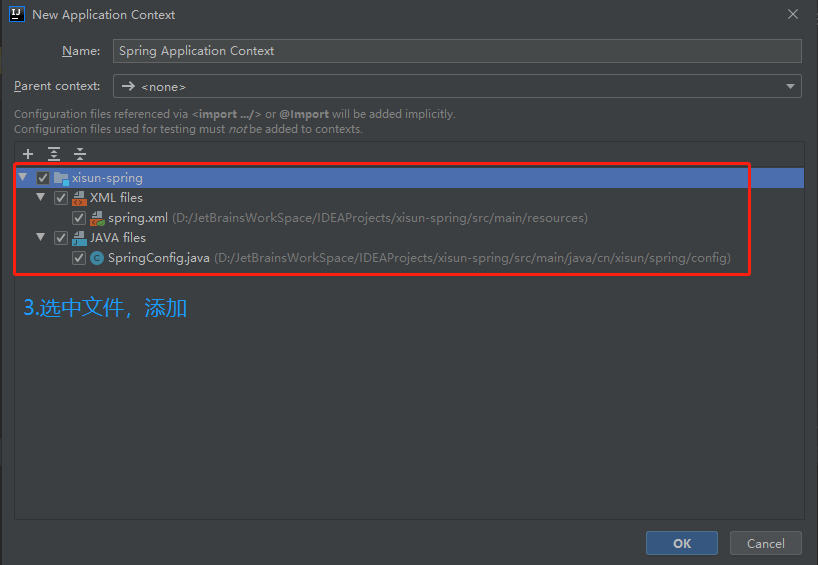
    • 调用 accept():监听连接请求,如果客户端请求连接,则接受连接,并返回通信套接字对象。
    • 调用该 Socket 类对象的 getOutputStream()getInputStream():获取输出流和输入流,开始网络数据的发送和接收。
    • 关闭 ServerSocket 和 Socket 对象:客户端访问结束,关闭通信套接字。
  • 客户端 Socket 的工作过程包含以下四个基本的步骤:

    • 创建 Socket:根据指定服务端的 IP 地址或端口号构造 Socket 类对象。若服务器端响应,则建立客户端到服务器的通信线路。若连接失败,会出现异常。
    • 打开连接到 Socket 的输入/输出流:使用 getInputStream() 获得输入流,使用 getOutputStream() 获得输出流,进行数据传输。
    • 按照一定的协议对 Socket 进行读/写操作:通过输入流读取服务器放入通信线路的信息 (但不能读取自己放入通信线路的信息),通过输出流将信息写入通信线路。
    • 关闭 Socket:断开客户端到服务器的连接,释放通信线路。
  • 服务器建立 ServerSocket 对象:

    • ServerSocket 对象负责等待客户端请求建立套接字连接,类似邮局某个窗口中的业务员。也就是说,服务器必须事先建立一个等待客户请求建立套接字
      连接的 ServerSocket 对象。

    • 所谓 “接收” 客户的套接字请求,就是 accept() 会返回一个 Socket 对象。

      1
      2
      3
      4
      5
      6
      7
      8
      9
      ServerSocket ss = new ServerSocket(9999);
      Socket s = ss.accept();
      InputStream in = s.getInputStream();
      byte[] buf = new byte[1024];
      int num = in.read(buf);
      String str = new String(buf,0,num);
      System.out.println(s.getInetAddress().toString()+”:”+str);
      s.close();
      ss.close();
  • 客户端创建 Socket 对象:

    • 客户端程序可以使用 Socket 类创建对象,创建的同时会自动向服务器方发起连接。Socket 的构造器是:

      • Socket(String host,int port)throws UnknownHostException,IOException:向服务器 (域名为 host,端口号为 port) 发起 TCP 连接,若成功,则创建 Socket 对象,否则抛出异常。
      • Socket(InetAddress address,int port)throws IOException:根据 InetAddress 对象所表示的 IP 地址以及端口号 port 发起连接。
    • 客户端建立 socketAtClient 对象的过程就是向服务器发出套接字连接请求。

      1
      2
      3
      4
      Socket s = new Socket("192.168.40.165",9999);
      OutputStream out = s.getOutputStream();
      out.write(" hello".getBytes());
      s.close();
  • 流程示意图:

    image-20210407094416022
  • 实例 1:客户端发送信息给服务端,服务端将数据显示在控制台上。

    1
    2
    3
    4
    5
    6
    7
    8
    9
    10
    11
    12
    13
    14
    15
    16
    17
    18
    19
    20
    21
    22
    23
    24
    25
    26
    27
    28
    29
    30
    31
    32
    33
    34
    35
    36
    37
    38
    39
    40
    41
    42
    43
    44
    45
    46
    47
    48
    49
    50
    51
    52
    53
    54
    55
    56
    57
    58
    59
    60
    61
    62
    63
    64
    65
    66
    67
    68
    69
    70
    71
    72
    73
    74
    75
    76
    77
    78
    79
    80
    81
    82
    83
    84
    85
    86
    87
    88
    89
    90
    91
    92
    93
    94
    95
    96
    97
    98
    99
    100
    101
    102
    103
    104
    105
    106
    107
    108
    109
    /**
    * 实现TCP的网络编程
    * 实例1:客户端发送信息给服务端,服务端将数据显示在控制台上
    */
    public class TCPTest {
    /*
    客户端
    */
    @Test
    public void client() {
    Socket socket = null;
    OutputStream os = null;
    try {
    // 1.创建Socket对象,指明服务器端的ip和端口号
    InetAddress inet = InetAddress.getByName("127.0.0.1");// 本机
    socket = new Socket(inet, 8879);
    // 2.获取一个输出流,用于输出数据
    os = socket.getOutputStream();
    // 3.写出数据的操作
    os.write("你好,我是客户端".getBytes());
    } catch (IOException e) {
    e.printStackTrace();
    } finally {
    // 4.关闭资源
    if (os != null) {
    try {
    os.close();
    } catch (IOException e) {
    e.printStackTrace();
    }
    }
    if (socket != null) {
    try {
    socket.close();
    } catch (IOException e) {
    e.printStackTrace();
    }
    }
    }
    }

    /*
    服务端
    */
    @Test
    public void server() {
    ServerSocket ss = null;
    Socket socket = null;
    InputStream is = null;
    ByteArrayOutputStream baos = null;
    try {
    // 1.创建服务器端的ServerSocket,指明自己的端口号
    ss = new ServerSocket(8879);
    // 2.调用accept()表示接收来自于客户端的socket
    socket = ss.accept();
    // 3.获取输入流
    is = socket.getInputStream();
    // 4.读取输入流中的数据
    // 不建议这样写,可能会有乱码(字节流读取中文)
    /*byte[] buffer = new byte[1024];
    int len;
    while ((len = is.read(buffer)) != -1) {
    String str = new String(buffer, 0, len);
    System.out.print(str);
    }*/
    baos = new ByteArrayOutputStream();
    byte[] buffer = new byte[5];
    int len;
    while ((len = is.read(buffer)) != -1) {
    // 将输入流中的数据都读到ByteArrayOutputStream中,读完之后再转换
    baos.write(buffer, 0, len);
    }
    System.out.println("收到了来自于:" + socket.getInetAddress().getHostAddress() + "的数据");// 客户端信息
    System.out.println(baos.toString());// 客户端发送的数据
    } catch (IOException e) {
    e.printStackTrace();
    } finally {
    // 5.关闭资源
    if (baos != null) {
    try {
    baos.close();
    } catch (IOException e) {
    e.printStackTrace();
    }
    }
    if (is != null) {
    try {
    is.close();
    } catch (IOException e) {
    e.printStackTrace();
    }
    }
    if (socket != null) {
    try {
    socket.close();
    } catch (IOException e) {
    e.printStackTrace();
    }
    }
    if (ss != null) {
    try {
    ss.close();
    } catch (IOException e) {
    e.printStackTrace();
    }
    }
    }
    }
    }
  • 实例 2:客户端发送文件给服务端,服务端将文件保存在本地。

    1
    2
    3
    4
    5
    6
    7
    8
    9
    10
    11
    12
    13
    14
    15
    16
    17
    18
    19
    20
    21
    22
    23
    24
    25
    26
    27
    28
    29
    30
    31
    32
    33
    34
    35
    36
    37
    38
    39
    40
    41
    42
    43
    44
    45
    46
    47
    48
    49
    50
    51
    52
    53
    54
    55
    56
    57
    /**
    *
    * 实现TCP的网络编程
    * 实例2:客户端发送文件给服务端,服务端将文件保存在本地。
    */
    public class TCPTest {
    /*
    客户端
    这里涉及到的异常,应该使用try-catch-finally处理
    */
    @Test
    public void client() throws IOException {
    // 1.创建Socket对象,指明服务器端的ip和端口号
    Socket socket = new Socket(InetAddress.getByName("127.0.0.1"), 9090);
    // 2.获取一个输出流,用于输出数据
    OutputStream os = socket.getOutputStream();
    // 3.创建输入流,可以使用BufferedInputStream包装
    FileInputStream fis = new FileInputStream(new File("beauty.jpg"));
    // 4.读写操作
    byte[] buffer = new byte[1024];
    int len;
    while ((len = fis.read(buffer)) != -1) {
    os.write(buffer, 0, len);
    }
    // 5.关闭资源
    fis.close();
    os.close();
    socket.close();
    }

    /*
    服务端
    这里涉及到的异常,应该使用try-catch-finally处理
    */
    @Test
    public void server() throws IOException {
    // 1.创建服务器端的ServerSocket,指明自己的端口号
    ServerSocket ss = new ServerSocket(9090);
    // 2.调用accept()表示接收来自于客户端的socket
    Socket socket = ss.accept();
    // 3.获取输入流
    InputStream is = socket.getInputStream();
    // 4.创建输出流,可以使用BufferedOutputStream包装
    FileOutputStream fos = new FileOutputStream(new File("beauty1.jpg"));
    // 5.读写操作
    byte[] buffer = new byte[1024];
    int len;
    while ((len = is.read(buffer)) != -1) {
    fos.write(buffer, 0, len);
    }
    // 6.关闭资源
    fos.close();
    is.close();
    socket.close();
    ss.close();
    }
    }
  • 实例 3:从客户端发送文件给服务端,服务端保存到本地,然后返回 “发送成功” 给客户端,并关闭相应的连接。

    1
    2
    3
    4
    5
    6
    7
    8
    9
    10
    11
    12
    13
    14
    15
    16
    17
    18
    19
    20
    21
    22
    23
    24
    25
    26
    27
    28
    29
    30
    31
    32
    33
    34
    35
    36
    37
    38
    39
    40
    41
    42
    43
    44
    45
    46
    47
    48
    49
    50
    51
    52
    53
    54
    55
    56
    57
    58
    59
    60
    61
    62
    63
    64
    65
    66
    67
    68
    69
    70
    71
    72
    73
    74
    75
    76
    77
    78
    79
    /**
    * 实现TCP的网络编程
    * 实例3:从客户端发送文件给服务端,服务端保存到本地,然后返回"发送成功"给客户端,并关闭相应的连接。
    */
    public class TCPTest {
    /*
    客户端
    这里涉及到的异常,应该使用try-catch-finally处理
    */
    @Test
    public void client() throws IOException {
    // 1.创建Socket对象,指明服务器端的ip和端口号
    Socket socket = new Socket(InetAddress.getByName("127.0.0.1"), 9090);
    // 2.获取一个输出流,用于输出数据
    OutputStream os = socket.getOutputStream();
    // 3.创建输入流,可以使用BufferedInputStream包装
    FileInputStream fis = new FileInputStream(new File("beauty.jpg"));
    // 4.读写操作
    byte[] buffer = new byte[1024];
    int len;
    while ((len = fis.read(buffer)) != -1) {
    os.write(buffer, 0, len);
    }
    // 关闭数据的输出,表示客服端数据传输已经完成,提醒服务端不必继续等待
    // 如果不执行此操作,服务器端会一直阻塞
    socket.shutdownOutput();

    // 5.接收来自于服务器端的数据,并显示到控制台上
    InputStream is = socket.getInputStream();
    ByteArrayOutputStream baos = new ByteArrayOutputStream();
    byte[] bufferr = new byte[20];
    int len1;
    while ((len1 = is.read(buffer)) != -1) {
    baos.write(buffer, 0, len1);
    }
    System.out.println(baos.toString());

    // 6.关闭资源
    baos.close();
    fis.close();
    os.close();
    socket.close();
    }

    /*
    服务端
    这里涉及到的异常,应该使用try-catch-finally处理
    */
    @Test
    public void server() throws IOException {
    // 1.创建服务器端的ServerSocket,指明自己的端口号
    ServerSocket ss = new ServerSocket(9090);
    // 2.调用accept()表示接收来自于客户端的socket
    Socket socket = ss.accept();
    // 3.获取输入流
    InputStream is = socket.getInputStream();
    // 4.创建输出流,可以使用BufferedOutputStream包装
    FileOutputStream fos = new FileOutputStream(new File("beauty1.jpg"));
    // 5.读写操作
    byte[] buffer = new byte[1024];
    int len;
    while ((len = is.read(buffer)) != -1) {// read()是一个阻塞式方法
    fos.write(buffer, 0, len);
    }

    System.out.println("图片传输完成");

    // 6.服务器端给予客户端反馈
    OutputStream os = socket.getOutputStream();
    os.write("你好,客户端,照片已收到!".getBytes());

    // 7.关闭资源
    os.close();
    fos.close();
    is.close();
    socket.close();
    ss.close();
    }
    }

UDP 网络编程

  • DatagramSocket 类和 DatagramPacket 类实现了基于 UDP 协议的网络编程。

  • UDP 数据报通过数据报套接字 DatagramSocket 发送和接收,系统不保证 UDP 数据报一定能够安全送到目的地,也不能确定什么时候可以抵达。

  • DatagramPacket 对象封装了 UDP 数据报,在数据报中包含了发送端的 IP 地址和端口号以及接收端的 IP 地址和端口号。

  • UDP 协议中每个数据报都给出了完整的地址信息,因此无须建立发送方和接收方的连接。如同发快递包裹一样。

  • DatagramSocket 类的常用方法:

    • public DatagramSocket(int port):创建数据报套接字并将其绑定到本地主机上的指定端口。套接字将被绑定到通配符地址,IP 地址由内核来选择。
    • public DatagramSocket(int port,InetAddress laddr):创建数据报套接字,将其绑定到指定的本地地址。本地端口必须在 0 到 65535 之间 (包括两者)。如果 IP 地址为 0.0.0.0,套接字将被绑定到通配符地址,IP 地址由内核选择。
    • public void close():关闭此数据报套接字。
    • public void send(DatagramPacket p):从此套接字发送数据报包。DatagramPacket 包含的信息指示:将要发送的数据、数据长度、远程主机的 IP 地址和远程主机的端口号。
    • public void receive(DatagramPacket p):从此套接字接收数据报包。当此方法返回时,DatagramPacket 的缓冲区填充了接收的数据。数据报包也包含发送方的 IP 地址和发送方机器上的端口号。此方法在接收到数据报前一直阻塞。数据报包对象的 length 字段包含所接收信息的长度。如果信息比包的长度长,该信息将被截短。
    • public InetAddress getLocalAddress():获取套接字绑定的本地地址。
    • public int getLocalPort():返回此套接字绑定的本地主机上的端口号。
    • public InetAddress getInetAddress():返回此套接字连接的地址。如果套接字未连接,则返回 null。
    • public int getPort():返回此套接字的端口。如果套接字未连接,则返回 -1。
  • DatagramPacket 类的常用方法:

    • public DatagramPacket(byte[] buf,int length):构造 DatagramPacket,用来接收长度为 length 的数据包。 length 参数必须小于等于 buf.length()
    • public DatagramPacket(byte[] buf,int length,InetAddress address,int port):构造数据报包,用来将长度为 length 的包发送到指定主机上的指定端口号。length 参数必须小于等于 buf.length()
    • public InetAddress getAddress():返回某台机器的 IP 地址,此数据报将要发往该机器或者是从该机器接收到的。
    • public int getPort():返回某台远程主机的端口号,此数据报将要发往该主机或者是从该主机接收到的。
    • public byte[] getData():返回数据缓冲区。接收到的或将要发送的数据从缓冲区中的偏移量 offset 处开始,持续 length 长度。
    • public int getLength():返回将要发送或接收到的数据的长度。
  • UDP 网络通信流程:

    • DatagramSocket 与 DatagramPacket。
    • 建立发送端,接收端, 发送端与接收端是两个独立的运行程序。
    • 建立数据包。
    • 调用 Socket 的发送、接收方法。
    • 关闭 Socket。
  • 实例:

    1
    2
    3
    4
    5
    6
    7
    8
    9
    10
    11
    12
    13
    14
    15
    16
    17
    18
    19
    20
    21
    22
    23
    24
    25
    26
    27
    28
    29
    30
    31
    32
    33
    34
    35
    36
    37
    38
    39
    40
    41
    42
    43
    44
    45
    46
    47
    48
    49
    50
    51
    public class UDPTest {
    /*
    发送端
    注意:发送端发送数据,是不管接收端能不能收到,为了保证接收端能收到数据,应该先启动接收端。
    */
    @Test
    public void sender() {
    DatagramSocket socket = null;
    try {
    socket = new DatagramSocket();

    String str = "我是UDP方式发送的数据";
    byte[] data = str.getBytes();
    InetAddress inet = InetAddress.getLocalHost();
    // 封装数据报,发送到本机的9090端口
    DatagramPacket packet = new DatagramPacket(data, 0, data.length, inet, 9090);

    socket.send(packet);
    } catch (IOException exception) {
    exception.printStackTrace();
    } finally {
    if (socket != null) {
    socket.close();
    }
    }
    }

    /*
    接收端
    注意:在接收端,要指定监听的端口。
    */
    @Test
    public void receiver() {
    DatagramSocket socket = null;
    try {
    socket = new DatagramSocket(9090);

    byte[] buffer = new byte[100];
    DatagramPacket packet = new DatagramPacket(buffer, 0, buffer.length);

    socket.receive(packet);
    System.out.println(new String(packet.getData(), 0, packet.getLength()));
    } catch (IOException exception) {
    exception.printStackTrace();
    } finally {
    if (socket != null) {
    socket.close();
    }
    }
    }
    }

URL 网络编程

  • URL (Uniform Resource Locator):统一资源定位符,它表示 Internet 上某一资源的地址。

  • 它是一种具体的 URI,即 URL 可以用来标识一个资源,而且还指明了如何 locate 这个资源。

  • 通过 URL 我们可以访问 Internet 上的各种网络资源,比如最常见的 www,ftp 站点。浏览器通过解析给定的 URL 可以在网络上查找相应的文件或其他资源。

  • URL 的基本结构由 5 部分组成:**<传输协议>://< 主机名>:< 端口号>/< 文件名>#片段名?参数列表**。

  • 为了表示 URL,java.net 中实现了类 URL。我们可以通过下面的构造器来初始化一个 URL 对象:

    • **public URL (String spec)**:通过一个表示 URL 地址的字符串可以构造一个 URL 对象。例如:URL url = new URL("http://www. atguigu.com/");
    • **public URL(URL context, String spec)**:通过基 URL 和相对 URL 构造一个 URL 对象。例如:URL downloadUrl = new URL(url, "download.html");
    • public URL(String protocol, String host, String file):例如:new URL("http","www.atguigu.com", “download. html");
    • public URL(String protocol, String host, int port, String file):例如:URL gamelan = new URL("http", "www.atguigu.com", 80, “download.html");
  • URL 类的构造器都声明抛出非运行时异常,必须要对这一异常进行处理,通常使用 try - catch 语句进行捕获。

  • 一个 URL 对象生成后,其属性是不能被改变的,但可以通过它给定的方法来获取这些属性:

    • public String getProtocol():获取该 URL 的协议名

    • public String getHost():获取该 URL 的主机名。

    • public String getPort():获取该 URL 的端口号。

    • public String getPath():获取该 URL 的文件路径。

    • public String getFile():获取该 URL 的文件名。

    • public String getQuery():获取该 URL 的查询名。

    • 实例:

      1
      2
      3
      4
      5
      6
      7
      8
      9
      10
      11
      12
      13
      14
      15
      16
      17
      18
      19
      20
      21
      22
      23
      24
      25
      26
      27
      28
      29
      /**
      * URL网络编程
      * 1.URL:统一资源定位符,对应着互联网的某一资源地址
      * 2.格式:
      * http://localhost:8080/examples/beauty.jpg?username=Tom
      * 协议 主机名 端口号 资源地址 参数列表
      */
      public class URLTest {
      public static void main(String[] args) {
      try {
      URL url = new URL("http://localhost:8080/examples/beauty.jpg?username=Tom");

      // public String getProtocol(): 获取该URL的协议名
      System.out.println(url.getProtocol());// http
      // public String getHost(): 获取该URL的主机名
      System.out.println(url.getHost());// localhost
      // public String getPort(): 获取该URL的端口号
      System.out.println(url.getPort());// 8080
      // public String getPath(): 获取该URL的文件路径
      System.out.println(url.getPath());// /examples/beauty.jpg
      // public String getFile(): 获取该URL的文件名
      System.out.println(url.getFile());// /examples/beauty.jpg?username=Tom
      // public String getQuery(): 获取该URL的查询名
      System.out.println(url.getQuery());// username=Tom
      } catch (MalformedURLException e) {
      e.printStackTrace();
      }
      }
      }
  • URL 的方法 openStream():能从网络上读取数据。

  • 若希望输出数据,例如向服务器端的 CGI (公共网关接口 Common Gateway Interface 的简称,是用户浏览器和服务器端的应用程序进行连接的接口) 程序发送一些数据,则必须先与 URL 建立连接,然后才能对其进行读写,此时需要使用 URLConnection 类。

  • URLConnection:表示到 URL 所引用的远程对象的连接。当与一个 URL 建立连接时,首先要在一个 URL 对象上通过方法 openConnection() 生成对应的 URLConnection 对象。如果连接过程失败,将产生 IOException。比如:

    1
    2
    URL netchinaren = new URL ("http://www.atguigu.com/index.shtml");
    URLConnectonn u = netchinaren.openConnection();
  • 通过 URLConnection 对象获取的输入流和输出流,即可以与现有的 CGI 程序进行交互。

    • public Object getContent() throws IOException

    • public int getContentLength()

    • public String getContentType()

    • public long getDate()

    • public long getLastModified()

    • public InputStream getInputStream()throws IOException

    • public OutputSteram getOutputStream()throws IOException

    • 实例:

      1
      2
      3
      4
      5
      6
      7
      8
      9
      10
      11
      12
      13
      14
      15
      16
      17
      18
      19
      20
      21
      22
      23
      24
      25
      26
      27
      28
      29
      30
      31
      32
      33
      34
      35
      36
      37
      38
      39
      40
      41
      42
      43
      44
      45
      46
      public class URLTest {
      public static void main(String[] args) {
      HttpURLConnection urlConnection = null;
      InputStream is = null;
      FileOutputStream fos = null;
      try {
      URL url = new URL("http://localhost:8080/examples/beauty.jpg");

      urlConnection = (HttpURLConnection) url.openConnection();

      urlConnection.connect();

      is = urlConnection.getInputStream();
      fos = new FileOutputStream("day10\\beauty3.jpg");

      byte[] buffer = new byte[1024];
      int len;
      while ((len = is.read(buffer)) != -1) {
      fos.write(buffer, 0, len);
      }

      System.out.println("下载完成");
      } catch (IOException e) {
      e.printStackTrace();
      } finally {
      // 关闭资源
      if (fos != null) {
      try {
      fos.close();
      } catch (IOException e) {
      e.printStackTrace();
      }
      }
      if (is != null) {
      try {
      is.close();
      } catch (IOException e) {
      e.printStackTrace();
      }
      }
      if (urlConnection != null) {
      urlConnection.disconnect();
      }
      }
      }
      }
  • URI 、URL 和URN的区别:

    image-20210407115543616
    • URI,是 uniform resource identifier,统一资源标识符,用来唯一的标识一个资源。而 URL 是 uniform resource locator,统一资源定位符,它是一种具体的 URI,即 URL 可以用来标识一个资源,而且还指明了如何 locate 这个资源。而 URN,是 uniform resource name,统一资源命名,是通过名字来标识资源,比如 mailto:java-net@java.sun.com。也就是说,URI 是以一种抽象的,高层次概念定义统一资源标识,而 URL 和 URN 则是具体的资源标识的方式。URL 和 URN 本身也都是一种 URI。
    • 在 Java 的 URI 中,一个 URI 实例可以代表绝对的,也可以是相对的,只要它符合 URI 的语法规则。而 URL 类则不仅符合语义,还包含了定位该资源的信息,因此它不能是相对的。

总结

  • 位于网络中的计算机具有唯一的 IP 地址,这样不同的主机可以互相区分。
  • 客户端-服务器是一种最常见的网络应用程序模型。服务器是一个为其客户端提供某种特定服务的硬件或软件。客户机是一个用户应用程序,用于访问某台服务器提供的服务。端口号是对一个服务的访问场所,它用于区分同一物理计算机上的多个服务。套接字用于连接客户端和服务器,客户端和服务器之间的每个通信会话使用一个不同的套接字。TCP 协议用于实现面向连接的会话。
  • Java 中有关网络方面的功能都定义在 java.net 程序包中。Java 用 InetAddress 对象表示 IP 地址,该对象里有两个字段:主机名 (String) 和 IP 地址 (int)。
  • 类 Socket 和 ServerSocket 实现了基于 TCP 协议的客户端-服务器程序。Socket 是客户端和服务器之间的一个连接,连接创建的细节被隐藏了。这个连接提供了一个安全的数据传输通道,这是因为 TCP 协议可以解决数据在传送过程中的丢失、损坏、重复、乱序以及网络拥挤等问题,它保证数据可靠的传送。
  • 类 URL 和 URLConnection 提供了最高级网络应用。URL 的网络资源的位置来统一标识 Internet 上各种网络资源。通过 URL 对象可以创建当前应用程序和 URL 表示的网络资源之间的连接,这样当前程序就可以读取网络资源数据,或者把自己的数据传送到网络上去。

本文参考

https://www.gulixueyuan.com/goods/show/203?targetId=309&preview=0

声明:写作本文初衷是个人学习记录,鉴于本人学识有限,如有侵权或不当之处,请联系 wdshfut@163.com