$ ~/kafka_2.12-2.6.0/bin/kafka-console-consumer.sh This tool helps to read data from Kafka topics and outputs it to standard output. Option Description ------ ----------- --bootstrap-server <String: server to REQUIRED: The server(s) to connect to. connect to> --consumer-property <String: A mechanism to pass user-defined consumer_prop> properties in the form key=value to the consumer. --consumer.config <String: config file> Consumer config properties file. Note that [consumer-property] takes precedence over this config. --enable-systest-events Log lifecycle events of the consumer in addition to logging consumed messages. (This is specific for system tests.) --formatter <String: class> The name of a class to use for formatting kafka messages for display. (default: kafka.tools. DefaultMessageFormatter) --from-beginning If the consumer does not already have an established offset to consume from, start with the earliest message present in the log rather than the latest message. --group <String: consumer group id> The consumer group id of the consumer. --help Print usage information. --isolation-level <String> Set to read_committed in order to filter out transactional messages which are not committed. Set to read_uncommitted to read all messages. (default: read_uncommitted) --key-deserializer <String: deserializer for key> --max-messages <Integer: num_messages> The maximum number of messages to consume before exiting. If not set, consumption is continual. --offset <String: consume offset> The offset id to consume from (a non- negative number), or 'earliest' which means from beginning, or 'latest'which means from end (default: latest) --partition <Integer: partition> The partition to consume from. Consumption starts from the end of the partition unless '--offset' is specified. --property <String: prop> The properties to initialize the message formatter. Default properties include: print.timestamp=true|false print.key=true|false print.value=true|false key.separator=<key.separator> line.separator=<line.separator> key.deserializer=<key.deserializer> value.deserializer=<value. deserializer> Users can also pass in customized properties for their formatter; more specifically, users can pass in properties keyed with 'key. deserializer.' and 'value. deserializer.' prefixes to configure their deserializers. --skip-message-on-error If there is an error when processing a message, skip it instead of halt. --timeout-ms <Integer: timeout_ms> If specified, exitif no message is available for consumption for the specified interval. --topic <String: topic> The topic id to consume on. --value-deserializer <String: deserializer for values> --version Display Kafka version. --whitelist <String: whitelist> Regular expression specifying whitelist of topics to include for consumption.
# 方法一:通过数组的方式 declare -a arr index=0 for i in $(echo$a | awk '{print $1,$3}') do arr[$index]=$i let"index+=1" done echo${arr[0]}# 结果为 123 echo${arr[1]}# 结果为 789
-atime n 在过去n天内被读取过的文件。 -cmin n 在过去n分钟内被修改过。 -cnewer file 比文件file更新的文件。 -ctime n 在过去n天内被修改过的文件。 -empty 空的文件。 -gid n gid是n。 -group name group名称是name。 -path p | -ipath p 路径名称符合p的文件。ipath忽略大小写。 -name name | -iname name 文件名称符合name的文件。iname忽略大小写。 -size n 文件大小是n单位,b代表512位元组的区块,c表示字元数,k表示kilo bytes,w是二个位元组。 -type d|f 文件类型是d|f的文件。 -pid n process id是n的文件。
basename NAME [SUFFIX] or: basename OPTION... NAME...
去掉 NAME 中的目录部分和后缀 SUFFIX,如果输出结果没有,则输出 SUFFIX。
参数说明
1 2 3 4 5 6 7 8 9 10 11 12 13 14
-a | --multiple support multiple arguments and treat each as a NAME -s | --suffix=SUFFIX remove a trailing SUFFIX; implies -a -z | --zero end each output line with NUL, not newline(默认情况下,每条输出行以换行符结尾) --help display this help and exit --version output version information and exit
实例
去除目录
1 2
$basename /usr/bin/sort sort
1 2
$ basename /usr/include/stdio.h stdio.h
去除目录和后缀
1 2
$ basename /usr/include/stdio.h .h stdio
1 2
$ basename -s .h /usr/include/stdio.h stdio
1 2
$ basename /usr/include/stdio.h stdio.h stdio.h
去除多个目录
1
2
3
4
$ basename -a any1/str1 any2/str2 any3/str3 str1 str2 str3
dirname
用于去除文件名中的非目录部分,删除最后一个 “\“ 后面的路径,显示父目录。
语法
1
dirname [OPTION] NAME...
如果 NAME 中不包含 /,则输出 .,即当前目录。
参数说明
1 2 3 4 5 6 7 8
-z | --zero end each output line with NUL, not newline --help display this help and exit --version output version information and exit
-a file 从文件中读入作为sdtin -e flag 注意有的时候可能会是-E,flag必须是一个以空格分隔的标志,当xargs分析到含有flag这个标志的时候就停止。 -p 当每次执行一个argument的时候询问一次用户。 -n num 后面加次数,表示命令在执行的时候一次用的argument的个数,默认是用所有的。
Linux version 4.4.0-116-generic (buildd@lgw01-amd64-021) (gcc version 5.4.0 20160609 (Ubuntu 5.4.0-6ubuntu1~16.04.9) ) #140-Ubuntu SMP Mon Feb 12 21:23:04 UTC 2018
或者
1
rename [options] expression replacement file...
linux 版本:
Linux version 3.10.0-1062.el7.x86_64 (mockbuild@kbuilder.bsys.centos.org) (gcc version 4.8.5 20150623 (Red Hat 4.8.5-36) (GCC) ) #1 SMP Wed Aug 7 18:08:02 UTC 2019
-v, -verbose Verbose: print names of files successfully renamed. -n, -nono No action: print names of files to be renamed, but don't rename. -f, -force Over write: allow existing files to be over-written. -h, -help Help: print SYNOPSIS and OPTIONS. -m, -man Manual: print manual page. -V, -version Version: show version number. -e Expression: code to act on files name. May be repeated to build up code (like "perl -e"). If no -e, the first argument is used as code. -E Statement: code to act on files name, as -e but terminated by ';'.
或者
1 2 3 4 5
-v, --verbose explain what is being done -s, --symlink act on symlink target
-h, --help display this help and exit -V, --version output version information and exit
# lin @ lin in ~/share/storage_server_3/Download/test [14:52:08] $ ll total 76G -rw-rw-r-- 1 lin lin 4.3G Dec 4 16:54 2005.tar.gz -rw-rw-r-- 1 lin lin 4.3G Dec 5 21:50 2006.tar.gz -rw-rw-r-- 1 lin lin 4.4G Dec 5 21:52 2007.tar.gz -rw-rw-r-- 1 lin lin 4.7G Dec 5 21:53 2008.tar.gz -rw-rw-r-- 1 lin lin 5.0G Dec 7 22:10 2009.tar.gz
# lin @ lin in ~/share/storage_server_3/Download/test [14:52:08] $ rename -v "s/20/patent-application/" *.tar.gz 2005.tar.gz renamed as patent-application05.tar.gz 2006.tar.gz renamed as patent-application06.tar.gz 2007.tar.gz renamed as patent-application07.tar.gz 2008.tar.gz renamed as patent-application08.tar.gz 2009.tar.gz renamed as patent-application09.tar.gz
# lin @ lin in ~/share/storage_server_3/Download/test [14:53:55] $ ll total 76G -rw-rw-r-- 1 lin lin 4.3G Dec 4 16:54 patent-application05.tar.gz -rw-rw-r-- 1 lin lin 4.3G Dec 5 21:50 patent-application06.tar.gz -rw-rw-r-- 1 lin lin 4.4G Dec 5 21:52 patent-application07.tar.gz -rw-rw-r-- 1 lin lin 4.7G Dec 5 21:53 patent-application08.tar.gz -rw-rw-r-- 1 lin lin 5.0G Dec 7 22:10 patent-application09.tar.gz
或者
1
$ rename 20 patent-application-20 *.tar.gz
1 2 3 4 5 6 7 8 9 10 11 12 13 14 15 16
(base) [hadoop@client version-1.0]$ ll total 79555796 -rw-rw-r-- 1 hadoop hadoop 4527645498 Dec 4 16:54 2005.tar.gz -rw-rw-r-- 1 hadoop hadoop 4550889304 Dec 5 21:50 2006.tar.gz -rw-rw-r-- 1 hadoop hadoop 4712276001 Dec 5 21:52 2007.tar.gz -rw-rw-r-- 1 hadoop hadoop 4986740725 Dec 5 21:53 2008.tar.gz -rw-rw-r-- 1 hadoop hadoop 5311490484 Dec 7 22:10 2009.tar.gz (base) [hadoop@client version-1.0]$ rename 20 patent-application-20 *.tar.gz (base) [hadoop@client version-1.0]$ ll total 79555796 -rw-rw-r-- 1 hadoop hadoop 1372 Dec 16 09:15 hash_calculate.txt -rw-rw-r-- 1 hadoop hadoop 4527645498 Dec 4 16:54 patent-application-2005.tar.gz -rw-rw-r-- 1 hadoop hadoop 4550889304 Dec 5 21:50 patent-application-2006.tar.gz -rw-rw-r-- 1 hadoop hadoop 4712276001 Dec 5 21:52 patent-application-2007.tar.gz -rw-rw-r-- 1 hadoop hadoop 4986740725 Dec 5 21:53 patent-application-2008.tar.gz -rw-rw-r-- 1 hadoop hadoop 5311490484 Dec 7 22:10 patent-application-2009.tar.gz
-o | --output=FILE 设定结果输出档。这个选项会将time的输出写入所指定的档案中。如果档案已经存在,系统将覆写其内容。 -a | --append 配合-o使用,会将结果写到档案的末端,而不会覆盖掉原来的内容。 -f FORMAT | --format=FORMAT 以FORMAT字串设定显示方式。当这个选项没有被设定的时候,会用系统预设的格式。不过你可以用环境变数time来设定这个格式,如此一来就不必每次登入系统都要设定一次。
实例
date 命令的运行时间
1 2 3
$ time date Tue Dec 22 12:01:50 CST 2020 date 0.00s user 0.01s system 8% cpu 0.092 total
查找文件并复制的运行时间
1 2 3
$ time find /home/lin/share/storage_server_3/patent/application/unzip_version-1.0/2019 -iname "*.xml" | xargs -P 6 -i cp {} /home/lin/share/storage_server_3/patent/application-patent/patent_version-1.0/2019 find -iname "*.xml" 24.00s user 114.39s system 1% cpu 2:08:02.95 total xargs -P 6 -i cp {} 4.35s user 28.35s system 0% cpu 2:08:02.99 total
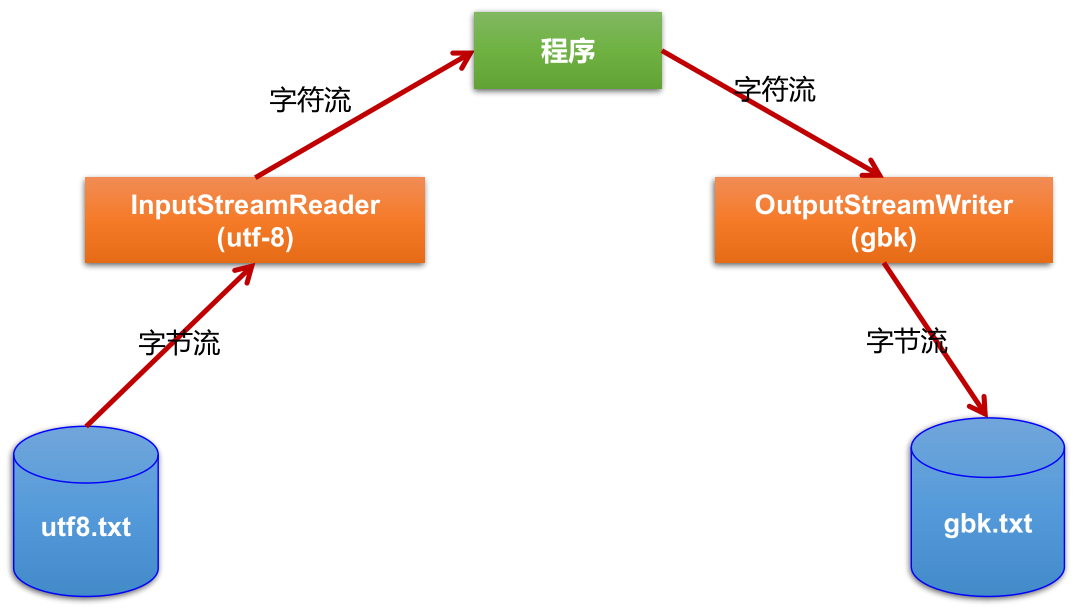
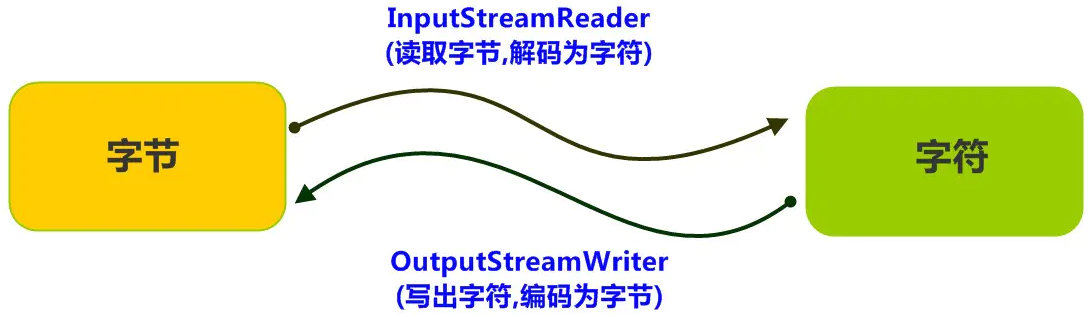
InputStream is = new FileInputStream("C:\\Users\\tang\\Desktop\\test.txt"); InputStreamReader isr = new InputStreamReader(is); BufferedReader br = new BufferedReader(isr); String string = br.readLine(); System.out.println(string);
/** * MyInput.java: Contain the methods for reading int, double, float, boolean, short, byte and * string values from the keyboard */ publicclassMyInput{ // Read a string from the keyboard publicstatic String readString(){ BufferedReader br = new BufferedReader(new InputStreamReader(System.in));
// Declare and initialize the string String string = "";
// Get the string from the keyboard try { string = br.readLine(); } catch (IOException ex) { System.out.println(ex); }
// Return the string obtained from the keyboard return string; }
// Read an int value from the keyboard publicstaticintreadInt(){ return Integer.parseInt(readString()); }
// Read a double value from the keyboard publicstaticdoublereadDouble(){ return Double.parseDouble(readString()); }
// Read a byte value from the keyboard publicstaticdoublereadByte(){ return Byte.parseByte(readString()); }
// Read a short value from the keyboard publicstaticdoublereadShort(){ return Short.parseShort(readString()); }
// Read a long value from the keyboard publicstaticdoublereadLong(){ return Long.parseLong(readString()); }
// Read a float value from the keyboard publicstaticdoublereadFloat(){ return Float.parseFloat(readString()); }
publicstaticvoidmain(String[] args){ int i = readInt(); System.out.println("输出的数为:" + i); } }
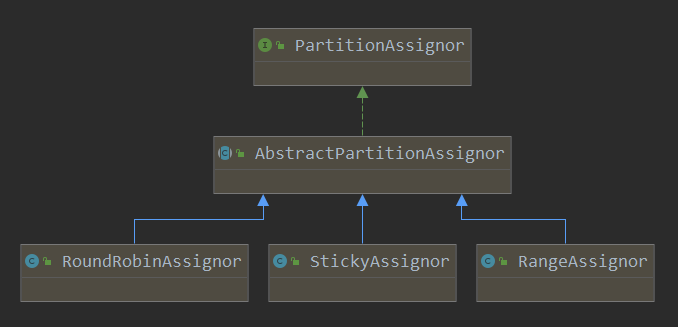
/** * Perform the group assignment given the partition counts and member subscriptions * @param partitionsPerTopic The number of partitions for each subscribed topic. Topics not in metadata will be excluded * from this map. * @param subscriptions Map from the memberId to their respective topic subscription * @return Map from each member to the list of partitions assigned to them. */ // 根据partitionsPerTopic和subscriptions进行分配,具体的实现会在子类中实现(不同的子类,其实现方法不相同) publicabstract Map<String, List<TopicPartition>> assign(Map<String, Integer> partitionsPerTopic, Map<String, Subscription> subscriptions);
// a mapping of all topic partitions to all consumers that can be assigned to them final Map<TopicPartition, List<String>> partition2AllPotentialConsumers = new HashMap<>(); // a mapping of all consumers to all potential topic partitions that can be assigned to them final Map<String, List<TopicPartition>> consumer2AllPotentialPartitions = new HashMap<>();
// initialize partition2AllPotentialConsumers and consumer2AllPotentialPartitions in the following two for loops for (Entry<String, Integer> entry: partitionsPerTopic.entrySet()) { for (int i = 0; i < entry.getValue(); ++i) partition2AllPotentialConsumers.put(new TopicPartition(entry.getKey(), i), new ArrayList<>()); }
for (Entry<String, Subscription> entry: subscriptions.entrySet()) { String consumer = entry.getKey(); consumer2AllPotentialPartitions.put(consumer, new ArrayList<>()); entry.getValue().topics().stream().filter(topic -> partitionsPerTopic.get(topic) != null).forEach(topic -> { for (int i = 0; i < partitionsPerTopic.get(topic); ++i) { TopicPartition topicPartition = new TopicPartition(topic, i); consumer2AllPotentialPartitions.get(consumer).add(topicPartition); partition2AllPotentialConsumers.get(topicPartition).add(consumer); } });
// add this consumer to currentAssignment (with an empty topic partition assignment) if it does not already exist if (!currentAssignment.containsKey(consumer)) currentAssignment.put(consumer, new ArrayList<>()); }
// a mapping of partition to current consumer Map<TopicPartition, String> currentPartitionConsumer = new HashMap<>(); for (Map.Entry<String, List<TopicPartition>> entry: currentAssignment.entrySet()) for (TopicPartition topicPartition: entry.getValue()) currentPartitionConsumer.put(topicPartition, entry.getKey());
// all partitions that need to be assigned (initially set to all partitions but adjusted in the following loop) List<TopicPartition> unassignedPartitions = new ArrayList<>(sortedPartitions); for (Iterator<Map.Entry<String, List<TopicPartition>>> it = currentAssignment.entrySet().iterator(); it.hasNext();) { Map.Entry<String, List<TopicPartition>> entry = it.next(); if (!subscriptions.containsKey(entry.getKey())) { // if a consumer that existed before (and had some partition assignments) is now removed, remove it from currentAssignment for (TopicPartition topicPartition: entry.getValue()) currentPartitionConsumer.remove(topicPartition); it.remove(); } else { // otherwise (the consumer still exists) for (Iterator<TopicPartition> partitionIter = entry.getValue().iterator(); partitionIter.hasNext();) { TopicPartition partition = partitionIter.next(); if (!partition2AllPotentialConsumers.containsKey(partition)) { // if this topic partition of this consumer no longer exists remove it from currentAssignment of the consumer partitionIter.remove(); currentPartitionConsumer.remove(partition); } elseif (!subscriptions.get(entry.getKey()).topics().contains(partition.topic())) { // if this partition cannot remain assigned to its current consumer because the consumer // is no longer subscribed to its topic remove it from currentAssignment of the consumer partitionIter.remove(); } else // otherwise, remove the topic partition from those that need to be assigned only if // its current consumer is still subscribed to its topic (because it is already assigned // and we would want to preserve that assignment as much as possible) unassignedPartitions.remove(partition); } } } // at this point we have preserved all valid topic partition to consumer assignments and removed // all invalid topic partitions and invalid consumers. Now we need to assign unassignedPartitions // to consumers so that the topic partition assignments are as balanced as possible.
// an ascending sorted set of consumers based on how many topic partitions are already assigned to them TreeSet<String> sortedCurrentSubscriptions = new TreeSet<>(new SubscriptionComparator(currentAssignment)); sortedCurrentSubscriptions.addAll(currentAssignment.keySet());
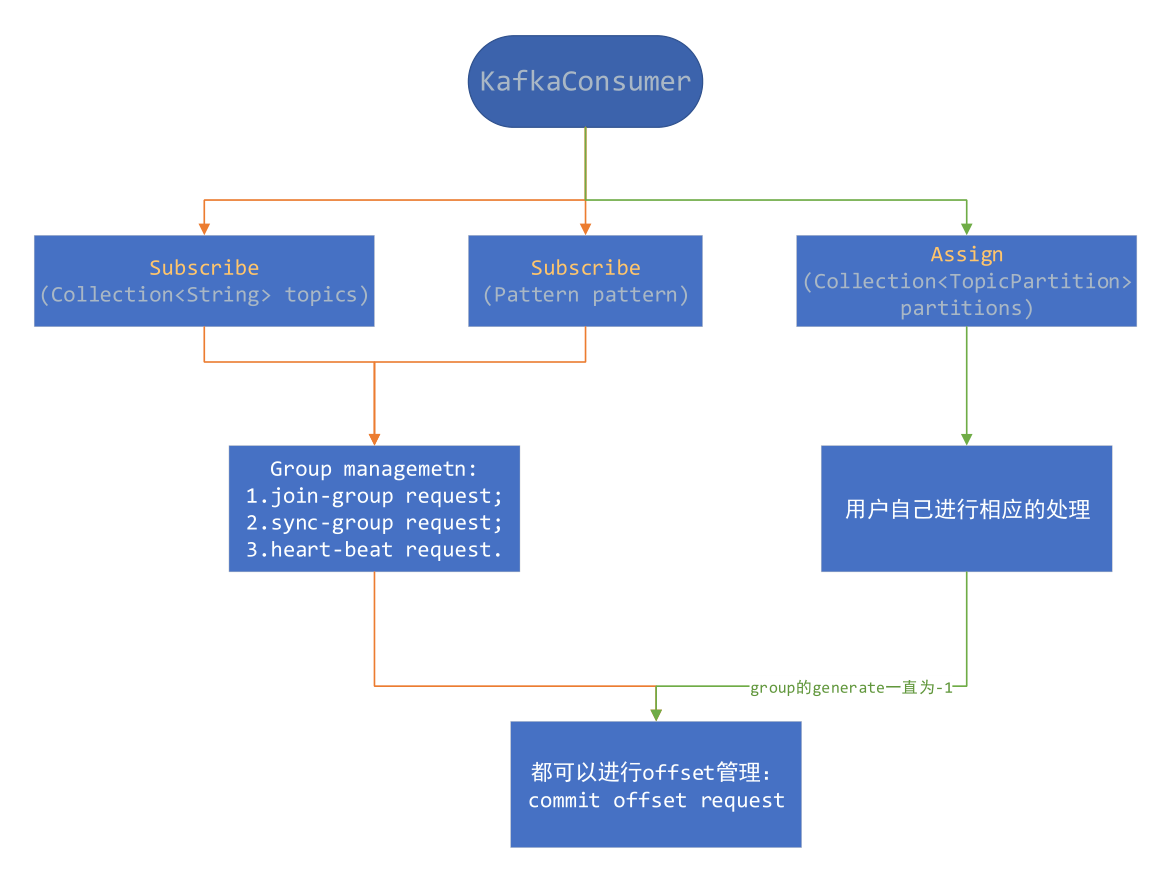
/** * Subscribe to the given list of topics to get dynamically * assigned partitions. <b>Topic subscriptions are not incremental. This list will replace the current * assignment (if there is one).</b> Note that it is not possible to combine topic subscription with group management * with manual partition assignment through {@link #assign(Collection)}. * * If the given list of topics is empty, it is treated the same as {@link #unsubscribe()}. * * <p> * As part of group management, the consumer will keep track of the list of consumers that belong to a particular * group and will trigger a rebalance operation if any one of the following events are triggered: * <ul> * <li>Number of partitions change for any of the subscribed topics * <li>A subscribed topic is created or deleted * <li>An existing member of the consumer group is shutdown or fails * <li>A new member is added to the consumer group * </ul> * <p> * When any of these events are triggered, the provided listener will be invoked first to indicate that * the consumer's assignment has been revoked, and then again when the new assignment has been received. * Note that rebalances will only occur during an active call to {@link #poll(Duration)}, so callbacks will * also only be invoked during that time. * * The provided listener will immediately override any listener set in a previous call to subscribe. * It is guaranteed, however, that the partitions revoked/assigned through this interface are from topics * subscribed in this call. See {@link ConsumerRebalanceListener} for more details. * * @param topics The list of topics to subscribe to * @param listener Non-null listener instance to get notifications on partition assignment/revocation for the * subscribed topics * @throws IllegalArgumentException If topics is null or contains null or empty elements, or if listener is null * @throws IllegalStateException If {@code subscribe()} is called previously with pattern, or assign is called * previously (without a subsequent call to {@link #unsubscribe()}), or if not * configured at-least one partition assignment strategy */ @Override publicvoidsubscribe(Collection<String> topics, ConsumerRebalanceListener listener){ acquireAndEnsureOpen(); try { maybeThrowInvalidGroupIdException(); if (topics == null) thrownew IllegalArgumentException("Topic collection to subscribe to cannot be null"); if (topics.isEmpty()) { // treat subscribing to empty topic list as the same as unsubscribing this.unsubscribe(); } else { for (String topic : topics) { if (topic == null || topic.trim().isEmpty()) thrownew IllegalArgumentException("Topic collection to subscribe to cannot contain null or empty topic"); }
privatebooleanchangeSubscription(Set<String> topicsToSubscribe){ if (subscription.equals(topicsToSubscribe)) returnfalse;
subscription = topicsToSubscribe; if (subscriptionType != SubscriptionType.USER_ASSIGNED) { groupSubscription = new HashSet<>(groupSubscription); groupSubscription.addAll(topicsToSubscribe); } else { groupSubscription = new HashSet<>(topicsToSubscribe); } returntrue; }
请求更新 metadata。
1 2 3 4 5 6 7 8 9 10 11 12 13 14
publicsynchronizedvoidrequestUpdateForNewTopics(){ // Override the timestamp of last refresh to let immediate update. this.lastRefreshMs = 0; this.requestVersion++; requestUpdate(); }
/** * Request an update of the current cluster metadata info, return the current updateVersion before the update */ publicsynchronizedintrequestUpdate(){ this.needUpdate = true; returnthis.updateVersion; }
/** * Subscribe to all topics matching specified pattern to get dynamically assigned partitions. * The pattern matching will be done periodically against all topics existing at the time of check. * This can be controlled through the {@code metadata.max.age.ms} configuration: by lowering * the max metadata age, the consumer will refresh metadata more often and check for matching topics. * <p> * See {@link #subscribe(Collection, ConsumerRebalanceListener)} for details on the * use of the {@link ConsumerRebalanceListener}. Generally rebalances are triggered when there * is a change to the topics matching the provided pattern and when consumer group membership changes. * Group rebalances only take place during an active call to {@link #poll(Duration)}. * * @param pattern Pattern to subscribe to * @param listener Non-null listener instance to get notifications on partition assignment/revocation for the * subscribed topics * @throws IllegalArgumentException If pattern or listener is null * @throws IllegalStateException If {@code subscribe()} is called previously with topics, or assign is called * previously (without a subsequent call to {@link #unsubscribe()}), or if not * configured at-least one partition assignment strategy */ @Override publicvoidsubscribe(Pattern pattern, ConsumerRebalanceListener listener){ maybeThrowInvalidGroupIdException(); if (pattern == null) thrownew IllegalArgumentException("Topic pattern to subscribe to cannot be null");
publicvoidupdatePatternSubscription(Cluster cluster){ final Set<String> topicsToSubscribe = cluster.topics().stream() .filter(subscriptions::matchesSubscribedPattern) .collect(Collectors.toSet()); if (subscriptions.subscribeFromPattern(topicsToSubscribe)) metadata.requestUpdateForNewTopics(); }
publicsynchronizedbooleansubscribeFromPattern(Set<String> topics){ if (subscriptionType != SubscriptionType.AUTO_PATTERN) thrownew IllegalArgumentException("Attempt to subscribe from pattern while subscription type set to " + subscriptionType);
return changeSubscription(topics); }
privatebooleanchangeSubscription(Set<String> topicsToSubscribe){ if (subscription.equals(topicsToSubscribe)) returnfalse;
subscription = topicsToSubscribe; if (subscriptionType != SubscriptionType.USER_ASSIGNED) { groupSubscription = new HashSet<>(groupSubscription); groupSubscription.addAll(topicsToSubscribe); } else { groupSubscription = new HashSet<>(topicsToSubscribe); } returntrue; }
1 2 3 4 5 6 7 8 9 10 11 12 13 14
publicsynchronizedvoidrequestUpdateForNewTopics(){ // Override the timestamp of last refresh to let immediate update. this.lastRefreshMs = 0; this.requestVersion++; requestUpdate(); }
/** * Request an update of the current cluster metadata info, return the current updateVersion before the update */ publicsynchronizedintrequestUpdate(){ this.needUpdate = true; returnthis.updateVersion; }
/** * Manually assign a list of partitions to this consumer. This interface does not allow for incremental assignment * and will replace the previous assignment (if there is one). * <p> * If the given list of topic partitions is empty, it is treated the same as {@link #unsubscribe()}. * <p> * Manual topic assignment through this method does not use the consumer's group management * functionality. As such, there will be no rebalance operation triggered when group membership or cluster and topic * metadata change. Note that it is not possible to use both manual partition assignment with {@link #assign(Collection)} * and group assignment with {@link #subscribe(Collection, ConsumerRebalanceListener)}. * <p> * If auto-commit is enabled, an async commit (based on the old assignment) will be triggered before the new * assignment replaces the old one. * * @param partitions The list of partitions to assign this consumer * @throws IllegalArgumentException If partitions is null or contains null or empty topics * @throws IllegalStateException If {@code subscribe()} is called previously with topics or pattern * (without a subsequent call to {@link #unsubscribe()}) */ @Override publicvoidassign(Collection<TopicPartition> partitions){ acquireAndEnsureOpen(); try { if (partitions == null) { thrownew IllegalArgumentException("Topic partition collection to assign to cannot be null"); } elseif (partitions.isEmpty()) { this.unsubscribe(); } else { for (TopicPartition tp : partitions) { String topic = (tp != null) ? tp.topic() : null; if (topic == null || topic.trim().isEmpty()) thrownew IllegalArgumentException("Topic partitions to assign to cannot have null or empty topic"); } fetcher.clearBufferedDataForUnassignedPartitions(partitions);
// make sure the offsets of topic partitions the consumer is unsubscribing from // are committed since there will be no following rebalance if (coordinator != null) this.coordinator.maybeAutoCommitOffsetsAsync(time.milliseconds());
log.info("Subscribed to partition(s): {}", Utils.join(partitions, ", ")); if (this.subscriptions.assignFromUser(new HashSet<>(partitions))) metadata.requestUpdateForNewTopics(); } } finally { release(); } }
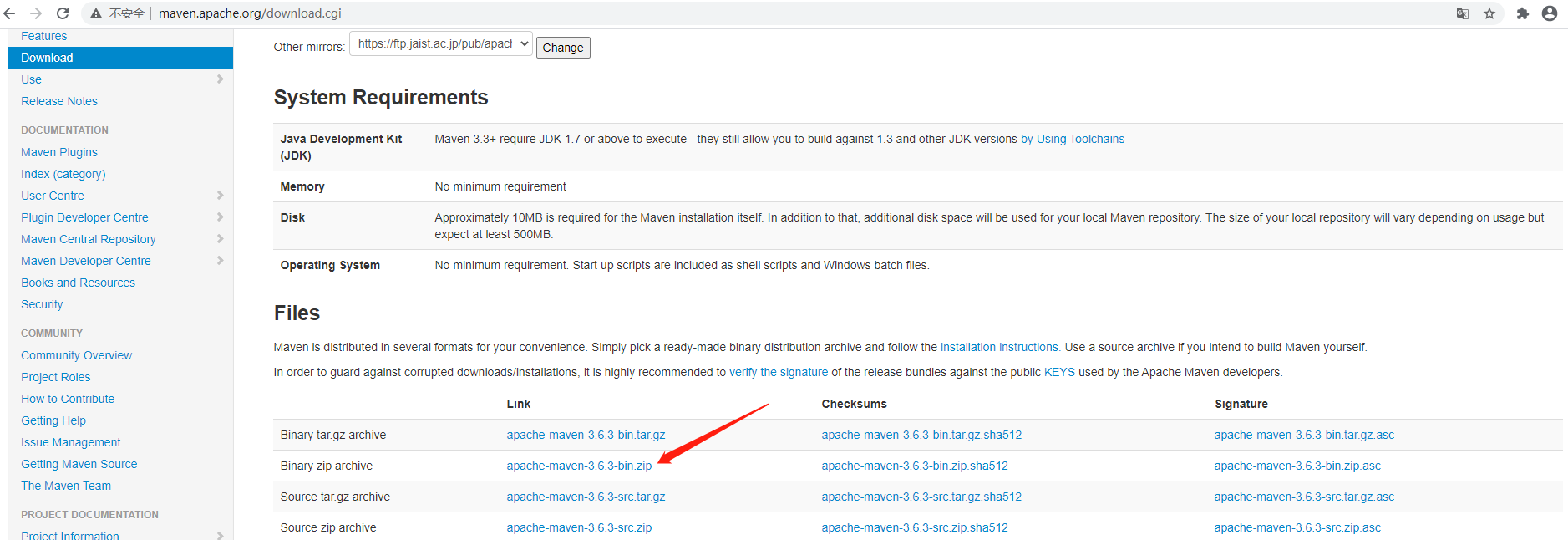
<mirrors> <!-- mirror | Specifies a repository mirror site to use instead of a given repository. The repository that | this mirror serves has an ID that matches the mirrorOf element of this mirror. IDs are used | for inheritance and direct lookup purposes, and must be unique across the set of mirrors. | <mirror> <id>mirrorId</id> <mirrorOf>repositoryId</mirrorOf> <name>Human Readable Name for this Mirror.</name> <url>http://my.repository.com/repo/path</url> </mirror> --> <mirror> <id>alimaven</id> <name>aliyun maven</name> <url>http://maven.aliyun.com/nexus/content/groups/public/</url> <mirrorOf>central</mirrorOf> </mirror> </mirrors>
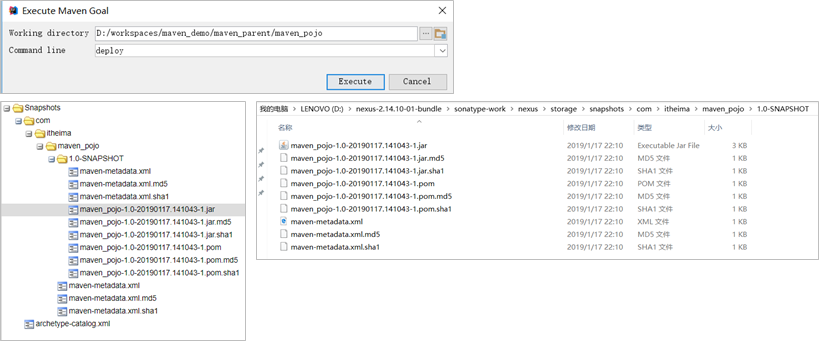
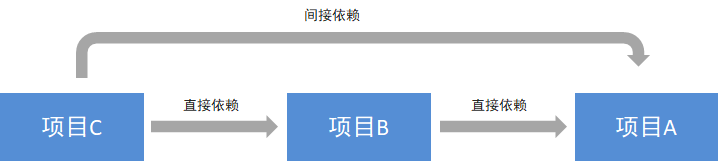
在 maven 工程的 pom.xml 文件中配置某个 jar 包的坐标后,如果本地的 maven 仓库不存在这个 jar 包,maven 工具会自动到配置的 maven 私服下载,如果私服中也不存在,maven 私服就会从 maven 中央仓库进行下载。
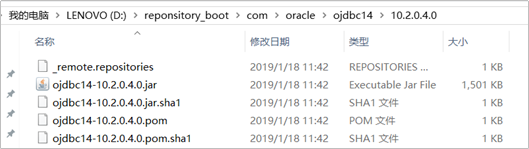
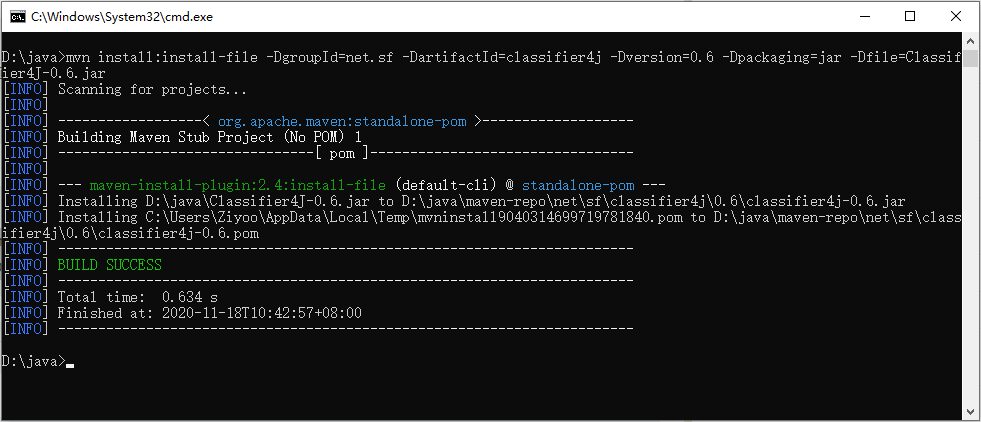
但是并不是所有的 jar 包都可以从中央仓库下载到,比如常用的 Oracle 数据库驱动的 jar 包在中央仓库就不存在。此时需要到 Oracle 的官网下载驱动 jar 包,然后将此 jar 包通过 maven 命令安装到我们本地的 maven 仓库或者 maven 私服中,这样在 maven 项目中就可以使用 maven 坐标引用到此 jar 包了。
private ConsumerRecords<K, V> poll(final Timer timer, finalboolean includeMetadataInTimeout){ // Step1:确认KafkaConsumer实例是单线程运行,以及没有被关闭 acquireAndEnsureOpen(); try { if (this.subscriptions.hasNoSubscriptionOrUserAssignment()) { thrownew IllegalStateException("Consumer is not subscribed to any topics or assigned any partitions"); }
// poll for new data until the timeout expires do { client.maybeTriggerWakeup();
if (includeMetadataInTimeout) { // Step2:更新metadata信息,获取GroupCoordinator的ip以及接口,并连接、 join-group、sync-group,期间group会进行rebalance。在此步骤,consumer会先加入group,然后获取需要消费的topic partition的offset信息 if (!updateAssignmentMetadataIfNeeded(timer)) { return ConsumerRecords.empty(); } } else { while (!updateAssignmentMetadataIfNeeded(time.timer(Long.MAX_VALUE))) { log.warn("Still waiting for metadata"); } }
// Step3:拉取数据,核心步骤 final Map<TopicPartition, List<ConsumerRecord<K, V>>> records = pollForFetches(timer); if (!records.isEmpty()) { // before returning the fetched records, we can send off the next round of fetches // and avoid block waiting for their responses to enable pipelining while the user // is handling the fetched records. // // NOTE: since the consumed position has already been updated, we must not allow // wakeups or any other errors to be triggered prior to returning the fetched records. // 在返回数据之前,发送下次的fetch请求,避免用户在下次获取数据时线程block if (fetcher.sendFetches() > 0 || client.hasPendingRequests()) { client.pollNoWakeup(); }
returnthis.interceptors.onConsume(new ConsumerRecords<>(records)); } } while (timer.notExpired());
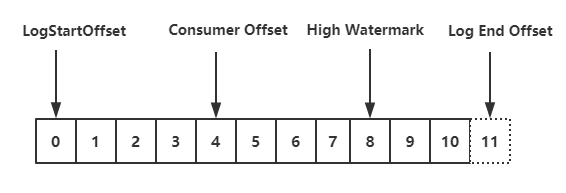
privatestaticclassTopicPartitionState{ private FetchState fetchState; private FetchPosition position; // last consumed position private Long highWatermark; // the high watermark from last fetch private Long logStartOffset; // the log start offset private Long lastStableOffset; privateboolean paused; // whether this partition has been paused by the user private OffsetResetStrategy resetStrategy; // the strategy to use if the offset needs resetting private Long nextRetryTimeMs; private Integer preferredReadReplica; private Long preferredReadReplicaExpireTimeMs; ... }
consumer 实例订阅的每个 topic-partition 都会有一个对应的 TopicPartitionState 对象,在这个对象中会记录上面内容,最需要关注的就是 position 这个属性,它表示上一次消费的位置。通过 consumer.seek () 方式指定消费 offset 的时候,其实设置的就是这个 position 值。
updateFetchPositions - 拉取 offset
在 consumer 成功加入 group 并开始消费之前,我们还需要知道 consumer 是从 offset 为多少的位置开始消费。consumer 加入 group 之后,就得去获取 offset 了,下面的方法,就是开始更新 position (offset):
/** * Set the fetch position to the committed position (if there is one) * or reset it using the offset reset policy the user has configured. * * @throws org.apache.kafka.common.errors.AuthenticationException if authentication fails. See the exception for more details * @throws NoOffsetForPartitionException If no offset is stored for a given partition and no offset reset policy is * defined * @return true iff the operation completed without timing out */ privatebooleanupdateFetchPositions(final Timer timer){ // If any partitions have been truncated due to a leader change, we need to validate the offsets fetcher.validateOffsetsIfNeeded();
// Step1:查看TopicPartitionState的position是否为空,第一次消费肯定为空 cachedSubscriptionHashAllFetchPositions = subscriptions.hasAllFetchPositions(); if (cachedSubscriptionHashAllFetchPositions) returntrue;
// If there are any partitions which do not have a valid position and are not // awaiting reset, then we need to fetch committed offsets. We will only do a // coordinator lookup if there are partitions which have missing positions, so // a consumer with manually assigned partitions can avoid a coordinator dependence // by always ensuring that assigned partitions have an initial position. // Step2:如果没有有效的offset,那么需要从GroupCoordinator中获取 if (coordinator != null && !coordinator.refreshCommittedOffsetsIfNeeded(timer)) returnfalse;
// If there are partitions still needing a position and a reset policy is defined, // request reset using the default policy. If no reset strategy is defined and there // are partitions with a missing position, then we will raise an exception. // Step3:如果还存在partition不知道position,并且设置了offsetreset策略,那么就等待重置,不然就抛出异常 subscriptions.resetMissingPositions();
// Finally send an asynchronous request to lookup and update the positions of any // partitions which are awaiting reset. // Step4:向PartitionLeader(GroupCoordinator所在机器)发送ListOffsetRequest重置position fetcher.resetOffsetsIfNeeded();
returntrue; }
上面的代码主要分为 4 个步骤,具体如下:
首先,查看当前 TopicPartition 的 position 是否为空,如果不为空,表示知道下次 fetch position (即拉取数据时从哪个位置开始拉取),但如果是第一次消费,这个 TopicPartitionState.position 肯定为空。
然后,通过 GroupCoordinator 为缺少 fetch position 的 partition 拉取 position (即 last committed offset)。
继而,仍不知道 partition 的 position (_consumer_offsets 中未保存位移信息),且设置了 offsetreset 策略,那么就等待重置,如果没有设置重置策略,就抛出 NoOffsetForPartitionException 异常。
最后,为那些需要重置 fetch position 的 partition 发送 ListOffsetRequest 重置 position (consumer.beginningOffsets (),consumer.endOffsets (),consumer.offsetsForTimes (),consumer.seek () 都会发送 ListOffRequest 请求)。
/** * Refresh the committed offsets for provided partitions. * * @param timer Timer bounding how long this method can block * @return true iff the operation completed within the timeout */ publicbooleanrefreshCommittedOffsetsIfNeeded(Timer timer){ final Set<TopicPartition> missingFetchPositions = subscriptions.missingFetchPositions();
// 1.发送获取offset的请求,核心步骤 final Map<TopicPartition, OffsetAndMetadata> offsets = fetchCommittedOffsets(missingFetchPositions, timer); if (offsets == null) returnfalse;
for (final Map.Entry<TopicPartition, OffsetAndMetadata> entry : offsets.entrySet()) { final TopicPartition tp = entry.getKey(); // 2.获取response中的offset final OffsetAndMetadata offsetAndMetadata = entry.getValue(); final ConsumerMetadata.LeaderAndEpoch leaderAndEpoch = metadata.leaderAndEpoch(tp); final SubscriptionState.FetchPosition position = new SubscriptionState.FetchPosition( offsetAndMetadata.offset(), offsetAndMetadata.leaderEpoch(), leaderAndEpoch);
log.info("Setting offset for partition {} to the committed offset {}", tp, position); entry.getValue().leaderEpoch().ifPresent(epoch -> this.metadata.updateLastSeenEpochIfNewer(entry.getKey(), epoch)); // 3.实际就是设置SubscriptionState的position值 this.subscriptions.seekUnvalidated(tp, position); } returntrue; }
/** * Fetch the current committed offsets from the coordinator for a set of partitions. * * @param partitions The partitions to fetch offsets for * @return A map from partition to the committed offset or null if the operation timed out */ public Map<TopicPartition, OffsetAndMetadata> fetchCommittedOffsets(final Set<TopicPartition> partitions, final Timer timer){ if (partitions.isEmpty()) return Collections.emptyMap();
final Generation generation = generation(); if (pendingCommittedOffsetRequest != null && !pendingCommittedOffsetRequest.sameRequest(partitions, generation)) { // if we were waiting for a different request, then just clear it. pendingCommittedOffsetRequest = null; }
do { if (!ensureCoordinatorReady(timer)) returnnull;
// contact coordinator to fetch committed offsets final RequestFuture<Map<TopicPartition, OffsetAndMetadata>> future; if (pendingCommittedOffsetRequest != null) { future = pendingCommittedOffsetRequest.response; } else { // 1.封装FetchRequest请求 future = sendOffsetFetchRequest(partitions); pendingCommittedOffsetRequest = new PendingCommittedOffsetRequest(partitions, generation, future);
/** * Reset offsets for all assigned partitions that require it. * * @throws org.apache.kafka.clients.consumer.NoOffsetForPartitionException If no offset reset strategy is defined * and one or more partitions aren't awaiting a seekToBeginning() or seekToEnd(). */ publicvoidresetOffsetsIfNeeded(){ // Raise exception from previous offset fetch if there is one RuntimeException exception = cachedListOffsetsException.getAndSet(null); if (exception != null) throw exception;
// 1.需要执行reset策略的partition Set<TopicPartition> partitions = subscriptions.partitionsNeedingReset(time.milliseconds()); if (partitions.isEmpty()) return;
final Map<TopicPartition, Long> offsetResetTimestamps = new HashMap<>(); for (final TopicPartition partition : partitions) { Long timestamp = offsetResetStrategyTimestamp(partition); if (timestamp != null) offsetResetTimestamps.put(partition, timestamp); }
if (!(e instanceof RetriableException) && !cachedListOffsetsException.compareAndSet(null, e)) log.error("Discarding error in ListOffsetResponse because another error is pending", e); } }); } }
/** * Send the ListOffsetRequest to a specific broker for the partitions and target timestamps. * * @param node The node to send the ListOffsetRequest to. * @param timestampsToSearch The mapping from partitions to the target timestamps. * @param requireTimestamp True if we require a timestamp in the response. * @return A response which can be polled to obtain the corresponding timestamps and offsets. */ private RequestFuture<ListOffsetResult> sendListOffsetRequest(final Node node, final Map<TopicPartition, ListOffsetRequest.PartitionData> timestampsToSearch, boolean requireTimestamp){ ListOffsetRequest.Builder builder = ListOffsetRequest.Builder .forConsumer(requireTimestamp, isolationLevel) .setTargetTimes(timestampsToSearch);
log.debug("Sending ListOffsetRequest {} to broker {}", builder, node); return client.send(node, builder) .compose(new RequestFutureAdapter<ClientResponse, ListOffsetResult>() { @Override publicvoidonSuccess(ClientResponse response, RequestFuture<ListOffsetResult> future){ ListOffsetResponse lor = (ListOffsetResponse) response.responseBody(); log.trace("Received ListOffsetResponse {} from broker {}", lor, node); handleListOffsetResponse(timestampsToSearch, lor, future); } }); }
// if data is available already, return it immediately // 1.获取fetcher已经拉取到的数据 final Map<TopicPartition, List<ConsumerRecord<K, V>>> records = fetcher.fetchedRecords(); if (!records.isEmpty()) { return records; } // 到此,说明上次fetch到的数据已经全部拉取了,需要再次发送fetch请求,从broker拉取新的数据
// send any new fetches (won't resend pending fetches) // 2.发送fetch请求,会从多个topic-partition拉取数据(只要对应的topic-partition没有未完成的请求) fetcher.sendFetches();
// We do not want to be stuck blocking in poll if we are missing some positions // since the offset lookup may be backing off after a failure
// NOTE: the use of cachedSubscriptionHashAllFetchPositions means we MUST call // updateAssignmentMetadataIfNeeded before this method. if (!cachedSubscriptionHashAllFetchPositions && pollTimeout > retryBackoffMs) { pollTimeout = retryBackoffMs; }
Timer pollTimer = time.timer(pollTimeout); // 3.真正开始发送,底层同样使用NIO client.poll(pollTimer, () -> { // since a fetch might be completed by the background thread, we need this poll condition // to ensure that we do not block unnecessarily in poll() return !fetcher.hasCompletedFetches(); }); timer.update(pollTimer.currentTimeMs());
// after the long poll, we should check whether the group needs to rebalance // prior to returning data so that the group can stabilize faster // 4.如果group需要rebalance,直接返回空数据,这样更快地让group进入稳定状态 if (coordinator != null && coordinator.rejoinNeededOrPending()) { return Collections.emptyMap(); }
/** * Set-up a fetch request for any node that we have assigned partitions for which doesn't already have * an in-flight fetch or pending fetch data. * @return number of fetches sent */ publicsynchronizedintsendFetches(){ // Update metrics in case there was an assignment change sensors.maybeUpdateAssignment(subscriptions);
// 1.创建FetchRequest Map<Node, FetchSessionHandler.FetchRequestData> fetchRequestMap = prepareFetchRequests(); for (Map.Entry<Node, FetchSessionHandler.FetchRequestData> entry : fetchRequestMap.entrySet()) { final Node fetchTarget = entry.getKey(); final FetchSessionHandler.FetchRequestData data = entry.getValue(); final FetchRequest.Builder request = FetchRequest.Builder .forConsumer(this.maxWaitMs, this.minBytes, data.toSend()) .isolationLevel(isolationLevel) .setMaxBytes(this.maxBytes) .metadata(data.metadata()) .toForget(data.toForget()) .rackId(clientRackId);
if (log.isDebugEnabled()) { log.debug("Sending {} {} to broker {}", isolationLevel, data.toString(), fetchTarget); } // 2.发送FetchRequest RequestFuture<ClientResponse> future = client.send(fetchTarget, request); // We add the node to the set of nodes with pending fetch requests before adding the // listener because the future may have been fulfilled on another thread (e.g. during a // disconnection being handled by the heartbeat thread) which will mean the listener // will be invoked synchronously. this.nodesWithPendingFetchRequests.add(entry.getKey().id()); future.addListener(new RequestFutureListener<ClientResponse>() { @Override publicvoidonSuccess(ClientResponse resp){ synchronized (Fetcher.this) { try { @SuppressWarnings("unchecked") FetchResponse<Records> response = (FetchResponse<Records>) resp.responseBody(); FetchSessionHandler handler = sessionHandler(fetchTarget.id()); if (handler == null) { log.error("Unable to find FetchSessionHandler for node {}. Ignoring fetch response.", fetchTarget.id()); return; } if (!handler.handleResponse(response)) { return; }
Set<TopicPartition> partitions = new HashSet<>(response.responseData().keySet()); FetchResponseMetricAggregator metricAggregator = new FetchResponseMetricAggregator(sensors, partitions);
for (Map.Entry<TopicPartition, FetchResponse.PartitionData<Records>> entry : response.responseData().entrySet()) { TopicPartition partition = entry.getKey(); FetchRequest.PartitionData requestData = data.sessionPartitions().get(partition); if (requestData == null) { String message; if (data.metadata().isFull()) { message = MessageFormatter.arrayFormat( "Response for missing full request partition: partition={}; metadata={}", new Object[]{partition, data.metadata()}).getMessage(); } else { message = MessageFormatter.arrayFormat( "Response for missing session request partition: partition={}; metadata={}; toSend={}; toForget={}", new Object[]{partition, data.metadata(), data.toSend(), data.toForget()}).getMessage(); }
// Received fetch response for missing session partition thrownew IllegalStateException(message); } else { long fetchOffset = requestData.fetchOffset; FetchResponse.PartitionData<Records> fetchData = entry.getValue();
log.debug("Fetch {} at offset {} for partition {} returned fetch data {}", isolationLevel, fetchOffset, partition, fetchData); // 3.发送FetchRequest请求成功,将返回的数据放到ConcurrentLinkedQueue<CompletedFetch>中 completedFetches.add(new CompletedFetch(partition, fetchOffset, fetchData, metricAggregator, resp.requestHeader().apiVersion())); } }
/** * Return the fetched records, empty the record buffer and update the consumed position. * * NOTE: returning empty records guarantees the consumed position are NOT updated. * * @return The fetched records per partition * @throws OffsetOutOfRangeException If there is OffsetOutOfRange error in fetchResponse and * the defaultResetPolicy is NONE * @throws TopicAuthorizationException If there is TopicAuthorization error in fetchResponse. */ public Map<TopicPartition, List<ConsumerRecord<K, V>>> fetchedRecords() { Map<TopicPartition, List<ConsumerRecord<K, V>>> fetched = new HashMap<>(); // 在max.poll.records中设置单词最大的拉取条数,默认500条 int recordsRemaining = maxPollRecords;
try { while (recordsRemaining > 0) { if (nextInLineRecords == null || nextInLineRecords.isFetched) {// nextInLineRecords为空时 // Step1:当一个nextInLineRecords处理完,就从completedFetches处理下一个完成的Fetch请求 CompletedFetch completedFetch = completedFetches.peek(); if (completedFetch == null) break;
try { // Step2:获取下一个要处理的nextInLineRecords nextInLineRecords = parseCompletedFetch(completedFetch); } catch (Exception e) { // Remove a completedFetch upon a parse with exception if (1) it contains no records, and // (2) there are no fetched records with actual content preceding this exception. // The first condition ensures that the completedFetches is not stuck with the same completedFetch // in cases such as the TopicAuthorizationException, and the second condition ensures that no // potential data loss due to an exception in a following record. FetchResponse.PartitionData partition = completedFetch.partitionData; if (fetched.isEmpty() && (partition.records == null || partition.records.sizeInBytes() == 0)) { completedFetches.poll(); } throw e; } completedFetches.poll(); } else { // Step3:拉取records,更新position List<ConsumerRecord<K, V>> records = fetchRecords(nextInLineRecords, recordsRemaining); TopicPartition partition = nextInLineRecords.partition; if (!records.isEmpty()) { List<ConsumerRecord<K, V>> currentRecords = fetched.get(partition); if (currentRecords == null) {// 正常情况下,一个node只会发送一个request,一般只会有一个 fetched.put(partition, records); } else { // this case shouldn't usually happen because we only send one fetch at a time per partition, // but it might conceivably happen in some rare cases (such as partition leader changes). // we have to copy to a new list because the old one may be immutable List<ConsumerRecord<K, V>> newRecords = new ArrayList<>(records.size() + currentRecords.size()); newRecords.addAll(currentRecords); newRecords.addAll(records); fetched.put(partition, newRecords); } recordsRemaining -= records.size(); } } } } catch (KafkaException e) { if (fetched.isEmpty()) throw e; } // Step4:返回相应的Records数据 return fetched; }
private List<ConsumerRecord<K, V>> fetchRecords(PartitionRecords partitionRecords, int maxRecords) { if (!subscriptions.isAssigned(partitionRecords.partition)) { // this can happen when a rebalance happened before fetched records are returned to the consumer's poll call log.debug("Not returning fetched records for partition {} since it is no longer assigned", partitionRecords.partition); } elseif (!subscriptions.isFetchable(partitionRecords.partition)) { // this can happen when a partition is paused before fetched records are returned to the consumer's // poll call or if the offset is being reset // 这个topic-partition不能被消费了,比如调用了pause log.debug("Not returning fetched records for assigned partition {} since it is no longer fetchable", partitionRecords.partition); } else { SubscriptionState.FetchPosition position = subscriptions.position(partitionRecords.partition); if (partitionRecords.nextFetchOffset == position.offset) {// offset对的上,也就是拉取是按顺序拉的 // 获取该topic-partition对应的records,并更新partitionRecords的fetchOffset(用于判断是否顺序) List<ConsumerRecord<K, V>> partRecords = partitionRecords.fetchRecords(maxRecords);
if (partitionRecords.nextFetchOffset > position.offset) { SubscriptionState.FetchPosition nextPosition = new SubscriptionState.FetchPosition( partitionRecords.nextFetchOffset, partitionRecords.lastEpoch, position.currentLeader); log.trace("Returning fetched records at offset {} for assigned partition {} and update " + "position to {}", position, partitionRecords.partition, nextPosition); // 更新消费到的offset(the fetch position) subscriptions.position(partitionRecords.partition, nextPosition); }
// 获取Lag(即position与hw之间差值),hw为null时,才返回null Long partitionLag = subscriptions.partitionLag(partitionRecords.partition, isolationLevel); if (partitionLag != null) this.sensors.recordPartitionLag(partitionRecords.partition, partitionLag);
Long lead = subscriptions.partitionLead(partitionRecords.partition); if (lead != null) { this.sensors.recordPartitionLead(partitionRecords.partition, lead); }
return partRecords; } else { // these records aren't next in line based on the last consumed position, ignore them // they must be from an obsolete request log.debug("Ignoring fetched records for {} at offset {} since the current position is {}", partitionRecords.partition, partitionRecords.nextFetchOffset, position); } }
partitionRecords.drain(); return emptyList(); }
consumer 的 Fetcher 处理从 server 获取的 fetch response 大致分为以下几个过程:



.jpg)
.jpg)
.jpg)